
Introduction
NoOps is changing how teams manage cloud systems and software delivery. It uses automation to reduce manual IT work. This helps teams build, deploy, and manage applications with fewer routine tasks.
Many IT professionals want to understand NoOps and its career opportunities. They also want to know which tools, skills, and certifications can help them grow.
This guide explains what NoOps means, how it works, and how it differs from DevOps. It also covers automation tools, career paths, training, consulting, and practical ways to start learning NoOps.
What Is NoOps?
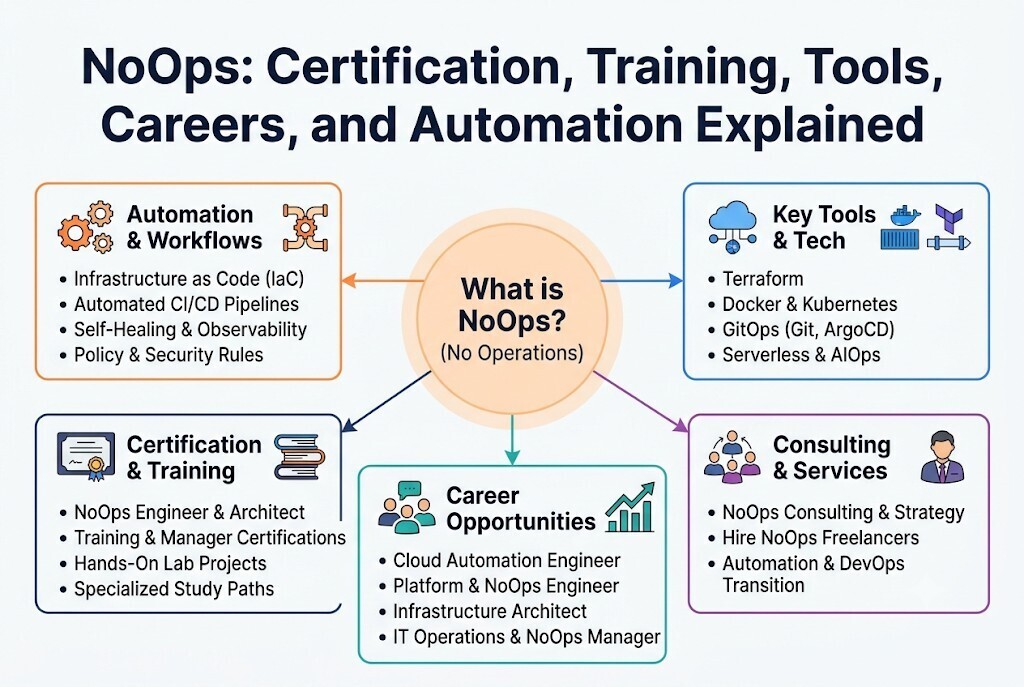
NoOps means "No Operations." It is an approach that uses automation to reduce daily IT operations work.
In a NoOps environment, software teams can use cloud services and automated systems. These systems handle many tasks that once required manual work. They can create resources, deploy applications, monitor systems, and manage routine updates.
The main goal is to reduce manual effort and improve software delivery.
NoOps does not mean that all IT professionals become unnecessary. Teams still need people to manage security, design systems, solve complex problems, and make important decisions.
NoOps is best viewed as a goal for better automation rather than a completely hands-free IT environment.
How NoOps Works
NoOps connects different tools and services to create automated workflows. These workflows perform tasks based on rules, code, or system events.
For example, a developer may update application code. An automated pipeline can test the changes, build the application, and deploy it. Monitoring tools can then check its health.
If a problem occurs, an automated system may restart a service or create an alert. This reduces the need for someone to perform every step manually.
Why NoOps Matters in Modern IT
IT teams manage many systems, applications, and cloud resources. Manual work can slow down development and create errors. It can also make routine tasks harder to repeat.
NoOps helps teams automate these tasks. Developers can focus more on application features. Cloud engineers can improve infrastructure automation. IT managers can focus on planning, security, and business needs.
Automation also helps organizations use consistent processes. A task performed through code can follow the same steps each time. This makes it easier to review changes and find problems.
Key Benefits of NoOps
- Less manual work: Automation handles repetitive tasks.
- Faster delivery: Teams can release software more quickly.
- Consistent processes: Automated workflows follow defined steps.
- Better resource use: Cloud resources can scale based on demand.
- Fewer routine errors: Automation reduces mistakes caused by manual work.
- More focus on improvement: Teams can spend time on complex tasks.
These benefits depend on good planning, suitable tools, and reliable automation. Poorly designed automation can also create new problems.
Core Principles of NoOps
NoOps depends on several practices that help teams manage IT environments with less manual effort.
Infrastructure as Code
Infrastructure as Code, or IaC, means managing cloud resources through files and code. Instead of creating servers by clicking through a dashboard, engineers define the setup in code.
Tools can then create networks, servers, storage, and other resources. Teams can review infrastructure changes before applying them.
This approach helps keep environments consistent. It also makes it easier to rebuild infrastructure when needed.
Automated Deployment
Automated deployment moves software from development to production through defined steps. These steps may include testing, building, security checks, and release approval.
CI/CD pipelines help teams manage this process. They reduce repeated manual actions and support faster software updates.
Monitoring and Observability
Monitoring checks whether systems are working as expected. Observability helps teams understand why a system may be behaving in an unusual way.
These practices support NoOps because automation needs reliable information. Teams can use alerts, logs, metrics, and traces to identify problems.
Self-Healing Systems
Self-healing systems can respond to certain problems automatically. For example, a system may restart a failed service or replace an unhealthy container.
These actions can reduce downtime for common issues. However, serious problems may still require human investigation.
NoOps vs DevOps and Other IT Practices
NoOps, DevOps, SRE, AIOps, and Platform Engineering share some goals. They aim to improve software delivery, reliability, and system management. However, each approach has a different focus.
NoOps vs DevOps
The difference between NoOps vs DevOps mainly involves how much operational work teams automate.
DevOps brings development and operations teams together. Both teams share responsibility for software delivery and system reliability.
NoOps aims to automate more operational tasks. It reduces the need for manual work through cloud services, automated pipelines, and managed platforms.
DevOps is useful for many types of systems. NoOps works best when systems support high levels of automation.
| Practice | Main Focus | Common Use |
|---|---|---|
| DevOps | Team collaboration and automation | Software delivery |
| NoOps | Reducing manual operations | Automated cloud environments |
| SRE | Reliability and service performance | Production systems |
| AIOps | AI-assisted operations | Monitoring and problem detection |
| Platform Engineering | Self-service tools for developers | Shared developer platforms |
These approaches can work together. An organization may use DevOps practices, SRE methods, and platform tools while moving toward greater NoOps automation.
Popular NoOps Automation Tools
NoOps automation tools help manage infrastructure, applications, deployments, and monitoring. The right tools depend on the team's needs and cloud environment.
Terraform
Terraform helps teams create and manage infrastructure through code. It can support repeatable cloud resource provisioning.
Kubernetes
Kubernetes manages containerized applications. It can support scaling, service recovery, and application deployment.
Docker
Docker helps package applications and their dependencies into containers. This makes applications easier to move between environments.
CI/CD Platforms
CI/CD tools automate testing, building, and software delivery. They help teams create reliable release workflows.
Monitoring Tools
Monitoring platforms collect system data, track performance, and send alerts when defined conditions occur.
Teams may also use GitOps tools, cloud services, configuration management tools, and serverless platforms. Each tool solves a different problem. A good NoOps setup connects suitable tools into a clear and reliable workflow.
How Businesses Can Use NoOps
NoOps can support many business and technical needs. The best starting point is usually a task that teams repeat often.
Cloud Infrastructure Management
Businesses can automate cloud resource creation, configuration, and scaling. IaC can help teams build similar environments for testing and production.
Software Delivery
Automated pipelines can test and deploy application updates. Teams can use approval rules and automated checks to reduce release risks.
Application Monitoring
Monitoring tools can detect service problems. Automated actions may restart failed services or notify the right team.
Security Automation
Security checks can run during software development and deployment. Automation can also help manage access, configuration rules, and routine security tasks.
Cloud Cost Management
Automation can help identify unused resources. Teams can also set limits, schedule resources, and use scaling rules to control cloud spending.
NoOps does not guarantee lower costs. Businesses must still review resource use, service fees, automation maintenance, and cloud provider choices.
Skills Required for a NoOps Career
NoOps careers require a mix of technical knowledge, automation skills, and problem-solving ability. Professionals should understand how applications work and how cloud systems support them.
Beginners can start with basic IT concepts. Experienced engineers can build on their current skills and learn more automation practices.
Important Skills to Learn
- Cloud computing fundamentals
- Linux and system administration
- Scripting with Python or Bash
- Infrastructure as Code
- Docker and Kubernetes
- Git and version control
- CI/CD pipelines
- GitOps workflows
- Monitoring and observability
- Cloud security
- Troubleshooting and incident response
Practical experience matters. Learners should build small projects, automate simple tasks, and test their work in safe environments.
NoOps Training Course and Certification Path
A NoOps training course can help learners understand automation and modern cloud operations. A structured learning path makes it easier to study concepts in the right order.
Step 1: Learn Cloud Fundamentals
Start with cloud computing, networking, storage, virtual machines, and identity management. Understand how cloud resources work before automating them.
Step 2: Build Automation Skills
Learn scripting and Infrastructure as Code. Practice creating resources and managing configurations through repeatable code.
Step 3: Understand Containers
Study Docker and Kubernetes. Learn how applications run inside containers and how platforms manage them.
Step 4: Practice CI/CD and GitOps
Create a pipeline that tests and deploys a simple application. Learn how Git can manage application and infrastructure changes.
Step 5: Learn Monitoring and Security
Practice collecting system data, creating alerts, and reviewing logs. Study security rules, access control, and automated checks.
Step 6: Build Practical Projects
Create projects that combine several skills. For example, deploy a small application using IaC, containers, and an automated pipeline.
Understanding NoOps Certifications
A NoOps certification may help learners organize their study and demonstrate knowledge of automation concepts. However, certification value depends on the course content, assessment quality, and employer expectations.
Different learning paths may suit different roles:
| Learning Path | Main Topics |
|---|---|
| NoOps certification | Automation and operational concepts |
| NoOps engineer certification | Infrastructure, deployment, and monitoring |
| NoOps architect training | System design, cloud architecture, and automation strategy |
| NoOps manager certification | Governance, teams, risks, and operational planning |
These are learning areas rather than claims about specific exam requirements. Before choosing a program, review its syllabus, practical exercises, learning goals, and assessment details.
NoOpsSchool offers learning resources, training, and certification-focused education related to NoOps and modern IT automation. Learners can explore relevant topics and choose a path that matches their current skills and career goals.
NoOps Career Opportunities
NoOps-related skills can support several IT career paths. The actual responsibilities depend on the organization, team structure, and technology stack.
NoOps Engineer
A NoOps Engineer works on automation, cloud infrastructure, deployment pipelines, monitoring, and system improvements. The role focuses on reducing repetitive operational work.
NoOps Architect
A NoOps Architect designs systems that use automation and managed services. They plan infrastructure, security, system connections, scaling, and reliability.
NoOps Manager
A NoOps Manager guides automation plans and operational improvements. They may manage teams, budgets, risks, processes, and technical goals.
Cloud Automation Engineer
A Cloud Automation Engineer builds scripts, pipelines, and infrastructure workflows. They help teams manage cloud resources with fewer manual steps.
Platform Engineer
A Platform Engineer creates tools and services that help developers build, test, and deploy applications. Self-service platforms can support NoOps goals.
Career growth depends on practical skills, experience, communication, and the needs of employers. Learning NoOps can help IT professionals expand their knowledge of modern infrastructure and software delivery.
NoOps Implementation Challenges
NoOps can improve workflows, but adopting it requires careful planning. Organizations should understand their systems before automating them.
Complex Infrastructure
Older applications may depend on special configurations or manual processes. Some systems cannot move easily to managed cloud services.
Teams should start with suitable applications. They can then expand automation as they gain experience.
Security and Governance
Automation can create risks if permissions are too broad. Incorrect scripts may affect many resources at once.
Teams should use access controls, testing, reviews, and security policies. Automated changes should also have clear ownership.
Monitoring and Troubleshooting
Automation can hide some technical details from application teams. This may make problems harder to understand.
Good monitoring, logs, alerts, and documentation help teams investigate issues. Human support remains important for unusual failures.
Cloud Costs and Vendor Dependence
Managed services can reduce maintenance work. But they may also increase costs or make switching providers harder.
Businesses should review service costs, data movement, provider limits, and exit plans before making major decisions.
NoOps Consulting Services and Freelancers
Organizations may need outside expertise when they begin an automation project. Their teams may lack experience with cloud architecture, infrastructure code, CI/CD, or security automation.
NoOps consulting services can help businesses plan and improve automation workflows. Consulting work may include:
- NoOps readiness assessments
- Cloud transformation planning
- Infrastructure automation
- CI/CD implementation
- Kubernetes adoption
- GitOps workflows
- Monitoring improvements
- Security automation
- AIOps integration
- Operational process redesign
A consultant can help identify suitable tasks for automation. They can also help teams understand risks, select tools, and build a practical implementation plan.
When to Hire NoOps Freelancers
Businesses may hire NoOps freelancers for specific projects or temporary technical needs. Freelancers can help create scripts, build deployment pipelines, configure cloud services, or improve monitoring.
Before hiring, review these factors:
- Relevant cloud and automation experience
- Previous project work
- Knowledge of security practices
- Clear communication
- Understanding of project requirements
- Defined scope and deliverables
- Documentation and handover plans
Start with a clear project goal. Agree on what the freelancer will deliver, how the work will be tested, and how knowledge will be transferred to your team.
NoOpsSchool provides a focus on NoOps education and professional guidance. Businesses and learners can explore its relevant training, consulting, and technical expertise options based on their needs.
Frequently Asked Questions
What is NoOps in simple words?
NoOps means reducing manual IT operations through automation and managed services. It helps teams spend less time on routine infrastructure tasks.
Is NoOps better than DevOps?
Not always. DevOps supports collaboration between development and operations teams. NoOps focuses on automating more operational tasks.
What is a NoOps certification?
A NoOps certification is a learning or assessment program focused on NoOps concepts and related skills. Its value depends on the program and the knowledge it covers.
Who should take a NoOps training course?
Cloud engineers, DevOps professionals, developers, system administrators, and IT beginners can explore NoOps training. The learning path should match their existing knowledge.
What skills are needed to become a NoOps engineer?
Cloud computing, scripting, IaC, containers, CI/CD, monitoring, and security are useful skills. Practical projects help learners apply them.
Which tools are used in NoOps?
Terraform, Docker, Kubernetes, Git, CI/CD platforms, cloud services, and monitoring tools can support NoOps. Tool selection depends on the project.
Does NoOps eliminate IT jobs?
NoOps does not remove the need for technical professionals. It changes the work by reducing routine tasks and increasing the need for automation, security, architecture, and problem-solving skills.
What does a NoOps architect do?
A NoOps architect designs automated cloud systems and delivery workflows. They plan infrastructure, security, reliability, and the use of managed services.
When should a business use NoOps consulting services?
Businesses may seek consulting when planning cloud automation or improving deployment and infrastructure processes. Consultants can help assess requirements and create an implementation plan.
Can businesses hire NoOps freelancers?
Yes, businesses may hire freelancers for automation projects, cloud setup, pipeline development, monitoring, or infrastructure improvements. They should check experience, project scope, and documentation before hiring.
Conclusion
NoOps focuses on reducing routine IT work through automation, cloud services, and better workflows. It can help teams improve software delivery, manage infrastructure, and use their time more effectively.
Learning NoOps requires practical skills in cloud computing, scripting, IaC, containers, CI/CD, monitoring, and security. Professionals can build these skills through guided learning and hands-on projects.
NoOps does not remove the need for human responsibility. Strong architecture, security, monitoring, and technical decisions remain important.
NoOpsSchool can be a learning resource for people exploring NoOps training, certifications, automation, and professional guidance. Start with basic cloud skills, practice automation, and build projects that solve real problems.



Top comments (0)