
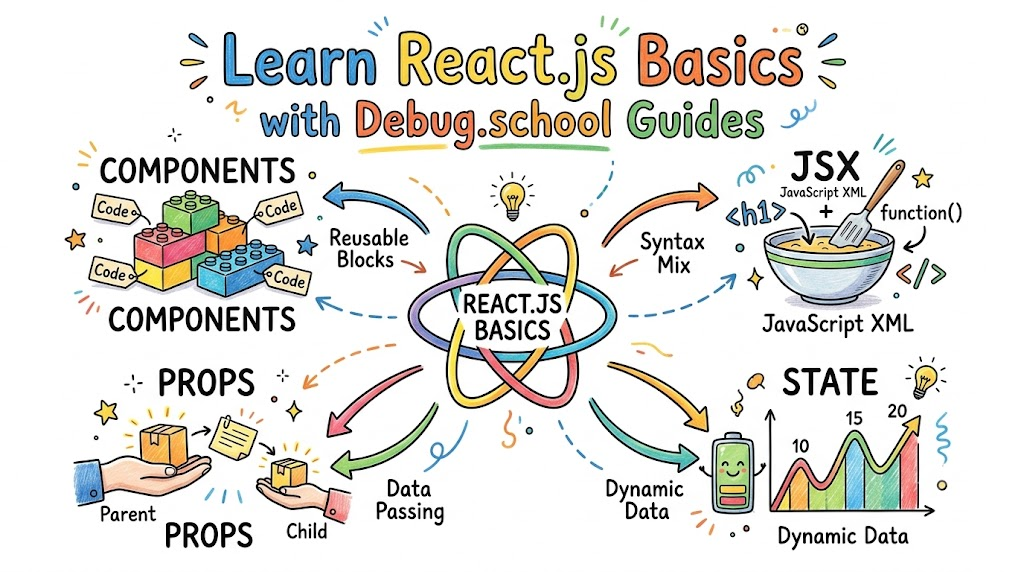
Building websites is a lot like building with toy blocks. You snap small parts together to make something huge and fun. Many web builders love to use a tool called React.js. You can master every step with the friendly lessons from debug.school. This website guides you through every step in a simple way.
Learning to code should never make you feel stuck. It should feel like an exciting game where you make cool things. When you build with good guides, you learn very fast. Soon, you will make your own apps and share them with friends.
What Is React.js All About?
React.js is a free tool made with JavaScript. JavaScript is the programming code that makes web pages move and respond. React helps you build screens that people see and click. We call this the user interface or front end.
Before React came along, coders had to change every single web element by hand. That took a lot of time. It also caused many bugs and errors. React fixes this problem by updating only the parts that change.
Think of an online scoreboard in a basketball game. When a team scores two points, only the score number changes. React updates that small box right away. It leaves the rest of the web page alone.
Traditional Web: Rebuilds the whole page on every update.
React Web:       Updates only the tiny box that changed.
The Big Idea of Components
In React, everything you build is a component. A component is just a small, reusable building block. You write the code for a block once. Then, you can use it all over your website.
Think about a simple button on a page. You can make a single button component with blue paint and white text. Next, you can place that same button on twenty different pages. You do not need to rewrite the code.
This method keeps your code neat and clean. If you want to change the button color to red, you change it once. Every button across the whole site turns red at the exact same time.
- Headers: The top bar that holds the site name and logo.
- Cards: Small boxes that display a photo and a short story.
- Footers: The bottom bar with contact info and copyright notes.
Making Blocks with JSX
React uses a special language helper called JSX. JSX lets you write HTML tags right inside your JavaScript code. HTML is the simple language that puts words and pictures on a web page.
Long ago, coders had to keep HTML and JavaScript in separate files. That made projects messy and hard to read. JSX combines them into one happy family so you work faster.
JSX looks almost identical to regular HTML. You write <button> when you want a clickable button. You write <h1> when you want a large title. It feels natural and very easy to read.
function WelcomeCard() {
  return <h1>Hello, friend! Welcome to my site!</h1>;
}
Passing Secrets with Props
Components need a way to talk to each other. They do this by sharing information called props. The word props is short for properties.
Think of props like a backpack full of notes. You hand the backpack to a component so it knows what to say. For instance, a profile card component needs a person's name. You send the name inside the props backpack.
Props only flow in one direction. They travel down from parent components to child components. This one-way street keeps your app orderly and stops bugs from hiding.
| Feature | What It Does | Real-World Example |
|---|---|---|
| Component | Builds a reusable Lego block | A photo frame box |
| JSX | Writes tags inside code | Putting words on the screen |
| Props | Passes data down to a block | Sending a user's name to a frame |
Keeping Track of Changing Data with State
Some parts of a web page never change, like a site logo. Other parts change all the time, like a counter or a shopping cart. React handles these changes with something called state.
State is like a digital notebook for a single component. The component writes down facts it needs to remember. When the facts change, the component reads the notebook again.
Next, React redraws that component on the screen with the new numbers. For example, click a heart icon on a post. The like count changes from five to six instantly. State makes that quick change happen.
User clicks like button
   --> State number changes from 5 to 6
   --> React redraws only the like box!
Listening to User Clicks with Events
Websites are fun because you can interact with them. You click buttons, scroll pages, and type words into search bars. In computer speak, every tap or click is an event.
React listens closely for these events. You tell your component what to do when an event occurs. You write a small helper plan called an event handler.
When someone taps a button, your handler springs into action. It can open a pop-up window or play a fun sound. It makes your site feel alive and active.
- The user clicks a green button on the screen.
- React catches the click event immediately.
- The event handler runs your custom code.
- The screen updates to show the result.
Supercharge Code with Hooks
Years ago, working with state was tricky and required long setup code. Then, React introduced clever helpers called Hooks. Hooks let you use powerful features with just one line of code.
The most famous hook is called useState. It creates a safe spot to store your changing data. It also gives you a special trigger to update that data whenever you want.
Another common hook is useEffect. This hook tells your component to run a task after it loads on the screen. You use it to fetch pictures or load scores from a server.
-
useState: Saves items that change, like game scores or names. -
useEffect: Loads fresh data when the page opens up. -
useRef: Grabs a single element directly on the page.
Why Debug.school Makes Learning Simple
Learning code on your own can feel lonely and confusing. Sometimes, you hit an error code that looks like total gibberish. That is why having clear, friendly guides matters so much.
The lessons break down tough ideas into small, bite-sized steps. You do not just read dry words; you build real things as you go. Each step feels like solving an easy puzzle.
Also, the guides show you how to fix mistakes quickly. Every coder makes errors every single day. Learning how to spot bugs turns you into a brave, confident creator.
Read small step --> Try the code --> Fix the bug --> Build great apps!
Setting Up Your Workspace
Before you start writing code, you need a safe place to practice. Coders call this their development setup. Do not worry, because setting it up takes only a few minutes.
First, you install a helper called Node.js on your computer. Node runs JavaScript outside of a regular web browser. Next, you pick a clean code editor where you type your programs.
Many beginners use fast online tools as well. These sandbox sites let you test React right inside your web browser. You do not need to download a single file to begin.
- Code Editor: A clean program where you type your lines of code.
- Terminal: A text window where you type simple computer commands.
- Browser: The place where you view and test your live project.
How React Compares to Old Ways
It helps to see why people love React so much. In plain web coding, updating a list takes many steps. You must find the list, make a new item, and push it in.
With React, you simply keep an array of list items in your state. When you want to add an item, you push it to the list. React figures out the rest on its own.
This saves hours of work on big projects. Coders spend less time on repetitive tasks. Instead, they focus on making things look great and run smooth.
| Old Plain JavaScript | Modern React.js |
|---|---|
| Find every element by hand | Components update themselves |
| Easy to make mistakes on big apps | Clean code structure stops bugs |
| Code gets messy very fast | Blocks snap together neatly |
Common Beginner Traps to Avoid
When you start out, you will run into simple traps. Almost every new coder makes the same few mistakes. Knowing what they are helps you jump over them easily.
One big mistake is changing state directly without using the updater tool. If you change state by hand, React never knows you did it. Because of that, the screen will not update.
Another common trap is forgetting to add keys to long lists. When you show a list of items, React wants a unique tag for each item. This tag helps the engine track which item moved or changed.
// Always give list items a key tag!
const fruits = ["Apple", "Banana", "Orange"];

return (
  <ul>
    {fruits.map((fruit) => (
      <li key={fruit}>{fruit}</li>
    ))}
  </ul>
);
Next Steps on Your Coding Journey
Now you know the big ideas behind React.js. You understand components, JSX, props, state, and hooks. These are the core tools every great web engineer uses.
Next, start small and build simple projects. Build a digital counter that goes up when you click a button. Then, build a colorful to-do list where you can cross off chores.
Keep your curiosity high and practice a little bit every day. With steady practice and clear guides, you will create amazing websites in no time at all.



Top comments (0)