
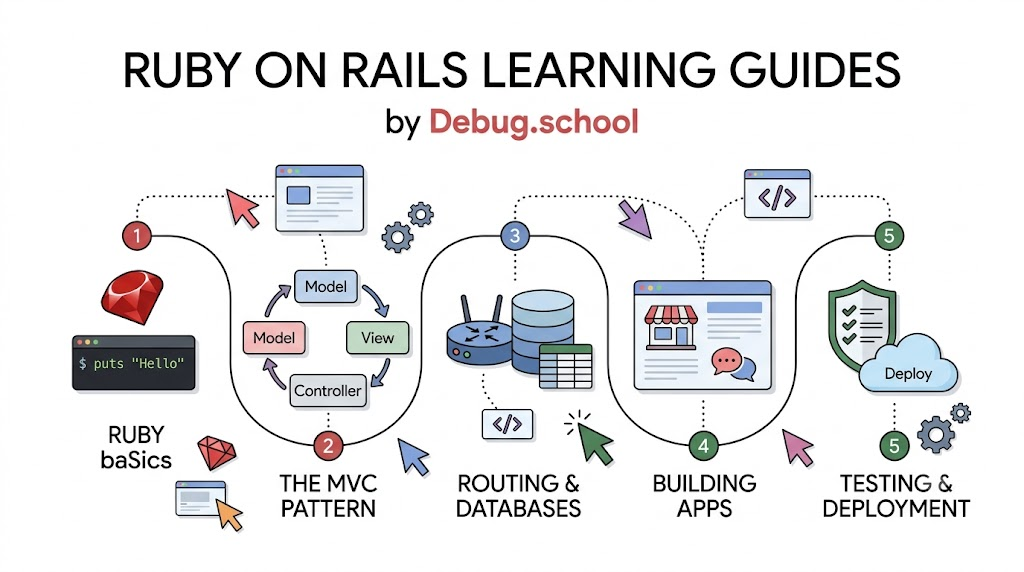
Building a web application sounds hard, but you do not need magic to make one. Anyone can build great websites with the right tools. You can start this journey easily with debug.school. The guides show you how to write code and fix mistakes step by step.
Ruby is an easy computer language that reads like simple English. Rails is a toolkit built on top of Ruby that helps you create websites fast. Together, they give you everything you need to bring your creative ideas to life.
What Makes Ruby Special
Ruby lets you write instructions that humans can read without getting a headache. You do not have to type strange symbols to say hello to the screen. Because the language is so clear, beginners can understand every single line right away.
Also, Ruby treats everything like a friendly building block called an object. You can tell these blocks to do fun tasks like counting numbers or sorting words. This clean design helps you focus on solving problems instead of fighting syntax rules.
Key Operational Concepts You Must Know
The Magic of MVC
Rails divides your work into three neat buckets to keep everything tidy. Programmers call this design pattern MVC, which stands for Model, View, and Controller. This system stops your code from becoming a tangled mess.
- Model: This part manages your information and talks directly to your database.
- View: This bucket holds the pretty web pages that visitors see on their screens.
- Controller: This acts like a traffic cop that passes messages between the model and the view.
Next, think of the controller like a waiter in a busy restaurant. You ask for a menu, and the waiter fetches it from the kitchen. Everyone has a clear job, so the app runs smoothly.
Convention Over Configuration
Many tools force you to set up hundreds of boring settings files before you write one feature. Rails works differently because it follows standard conventions. It uses smart defaults so you can start making things right away.
For example, if you name a model "Cat", Rails knows the database table name is "cats". You do not have to waste time telling the computer the obvious plural form. This simple rule saves hours of typing every week.
The Power of Generators
Rails comes with built-in helper tools called generators. You type one small command in your terminal, and Rails builds whole files for you. It writes forms, links, and database tables in just two seconds.
So, beginners can see results on their screens almost instantly. Watching your site appear quickly builds confidence. It removes the scary parts of setup and keeps learning fun.
Platform Implementation vs. Culture — What's the Real Difference?
Tools Do Not Fix Bad Habits
Some new coders think that downloading popular tools makes them great engineers immediately. A fancy code framework is just a tool in your digital toolbox. If you do not learn how to structure your work, your app will still break.
Because tools cannot think for you, you must build good habits. You need to write small parts of code and run tests often. Relying only on software settings without clear logic leads to messy results.
Growing a Healthy Mindset
A great coder knows how to stay calm when bugs show up on the screen. Errors are not bad grades; they are helpful clues. A strong coding culture means reading error lines carefully to find fixes.
Also, you must practice sharing code and asking questions without fear. When teams help each other, they fix problems much faster. That shared habit matters way more than any software package you install.
| Category | Platform Implementation | Culture & Habits |
|---|---|---|
| Main Goal | Installs frameworks, packages, and database servers. | Builds clean thinking, patience, and good teamwork. |
| Speed | Sets up basic files in a few minutes. | Takes weeks of steady practice to grow. |
| Value | Gives you pre-made web helpers and fast routing. | Helps you hunt down bugs calmly when things break. |
Real-World Use Cases of Modern Operations
Quick Online Stores
Many small business owners launch online shops using Rails. Rails lets developers set up shopping carts and order lists very fast. The system handles product pictures and customer profiles without extra stress.
- Cart Tracking: It remembers what you want to buy while you look at other shoes or games.
- Order History: It stores past receipts safely in the database for later review.
- Speedy Launch: A single coder can launch a working store in just one weekend.
Community Message Boards
Rails powers large social platforms and lively forums where people share ideas. It easily handles login forms, comments, and upvotes.
Because the framework handles user accounts cleanly, members feel safe chatting online. You can build a place for book clubs or gaming groups in just a few lessons.
Live Tracking Dashboards
Companies use web dashboards to watch system alerts and server metrics in real time. Rails connects directly to browser windows using live update tools.
So, when numbers change, the webpage refreshes instantly without you clicking any buttons. This fast visual feedback helps team members spot troubles before customers notice anything wrong.
Common Mistakes in Operations Engineering
Writing Too Much Logic in Views
Beginners often put heavy calculations inside HTML view files. Views should only show words, pictures, and buttons to the user. If you hide math inside a view, the code gets messy fast.
Instead, let your models do the heavy thinking. Keep your screen files clean and simple. This neat choice makes your layout easy to style later.
Skipping Automated Tests
Writing tests feels slow when you want to see exciting new screens right away. But skipping tests is like building a car without testing the brakes. A small fix in one spot might break three other pages.
Next, get in the habit of writing tiny test checks for every new button. Automated checks tell you right away if something broke. This habit saves you from boring manual tests later.
Forgetting Database Safety
Websites store valuable user facts, like passwords and emails. If you do not protect your inputs, bad actors can harm your app. Rails offers built-in guards, but you must use them properly.
Never put raw user text directly into your database searches. Always use safe helper methods to filter dangerous input. That simple choice keeps your site safe and dependable.
How to Become an Operations Expert — Career Roadmap
- Step 1: Learn Ruby Basics Start by learning how strings, numbers, and loops work. Practice writing small scripts that print simple greeting messages in your terminal.
- Step 2: Master Rails Fundamentals Build small apps with forms and database tables. Learn how web requests travel from a web browser into your code.
- Step 3: Hunt Down Bugs Like a Pro Learn to read long error messages with patience. Practice finding problems by turning off one piece of code at a time.
- Step 4: Deploy Your Creations Put your finished web application online so your friends can visit it. Learn how web servers run your code all day long.
FAQ Section
- Is Ruby hard for a young beginner to learn? No, Ruby is one of the easiest computer languages for beginners. It reads almost like plain English sentences, so you will pick it up quickly.
- What does MVC stand for in simple words? MVC stands for Model, View, and Controller. It is a system that sorts your code so files stay clean and easy to find.
- Can I build real games with Rails? Rails works best for web apps, blogs, and stores, not fast 3D action games. But you can easily build fun quiz games and text adventures with it.
- Do I need an expensive laptop to code Rails? You do not need a fancy computer to learn Rails. Any simple laptop can run Ruby without slowing down.
- Why do people love the Rails framework so much? People love Rails because it comes with pre-made building tools. You can build a complete web application with very few lines of code.
Final Summary
Learning web development does not have to feel scary or complicated. Ruby on Rails gives you the right blocks to build apps quickly and cleanly. By following clear guides, you can create online stores, message boards, and fun projects with ease. Focus on small steps, test your work, and do not fear error screens. With daily practice, you will turn your creative dreams into working websites that anyone can use!



Top comments (0)