
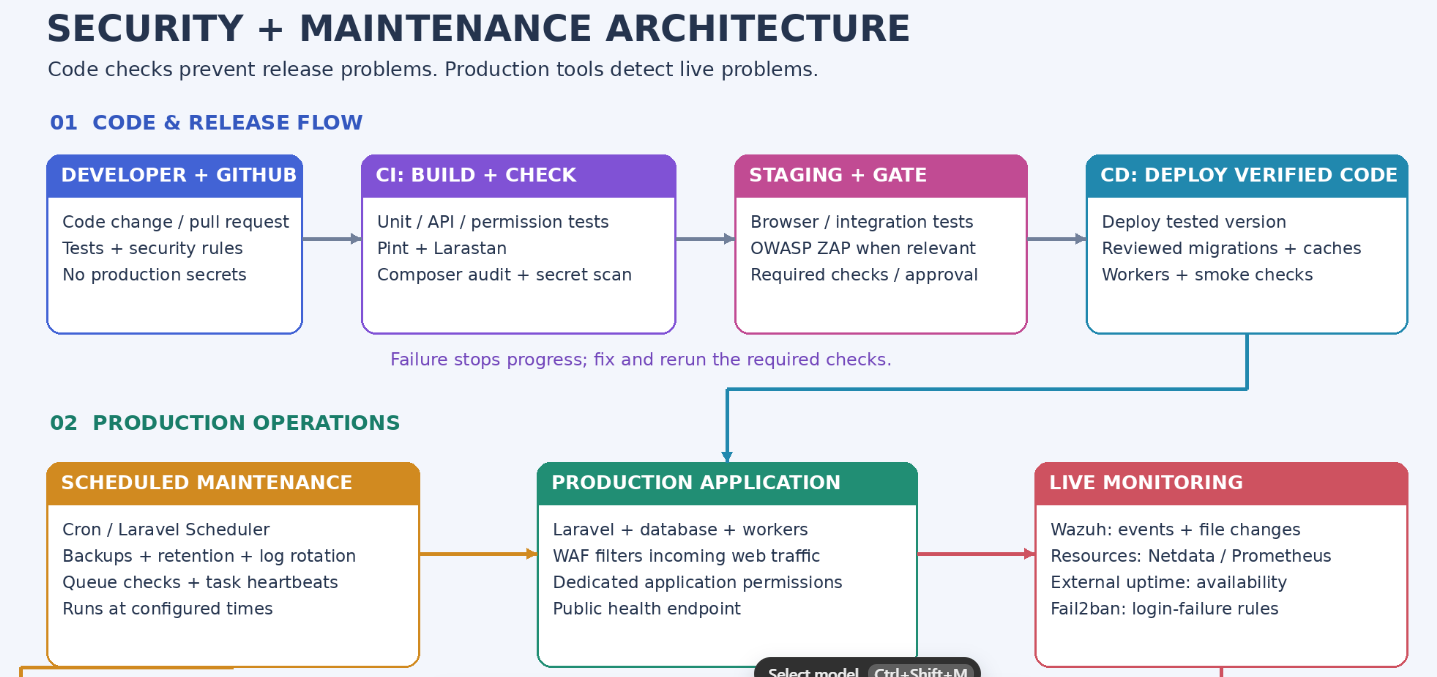
Security and maintenance both include code work and production work. The correct place to perform an activity depends on what it checks and what triggers it.
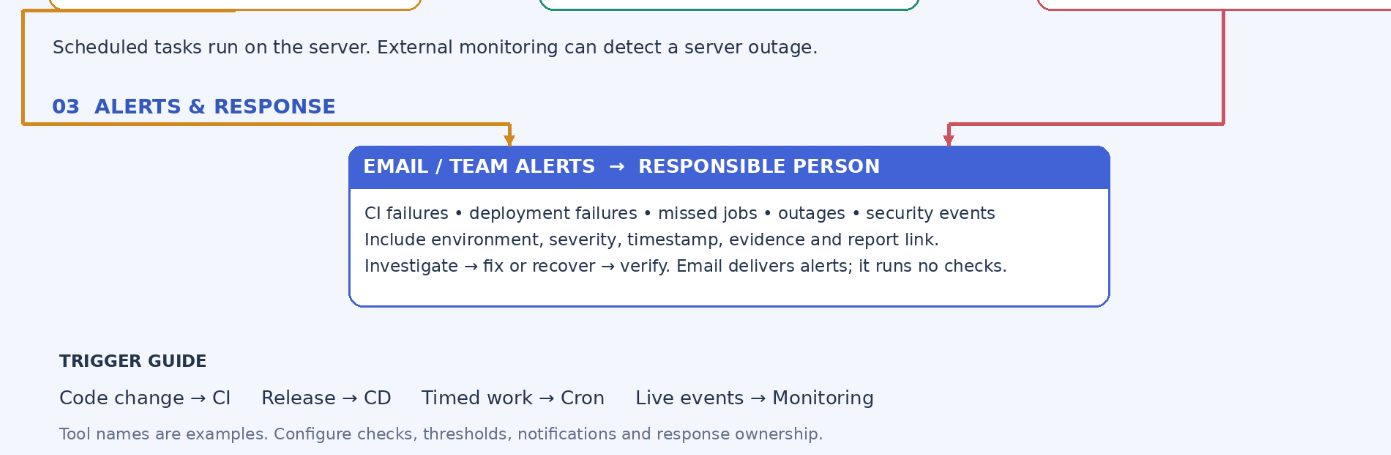
Core rule: Code changes trigger CI; releases trigger CD; timed tasks use cron or a scheduler; live incidents need monitoring; email delivers the results.
1. What Is the Difference Between Security and Maintenance?
| Aspect | Security | Maintenance |
|---|---|---|
| Main purpose | Protect systems, accounts, and data | Keep applications reliable and supportable |
| Code example | Test that users cannot read another user's private records | Fix a broken search filter and add a regression test |
| Production example | Investigate suspicious SSH logins | Investigate stopped queue workers |
| Expected result | Reduce vulnerabilities and detect/respond to attacks | Reduce failures and restore normal operation |
| Typical trigger | A vulnerability, suspicious event, or relevant code change | A bug, release, scheduled task, or operational failure |
Some work serves both purposes: software updates, access reviews, backups, log review, and resource monitoring.
2. What Are CI, CD, Cron, Monitoring, and Email?
| Mechanism | What it does | What it does not do automatically |
|---|---|---|
| CI: Continuous Integration | Builds and checks proposed code changes | Monitor a live server continuously |
| Continuous Delivery | Prepares verified changes for release, with a production approval step | Deploy every change without approval |
| Continuous Deployment | Automatically deploys changes after required gates pass | Guarantee a release has no bugs |
| Cron / Laravel Scheduler | Runs commands at configured times | Detect every missed run or send alerts without configuration |
| Monitoring tools | Observe services, resources, logs, and security events | Fix every incident without a response procedure |
| Delivers alerts and reports | Execute tests or monitor systems by itself |
CI and CD can run in the same GitHub Actions workflow but have different roles. A YAML file only performs the steps actually configured in it.
3. What Are the Main Types of Work?
3.1 Code-Based Security
Check source code and its dependencies before release:
- Authentication and authorization tests.
- Input validation and unsafe data handling checks.
- Dependency vulnerability scans.
- Secret detection for committed credentials.
- Static security analysis.
3.2 Running Application Security
Check application behavior through deployed pages and APIs:
- Access restrictions and session behavior.
- Security-related request and response behavior.
- Automated dynamic scanning of a staging application.
Use test accounts and controlled staging data for active scans.
3.3 Production Server Security
Observe and protect the running environment:
- Repeated failed SSH or application logins.
- Unexpected changes to important files.
- Suspicious processes or system activity.
- Suspicious incoming HTTP requests.
- Security updates and access configuration reviews.
An alert indicates something to investigate; it does not establish that a breach succeeded.
3.4 Code-Based Maintenance
Keep code working as requirements and dependencies change:
- Bug fixes and regression tests.
- Static analysis and formatting.
- Compatibility checks.
- Dependency upgrades followed by testing.
- Removal of obsolete code after review.
3.5 Deployment Maintenance
Prepare and verify releases:
- Deploy the tested version.
- Build and deliver assets where needed.
- Apply reviewed database migrations.
- Refresh appropriate Laravel caches.
- Restart workers when required.
- Verify application health after deployment.
3.6 Production Operational Maintenance
Keep the running service healthy:
- Availability and certificate checks.
- Disk, CPU, memory, and service monitoring.
- Queue and scheduled-task monitoring.
- Backups, restore exercises, and retention management.
- Log rotation and approved temporary-file cleanup.
4. Where Should Each Activity Run?
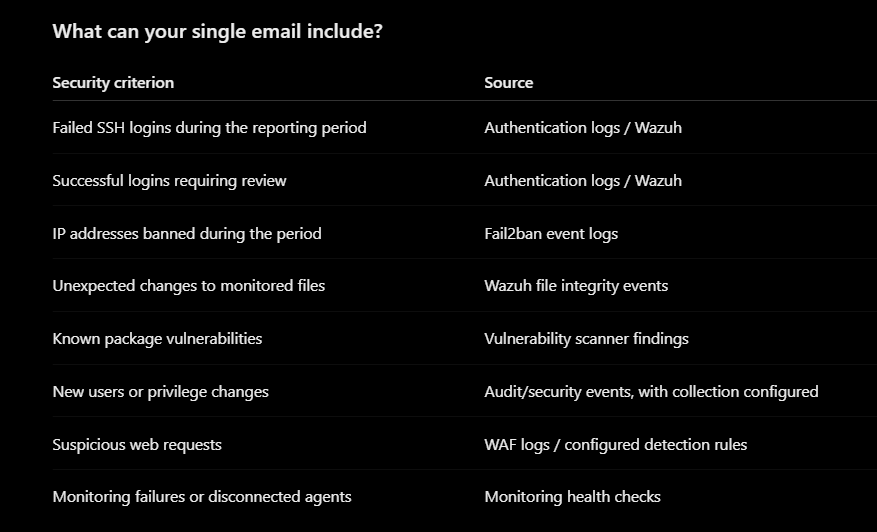
Subject: Daily Server Security Summary — Production
Period: Previous 24 hours
Timezone: Asia/Kolkata
Check Result
Failed SSH logins 42 events
Fail2ban bans 6 IPs
Monitored file changes 3 — review required
Known critical vulnerabilities 1 — action required
User/privilege changes 0 detected
WAF detections 18 events
Monitoring health 1 agent disconnected
Overall: ACTION REQUIRED
Evidence: Links to monitoring dashboard and reports
| Category | Activity | Best location / mechanism | Tool examples | Suggested trigger |
|---|---|---|---|---|
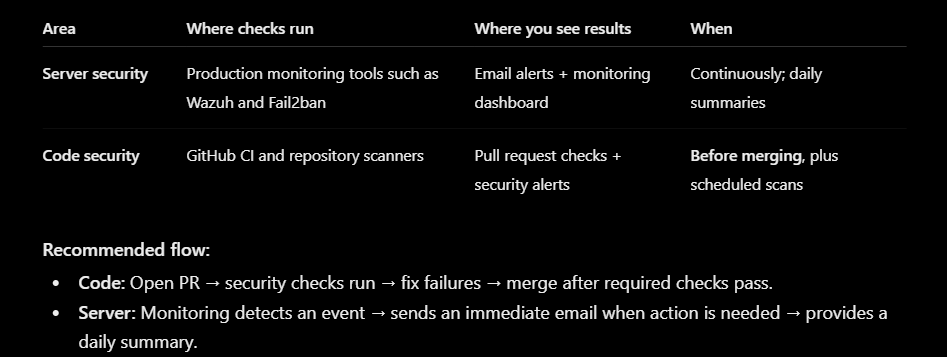
| Code security | Authentication, permissions, validation tests | CI with isolated test services | PHPUnit / Pest | Every PR |
| Code security | Dependency vulnerability scanning | CI plus periodic scans | Composer audit, Dependabot | PRs and daily/weekly scans |
| Code security | Secret scanning | Repository integration or CI | GitHub secret scanning, Gitleaks | Pushes and PRs |
| Code security | Static security analysis | CI | Semgrep with suitable PHP rules | PRs |
| Application security | Dynamic web/API scanning | Staging pipeline | OWASP ZAP | Before releases or scheduled |
| Server security | File integrity and security-event monitoring | Server agent with monitoring backend | Wazuh | Continuous / configured scan intervals |
| Server security | Repeated login-failure blocking | Relevant server | Fail2ban | Event-driven |
| Web protection | Filter suspicious HTTP traffic | Edge proxy or web server | Cloudflare WAF, ModSecurity | Each request |
| Code maintenance | Unit, feature, integration tests | CI | PHPUnit / Pest | Every PR |
| Code maintenance | Static analysis and formatting | CI and local development | PHPStan / Larastan, Laravel Pint | Every PR |
| Release maintenance | Deploy, cache, workers, smoke checks | CD | GitHub Actions deployment workflow | Each release |
| Availability | Website/API reachability | External monitoring | UptimeRobot, externally hosted Uptime Kuma | Regular intervals |
| Resource maintenance | CPU, RAM, disk, service health | Server monitoring | Netdata or Prometheus + Grafana with alerting | Continuous collection |
| Scheduled maintenance | Backups and retention tasks | Cron / Laravel Scheduler | Backup tools, Laravel commands, logrotate | Defined schedule |
| Job reliability | Failed queues and missed scheduled tasks | Application monitoring plus external heartbeat checks | Laravel queue monitoring, Healthchecks.io | Regular / event-driven |
| Notifications | Deliver actionable alerts | Connected to the above systems | Email or team messaging | Failure or actionable event |
These tools are examples, not a requirement to install everything. Confirm compatibility, resource requirements, and feature availability before adoption. Some hosted security features depend on the repository type and subscription.
5. Why Use Different Mechanisms?
- CI sees a proposed version of the code. It can detect problems before merging.
- CD controls a release. It can stop a deployment when required checks fail.
- Cron performs recurring work. Backups and retention tasks need schedules even when no developer pushes code.
- Monitoring observes production continuously. An attack or outage can occur between releases.
- External monitoring can notice a dead server. A check running only on the failed server may never execute or send an email.
- Email brings results to people. It must be connected to checks with clear failure conditions.
6. When Should Each Check Run?
| Time / event | Work to run |
|---|---|
| Before pushing code | Relevant local tests and formatting checks |
| On every pull request | Fast tests, code analysis, dependency and secret checks |
| Before production release | Staging integration/UI tests; relevant security and compatibility checks |
| During deployment | Release preparation, reviewed migrations, worker handling |
| Immediately after deployment | Small smoke tests against the deployed application |
| Every few minutes | Availability, queue, and operational checks according to need |
| Daily | Backup verification and review of actionable alerts |
| Weekly or as needed | Broader regression scans, dependency review, capacity review |
| Continuously | Production security-event and resource monitoring |
| Periodically | Restore exercises, access reviews, and recovery-plan validation |
The timings are starting points. Adjust them to traffic, service importance, cost, and recovery requirements. Do not run load tests against production by default.
7. Who Is Responsible?
| Role | Typical responsibility |
|---|---|
| Developer | Tests, code fixes, validation and authorization checks |
| Reviewer / technical lead | Review changes, enforce required checks, approve sensitive changes |
| Deployment / operations owner | Deployment workflow, server permissions, backups, operational monitoring |
| Security owner | Security alert triage, vulnerability prioritization, incident response |
| Product / service owner | Define critical user journeys and acceptable recovery targets |
One person may cover multiple roles. Each alert still needs a named owner and a response expectation.
8. How to Apply This Step by Step in a Laravel Project
Step 1: Identify the Critical Features
List the functions that must keep working, for example:
- Login and logout.
- Search and profile pages.
- Booking or enquiry submission.
- Permissions for customers, partners, and administrators.
- Important background jobs and integrations.
For each function, define expected behavior and what constitutes failure.
Step 2: Separate Environments
Use local development, isolated CI tests, staging, and production.
- Tests must use a separate database and safe service credentials.
- Disable or fake real emails, payments, and external mutations during tests.
- Use test accounts for staging journeys.
- Keep production secrets outside Git.
Step 3: Add Code Checks to CI
In .github/workflows/ci.yml, configure the runtime, dependencies, test environment, and checks.
Example commands, assuming the corresponding tools are installed and configured:
php artisan test
vendor/bin/pint --test
vendor/bin/phpstan analyse
composer audit
Larastan extends PHPStan for Laravel; its configuration must match your application. Format checks inspect code without automatically changing it in CI.
Require important checks to pass before merging. A green result only confirms the checks you have actually written.
Step 4: Add Repository Security Checks
- Enable suitable dependency alerts.
- Enable available secret scanning or configure Gitleaks.
- Add static security rules appropriate to PHP/Laravel.
- Assign someone to investigate alerts.
When a real credential is exposed, revoke or rotate it. Removing it from the latest commit alone does not make it safe.
Step 5: Test the Running Application on Staging
Run critical browser/API journeys after a staging deployment. Use dynamic security scanning when appropriate.
Example authorization scenario:
- Create two test users.
- Sign in as user A.
- Request user B's private booking.
- Confirm the application denies access.
Functional correctness and security overlap here: a page can load successfully while exposing the wrong person's data.
Step 6: Configure CD
Deploy only after required CI checks pass.
A release process should:
- Select the tested commit or artifact.
- Prepare dependencies and compiled assets.
- Apply reviewed, compatible database changes when required.
- Activate the release.
- Refresh caches and handle workers appropriately.
- Run smoke checks.
- Record the release and trigger recovery if checks fail.
For production, versioned release directories and an atomic switch can reduce problems from updating files in place. Database recovery requires its own plan; reverting code does not undo schema or data changes.
Once CD successfully handles production deployment, manual git pull is normally unnecessary. Test-only and build-only workflows do not deploy production.
Step 7: Configure Scheduled Maintenance
Use cron or Laravel Scheduler for recurring operational tasks. A typical Laravel scheduler entry is:
* * * * * cd /path/to/your-app && /usr/bin/php artisan schedule:run >> /path/to/scheduler.log 2>&1
Replace the path and PHP binary with verified values for your server. XAMPP/LAMPP installations may use a different PHP executable. Run as the appropriate application user and rotate the scheduler log.
Schedule backups, retention tasks, and operational checks according to requirements. Avoid overlapping long-running tasks and duplicate execution across multiple servers.
Step 8: Configure External Availability Checks
Monitor the public website or a minimal health endpoint from outside the application server.
Define what the check proves:
- HTTP response check: web endpoint is reachable.
- Application response check: expected content is returned.
- Dependency check: a required backend service responds.
Do not expose credentials, configuration, or internal diagnostic details through a public health endpoint.
Step 9: Add Production Security and Resource Monitoring
- Use server monitoring for resource and service health.
- Use Wazuh where security-event and file-integrity monitoring are needed.
- Apply Fail2ban rules to appropriate log sources.
- Apply a WAF where suitable for the application.
- Tune alerts to distinguish expected deployments from unexplained changes.
Prefer protected, centralized logs so that an affected server is not the only place evidence exists. Plan monitoring infrastructure separately from the application server's resource budget.
Step 10: Connect Email Alerts
Configure SMTP or a notification provider in the relevant system.
An alert should include:
- Application/server name and environment.
- Check or event name.
- Failure time and timezone.
- Severity and useful evidence.
- Link to logs or a report.
- Owner or response instructions.
Laravel scheduled commands can use failure notification hooks. Queue monitoring needs notification handling too. Neither email nor recovery is automatic merely because a scheduled command exists.
Deduplicate repeated failures, send recovery notifications where useful, and keep secrets out of messages.
Step 11: Verify the Complete Setup
Use safe, controlled checks on staging:
- Make a test fail and confirm CI blocks the change.
- Fix it and confirm the pipeline passes.
- Deploy and verify the expected version.
- Simulate an unavailable staging endpoint and confirm an external alert.
- Trigger a safe scheduled-task failure and confirm notification.
- Verify a monitoring rule detects an expected test event.
- Restore a backup into an isolated environment.
Record evidence and correct any gaps. A successful backup command is not proof that a backup can be restored.
9. What Does a Practical Laravel Setup Look Like?
| Layer | Starting approach |
|---|---|
| CI | GitHub Actions with PHPUnit/Pest, Pint, Larastan, and Composer audit |
| Repository security | Dependency alerts and secret detection |
| Staging | Critical browser/API journeys; relevant dynamic scans |
| CD | Tested-version deployment and smoke checks |
| Scheduled maintenance | Laravel Scheduler / cron for backups and retention |
| Availability | External uptime monitoring |
| Resource monitoring | Choose one suitable resource-monitoring stack |
| Server security | Wazuh when needed; appropriate login protection and WAF rules |
| Alerts | Email with owners, failure evidence, and report links |
Start with one service, prove the checks and alerts work, then extend the pattern across microservices. Add cross-service integration tests for shared login and other important dependencies.
10. Common Mistakes to Avoid
- Expecting GitHub CI to detect live attacks continuously.
- Assuming a deployment job name proves production deployment is configured.
- Treating email as the checking tool.
- Checking availability only from the server being monitored.
- Running destructive tests against production data.
- Automatically deleting logs without a retention policy.
- Applying dependency updates directly to production without testing.
- Treating every failed login as a confirmed compromise.
- Installing overlapping tools without assigning alert owners.
- Assuming a WAF replaces authorization tests, patching, or incident response.
11. Quick Decision Guide
| Ask this question | Use this approach |
|---|---|
| Did code change? | CI checks |
| Are we releasing a verified version? | CD workflow |
| Must work happen at a specific interval? | Cron / Laravel Scheduler |
| Must we detect live failures or attacks? | Production monitoring / protection tools |
| Must someone be notified? | Email or another alert channel connected to the checker |
References
- GitHub secret scanning
- GitHub dependency review action
- Wazuh file integrity monitoring
- Laravel task scheduling
- Laravel queues and monitoring
Use documentation that matches your Laravel version when implementing commands and configuration.



Top comments (0)