
Basic Data Types
Collection data types
Derived data types
User-defined data types
Special data types
swift is type safety programming language
Type inference is a special feature of Swift language
Basic data types    Int, UInt, Float, Double, Bool, Character, String
Collection data types   Array, Set, Dictionary
Derived data types  Tuple, Optional, Range, Function types
User-defined data types struct, class, enum, protocol, typealias
Special data types  Any, AnyObject, Void, Never
Basic Data Types
Integer — Int
Stores whole numbers.
let age: Int = 30
let temperature: Int = -5

print(age)
print(temperature)

Output:

30
-5
Unsigned Integer — UInt
Stores only zero and positive whole numbers.
let totalStudents: UInt = 150
let availableSeats: UInt = 25

print(totalStudents)
print(availableSeats)

Output:

150
25
A UInt cannot store a negative value.
// let number: UInt = -10
Output:
Error: Negative integer cannot be converted to UInt
Float
Stores decimal values with lower precision.
let height: Float = 5.8
let weight: Float = 68.5

print(height)
print(weight)

Output:

5.8
68.5
1.4 Double
Stores decimal values with higher precision.
let price: Double = 999.99
let pi: Double = 3.141592653589793

print(price)
print(pi)

Output:

999.99
3.141592653589793
1.5 Boolean — Bool
Stores either true or false.
let isLoggedIn: Bool = true
let isAdmin: Bool = false

print(isLoggedIn)
print(isAdmin)

Output:

true
false
Boolean values are commonly used in conditions.
let hasPermission = true

if hasPermission {
    print("Access granted")
} else {
    print("Access denied")
}

Output:

Access granted
1.6 Character
Stores a single character.
let grade: Character = "A"
let currency: Character = "₹"
let emoji: Character = "😊"

print(grade)
print(currency)
print(emoji)

Output:

A
₹
😊
1.7 String
Stores text.
let name: String = "Ashwani"
let course: String = "Swift Programming"

print(name)
print(course)

Output:

Ashwani
Swift Programming
String interpolation example:
let name = "Ashwani"
let age = 30

let message = "My name is \(name) and I am \(age) years old."

print(message)

Output:

My name is Ashwani and I am 30 years old.
Collection Data Types
Array
An array stores multiple values of the same type in an ordered collection.
var fruits: [String] = ["Apple", "Mango", "Banana"]

print(fruits)
print(fruits[0])

Output:

["Apple", "Mango", "Banana"]
Apple
Adding and modifying values:
var fruits = ["Apple", "Mango", "Banana"]

fruits.append("Orange")
fruits[1] = "Grapes"

print(fruits)

Output:

["Apple", "Grapes", "Banana", "Orange"]
Looping through an array:
let subjects = ["Swift", "iOS", "Xcode"]

for subject in subjects {
    print(subject)
}

Output:

Swift
iOS
Xcode
2.2 Set
A set stores unique values. It does not guarantee order.
var skills: Set<String> = [
    "Swift",
    "Laravel",
    "Swift",
    "MySQL"
]

print(skills.count)

Output:

3
The duplicate "Swift" is stored only once.
Adding, removing, and checking values:
var technologies: Set<String> = ["Swift", "MySQL"]

technologies.insert("Laravel")
technologies.remove("MySQL")

print(technologies.contains("Swift"))
print(technologies.contains("MySQL"))

Output:

true
false
Dictionary
A dictionary stores data as key-value pairs.
var student: [String: String] = [
    "name": "Ashwani",
    "course": "Swift",
    "country": "India"
]

print(student["name"] ?? "Not found")
print(student["course"] ?? "Not found")

Output:

Ashwani
Swift
Adding and modifying values:
var employee: [String: String] = [
    "name": "Ashwani",
    "role": "Developer"
]

employee["city"] = "Bengaluru"
employee["role"] = "Senior Developer"

print(employee["city"] ?? "Not found")
print(employee["role"] ?? "Not found")

Output:

Bengaluru
Senior Developer
Derived or Compound Data Types
Tuple
A tuple groups multiple values, including values of different types.
var myValue = (value1, value2, value3, value4, , valueN)
let employee = ("Ashwani", 30, true)

print(employee.0)
print(employee.1)
print(employee.2)


Output:

Ashwani
30
true
var student = ("Robin", 21)
Access Tuple Elements
var result = tupleName.indexValue
Named tuple example:
let user = (
    name: "Ashwani",
    age: 30,
    isActive: true
)

print(user.name)
print(user.age)
print(user.isActive)

Output:

Ashwani
30
true
Function returning a tuple:
func getStudent() -> (name: String, marks: Int) {
    return ("Ashwani", 85)
}

let student = getStudent()

print(student.name)
print(student.marks)

Output:

Ashwani
85
3.2 Optional
An optional stores either a value or nil.
var email: String? = nil

print(email as Any)

Output:

nil
Optional with a value:
var email: String? = "ashwani@example.com"

if let validEmail = email {
    print(validEmail)
} else {
    print("Email not available")
}

Output:

ashwani@example.com
Using the nil-coalescing operator:
var phoneNumber: String? = nil

let displayNumber = phoneNumber ?? "Phone number not available"

print(displayNumber)

Output:

Phone number not available
3.3 Range
Closed range
Includes both starting and ending values.
for number in 1...5 {
    print(number)
}

Output:

1
2
3
4
5
Half-open range
Includes the starting value but excludes the ending value.
for number in 1..<5 {
    print(number)
}

Output:

1
2
3
4
3.4 Function Type
A function can be stored in a variable.
func add(_ first: Int, _ second: Int) -> Int {
    return first + second
}

let operation: (Int, Int) -> Int = add

let result = operation(10, 20)

print(result)

Output:

30
Another function type example:
func multiply(_ first: Int, _ second: Int) -> Int {
    return first * second
}

var calculation: (Int, Int) -> Int = multiply

print(calculation(5, 4))

Output:

20
User-Defined Data Types
4.1 Structure — struct
A structure groups related properties and methods.
Structures are value types.
struct Student {
    var name: String
    var age: Int

    func displayDetails() {
        print("Name: \(name)")
        print("Age: \(age)")
    }
}

let student = Student(
    name: "Ashwani",
    age: 30
)

student.displayDetails()

Output:

Name: Ashwani
Age: 30
Struct copy example:
struct Student {
    var name: String
}

var student1 = Student(name: "Ashwani")
var student2 = student1

student2.name = "Ravi"

print(student1.name)
print(student2.name)

Output:

Ashwani
Ravi
This shows that structures are value types. A separate copy is created.
4.2 Class — class
A class groups properties and methods.
Classes are reference types.
class Employee {
    var name: String
    var salary: Double

    init(name: String, salary: Double) {
        self.name = name
        self.salary = salary
    }

    func displayDetails() {
        print("Name: \(name)")
        print("Salary: \(salary)")
    }
}

let employee = Employee(
    name: "Ashwani",
    salary: 50_000
)

employee.displayDetails()


Output:

Name: Ashwani
Salary: 50000.0
Class reference example:
class Employee {
    var name: String

    init(name: String) {
        self.name = name
    }
}

let employee1 = Employee(name: "Ashwani")
let employee2 = employee1

employee2.name = "Ravi"

print(employee1.name)
print(employee2.name)


`Output:`


Ravi
Ravi
Both variables refer to the same class object.
4.3 Enumeration — enum
An enumeration defines a fixed group of related values.
enum UserRole {
    case student
    case trainer
    case admin
}

let role: UserRole = .trainer

switch role {
case .student:
    print("Student dashboard")

case .trainer:
    print("Trainer dashboard")

case .admin:
    print("Admin dashboard")
}

Output:

Trainer dashboard
Enum with raw values:
enum PaymentStatus: String {
    case pending = "Pending"
    case completed = "Completed"
    case failed = "Failed"
}

let status = PaymentStatus.completed

print(status.rawValue)
Output:
Completed
Enum with associated values:
enum PaymentResult {
    case success(amount: Double)
    case failure(message: String)
}

let result = PaymentResult.success(amount: 2500)

switch result {
case .success(let amount):
    print("Payment successful: ₹\(amount)")

case .failure(let message):
    print("Payment failed: \(message)")
}
Output:
Payment successful: ₹2500.0
4.4 Protocol — protocol
A protocol defines rules that a structure, class, or enum must follow.
protocol Printable {
    func printDetails()
}

struct Product: Printable {
    let name: String
    let price: Double

    func printDetails() {
        print("Product: \(name)")
        print("Price: ₹\(price)")
    }
}

let product = Product(
    name: "Laptop",
    price: 75_000
)

product.printDetails()


Output:

Product: Laptop
Price: ₹75000.0
Protocol with a class:
protocol Drivable {
    func drive()
}

class Car: Drivable {
    func drive() {
        print("The car is moving")
    }
}

let car = Car()
car.drive()

Output:

The car is moving
4.5 Type Alias — typealias
A type alias gives another name to an existing type.
typealias UserID = Int
typealias Price = Double

let userID: UserID = 101
let productPrice: Price = 999.99

print(userID)
print(productPrice)

Output:

101
999.99
Function type alias example:
typealias Calculation = (Int, Int) -> Int

func add(_ first: Int, _ second: Int) -> Int {
    return first + second
}

let operation: Calculation = add

print(operation(15, 25))

Output:

40
Special Data Types
5.1 Any
Any can store a value of any Swift type.
var value: Any = 100

print(value)

value = "Hello Swift"
print(value)

value = true
print(value)

Output:

100
Hello Swift
true
Mixed array example:
let values: [Any] = [
    "Ashwani",
    30,
    true,
    99.99
]

for value in values {
    print(value)
}

Output:

Ashwani
30
true
99.99
5.2 AnyObject
AnyObject can store an instance of any class.
class Car {
    let model: String

    init(model: String) {
        self.model = model
    }
}

let car = Car(model: "Honda City")
let object: AnyObject = car

if let validCar = object as? Car {
    print(validCar.model)
}

Output:

Honda City
5.3 Void
Void means that a function does not return a value.
func showMessage() -> Void {
    print("Welcome to Swift")
}

showMessage()

Output:

Welcome to Swift

It can also be written without -> Void:

func greetUser() {
    print("Hello, Ashwani")
}

greetUser()

Output:

Hello, Ashwani
5.4 Never
Never means that a function never returns normally.
func stopApplication() -> Never {
fatalError("Application stopped")
}
stopApplication()
Output:
Fatal error: Application stopped
Complete Classification
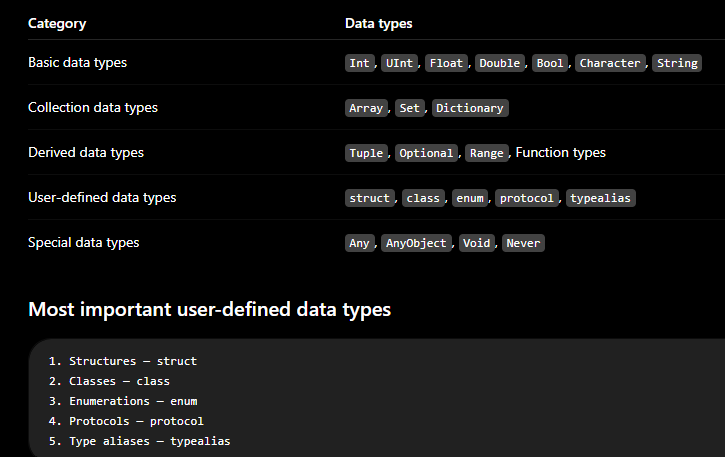
Most important user-defined data types
1. Structures — struct
2. Classes — class
3. Enumerations — enum
4. Protocols — protocol
5. Type aliases — typealias
swift is type safety programming language
It means that if a variable of your program expects a String, you can't pass int in it by mistake because Swift performs type-checks while compiling your code and displays an error message if it finds any type mismatch.
var varA = 42

// Here compiler will show an error message because varA
// variable can only store integer type value
varA = "This is hello"

print(varA)
The output of the above example is:
main.swift:5:8: error: cannot assign value of type 'String' to type 'Int'
varA = "This is hello"
Type inference is a special feature of Swift language
Type inference is a special feature of Swift language; it allows the compiler to automatically deduce the type of the given expression at the time of compilation
import Foundation

// varA is inferred to be of type Int
var varA = 42
print("Type of varA variable is:", type(of:varA))

// varB is inferred to be of type Double
var varB = 3.14159
print("Type of varB variable is:", type(of:varB))

// varC is also inferred to be of type String
var varC = "TutorialsPoint"
print("Type of varC variable is:", type(of:varC))
output
The output of the above example is:
Type of varA variable is: Int
Type of varB variable is: Double
Type of varC variable is: String



Top comments (0)