
Steps
User clicks “Sign in with Google”
Browser goes to Keycloak (with kc_idp_hint=google)
Keycloak does Google login and creates Keycloak SSO cookie
Keycloak redirects back to Laravel /auth/callback
Laravel exchanges code → gets tokens
Laravel reads claims (email/name/phone) and auto create/update user
Laravel logs user in and returns your existing JSON redirect_url
Laravel setup
Replace your existing routes
Remove (or keep but stop using) these:
Route::get('auth/google', [AuthenticatedSessionController::class, 'redirectToGoogle'])->name('google.login');
Route::get('auth/google/callback', [AuthenticatedSessionController::class, 'handleGoogleCallback']);
Add these instead (Keycloak-broker Google):
Route::get('auth/google', [AuthenticatedSessionController::class, 'redirectToKeycloakGoogle'])
    ->name('google.login');

Route::get('auth/callback', [AuthenticatedSessionController::class, 'handleKeycloakCallback'])
    ->name('auth.kc.callback');
AuthenticatedSessionController Controller
public function redirectToKeycloakGoogle(Request $request)
    {
        // Preserve where to go after login (you already do something similar)
        $routeName = (string) $request->query('route_name', session('login_from', 'login'));
        session(['login_from' => $routeName]);

        // You said you return JSON redirect_url sometimes:
        // If you need to store intended URL, do it here.
        if ($request->has('post_login_redirect')) {
            session(['post_login_redirect' => (string)$request->query('post_login_redirect')]);
        }

        $kcBase = rtrim(env('KEYCLOAK_BASE_URL'), '/');
        $realm  = env('KEYCLOAK_REALM');
        $client = env('KEYCLOAK_CLIENT_ID');

        $redirectUri = rtrim(env('APP_URL'), '/') . '/auth/callback';

        $state = Str::random(40);
        $nonce = Str::random(40);

        session([
            'kc_state' => $state,
            'kc_nonce' => $nonce,
        ]);

        $params = [
            'client_id'     => $client,
            'redirect_uri'  => $redirectUri,
            'response_type' => 'code',
            'scope'         => 'openid email profile',   // phone comes via mapper claim; keep scope basic
            'state'         => $state,
            'nonce'         => $nonce,

            // ✅ Force Keycloak to use Google IdP and skip KC username/password UI
            'kc_idp_hint'   => 'google',
        ];

        $authUrl = "{$kcBase}/realms/{$realm}/protocol/openid-connect/auth?" . http_build_query($params);

        Log::info('[KC_GOOGLE] Redirecting to Keycloak Google broker', [
            'redirect_uri' => $redirectUri,
        ]);

        return redirect()->away($authUrl);
    }

    /**
     * Step 2:
     * Keycloak -> Laravel callback with ?code=...&state=...
     * Exchange code for tokens, read claims, upsert user, login.
     */
    public function handleKeycloakCallback(Request $request)
    {
        Log::info('[KC_CB] /auth/callback hit', $request->query());

        // Keycloak may return error
        if ($request->has('error')) {
            Log::warning('[KC_CB] Keycloak returned error', [
                'error' => $request->query('error'),
                'desc'  => $request->query('error_description'),
            ]);

            // If user is already logged in locally, continue
            if (Auth::check()) {
                return $this->finalRedirectResponse(Auth::user(), $request);
            }

            // Otherwise send them to login page (your choice)
            return response()->json([
                'success' => false,
                'message' => 'SSO failed: ' . $request->query('error'),
            ], 401);
        }

        $code  = (string) $request->query('code', '');
        $state = (string) $request->query('state', '');

        $expectedState = (string) session()->pull('kc_state', '');

        if ($code === '' || $expectedState === '' || !hash_equals($expectedState, $state)) {
            Log::warning('[KC_CB] Missing code or invalid state', [
                'code_present' => $code !== '',
                'state_ok'     => ($expectedState !== '' && $state !== '' && hash_equals($expectedState, $state)),
            ]);

            return response()->json([
                'success' => false,
                'message' => 'Invalid SSO state or missing code',
            ], 400);
        }

        // Exchange code -> tokens
        $tokens = $this->exchangeAuthorizationCodeForTokens($code);

        if (!$tokens || empty($tokens['access_token'])) {
            return response()->json([
                'success' => false,
                'message' => 'Token exchange failed',
            ], 401);
        }

        // Read claims using UserInfo (recommended: no JWT parsing needed)
        $claims = $this->fetchUserInfo((string)$tokens['access_token']);

        if (!$claims || empty($claims['email'])) {
            Log::error('[KC_CB] Userinfo missing email', ['claims' => $claims]);
            return response()->json([
                'success' => false,
                'message' => 'SSO succeeded but email not available',
            ], 422);
        }

        // Upsert local user from claims
        $user = $this->upsertLaravelUserFromKeycloakClaims($claims);

        // Login locally
        Auth::login($user, true);
        $request->session()->regenerate();

        // Store KC tokens in your existing table (encrypted)
        $this->storeKeycloakTokens($user, $tokens);

        // Done -> return redirect_url in JSON (as you want)
        return $this->finalRedirectResponse($user, $request);
    }

    private function exchangeAuthorizationCodeForTokens(string $code): ?array
    {
        $kcBase  = rtrim(env('KEYCLOAK_BASE_URL'), '/');
        $realm   = env('KEYCLOAK_REALM');
        $client  = env('KEYCLOAK_CLIENT_ID');
        $secret  = env('KEYCLOAK_CLIENT_SECRET');

        $redirectUri = rtrim(env('APP_URL'), '/') . '/auth/callback';

        $tokenUrl = "{$kcBase}/realms/{$realm}/protocol/openid-connect/token";

        $resp = Http::asForm()->post($tokenUrl, [
            'grant_type'    => 'authorization_code',
            'client_id'     => $client,
            'client_secret' => $secret,
            'code'          => $code,
            'redirect_uri'  => $redirectUri,
        ]);

        Log::info('[KC_TOKEN] exchange status', ['status' => $resp->status()]);

        if (!$resp->ok()) {
            Log::error('[KC_TOKEN] exchange failed', ['body' => $resp->body()]);
            return null;
        }

        return $resp->json();
    }

    private function fetchUserInfo(string $accessToken): ?array
    {
        $kcBase = rtrim(env('KEYCLOAK_BASE_URL'), '/');
        $realm  = env('KEYCLOAK_REALM');

        $url = "{$kcBase}/realms/{$realm}/protocol/openid-connect/userinfo";

        $resp = Http::withToken($accessToken)->get($url);

        Log::info('[KC_USERINFO] status', ['status' => $resp->status()]);

        if (!$resp->ok()) {
            Log::error('[KC_USERINFO] failed', ['body' => $resp->body()]);
            return null;
        }

        return $resp->json();
    }

    /**
     * This is where your "phone claim" is used.
     * If your mapper puts phone into claim name "phone", it will be in $claims['phone'].
     */
    private function upsertLaravelUserFromKeycloakClaims(array $claims): User
    {
        $email = (string) ($claims['email'] ?? '');
        $name  = (string) ($claims['name'] ?? $claims['preferred_username'] ?? 'User');

        // Your mapper claim (from screenshot): Token Claim Name = "phone"
        $phone = $claims['phone'] ?? $claims['phone_number'] ?? null;

        // Keycloak subject = user id in KC
        $kcUserId = (string) ($claims['sub'] ?? '');

        $user = User::where('email', $email)->first();

        if (!$user) {
            // Create user
            $user = new User();
            $user->email = $email;
            $user->name  = $name;

            // set any defaults your app needs
            $user->role   = $user->role ?? 'user';
            $user->status = $user->status ?? 'active';

            // password required by Laravel even if you do SSO
            $user->password = bcrypt(Str::random(32));

            $user->kc_user_id = $kcUserId ?: null;

            // Save phone if present and your users table has "number"
            if ($phone) {
                $user->number = $this->normalizePhone($phone);
                $user->number_verified_at = now();
            }

            $user->email_verified_at = now();
            $user->save();

            Log::info('[KC_USER] created', ['user_id' => $user->id, 'email' => $email]);
            return $user;
        }

        // Update existing user (non-destructive)
        $dirty = false;

        if (!$user->kc_user_id && $kcUserId) {
            $user->kc_user_id = $kcUserId;
            $dirty = true;
        }

        if ($user->name === null || $user->name === '' || $user->name !== $name) {
            $user->name = $name;
            $dirty = true;
        }

        if ($phone) {
            $normalized = $this->normalizePhone($phone);
            if (!empty($normalized) && (string)$user->number !== (string)$normalized) {
                $user->number = $normalized;
                $dirty = true;
            }
        }

        if ($user->email_verified_at === null) {
            $user->email_verified_at = now();
            $dirty = true;
        }

        if ($dirty) {
            $user->save();
            Log::info('[KC_USER] updated', ['user_id' => $user->id, 'email' => $email]);
        }

        return $user;
    }

    private function storeKeycloakTokens(User $user, array $tokens): void
    {
        $accessToken  = (string) ($tokens['access_token'] ?? '');
        $refreshToken = $tokens['refresh_token'] ?? null;
        $expiresIn    = (int) ($tokens['expires_in'] ?? 0);

        if ($accessToken === '' || $expiresIn <= 0) {
            Log::warning('[KC_STORE] tokens missing essentials');
            return;
        }

        $encAccess  = encrypt($accessToken);
        $encRefresh = $refreshToken ? encrypt((string)$refreshToken) : null;

        UserKeycloakToken::updateOrCreate(
            ['user_id' => $user->id],
            [
                'access_token'  => $encAccess,
                'refresh_token' => $encRefresh,
                'expires_at'    => time() + $expiresIn,
                'revoked_at'    => null,
            ]
        );

        Log::info('[KC_STORE] stored', [
            'user_id' => $user->id,
            'expires_at' => time() + $expiresIn,
        ]);
    }

    private function finalRedirectResponse(User $user, Request $request)
    {
        // Keep your existing JSON redirect style
        $role = (string) $user->role;
        $routeName = (string) session('login_from', $request->input('route_name', 'login'));

        // If you already have a function, keep it
        $redirectUrl = method_exists($this, 'getRedirectUrlForRole')
            ? $this->getRedirectUrlForRole($role, $routeName)
            : (string) session('post_login_redirect', '/');

        return response()->json([
            'success'      => true,
            'message'      => 'Logged in successfully!',
            'role'         => $role,
            'redirect_url' => $redirectUrl,
        ], 200);
    }

    private function normalizePhone($phone): ?string
    {
        $p = preg_replace('/\D+/', '', (string)$phone);
        return $p !== '' ? $p : null;
    }
Keycloack setup
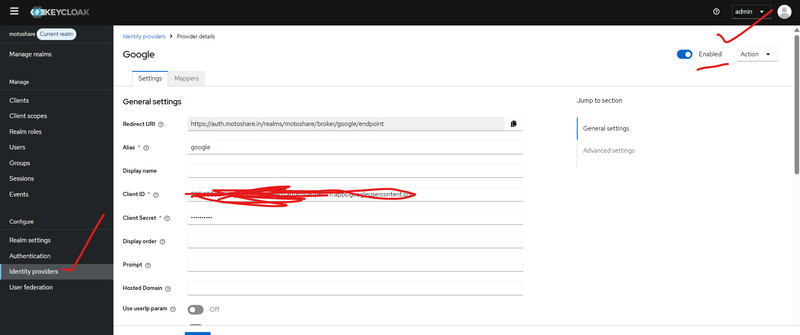
Step 1) Open your realm
Login to Keycloak Admin Console
Top-left realm dropdown → select motoshare
Step 2) Go to Identity Providers
Left sidebar:
Identity providers → click it
Now you have two cases:
Case A: “Google” already exists
You’ll see Google in the list → click Google
Case B: “Google” not added yet
Click Add provider
Select Google
It will open Google provider settings page
Step 3) Configure Google Provider (most important settings)
On the Google provider page, fill these:
A) Enable it
Enabled = ON
B) Google credentials
Client ID = (from Google Cloud OAuth Client)

Client Secret = (from Google Cloud OAuth Client)
C) Default scopes (recommended)
There is a field like “Default Scopes” (or similar):
Put: openid email profile
D) Redirect URI (you must copy this to Google Console)
Keycloak shows a Redirect URI for this Identity Provider.
It looks like:
https://auth.motoshare.in/realms/motoshare/broker/google/endpoint
Copy it.
Step 4) Configure Google Cloud Console (must be done)
In Google Cloud Console → OAuth Client:
Go to APIs & Services → Credentials
Open your OAuth Client (Web application)
Under Authorized redirect URIs, add the Keycloak redirect:
https://auth.motoshare.in/realms/motoshare/broker/google/endpoint
Save
Without this, Google login will fail.
Step 5) First Login Flow (auto create / auto link)
This is the “Optional but recommended” part you asked.
In the Google provider page (Keycloak):
Find First Login Flow (dropdown)
Recommended option:
first broker login
This flow usually:
Creates user on first login, or
Links account if email matches (depending on settings)
Step 6) Make sure Keycloak will “trust email” for linking (recommended)
Still in Google provider settings:
Look for these options (names may vary slightly by KC version):
Trust Email = ON
(Keycloak will treat Google email as verified)
Store Token = Optional
(not required for your Laravel SSO, but can be ON)
Step 7) Ensure “Account linking / create user” works
Go to:
Authentication → Flows
Look for flow:
first broker login
Click it and verify it includes steps like:
“Create User If Unique”
“Verify Existing Account By Email” / “Confirm Link Existing Account” (depends)
If you want fully automatic linking by email (no UI prompt), that requires customizing the broker flow.
Most people keep default first.
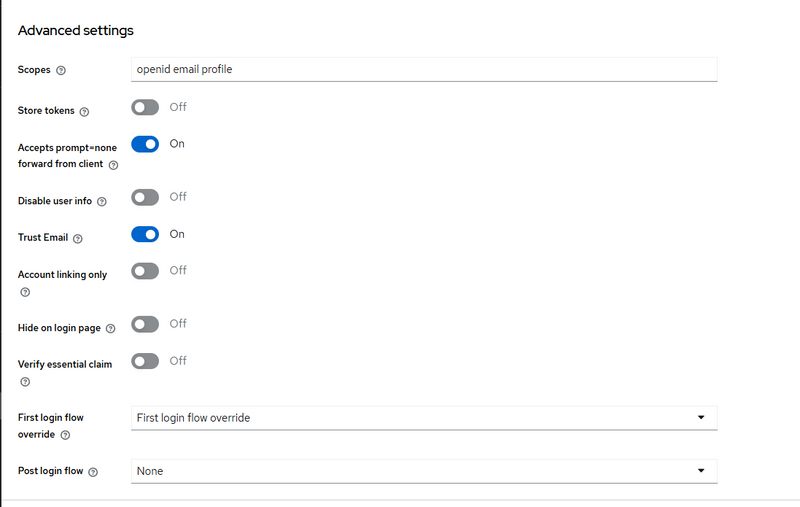
Step 2 — Advanced settings (very important for silent SSO)
Scroll to Advanced settings (your 3rd screenshot).
Set these:
A) Scopes
In Scopes field, put:
openid email profile
(If later you want refresh token from Google, you can add offline_access but not required for normal login.)
B) Accepts prompt=none forward from client = ON ✅
Turn ON:
Accepts prompt=none forward from client
Why: you are doing silent check from Laravel using prompt=none.
If this is OFF, Keycloak may not behave as you expect for silent SSO flows.
C) Trust Email = ON (recommended)
Turn ON:

Trust Email
So Keycloak treats Google email as verified and reduces extra verification steps.
D) Store tokens (optional)
Keep OFF unless you specifically need to store Google tokens inside Keycloak.
E) Hide on login page
Keep OFF if you want “Login with Google” button visible on Keycloak login screen.
Now click Save.



Top comments (0)