
How FastAPI Handles Requests Efficiently
Is FastAPI always better?
Is FastAPI a “pure backend” framework?
How FastAPI Handles Requests Efficiently
Asynchronous Request Handling
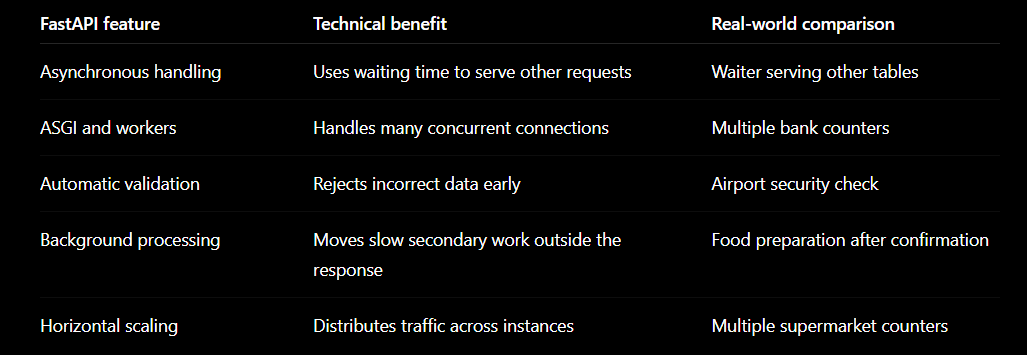
FastAPI can process other requests while waiting for databases or external APIs.
High-Speed ASGI Architecture
It uses ASGI servers such as Uvicorn to handle many concurrent connections efficiently.
Automatic Data Validation
FastAPI validates incoming data early, preventing invalid requests from reaching business logic.
Background Task Processing
Slow tasks such as emails, invoices, and notifications can run in the background.
Easy Horizontal Scaling
Multiple FastAPI instances can run behind a load balancer to distribute heavy traffic.
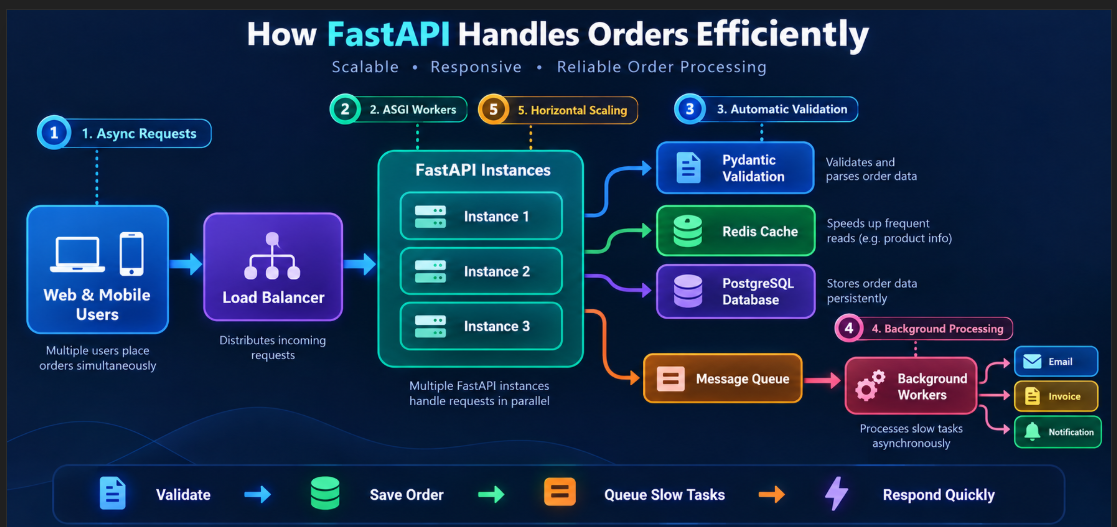
Asynchronous Request Handling
When FastAPI is waiting for a database or another API, it can process other requests instead of keeping the server blocked.
Coding example
from fastapi import FastAPI
import asyncio

app = FastAPI()

@app.get("/orders/{order_id}")
async def get_order(order_id: int):
    # Imagine this is an asynchronous database request
    await asyncio.sleep(2)

    return {
        "order_id": order_id,
        "status": "confirmed"
    }
The async and await keywords allow the server to handle another request during the two-second waiting period.
Real-world example
Think of a restaurant waiter:
The waiter takes your order.
The kitchen starts preparing it.
Instead of standing in the kitchen, the waiter serves other customers.
The waiter returns when your food is ready.
FastAPI works similarly while waiting for databases, payment gateways or external APIs.
Async improves waiting-based operations. It does not automatically speed up CPU-heavy work such as video processing.
- High-Speed ASGI Architecture
FastAPI runs on the ASGI standard using servers such as Uvicorn. ASGI is designed to handle asynchronous operations and many concurrent connections.
Coding example
Create main.py:
from fastapi import FastAPI

app = FastAPI()

@app.get("/")
async def home():
    return {"message": "FastAPI is running"}
Start the application:
uvicorn main:app --host 0.0.0.0 --port 8000
Run multiple worker processes:
uvicorn main:app \
  --host 0.0.0.0 \
  --port 8000 \
  --workers 4
The workers allow the server to use multiple CPU cores and process more traffic.
Real-world example
Imagine a bank:
One counter can serve only one customer at a time.
Four counters can serve four customers simultaneously.
Customers are distributed among available counters.
The four Uvicorn workers act like four service counters.
- Automatic Data Validation
FastAPI uses Pydantic models to check incoming request data before sending it to the business logic.
Coding example
from fastapi import FastAPI
from pydantic import BaseModel, Field

app = FastAPI()

class OrderRequest(BaseModel):
    product_id: int
    quantity: int = Field(gt=0, le=10)
    customer_email: str

@app.post("/orders")
async def create_order(order: OrderRequest):
    return {
        "message": "Order accepted",
        "order": order
    }
Valid request:
{
  "product_id": 101,
  "quantity": 2,
  "customer_email": "customer@example.com"
}
Invalid request:
{
  "product_id": "phone",
  "quantity": -5
}
FastAPI rejects the invalid request automatically. The main order-processing code does not need to handle obviously incorrect values.
Real-world example
Consider security at an airport:
Passengers are checked before entering the boarding area.
People without valid documents are stopped at the entrance.
Only validated passengers reach the aircraft.
Similarly, FastAPI stops invalid data before it reaches the database or business logic.
- Background Task Processing
FastAPI can return a response without making the user wait for small secondary tasks such as sending a confirmation email.
Coding example
from fastapi import FastAPI, BackgroundTasks

app = FastAPI()

def send_confirmation_email(email: str):
    print(f"Confirmation email sent to {email}")

@app.post("/orders")
async def create_order(
    email: str,
    background_tasks: BackgroundTasks
):
    # Save the order first

    background_tasks.add_task(
        send_confirmation_email,
        email
    )

    return {
        "message": "Order placed successfully"
    }
The customer receives the order response first. The email task runs afterward.
Real-world example
When you place an online food order:
The application immediately shows “Order confirmed.”
The restaurant begins preparing the food.
The notification and invoice are processed separately.
You do not need to wait for every secondary activity before seeing the confirmation.
Important production point
FastAPI BackgroundTasks is suitable for small, non-critical work. For heavy or critical tasks, use:
Celery
RabbitMQ
Kafka
Redis Queue
Examples include payment processing, video conversion, invoice generation and bulk email delivery.
- Easy Horizontal Scaling
You can run multiple FastAPI application instances behind a load balancer. Incoming requests are distributed across those instances.
Coding example
Assume FastAPI is running on three servers:
FastAPI instance 1 → Port 8001
FastAPI instance 2 → Port 8002
FastAPI instance 3 → Port 8003
An Nginx load-balancer configuration could look like this:
upstream fastapi_servers {
    server 127.0.0.1:8001;
    server 127.0.0.1:8002;
    server 127.0.0.1:8003;
}

server {
    listen 80;

    location / {
        proxy_pass http://fastapi_servers;
    }
}
Nginx distributes incoming requests among the three application instances.
Real-world example
Imagine a supermarket:
One billing counter creates a long queue.
The manager opens several more counters.
Customers are distributed among all available counters.
Similarly, additional FastAPI instances can be added when traffic increases.
Is FastAPI always better?
Is FastAPI a “pure backend” framework?
FastAPI is often called a pure API/backend framework because it focuses mainly on:
Building REST APIs
Receiving requests and returning JSON
Data validation
Authentication and authorization
Connecting frontend/mobile apps with databases and services
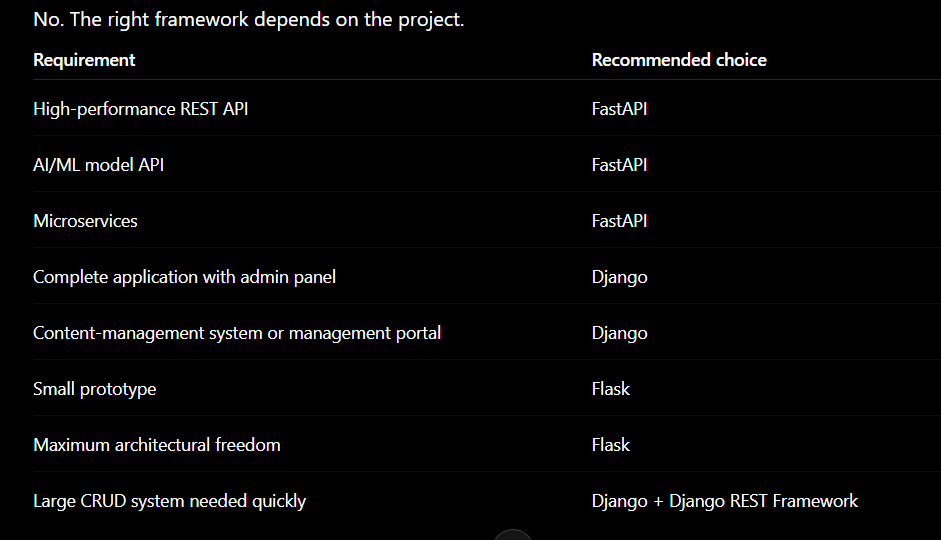
However, saying Django and Flask are not backend frameworks is incorrect. All three are backend frameworks, but their focus is different:
FastAPI: API-first backend
Django: Complete web-application framework
Flask: Minimal and flexible backend framework



Top comments (0)