
A family planning a December getaway might first search for a budget, watch a short video showing what the trip is like, and then open the listing to check the dates. Each channel helps at a different point. Start with one trip you can actually book and give travellers a clear next step wherever they find you.
What counts as site growth?
| Metric | Where to measure it | What to record |
|---|---|---|
| Google organic search clicks | Google Search Console | Site-wide Google Search clicks for the reporting month |
| Bing organic search clicks | Bing Webmaster Tools | Site-wide Bing search clicks for the same month |
| Verified users | HolidayLandmark admin or database | Total verified accounts at month-end, including existing verified users |
| Paid ad clicks, social views and followers | Ad and social platform reports | Use these to evaluate each channel and check any separate payout rules |
| Trip link clicks and booking actions | Site analytics or booking records | Use these to see where visitors progress or drop off |
For URLsNow, follow the How this pays & where to find your numbers instructions on the Site Growth screen. Keep paid clicks, social referrals and clicks between your own pages out of the Google and Bing organic search fields. If the site had 1,200 verified accounts at the end of one month and 1,260 at the end of the next, submit 1,260 for the second month. The increase is 60. Google Search Console metrics · Bing Search Performance
1. Trip pages and SEO blogs
Fix the trip page first
- Pick an available trip. For the Royal Family Luxury Getaway, verify the destination, pickup point and trip length with the organizer before promoting it. In the reviewed listing, the map pointed to Delhi while the itinerary mentioned Bokaro, and different sections gave different durations.
- Put the actual destination, dates, price per person and booking action near the top. Confirm what the price covers and name any extras. Use a cover photo and map that match the destination.
- Open the page on a phone and follow the booking flow. Check whether a new customer can register, verify their account and return to the same trip. Royal Family Luxury Getaway listing
Publish a blog that links to the trip
- Choose one question families ask before booking. If Bokaro and three days are confirmed, use How to Plan a 3-Day Family Trip to Bokaro.
- In your blog editor, create a new post. Answer the main question in the opening, then use headings for the itinerary, transport and budget. Distinguish estimates from confirmed package prices.
- Near the budget section, add a link on the words See the family trip itinerary, dates, and price. Paste the current trip URL as the destination. Preview the article, test the link, then publish.
- Review search impressions and clicks for the article. Track clicks from the article to the trip and completed verification in your site analytics.
Grow Google and Bing clicks
Look for an existing page with relevant search impressions and few clicks. Review the search phrases and check whether the page title and opening answer them. For example, a page appearing for a family trip query should make the destination and trip length clear. Check that published trip and blog pages are linked from the site, included in the sitemap, and eligible for indexing. Compare the same pages over comparable periods. Google Search Console metrics · Bing Search Performance
2. Pay-per-click (PPC) with Google Search Ads
Get more relevant clicks from your budget
- Choose one confirmed offer and use its trip page as the ad destination.
- Start with searches that match what you sell. For example, use “Bokaro family tour package” only if the listing actually serves Bokaro. Mention the real destination and trip details in the ad.
- Set a test budget and track verified signups or booking requests from the ad. Review the search terms that trigger the ad and exclude clearly unrelated ones.
- Compare the cost and quality of the outcomes before increasing spend. A campaign can bring more clicks while producing fewer bookings.
Measure paid clicks and signups
Average CPC equals ad spend divided by paid clicks. Cost per verified signup equals ad spend divided by verified signups attributed to the campaign. For example, ₹600 for 100 clicks and two verified signups works out to ₹6 per click and ₹300 per verified signup. If URLsNow also has a separate pay-per-click reward, check which links and traffic sources are eligible for that reward. Google Ads average CPC and paid versus organic results
3. Instagram Reels, Facebook Reels and YouTube Shorts
- Use footage from the actual destination. Make three videos from one trip: what the experience looks like, what the price includes, and what families should know before booking.
- Show the destination in the first few seconds. Add captions for dates, price and departure or pickup details when confirmed.
- Give viewers one action, such as visiting the trip through the profile link or following for upcoming departures. Use a tagged link where the platform makes it clickable.
- Compare views, profile visits, new followers and site visits. A video that brings enquiries is worth repeating even if another video gets more views.
4. Meta Ads for trip enquiries
- Choose an outcome before building the ad. Send travellers to the trip page when you want them to check the offer and register. Use WhatsApp when your team can handle questions and follow up there.
- Test two videos for the same trip. One can show the experience while the other answers a booking question, such as what the package includes.
- Compare cost per qualified enquiry, verified signup or booking. For an enquiry, check whether the requested travel dates, group size and budget fit the offer before counting it as qualified.
5. Social posts and carousels
- Turn the itinerary into a carousel. Use the first slide for the destination and duration, then show highlights, inclusions and pickup details.
- Publish genuine traveller reviews with permission and share departure updates when dates or availability change.
- End with a specific action such as Check dates and availability. Track link visits and enquiries to find which posts help travellers decide.
6. Likes, comments and community replies
- Reply to real questions on your posts and in relevant travel discussions. Answer questions about children’s pricing, pickup, room sharing or whether someone can join alone.
- Put the answer in the reply. Share the matching trip link when it helps and community rules permit it.
- Turn repeated questions into a trip FAQ, blog section or Reel. Track enquiries from those conversations. Routine liking is a low priority for this goal.
7. Social bookmarking (SBM) and referral traffic
- Choose communities or bookmarking sites where people discuss the destination or travel question your article answers.
- Write a short description for that audience and share the most useful link. A trip planning discussion may benefit from your budget guide, while a booking question may benefit from the trip page.
- Track referral visits and verified signups. Continue with sources that send interested travellers. Referral clicks belong in your channel analytics.
8. Grow verified signups with the traffic you already have
- On mobile, make the price, dates and next action easy to find. Explain why an account is needed when the user starts a booking.
- Test signup, verification and the return to the same trip in a private browser window. Check whether a user can resend a code or recover from an error.
- Track signup starts and completed verifications. If many people start but few finish, check where they stop before spending more on traffic.
- Ask relevant local organizers to share their confirmed trip listings with their own audiences. Use tagged links for those external shares and record any verified signups they bring.
A simple weekly and monthly routine
| When | What to do |
|---|---|
| Daily | Answer trip questions and check for signup or booking issues. |
| Weekly | Improve one trip page or related blog, review organic clicks, and compare the Reels or ads promoting that trip. |
| Monthly | Record Google and Bing search clicks for the reporting month and the total verified users at month-end. Compare with the previous month and note what changed. |
For HolidayLandmark’s first test, correct the Royal Family Luxury Getaway listing, publish one destination-specific family planning guide, and check how many people find the guide through search, open the trip, and complete verification.
| Rank | Activity | Most effective for |
|---|---|---|
| 1 | Trip pages and SEO blogs | Growing organic search clicks |
| 2 | Signup and verification improvements | Turning existing visitors into verified users |
| 3 | Google Search Ads (PPC) | Getting paid clicks from travellers already searching for a trip |
| 4 | Reels and Shorts | Reaching new travellers and gaining followers |
| 5 | Meta Ads | Generating enquiries for trips that sell well through video |
| 6 | Social posts and carousels | Helping interested travellers check dates, prices, and inclusions |
| 7 | Comments and replies | Answering questions that can hold up a booking |
| 8 | Social bookmarking (SBM) | Bringing referral visits from relevant communities |
0 ways to grow HolidayLandmark, in priority order
This order is based on your URLsNow Site Growth goals: more Google and Bing organic clicks and more verified signups.
- Improve existing pages that already appear in search. In Google Search Console and Bing Webmaster Tools, find trip or destination pages with relevant impressions and few clicks. Use the actual search phrases to improve the title and opening section. Best first step for organic clicks.
- Fix trip listings before promoting them. Confirm the destination, duration, pickup point, price, and inclusions. For your Royal Family Luxury Getaway, resolve the Delhi/Bokaro and duration differences first. Helps travellers decide whether to book.
- Make signup and verification easier on mobile. Tap Sign in to book, create an account, complete verification, and check that you return to the same trip. Fix the first step where users get stuck. Best first step if you already have traffic but few verified signups.
- Publish SEO blogs that link to bookable trips. Answer a real question about budget, itinerary, or transport. Add a link such as See trip dates, prices, and inclusions where the reader is choosing an option. Builds organic traffic over time.
- Fix indexing and add internal links. Check whether your main trip and blog pages are indexed. Link to them from relevant destination or category pages and include them in your sitemap. Helps search engines discover important pages.
- Run Google Search Ads for one confirmed trip. Target searches that match the actual destination and package, and send visitors straight to that listing. Track cost per verified signup or booking alongside cost per click. Best for paid clicks with booking intent.
- Post Reels and Shorts using actual trip footage. Show the destination, one experience, and a confirmed detail such as the price or departure date. Give viewers a clear way to reach the listing. Best for organic discovery and followers.
- Test Meta Ads with two videos for the same trip. Use one video to show the experience and another to explain what the price covers. Compare qualified WhatsApp enquiries, verified signups, or bookings. Useful for trips that are easy to show visually.
- Use carousels and replies to answer booking questions. Post the itinerary, pickup point, and inclusions in a carousel. Turn repeated questions about room sharing, children’s prices, or solo bookings into a trip-page FAQ. Helps interested travellers take the next step. 10.** Get referral traffic from organizers and travel communities**. Ask the organizer to share the confirmed listing. Share a helpful guide in relevant forums or bookmarking communities where the rules allow it. Track which sources bring enquiries or verified users. Lower priority until a source shows results. Do first this week: Fix the family trip listing, test signup and verification on your phone, then publish one destination-specific blog linking to the corrected page. For the URLsNow search-click fields, use organic clicks from Google and Bing. Track ad clicks and social visits in their own reports.
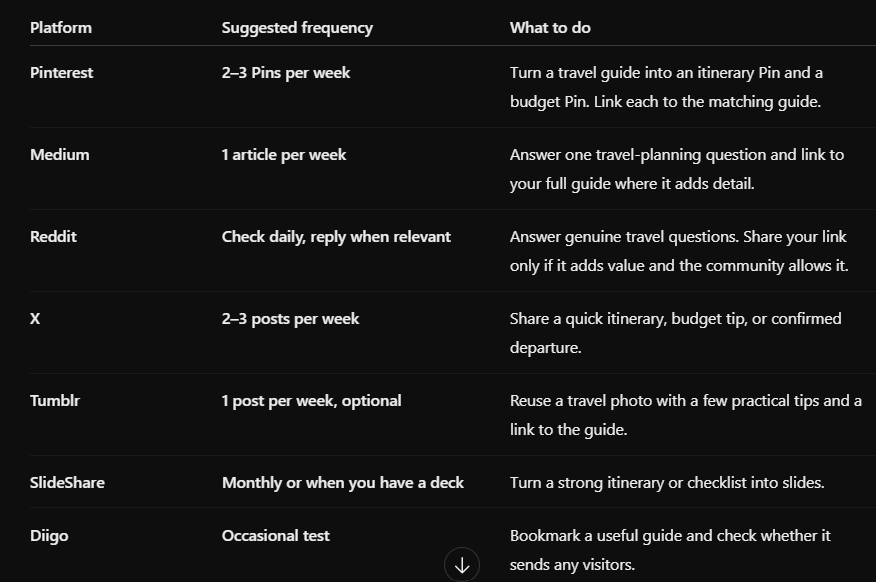
| Priority | Platform | What to post | Where to send readers |
|---|---|---|---|
| 1 | Make two vertical Pins from one guide, such as a family itinerary and a trip budget checklist. | Link each Pin directly to the matching HolidayLandmark blog. | |
| 2 | Medium | Publish a standalone article that answers one planning question, such as what to check before booking a family tour package. | Link to the full HolidayLandmark guide where readers can get more detail. |
| 3 | Find a relevant travel question and answer it directly. Disclose your HolidayLandmark connection if you share a link, and check the community’s rules first. | Link only when your guide genuinely adds to the answer and the community allows it. | |
| 4 | X | Share a short itinerary, a budget breakdown, or an update about a confirmed departure. | Link planning posts to the blog and departure updates to the trip page. |
| 5 | Tumblr | Post a short visual travel note with a photo and a few practical tips. | Link to the related guide for the full itinerary or budget. |
| 6 | SlideShare | Make a short family travel planning deck if you already have the material. | Add the full guide as a resource on the final slide where linking is supported. |
| 7 | Diigo | Save and organize useful travel resources. | Use it as a small referral test. Give it more time only if it brings measurable visits. |
How to use one blog across these accounts
- Publish one useful guide on HolidayLandmark. For the Royal Family Luxury Getaway, confirm the destination, duration, and price inclusions before linking to the booking page. Use the full public https://www.holidaylandmark.com/... URL in each post.
- Start with two Pinterest Pins and one Medium article. Give each a distinct angle. For example, make one Pin about budgeting, one about the itinerary, and a Medium article about choosing a package for children and grandparents.
- Track each external link. Add ?utm_source=pinterest&utm_medium=organic_social&utm_campaign=family_trip to the blog URL for Pinterest. Change the source to medium, reddit, or x for the corresponding post. In GA4, compare visits and completed verified signups by source if your verification event is set up. Analytics Help
- Review after a few weeks. If Pinterest sends visits but few people open the trip, check whether the Pin matches the guide and whether the trip link is easy to find. If a channel brings verified users, give it more time next month.
How Meta Ads Help HolidayLandmark Reach New Travellers on Facebook and Instagram
Meta Ads help HolidayLandmark reach new travellers on Facebook and Instagram and turn some of them into trip enquiries, verified signups, or bookings. They’re especially useful when a short video can show why a trip is worth taking.
How it works for one family trip
- Choose one bookable trip. For your Royal Family Luxury Getaway, confirm the destination, duration, and what ₹3,000 includes before spending on ads.
- Make two short ads for the same trip. In one, show what a family will experience. In the other, explain what the package includes. Use actual trip footage and confirmed dates, price, and pickup details.
- Choose one action. If your goal is verified signups, send visitors directly to the trip page and test that they can register, verify, and return to booking. If families usually have questions before booking, send them to WhatsApp and measure qualified enquiries.
- Judge the ad by what people do next. If you spend ₹600 and get 60 clicks, your cost per click is ₹10. If three of those visitors complete verification, your cost per verified signup is ₹200. Compare that number across ads when deciding which one to keep running.
| What Meta Ads bring | How it helps your URLsNow Site Growth |
|---|---|
| Facebook or Instagram ad clicks | Track them as paid traffic in your ad report. |
| WhatsApp enquiries | Track them as leads. If an enquirer later verifies an account, that user contributes to your month-end total. |
| Completed verified signups | These contribute to your total verified users. |
| Google and Bing organic clicks | Grow these through trip-page SEO and useful travel blogs. |
| Page | Suggested title | What to include |
|---|---|---|
| Blog | Andaman With Kids in January: A 5-Day Family Itinerary | A day-by-day plan, ferry tips, family-friendly activities, and budget guidance. |
| Trip listing | 5-Day Andaman Family Tour Package | Confirmed dates, price per person, children’s pricing, pickup point, hotel and ferry inclusions, and a booking button. |
| What your post promises | Link to use | Andaman example |
|---|---|---|
| A guide, itinerary, or travel tips | Blog link | A Pinterest Pin titled Andaman With Kids: 5-Day Family Itinerary should open the itinerary blog. |
| Dates, price, or availability for a specific package | Trip listing link | A post promoting a confirmed 5-Day Andaman Family Tour should open that package’s booking page. |
| A video someone specifically wants to watch | Reel link | Share the Reel link when the video itself is the reason to click. If your goal is website visits, use the video as the post’s creative where possible and point people to the blog or trip. |
How to connect all three
- Post the Reel. Show a few highlights from the Andaman itinerary. End with “Read the full 5-day itinerary — link in bio.” Point the profile link to the Andaman itinerary blog.
- Share the blog on Pinterest, Medium, Tumblr, or other bookmarking sites. Use an itinerary image, short article, or useful tip. Give readers one clear next step: “Read the full 5-day Andaman itinerary.” On Reddit or Quora, share the link where it helps answer the question and the community allows it.
- Link the blog to the matching trip listing. Once your Andaman package is live and bookable, add “Check dates, prices, and inclusions for the 5-day Andaman family tour” near the end of the itinerary or budget section. Link those words directly to the trip.
- Share the trip link directly in a separate booking post. When you have confirmed dates and pricing, create a post focused on the package and send readers straight to the listing. For your first Pinterest or Medium post, use the Andaman blog link. The path is Pinterest, Medium, or Reel → Andaman blog → Andaman trip listing → signup or booking. When your post is specifically about booking the package, send people straight to the trip listing.



Top comments (0)