
How to install maven in local
Set-ExecutionPolicy Bypass -Scope Process -Force
[System.Net.ServicePointManager]::SecurityProtocol = [System.Net.ServicePointManager]::SecurityProtocol -bor 3072
irm https://community.chocolatey.org/install.ps1 | iex
Test-Path "C:\ProgramData\chocolatey\bin\choco.exe"
mvn -version

choco -v
choco list --local-only | findstr /i maven
If choco install maven -y fails with permission / install errors
Run these and paste output:
choco install maven -y --debug --verbose
Close PowerShell completely, open a new PowerShell window, then run
mvn -version
Step by Step to create folder structure
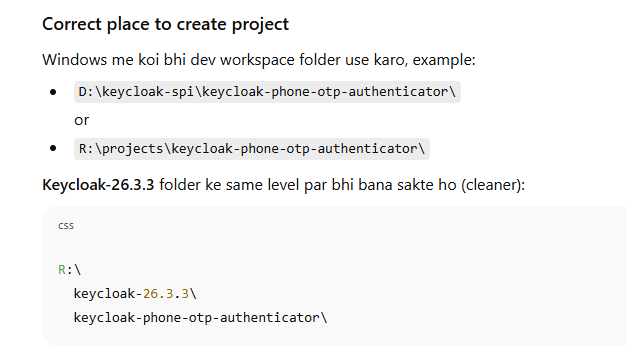
Note:keycloak-phone-otp-authenticator/ folder Keycloak ke install folder ke andar nahi banana.
Ye separate Maven project hota hai jo JAR banata hai. Phir us JAR ko Keycloak-26.3.3/providers/ me copy karte ho.
Step-by-step (Exact)
Step 1) Create folder (outside Keycloak)
PowerShell:
cd R:\
mkdir keycloak-phone-otp-authenticator
cd keycloak-phone-otp-authenticator
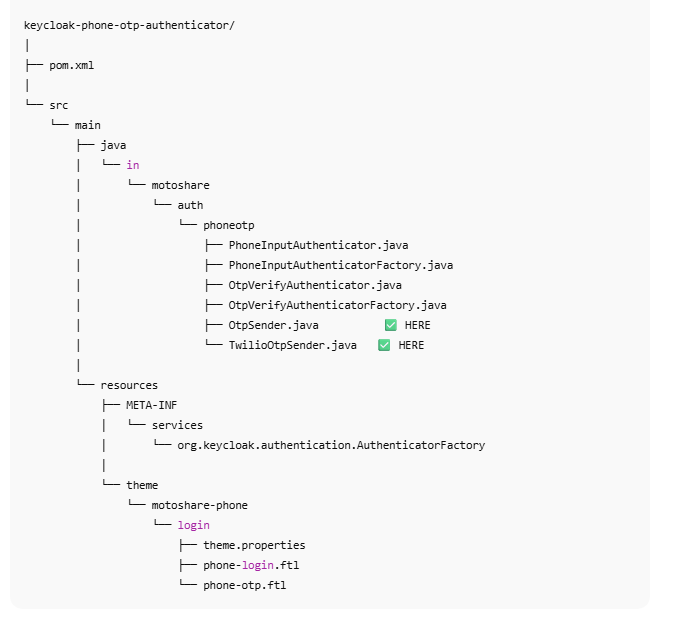
Step 2) Create standard Maven structure
mkdir -Force src\main\java\in\motoshare\auth\phoneotp
mkdir -Force src\main\resources\META-INF\services
mkdir -Force src\main\resources\theme\motoshare-phoneotp\login
mkdir -Force src\main\resources\theme\motoshare-phoneotp\login\resources
Step 3) Put pom.xml here
Location:
R:\keycloak-phone-otp-authenticator\pom.xml
Step 4) Provider registration file (very important)
Create this file:
R:\keycloak-phone-otp-authenticator\src\main\resources\META-INF\services\org.keycloak.authentication.AuthenticatorFactory
Content:
in.motoshare.auth.phoneotp.PhoneInputAuthenticatorFactory
in.motoshare.auth.phoneotp.OtpVerifyAuthenticatorFactory
Step 5) Put your Java files here
Example path:
R:\keycloak-phone-otp-authenticator\src\main\java\in\motoshare\auth\phoneotp\PhoneInputAuthenticatorFactory.java
R:\keycloak-phone-otp-authenticator\src\main\java\in\motoshare\auth\phoneotp\PhoneInputAuthenticator.java
...OtpVerifyAuthenticatorFactory.java
...OtpVerifyAuthenticator.java
Step 6) Put your FTL files here
Example:
R:\keycloak-phone-otp-authenticator\src\main\resources\theme\motoshare-phoneotp\login\phone-login.ftl
R:\keycloak-phone-otp-authenticator\src\main\resources\theme\motoshare-phoneotp\login\otp-verify.ftl
R:\keycloak-phone-otp-authenticator\src\main\resources\theme\motoshare-phoneotp\login\theme.properties
theme.properties minimal:
parent=keycloak.v2
Build JAR
From project root:
mvn -version
mvn -DskipTests clean package
You will get jar here:
R:\keycloak-phone-otp-authenticator\target\keycloak-phone-otp-authenticator-1.0.0.jar
Copy JAR into Keycloak
Copy to:
R:\keycloak-26.3.3\providers\
PowerShell:
copy .\target\keycloak-phone-otp-authenticator-1.0.0.jar R:\keycloak-26.3.3\providers\
If you included theme inside JAR, it will load automatically (no need to copy into themes/).
Rebuild Keycloak (must)
From Keycloak folder:
cd R:\keycloak-26.3.3
.\bin\kc.bat build
.\bin\kc.bat start-dev
Where your earlier error came from (root cause)
Your Keycloak flow logs showed:
authenticator SETUP_REQUIRED: auth-otp-form → Keycloak TOTP app (Google Authenticator type) setup required
Failed authentication: authenticator: mobile-number-authenticator → your custom authenticator required but not configured / not ready
So once your SPI is installed properly, you will remove TOTP and use Phone OTP authenticators only.
Step 3:Put pom.xml here
Location:
R:\keycloak-phone-otp-authenticator\pom.xml
Step 4 Provider registration file (very important)
Create this file:
R:\keycloak-phone-otp-authenticator\src\main\resources\META-INF\services\org.keycloak.authentication.AuthenticatorFactory
Content:
in.motoshare.auth.phoneotp.PhoneInputAuthenticatorFactory
in.motoshare.auth.phoneotp.OtpVerifyAuthenticatorFactory
Step 5) Put your Java files here
Example path:
R:\keycloak-phone-otp-authenticator\src\main\java\in\motoshare\auth\phoneotp\PhoneInputAuthenticatorFactory.java
R:\keycloak-phone-otp-authenticator\src\main\java\in\motoshare\auth\phoneotp\PhoneInputAuthenticator.java
...OtpVerifyAuthenticatorFactory.java
...OtpVerifyAuthenticator.java
step6: put code on pom.xml
<project xmlns="http://maven.apache.org/POM/4.0.0"
         xmlns:xsi="http://www.w3.org/2001/XMLSchema-instance"
         xsi:schemaLocation="http://maven.apache.org/POM/4.0.0 http://maven.apache.org/xsd/maven-4.0.0.xsd">
  <modelVersion>4.0.0</modelVersion>

  <groupId>in.motoshare</groupId>
  <artifactId>keycloak-phone-otp-authenticator</artifactId>
  <version>1.0.0</version>
  <name>Keycloak Phone OTP Authenticator</name>

  <properties>
    <maven.compiler.release>17</maven.compiler.release>
    <keycloak.version>26.3.3</keycloak.version>
  </properties>

  <dependencies>
    <!-- Keycloak SPI -->
    <dependency>
      <groupId>org.keycloak</groupId>
      <artifactId>keycloak-server-spi</artifactId>
      <version>${keycloak.version}</version>
      <scope>provided</scope>
    </dependency>

    <dependency>
      <groupId>org.keycloak</groupId>
      <artifactId>keycloak-server-spi-private</artifactId>
      <version>${keycloak.version}</version>
      <scope>provided</scope>
    </dependency>

    <dependency>
      <groupId>org.keycloak</groupId>
      <artifactId>keycloak-services</artifactId>
      <version>${keycloak.version}</version>
      <scope>provided</scope>
    </dependency>

    <!-- Optional: simple HTTP -->
    <dependency>
      <groupId>com.squareup.okhttp3</groupId>
      <artifactId>okhttp</artifactId>
      <version>4.12.0</version>
    </dependency>
  </dependencies>

  <build>
    <plugins>
      <plugin>
        <groupId>org.apache.maven.plugins</groupId>
        <artifactId>maven-compiler-plugin</artifactId>
        <version>3.13.0</version>
        <configuration>
          <release>${maven.compiler.release}</release>
        </configuration>
      </plugin>
    </plugins>
  </build>
</project>
A) PhoneInputAuthenticatorFactory.java
package in.motoshare.auth.phoneotp;
import org.keycloak.Config;
import org.keycloak.authentication.Authenticator;
import org.keycloak.authentication.AuthenticatorFactory;
import org.keycloak.models.KeycloakSession;
import org.keycloak.models.KeycloakSessionFactory;

public class PhoneInputAuthenticatorFactory implements AuthenticatorFactory {

    public static final String ID = "phone-input-authenticator";

    @Override
    public String getId() { return ID; }

    @Override
    public String getDisplayType() { return "Phone Login - Enter Phone & Send OTP"; }

    @Override
    public String getHelpText() { return "Collect country+phone, send OTP via SMS/WhatsApp provider."; }

    @Override
    public Authenticator create(KeycloakSession session) {
        return new PhoneInputAuthenticator();
    }

    @Override public void init(Config.Scope config) {}
    @Override public void postInit(KeycloakSessionFactory factory) {}
    @Override public void close() {}
    @Override public boolean isConfigurable() { return true; }

    // you can add config properties later (Twilio SID/token, etc.)
}
B) PhoneInputAuthenticator.java
package in.motoshare.auth.phoneotp;
import jakarta.ws.rs.core.MultivaluedMap;
import jakarta.ws.rs.core.Response;
import org.keycloak.authentication.AuthenticationFlowContext;
import org.keycloak.authentication.Authenticator;
import org.keycloak.models.AuthenticationSessionModel;
import org.keycloak.services.validation.Validation;

import java.security.SecureRandom;

public class PhoneInputAuthenticator implements Authenticator {

    private static final SecureRandom RNG = new SecureRandom();

    @Override
    public void authenticate(AuthenticationFlowContext context) {
        // show phone input page
        Response challenge = context.form()
                .setAttribute("realmName", context.getRealm().getName())
                .createForm("phone-login.ftl");
        context.challenge(challenge);
    }

    @Override
    public void action(AuthenticationFlowContext context) {
        MultivaluedMap<String, String> formData = context.getHttpRequest().getDecodedFormParameters();

        String country = safe(formData.getFirst("country"));
        String phone = safe(formData.getFirst("phone"));

        // Basic validation
        if (country.isBlank() || phone.isBlank()) {
            context.challenge(context.form()
                    .setError("Country and phone are required.")
                    .createForm("phone-login.ftl"));
            return;
        }

        // Normalize phone (you can improve formatting)
        String fullPhone = country + phone;

        // Generate OTP
        String otp = String.format("%06d", RNG.nextInt(1_000_000));

        AuthenticationSessionModel authSession = context.getAuthenticationSession();
        authSession.setAuthNote("PHONE_OTP_PHONE", fullPhone);
        authSession.setAuthNote("PHONE_OTP_CODE", otp);
        authSession.setAuthNote("PHONE_OTP_TS", String.valueOf(System.currentTimeMillis()));

        // Send OTP using provider (implement)
        try {
            OtpSender sender = new TwilioOtpSender(); // replace later with your provider
            sender.send(fullPhone, otp);
        } catch (Exception e) {
            context.failureChallenge(org.keycloak.authentication.AuthenticationFlowError.INTERNAL_ERROR,
                    context.form().setError("Failed to send OTP. Try again.").createForm("phone-login.ftl"));
            return;
        }

        // Move to next step (OTP verify authenticator)
        context.success();
    }

    @Override public boolean requiresUser() { return false; }
    @Override public boolean configuredFor(org.keycloak.models.KeycloakSession session, org.keycloak.models.RealmModel realm, org.keycloak.models.UserModel user) { return true; }
    @Override public void setRequiredActions(org.keycloak.models.KeycloakSession session, org.keycloak.models.RealmModel realm, org.keycloak.models.UserModel user) {}
    @Override public void close() {}

    private String safe(String v) { return v == null ? "" : v.trim(); }
}
5) Implement Authenticator #2 (OTP verify + user create/link)
A) OtpVerifyAuthenticatorFactory.java
package in.motoshare.auth.phoneotp;
import org.keycloak.Config;
import org.keycloak.authentication.Authenticator;
import org.keycloak.authentication.AuthenticatorFactory;
import org.keycloak.models.KeycloakSession;
import org.keycloak.models.KeycloakSessionFactory;

public class OtpVerifyAuthenticatorFactory implements AuthenticatorFactory {

    public static final String ID = "phone-otp-verify-authenticator";

    @Override public String getId() { return ID; }
    @Override public String getDisplayType() { return "Phone Login - Verify OTP"; }
    @Override public String getHelpText() { return "Verify OTP and login/create user by phone."; }

    @Override
    public Authenticator create(KeycloakSession session) {
        return new OtpVerifyAuthenticator();
    }

    @Override public void init(Config.Scope config) {}
    @Override public void postInit(KeycloakSessionFactory factory) {}
    @Override public void close() {}
}
B) OtpVerifyAuthenticator.java
package in.motoshare.auth.phoneotp;

import jakarta.ws.rs.core.MultivaluedMap;
import jakarta.ws.rs.core.Response;
import org.keycloak.authentication.AuthenticationFlowContext;
import org.keycloak.authentication.Authenticator;
import org.keycloak.models.AuthenticationSessionModel;
import org.keycloak.models.UserModel;

public class OtpVerifyAuthenticator implements Authenticator {

    private static final long OTP_TTL_MS = 3 * 60 * 1000; // 3 min

    @Override
    public void authenticate(AuthenticationFlowContext context) {
        Response challenge = context.form().createForm("phone-otp.ftl");
        context.challenge(challenge);
    }

    @Override
    public void action(AuthenticationFlowContext context) {
        MultivaluedMap<String, String> formData = context.getHttpRequest().getDecodedFormParameters();
        String userOtp = safe(formData.getFirst("otp"));

        AuthenticationSessionModel authSession = context.getAuthenticationSession();
        String expectedOtp = safe(authSession.getAuthNote("PHONE_OTP_CODE"));
        String phone = safe(authSession.getAuthNote("PHONE_OTP_PHONE"));
        long ts = parseLong(authSession.getAuthNote("PHONE_OTP_TS"));

        if (expectedOtp.isBlank() || phone.isBlank()) {
            context.failureChallenge(org.keycloak.authentication.AuthenticationFlowError.INTERNAL_ERROR,
                    context.form().setError("OTP session missing. Please restart login.").createForm("phone-login.ftl"));
            return;
        }

        if (System.currentTimeMillis() - ts > OTP_TTL_MS) {
            context.challenge(context.form().setError("OTP expired. Please resend OTP.").createForm("phone-login.ftl"));
            return;
        }

        if (!expectedOtp.equals(userOtp)) {
            context.challenge(context.form().setError("Invalid OTP. Try again.").createForm("phone-otp.ftl"));
            return;
        }

        // OTP OK -> find/create user by phone
        UserModel user = context.getSession().users().getUserByUsername(context.getRealm(), phone);

        if (user == null) {
            user = context.getSession().users().addUser(context.getRealm(), phone);
            user.setEnabled(true);
            user.setSingleAttribute("phone_number", phone);
            // optional: mark emailVerified false, etc.
        }

        context.setUser(user);
        context.success();
    }

    @Override public boolean requiresUser() { return false; }
    @Override public boolean configuredFor(org.keycloak.models.KeycloakSession session, org.keycloak.models.RealmModel realm, UserModel user) { return true; }
    @Override public void setRequiredActions(org.keycloak.models.KeycloakSession session, org.keycloak.models.RealmModel realm, UserModel user) {}
    @Override public void close() {}

    private String safe(String v) { return v == null ? "" : v.trim(); }
    private long parseLong(String v) { try { return Long.parseLong(v); } catch (Exception e) { return 0; } }
}
6) Implement OTP Sender (Twilio example placeholder)
Create:
OtpSender.java
package in.motoshare.auth.phoneotp;

public interface OtpSender {
    void send(String phone, String otp) throws Exception;
}

TwilioOtpSender.java (simple demo)
package in.motoshare.auth.phoneotp;

public class TwilioOtpSender implements OtpSender {

    @Override
    public void send(String phone, String otp) throws Exception {
        // TODO: Replace with real Twilio Verify or SMS API call
        // For now just log by throwing none.
        System.out.println("[PHONE_OTP] Send to " + phone + " OTP=" + otp);
    }
}
✅ First test: run with console logging OTP so you confirm flow works.
Then replace send() with real Twilio/MSG91 API call.
7) Add Theme (FTL pages)
Create folder:
src/main/resources/theme/motoshare-phone/login/
Add:
theme.properties
parent=keycloak.v2

phone-login.ftl
Minimal:
<#import "template.ftl" as layout>
<@layout.registrationLayout displayInfo=false; section>
  <#if section = "form">
    <h1>Login with Phone</h1>

    <#if message?has_content>
      <div class="alert alert-error">${message.summary}</div>
    </#if>

    <form id="kc-phone-form" action="${url.loginAction}" method="post">
      <div class="form-group">
        <label>Country Code</label>
        <select name="country" class="form-control" required>
          <option value="">Select Country</option>
          <option value="+91">India (+91)</option>
          <option value="+1">USA (+1)</option>
          <option value="+81">Japan (+81)</option>
        </select>
      </div>

      <div class="form-group">
        <label>Phone</label>
        <input name="phone" class="form-control" placeholder="Enter phone number" required />
      </div>

      <button class="btn btn-primary" type="submit">Send OTP</button>
    </form>
  </#if>
</@layout.registrationLayout>

phone-otp.ftl
<#import "template.ftl" as layout>
<@layout.registrationLayout displayInfo=false; section>
  <#if section = "form">
    <h1>Enter OTP</h1>

    <#if message?has_content>
      <div class="alert alert-error">${message.summary}</div>
    </#if>

    <form action="${url.loginAction}" method="post">
      <div class="form-group">
        <label>OTP</label>
        <input name="otp" class="form-control" placeholder="Enter 6-digit OTP" required />
      </div>

      <button class="btn btn-primary" type="submit">Verify OTP</button>
    </form>
  </#if>
</@layout.registrationLayout>
8) Build JAR
From project root:
mvn clean package
You will get:
target/keycloak-phone-otp-authenticator-1.0.0.jar
9) Install provider JAR into Keycloak
Copy jar to:
keycloak-26.3.3/providers/
Example:
R:\keycloak-26.3.3\providers\keycloak-phone-otp-authenticator-1.0.0.jar
10) Restart Keycloak (important)
Stop and start again:
 cd bin
.\kc.bat start-dev --http-port=8080 --spi-theme-cache-themes=false --spi-theme-cache-templates=false
After restart, your authenticator should appear in Admin UI.
11) move theme
R:\keycloak-phone-otp-authenticator\src\main\resources\theme\motoshare-phoneotp to inside folder
R:\keycloak-26.3.3\themes\motoshare-phoneotp\login\theme.properties
R:\keycloak-26.3.3\themes\motoshare-phoneotp\login\phone-login.ftl
R:\keycloak-26.3.3\themes\motoshare-phoneotp\login\phone-otp.ftl
Your screenshot shows this is correct ✅
✅ theme.properties content
Inside:
R:\keycloak-26.3.3\themes\motoshare-phoneotp\login\theme.properties

Keep:

parent=keycloak.v2
12.Correct steps to show Phone Login page (NO username/password)
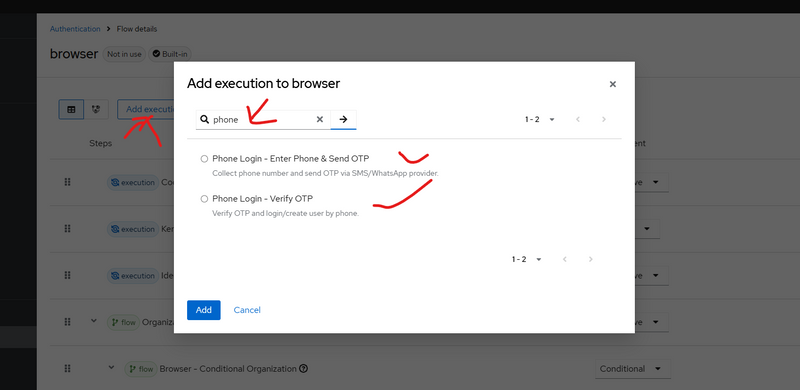
Step 1: Confirm your authenticators appear in Admin UI
Go:
Authentication → Flows → (any flow) → Add execution
In the execution list, you must see:
Phone Login - Enter Phone & Send OTP

Phone Login - Verify OTP
If you don’t see them → provider JAR not loaded (then check Step D below
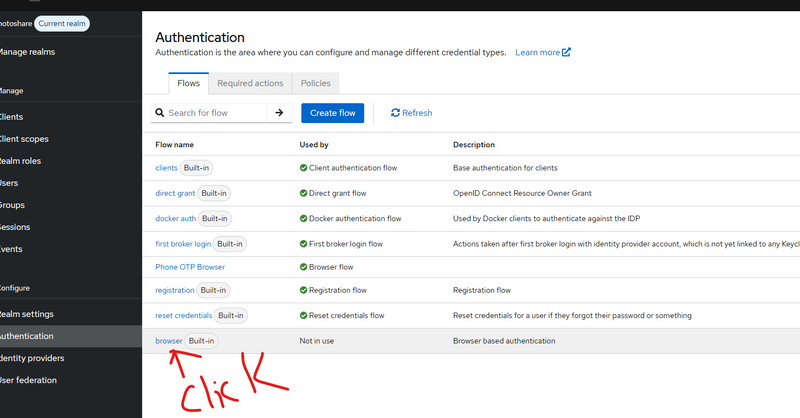
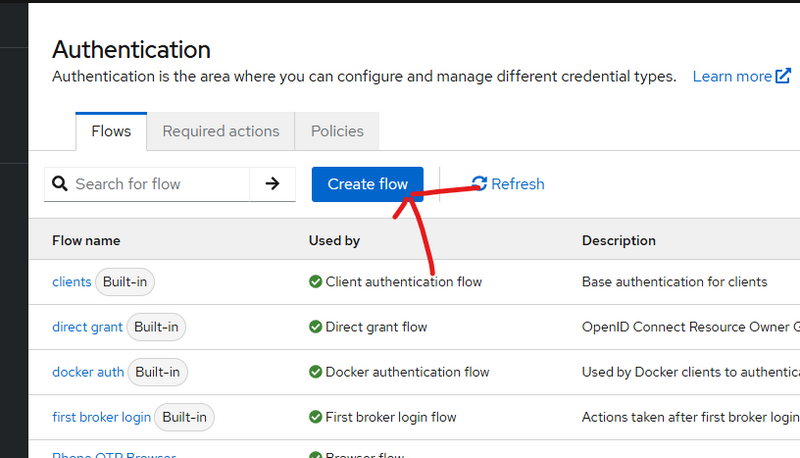
13.Create a new Browser flow

14.later if want to add moreexecution flow
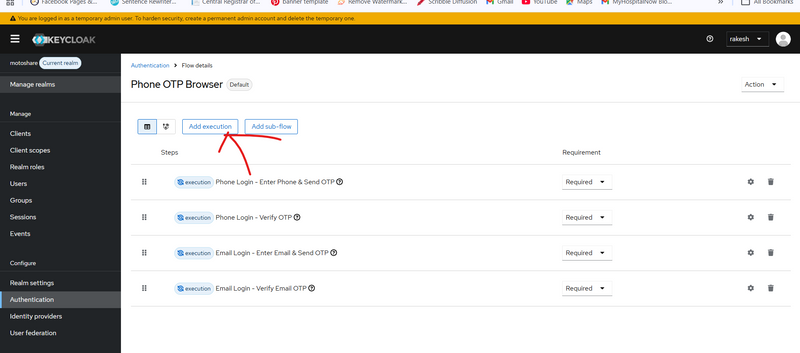
click
authentication-->Add execution
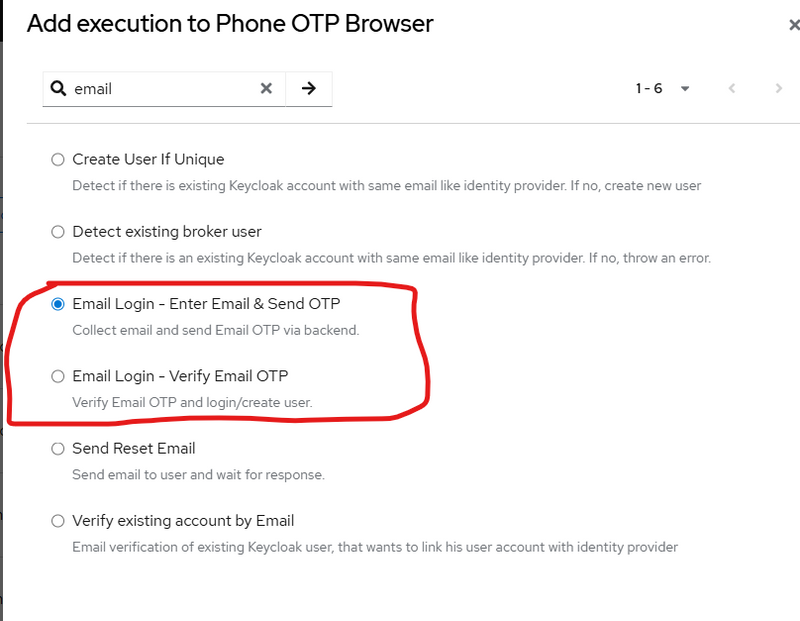
Go:
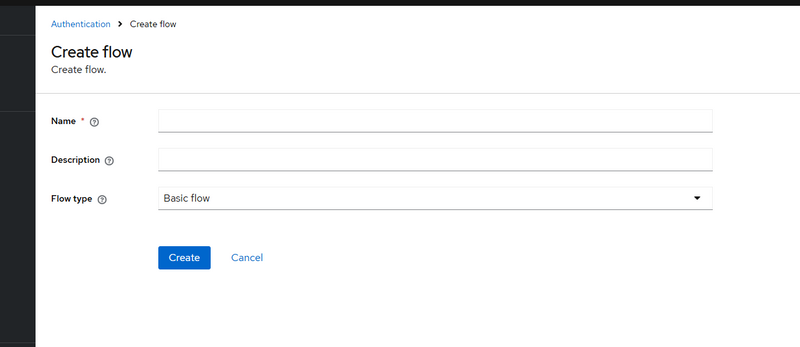
Authentication → Flows → Create flow
Name: Phone OTP Browser
Type: Basic flow
Open Phone OTP Browser flow:
✅ Click Add execution → select Phone Login - Enter Phone & Send OTP → set REQUIRED
✅ Click Add execution → select Phone Login - Verify OTP → set REQUIRED
❌ Do NOT add “Username Password Form”
(If it is already there, remove/disable it.)
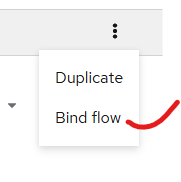
Step 3: Bind it as Browser flow
Go:
Authentication → Bindings
Set:
Browser Flow = Phone OTP Browser → Save
Now Keycloak will start login with your phone page.
14.stop keycloack and restart
cd bin
.\kc.bat start-dev --http-port=8080 --spi-theme-cache-themes=false --spi-theme-cache-templates=false



Top comments (0)