
When building a microservice-based web application, one common challenge is maintaining the same header, footer, theme, CSS, and JavaScript across multiple services.
For example, in the HolidayLandmark project, we had separate Laravel microservices such as:
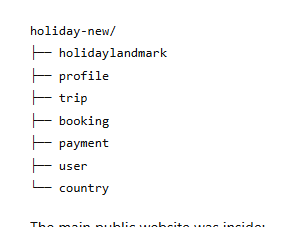
The main public website was inside:
/opt/lampp/htdocs/holiday-new/holidaylandmark
And the profile microservice was inside:
/opt/lampp/htdocs/holiday-new/profile
The requirement was simple:
The profile microservice should reuse the same navbar, footer, Tailwind CSS, Alpine.js, and Vite assets from the main holidaylandmark service.
This blog explains how to implement shared navbar assets between two Laravel microservices and how to solve common production issues like missing views, missing CSS, wrong asset paths, Apache alias issues, and session permission errors.
Why Shared Navbar and Assets Are Needed
In a microservice architecture, every service may have its own Laravel application. If each service maintains its own navbar and footer, the following problems happen:
- UI inconsistency between services
- Duplicate navbar/footer code
- Extra maintenance work
- Different CSS behavior across services
- Broken user experience during navigation
- Higher chance of design drift
A better approach is to keep the navbar, footer, theme CSS, and JavaScript in one main public service and reuse them in other services.
In this example:
holidaylandmark = main public website
profile = profile microservice
The profile microservice will reuse navbar/footer views and compiled assets from the main public website.
Final Folder Structure
The production folder structure looks like this:
/opt/lampp/htdocs/holiday-new/
├── holidaylandmark
│   ├── resources/views/partials/header.blade.php
│   ├── resources/views/partials/footer.blade.php
│   ├── build
│   │   ├── manifest.json
│   │   └── assets
│   │       ├── app-l3B943OL.css
│   │       └── app-CZm0HQoV.js
│   └── index.php
│
├── profile
│   ├── app/Support/SharedAssets.php
│   ├── config/view.php
│   ├── resources/views/layouts/app.blade.php
│   └── index.php
The main service contains the shared Blade partials and compiled Vite build assets.
The profile service loads those shared files.
Step 1: Share Views Between Services
The profile microservice needs to load Blade partials from the main public website.
For example, this line inprofile/resources/views/layouts/app.blade.php:
@include('partials.header')
will normally search only inside:
profile/resources/views/partials/header.blade.php
But our actual header exists in:
holidaylandmark/resources/views/partials/header.blade.php
So we need to tell Laravel to also look inside the shared public-site view folder.
Open:
profile/config/view.php
Use this:
<?php

$sharedViewsPath = env(
    'PUBLIC_SITE_VIEWS_PATH',
    realpath(base_path('../holidaylandmark/resources/views')) ?: null
);

return [

    'paths' => array_values(array_filter([
        resource_path('views'),
        $sharedViewsPath,
    ])),

    'compiled' => env(
        'VIEW_COMPILED_PATH',
        realpath(storage_path('framework/views'))
    ),

];
Now Laravel will first check its own profile views and then fall back to the shared views from the main holidaylandmark service.
Step 2: Add Shared View Path in .env
In the profile microservice .env file, add:
PUBLIC_SITE_VIEWS_PATH=/opt/lampp/htdocs/holiday-new/holidaylandmark/resources/views
This makes the path production-safe and avoids hardcoding everything inside PHP files.
After changing .env, clear Laravel cache:
cd /opt/lampp/htdocs/holiday-new/profile
php artisan optimize:clear
php artisan config:clear
php artisan view:clear
php artisan route:clear
Step 3: Include Shared Header and Footer in Profile Layout
Open:
profile/resources/views/layouts/app.blade.php
Example layout:
<!DOCTYPE html>
<html lang="en" data-theme="holidaylandmark">
<head>
    <meta charset="UTF-8">
    <meta name="viewport" content="width=device-width, initial-scale=1.0">
    <title>@yield('title', 'HolidayLandmark')</title>
    <meta name="csrf-token" content="{{ csrf_token() }}">

    {!! \App\Support\SharedAssets::publicSiteBundle() !!}
</head>

<body class="min-h-screen bg-cream text-ink font-sans">
    @include('partials.header')

    <main id="main-content">
        @yield('content')
    </main>

    @include('partials.footer')
</body>
</html>
The important line is:
{!! \App\Support\SharedAssets::publicSiteBundle() !!}
This line loads the shared CSS and JavaScript from the main public website.
Step 4: Create SharedAssets.php
In the profile microservice, create:
profile/app/Support/SharedAssets.php
Use this code:
<?php

namespace App\Support;

use Illuminate\Support\Facades\File;
use Illuminate\Support\HtmlString;

class SharedAssets
{
    public static function publicSiteBundle(): HtmlString
    {
        $manifestPath = env(
            'SHARED_ASSETS_MANIFEST_PATH',
            base_path('../holidaylandmark/build/manifest.json')
        );

        $assetBaseUrl = rtrim(
            env('SHARED_ASSETS_BASE_URL', '/build'),
            '/'
        );

        if (! is_file($manifestPath)) {
            return new HtmlString(
                '<!-- shared assets unavailable: manifest not found at ' . e($manifestPath) . ' -->'
            );
        }

        $manifest = json_decode(File::get($manifestPath), true) ?: [];

        $css = $manifest['resources/css/app.css']['file'] ?? null;
        $js  = $manifest['resources/js/app.js']['file'] ?? null;

        $html = '';

        if ($css) {
            $html .= '<link rel="stylesheet" href="' . $assetBaseUrl . '/' . e($css) . '">' . "\n";
        }

        if ($js) {
            $html .= '<script type="module" src="' . $assetBaseUrl . '/' . e($js) . '"></script>' . "\n";
        }

        return new HtmlString($html);
    }
}
This file reads the Vite manifest.json from the main holidaylandmark service and generates correct CSS and JS links.
Step 5: Add Shared Asset Path in .env
In profile/.env, add:
SHARED_ASSETS_MANIFEST_PATH=/opt/lampp/htdocs/holiday-new/holidaylandmark/build/manifest.json
SHARED_ASSETS_BASE_URL=/build
If your production site always redirects to www, you can also use:
SHARED_ASSETS_BASE_URL=https://www.holidaylandmark.com/build
Then clear cache:
cd /opt/lampp/htdocs/holiday-new/profile
php artisan optimize:clear
php artisan config:clear
php artisan view:clear
php artisan route:clear
Step 6: Understand the Vite Manifest
The main service has this file:
holidaylandmark/build/manifest.json
Example:
{
  "resources/css/app.css": {
    "file": "assets/app-l3B943OL.css",
    "src": "resources/css/app.css",
    "isEntry": true
  },
  "resources/js/app.js": {
    "file": "assets/app-CZm0HQoV.js",
    "name": "app",
    "src": "resources/js/app.js",
    "isEntry": true
  }
}
The generated CSS URL becomes:
/build/assets/app-l3B943OL.css
The generated JS URL becomes:
/build/assets/app-CZm0HQoV.js
Do not manually guess these filenames because Vite changes them after every build.
Always read from manifest.json.
Step 7: Fix Apache /build Asset URL
A common production problem is that this URL gives 404:
https://www.holidaylandmark.com/build/assets/app-l3B943OL.css
This happens when Apache does not know that /build should point to:
/opt/lampp/htdocs/holiday-new/holidaylandmark/build
Add this inside the correct Apache VirtualHost:
Alias /build "/opt/lampp/htdocs/holiday-new/holidaylandmark/build"

<Directory "/opt/lampp/htdocs/holiday-new/holidaylandmark/build">
    Options +FollowSymLinks -Indexes
    AllowOverride None
    Require all granted
</Directory>
Important: use this syntax:
Options +FollowSymLinks -Indexes
Do not write:
Options FollowSymLinks -Indexes
That causes this Apache error:
Either all Options must start with + or -, or no Option may.
After editing Apache config, check syntax:
sudo /opt/lampp/bin/apachectl -t
If it says:
Syntax OK
restart Apache:
sudo /opt/lampp/lampp restart
Now test CSS:
curl -k -I https://www.holidaylandmark.com/build/assets/app-l3B943OL.css
Expected result:
HTTP/1.1 200 OK
Content-Type: text/css
Step 8: Example Apache Configuration
Here is an example Apache configuration for the HolidayLandmark setup:
Alias /build "/opt/lampp/htdocs/holiday-new/holidaylandmark/build"
<Directory "/opt/lampp/htdocs/holiday-new/holidaylandmark/build">
    Options +FollowSymLinks -Indexes
    AllowOverride None
    Require all granted
</Directory>

Alias /trips      /opt/lampp/htdocs/holiday-new/holidaylandmark
Alias /organizers /opt/lampp/htdocs/holiday-new/holidaylandmark

<Directory "/opt/lampp/htdocs/holiday-new/holidaylandmark">
    AllowOverride All
    Require all granted
    Options -MultiViews -Indexes
</Directory>

AliasMatch ^/country(/.*)?$               /opt/lampp/htdocs/holiday-new/country/index.php
AliasMatch ^/trip(/.*)?$                  /opt/lampp/htdocs/holiday-new/trip/index.php
AliasMatch ^/booking(/.*)?$               /opt/lampp/htdocs/holiday-new/booking/index.php
AliasMatch ^/payment(/.*)?$               /opt/lampp/htdocs/holiday-new/payment/index.php
AliasMatch ^/user(/.*)?$                  /opt/lampp/htdocs/holiday-new/user/index.php
AliasMatch ^/file(/.*)?$                  /opt/lampp/htdocs/holiday-new/file/index.php

AliasMatch ^/auth(/.*)?$                  /opt/lampp/htdocs/holiday-new/profile/index.php
AliasMatch ^/keycloak(/.*)?$              /opt/lampp/htdocs/holiday-new/profile/index.php
AliasMatch ^/become-organizer(/.*)?$      /opt/lampp/htdocs/holiday-new/profile/index.php
AliasMatch ^/tourist/profile(/.*)?$       /opt/lampp/htdocs/holiday-new/profile/index.php
AliasMatch ^/country-admin/profile(/.*)?$ /opt/lampp/htdocs/holiday-new/profile/index.php
AliasMatch ^/super-admin/profile(/.*)?$   /opt/lampp/htdocs/holiday-new/profile/index.php
AliasMatch ^/organizer/profile(/.*)?$     /opt/lampp/htdocs/holiday-new/profile/index.php

<Directory "/opt/lampp/htdocs/holiday-new">
    AllowOverride All
    Require all granted
    Options FollowSymLinks
</Directory>
Step 9: Fix File and Folder Permissions
The build folder must be readable by Apache:
chmod -R 755 /opt/lampp/htdocs/holiday-new/holidaylandmark/build
chown -R daemon:daemon /opt/lampp/htdocs/holiday-new/holidaylandmark/build
For XAMPP, Apache commonly runs as daemon.
To check Apache user:
ps aux | grep -E 'httpd|apache2' | grep -v root | head
If Apache runs as www-data, use:
chown -R www-data:www-data /opt/lampp/htdocs/holiday-new/holidaylandmark/build
Step 10: Common Error: View Not Found
Error:
View [partials.header] not found.
Reason:
The profile microservice cannot find the shared header file.
Fix:
Make sure this file exists:
ls -lah /opt/lampp/htdocs/holiday-new/holidaylandmark/resources/views/partials/header.blade.php
Then make sure profile/config/view.php includes:
'paths' => array_values(array_filter([
    resource_path('views'),
    env(
        'PUBLIC_SITE_VIEWS_PATH',
        realpath(base_path('../holidaylandmark/resources/views')) ?: null
    ),
])),
And .env has:
PUBLIC_SITE_VIEWS_PATH=/opt/lampp/htdocs/holiday-new/holidaylandmark/resources/views
Then clear cache:
cd /opt/lampp/htdocs/holiday-new/profile
php artisan optimize:clear
php artisan config:clear
php artisan view:clear
Step 11: Common Error: CSS Not Loading
Symptoms:
Page loads without design
Navbar appears broken
Huge SVG/logo appears
Only plain HTML is visible
“Skip to main content” appears at the top
Reason:
CSS file is not loading.
Check generated CSS link:
cat /opt/lampp/htdocs/holiday-new/holidaylandmark/build/manifest.json
Then test the CSS URL:
curl -k -I https://www.holidaylandmark.com/build/assets/app-l3B943OL.css
If it returns:
404 Not Found
then Apache /build alias is missing or wrong.
Fix:
Alias /build "/opt/lampp/htdocs/holiday-new/holidaylandmark/build"

<Directory "/opt/lampp/htdocs/holiday-new/holidaylandmark/build">
    Options +FollowSymLinks -Indexes
    AllowOverride None
    Require all granted
</Directory>
Step 12: Common Error: Wrong Folder Name
In our case, one problem happened because the folder name was wrongly written as:
holidaylanmark
But the real folder name was:
holidaylandmark
This caused session and asset path errors.
To find wrong references:
cd /opt/lampp/htdocs/holiday-new
grep -R "holidaylanmark" -n . \
--exclude-dir=vendor \
--exclude-dir=node_modules \
--exclude-dir=storage \
--exclude-dir=.git 2>/dev/null
Replace wrong values carefully:
sed -i 's|holidaylanmark|holidaylandmark|g' holidaylandmark/.env
sed -i 's|holidaylanmark|holidaylandmark|g' profile/.env
sed -i 's|holidaylanmark|holidaylandmark|g' user/.env
Then clear cache in each Laravel app.
Step 13: Common Error: Session Folder Permission
Error:
file_put_contents(.../_shared/sessions/...): Failed to open stream: Permission denied
Fix:
mkdir -p /opt/lampp/htdocs/holiday-new/holidaylandmark/_shared/sessions

chmod -R 775 /opt/lampp/htdocs/holiday-new/holidaylandmark/_shared
chown -R daemon:daemon /opt/lampp/htdocs/holiday-new/holidaylandmark/_shared
If Apache runs as www-data:
chown -R www-data:www-data /opt/lampp/htdocs/holiday-new/holidaylandmark/_shared
In .env:
SESSION_DRIVER=file
SESSION_FILES_PATH=/opt/lampp/htdocs/holiday-new/holidaylandmark/_shared/sessions
Then clear cache:
php artisan optimize:clear
php artisan config:clear
Step 14: Common Error: Bootstrap Cache Not Writable
Error:
The /opt/lampp/htdocs/holiday-new/holidaylandmark/bootstrap/cache directory must be present and writable.
Fix:
cd /opt/lampp/htdocs/holiday-new/holidaylandmark
mkdir -p bootstrap/cache
chmod -R 775 bootstrap/cache
chown -R daemon:daemon bootstrap/cache
Also fix storage:
mkdir -p storage/framework/cache/data
mkdir -p storage/framework/sessions
mkdir -p storage/framework/views
mkdir -p storage/logs
chmod -R 775 storage bootstrap/cache
chown -R daemon:daemon storage bootstrap/cache
Step 15: Final Production Checklist
Before going live, verify these things:
1. Shared view exists
ls -lah /opt/lampp/htdocs/holiday-new/holidaylandmark/resources/views/partials/header.blade.php
2. Manifest exists
ls -lah /opt/lampp/htdocs/holiday-new/holidaylandmark/build/manifest.json
3. CSS file exists
ls -lah /opt/lampp/htdocs/holiday-new/holidaylandmark/build/assets/
4. CSS URL works
curl -k -I https://www.holidaylandmark.com/build/assets/app-l3B943OL.css
5. Apache syntax is OK
sudo /opt/lampp/bin/apachectl -t
6. Laravel cache is cleared
cd /opt/lampp/htdocs/holiday-new/profile
php artisan optimize:clear
php artisan config:clear
php artisan view:clear
Expected CSS response:
HTTP/1.1 200 OK
Content-Type: text/css
Best Practice Recommendation
For long-term stability, avoid hardcoding paths inside PHP files.
Use .env values:
PUBLIC_SITE_VIEWS_PATH=/opt/lampp/htdocs/holiday-new/holidaylandmark/resources/views
SHARED_ASSETS_MANIFEST_PATH=/opt/lampp/htdocs/holiday-new/holidaylandmark/build/manifest.json
SHARED_ASSETS_BASE_URL=https://www.holidaylandmark.com/build
SESSION_FILES_PATH=/opt/lampp/htdocs/holiday-new/holidaylandmark/_shared/sessions
This keeps the setup flexible for local, staging, and production environments.
Conclusion
Sharing navbar, footer, CSS, and JavaScript between Laravel microservices is a clean way to maintain UI consistency across a platform.
The main idea is:
Keep shared views in one main service
Allow other microservices to load those views using config/view.php
Load shared Vite assets using manifest.json
Make /build publicly accessible through Apache Alias
Keep production paths configurable using .env
Clear Laravel cache after every config change
With this approach, multiple Laravel microservices ca



Top comments (0)