
JavaScript powers interactive websites, APIs, dashboards, and mobile apps. Understanding its core concepts helps you write predictable code, avoid bugs, and build responsive applications.
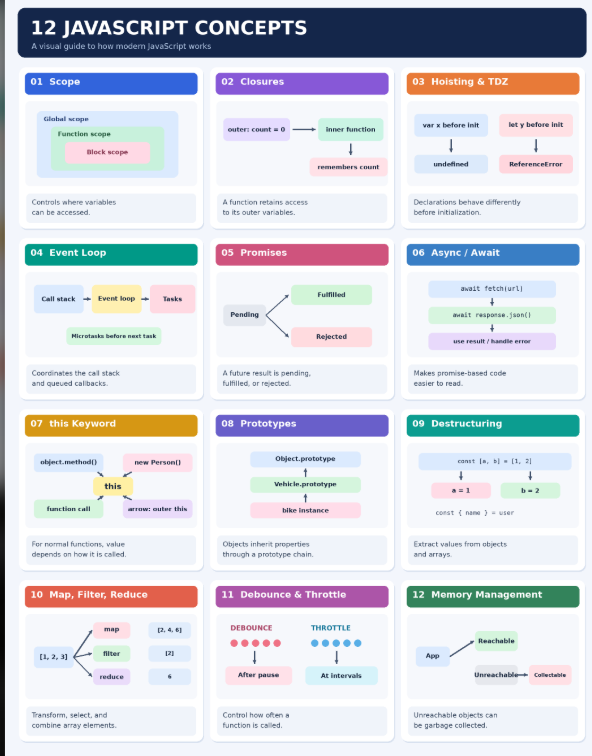
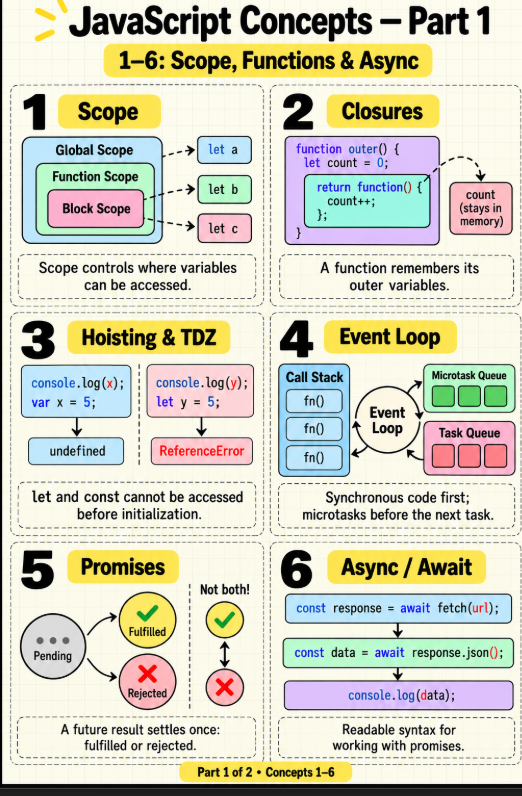
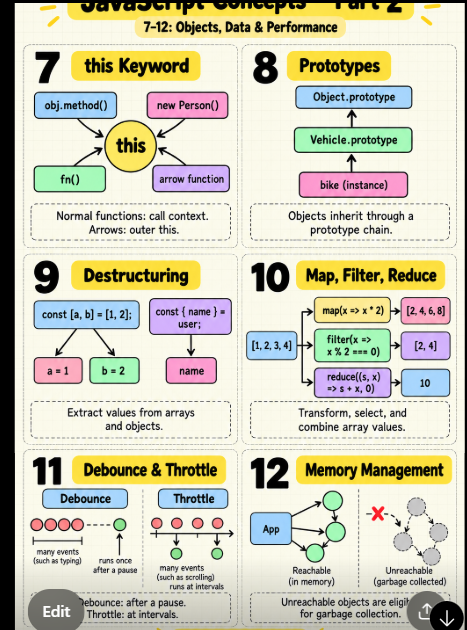
This guide explains the 12 concepts shown in the reference image: scope, closures, hoisting, the event loop, promises, async/await, this, prototypes, destructuring, array methods, debounce and throttle, and memory management. Each section includes a definition, syntax, a practical example, and the reason to use it.
The examples use modern JavaScript. Browser examples such as
document,fetch, andrequestAnimationFramerequire a browser or an environment that provides the equivalent APIs.
Quick overview
| # | Concept | Simple meaning | Common use |
|---|---|---|---|
| 1 | Scope | Where a variable can be accessed | Keep variables inside a function or block |
| 2 | Closure | A function remembers its surrounding variables | Private counters and callbacks |
| 3 | Hoisting and TDZ | Declarations have different behavior before initialization | Avoid confusing variable access errors |
| 4 | Event loop | Coordinates queued work with the call stack | UI events, timers and asynchronous operations |
| 5 | Promise | Represents an eventual asynchronous result | API calls and file operations |
| 6 | Async/await | Syntax for working with promises | Readable API requests |
| 7 | this |
A value determined by how a function is called | Object methods and classes |
| 8 | Prototypes | Objects can inherit properties through a chain | Shared methods |
| 9 | Destructuring | Extract values into variables | Read API responses and arrays |
| 10 |
map, filter, reduce
|
Transform, select, and combine array elements | Vehicle listings and totals |
| 11 | Debounce and throttle | Control how often a function runs | Search inputs and scroll events |
| 12 | Memory management | Manage reachable objects and resources | Prevent memory leaks |
1. Scope
What: Scope defines where a variable is accessible in code.
Why: Restricting visibility makes code easier to understand and reduces unintended changes.
When and where: Use block scope for temporary values, function scope for values inside a function, and module scope for shared code within one module.
How — syntax:
const globalValue = 'Available outside the function';

function showExample() {
  const functionValue = 'Available inside this function';

  if (true) {
    let blockValue = 'Available inside this block';
    console.log(globalValue, functionValue, blockValue);
  }

  // console.log(blockValue); // ReferenceError: outside its block
}

showExample();
| Declaration | Scope | Can be reassigned? |
|---|---|---|
let |
Block | Yes |
const |
Block | No; object contents can still be modified |
var |
Function, or global depending on context | Yes |
Practical example:
function calculateRental(days) {
  const dailyPrice = 500;
  if (days >= 7) {
    const discount = 300;
    return days * dailyPrice - discount;
  }
  return days * dailyPrice;
}
console.log(calculateRental(7)); // 3200
The discount variable exists only inside the if block. Prefer const by default and use let when reassignment is required. var is function-scoped, not block-scoped.
2. Closures
What: A closure is a function bundled with access to variables from its surrounding lexical environment.
Why: It lets a function retain state without exposing that state as a global variable.
When and where: Use closures for private state, event handlers, factories, and configurable functions.
How — syntax and example:
function createBookingCounter() {
  let count = 0;

  return function () {
    count += 1;
    return count;
  };
}

const counter = createBookingCounter();
console.log(counter()); // 1
console.log(counter()); // 2

const anotherCounter = createBookingCounter();
console.log(anotherCounter()); // 1: separate state
What happens: The returned function can still access count after createBookingCounter() returns. A closure retains access to a binding; it does not necessarily freeze a snapshot of the value.
Security perspective: Closures can hide variables from ordinary external access, but they do not encrypt data or create a security boundary against compromised code running in the same application.
3. Hoisting and the temporal dead zone
What: JavaScript processes declarations as part of setting up an execution context. Different declarations behave differently before their initialization.
Why: Understanding this helps avoid undefined values and ReferenceError exceptions.
When and where: This matters whenever code references a variable or function before its declaration is reached.
How — syntax:
console.log(price); // undefined
var price = 500;

// console.log(city); // ReferenceError: temporal dead zone
let city = 'Bangalore';

// console.log(rate); // ReferenceError: temporal dead zone
const rate = 5;

showMessage(); // Works: function declaration is available
function showMessage() {
  console.log('Welcome');
}
| Declaration | Before initialization | Explanation |
|---|---|---|
var |
undefined |
Binding is initialized to undefined
|
let |
ReferenceError |
Binding is in the temporal dead zone (TDZ) |
const |
ReferenceError |
Binding is in the TDZ until initialized |
| Function declaration | Callable before its textual position in the same scope | Function binding is initialized during setup |
Practical rule: Declare variables before using them. A function expression assigned to let or const follows that variable's TDZ rules.
const calculateTotal = (days, price) => days * price;
console.log(calculateTotal(2, 500)); // 1000
4. Event loop
What: The event loop coordinates execution of queued work. In a browser, JavaScript runs synchronous code on the call stack, while the environment manages events, timers, and other asynchronous work.
Why: It helps explain why a timer or promise callback does not run immediately, and why heavy synchronous work can freeze the UI.
When and where: This applies to browsers and JavaScript runtimes. Node.js also has an event loop, but its scheduling details differ from browsers.
How — browser example:
console.log('1: start');

setTimeout(() => console.log('4: timer task'), 0);
Promise.resolve().then(() => console.log('3: microtask'));

console.log('2: end');
Expected output:
1: start
2: end
3: microtask
4: timer task
The synchronous code finishes first. The promise callback is a microtask; the timer callback runs as a later task. A delay of zero does not mean immediate execution. Browsers normally drain the microtask queue at the relevant checkpoint before moving to the next task. Excessive microtasks can delay other work and rendering.
Practical use: If processing a very large list blocks a page, split the work or use a Web Worker for suitable CPU-heavy work. Making a function async by itself does not move computation to another thread.
5. Promises
What: A promise represents a result that may become available later.
Why: It provides a consistent way to handle asynchronous success and failure.
When and where: Use promises with APIs such as fetch, asynchronous libraries, and functions that must return a future result.
| State | Meaning |
|---|---|
| Pending | The operation has not settled |
| Fulfilled | It settled successfully with a value |
| Rejected | It settled with a reason or error |
A promise settles once: it becomes fulfilled or rejected. Fulfilled and rejected are alternative outcomes, not sequential stages.
How — syntax:
const booking = new Promise((resolve, reject) => {
  const vehicleAvailable = true;
  if (vehicleAvailable) {
    resolve('Booking confirmed');
  } else {
    reject(new Error('Vehicle unavailable'));
  }
});

booking
  .then(message => console.log(message))
  .catch(error => console.error(error.message))
  .finally(() => console.log('Booking attempt finished'));
Practical API example:
fetch('/api/vehicles')
  .then(response => {
    if (!response.ok) throw new Error(`HTTP ${response.status}`);
    return response.json();
  })
  .then(vehicles => console.log(vehicles))
  .catch(error => console.error('Unable to load vehicles:', error));
fetch() can fulfill for an HTTP 404 or 500; check response.ok. Network failures can reject the promise.
6. Async / await
What: async and await provide syntax for working with promises in a more sequential style.
Why: They make multi-step asynchronous code easier to read and handle errors with try/catch.
When and where: Use them in functions that call asynchronous APIs, such as booking or profile requests.
How — syntax:
async function loadVehicles() {
  try {
    const response = await fetch('/api/vehicles');
    if (!response.ok) throw new Error(`HTTP ${response.status}`);

    const vehicles = await response.json();
    console.log(vehicles);
    return vehicles;
  } catch (error) {
    console.error('Could not load vehicles:', error);
    throw error; // Let the caller decide what to do.
  }
}

loadVehicles().catch(() => {
  // Update the UI with a suitable error message.
});
Key points: An async function returns a promise. await pauses that function until the awaited value settles; it does not block the entire JavaScript thread while waiting.
Independent requests:
const [vehiclesResponse, citiesResponse] = await Promise.all([
  fetch('/api/vehicles'),
  fetch('/api/cities'),
]);
if (!vehiclesResponse.ok || !citiesResponse.ok) {
  throw new Error('Could not load required data');
}
const [vehicles, cities] = await Promise.all([
  vehiclesResponse.json(),
  citiesResponse.json(),
]);
Place this inside an async function or a module supporting top-level await. Promise.all rejects if any input rejects; it does not automatically cancel the other requests.
7. The this keyword
What: In an ordinary function, this is generally determined by how the function is called. Arrow functions inherit this from their surrounding context.
Why: Correct this handling prevents confusing bugs in object methods, callbacks, and classes.
When and where: Use it to refer to the object involved in an object method or a class instance.
How — syntax:
'use strict';

const vehicle = {
  brand: 'Honda',
  showBrand() {
    console.log(this.brand);
  },
};

vehicle.showBrand(); // Honda

const detached = vehicle.showBrand;
// detached(); // TypeError in strict mode: this is undefined

const bound = vehicle.showBrand.bind(vehicle);
bound(); // Honda
| Call style | Typical this
|
|---|---|
vehicle.showBrand() |
vehicle |
fn() in strict mode |
undefined |
fn.call(obj) / fn.apply(obj)
|
The provided object, subject to function semantics |
new Person() |
The newly created instance for a normal constructor |
| Arrow function | Inherited from the surrounding context |
Practical class example:
class Vehicle {
  constructor(name) { this.name = name; }
  showLater() {
    setTimeout(() => console.log(this.name), 100);
  }
}
new Vehicle('Scooter').showLater(); // Scooter
Arrow functions are useful here because they capture the method's this. They do not have their own this and are usually unsuitable as object methods that need dynamic this.
8. Prototypes
What: JavaScript objects can inherit properties and methods from another object through a prototype chain.
Why: Many objects can share methods without storing a separate copy on each instance.
When and where: Use classes or prototype-based patterns for related objects and reusable behavior.
How — syntax:
class Vehicle {
  constructor(name) {
    this.name = name;
  }
  describe() {
    return `Vehicle: ${this.name}`;
  }
}

const bike = new Vehicle('Bike');
const car = new Vehicle('Car');
console.log(bike.describe()); // Vehicle: Bike
console.log(bike.describe === car.describe); // true
console.log(Object.getPrototypeOf(bike) === Vehicle.prototype); // true
The method is found through the prototype chain. Class syntax is built on JavaScript's prototype system.
Security perspective: Do not blindly merge untrusted keys into objects. Guard against unsafe keys such as __proto__, and use safe parsing, validation, and current libraries to reduce prototype-pollution risks.
9. Destructuring
What: Destructuring extracts values from arrays or object properties into variables.
Why: It reduces repetitive property access and makes code easier to read.
When and where: Useful with API responses, function arguments, configuration objects, and arrays.
How — syntax:
const user = { name: 'Ashwani', city: 'Bokaro' };
const { name, city, role = 'customer' } = user;
console.log(name, city, role); // Ashwani Bokaro customer

const prices = [500, 800];
const [bikePrice, carPrice] = prices;
console.log(bikePrice, carPrice); // 500 800
Practical function example:
function showVehicle({ brand, price, city = 'Unknown' }) {
  return `${brand}: ₹${price}/day in ${city}`;
}
console.log(showVehicle({ brand: 'Honda', price: 500, city: 'Goa' }));
Defaults apply when a value is undefined, not when it is null. Destructuring is not validation: validate untrusted data before relying on it.
10. map, filter, and reduce
What: These array methods transform elements, select elements, and combine values.
Why: They express common data operations clearly.
When and where: Use them for UI lists, reports, filtering available vehicles, and calculating totals.
| Method | Syntax | Purpose |
|---|---|---|
map |
items.map(item => result) |
Create a new array of transformed values |
filter |
items.filter(item => condition) |
Create a new array of matching elements |
reduce |
items.reduce((total, item) => ..., initial) |
Combine elements into one result |
How — practical example:
const vehicles = [
  { name: 'Bike', price: 500, available: true },
  { name: 'Car', price: 1500, available: false },
  { name: 'Scooter', price: 400, available: true },
];

const names = vehicles.map(vehicle => vehicle.name);
const available = vehicles.filter(vehicle => vehicle.available);
const dailyTotal = available.reduce((sum, vehicle) => sum + vehicle.price, 0);

console.log(names);      // ['Bike', 'Car', 'Scooter']
console.log(available);  // Bike and Scooter objects
console.log(dailyTotal); // 900
map and filter create new arrays but do not deep-copy object elements. Give reduce an appropriate initial value, especially for possibly empty arrays.
11. Debounce and throttle
What: Debounce waits until calls stop for a defined period. Throttle limits how often work executes during repeated calls.
Why: Both reduce unnecessary work during frequent user events.
When and where: Debounce search input; throttle continuous events such as scroll or resize, where periodic updates are useful.
How — debounce syntax:
function debounce(fn, delay) {
  let timer;
  return function (...args) {
    clearTimeout(timer);
    timer = setTimeout(() => fn.apply(this, args), delay);
  };
}

const searchInput = document.querySelector('#city-search');
const searchCities = debounce(event => {
  console.log('Search for:', event.target.value);
}, 300);

searchInput.addEventListener('input', searchCities);
This simple trailing debounce runs after 300 ms without another call. The page must contain #city-search. If searching an API, also handle out-of-order responses or cancel stale requests.
How — simple leading throttle:
function throttle(fn, interval) {
  let lastRun = -Infinity;
  return function (...args) {
    const now = performance.now();
    if (now - lastRun >= interval) {
      lastRun = now;
      fn.apply(this, args);
    }
  };
}

const onScroll = throttle(() => {
  console.log('Scroll position:', window.scrollY);
}, 200);
window.addEventListener('scroll', onScroll);
This implementation runs on the leading call and drops calls during the interval; it does not guarantee a trailing call. Different implementations may offer leading and trailing options.
| Situation | Choice | Reason |
|---|---|---|
| Search while typing | Debounce | Wait for a pause |
| Track scroll position | Throttle | Update periodically |
| Animate visual movement | Often requestAnimationFrame
|
Coordinate visual updates with the browser |
| Protect a server from abuse | Server-side rate limiting | Client-side timing can be bypassed |
12. Memory management
What: JavaScript automatically manages much of its memory. Garbage collection can reclaim objects that are no longer reachable by the running program.
Why: Objects retained longer than needed can increase memory usage and slow or crash an application.
When and where: Watch memory in long-lived dashboards, single-page apps, event listeners, timers, caches, and large data processing.
How — release references and resources:
let selectedVehicle = { id: 101, image: 'bike.jpg' };
console.log(selectedVehicle.id);
selectedVehicle = null; // Removes this reference; collection is not immediate.
Event listener cleanup:
const button = document.querySelector('#refresh');

function refreshVehicles() {
  console.log('Refresh vehicles');
}

button.addEventListener('click', refreshVehicles);

// Later, when this feature is removed:
button.removeEventListener('click', refreshVehicles);
Timer cleanup:
const timerId = setInterval(() => console.log('Checking updates'), 5000);
// When updates are no longer needed:
clearInterval(timerId);
| Common issue | Why memory remains used | Practical action |
|---|---|---|
| Unbounded cache | Application keeps references forever | Set a size or expiration limit |
| Forgotten timer | Callback and referenced data stay reachable | Clear the timer |
| Unneeded event listener | Live target retains its callback | Remove listeners when appropriate |
| Closure captures a large object | The closure remains reachable | Avoid retaining unnecessary state |
| Detached DOM nodes | JavaScript still references removed elements | Remove unnecessary references |
Modern garbage collectors handle cycles, so circular references alone do not necessarily cause leaks. Unreachable objects are eligible for collection; the engine decides when to reclaim them. Use browser DevTools memory snapshots to investigate growth.
Common mistakes and safer choices
| Concept | Common mistake | Better practice |
|---|---|---|
| Scope | Use a global variable for every value | Restrict scope with const, let, functions, and modules |
| Closure | Assume captured data is encrypted | Treat closure state as normal application memory |
| Hoisting | Use variables before declaration | Declare before use |
| Event loop | Run large synchronous loops on the UI thread | Batch work or use a worker when suitable |
| Promises | Assume HTTP error responses reject fetch
|
Check response.ok
|
| Async/await | Forget rejection handling | Use try/catch or handle the returned promise |
this |
Pass an unbound method as callback | Bind it or use an appropriate wrapper |
| Prototypes | Merge untrusted object keys without controls | Validate keys and use secure libraries |
| Destructuring | Assume extraction validates input | Validate types and required fields |
| Array methods | Assume new arrays deep-copy objects | Copy objects explicitly when needed |
| Debounce/throttle | Treat client-side timing as server protection | Enforce rate limits on the server |
| Memory | Expect immediate garbage collection | Release references and clean up resources |
References
- MDN: Closures
- MDN: JavaScript execution model
- MDN:
this - MDN: Memory management
- MDN: Promises
- MDN: Async functions
Big colorful JavaScript architecture diagram
Follow the paths from a user action through synchronous code and asynchronous operations. Scope, closures, hoisting, this, and prototypes affect how code behaves. Array methods, destructuring, and rate controls help organize work. Memory management applies across the whole application.
flowchart TD
    USER["👤 User action: search or book"]:::blue --> EVENT["Browser event or request"]:::blue
    EVENT --> STACK["Call stack: synchronous JavaScript"]:::yellow

    STACK --> SCOPE["1. Scope: where variables are visible"]:::purple
    STACK --> HOIST["3. Hoisting and TDZ: declaration timing"]:::purple
    STACK --> THIS["7. this: call context"]:::purple
    SCOPE --> CLOSURE["2. Closures: retain outer bindings"]:::purple
    THIS --> PROTO["8. Prototypes: shared behavior"]:::purple

    STACK --> DATA["Application data"]:::green
    DATA --> DESTRUCT["9. Destructuring: extract values"]:::green
    DATA --> ARRAYS["10. Map / filter / reduce"]:::green
    EVENT --> RATE["11. Debounce / throttle"]:::orange
    RATE --> ASYNC["Start asynchronous operation"]:::orange
    STACK --> ASYNC

    ASYNC --> PROMISE["5. Promise: pending"]:::cyan
    PROMISE -->|success| OK["Fulfilled"]:::green
    PROMISE -->|failure| ERR["Rejected"]:::red
    OK --> MICRO["Promise callbacks: microtask queue"]:::cyan
    ERR --> MICRO
    AWAIT["6. async / await: promise syntax"]:::cyan --> PROMISE
    TIMER["Timer or event task"]:::orange --> LOOP["4. Event loop"]:::yellow
    MICRO --> LOOP
    LOOP --> STACK

    STORAGE["12. Memory: reachable objects and resources"]:::pink
    CLOSURE -. "may retain references" .-> STORAGE
    DATA -. "may retain references" .-> STORAGE
    STORAGE --> CLEAN["Cleanup: references, listeners, timers, caches"]:::pink

    classDef blue fill:#dbeafe,stroke:#2563eb,color:#172554,stroke-width:2px;
    classDef yellow fill:#fef9c3,stroke:#ca8a04,color:#713f12,stroke-width:2px;
    classDef purple fill:#f3e8ff,stroke:#9333ea,color:#581c87,stroke-width:2px;
    classDef green fill:#dcfce7,stroke:#16a34a,color:#14532d,stroke-width:2px;
    classDef orange fill:#ffedd5,stroke:#ea580c,color:#7c2d12,stroke-width:2px;
    classDef cyan fill:#cffafe,stroke:#0891b2,color:#164e63,stroke-width:2px;
    classDef red fill:#fee2e2,stroke:#dc2626,color:#7f1d1d,stroke-width:2px;
    classDef pink fill:#fce7f3,stroke:#db2777,color:#831843,stroke-width:2px;
flowchart LR
A["🔵 User and events"] --> B["🟡 Execution and event loop"]
B --> C["🟣 Language behavior"]
B --> D["🟢 Data operations"]
B --> E["🔷 Promises and async"]
C --> F["🩷 Memory and cleanup"]
D --> F
E --> F
classDef blue fill:#dbeafe,stroke:#2563eb,color:#172554,stroke-width:2px;
classDef yellow fill:#fef9c3,stroke:#ca8a04,color:#713f12,stroke-width:2px;
classDef purple fill:#f3e8ff,stroke:#9333ea,color:#581c87,stroke-width:2px;
classDef green fill:#dcfce7,stroke:#16a34a,color:#14532d,stroke-width:2px;
classDef cyan fill:#cffafe,stroke:#0891b2,color:#164e63,stroke-width:2px;
classDef pink fill:#fce7f3,stroke:#db2777,color:#831843,stroke-width:2px;
class A blue;
class B yellow;
class C purple;
class D green;
class E cyan;
class F pink;Mermaid support depends on the publishing platform. If the blog does not render Mermaid, render the diagram to an image before publishing.
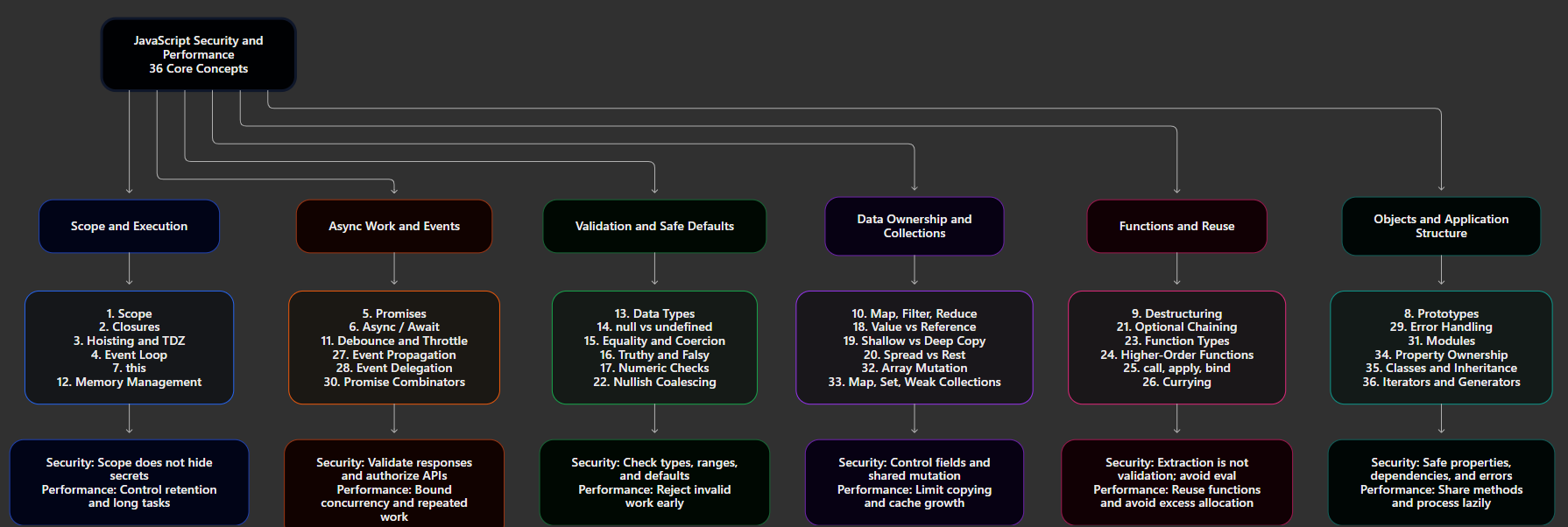
Diagram



Top comments (0)