
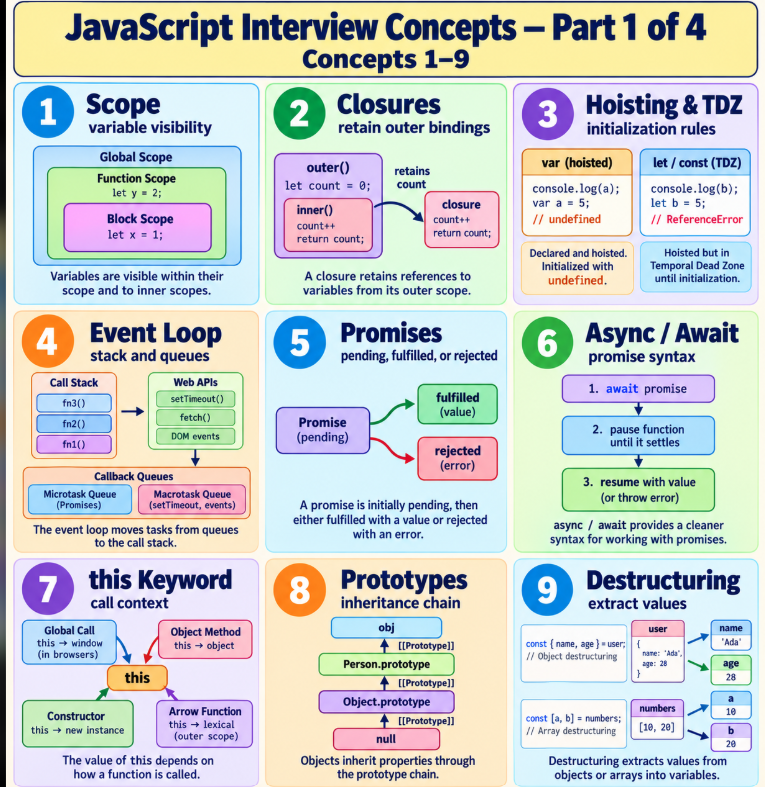
Prepare for JavaScript interviews by understanding what the code does and why it produces its output. This guide covers the original 12 concepts plus 24 additional topics, in the same numbering used in our discussion.
Each concept includes what it means, why and when to use it, syntax, a worked example, its expected output, and an interview fact or common mistake. The two colorful architecture maps at the end cover all 36 concepts.
How to use the examples
Run each example separately in a modern JavaScript environment. Most work in Node.js or a browser console. Concepts 27 and 28 require browser DOM APIs; concept 31 requires two module files. Output uses text or JSON to avoid environment-dependent object formatting. Timers have approximate delays. Expected output assumes no unrelated work changes scheduling in the simple timing example.
These are learning examples, not complete production booking or authentication implementations.
Concept index
| No. | Concept | No. | Concept |
|---|---|---|---|
| 1 | Scope | 19 | Shallow vs Deep Copy |
| 2 | Closures | 20 | Spread vs Rest |
| 3 | Hoisting and the Temporal Dead Zone | 21 | Optional Chaining |
| 4 | Event Loop | 22 | Nullish Coalescing |
| 5 | Promises | 23 | Function Declarations, Expressions, and Arrows |
| 6 | Async / Await | 24 | Higher-Order Functions |
| 7 | The this Keyword | 25 | call, apply, and bind |
| 8 | Prototypes | 26 | Currying |
| 9 | Destructuring | 27 | Event Propagation |
| 10 | Map, Filter, and Reduce | 28 | Event Delegation |
| 11 | Debounce and Throttle | 29 | Error Handling |
| 12 | Memory Management | 30 | Promise Combinators |
| 13 | Data Types | 31 | Modules: import and export |
| 14 | null vs undefined | 32 | Array Mutation |
| 15 | Equality and Type Coercion | 33 | Map, Set, and Weak Collections |
| 16 | Truthy and Falsy Values | 34 | Property Ownership |
| 17 | NaN and Numeric Checks | 35 | Classes and Inheritance |
| 18 | Value vs Reference | 36 | Iterators and Generators |
1. Scope
What is it? Scope determines where a variable is accessible.
Why and when should you use it? Keep temporary values inside the function or block that needs them.
Syntax:
const name = value; let count = 0;
Example (JavaScript):
const city = 'Bokaro';
function showCity() {
  const role = 'developer';
  if (true) {
    let message = `${city}: ${role}`;
    console.log(message);
  }
  console.log(typeof message);
}
showCity();
Expected output:
Bokaro: developer
undefined
Why this output / interview fact: let and const are block-scoped; var is function-scoped. typeof on an undeclared name returns "undefined", but typeof on a lexical binding in its TDZ throws.
2. Closures
What is it? A closure retains access to its surrounding lexical bindings.
Why and when should you use it? Maintain state in counters, callbacks, and function factories.
Syntax:
function outer() { let state; return function inner() {}; }
Example (JavaScript):
function createCounter() {
  let count = 0;
  return () => ++count;
}
const a = createCounter();
const b = createCounter();
console.log(a());
console.log(a());
console.log(b());
Expected output:
1
2
1
Why this output / interview fact: Each call to the factory creates separate state. Closures retain access to bindings, not frozen copies; they are not encryption.
3. Hoisting and the Temporal Dead Zone
What is it? Declarations are established during execution-context setup, but initialization rules differ.
Why and when should you use it? Explain access before declaration and avoid initialization bugs.
Syntax:
var x; let y; const z = value;
Example (JavaScript):
console.log(price);
var price = 500;
try {
  console.log(city);
  let city = 'Goa';
} catch (error) {
  console.log(error.name);
}
greet();
function greet() { console.log('Hello'); }
Expected output:
undefined
ReferenceError
Hello
Why this output / interview fact: var is initialized to undefined. let and const remain uninitialized in the TDZ. Function declarations are available before their textual position in the same scope.
4. Event Loop
What is it? The runtime coordinates synchronous execution with queued callbacks.
Why and when should you use it? Reason about timers, promises, UI responsiveness, and callback order.
Syntax:
setTimeout(callback, delay); Promise.resolve().then(callback);
Example (JavaScript):
console.log('A');
setTimeout(() => console.log('D'), 0);
Promise.resolve().then(() => console.log('C'));
console.log('B');
Expected output:
A
B
C
D
Why this output / interview fact: Synchronous code completes before queued promise callbacks. Microtasks run before the next timer task in this example. Zero milliseconds is not immediate; browser and Node scheduling details differ.
5. Promises
What is it? A promise represents an eventual result: pending, fulfilled, or rejected.
Why and when should you use it? Model asynchronous success or failure without nested callbacks.
Syntax:
new Promise((resolve, reject) => { ... });
Example (JavaScript):
const booking = new Promise(resolve => {
  resolve('Booking confirmed');
});
booking
  .then(message => console.log(message))
  .finally(() => console.log('Finished'));
console.log('Request started');
Expected output:
Request started
Booking confirmed
Finished
Why this output / interview fact: Fulfilled and rejected are alternative terminal states. A promise executor runs synchronously, while then handlers run asynchronously. Handle rejections.
6. Async / Await
What is it? async functions return promises; await pauses that function until an awaited value settles.
Why and when should you use it? Write readable multi-step asynchronous operations.
Syntax:
async function load() { const value = await promise; }
Example (JavaScript):
async function getPrice() {
  const price = await Promise.resolve(500);
  return price * 2;
}
console.log('Start');
getPrice().then(total => console.log(total));
console.log('End');
Expected output:
Start
End
1000
Why this output / interview fact: await does not move CPU-heavy work to another thread. fetch can fulfill for HTTP errors; check response.ok and handle rejection.
7. The this Keyword
What is it? For ordinary functions, this usually depends on the call; arrows inherit it lexically.
Why and when should you use it? Access an object in methods and preserve context in callbacks.
Syntax:
object.method(); functionName.bind(object);
Example (JavaScript):
'use strict';
const vehicle = {
  brand: 'Honda',
  show() { return this.brand; }
};
console.log(vehicle.show());
const bound = vehicle.show.bind(vehicle);
console.log(bound());
Expected output:
Honda
Honda
Why this output / interview fact: A detached ordinary method does not automatically remember its object. In strict mode a plain call normally receives undefined as this.
8. Prototypes
What is it? Objects can delegate property lookup through a prototype chain.
Why and when should you use it? Share methods and understand class instances and inheritance.
Syntax:
Object.create(prototype); Object.getPrototypeOf(object);
Example (JavaScript):
const vehicle = {
  describe() { return `Vehicle: ${this.name}`; }
};
const bike = Object.create(vehicle);
bike.name = 'Bike';
console.log(bike.describe());
console.log(Object.getPrototypeOf(bike) === vehicle);
Expected output:
Vehicle: Bike
true
Why this output / interview fact: The prototype is consulted when an own property is not found. Class methods also use prototypes; avoid unsafe merging of untrusted keys.
9. Destructuring
What is it? Destructuring extracts array elements or object properties into bindings.
Why and when should you use it? Read function arguments, API data, and configuration concisely.
Syntax:
const { name } = user; const [first] = values;
Example (JavaScript):
const user = { name: 'Ashwani', city: 'Bokaro' };
const { name, role = 'customer' } = user;
const [bikePrice, carPrice] = [500, 1500];
console.log(name);
console.log(role);
console.log(bikePrice + carPrice);
Expected output:
Ashwani
customer
2000
Why this output / interview fact: Defaults apply to undefined, not null. Destructuring does not validate input and fails on null or undefined without a suitable guard.
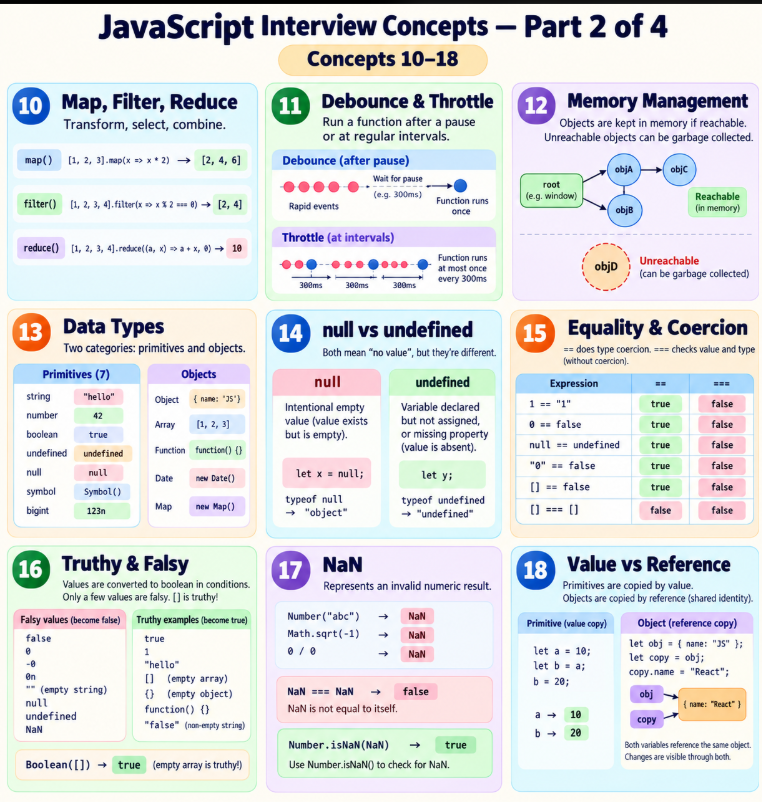
10. Map, Filter, and Reduce
What is it? map transforms elements, filter selects them, and reduce combines them.
Why and when should you use it? Build lists, select available products, and calculate totals.
Syntax:
array.map(fn); array.filter(fn); array.reduce(fn, initial);
Example (JavaScript):
const prices = [500, 1500, 400];
console.log(JSON.stringify(prices.map(p => p * 2)));
console.log(JSON.stringify(prices.filter(p => p <= 500)));
console.log(prices.reduce((sum, p) => sum + p, 0));
Expected output:
[1000,3000,800]
[500,400]
2400
Why this output / interview fact: map and filter create new arrays, but do not deep-copy object elements. Give reduce an appropriate initial value for empty arrays.
11. Debounce and Throttle
What is it? Debounce waits for a pause; throttle limits execution frequency during repeated calls.
Why and when should you use it? Debounce search input; throttle continuous events such as scrolling.
Syntax:
const handler = debounce(fn, delay); const handler2 = throttle(fn, interval);
Example (JavaScript):
function debounce(fn, delay) {
  let timer;
  return function (...args) {
    clearTimeout(timer);
    timer = setTimeout(() => fn.apply(this, args), delay);
  };
}
function throttle(fn, interval) {
  let lastRun = -Infinity;
  return function (...args) {
    const now = Date.now();
    if (now - lastRun >= interval) {
      lastRun = now;
      fn.apply(this, args);
    }
  };
}
const search = debounce(query => console.log(query), 30);
search('G'); search('Go'); search('Goa');
const update = throttle(value => console.log(value), 1000);
update('First'); update('Second');
Expected output:
First
Goa
Why this output / interview fact: The debounce example is trailing; the throttle is leading-only and drops calls inside the interval. Timers are approximate. Client-side controls cannot enforce server security; use server rate limits.
12. Memory Management
What is it? Garbage collection can reclaim unreachable objects; live references retain objects.
Why and when should you use it? Avoid unbounded caches and clean up timers and listeners in long-lived apps.
Syntax:
reference = null; clearInterval(timerId);
Example (JavaScript):
const cache = new Map();
let vehicle = { id: 1 };
cache.set('selected', vehicle);
vehicle = null;
console.log(cache.size);
cache.delete('selected');
console.log(cache.size);
Expected output:
1
0
Why this output / interview fact: Setting one reference to null does not remove other references. This example shows reference cleanup, not proof of garbage-collection timing. Unreachable cycles can be collected.
13. Data Types
What is it? JavaScript has seven primitive types plus objects.
Why and when should you use it? Validate values and understand operations on different types.
Syntax:
typeof value; Array.isArray(value);
Example (JavaScript):
console.log(typeof 'Goa');
console.log(typeof 500);
console.log(typeof 1n);
console.log(typeof true);
console.log(typeof undefined);
console.log(typeof Symbol('id'));
console.log(typeof null);
console.log(typeof {});
console.log(Array.isArray([]));
Expected output:
string
number
bigint
boolean
undefined
symbol
object
object
true
Why this output / interview fact: null is a primitive although typeof null returns "object", a historical quirk. Arrays are objects; functions are callable objects.
14. null vs undefined
What is it? null commonly expresses an intentional empty value; undefined commonly expresses an absent value.
Why and when should you use it? Model optional fields and distinguish missing from intentionally empty data.
Syntax:
let missing; const empty = null;
Example (JavaScript):
let missing;
const empty = null;
const user = {};
console.log(missing);
console.log(empty);
console.log(user.phone);
console.log(missing === empty);
Expected output:
undefined
null
undefined
false
Why this output / interview fact: These meanings are conventions: both can be assigned explicitly. Check the actual API contract.
15. Equality and Type Coercion
What is it? Loose equality can convert types; strict equality does not convert operands.
Why and when should you use it? Compare input predictably and explain surprising interview outputs.
Syntax:
a == b; a === b;
Example (JavaScript):
console.log(0 == false);
console.log(0 === false);
console.log('5' + 2);
console.log('5' - 2);
console.log(null == undefined);
console.log(null === undefined);
Expected output:
true
false
52
3
true
false
Why this output / interview fact: Prefer strict equality for predictable comparisons. The + operator can concatenate strings; subtraction triggers numeric conversion.
16. Truthy and Falsy Values
What is it? Conditions convert values to booleans.
Why and when should you use it? Write guards without accidentally rejecting valid values such as zero.
Syntax:
Boolean(value); if (value) { ... }
Example (JavaScript):
console.log(Boolean([]));
console.log(Boolean({}));
console.log(Boolean(''));
console.log(Boolean('0'));
console.log(Boolean(0));
console.log(Boolean(NaN));
Expected output:
true
true
false
true
false
false
Why this output / interview fact: Falsy values include false, 0, -0, 0n, empty string, null, undefined, and NaN. Browsers also have the legacy document.all exception.
17. NaN and Numeric Checks
What is it? NaN represents an invalid numeric result and is not equal to itself.
Why and when should you use it? Validate conversions and calculations.
Syntax:
Number.isNaN(value); Number.isFinite(value);
Example (JavaScript):
const value = Number('hello');
console.log(value);
console.log(value === value);
console.log(Number.isNaN(value));
console.log(Number.isNaN('hello'));
console.log(Number.isFinite(Infinity));
Expected output:
NaN
false
true
false
false
Why this output / interview fact: Number.isNaN does not coerce its input. NaN has type "number". Use explicit validation for numeric strings before trusting conversions.
18. Value vs Reference
What is it? Assignments copy values; an object value is a reference to an object.
Why and when should you use it? Understand shared mutation when passing objects or assigning variables.
Syntax:
const second = first;
Example (JavaScript):
let a = 5;
let b = a;
b = 9;
const first = { price: 500 };
const second = first;
second.price = 800;
console.log(a);
console.log(b);
console.log(first.price);
console.log(first === second);
Expected output:
5
9
800
true
Why this output / interview fact: JavaScript passes arguments by value, including reference values. Reassigning a function parameter does not reassign the caller variable.
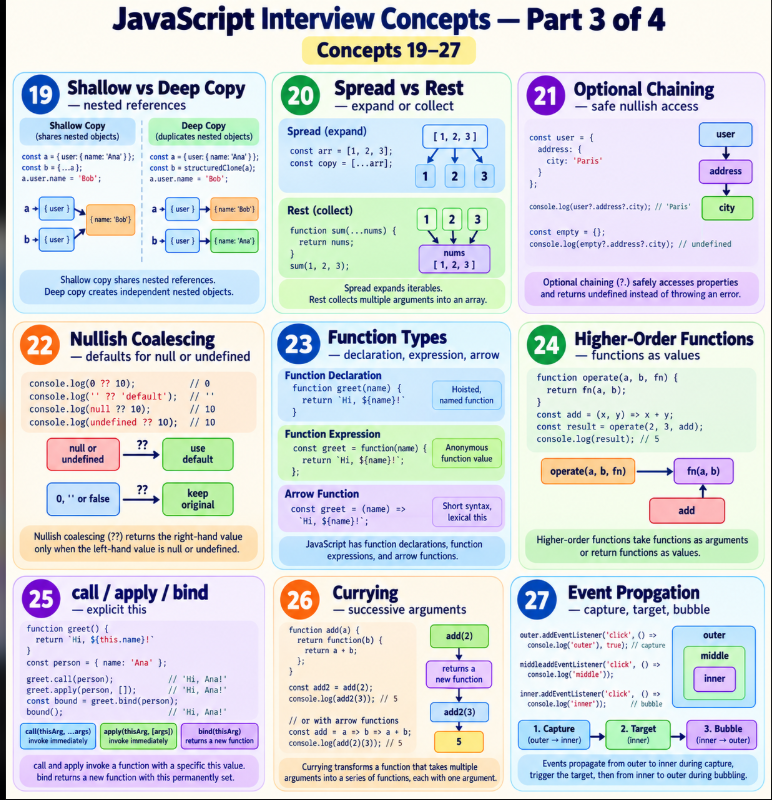
19. Shallow vs Deep Copy
What is it? A shallow copy shares nested references; a deep copy duplicates supported nested values.
Why and when should you use it? Avoid accidental changes to nested state.
Syntax:
const shallow = { ...obj }; const deep = structuredClone(obj);
Example (JavaScript):
const original = { address: { city: 'Goa' } };
const shallow = { ...original };
const deep = structuredClone(original);
shallow.address.city = 'Bokaro';
console.log(original.address.city);
console.log(deep.address.city);
console.log(shallow.address === original.address);
Expected output:
Bokaro
Goa
true
Why this output / interview fact: structuredClone supports many built-in data types and cycles, but not functions or DOM nodes. It does not preserve arbitrary custom class behavior. JSON conversion is not a universal deep clone.
20. Spread vs Rest
What is it? Spread expands values; rest collects remaining values.
Why and when should you use it? Combine arrays, copy properties, or accept a variable number of arguments.
Syntax:
[...items]; { ...obj }; function sum(...values) {}
Example (JavaScript):
const prices = [100, 200];
const all = [...prices, 300];
function total(...values) {
  return values.reduce((sum, value) => sum + value, 0);
}
const [first, ...remaining] = all;
console.log(JSON.stringify(all));
console.log(total(...all));
console.log(first);
console.log(JSON.stringify(remaining));
Expected output:
[100,200,300]
600
100
[200,300]
Why this output / interview fact: Rest is last in its parameter/destructuring position. Object spread is shallow and copies enumerable own properties.
21. Optional Chaining
What is it? Optional chaining stops a continuous access chain when the receiver is null or undefined.
Why and when should you use it? Read optional API fields without repeated nullish checks.
Syntax:
object?.property; object?.method?.();
Example (JavaScript):
const user = { address: null };
console.log(user.address?.city);
console.log(user.phone?.number);
const service = {};
console.log(service.refresh?.());
Expected output:
undefined
undefined
undefined
Why this output / interview fact: It does not validate data, suppress every exception, or make an undeclared root variable safe. Grouping can end the protected continuous chain.
22. Nullish Coalescing
What is it? The ?? operator uses a fallback only for null or undefined.
Why and when should you use it? Preserve valid falsy values such as zero, false, and empty strings.
Syntax:
const value = input ?? fallback;
Example (JavaScript):
console.log(0 ?? 10);
console.log(0 || 10);
console.log('' ?? 'Unknown');
console.log(null ?? 'Unknown');
console.log(false ?? true);
Expected output:
0
10

Unknown
false
Why this output / interview fact: The third output is an empty line. Parenthesize when combining ?? with && or ||; unparenthesized mixing is a syntax error.
23. Function Declarations, Expressions, and Arrows
What is it? JavaScript has several function forms with different initialization and this behavior.
Why and when should you use it? Choose an appropriate declaration or callback style.
Syntax:
function fn() {}; const expr = function () {}; const arrow = () => {};
Example (JavaScript):
console.log(add(2, 3));
function add(a, b) { return a + b; }
const multiply = function (a, b) { return a * b; };
const subtract = (a, b) => a - b;
console.log(multiply(2, 3));
console.log(subtract(5, 2));
Expected output:
5
6
3
Why this output / interview fact: An arrow has no own this or arguments and cannot be called with new. A const function expression is unavailable before initialization.
24. Higher-Order Functions
What is it? A higher-order function accepts a function, returns one, or both.
Why and when should you use it? Reuse behavior in transforms, validators, and configurable operations.
Syntax:
function apply(value, fn) { return fn(value); }
Example (JavaScript):
function applyPrice(price, transform) {
  return transform(price);
}
function createMultiplier(factor) {
  return value => value * factor;
}
console.log(applyPrice(500, price => price - 100));
console.log(createMultiplier(3)(200));
Expected output:
400
600
Why this output / interview fact: map is a higher-order function. A callback is a function passed to another function; it need not be asynchronous.
25. call, apply, and bind
What is it? These methods invoke or create functions with an explicit this value.
Why and when should you use it? Reuse ordinary methods or preserve context in callbacks.
Syntax:
fn.call(obj, a); fn.apply(obj, [a]); const bound = fn.bind(obj);
Example (JavaScript):
function quote(days, fee) {
  return this.price * days + fee;
}
const bike = { price: 500 };
console.log(quote.call(bike, 2, 100));
console.log(quote.apply(bike, [3, 100]));
const bikeQuote = quote.bind(bike, 4);
console.log(bikeQuote(100));
Expected output:
1100
1600
2100
Why this output / interview fact: call/apply invoke now; bind returns a function and supports partial arguments. They do not replace an arrow function's lexical this.
26. Currying
What is it? Currying transforms a multi-argument operation into successive functions, commonly one argument at a time.
Why and when should you use it? Create reusable configured operations.
Syntax:
const add = a => b => a + b;
Example (JavaScript):
const rentalTotal = dailyRate => days => dailyRate * days;
const bikeTotal = rentalTotal(500);
console.log(bikeTotal(2));
console.log(bikeTotal(5));
console.log(rentalTotal(1500)(2));
Expected output:
1000
2500
3000
Why this output / interview fact: Currying and partial application are related but distinct: partial application fixes some arguments; currying changes how arguments are received.
27. Event Propagation
What is it? DOM events follow a path with capture, target, and, for bubbling events, bubble phases.
Why and when should you use it? Understand nested UI handlers and control event flow.
Syntax:
element.addEventListener(type, handler, { capture: true });
Example (Browser console):
const parent = document.createElement('div');
const button = document.createElement('button');
parent.append(button);
parent.addEventListener('click', () => console.log('Capture'), true);
button.addEventListener('click', () => console.log('Target'));
parent.addEventListener('click', () => console.log('Bubble'));
button.dispatchEvent(new MouseEvent('click', { bubbles: true }));
Expected output:
Capture
Target
Bubble
Why this output / interview fact: stopPropagation stops propagation; preventDefault cancels a cancelable default action. They do different things. Not every event bubbles.
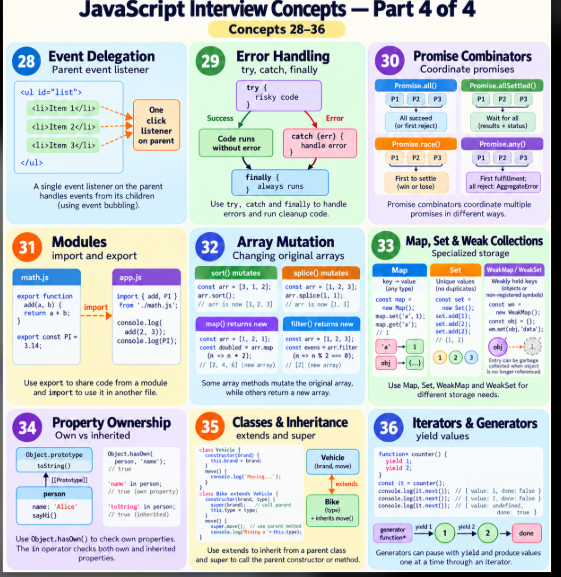
28. Event Delegation
What is it? A parent listener handles events from descendants by using the event target.
Why and when should you use it? Manage many list items, including dynamically added ones, with one listener.
Syntax:
parent.addEventListener("click", event => { ... });
Example (Browser console):
const list = document.createElement('div');
list.innerHTML = '<button data-id="101"><span>Book</span></button>';
list.addEventListener('click', event => {
  if (!(event.target instanceof Element)) return;
  const button = event.target.closest('button[data-id]');
  if (!button || !list.contains(button)) return;
  console.log(`Book vehicle ${button.dataset.id}`);
});
list.querySelector('span').dispatchEvent(
  new MouseEvent('click', { bubbles: true })
);
Expected output:
Book vehicle 101
Why this output / interview fact: event.target is the origin; currentTarget is the element whose listener is executing. closest handles clicks on nested content. Use only with a suitable propagation model.
29. Error Handling
What is it? try/catch handles thrown exceptions; finally runs after the try/catch path completes.
Why and when should you use it? Handle validation failures and awaited promise rejections.
Syntax:
try { ... } catch (error) { ... } finally { ... }
Example (JavaScript):
async function book() {
  try {
    await Promise.reject(new Error('Vehicle unavailable'));
  } catch (error) {
    console.log(error.message);
  } finally {
    console.log('Hide loader');
  }
}
book();
Expected output:
Vehicle unavailable
Hide loader
Why this output / interview fact: A synchronous try/catch does not catch a later callback error just because the callback was scheduled inside try. Avoid return in finally because it can override earlier results or errors.
30. Promise Combinators
What is it? Promise combinators coordinate multiple asynchronous outcomes.
Why and when should you use it? Load independent resources, collect results, or choose the first outcome.
Syntax:
Promise.all(values); Promise.allSettled(values); Promise.race(values); Promise.any(values);
Example (JavaScript):
async function demo() {
  console.log(JSON.stringify(await Promise.all([
    Promise.resolve('Bike'), Promise.resolve('Car')
  ])));
  const results = await Promise.allSettled([
    Promise.resolve(1), Promise.reject('Unavailable')
  ]);
  console.log(results.map(result => result.status).join(','));
  console.log(await Promise.race([
    Promise.resolve('First'), Promise.resolve('Second')
  ]));
  console.log(await Promise.any([
    Promise.reject('Failed'), Promise.resolve('Available')
  ]));
}
demo();
Expected output:
["Bike","Car"]
fulfilled,rejected
First
Available
Why this output / interview fact: all returns values in input order and rejects on a rejection; allSettled waits for all; race takes the first settlement; any takes the first fulfillment or rejects with AggregateError if all reject. None automatically cancels remaining work.
31. Modules: import and export
What is it? ES modules expose and consume bindings across files.
Why and when should you use it? Organize reusable code and avoid global namespace collisions.
Syntax:
export function fn() {}; import { fn } from "./module.mjs";
Example (Two ES module files):
// pricing.mjs
export const dailyRate = 500;
export function total(days) { return dailyRate * days; }

// app.mjs
import { dailyRate, total } from './pricing.mjs';
console.log(dailyRate);
console.log(total(3));
Expected output:
500
1500
Why this output / interview fact: Save the two files separately and run node app.mjs, or use an appropriate browser module setup. Modules use strict mode, have their own scope, and expose live bindings. The imported binding cannot be reassigned by the importer.
32. Array Mutation
What is it? Some array methods change their receiver; others create a new array.
Why and when should you use it? Avoid unintended changes to shared state, especially in UI applications.
Syntax:
array.sort(compare); array.splice(start, count); const copy = [...array];
Example (JavaScript):
const prices = [100, 20, 3];
const sorted = [...prices].sort((a, b) => a - b);
console.log(JSON.stringify(prices));
console.log(JSON.stringify(sorted));
prices.splice(1, 1);
console.log(JSON.stringify(prices));
Expected output:
[100,20,3]
[3,20,100]
[100,3]
Why this output / interview fact: sort, reverse, splice, push, and pop mutate. map/filter/slice create new arrays. Default sort compares string representations; use a numeric comparator for numbers. Array copies remain shallow.
33. Map, Set, and Weak Collections
What is it? Map holds key/value pairs; Set holds unique values; weak collections do not keep eligible keys alive.
Why and when should you use it? Store keyed records, deduplicate values, or associate metadata with objects.
Syntax:
new Map(); new Set(); new WeakMap(); new WeakSet();
Example (JavaScript):
const map = new Map([['bike', 500]]);
const unique = new Set([1, 1, 2]);
const key = {};
const weakMap = new WeakMap();
const weakSet = new WeakSet();
weakMap.set(key, 'metadata');
weakSet.add(key);
console.log(map.get('bike'));
console.log(JSON.stringify([...unique]));
console.log(weakMap.get(key));
console.log(weakSet.has(key));
Expected output:
500
[1,2]
metadata
true
Why this output / interview fact: Weak collections are not enumerable and have no size property. Use objects as portable weak keys; current ECMAScript also permits non-registered symbols. Collection timing is deliberately not observable through enumeration.
34. Property Ownership
What is it? An object can have own properties and properties inherited through its prototype.
Why and when should you use it? Distinguish user data from inherited fields during validation and iteration.
Syntax:
Object.hasOwn(obj, key); key in obj;
Example (JavaScript):
const vehicle = Object.create({ type: 'bike' });
vehicle.price = 500;
console.log(Object.hasOwn(vehicle, 'price'));
console.log(Object.hasOwn(vehicle, 'type'));
console.log('type' in vehicle);
console.log(Object.keys(vehicle).join(','));
Expected output:
true
false
true
price
Why this output / interview fact: Object.hasOwn avoids relying on an object's own hasOwnProperty method, which may be missing or shadowed. Object.keys returns enumerable own string keys, not symbols.
35. Classes and Inheritance
What is it? Classes describe instances; extends establishes inheritance and super accesses parent behavior.
Why and when should you use it? Model related objects with shared behavior and explicit constructors.
Syntax:
class Child extends Parent { constructor() { super(); } }
Example (JavaScript):
class Vehicle {
  constructor(name) { this.name = name; }
  describe() { return `Vehicle: ${this.name}`; }
}
class Bike extends Vehicle {
  constructor(name) { super(name); }
  describe() { return `${super.describe()} (bike)`; }
}
const bike = new Bike('Honda');
console.log(bike.describe());
console.log(bike instanceof Vehicle);
Expected output:
Vehicle: Honda (bike)
true
Why this output / interview fact: A derived constructor must call super before using this. Instance methods normally live on the prototype; classes do not remove JavaScript's prototype model.
36. Iterators and Generators
What is it? An iterator yields result objects; a generator function can pause at yield and resume later.
Why and when should you use it? Produce sequences lazily and implement custom iteration.
Syntax:
function* sequence() { yield value; } iterator.next();
Example (JavaScript):
function* bookingIds() {
  yield 101;
  yield 102;
  return 'finished';
}
const iterator = bookingIds();
console.log(JSON.stringify(iterator.next()));
console.log(JSON.stringify(iterator.next()));
console.log(JSON.stringify(iterator.next()));
console.log(JSON.stringify([...bookingIds()]));
Expected output:
{"value":101,"done":false}
{"value":102,"done":false}
{"value":"finished","done":true}
[101,102]
Why this output / interview fact: for...of and spread consume yielded values and exclude the generator's final return value. Iterators and iterables are related but different protocols; generators implement both.
Interview revision checklist
- Explain each concept without reading its definition.
- Predict the output before executing the example.
- Change one input and explain the new output.
- Identify whether the concept belongs to JavaScript itself or a host API such as the browser DOM.
- Explain one practical use and one common mistake.
References and further reading
These are original learning examples. Consult the language and API references for full edge cases.
- MDN JavaScript Guide
- MDN JavaScript Reference
- MDN Closures
- MDN Execution Model
- MDN Promise Reference
- MDN Event Propagation
- MDN Memory Management
- ECMAScript Specification
Colorful architecture 1: concepts 1–18
This is a relationship and revision map, not the order in which the JavaScript engine executes all features. Branches group concepts by their practical role.
flowchart TD
  ROOT["JavaScript foundations — concepts 1–18"]:::root
  ROOT --> EXEC["Variables and execution"]:::blue
  ROOT --> ASYNC["Asynchronous behavior"]:::orange
  ROOT --> OBJECTS["Objects and data"]:::green
  ROOT --> VALUES["Values and resources"]:::purple
  EXEC --> C1["1 Scope"]:::blue
  EXEC --> C2["2 Closures"]:::blue
  EXEC --> C3["3 Hoisting and TDZ"]:::blue
  ASYNC --> C4["4 Event Loop"]:::orange
  ASYNC --> C5["5 Promises"]:::orange
  ASYNC --> C6["6 Async / Await"]:::orange
  OBJECTS --> C7["7 this Keyword"]:::green
  OBJECTS --> C8["8 Prototypes"]:::green
  OBJECTS --> C9["9 Destructuring"]:::green
  OBJECTS --> C10["10 Map, Filter, Reduce"]:::green
  ASYNC --> C11["11 Debounce and Throttle"]:::orange
  VALUES --> C12["12 Memory Management"]:::purple
  VALUES --> C13["13 Data Types"]:::purple
  VALUES --> C14["14 null vs undefined"]:::purple
  VALUES --> C15["15 Equality and Coercion"]:::purple
  VALUES --> C16["16 Truthy and Falsy"]:::purple
  VALUES --> C17["17 NaN and Numeric Checks"]:::purple
  VALUES --> C18["18 Value vs Reference"]:::purple
  C1 -. "outer bindings" .-> C2
  C5 -. "readable syntax" .-> C6
  C18 -. "retained references" .-> C12
  classDef root fill:#172554,stroke:#172554,color:#ffffff,stroke-width:3px;
  classDef blue fill:#dbeafe,stroke:#2563eb,color:#172554,stroke-width:2px;
  classDef orange fill:#ffedd5,stroke:#ea580c,color:#7c2d12,stroke-width:2px;
  classDef green fill:#dcfce7,stroke:#16a34a,color:#14532d,stroke-width:2px;
  classDef purple fill:#f3e8ff,stroke:#9333ea,color:#581c87,stroke-width:2px;
Colorful architecture 2: concepts 19–36
The second map groups copying, functions, DOM events, asynchronous coordination, and object organization. Dotted links indicate particularly useful relationships to explain in interviews.
flowchart TD
  ROOT["JavaScript application patterns — concepts 19–36"]:::root
  ROOT --> DATA["Data access and copying"]:::blue
  ROOT --> FUNC["Function composition"]:::purple
  ROOT --> FLOW["Events and async safety"]:::orange
  ROOT --> STRUCT["Application structure"]:::green
  DATA --> C19["19 Shallow vs Deep Copy"]:::blue
  DATA --> C20["20 Spread vs Rest"]:::blue
  DATA --> C21["21 Optional Chaining"]:::blue
  DATA --> C22["22 Nullish Coalescing"]:::blue
  FUNC --> C23["23 Function Types"]:::purple
  FUNC --> C24["24 Higher-Order Functions"]:::purple
  FUNC --> C25["25 call, apply, bind"]:::purple
  FUNC --> C26["26 Currying"]:::purple
  FLOW --> C27["27 Event Propagation"]:::orange
  FLOW --> C28["28 Event Delegation"]:::orange
  FLOW --> C29["29 Error Handling"]:::orange
  FLOW --> C30["30 Promise Combinators"]:::orange
  STRUCT --> C31["31 Modules"]:::green
  STRUCT --> C32["32 Array Mutation"]:::green
  STRUCT --> C33["33 Map, Set, Weak Collections"]:::green
  STRUCT --> C34["34 Property Ownership"]:::green
  STRUCT --> C35["35 Classes and Inheritance"]:::green
  STRUCT --> C36["36 Iterators and Generators"]:::green
  C20 -. "shallow copying" .-> C19
  C27 -. "enables delegation" .-> C28
  C30 -. "rejection paths" .-> C29
  classDef root fill:#172554,stroke:#172554,color:#ffffff,stroke-width:3px;
  classDef blue fill:#dbeafe,stroke:#2563eb,color:#172554,stroke-width:2px;
  classDef purple fill:#f3e8ff,stroke:#9333ea,color:#581c87,stroke-width:2px;
  classDef orange fill:#ffedd5,stroke:#ea580c,color:#7c2d12,stroke-width:2px;
  classDef green fill:#dcfce7,stroke:#16a34a,color:#14532d,stroke-width:2px;
Mermaid diagrams require a compatible Markdown renderer. Two matching image posters are also supplied separately for publishing platforms that do not render Mermaid.



Top comments (0)