
LLM vs RAG vs AI Agent vs Agentic AI
What is an LLM?
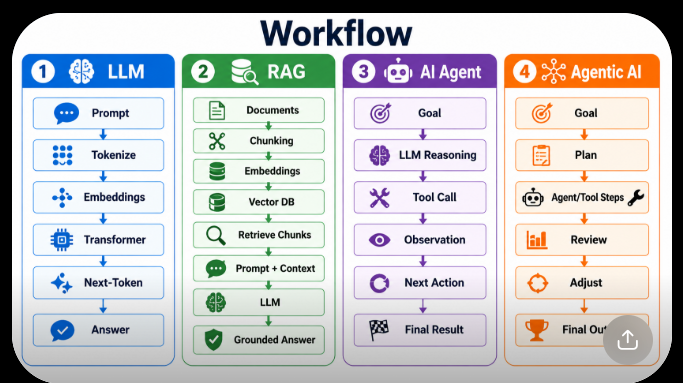
How an LLM processes a prompt
What is RAG?
Why RAG is added to an LLM
What is an AI Agent?
How an AI Agent uses LLM + Tools + APIs
What is Agentic AI?
AI Agent vs Agentic AI
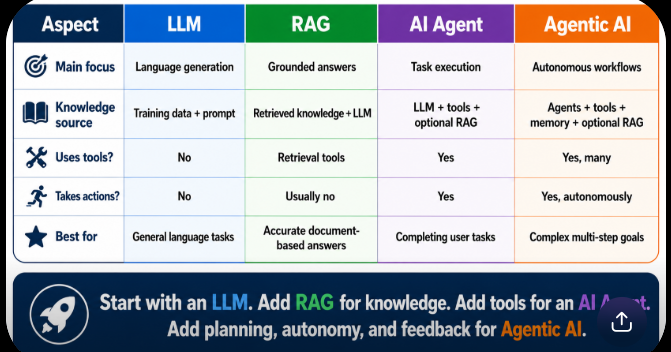
LLM vs RAG vs AI Agent vs Agentic AI comparison
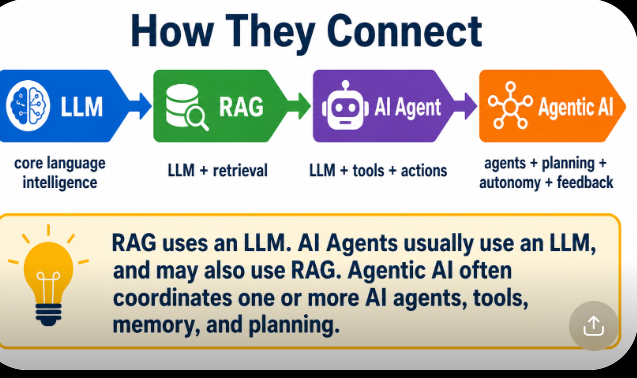
How they connect in one architecture
When to use each
Real-world example using all four
Developer learning roadmap: LLM → RAG → Agents → Agentic AI
LLM vs RAG vs AI Agent vs Agentic AI
The easiest relationship to remember is:
LLM
↓
RAG
↓
AI Agent
↓
Agentic AI
But this does not mean one always replaces the previous one.
A better understanding is:
LLM = language intelligence
RAG = LLM + external knowledge
AI Agent = LLM + tools + actions
Agentic AI = agents + planning + memory + tools + feedback + autonomy
What is an LLM?
How an LLM processes a prompt
What is RAG?
Why RAG is added to an LLM
What is an AI Agent?
How an AI Agent uses LLM + Tools + APIs
What is Agentic AI?
AI Agent vs Agentic AI
LLM vs RAG vs AI Agent vs Agentic AI comparison
How they connect in one architecture
When to use each
Real-world example using all four
Developer learning roadmap: LLM → RAG → Agents → Agentic AI
What is an LLM?
LLM stands for Large Language Model
.
An LLM is an AI model trained on a huge amount of text so it can:
understand language
answer questions
generate text
summarize
translate
write code
explain concepts
reason over information in its context
Examples of LLM families include GPT-style models, Llama-style models, Gemini models, and Claude models.
Simple example
You ask:
Explain photosynthesis in simple words.
The LLM generates:
Photosynthesis is the process plants use
to make food using sunlight, water,
and carbon dioxide.
Main purpose
LLM
=
Understand language
+
Generate language
How does an LLM process a prompt?
Suppose the user asks:
Explain photosynthesis simply.
The simplified processing flow is:
User Prompt
    ↓
Tokenization
    ↓
Tokens
    ↓
Embeddings
    ↓
Transformer Layers
    ↓
Attention
    ↓
Learned Parameters / Weights
    ↓
Next-token probabilities
    ↓
Temperature / Top-P
    ↓
Select Next Token
    ↓
Repeat
    ↓
Generated Answer
Step 1 — Prompt
User writes:
Explain photosynthesis simply.
Step 2 — Tokenization
Text is broken into smaller units.
Conceptually:
Explain
photo
synthesis
simply
Step 3 — Tokens
Each token is converted to an ID.
Example:
Explain → 421
photo → 982
synthesis → 1637
Step 4 — Embeddings
Token IDs are converted into numerical vectors representing information the neural network can process.
Token
↓
Vector
Step 5 — Transformer
The Transformer processes those representations through many layers.
Step 6 — Attention
Attention helps determine which words/tokens are related.
Example:
The plant uses sunlight to make its food.
The word:
its
should relate strongly to:
plant
Step 7 — Parameters / Weights
The model uses the numerical patterns learned during training.
Step 8 — Next-token prediction
The model predicts probabilities for the next token.
Example:
Plants use ______
Possible predictions:
sunlight     65%
water        15%
energy       10%
oxygen        5%
other         5%
Step 9 — Repeat
The selected token is added to the context.
Then the model predicts the next token again.
Token
↓
Next Token
↓
Next Token
↓
Next Token
↓
Final Response
What is RAG?
RAG stands for Retrieval-Augmented Generation.
RAG allows an LLM to use information from external sources before generating an answer.
External sources can include:
PDF
Word Documents
Company Database
Website
Knowledge Base
Product Data
Hospital Records
API Data
Technical Documentation
A typical RAG workflow is:
Documents
   ↓
Chunking
   ↓
Embeddings
   ↓
Vector Database
Then when the user asks something:
User Question
   ↓
Query Embedding
   ↓
Vector Search
   ↓
Relevant Chunks
   ↓
Question + Retrieved Information
   ↓
LLM
   ↓
Grounded Answer
Example
Company policy says:
Employees get 12 casual leaves annually.
User asks:
How many casual leaves do employees get?
RAG retrieves the policy section.
Then:
Question
+
Relevant Policy
↓
LLM
↓
12 casual leaves per year
Why is RAG added to an LLM?
An LLM does not automatically know your private or constantly changing information.
For example, an LLM may not know:
your company policy
your private database
today's inventory
your project documentation
your hospital records
internal APIs
recently updated PDFs
Therefore we add retrieval.
Without RAG:
Question
↓
LLM
↓
Answer using training knowledge
With RAG:
Question
↓
Retrieve relevant information
↓
Question + Information
↓
LLM
↓
Grounded Answer
RAG is useful because it can provide
private knowledge
domain-specific information
newer information
document-based answers
better factual grounding
So:
LLM
=
General intelligence


RAG
=
General intelligence
+
Relevant external knowledge
What is an AI Agent?
An AI Agent is an AI system that can do more than generate text.
It can:
Understand goal
↓
Decide what to do
↓
Use a tool
↓
Observe result
↓
Take another action
↓
Complete task
An AI Agent usually contains:
LLM
+
Tools
+
APIs
+
Instructions
+
State / Memory
Example
User says:
Find flights from Delhi to Bangalore
for tomorrow under ₹6,000.
A normal LLM might explain where to search.
An agent can potentially:
Understand destination
↓
Call Flight API
↓
Get flight results
↓
Filter by ₹6,000
↓
Compare options
↓
Return best flights
Main purpose
LLM → answer
AI Agent → perform a task
How does an AI Agent use LLM + Tools + APIs?
This is one of the most important concepts.
The LLM works as the reasoning/control component.
Tools provide capabilities.
For example:
LLM
↓
"What should I do?"
↓
Select Tool
↓
API Call
↓
API Result
↓
LLM evaluates result
↓
Next Action
Suppose the user asks:
Check tomorrow's weather in Jaipur
and schedule my outdoor meeting
when the weather is suitable.
The agent could perform:
User Goal
   ↓
LLM understands request
   ↓
Weather API
   ↓
Get forecast
   ↓
Calendar API
   ↓
Check available times
   ↓
LLM chooses suitable slot
   ↓
Calendar Tool
   ↓
Create meeting
The roles are:
LLM
= decides


Tool
= performs capability


API
= connects to external system
Examples of tools:
Google Calendar
Gmail
Search
Database
Calculator
CRM
Weather API
Payment API
Booking API
File system
What is Agentic AI?
Agentic AI is a goal-driven AI system that can plan, act, observe, adjust, and continue working toward a goal.
It may use:
one AI agent
or
multiple AI agents
Agentic AI typically includes:
Goal
↓
Planning
↓
Actions
↓
Tools
↓
Observations
↓
Evaluation
↓
Adjustment
↓
Repeat
↓
Final Goal
Example
Goal:
Create a detailed competitor analysis
for our hospital platform.
Agentic AI might:
Create research plan
↓
Search competitors
↓
Collect data
↓
Analyze pricing
↓
Analyze features
↓
Compare companies
↓
Generate report
↓
Review missing information
↓
Research again
↓
Improve report
↓
Final result
The important concept is:
Plan
→ Act
→ Observe
→ Evaluate
→ Adjust
→ Repeat
AI Agent vs Agentic AI
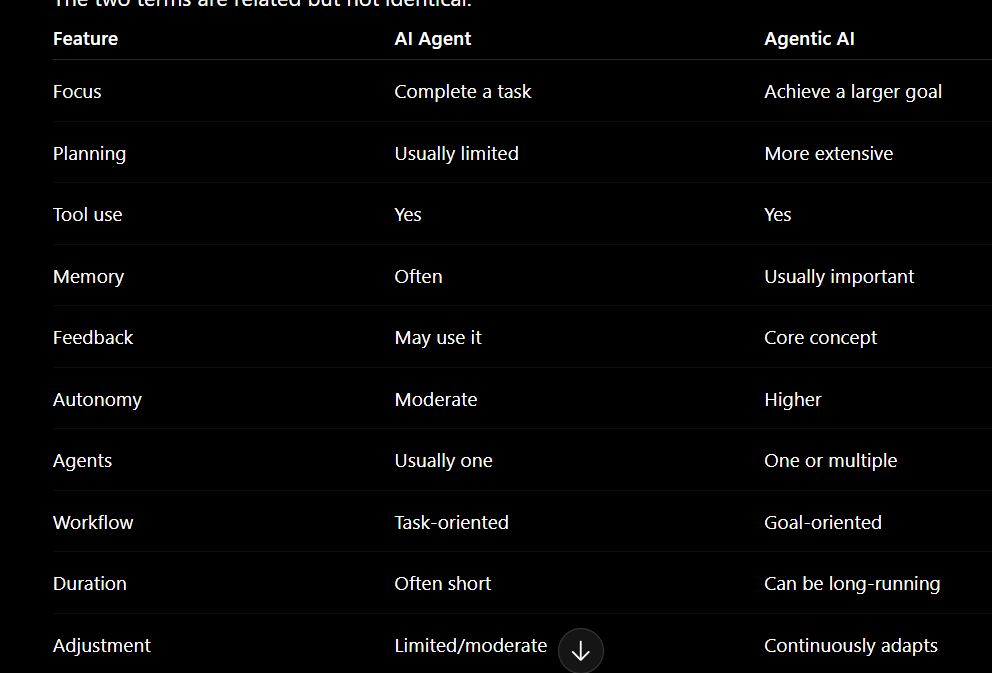
AI Agent example
Book a doctor appointment.
Flow:
Search doctor
↓
Check availability
↓
Book slot
↓
Done
Agentic AI example
Improve hospital appointment utilization
over the next month.
Flow:
Analyze appointment data
↓
Find unused slots
↓
Analyze patient demand
↓
Recommend schedule changes
↓
Run campaigns
↓
Observe bookings
↓
Analyze results
↓
Adjust strategy
↓
Continue
Therefore:
AI Agent
=
Task executor


Agentic AI
=
Goal-driven autonomous system
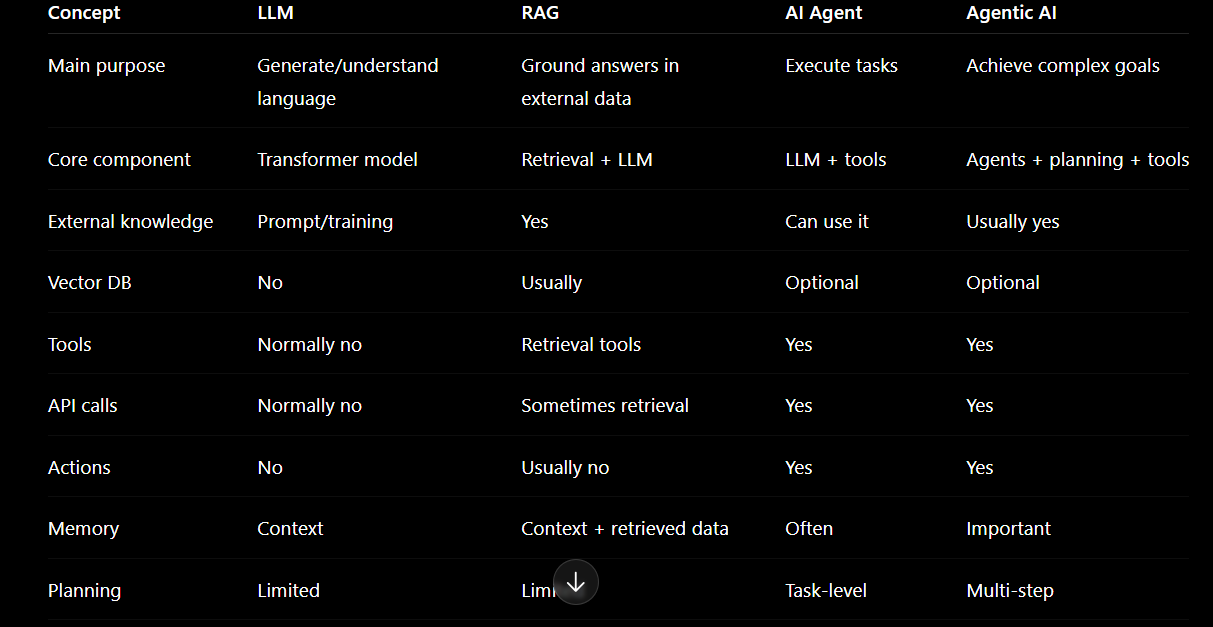
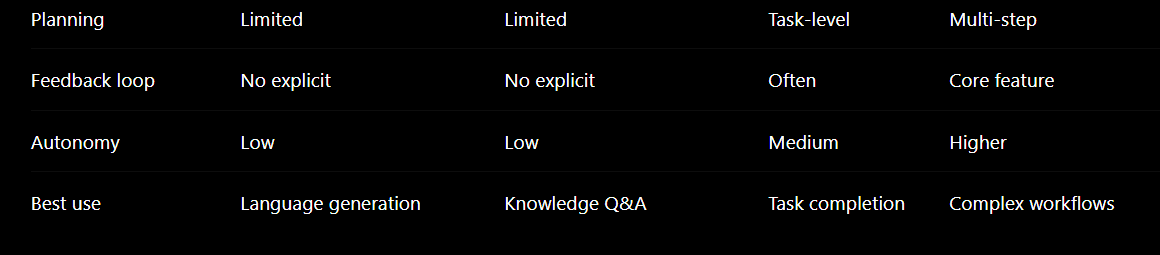
LLM vs RAG vs AI Agent vs Agentic AI
How do they connect in one architecture?
A useful architecture is:
 USER
                     ↓
                    Goal
                     ↓
              AGENTIC AI SYSTEM
                     ↓
                Orchestrator
                     ↓
              ┌──────┴──────┐
              ↓             ↓
          AI Agent       AI Agent
              ↓             ↓
            LLM           LLM
              ↓             ↓
       ┌──────┴──────┐     Tools
       ↓             ↓
      RAG           Tools
       ↓
Vector Database
       ↓
Documents / Data
Another way to remember it:
LLM
↓
provides intelligence


RAG
↓
provides knowledge to LLM


AI Agent
↓
uses LLM + knowledge + tools


Agentic AI
↓
coordinates agents, tools, memory,
planning and feedback
The relationship is therefore:
Agentic AI
   │
   ├── AI Agent
   │      │
   │      ├── LLM
   │      ├── RAG
   │      ├── Tools
   │      └── APIs
   │
   ├── Memory
   ├── Planning
   ├── Feedback
   └── Orchestration
When should you use each?
Use an LLM when
You need:
Writing
Summarization
Translation
General Q&A
Coding
Explanation
Brainstorming
Classification
Example:
Explain Kubernetes.
Use:
LLM
Use RAG when
The answer must come from:
PDF
Company data
Documentation
Database
Knowledge base
Product catalog
Hospital data
Private information
Frequently updated content
Example:
According to our employee handbook,
how many casual leaves are allowed?
Use:
RAG + LLM
Use an AI Agent when
The system needs to take actions.
Example:
Find an available doctor and book
an appointment tomorrow.
Use:
LLM
+
Doctor API
+
Calendar
+
Booking Tool
Use Agentic AI when
You have a complex goal requiring:
planning
multiple steps
multiple tools
repeated decisions
memory
feedback
adaptation
possibly multiple agents
Example:
Increase appointment bookings by 20%
during the next three months.
Use:
Agentic AI
Real-world example using all four
Consider a hospital AI system.
Stage 1 — LLM
Patient asks:
What is angioplasty?
Flow:
Patient
↓
LLM
↓
Explanation
LLM handles general medical explanation.
Stage 2 — RAG
Patient asks:
Which treatments does ABC Hospital
provide for heart patients?
Flow:
Patient Question
↓
Search Hospital Knowledge
↓
Retrieve relevant records
↓
LLM
↓
Grounded Answer
Now RAG is being used.
Stage 3 — AI Agent
Patient asks:
Find a cardiologist tomorrow
and book an appointment.
Flow:
User Request
↓
AI Agent
↓
Search Doctors API
↓
Check Availability
↓
Select Doctor
↓
Booking API
↓
Appointment Created
The system now takes an action.
Stage 4 — Agentic AI
Hospital gives the system a goal:
Reduce doctor idle time
and increase appointments.
Flow:
Goal
↓
Analyze booking history
↓
Analyze doctor schedules
↓
Identify empty slots
↓
Find patient demand
↓
Recommend scheduling changes
↓
Send targeted campaigns
↓
Track new appointments
↓
Evaluate performance
↓
Adjust strategy
↓
Repeat
Here:
LLM
= understands and reasons


RAG
= provides hospital knowledge


AI Agent
= performs actions


Agentic AI
= manages the complete goal
Developer Learning Roadmap
For learning, follow this order:
LLM
↓
RAG
↓
AI Agent
↓
Agentic AI
Phase 1 — LLM Fundamentals
Learn:
AI basics
↓
Machine Learning basics
↓
Deep Learning basics
↓
Transformer
↓
Tokens
↓
Tokenization
↓
Embeddings
↓
Attention
↓
Parameters / Weights
↓
Pre-training
↓
Fine-tuning
↓
Inference
↓
Context Window
↓
Temperature
↓
Top-P
↓
Next-token prediction
Build:
Project 0 — LLM Foundations Experiment Lab
Phase 2 — LLM Application Development
Learn:
Prompt engineering
System prompts
Structured outputs
LLM APIs
Function calling basics
Context management
Build:
Project 1 — AI Text Analyzer
For example:
Input text
↓
Summarize
↓
Classify
↓
Extract keywords
↓
Generate response
Phase 3 — RAG
Learn:
Document loading
↓
Chunking
↓
Embeddings
↓
Vector Database
↓
Similarity Search
↓
Retriever
↓
Prompt + Context
↓
LLM
Also learn:
Metadata filtering
Hybrid search
Reranking
RAG evaluation
Build:
Project 2 — PDF / Company Knowledge Assistant
Phase 4 — Tool Calling
Learn:
Function calling
APIs
JSON schemas
Tool execution
Error handling
Authentication
Build:
Project 3 — Tool-Using Assistant
Example:
Weather
Calculator
Search
Database
Email
Phase 5 — AI Agent
Learn:
Agent loop
↓
Reasoning
↓
Tool selection
↓
Action
↓
Observation
↓
Next action
Also learn:
State
Memory
Retries
Human approval
Guardrails
Build:
Project 4 — AI Booking Agent
Phase 6 — Agent Frameworks
Then learn frameworks such as:
LangChain
LangGraph
LlamaIndex
OpenAI Agents SDK
other agent orchestration frameworks
The important concept is not memorizing frameworks.
Understand:
State
Nodes
Edges
Tools
Memory
Routing
Retries
Human-in-the-loop
Build:
Project 5 — Stateful Workflow Agent
Phase 7 — Agentic AI
Learn:
Planning
↓
Task decomposition
↓
Memory
↓
Tool orchestration
↓
Feedback
↓
Reflection
↓
Evaluation
↓
Replanning
Build:
Project 6 — Research Agent
Example:
Topic
↓
Plan
↓
Search
↓
Retrieve
↓
Analyze
↓
Write
↓
Review
↓
Improve
Phase 8 — Multi-Agent Systems
Learn:
Agent roles
Agent communication
Orchestrator
Supervisor
Worker agents
Shared state
Agent handoffs
Architecture:
             Supervisor
                 ↓
      ┌──────────┼──────────┐
      ↓          ↓          ↓
 Researcher   Analyst     Writer
      ↓          ↓          ↓
    Tools       Tools      Tools
      └──────────┼──────────┘
                 ↓
              Reviewer
                 ↓
            Final Output
Build:
Project 7 — Multi-Agent Research System
Final roadmap
The complete learning path becomes:
1. LLM Fundamentals
        ↓
2. Prompt Engineering
        ↓
3. LLM APIs
        ↓
4. Embeddings
        ↓
5. Vector Databases
        ↓
6. RAG
        ↓
7. Function / Tool Calling
        ↓
8. AI Agents
        ↓
9. State + Memory
        ↓
10. Agent Workflows
        ↓
11. Planning + Reflection
        ↓
12. Agentic AI
        ↓
13. Multi-Agent Systems
        ↓
14. Production Agentic AI
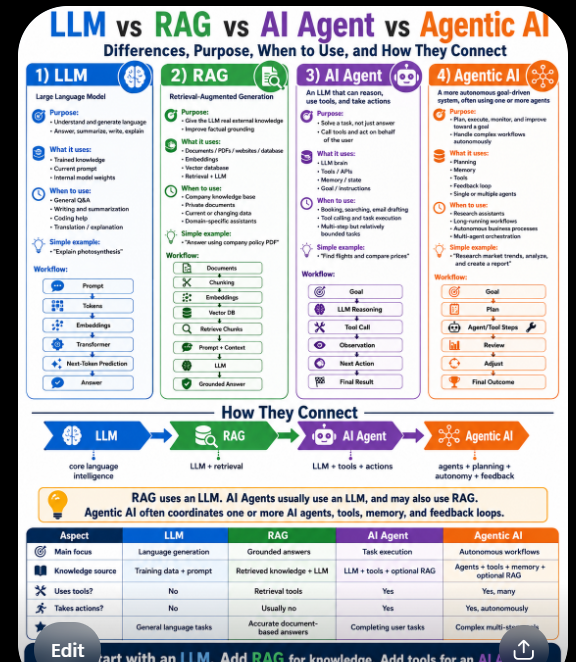
The single best sentence to remember the entire blog is:
 LLMs == provide intelligence,
 RAG == provides external knowledge,
 AI Agents == provide actions,
 Agentic AI == combines planning, tools, memory, feedback, and autonomy to achieve complex goals.



Top comments (0)