
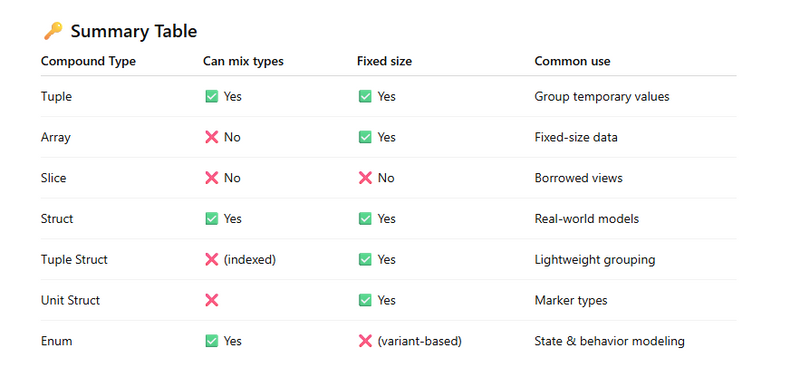
Different type of Compound data type
Programming on tuples
Programming on array and slice
Programming on structs
Struct vs Tuple vs Enum comparison in rust
Programming on Enum
Different type of Compound data type
Rust mainly provides four core compound data types:
Tuples

Arrays

Slices

Structs (including tuple structs & unit structs)
Additionally, Enums are often discussed alongside compound types because they group data variants.
1️⃣ Tuple
A tuple groups values of different types.
Example
fn main() {
    let person = ("Ashwani", 27, true);

    println!("Name: {}", person.0);
    println!("Age: {}", person.1);
    println!("Active: {}", person.2);
}
Output
Name: Ashwani
Age: 27
Active: true
Key Points
Fixed size

Can mix different types

Indexed using .0, .1, etc.
2️⃣ Array
An array stores multiple values of the same type with fixed length.
Example
fn main() {
    let numbers: [i32; 4] = [10, 20, 30, 40];

    println!("First: {}", numbers[0]);
    println!("Length: {}", numbers.len());
}
Output
First: 10
Length: 4
Key Points
Fixed size

Same data type

Stack allocated
3️⃣ Slice
A slice is a view into a portion of an array or vector.
Example
fn print_slice(slice: &[i32]) {
    println!("{:?}", slice);
}

fn main() {
    let arr = [1, 2, 3, 4, 5];
    print_slice(&arr[1..4]);
}
Output
[2, 3, 4]
Key Points
Dynamically sized

Borrowed (&[T])

Does not own data
4️⃣ Struct (Named Fields)
A structgroups related data with names.
Example
struct User {
    name: String,
    age: u8,
    active: bool,
}

fn main() {
    let user = User {
        name: String::from("Ashwani"),
        age: 27,
        active: true,
    };

    println!("{} is {} years old", user.name, user.age);
}
Output
Ashwani is 27 years old

Key Points

Fields have names

Can mix types
Very common in real projects
5️⃣ Tuple Struct
A tuple struct is a struct without field names.
Example
struct Point(i32, i32);

fn main() {
    let p = Point(10, 20);
    println!("x={}, y={}", p.0, p.1);
}
Output
x=10, y=20
6️⃣ Unit Struct
A unit struct has no fields.
Example
struct Marker;

fn main() {
    let _m = Marker;
    println!("Unit struct created");
}
Output
Unit struct created

Use Case

Marker types

Traits implementation
Compile-time behavior
7️⃣ Enum (Data-Carrying Enum)
Enums can store different kinds of data.
Example
enum Message {
    Quit,
    Move(i32, i32),
    Write(String),
}

fn main() {
    let msg = Message::Move(10, 20);

    match msg {
        Message::Move(x, y) => println!("Move to {}, {}", x, y),
        _ => println!("Other message"),
    }
}
Output
Move to 10, 20
Programming on tuples
1) Swap two values (generic tuple)
fn swap<T, U>(pair: (T, U)) -> (U, T) {
    let (a, b) = pair;
    (b, a)
}

fn main() {
    let p = ("Rust", 2026);
    println!("Original: {:?}", p);
    println!("Swapped:  {:?}", swap(p));
}
Output
Original: ("Rust", 2026)
Swapped:  (2026, "Rust")
2) Return multiple values from a function (min, max)
fn min_max(a: i32, b: i32) -> (i32, i32) {
    if a < b { (a, b) } else { (b, a) }
}

fn main() {
    let (mn, mx) = min_max(40, 12);
    println!("min = {}, max = {}", mn, mx);
}
Output
min = 12, max = 40
3) Nested tuple destructuring
fn main() {
    let data = ((10, 20), ("A", "B"), true);

    let ((x, y), (s1, s2), flag) = data;

    println!("x={}, y={}", x, y);
    println!("s1={}, s2={}", s1, s2);
    println!("flag={}", flag);
}
Output
x=10, y=20
s1=A, s2=B
flag=true
4) Tuple indexing + updating tuple elements
fn main() {
    let mut user = ("Ashwani", 27, true);

    println!("Name: {}", user.0);
    println!("Age: {}", user.1);
    println!("Active: {}", user.2);

    user.1 = 28;
    user.2 = false;

    println!("Updated: {:?}", user);
}
Output
Name: Ashwani
Age: 27
Active: true
Updated: ("Ashwani", 28, false)
5) One-element tuple vs parentheses literal
fn main() {
    println!("One element tuple: {:?}", (99u32,));
    println!("Just a number:     {:?}", (99u32));
}
Output
One element tuple: (99,)
Just a number:     99
6) Tuple struct with methods (Point)
#[derive(Debug)]
struct Point(i32, i32);

impl Point {
    fn move_by(self, dx: i32, dy: i32) -> Point {
        Point(self.0 + dx, self.1 + dy)
    }
}

fn main() {
    let p = Point(5, 7);
    println!("Before: {:?}", p);

    let p2 = p.move_by(3, -2);
    println!("After:  {:?}", p2);
}
Output
Before: Point(5, 7)
After:  Point(8, 5)
7) Tuple struct (Matrix) formatting like real matrix
#[derive(Debug)]
struct Matrix(f32, f32, f32, f32);

fn pretty(m: Matrix) -> (String, String) {
    let line1 = format!("| {:>4.1} {:>4.1} |", m.0, m.1);
    let line2 = format!("| {:>4.1} {:>4.1} |", m.2, m.3);
    (line1, line2)
}

fn main() {
    let m = Matrix(1.1, 1.2, 2.1, 2.2);
    println!("Debug: {:?}", m);

    let (l1, l2) = pretty(m);
    println!("{}", l1);
    println!("{}", l2);
}
Output
Debug: Matrix(1.1, 1.2, 2.1, 2.2)
|  1.1  1.2 |
|  2.1  2.2 |
8) Using tuple as a key in HashMap
use std::collections::HashMap;

fn main() {
    let mut grid: HashMap<(i32, i32), &'static str> = HashMap::new();

    grid.insert((0, 0), "Home");
    grid.insert((1, 0), "Shop");
    grid.insert((1, 1), "Office");

    println!("{:?}", grid.get(&(1, 1)));
    println!("{:?}", grid.get(&(2, 2)));
}
Output
Some("Office")
None
9) Iterating a Vec of tuples + calculating total
fn main() {
    let cart = vec![
        ("Apple", 2, 50),   // (item, qty, price)
        ("Milk",  1, 60),
        ("Bread", 3, 40),
    ];

    let mut total = 0;
    for (name, qty, price) in cart {
        let cost = qty * price;
        total += cost;
        println!("{} x{} = {}", name, qty, cost);
    }

    println!("Total = {}", total);
}
Output
Apple x2 = 100
Milk x1 = 60
Bread x3 = 120
Total = 280
10) Pattern matching on tuples (match)
fn describe(p: (i32, i32)) -> &'static str {
    match p {
        (0, 0) => "Origin",
        (0, _) => "On Y-axis",
        (_, 0) => "On X-axis",
        _ => "Somewhere else",
    }
}

fn main() {
    println!("{}", describe((0, 0)));
    println!("{}", describe((0, 5)));
    println!("{}", describe((7, 0)));
    println!("{}", describe((3, 4)));
}
Output
Origin
On Y-axis
On X-axis
Somewhere else
Programming on array and slice
Borrow full array as slice
fn print_slice(slice: &[i32]) {
    println!("Slice: {:?}, length={}", slice, slice.len());
}

fn main() {
    let numbers = [10, 20, 30, 40];

    print_slice(&numbers);
}
Output
Slice: [10, 20, 30, 40], length=4
2️⃣ Slice a portion of an array
fn main() {
    let data = [1, 2, 3, 4, 5, 6];

    let part = &data[2..5];
    println!("Sliced part: {:?}", part);
}
Output
Sliced part: [3, 4, 5]
3️⃣ Modify array using mutable slice
fn double_values(slice: &mut [i32]) {
    for v in slice {
        *v *= 2;
    }
}

fn main() {
    let mut nums = [1, 2, 3, 4];

    double_values(&mut nums[1..3]);
    println!("Updated array: {:?}", nums);
}
Output
Updated array: [1, 4, 6, 4]
4️⃣ Safe access using .get() on slice
fn main() {
    let values = [10, 20, 30];

    match values.get(5) {
        Some(v) => println!("Value: {}", v),
        None => println!("Index out of bounds"),
    }
}
Output
Index out of bounds
5️⃣ Iterating over array vs slice
fn main() {
    let arr = [5, 10, 15];

    println!("Array iteration:");
    for x in arr {
        println!("{}", x);
    }

    println!("Slice iteration:");
    for x in &arr[1..] {
        println!("{}", x);
    }
}
Output
Array iteration:
5
10
15
Slice iteration:
10
15
6️⃣ Empty slice behavior
fn main() {
    let empty: [i32; 0] = [];

    println!("Length: {}", empty.len());
    println!("Slice equals empty slice: {}", &empty == &[]);
}
Output
Length: 0
Slice equals empty slice: true
7️⃣ Split array using slices
fn main() {
    let scores = [90, 80, 70, 60, 50];

    let first_half = &scores[..2];
    let second_half = &scores[2..];

    println!("First half: {:?}", first_half);
    println!("Second half: {:?}", second_half);
}
Output
First half: [90, 80]
Second half: [70, 60, 50]
8️⃣ Passing array to function expecting slice
fn sum(slice: &[i32]) -> i32 {
    slice.iter().sum()
}

fn main() {
    let data = [1, 2, 3, 4];

    println!("Sum = {}", sum(&data));
}
Output
Sum = 10
9️⃣ Using chunks() on slices
fn main() {
    let nums = [1, 2, 3, 4, 5];

    for chunk in nums.chunks(2) {
        println!("{:?}", chunk);
    }
}
Output
[1, 2]
[3, 4]
[5]
🔟 Pattern matching with slices
fn main() {
    let values = [1, 2, 3];

    match values.as_slice() {
        [a, b, c] => println!("Three elements: {}, {}, {}", a, b, c),
        _ => println!("Something else"),
    }
}
Output
Three elements: 1, 2, 3
Programming on structs
Basic struct with named fields
struct Person {
    name: String,
    age: u8,
}

fn main() {
    let p = Person {
        name: String::from("Ashwani"),
        age: 27,
    };

    println!("{} is {} years old", p.name, p.age);
}
Output
Ashwani is 27 years old
2️⃣ Struct with method (impl)
struct Rectangle {
    width: u32,
    height: u32,
}

impl Rectangle {
    fn area(&self) -> u32 {
        self.width * self.height
    }
}

fn main() {
    let r = Rectangle { width: 10, height: 5 };
    println!("Area = {}", r.area());
}
Output
Area = 50
3️⃣ Mutable struct fields
struct Counter {
    value: i32,
}

fn main() {
    let mut c = Counter { value: 0 };

    c.value += 1;
    c.value += 5;

    println!("Counter = {}", c.value);
}
Output
Counter = 6
4️⃣ Struct update syntax
struct User {
    name: String,
    active: bool,
}

fn main() {
    let u1 = User {
        name: String::from("Admin"),
        active: true,
    };

    let u2 = User {
        name: String::from("Guest"),
        ..u1
    };

    println!("{} active={}", u2.name, u2.active);
}
Output
Guest active=true
5️⃣ Tuple struct
struct Color(u8, u8, u8);

fn main() {
    let red = Color(255, 0, 0);
    println!("Red: {}, {}, {}", red.0, red.1, red.2);
}
Output
Red: 255, 0, 0
6️⃣ Struct with constructor-like function
struct Book {
    title: String,
    pages: u32,
}

impl Book {
    fn new(title: &str, pages: u32) -> Book {
        Book {
            title: title.to_string(),
            pages,
        }
    }
}

fn main() {
    let b = Book::new("Rust Basics", 320);
    println!("{} has {} pages", b.title, b.pages);
}
Output
Rust Basics has 320 pages
7️⃣ Struct borrowing data (&str)
struct City<'a> {
    name: &'a str,
    population: u32,
}

fn main() {
    let name = "Mumbai";
    let c = City { name, population: 20_000_000 };

    println!("{} population {}", c.name, c.population);
}
Output
Mumbai population 20000000
8️⃣ Nested structs
struct Engine {
    hp: u32,
}

struct Car {
    brand: String,
    engine: Engine,
}

fn main() {
    let car = Car {
        brand: String::from("Tesla"),
        engine: Engine { hp: 670 },
    };

    println!("{} has {} HP", car.brand, car.engine.hp);
}
Output
Tesla has 670 HP
9️⃣ Struct with derive(Debug)
#[derive(Debug)]
struct Point {
    x: i32,
    y: i32,
}

fn main() {
    let p = Point { x: 5, y: 10 };
    println!("{:?}", p);
}
Output
Point { x: 5, y: 10 }
🔟 Struct with ownership transfer
struct File {
    name: String,
}

fn consume(f: File) {
    println!("Using file: {}", f.name);
}

fn main() {
    let f = File {
        name: String::from("data.txt"),
    };

    consume(f);
}
Output
Using file: data.txt
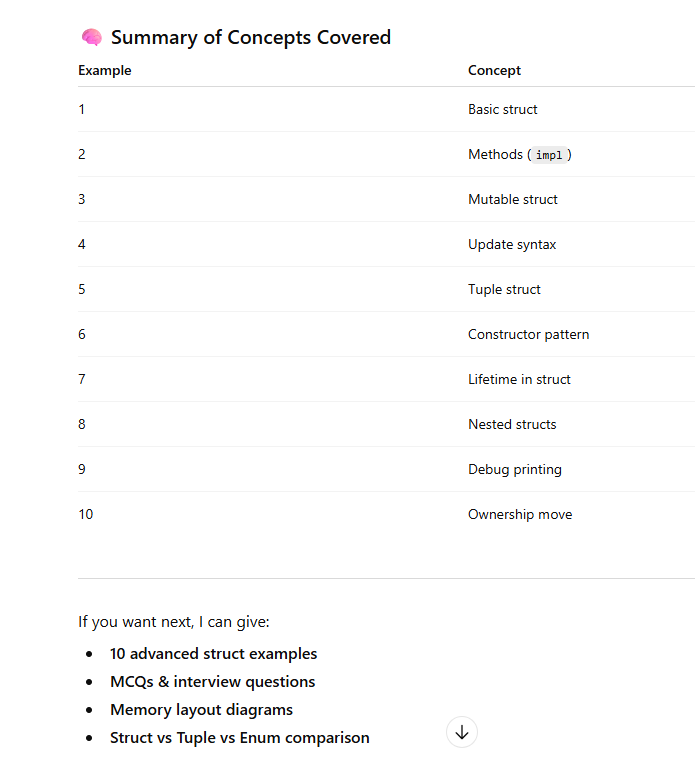
Struct vs Tuple vs Enum comparison in rust
What each one represents
Tuple
A quick group of values (can be different types)
Fields are accessed by position (.0, .1)
Best for temporary / return multiple values (small, simple)
Struct
A named data model
Fields have meaningful names (user.name)
Best for real-world objects (User, Order, Product, Hospital, etc.)
Enum
A value that can be one of many variants
Each variant can carry different data
Best for states, modes, message types, success/failure, etc.
Side-by-side example
1) Tuple
fn main() {
    let user = ("Ashwani", 27, true); // (name, age, active)
    println!("name={}, age={}, active={}", user.0, user.1, user.2);
}
Output
name=Ashwani, age=27, active=true
✅ Use when:
fast grouping

return multiple values

you don’t need long-term readability
2) Struct
struct User {
    name: String,
    age: u8,
    active: bool,
}

fn main() {
    let u = User {
        name: "Ashwani".to_string(),
        age: 27,
        active: true,
    };

    println!("name={}, age={}, active={}", u.name, u.age, u.active);
}
Output
name=Ashwani, age=27, active=true
✅ Use when:
data has meaning and will be used often

you want readability and maintainability

you want methods (impl User { ... })
3) Enum
enum LoginState {
    LoggedIn { name: String },
    LoggedOut,
    Blocked(String),
}

fn main() {
    let state = LoginState::Blocked("Too many attempts".to_string());

    match state {
        LoginState::LoggedIn { name } => println!("Welcome {}", name),
        LoginState::LoggedOut => println!("Please login"),
        LoginState::Blocked(reason) => println!("Blocked: {}", reason),
    }
}
Output
Blocked: Too many attempts
✅ Use when:
the value can be different kinds (variants)
you must handle all cases (match ensures safety)
you’re modeling state machines, commands, errors
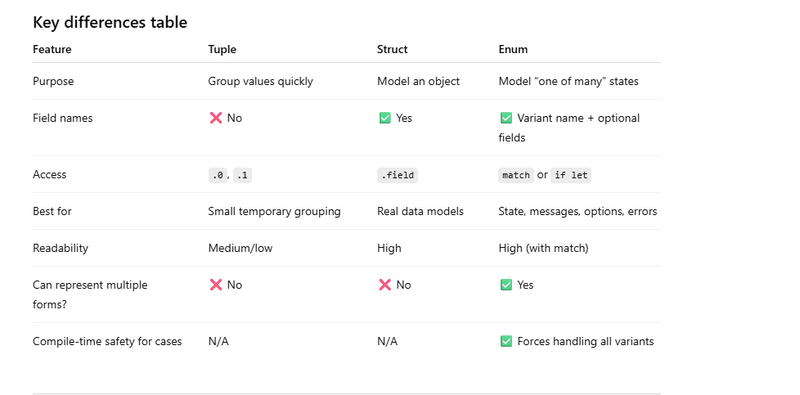
When to choose what (easy rule)
Choose Tuple when:
you return multiple values from a function:

(min, max), (data, count), (bool, i32)

it’s small and local
Choose Struct when:
fields have meaning and will be used repeatedly

you want clean code and maintenance

you want methods and clear field access
Choose Enum when:
something can be in different forms/states

you would otherwise use “status strings” or “magic numbers”

you need guaranteed handling of all cases

Real-world analogy (very simple)
Tuple = “a packet of values”
Struct = “a form with labeled fields”
Enum = “a switchboard with different modes”
Programming on structs
Simple enum + match
enum Direction {
    North,
    South,
    East,
    West,
}

fn main() {
    let d = Direction::East;

    match d {
        Direction::North => println!("Going North"),
        Direction::South => println!("Going South"),
        Direction::East  => println!("Going East"),
        Direction::West  => println!("Going West"),
    }
}
Output
Going East
2️⃣ Enum with data (tuple variants)
enum Shape {
    Circle(f64),
    Rectangle(f64, f64),
}

fn main() {
    let s = Shape::Rectangle(10.0, 5.0);

    match s {
        Shape::Circle(r) => println!("Circle area = {}", 3.14 * r * r),
        Shape::Rectangle(w, h) => println!("Rectangle area = {}", w * h),
    }
}
Output
Rectangle area = 50
3️⃣ Enum with named fields
enum Message {
    Quit,
    Move { x: i32, y: i32 },
}

fn main() {
    let msg = Message::Move { x: 3, y: 7 };

    match msg {
        Message::Quit => println!("Quit message"),
        Message::Move { x, y } => println!("Move to {}, {}", x, y),
    }
}
Output
Move to 3, 7
4️⃣ Enum + impl method
enum TrafficLight {
    Red,
    Yellow,
    Green,
}

impl TrafficLight {
    fn action(&self) -> &str {
        match self {
            TrafficLight::Red => "Stop",
            TrafficLight::Yellow => "Slow down",
            TrafficLight::Green => "Go",
        }
    }
}

fn main() {
    let light = TrafficLight::Green;
    println!("{}", light.action());
}
Output
Go
5️⃣ Enum representing Result-like state
enum Status {
    Success,
    Failure(String),
}

fn main() {
    let s = Status::Failure("Network error".to_string());

    match s {
        Status::Success => println!("Operation successful"),
        Status::Failure(msg) => println!("Failed: {}", msg),
    }
}
Output
Failed: Network error
6️⃣ Enum with Option style usage
enum MyOption<T> {
    Some(T),
    None,
}

fn main() {
    let value = MyOption::Some(10);

    match value {
        MyOption::Some(v) => println!("Value = {}", v),
        MyOption::None => println!("No value"),
    }
}
Output
Value = 10
7️⃣ Enum in function return type
enum Temperature {
    Cold,
    Warm,
    Hot,
}

fn check_temp(t: i32) -> Temperature {
    if t < 20 {
        Temperature::Cold
    } else if t < 35 {
        Temperature::Warm
    } else {
        Temperature::Hot
    }
}

fn main() {
    let t = check_temp(30);

    match t {
        Temperature::Cold => println!("Cold"),
        Temperature::Warm => println!("Warm"),
        Temperature::Hot => println!("Hot"),
    }
}
Output
Warm
8️⃣ Enum storing multiple data types
enum Data {
    Int(i32),
    Float(f64),
    Text(String),
}

fn main() {
    let d = Data::Text("Rust".to_string());

    match d {
        Data::Int(i) => println!("Int {}", i),
        Data::Float(f) => println!("Float {}", f),
        Data::Text(s) => println!("Text {}", s),
    }
}
Output
Text Rust
9️⃣ Enum with recursive structure
enum List {
    Cons(i32, Box<List>),
    Nil,
}

fn main() {
    let list = List::Cons(1,
        Box::new(List::Cons(2,
            Box::new(List::Nil))));

    match list {
        List::Cons(v, _) => println!("First value {}", v),
        List::Nil => println!("Empty list"),
    }
}
Output
First value 1
🔟 Enum + if let
enum LoginState {
    LoggedIn(String),
    LoggedOut,
}

fn main() {
    let state = LoginState::LoggedIn("Ashwani".to_string());

    if let LoginState::LoggedIn(name) = state {
        println!("Welcome {}", name);
    }
}
Output
Welcome Ashwani



Top comments (0)