
Diagram of Learning journey
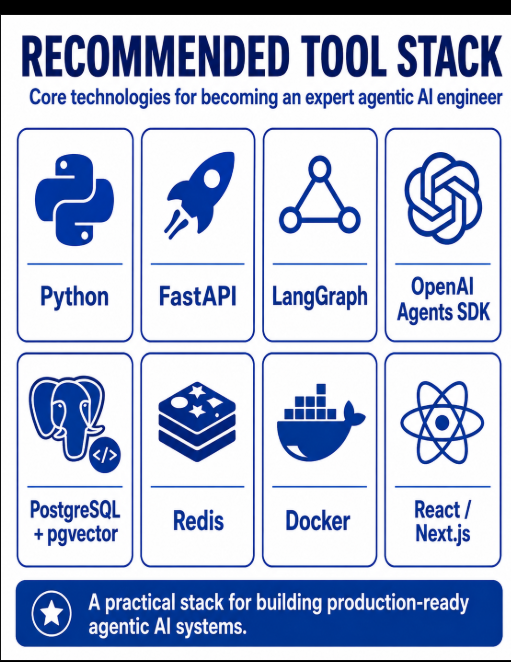
Programming Languages
Python Skills
LLM Fundamentals
Prompt Engineering
Structured Output + Pydantic
Tool / Function Calling
APIs
Backend — FastAPI
RAG
Vector Databases
Agent Framework — LangGraph
OpenAI Agents SDK
State & Memory
MCP — Very Important
Multi-Agent Systems
Workflow Engineering
Databases
Frontend
Authentication & Authorization
Human-in-the-Loop
Guardrails & AI Security
Evaluation
Observability / Tracing
Background Processing
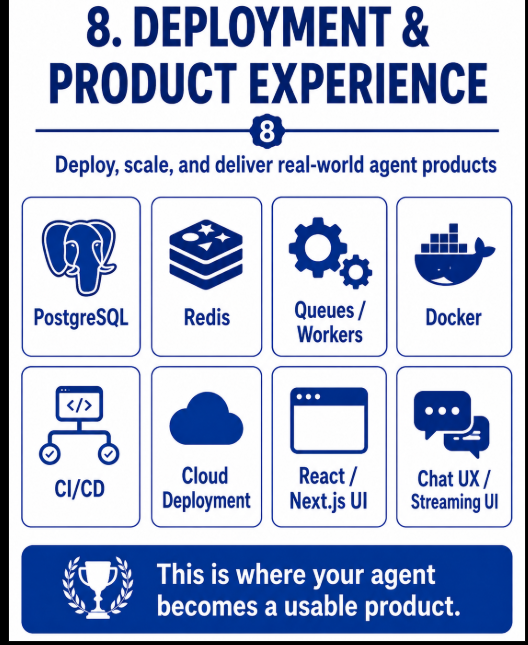
DevOps
Follow this sequence:
You do not need to become an expert in:
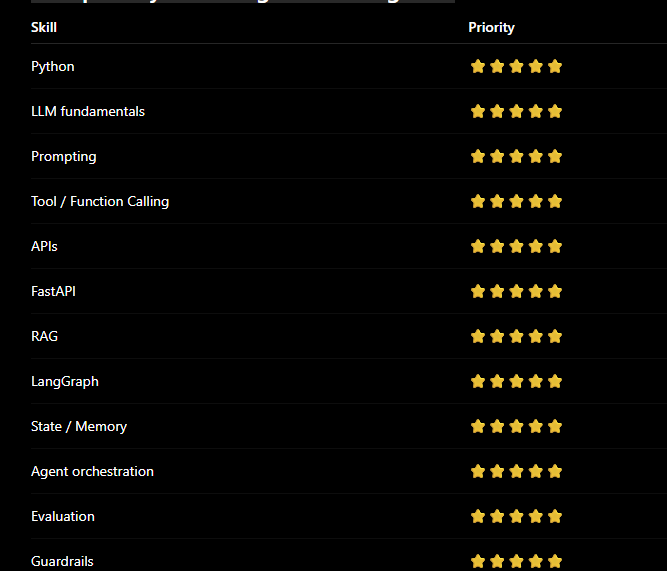
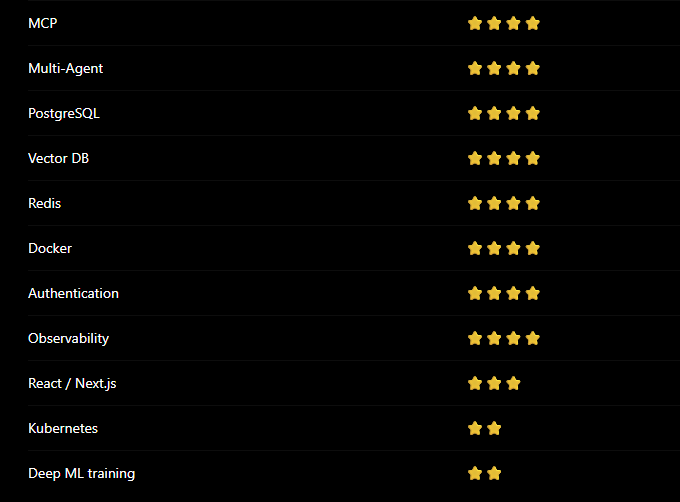
Skill priority for an Agentic AI Engineer
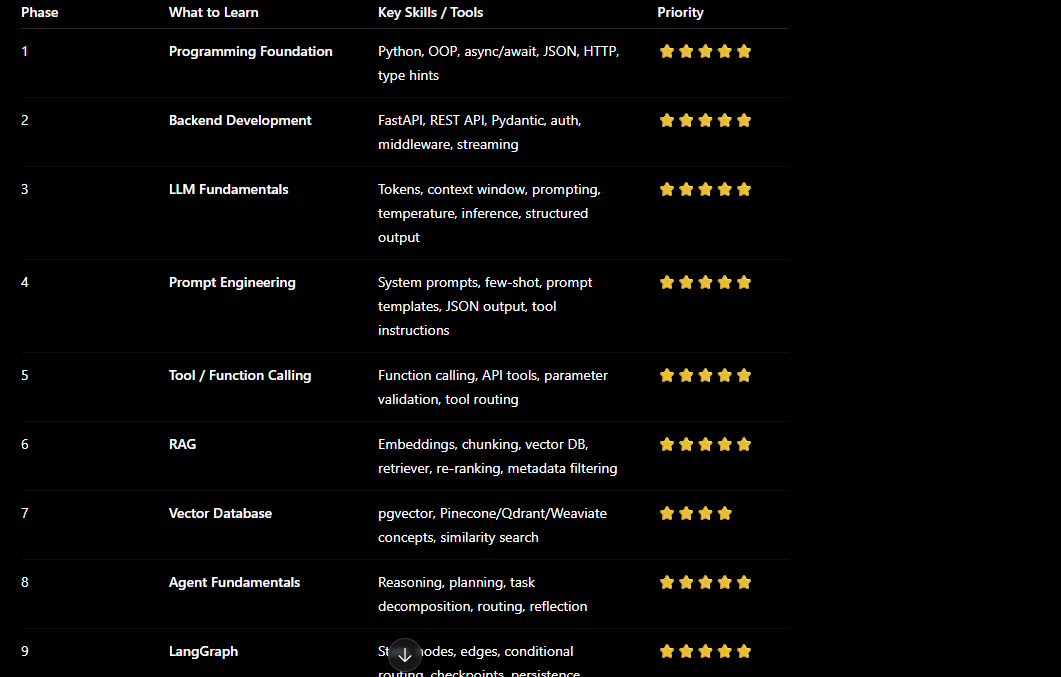
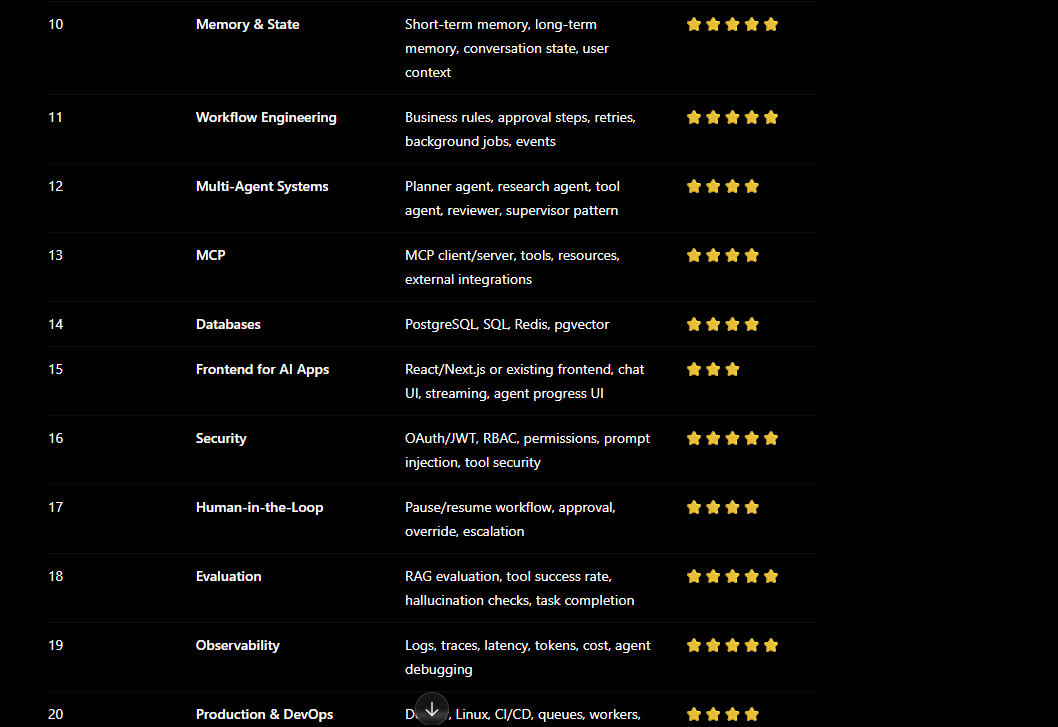
Best learning order
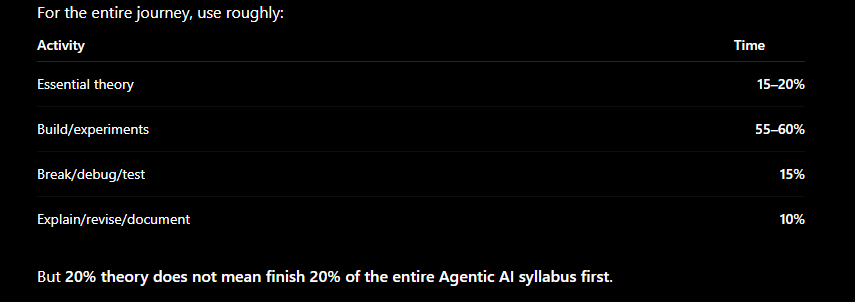
Recommended learning rule
My recommended order
Final recommended flow
New Project 0 — LLM Foundations Experiment Lab
PROJECT 1 — AI Text Analyzer
PROJECT 2 — AI Booking Tool Assistant
PROJECT 3 — Enterprise Knowledge RAG Assistant
PROJECT 4 — AI Incident Investigation Agent
PROJECT 5 — Stateful LangGraph Operations Agent
PROJECT 6 — Multi-Agent Customer Operations System
PROJECT 7 — MCP Enterprise Integration Agent
PROJECT 8 — Production Agentic AI Platform
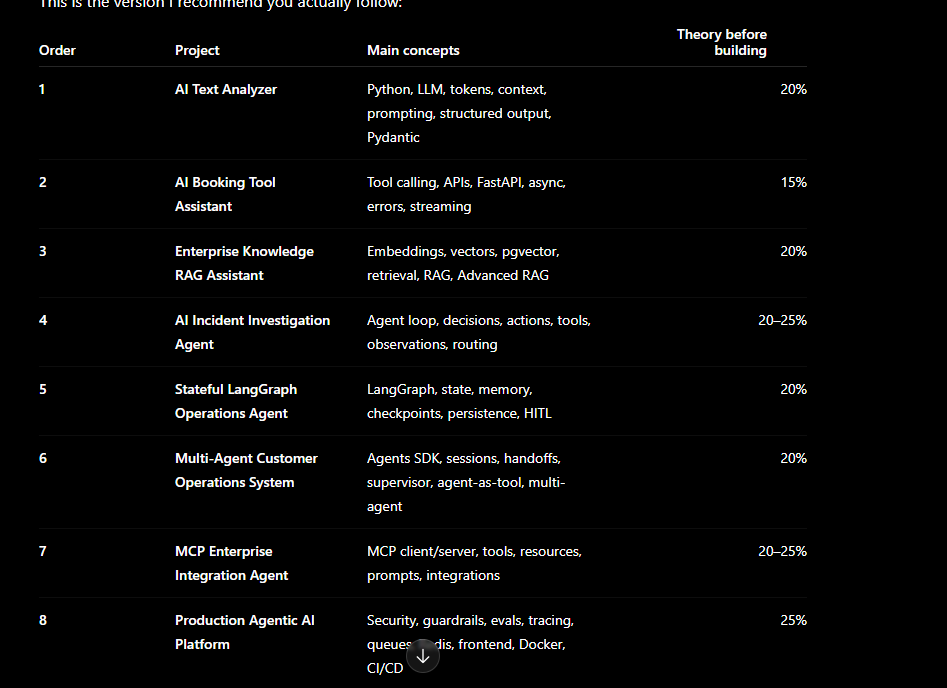
Your complete project-based roadmap
You need a combination of
AI + backend + RAG + agents + tools/APIs + production engineering.
Python → FastAPI → LLM APIs → RAG → LangGraph → OpenAI Agents SDK → MCP → PostgreSQL/Vector DB → Redis → Docker → Observability/Evaluation → React/Next.js or your existing frontend
Diagram of Learning journey
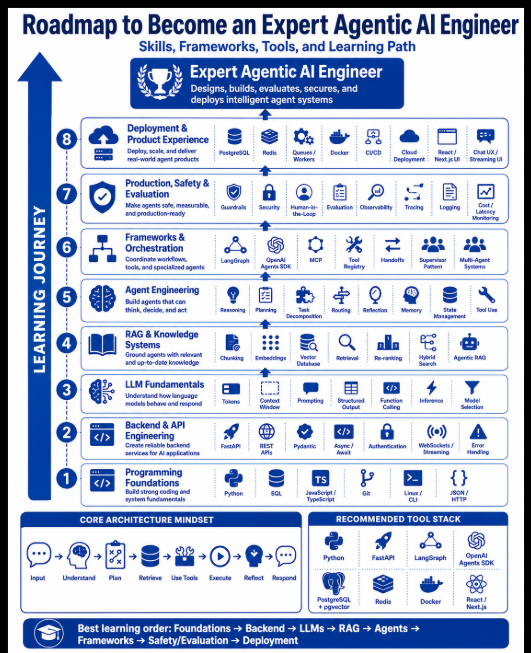
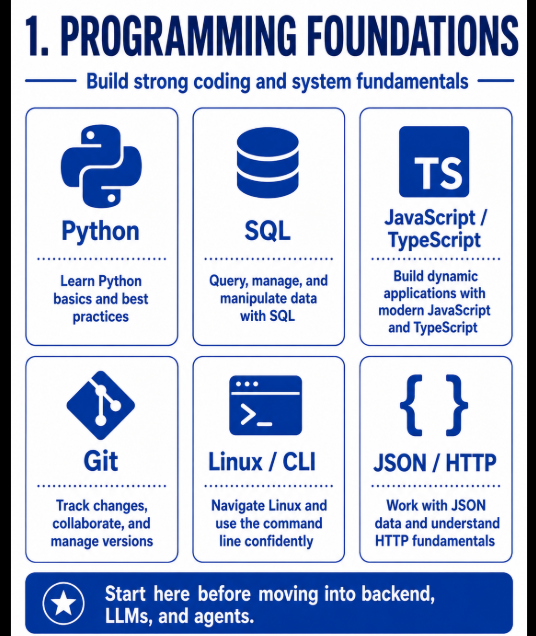
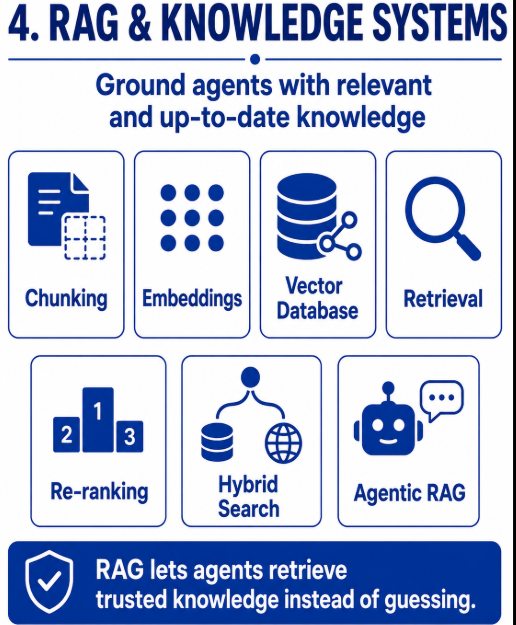
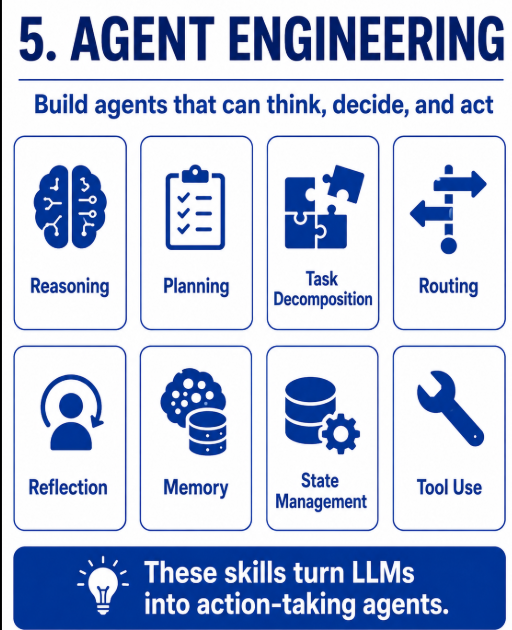
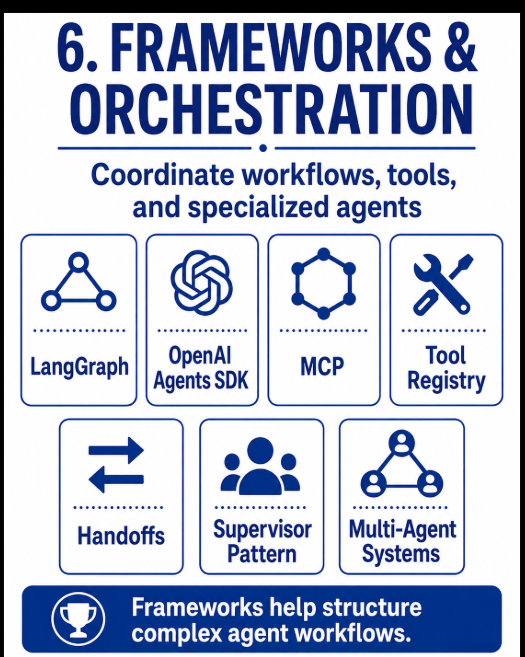
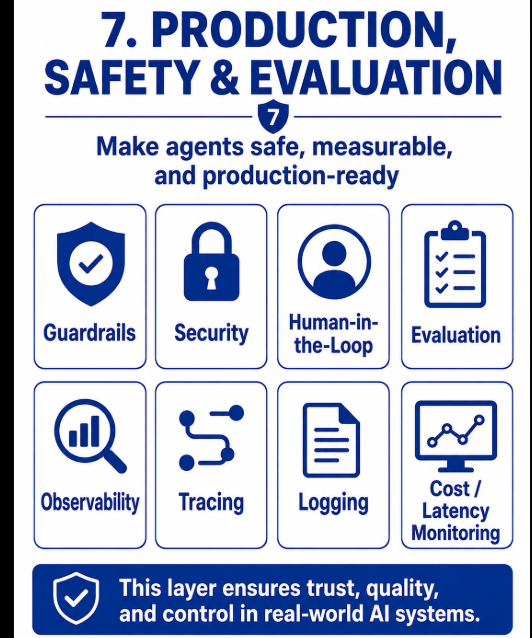
Programming Languages
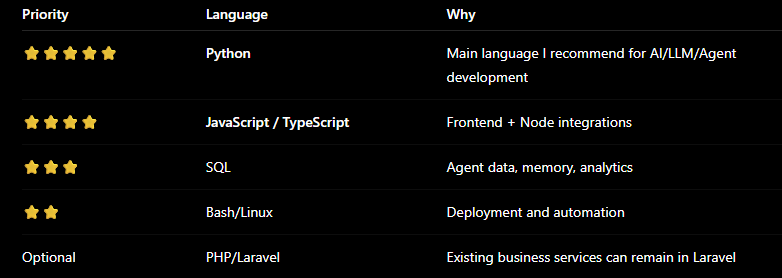
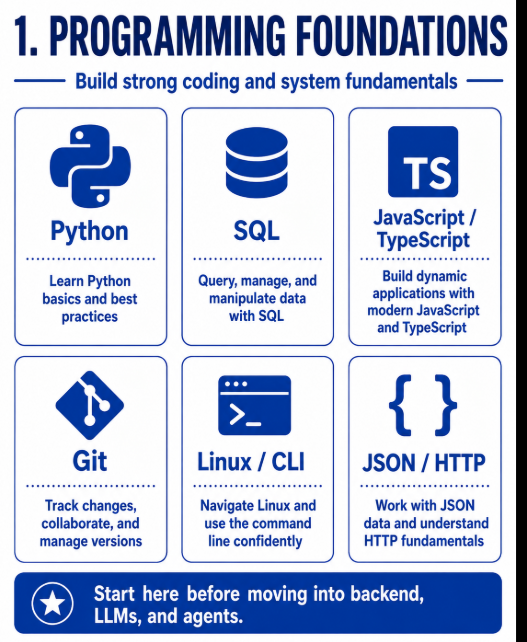
For you, I would not abandon Laravel.
Instead:
Existing Application
Laravel
     │
     │ REST API
     ↓
Agentic AI Service
Python + FastAPI
Python Skills
Before learning agent frameworks, become comfortable with:
Python Basics
│
├── Variables
├── Lists / Dicts / Sets
├── Functions
├── Classes / OOP
├── Exceptions
├── Modules
├── Type Hints
├── Decorators
│
├── JSON
├── HTTP requests
│
├── async / await
└── Environment variables
Pay special attention to:
async / await
Agent systems frequently wait on APIs, databases, LLM calls, search, and tools. FastAPI is based on Python type hints and supports asynchronous application patterns.
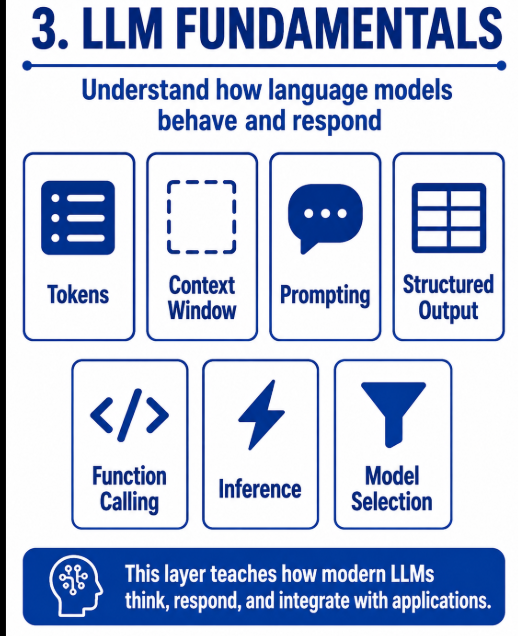
LLM Fundamentals
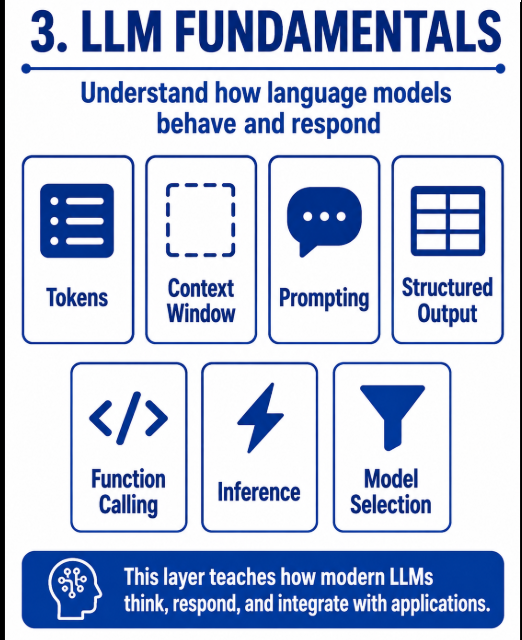
Before Agentic AI, understand the LLM itself.
Learn:
LLM
│
├── Prompt
├── System Prompt
├── Tokens
├── Context Window
├── Temperature
├── Structured Output
├── JSON Output
├── Function Calling
├── Tool Calling
├── Streaming
└── Model Selection
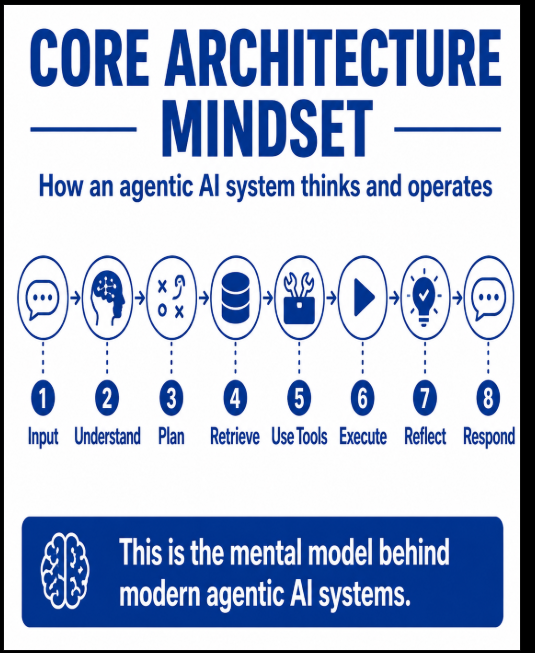
You should understand this basic interaction:
Prompt
  ↓
LLM
  ↓
Response
Then:
Prompt
  ↓
LLM
  ↓
Structured JSON
Then:
Prompt
  ↓
LLM
  ↓
Tool Decision
  ↓
Tool Call
  ↓
Result
  ↓
LLM
That third flow is where agent development starts becoming interesting.
Prompt Engineering
You don't need to become only a "prompt engineer", but you need strong prompting skills.
Learn:
System Instructions
User Prompt
Context
Few-shot Examples
Structured Output
Prompt Templates
Prompt Versioning
Tool Instructions
Agent Instructions
For example:
You are a hospital research agent.
Goal:
Find hospitals matching the user's requirements.
You may use:
- hospital_search
- web_search
- price_lookup
Return:
{
 hospital_name,
 location,
 price,
 rating
}
Structured Output + Pydantic
This is very important for production AI.
Don't build systems that return random free text everywhere.
Prefer:
LLM
 ↓
Validated structure
 ↓
Application
For example:
class HospitalResult:


    name: str
    city: str
    price: float
    rating: float
This allows AI output to become usable by backend applications.
Tool / Function Calling
This is one of the most important Agentic AI skills.
Understand:
Agent
 ↓
Decides tool
 ↓
Calls function
 ↓
Function executes
 ↓
Result returns
 ↓
Agent reasons again
Example:
User:
"Check my booking."
Agent
 ↓
get_booking_status()
 ↓
Booking API
 ↓
Status = Confirmed
 ↓
Agent
 ↓
Response
The OpenAI Agents SDK supports tools as part of its core agent model along with guardrails, handoffs, sessions, and orchestration.
APIs
An Agentic AI expert should be very comfortable with APIs.
Learn:
REST APIs
GET
POST
PUT
PATCH
DELETE
JSON
Headers
Bearer Tokens
OAuth
API Keys
Webhooks
Retries
Timeouts
Rate Limits
Because eventually:
AI Agent
   │
   ├── Gmail API
   ├── Calendar API
   ├── Payment API
   ├── CRM API
   ├── Hospital API
   ├── Booking API
   └── Internal Microservices
Your existing backend/API experience gives you a strong advantage here.
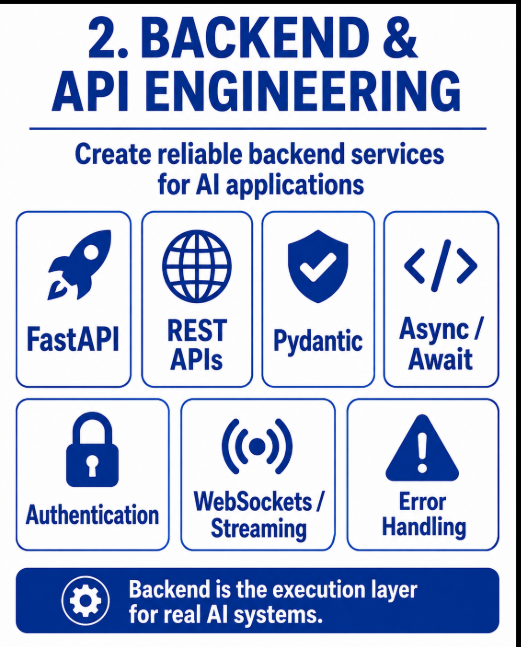
Backend — FastAPI
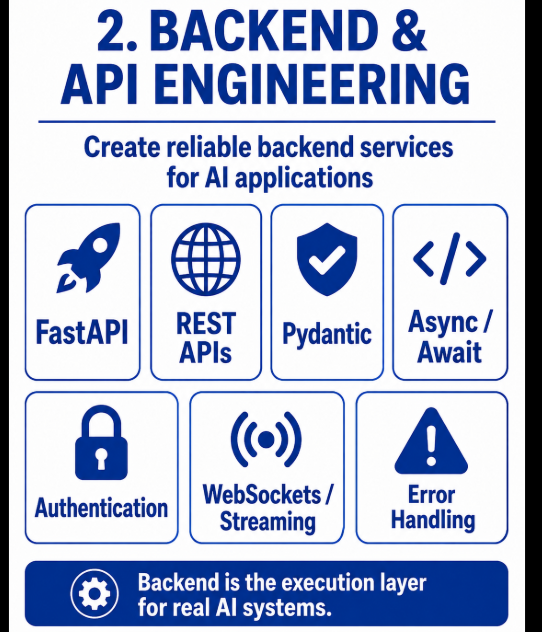
For Agentic AI development, I recommend:
Python + FastAPI
FastAPI describes itself as a modern Python framework for building APIs using Python type hints, and it supports async endpoints and streaming responses.
Architecture:

Frontend
   ↓
FastAPI
   ↓
Agent Service
   ↓
LangGraph
   ↓
LLM
Learn:
FastAPI
│
├── Routes
├── Request/Response
├── Pydantic
├── Dependency Injection
├── Authentication
├── Middleware
├── async/await
├── Streaming
├── Background Tasks
├── WebSockets/SSE
└── Error Handling
RAG
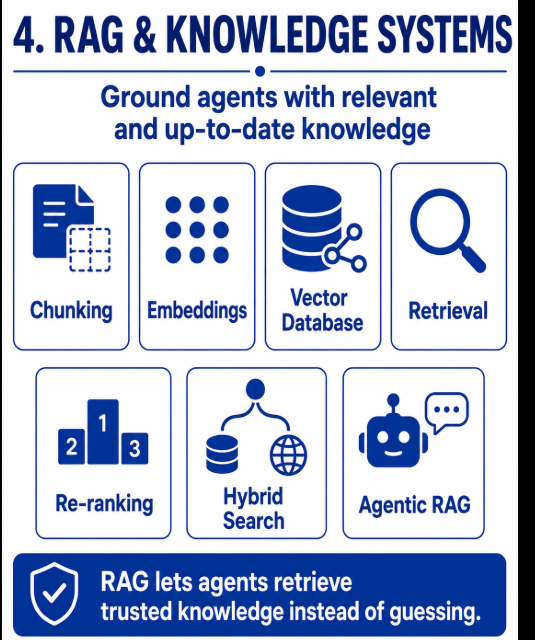
RAG is a core skill, not a separate career you should learn instead of Agentic AI.
Learn:
Documents
 ↓
Chunking
 ↓
Embedding
 ↓
Vector DB
 ↓
Retriever
 ↓
Relevant Context
 ↓
LLM
Then move into:
Advanced RAG
Query Rewriting
Hybrid Search
Metadata Filtering
Re-ranking
Multi-query Retrieval
Agentic RAG
RAG Evaluation
LangGraph's official documentation includes retrieval-agent patterns where an LLM can decide whether it needs to retrieve context from a vector store or answer directly.
Vector Databases
Learn the concepts before learning ten products.
Understand:
Embedding


Similarity Search


Cosine Similarity


Top-K


Metadata Filtering


Hybrid Search
For your stack, a practical starting point is:
PostgreSQL
+
pgvector
You can later explore dedicated vector systems depending on the project.
Agent Framework — LangGraph
This should be one of your main frameworks.
LangGraph focuses on orchestration for long-running, stateful agents and represents workflows using state and graph-based execution.
Learn:
LangGraph
│
├── State
├── Nodes
├── Edges
├── Conditional Edges
├── Graph
├── Tool Nodes
├── Checkpoints
├── Memory
├── Persistence
├── Human-in-the-loop
└── Multi-agent workflows
Conceptually:
START
  ↓
Understand
  ↓
Plan
  ↓
Need RAG?
 /       \
Yes       No
 ↓         ↓
Retrieve  Reason
  \       /
   ↓
Call Tool?
 /       \
Yes       No
 ↓         ↓
Tool      Respond
 ↓
Reflect
 ↓
END
That's why LangGraph fits your architecture extremely well.
OpenAI Agents SDK
After understanding agent fundamentals, learn the OpenAI Agents SDK too.
Its official SDK covers:
Agents
Tools
Guardrails
Handoffs
Sessions
Agent orchestration
Tracing
For example:
Triage Agent
     ↓
 ┌───┼──────────┐
 ↓   ↓          ↓
Sales Research Support
Agent Agent     Agent
So I would learn:
LangGraph first for deep orchestration concepts + OpenAI Agents SDK for another production agent-development approach.
State & Memory
This is critical.
Understand the difference between:
Context
≠
Memory
≠
State
Learn:
Short-term
Current conversation
Current workflow
Current task
Long-term
User preferences
Previous interactions
Historical information
Agent state
Current step
Completed tasks
Pending tasks
Tool results
Errors
The OpenAI Agents SDK also provides sessions for maintaining conversation history across agent runs.
MCP — Very Important
Add Model Context Protocol (MCP) to your roadmap.
MCP provides standardized mechanisms for servers to expose capabilities such as tools, resources, and prompts to AI applications.
Conceptually:
AI Agent
   ↓
MCP Client
   ↓
MCP Server
   │
   ├── Tools
   ├── Resources
   └── Prompts
For example:
Agent
 ↓
GitHub MCP
 ↓
Repositories / Issues / PRs
or:
Agent
 ↓
Database MCP
 ↓
SQL Database
An Agentic AI engineer should know MCP.
Multi-Agent Systems
Don't jump here immediately.
First master single agents.
Then:
Coordinator Agent
       │
       ├── Planner Agent
       ├── Research Agent
       ├── RAG Agent
       ├── Tool Agent
       ├── Analyst Agent
       └── Reviewer Agent
Learn:
Agent Routing


Agent Handoffs


Supervisor Pattern


Planner-Executor Pattern


Reviewer Pattern


Parallel Agents


Sequential Agents


Agent-as-Tool
Workflow Engineering
This skill separates demos from real enterprise agents.
Learn:
Workflow Engine
       ↓
Business Rules
       ↓
Approval
       ↓
Tool Execution
       ↓
Background Job
       ↓
Event Trigger
       ↓
Notification
LangGraph explicitly distinguishes predefined workflows from dynamic agents and supports persistence and workflow/agent patterns.
Databases
You should know:
SQL
PostgreSQL
MySQL
Cache / temporary state
Redis
Vector storage
PostgreSQL + pgvector
You already understand MySQL/MariaDB, so PostgreSQL would be a natural additional skill for AI-oriented systems.
Frontend
Frontend is useful but not the main skill for becoming an Agentic AI expert.
You need enough frontend knowledge to create good AI interfaces.
You can use:
React
+
Next.js
+
TypeScript
or continue using:
HTML
Tailwind CSS
JavaScript
Alpine.js
for simpler AI dashboards.
Important AI frontend concepts are:
Streaming responses


Chat UI


Tool execution status


Agent progress


Human approval UI


File upload


Conversation history


Citation display


Error/retry UI
For example:
AI is working...
✓ Understanding request
✓ Searching knowledge base
✓ Calling Hospital API
⟳ Comparing results
□ Generating report
That is much more useful for Agentic AI than simply creating a chatbot box.
Authentication & Authorization
Enterprise AI agents need security.
Learn:
OAuth 2.0


JWT


API Keys


RBAC


Permissions


Service Accounts


Secrets Management
Example:
Agent wants:
delete_user()


        ↓


Permission check


        ↓


Admin?
 /   \
Yes   No
 ↓     ↓
Run   Deny
Your existing Keycloak knowledge will be valuable here.
Human-in-the-Loop
Very important for real applications.
Example:
Agent
 ↓
Refund ₹50,000
 ↓
Approval Required
 ↓
Manager
 ↓
Approve
 ↓
Agent executes refund
Learn how to:
Pause workflow
Save state
Request approval
Resume workflow
Reject action
Override agent decision
Guardrails & AI Security
Learn:
Prompt Injection


Jailbreak Protection


Data Leakage


Tool Permissions


Input Validation


Output Validation


PII Protection


SQL Injection


Tool Abuse


Unsafe Code Execution
Production Agentic AI is as much security engineering as AI engineering.
Evaluation
Many developers skip this.
Don't.
Learn to evaluate:
Agent accuracy


RAG quality


Tool selection


Tool success rate


Hallucinations


Task completion


Latency


Token usage


Cost
Think:
Did the agent answer correctly?


Did it choose the correct tool?


Did the workflow finish?


Did retrieval return useful information?
Observability / Tracing
You should be able to see:
User Request
      ↓
Agent
      ↓
LLM call #1
      ↓
Tool call
      ↓
RAG search
      ↓
LLM call #2
      ↓
Final result
And measure:
Latency


Tokens


Errors


Tool calls


Cost


Workflow duration
Background Processing
Many agents execute jobs that take longer than a normal HTTP request.
Learn concepts around:
Queues


Workers


Retry


Scheduled Jobs


Event-driven execution
Typical architecture:
FastAPI
   ↓
Queue
   ↓
Worker
   ↓
Agent Workflow
   ↓
Database
DevOps
To become an expert rather than only a prototype developer, learn:
Docker


Linux


Nginx


CI/CD
GitHub Actions
Environment Variables


Secrets


Logging


Monitoring
Later:
Kubernetes


Cloud deployment


Autoscaling
Your Recommended Agentic AI Stack
For your path, I would build around this:
 FRONTEND
                   │
       React / Next.js / Tailwind
          OR existing frontend
                   │
                   ↓
               FastAPI
                   │
        ┌──────────┴─────────┐
        ↓                    ↓
   Authentication        Agent API
                           │
                           ↓
                       LangGraph
                           │
          ┌────────────────┼───────────────┐
          ↓                ↓               ↓
         LLM              RAG             Tools
          │                │               │
          │          Embeddings            ├── REST API
          │                │               ├── Laravel APIs
          │           Vector DB            ├── Database
          │                │               ├── Email
          │           Documents            ├── Calendar
          │                                └── Browser
          │
          ├──────── Memory / State
          │
          ├──────── MCP
          │
          ├──────── Multi-Agent
          │
          └──────── Guardrails
                   │
                   ↓
             PostgreSQL
              + Redis
              + pgvector
                   │
                   ↓
               Docker
                   │
                   ↓
           Monitoring / Evals
What you should learn first
Don't try to learn everything simultaneously.
Follow this sequence:
PHASE 1
Python
 ↓
FastAPI
 ↓
LLM APIs
 ↓
Prompting
 ↓
Structured Output
 ↓
Tool Calling
PHASE 2
Embeddings
 ↓
Vector DB
 ↓
RAG
 ↓
Advanced RAG
PHASE 3
Agent Fundamentals
 ↓
LangGraph
 ↓
State
 ↓
Memory
 ↓
Tool Routing
 ↓
Human-in-the-Loop
PHASE 4
OpenAI Agents SDK
 ↓
Agent Handoffs
 ↓
Multi-Agent
 ↓
MCP
PHASE 5
Evaluation
 ↓
Guardrails
 ↓
Observability
 ↓
Security
 ↓
Docker
 ↓
Production Deployment
What NOT to spend too much time on initially
You do not need to become an expert in:
TensorFlow
PyTorch
Training huge LLMs
Advanced Data Science
Advanced Mathematics
Computer Vision
Model architecture research
before becoming productive in Agentic AI.
Understand the fundamentals of ML, deep learning, transformers, embeddings, and inference, but your main specialization should be:
building AI applications and autonomous workflows around foundation models.
Skill priority for an Agentic AI Engineer
The main idea
For you, I would target this professional profile:
Full-Stack Developer → Python/FastAPI Developer → GenAI Developer → RAG Engineer → Agentic AI Engineer → Production AI Engineer
Best learning order
Python
   ↓
FastAPI
   ↓
LLM Fundamentals
   ↓
Prompt Engineering
   ↓
Structured Output
   ↓
Tool / Function Calling
   ↓
Embeddings
   ↓
Vector Database
   ↓
RAG
   ↓
Advanced RAG
   ↓
Agent Fundamentals
   ↓
LangGraph
   ↓
State + Memory
   ↓
Workflow Execution
   ↓
Human-in-the-Loop
   ↓
Multi-Agent Systems
   ↓
MCP
   ↓
Security + Guardrails
   ↓
Evaluation
   ↓
Observability
   ↓
Docker + Production Deployment
       Agentic AI Engineer
                       │
        ┌──────────────┼──────────────┐
        ↓              ↓              ↓
      LLM             RAG          Backend
        │              │              │
   Prompting       Embeddings      FastAPI
   Reasoning       Vector DB       APIs
   Tools           Retrieval       Database
        │              │              │
        └──────────────┼──────────────┘
                       ↓
                 Agent Framework
                   LangGraph
                       ↓
              State + Memory
                       ↓
                 Tool Calling
                       ↓
                  Workflows
                       ↓
                 Multi-Agent
                       ↓
              MCP + Integrations
                       ↓
          Security + Evaluation
                       ↓
             Production / DevOps
Recommended learning rule
My recommended order
I would use this order:

1. Python for AI
        ↓
2. LLM Fundamentals
        ↓
3. Prompt Engineering
        ↓
4. Structured Output + Pydantic
        ↓
5. LLM APIs
        ↓
6. Tool / Function Calling
        ↓
7. FastAPI + API Integration
        ↓
8. Embeddings
        ↓
9. Vector Database
        ↓
10. RAG
        ↓
11. Advanced RAG
        ↓
12. Agent Fundamentals
        ↓
13. Workflow vs Agent
        ↓
14. LangGraph
        ↓
15. State
        ↓
16. Memory
        ↓
17. Persistence / Checkpoints
        ↓
18. Tool Routing
        ↓
19. Human-in-the-Loop
        ↓
20. OpenAI Agents SDK
        ↓
21. Multi-Agent Systems
        ↓
22. MCP
        ↓
23. Authentication / Authorization
        ↓
24. Guardrails / AI Security
        ↓
25. Evaluation
        ↓
26. Observability / Tracing
        ↓
27. Background Processing
        ↓
28. Production Databases / Redis
        ↓
29. AI Frontend
        ↓
30. Docker / CI-CD / Deployment
This is very close to the blog's recommended sequence, with one practical adjustment: I would experiment with an LLM before deeply studying FastAPI. The roadmap itself shows the progression from prompt → LLM → response, then structured JSON, then tool decisions/calls, which makes that ordering easier for learning.
Final recommended flow
PROJECT 0
LLM Foundations Experiment Lab
│
├── Transformer
├── Attention
├── Tokens
├── Tokenization
└── Embeddings
        ↓

PROJECT 1
AI Text Analyzer
│
├── LLM API
├── Prompt Engineering
├── Context
├── Temperature
├── Structured Output
└── Pydantic
        ↓

PROJECT 2
AI Booking Tool Assistant
│
├── Function Calling
├── Tool Calling
├── FastAPI
├── REST APIs
└── Async
        ↓

PROJECT 3
Enterprise RAG Assistant
│
├── Embeddings deeper
├── Vector DB
├── Chunking
├── Retrieval
├── RAG
└── Advanced RAG
        ↓

PROJECT 4
Single AI Agent
        ↓
PROJECT 5
LangGraph Stateful Agent
        ↓
PROJECT 6
Multi-Agent System
        ↓
PROJECT 7
MCP Integration
        ↓
PROJECT 8
Production Agentic AI Platform
New Project 0 — LLM Foundations Experiment Lab
Purpose: Understand what happens inside an LLM application before building the AI Text Analyzer.
Concepts covered
Transformer
↓
Attention
↓
Tokens
↓
Tokenization
↓
Embeddings
 ↓
Parameters / Weights
↓
Pre-training
↓
Fine-tuning
 ↓
Instruction Tuning
↓
LLM / Foundation Model
↓
Inference
↓
Context Window
 ↓
Temperature
 ↓
 Top-P
↓
Next-Token Prediction
 ↓
Hallucination
Also learn only the minimum related concepts:
Neural Network
    ↓
Deep Learning
    ↓
Transformer
    ↓
Attention
    ↓
Tokens
    ↓
Embeddings
    ↓
LLM
What theory should you learn?
For Project 0, use roughly:
Theory: 30%
Experiments: 50%
Debug / comparison / explanation: 20%
This project can have slightly more theory because these are foundational concepts.
But still do not study Transformer mathematics deeply.
Step 1 — Understand Transformer Fundamentals
Learn:
What a Transformer is
Why modern LLMs use Transformers
How Transformers process sequences
Encoder and decoder concepts
Positional information
Feed Forward Network
Residual connections
Normalization
Practical Experiment
Take a simple sentence:
The animal didn't cross the street because it was tired.
Observe how the Transformer processes all tokens and builds contextual representations.
Step 2 — Understand Attention and Self-Attention
Learn:
What Attention means
What Self-Attention means
Query
Key
Value
Attention score
Attention weight
How one token finds relevant information from other tokens
Practical Experiment
Use the sentence:
The animal didn't cross the street because it was tired.
Analyze why the word:
it
is strongly related to:
animal

instead of:

street
Step 3 — Understand Tokens and Tokenization
Learn:
What a token is
What tokenization means
Word tokens
Subword tokens
Special tokens
Token IDs
Why LLMs do not directly process normal text
Flow
Human Text
   ↓
Tokenizer
   ↓
Tokens
   ↓
Token IDs
Practical Experiment
Compare tokenization for:
Artificial Intelligence
Agentic AI
unbelievable
developer
Observe how different words may be split into different numbers of tokens.
Step 4 — Understand Embeddings
Learn:
What embeddings are
Why embeddings are required
Embedding vectors
Semantic meaning
Vector dimensions
Similarity between vectors
Cosine similarity
Why similar meanings have nearby vectors
Flow
Text
 ↓
Tokens
 ↓
Embedding Model
 ↓
Vectors
 ↓
Semantic Representation
Practical Experiment
Compare:
car
automobile
banana
You should observe:
car ↔ automobile
has higher semantic similarity than:
car ↔ banana
Step 5 — Understand Parameters and Weights
After embeddings, understand what model parameters are.
Learn:
What parameters are
What weights are
What biases are
Why LLMs contain billions of parameters
How parameters store learned patterns
Difference between parameters and training data
Difference between model parameters and generation parameters
Important Difference
Model Parameters
     ↓
Learned during training

Temperature / Top-P
     ↓
Configured during inference
Practical Experiment
Use a small neural network example and observe how changing weights changes its output.
You do not need to manually work with billions of parameters.
The goal is to understand:
Training
   ↓
Updates Parameters
   ↓
Model Learns Patterns
Step 6 — Understand Pre-training
Learn how an LLM learns before it becomes a usable assistant.
Learn:
What pre-training means
Large training datasets
Next-token prediction
Training examples
Loss
Parameter updates
How patterns are learned from massive text datasets
Simplified Flow
Huge Text Dataset
      ↓
Tokenization
      ↓
Transformer
      ↓
Predict Next Token
      ↓
Compare Prediction
      ↓
Calculate Loss
      ↓
Update Parameters
      ↓
Repeat Billions of Times
      ↓
Pre-trained Model
Practical Experiment
Given:
The capital of France is ___
observe how a language model predicts likely next tokens.
Step 7 — Understand Fine-Tuning
Learn:
What fine-tuning means
Why a pre-trained model may require specialization
Domain-specific fine-tuning
Task-specific fine-tuning
Difference between pre-training and fine-tuning
How fine-tuning updates model parameters
Example
General Pre-trained LLM
        ↓
Medical Dataset
        ↓
Fine-Tuning
        ↓
Medical-focused Model
Practical Experiment
Compare responses from:
General-purpose model
and a model adapted for a specific task or domain.
Step 8 — Understand Instruction Tuning
Learn how a language model becomes better at following human instructions.
Learn:
What instruction tuning means
Instruction-response datasets
Following commands
Question-answer training
Difference between fine-tuning and instruction tuning
Example Training Data
Instruction:
Summarize this paragraph.
Input:
Long paragraph...
Expected Output:
Short summary...
Flow
Pre-trained LLM
      ↓
Instruction + Response Examples
      ↓
Instruction Tuning
      ↓
Instruction-following LLM
Step 9 — Understand the Complete LLM Training Lifecycle
Now connect the previous concepts.

Raw Training Data
      ↓
Tokenization
      ↓
Tokens
      ↓
Embeddings
      ↓
Transformer + Attention
      ↓
Next-Token Prediction
      ↓
Loss Calculation
      ↓
Parameter Updates
      ↓
Pre-training
      ↓
Fine-Tuning
      ↓
Instruction Tuning
      ↓
Ready-to-Use LLM
At this stage, understand the difference between:
Training

and:

Using the trained model
The second process is called Inference.
Step 10 — Understand LLM Inference
Learn:
What inference means
Training vs inference
Prompt processing
Prompt tokens
Model execution
Token probabilities
Autoregressive generation
Why output is generated one token at a time
Flow
User Prompt
    ↓
Tokenization
    ↓
Token IDs
    ↓
Embeddings
    ↓
Transformer
    ↓
Token Probabilities
    ↓
Select Next Token
    ↓
Add Token to Context
    ↓
Repeat
    ↓
Final Response
Step 11 — Understand Context Window
Learn:
What a context window is
Input tokens
Output tokens
Conversation history
System prompt
Retrieved documents
Why context size matters
Difference between context and permanent memory
Example
An LLM may receive:
System Prompt
+
User Prompt
+
Previous Conversation
+
Retrieved Documents
+
Tool Results
All of this information may consume space inside the model's context window.
Practical Experiment
Send the same question:
Who should I contact?
first without context and then with:
Our project manager is Raj.
Observe how additional context changes the answer.
Step 12 — Understand Temperature
Temperature controls how conservative or creative token selection becomes.
Learn:
Low temperature
High temperature
Deterministic responses
Creative responses
Token probability distribution
Example
Temperature = Low
        ↓
More predictable output

Temperature = High
        ↓
More varied output
Practical Experiment
Ask the same prompt several times:
Write a slogan for an AI product.
Compare outputs using different temperature values.
Step 13 — Understand Top-P
Learn:
What Top-P means
Probability distribution
Nucleus sampling
Candidate tokens
Difference between Temperature and Top-P
Simplified Example
Suppose next-token probabilities are:
AI           40%
software     25%
system       15%
application  10%
banana        1%
Top-P restricts token selection to a group of tokens whose cumulative probability reaches the configured threshold.
Practical Experiment
Run the same prompt with different Top-P settings and compare generated responses.
Step 14 — Understand Next-Token Prediction
This is one of the most important concepts behind LLM generation.
Learn:
Next-token probabilities
Autoregressive generation
Token-by-token generation
How generated tokens become part of the next context
Example
Prompt:
Artificial intelligence is changing
The model may predict:
the       35%
how       20%
software  15%
business  10%
One token is selected.
Suppose:
the
is selected.
The new context becomes:
Artificial intelligence is changing the
The model predicts again.
Prompt
  ↓
Predict Token
  ↓
Append Token
  ↓
Updated Context
  ↓
Predict Next Token
  ↓
Repeat
This continues until the response is complete.
Step 15 — Understand Hallucination
Learn:
What hallucination means
Why LLMs can generate incorrect information
Why fluent text does not guarantee factual correctness
Missing knowledge
Weak or incorrect context
Ambiguous prompts
Probability-based generation
How retrieval can reduce hallucination
Practical Experiment
Ask an LLM about:
A well-known fact
An obscure fact
A fictional company
A question with insufficient context
Compare when the model correctly admits uncertainty and when it produces unsupported information.
Step 16 — Connect Everything Together
Finally, understand the complete lifecycle.
**MODEL CREATION**
Training Data
     ↓
Tokenization
     ↓
Tokens
     ↓
Embeddings
     ↓
Transformer
     ↓
Attention
     ↓
Next-Token Prediction
     ↓
Loss
     ↓
Parameter Updates
     ↓
Pre-training
     ↓
Fine-Tuning
     ↓
Instruction Tuning
     ↓
Trained LLM
**MODEL USAGE**
User Prompt
     ↓
Tokenization
     ↓
Tokens
     ↓
Embeddings
     ↓
Context Window
     ↓
Transformer + Attention
     ↓
Inference
     ↓
Next-Token Probabilities
     ↓
Temperature + Top-P
     ↓
Next Token
     ↓
Updated Context
     ↓
Repeat
     ↓
Generated Response
     ↓
Possible Hallucination
Final Outcome of Project 0
After completing this project, you should clearly understand:
Transformer
Attention
Tokens
Tokenization
Embeddings
Parameters
Pre-training
Fine-tuning
Instruction tuning
Inference
Context Window
Temperature
Top-P
Next-token prediction
Hallucination
You should be able to explain the complete journey:
How an LLM learns
        ↓
How an LLM stores learned patterns
        ↓
How an LLM receives a prompt
        ↓
How it understands context
        ↓
How it predicts tokens
        ↓
How generation settings affect output
        ↓
Why hallucinations can happen
What should Project 0 actually build?
Project 0 — LLM Foundations Experiment Lab
Don't build a full application.
Build 4 small experiments inside one project.
Experiment 1 — Token Explorer
Input:
"How does an AI agent use tools?"
Show:
Original text
↓
Tokens
↓
Token count
↓
Approximate context usage
This teaches:
Tokens + Tokenization + Context Window
Experiment 2 — Attention Concept Demo
Use a few sentences where meaning changes based on context.
For example:
"The bank approved my loan."

"The fisherman sat on the bank."
Ask an LLM to explain what bank means in each sentence.
Your mental model:
Same word
+
Different surrounding tokens
        ↓
Different contextual meaning
This connects attention + Transformer context processing.
You do not need to calculate attention matrices.
Experiment 3 — Embedding Similarity Search
Take sentences like:
1. "Book a rental car"
2. "Hire a vehicle"
3. "Reserve a hotel"
4. "Rent a motorcycle"
Create embeddings.
Then compare similarity.
Expected:
"Book a rental car"
       ↓
closer to
       ↓
"Hire a vehicle"

than

"Reserve a hotel"
This teaches embeddings much better than only reading definitions.
Experiment 4 — LLM Input → Output Pipeline
Build a simple script showing the conceptual flow:
User Text
   ↓
Tokenization
   ↓
Tokens
   ↓
Transformer
   ↓
Attention / contextual processing
   ↓
Next-token generation
   ↓
Generated Tokens
   ↓
Text Response
You don't implement the Transformer itself.
You simply use an LLM API and explain what happens conceptually
PROJECT 1 — AI Text Analyzer
Goal
Learn how LLM applications actually work.
Concepts
Python for AI
    ↓
LLM fundamentals
    ↓
LLM API
    ↓
Prompt Engineering
    ↓
Structured Output
    ↓
Pydantic
Theory: about 20%
Learn only this Python
Don't restart a complete Python course.
Learn:
Functions
Classes
Lists / dictionaries
Exceptions
Modules
JSON
Type hints
Environment variables
HTTP requests
async / await
The roadmap particularly emphasizes type hints, HTTP/JSON and async/await because AI applications frequently wait for APIs, databases and model calls.
LLM theory
Understand:
What is an LLM?
What is inference?
Prompt
System prompt
Tokens
Context window
Temperature
Model
Response
Hallucination
Structured output
Streaming
Don't go deep into:
Transformer mathematics
Q/K/V calculations
Backpropagation
Model training
GPU architecture
PyTorch
TensorFlow
The roadmap specifically says advanced mathematics, model training, TensorFlow/PyTorch and architecture research are not prerequisites for becoming productive in Agentic AI.
Build
AI Text Analyzer
Input:
"Patient needs a cardiologist in Delhi,
budget ₹2 lakh."
LLM initially returns text.
Then upgrade it to:
{
  "specialty": "Cardiology",
  "location": "Delhi",
  "budget": 200000,
  "urgency": "normal"
}
Validate it using Pydantic.
You learn
Prompt
        ↓
LLM
        ↓
Structured JSON
        ↓
Pydantic Validation
        ↓
Application
Do not move forward until you can
call an LLM
change model parameters
write system/user prompts
return structured results
validate output
handle malformed output
explain token/context basics
PROJECT 2 — AI Booking Tool Assistant
Now learn what really begins to make applications agent-like.
Concepts
Tool Calling
Function Calling
REST APIs
FastAPI
Async
Retries
Timeouts
Authentication
API errors
Streaming
The roadmap considers tool/function calling one of the most important Agentic AI skills. The core loop is agent → tool selection → function execution → result → further model decision.
Theory: 15%
Understand:
What is a tool?
Why does LLM need tools?
Tool schema
Tool parameters
Tool result
Tool selection
Tool error
Tool retry
Build
AI Booking Tool Assistant
Give it 4 tools:
get_booking()
get_customer()
check_payment()
cancel_booking()
Architecture:
User
 ↓
LLM
 ↓
Select Tool
 ↓
get_booking()
 ↓
Booking API
 ↓
Result
 ↓
LLM
 ↓
Answer
Then wrap it in:
Frontend
   ↓
FastAPI
   ↓
LLM
   ↓
Tools
   ↓
External/Internal APIs
FastAPI supports Python type hints, async request handling, response validation and background-task patterns that are useful as the application layer around AI services.
Learn FastAPI only as needed
Routes
Request
Response
Pydantic
Dependency Injection
Error handling
Authentication
async / await
Streaming
Don't spend weeks learning every FastAPI feature.
PROJECT 3 — Enterprise Knowledge RAG Assistant
Now the model needs your own knowledge.
Concepts
Embeddings
       ↓
Vector Database
       ↓
Chunking
       ↓
Retrieval
       ↓
RAG
       ↓
Advanced RAG
The roadmap recommends learning embedding concepts and vector-search concepts before learning many vector-database products, with PostgreSQL + pgvector as a practical starting point.
Theory: 20%
Understand initially:
Embedding
Vector
Semantic similarity
Cosine similarity
Top-K
Chunk
Retriever
Context
Vector database
Metadata
Don't start with every advanced retrieval algorithm.
Build
Enterprise Knowledge Assistant
Upload:
PDF
Documentation
FAQs
Policies
Product information
Pipeline:
Documents
   ↓
Chunk
   ↓
Embedding
   ↓
PostgreSQL + pgvector
   ↓
Similarity Search
   ↓
Top-K Documents
   ↓
LLM Context
   ↓
Answer + citations
After basic RAG works, upgrade the SAME project
Don't create another project.
Add:
Query rewriting
Metadata filtering
Hybrid search
Re-ranking
Multi-query retrieval
RAG evaluation
Agentic RAG
Those are the advanced-RAG topics in the roadmap.
So:
Project 3 v1
Basic RAG


Project 3 v2
Advanced RAG


Project 3 v3
Evaluated RAG
PROJECT 4 — AI Incident Investigation Agent
Now start actual agent fundamentals.
Do this before LangGraph.
Concepts
Agent
Goal
Decision
Tool
Action
Observation
Loop
Reflection
Stop condition
Workflow vs Agent
Tool routing
Theory: 20–25%
This theory is important.
Understand the difference:
LLM Application
Input
 ↓
LLM
 ↓
Output
versus:
Agent
Goal
 ↓
LLM Decision
 ↓
Tool
 ↓
Observation
 ↓
Decision
 ↓
Another Tool
 ↓
Result
Also understand:
Workflow
=
developer defines path


Agent
=
model dynamically chooses next action
LangGraph's current documentation similarly distinguishes predetermined workflows from dynamic agents.
Build
AI Incident Investigation Agent
Available tools:
read_logs()
check_service_status()
check_database()
search_documentation()
get_recent_deployments()
create_incident_report()
Example:
User:
"Why is payment service failing?"


        ↓


Agent
        ↓
check_service_status()
        ↓
read_logs()
        ↓
get_recent_deployments()
        ↓
search_documentation()
        ↓
Reason over results
        ↓
Incident report
Critical rule
Don't use LangGraph initially.
Build your first agent loop with ordinary Python.
Then you will understand why LangGraph exists.
PROJECT 5 — Stateful LangGraph Operations Agent
Now take Project 4 and make it production-oriented.
Concepts
LangGraph
State
Nodes
Edges
Conditional edges
Tool nodes
Checkpoints
Persistence
Memory
Human-in-the-loop
Workflow execution
Retries
LangGraph currently focuses on agent orchestration capabilities such as durable execution, streaming, persistence and human-in-the-loop workflows.
Theory: 20%
First understand only:
State
Node
Edge
Conditional edge
START
END
Graph
Then build.
Architecture:
START
 ↓
Analyze Issue
 ↓
Need Knowledge?
 ├──Yes → RAG
 └──No
 ↓
Need Tool?
 ├──Yes → Tool
 └──No
 ↓
Evaluate Result
 ↓
Need Approval?
 ├──Yes → Human
 └──No
 ↓
Response
 ↓
END
Then learn deeper concepts
Checkpoint
Persistence
Memory
Interrupt
Resume
Retry
LangGraph checkpointers preserve graph state and support continuation, fault tolerance and human-in-the-loop workflows.
PROJECT 6 — Multi-Agent Customer Operations System
Once you can build a strong single agent, move to multiple agents.
The roadmap explicitly says don't jump to multi-agent immediately; first master single agents.
Concepts
OpenAI Agents SDK
Agents
Tools
Sessions
Handoffs
Agent-as-tool
Coordinator
Supervisor
Parallel agents
Sequential agents
Reviewer agent
Planner/Executor
Theory: 20%
Learn:
When should I create another agent?


Agent-as-tool vs handoff


Supervisor pattern


Planner-executor pattern


Sequential execution


Parallel execution


Reviewer pattern
Build
Multi-Agent Customer Operations System
                    Triage Agent
                         │
          ┌──────────────┼──────────────┐
          ↓              ↓              ↓
     Booking Agent   Payment Agent   Support Agent
          │              │              │
          └──────────────┼──────────────┘
                         ↓
                   Review Agent
                         ↓
                       User
The OpenAI Agents SDK currently provides agents, tools, handoffs, guardrails, sessions, tracing and human-in-the-loop capabilities.
Handoffs specifically allow one agent to delegate work to another specialist.
Important
Don't think:
More agents = better AI
Sometimes:
1 Agent + 5 Tools
is better than:
6 Agents
You should be able to justify why every agent exists.
PROJECT 7 — MCP Enterprise Integration Agent
Now learn MCP.
Concepts
MCP
Client
Server
Tools
Resources
Prompts
Schemas
Transport
Permissions
Authentication
External integrations
MCP is currently an open standard for connecting AI applications with external systems, including tools, data sources and reusable capabilities.
Theory: 20–25%
Understand this architecture:
Agent
 ↓
MCP Client
 ↓
MCP Server
 ├── Tools
 ├── Resources
 └── Prompts
 ↓
External System
Build
Enterprise MCP Integration Hub
Expose:
Database
GitHub
Calendar
Email
Internal APIs
Knowledge base
through MCP.
Example:
Operations Agent
      ↓
MCP Client
      ↓
Company MCP Server
      │
      ├── get_customer()
      ├── search_booking()
      ├── get_invoice()
      ├── create_ticket()
      └── search_docs()
Now concepts from Projects 1–6 become reusable integrations rather than isolated examples.
PROJECT 8 — Production Agentic AI Platform
This is where you move from:
Agentic AI developer → Agentic AI engineer.
Concepts
Authentication
Authorization
OAuth
JWT
RBAC
Service accounts
Secrets
        +
Human approval
        +
Guardrails
        +
Prompt injection protection
        +
PII protection
        +
Tool permissions
        +
Evaluation
        +
Observability
        +
Tracing
        +
Background processing
        +
Queues / workers
        +
Redis
        +
Docker
        +
CI/CD
        +
Monitoring
        +
Production deployment
        +
AI frontend
The roadmap places evaluation, guardrails, observability, security and deployment in the final production phase rather than treating a working chatbot as the end goal.
Theory: about 25%
This is one area where don't reduce theory too aggressively, particularly security.
Understand:
Prompt Injection
Data Leakage
Tool Abuse
PII
Input Validation
Output Validation
Tool Authorization
RBAC
Secrets
Then:
Evaluation:
Accuracy
RAG quality
Tool selection
Task completion
Hallucination rate
Latency
Cost
Then:
Observability:
LLM calls
Tool calls
RAG calls
Agent steps
Tokens
Latency
Errors
Cost
OpenAI's Agents SDK currently includes tracing across model generations, tool calls, handoffs and guardrails.
Build
Enterprise Agentic Operations Platform
Final architecture:
     USER
                        │
                        ▼
                   AI FRONTEND
                        │
                        ▼
                     FastAPI
                        │
             Authentication / RBAC
                        │
                        ▼
                  Agent Gateway
                        │
                        ▼
                    LangGraph
                        │
          ┌─────────────┼─────────────┐
          ↓             ↓             ↓
         LLM           RAG          Tools
                         │             │
                    pgvector          │
                                      ↓
                                  MCP Layer
                                      │
                    ┌─────────────────┼───────────────┐
                    ↓                 ↓               ↓
                Database          APIs            Services
                    │
                    ▼
                PostgreSQL
                    +
                  Redis


                        │
                        ▼
                 Multi-Agent Layer
                        │
          ┌─────────────┼─────────────┐
          ↓             ↓             ↓
       Planner       Specialist     Reviewer
          │
          ▼
     Human Approval
          │
          ▼
      Guardrails
          │
          ▼
     Final Action
          │
          ▼
 Evaluation + Tracing + Monitoring
          │
          ▼
   Docker / CI-CD / Production
That final stack closely matches the architecture proposed by the roadmap: FastAPI in front of LangGraph, with LLM/RAG/tools, memory/state, MCP, multi-agent capability, PostgreSQL/Redis/pgvector and production monitoring/evaluation.
Your complete project-based roadmap



Top comments (0)