
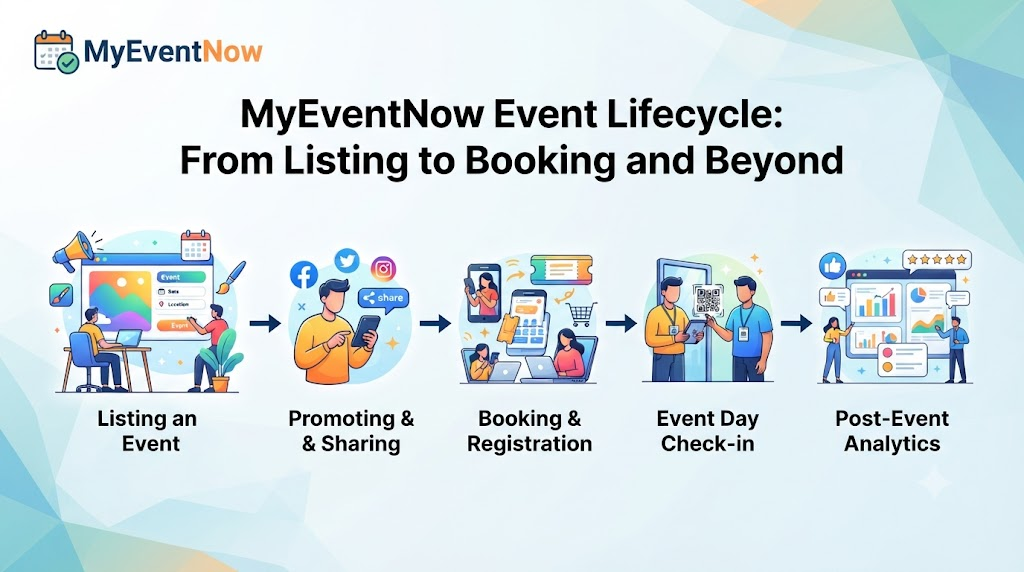
Every event follows a path. Someone has an idea, someone else hears about it, a few people sign up, and on the day, the right people arrive at the right place. When any step is unclear, the whole path gets harder. Attendees can't find the details, and organizers lose track of who is coming.
MyEventNow is designed around that path. It brings event discovery, ticket booking, and organizer tools into one marketplace, so each stage of an event can be handled in a single place. This article follows the life of an event, first from the attendee's side and then from the organizer's.
What Is MyEventNow?
MyEventNow is an online marketplace that connects event organizers, businesses, communities, and attendees. Visitors use it to discover local and upcoming events, read event information, and register or purchase tickets. Organizers use it to publish events and manage what happens afterward.
The events on the platform include concerts, comedy shows, festivals, workshops, exhibitions, conferences, seminars, webinars, theatre productions, and community gatherings. Organizers can create event listings, configure ticket options, publish schedules, manage registrations, organize attendee information, monitor bookings, and review event performance through centralized dashboards.
Think of it as one shared record. The organizer writes the listing, and the attendee reads that same listing before booking.
Why a Clear Event Path Matters
Most event problems are information problems. A date is missing, a venue is vague, or a ticket option is hard to understand. These gaps cost time for everyone.
Here are a few situations where a single, organized source helps:
- A student wants a weekend workshop but doesn't know where to look.
- A team lead needs a professional seminar and must compare a few choices quickly.
- A family wants a community event and needs to check the timing against school hours.
- A group of friends is weighing a music night against a stage show.
On the other side, organizers need a dependable way to introduce their events. A good listing answers the common questions early, so interested people can decide without chasing the organizer for basics.
The Event Lifecycle on MyEventNow
Stage 1: Discovery for Attendees
Someone searching for events near me usually wants something workable for the coming days. They may be open to a concert, a workshop, a food festival, a theatre show, an exhibition, or a neighborhood gathering.
MyEventNow presents events with their descriptions, schedules, and venue details, grouped by category. A visitor can begin with the kind of experience they want, then check whether the date and place fit their week.
For longer-term planning, readers interested in upcoming events in India can look at listings connected to Mumbai, Delhi, Bengaluru, Hyderabad, Pune, Chennai, Kolkata, and Ahmedabad. A resident might plan ahead for the month, while a traveler might check what is on during a short visit. Because organizers publish the events, what appears will differ by city and by season.
Stage 2: Choosing the Right Experience
Once someone finds a few options, the real work is comparing them. The listing should do most of that work.
For music, anyone looking at concert tickets online should read the description for the style of the show, the venue and schedule for travel and timing, and the ticket options for what each choice includes. These checks take a few minutes and prevent most day-of surprises.
For stage entertainment, people choosing comedy show tickets can ask four simple questions. What is the format? Does the date work? Is the venue easy to reach? Does the organizer explain what to expect? Theatre productions and other live performances follow the same approach.
Stage 3: Booking
The core of online event ticket booking is a short path: find the event, read the details, pick a registration or ticket option, and complete the booking. What makes this feel dependable is clear information at each step.
Because discovery and booking share one marketplace, an attendee doesn't need to leave one page to find details and open another to book. The exact options depend on how each organizer sets up the event, so attendees should follow what the listing shows.
Stage 4: Setting Up the Event as an Organizer
Behind every listing is an organizer who prepared it. As an event ticketing platform, MyEventNow lets organizers create a listing, add event information, configure ticket options, publish the schedule, and share the listing to help people find the event.
Different kinds of organizers can use this:
- Independent organizers running their first show or class.
- Businesses hosting seminars or customer sessions.
- Educational institutions arranging lectures and training days.
- Agencies handling events for clients.
- Community groups organizing local meetups.
Organizers who want to list your event online should first collect the basics: a plain description, the correct date and time, the venue, and ticket details that are easy to read. No listing can promise a certain audience size or number of sign-ups. That depends on the event itself and how it is shared.
Stage 5: Registration and Attendee Records
Not every event is entertainment. Many exist to teach or connect people. An event registration platform helps organizers handle conferences, seminars, workshops, training programs, webinars, business events, and networking meetups.
The main value is an organized list of attendees. Some examples:
- A university department hosting a guest lecture can see who has registered.
- A company running a product training day can keep participant details together.
- A training provider offering weekend courses can follow sign-ups for each session.
Stage 6: Managing Sales and Availability
Organizers who plan to sell event tickets online need to keep their listing current while bookings come in. MyEventNow supports publishing ticket information, managing event availability, monitoring bookings, and promoting events through shareable listings.
The best habit is to update the page whenever something changes. A new start time or a revised ticket option should appear on the listing right away, so attendees are never working from old information.
Stage 7: Coordination and Review
As the date gets closer, organizers need one place to look. MyEventNow serves as event management software, with tools for coordinating registrations, managing ticket sales, organizing attendee information, maintaining schedules, and reviewing performance reports through centralized dashboards.
Without this, names end up in one file, ticket counts in another, and schedule changes in message threads. Keeping these tasks together reduces the effort of switching between tools. Performance reports let organizers look back at how an event went and use that when planning the next one. The exact details shown are available inside the organizer's own dashboard.
How to Use MyEventNow for Discovery and Management
For attendees:
- Visit the platform and explore the available events.
- Search by location or category.
- Read the description, schedule, and other details.
- Choose the registration or ticket option that suits you.
- Complete the booking as the platform directs.
For organizers:
- Prepare the description, date, venue, and schedule.
- Create the listing and configure ticket options.
- Publish the event and share it.
- Follow registrations and bookings as they arrive.
- Review performance information after the event.
Common Mistakes to Avoid When Booking or Managing Events
Small oversights cause most event trouble.
Attendees should avoid:
- Booking before confirming the date and venue.
- Skipping details that explain the event format.
- Choosing a category that doesn't match their interest.
Organizers should avoid:
- Publishing a listing with missing information.
- Writing ticket descriptions that leave people guessing.
- Forgetting to update the schedule after a change.
- Going too long without checking registrations and bookings.
Fixing these habits takes little effort and leads to fewer misunderstandings for both groups.
Practical Example of Using MyEventNow
Imagine a local group of data enthusiasts planning a one-day beginner workshop on spreadsheets and basic charts. A volunteer drafts the description, confirms the date and venue, sets the timings, and decides on two ticket options. She creates the listing on MyEventNow, adds the schedule, publishes it, and shares the page in the group's chat and with a nearby college.
A final-year student searching for weekend learning events finds the workshop. He reads the agenda, confirms the venue is reachable, and registers with a suitable ticket option.
The volunteer checks her dashboard to see registrations and attendee information in one view. When the start time moves by thirty minutes, she updates the listing so everyone sees the correct schedule.
Frequently Asked Questions About MyEventNow
What is MyEventNow used for?
It helps people discover events and register or buy tickets, and it helps organizers publish and manage their events.
Can visitors find events in their own area?
Yes. Visitors can browse local and upcoming events. What appears depends on what organizers have published.
Which event types are covered?
Concerts, comedy shows, festivals, workshops, exhibitions, conferences, seminars, webinars, theatre productions, and community gatherings.
How do organizers publish an event?
They create a listing, add event information, configure ticket options, and publish the schedule.
Is online ticket booking supported?
Yes. Attendees can register or purchase tickets, following the steps shown on each listing.
What can organizers manage?
Registrations, ticket sales, attendee information, schedules, and performance reports through centralized dashboards.
Can businesses and educational institutions use it?
Yes. They can use it for conferences, seminars, workshops, and similar events.
Can independent organizers sell tickets?
Yes. They can publish ticket information and manage bookings for their own events.
Conclusion
MyEventNow connects the stages of an event in one marketplace. Attendees can explore concerts, comedy shows, workshops, festivals, and professional programs, then review the details and book. Organizers can publish listings, set up tickets, share their events, and manage registrations from a central dashboard.
The platform works best when organizers keep their listings complete and current, and attendees take a moment to read them. With both in place, an event moves from idea to attendance with fewer gaps along the way.



Top comments (0)