
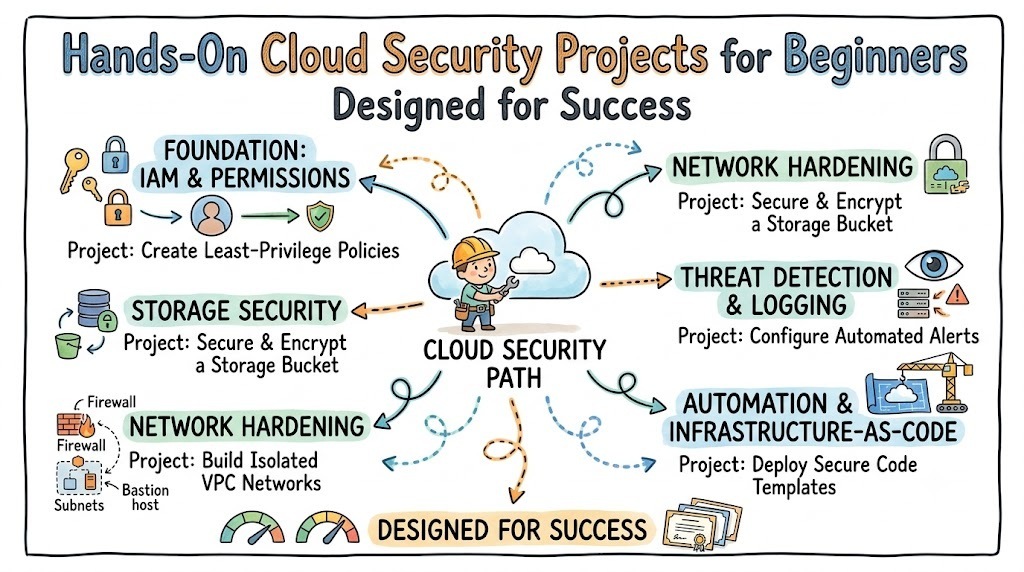
Securing cloud environments requires moving past theory and actively building defensive mechanics in real-world scenarios. Beginners who want to master cloud infrastructure must understand how to configure permissions, secure storage containers, and monitor network traffic continuously. Aspiring cybersecurity professionals can easily develop these practical skill sets through the structured learning modules available at debug.school. This specialized educational ecosystem simplifies multi-cloud security concepts by breaking down complex infrastructure architectures into actionable, step-by-step engineering exercises. As a result, learners gain the technical confidence required to lock down cloud assets, eliminate misconfigurations, and defend enterprise systems against modern cyber threats.
Key Operational Concepts You Must Know
Least Privilege and Identity Control
Identity and Access Management forms the core perimeter of modern cloud computing environments. Implementing the principle of least privilege ensures that users, applications, and automated service accounts receive only the exact permissions needed to execute their assigned tasks. Furthermore, engineers must avoid using root account credentials for daily operational activities to prevent catastrophic administrative compromise.
Assigning explicit temporary roles instead of hardcoded long-term credentials drastically reduces the attack surface across distributed systems. Additionally, configuring multi-factor authentication across all account portals provides an essential defensive layer against credential theft and unauthorized entry.
Consequently, mastering identity boundary policies, role delegation, and access condition keys remains essential for every cloud security practitioner. When you design strict permission boundaries, you effectively isolate security incidents and prevent unauthorized lateral movement within your network.
Cloud Storage Encryption Mechanics
Securing static data across distributed storage buckets requires robust encryption strategies at every layer. Cloud platforms offer both server-side encryption and client-side encryption options to protect sensitive data files from public exposure. Server-side encryption automatically handles key management and data transformation upon storage, whereas client-side encryption ensures data is scrambled before it ever leaves your local environment.
Moreover, managing cryptographic keys through dedicated key management services allows teams to control access schedules, configure automatic key rotations, and maintain full audit control. Enforcing strict bucket policies alongside mandatory encryption headers prevents unencrypted uploads completely.
As a result, combining data-at-rest encryption with mandatory transport layer security for data-in-transit guarantees full data protection. Understanding these fundamental cryptographic concepts allows engineers to construct private, tamper-proof storage repositories that comply with strict regulatory mandates.
Network Isolation and Traffic Filtering
Protecting virtual cloud instances requires establishing isolated network perimeters using virtual private clouds and customized subnets. Engineers must separate public-facing resources, such as web load balancers, from internal application servers and private database engines. This isolation prevents public internet traffic from directly accessing sensitive internal infrastructure layers.
Additionally, stateful security groups and stateless network access control lists act as continuous firewalls to filter incoming and outgoing packets. Security groups evaluate traffic at the instance level, whereas network control lists enforce broad rule sets at the subnet boundary.
Subsequently, configuring micro-segmentation strategies ensures that compromised public assets cannot easily communicate with private internal resources. Mastering virtual network routing, port restrictions, and subnet isolation allows you to build resilient environments capable of deflecting unauthorized port scans.
Continuous Audit Logging and Monitoring
Maintaining absolute visibility across cloud infrastructure requires centralizing and analyzing system events continuously. Audit logging tools automatically record every API call, user authentication attempt, administrative policy change, and resource modification across your infrastructure. Without centralized logging, security teams remain blind to active threat vectors and post-compromise system modifications.
Furthermore, integrating real-time metric filters with automated notification channels allows systems to trigger immediate alerts whenever abnormal behavior occurs. Automatically parsing log records enables security systems to detect brute-force login attempts, unauthorized policy changes, and suspicious data exfiltration attempts instantly.
Ultimately, proper log retention policies and real-time monitoring strategies form the cornerstone of cloud incident response. Establishing centralized logging pipelines guarantees that security analysts possess the forensic evidence needed to investigate and remediate operational security incidents quickly.
Platform Implementation vs. Culture — What's the Real Difference?
The Technology Trap in Engineering
Many technology teams mistakenly assume that deploying advanced cloud security software automatically guarantees total protection against sophisticated attacks. This narrow reliance on security tools creates a false sense of safety where organizations deploy complex platforms without understanding the underlying configuration mechanics. Consequently, companies end up with bloated security environments that produce endless alert noise while leaving simple configuration gaps exposed.
In reality, security tools are only as effective as the operational workflows and architectural decisions that support them. When security engineers focus solely on purchasing new tools rather than understanding core security principles, human error inevitably introduces severe vulnerabilities.
Therefore, true security engineering requires a deep commitment to foundational infrastructure mechanics rather than relying on automated software features. Mastering fundamental access controls and architectural patterns prevents your organization from falling into the trap of buying software to fix basic human procedural errors.
Fostering a Data-Driven Engineering Culture
A robust cloud security culture embeds defensive thinking directly into everyday software development and operational workflows. In this collaborative environment, developers and system operators work alongside security professionals to build secure infrastructure from the very start. This proactive approach ensures that security compliance checks, automated vulnerability scans, and code reviews occur naturally throughout the development lifecycle.
Additionally, a positive security culture encourages developers to report misconfigurations and accidental credential leaks immediately without fear of punishment. Open communication speeds up incident remediation and turns security into a shared organizational responsibility rather than a single team's burden.
When an organization successfully combines automated security platforms with a security-minded engineering culture, system resilience increases dramatically. Developers write safer deployment templates, operational teams maintain strict access boundaries, and the entire platform remains secure against emerging threats.
| Aspect | Platform Implementation | Culture & Mindset |
|---|---|---|
| Primary Focus | Deploying firewalls, setting up scanners, and purchasing specialized cloud tools. | Embedding security practices into development workflows and encouraging shared accountability. |
| Operational Impact | Enforces technical rules, blocks unauthorized ports, and logs raw infrastructure events. | Guides everyday decision-making, code reviews, and proactive risk management choices. |
| Maintenance Need | Requires ongoing patch management, tool updates, and complex rule updates. | Requires continuous education, clear communication, and open incident reporting procedures. |
| Failure Mode | Produces excessive alert fatigue, misconfiguration risks, and ignored security dashboards. | Results in weak password choices, shared credentials, and bypassed security controls. |
Real-World Use Cases of Modern Operations
Securing Public File Repositories
Businesses regularly handle massive amounts of sensitive customer data that must remain completely secure from unauthorized internet access. Security teams implement strict bucket policies, disable public access settings globally, and enforce server-side encryption across all cloud storage containers. This multi-layered approach ensures that files remain inaccessible to unauthorized internet web crawlers and malicious automated scripts.
Simultaneously, automated compliance monitoring tools continuously scan storage configurations to detect and reverse unauthorized permission changes instantly. If an employee accidentally sets a file bucket to public access, the automated monitoring tool restores private permissions within seconds.
- Key Requirements: Private bucket policies, default encryption, access logging, and automated policy remediation.
- Core Benefit: Prevents accidental data exposure and protects corporate records from public access.
- Data Scale: Protects terabytes of confidential business documents and sensitive user records continuously.
Automated Vulnerability Scanning in CI/CD Pipelines
Modern development pipelines integrate automated security scanning directly into code repositories to catch vulnerabilities before code reaches production. As developers commit infrastructure-as-code templates, automated tools instantly analyze the code for security flaws like open administrative ports or hardcoded passwords. This immediate feedback loop allows developers to fix security misconfigurations right inside their code editor.
Furthermore, container image scanners analyze application dependencies for known security vulnerabilities before pushing images to production registries. Blocking vulnerable builds from deploying guarantees that production environments remain consistent, compliant, and hardened against public exploits.
- Target Outcomes: Clean code deployments, reduced manual auditing overhead, and early risk detection.
- Pipeline Integration: Automated pre-commit hooks, static code analysis, and container vulnerability checks.
- Scale Challenge: Scanning hundreds of daily code commits without slowing down deployment speeds.
Automated Incident Isolation and Threat Detection
Financial systems require real-time monitoring to detect unauthorized administrative actions and isolate compromised server instances immediately. Threat detection engines continuously process CloudTrail logs and network flow records to identify suspicious behavioral anomalies across the infrastructure. When the system detects suspicious activities, such as an unauthorized API call from an unknown IP address, it triggers automated response workflows.
Consequently, automated serverless functions can immediately revoke compromised API keys, isolate affected virtual machines, and notify security teams via instant alert channels. This rapid response limits damage and neutralizes active threats before attackers can access sensitive internal databases.
- Data Types: API access logs, network flow logs, and system event streams.
- Operational Goal: Neutralize active security breaches instantly using automated containment scripts.
- Analysis Method: Combines pattern-based event monitoring with automated serverless remediation actions.
Common Mistakes in Operations Engineering
Hardcoding Secret Credentials in Code Repositories
A frequent mistake made by beginner developers is embedding database passwords, API keys, and access tokens directly into software source code. When these codebases are pushed to public or shared version control repositories, automated scanning bots harvest those exposed credentials within seconds. Attackers then use these stolen credentials to launch unauthorized server instances, steal sensitive data, or compromise cloud accounts entirely.
To avoid this dangerous flaw, developers must store sensitive secrets inside dedicated cloud secret manager services instead of raw code. Applications should retrieve credentials dynamically at runtime using secure IAM roles and environment variables.
Ultimately, adopting secret management services and setting up pre-commit code scanners prevents sensitive credentials from leaking into repositories. Prioritizing credential security protects your infrastructure from unauthorized access and eliminates costly emergency secret rotation procedures.
Deploying Overly Permissive Security Groups
Setting security group rules to allow unrestricted inbound traffic on ports like 22 or 3389 invites relentless automated brute-force attacks. Developers often open all network ports globally during testing to bypass connectivity issues and then forget to close those permissions before moving to production. This oversight leaves virtual servers exposed to internet-wide port scans and unauthorized access attempts.
Instead, engineers should strictly limit network access to specific trusted IP address ranges and necessary communication ports. Administrative access should always require secure network gateways or bastion host architectures rather than direct public access.
Therefore, you must regularly audit network rules and enforce the principle of least privilege across all security group configurations. Restricting inbound and outbound network traffic minimizes your attack surface and keeps internal server workloads safe from malicious internet scans.
Neglecting Centralized Log Monitoring and Storage
Operating cloud infrastructure without enabling central audit logging leaves security teams completely blind when system incidents occur. Beginners often neglect log configuration because storage setup seems unnecessary during early application development phases. However, when a security breach occurs, the absence of detailed audit logs makes it impossible to determine how attackers gained access or what data was stolen.
Moreover, storing logs on the same instance being monitored creates severe risk, as attackers can easily delete local log files to hide their tracks. Audit records should always be shipped immediately to an isolated, write-once, read-many centralized storage container.
As a result, enabling comprehensive system logging and securing log storage should be step-one for any cloud project build. Proper centralized logging provides essential operational visibility and ensures your team has the necessary forensic tools to investigate system anomalies.
How to Become an Operations Expert — Career Roadmap
Step 1: Mastering Fundamentals
Begin your cloud security career path by building a rock-solid foundation in core networking, operating system administration, and basic security principles. Focus on understanding TCP/IP stack behavior, domain name systems, subnetting calculations, and public key infrastructure mechanics. Additionally, achieve high proficiency with Linux command-line utilities, shell scripting, and basic Python automation to prepare for hands-on cloud tasks.
- Core Focus: Master Linux administration, understand network routing, and learn basic identity management principles.
- Learning Resources: Interactive terminal labs, fundamental networking courses, and basic cybersecurity tutorials.
- Estimated Time: Spend your initial months mastering these technical baselines before attempting complex multi-cloud projects.
Step 2: Hands-On Storage and IAM Projects
Transition your theoretical knowledge into practical capability by configuring core cloud storage services and access control policies. Practice writing custom JSON policy documents to enforce strict permission limits across different user groups and service accounts. Build projects that isolate storage buckets, mandate server-side encryption, and configure access logging to track file interactions.
- Core Focus: Construct custom access policies, implement server-side encryption, and secure public storage containers.
- Practical Projects: Build a secure document storage pipeline with restricted user access policies and automatic encryption.
- Key Concept: Master the logic of identity policies to ensure resources remain completely private by default.
Step 3: Network Hardening and Threat Detection
Advance your skillset by building isolated network environments and configuring automated threat detection pipelines. Design multi-tier virtual private clouds featuring public subnets, private subnets, NAT gateways, and custom route tables. Deploy intrusion detection monitors, collect flow logs, and write serverless scripts that automatically isolate compromised virtual instances upon alert generation.
- Core Focus: Build custom virtual network topologies, configure stateful firewalls, and automate threat detection alerts.
- Design Skills: Master network micro-segmentation strategies and design secure bastion host jump boxes.
- Optimization Goal: Minimize open network ports while establishing continuous, automated monitoring across all subnets.
Step 4: DevSecOps and Infrastructure Automation
Complete your professional transformation by integrating security automation directly into continuous integration and deployment pipelines. Master infrastructure-as-code tools to define secure, repeatable cloud deployments using standardized software templates. Finally, build end-to-end DevSecOps pipelines that perform static code analysis, scan container images, and audit cloud environments for configuration drift automatically.
- Core Focus: Automate security compliance checks, implement infrastructure-as-code, and build secure deployment pipelines.
- Career Growth: Advance from a junior security analyst into a senior cloud security engineer capable of designing enterprise architectures.
- Final Goal: Build fully automated, compliant cloud infrastructures that detect, alert, and self-heal against security risks.
FAQ Section
- Why are hands-on projects so important for learning cloud security? Hands-on projects allow you to apply theoretical security principles directly to real cloud infrastructure. Building actual systems helps you understand permission boundaries, network configurations, and error troubleshooting much better than reading textbooks alone.
- Which cloud platform should a security beginner start with first? Beginners should start with major providers like AWS, Azure, or Google Cloud because they offer extensive documentation and free-tier access. The core security principles—such as IAM, encryption, and network isolation—apply similarly across all major cloud providers.
- How do automated scanners help prevent cloud security misconfigurations? Automated scanners check your cloud resources and deployment scripts against security standards constantly. They catch common errors like public storage buckets or open administrative ports early, allowing you to fix vulnerabilities before attackers exploit them.
- Is programming necessary for a career in cloud security engineering? Yes, basic programming and scripting skills in Python, Bash, or PowerShell are essential for cloud security roles. Scripting enables you to automate security audits, build custom remediation tools, and interact with cloud provider APIs efficiently.
- What is the difference between a security group and a network ACL? Security groups operate at the virtual instance level and act as stateful firewalls that automatically allow return traffic. Network ACLs operate at the subnet level and act as stateless firewalls that require explicit rules for both inbound and outbound traffic.
Final Summary
Securing cloud environments requires a continuous commitment to mastering foundational technical mechanics, building hands-on projects, and maintaining strict operational discipline. By systematically working through real-world scenarios—such as configuring least-privilege IAM policies, securing storage buckets, and automating network threat response—beginners can rapidly develop professional security capabilities. Platforms like debug.school provide the structured learning paths and practical exercises necessary to bridge the gap between theoretical security concepts and enterprise execution. Remember that technology alone cannot secure an ecosystem; fostering a security-conscious culture and eliminating common mistakes like hardcoded credentials remain equally vital. Ultimately, combining strong foundational skills with automated DevSecOps workflows allows you to design resilient cloud architectures that stand firm against modern threats.



Top comments (0)