
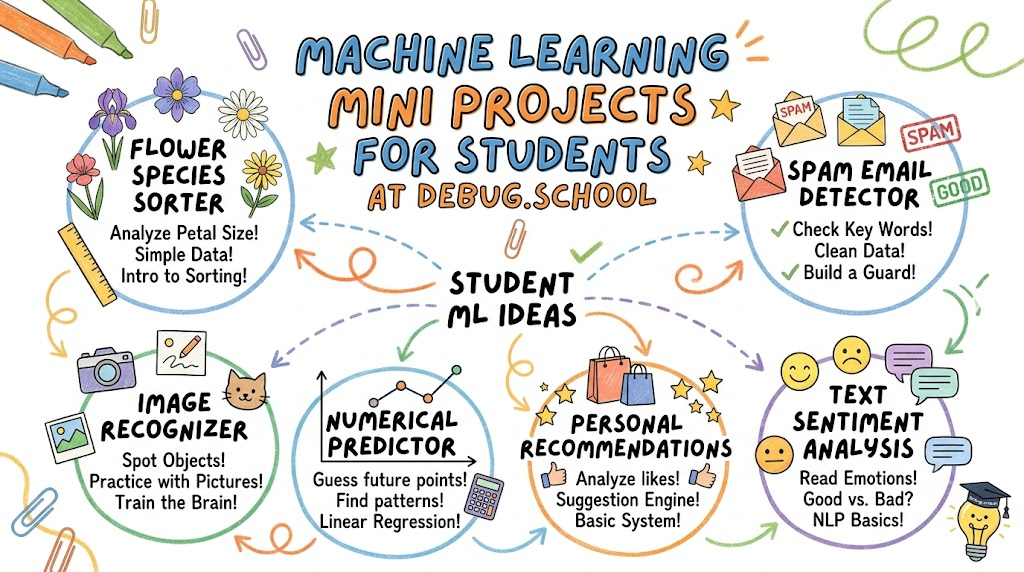
Machine learning sounds like magic to many beginners. But you can master it quickly with clear, step-by-step guidance. You can learn these smart computer skills at debug.school. This interactive site guides you through real hands-on exercises. You will train computers to recognize pictures, spot numbers, and predict answers.
Students can build cool tools without getting stuck in hard theory. You start with small steps and watch your smart code come alive. Best of all, you do not need complex math to begin.
What Is Machine Learning for Beginners?
Teaching Computers to Learn from Examples
Machine learning means teaching a computer using clear examples. Think about how you learned to spot a dog. You looked at many dogs until you knew the shape.
Computers learn the exact same way. You show the computer thousands of cat and dog photos.
Next, the computer finds patterns in the colors and shapes. Soon, it can spot a puppy all by itself.
Finding Hidden Rules in Data
Regular coding requires people to write every single rule by hand. That takes hours and creates lots of mistakes.
Machine learning lets the computer write its own rules. You just give it plenty of good practice facts.
So, the machine studies the numbers and finds the answers. This makes solving huge puzzles fast and fun.
Key Operational Concepts You Must Know
Splitting Data for Training and Testing
You cannot test a student with the exact same questions they practiced. If you do, you only test their memory, not their skill.
Computers work the exact same way during training. So, you must split your data into two separate piles.
One big pile teaches your model the main patterns. The smaller pile tests if your model truly learned the lesson.
Watching Out for Memorization Traps
Sometimes a computer tries to memorize every single detail. We call this problem overfitting.
It is like a student who memorizes test answers without understanding the topic. When a new question appears, the student fails completely.
So, keep your computer models simple and clean. Good models spot general rules instead of memorizing tiny facts.
Platform Implementation vs. Culture — What's the Real Difference?
Tools Help but Good Habits Win
Many learners rush to download the newest coding tools. They think fancy software makes them instant experts.
However, great tools cannot save a sloppy project. If you feed bad data to a smart tool, you get bad results.
So, focus on building strong habits before chasing fancy software. Good planning always beats shiny tools.
Building a Curious Maker Mindset
A great learning culture encourages students to explore and make mistakes. Smart builders test unusual ideas to see what happens.
Also, they share their project steps with classmates. Everyone learns faster when friends test each other's ideas.
When strong habits meet simple tools, students build amazing things. You solve real problems and gain deep confidence.
| Focus Area | Tool Setup | Maker Culture |
|---|---|---|
| Main Goal | Install smart coding libraries. | Build a habit of curious testing. |
| Daily Work | Write scripts and click run buttons. | Check data and fix small mistakes. |
| Big Win | Working code on your computer. | Deep skills to solve fresh problems. |
Real-World Use Cases of Modern Operations
Sorting Spam Messages Automatically
Email apps protect your inbox every single minute. They use smart models to spot annoying junk mail.
The model checks for weird links and pushy sales words. Then, it sends junk mail straight into the trash folder.
- Main Goal: Keep your inbox tidy and safe from scams.
- Helpful Clues: Odd sender names, strange words, and fake links.
- Big Result: Clean mailboxes and happy readers every day.
Spotting Plant Diseases from Photos
Farms use smart cameras to protect green crops. A farmer snaps a quick photo of a sick leaf.
Next, the model compares the leaf against thousands of plant pictures. It tells the farmer which bug or disease caused the harm.
- Main Goal: Save crops before plant sickness spreads across fields.
- Helpful Clues: Brown spots, leaf color, and leaf shape.
- Big Result: Healthy plants and more food for everyone.
Common Mistakes in Operations Engineering
Training with Messy or Incomplete Facts
A model is only as smart as the facts you feed it. If your pictures are dark or blurry, the model gets confused.
Many beginners forget to check their example photos first. Then, they wonder why their code makes silly mistakes.
Always tidy your facts before you hit the train button. Clean examples create accurate, reliable tools.
Making Projects Too Complicated Early
New coders often try to build giant self-driving cars on day one. They quickly get lost in massive files and quit.
Start with tiny, fun ideas that finish in one afternoon. For example, build a tool that guesses flower types.
Small wins keep your spirit high and build real skill. You can always add bigger features later.
How to Become an Operations Expert — Career Roadmap
- Step 1: Master Basic Logic and Code Learn simple loops, lists, and basic math functions. Practice writing clean, easy-to-read scripts every week.
- Step 2: Build a Flower Classifier Project Train a basic model to sort three types of flowers. Learn how petal lengths help the machine make smart guesses.
- Step 3: Try Handwritten Digit Recognition Feed your model thousands of drawn numbers. Teach your program to read messy handwriting accurately.
- Step 4: Share Your Mini Projects Online Write a short summary about how your project works. Show friends your working models to build a strong portfolio.
FAQ Section
- Do I need to be a math genius to start? No, basic adding and multiplication skills are plenty to begin. The computer takes care of the hard math equations for you.
- How long does a mini project take to build? Most student mini projects take just a few hours to finish. You can easily train a simple image sorter in one afternoon.
- What is the best project for a complete beginner? Start with an iris flower classifier or a simple number reader. These classic projects have clean data and run very fast.
- Why did my model guess the wrong answer? Your training data might have mistakes or lack enough varied examples. Add more clean photos or facts to help your model learn better.
Final Summary
Learning machine learning is an exciting journey full of discovery and fun puzzles. You do not need hard math or costly tools to build smart apps. By training computers on simple examples, you learn how machines spot patterns and solve real challenges. Start with small mini projects, keep your data clean, and test your ideas step by step!



Top comments (0)