
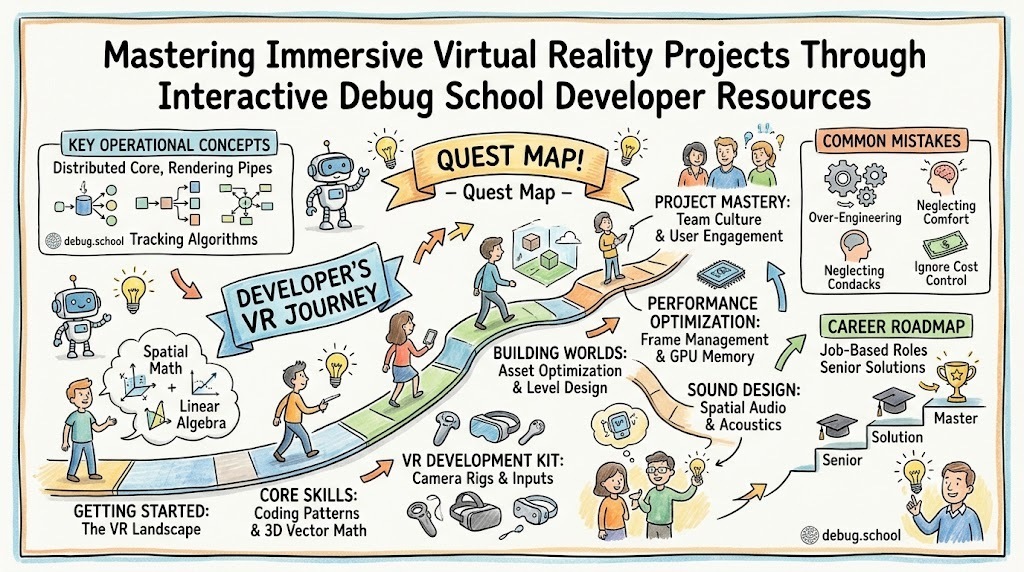
Virtual reality software development transforms abstract digital code into three-dimensional interactive environments that users explore in real time. Building these complex spatial applications requires a clear understanding of graphic rendering, physics engines, spatial audio, and hardware performance optimization. Developers can easily master these advanced spatial engineering techniques by leveraging curated guides available at debug.school. This specialized educational hub simplifies virtual reality architecture by converting complex spatial computing theories into practical, hands-on engineering tutorials. As a result, software creators quickly learn how to design, test, and deploy highly immersive spatial applications without getting bogged down by frustrating technical barriers.
Key Operational Concepts You Must Know
Spatial Rendering and Frame Management
Achieving smooth spatial rendering forms the foundation of any successful virtual reality software application. Unlike traditional desktop interfaces that render graphics to a single flat display, virtual reality engines must process two distinct visual perspectives simultaneously. This dual rendering pipeline creates the convincing depth illusion required for true user immersion.
Furthermore, VR rendering engines must maintain exceptionally high frame rates to prevent visual disorientation and motion sickness. Software applications need to render complex three-dimensional scenes at target refresh rates of ninety frames per second or higher for each display. Consequently, missing target rendering windows causes severe stuttering that ruins the user experience.
Therefore, engineering teams must continuously profile draw calls, geometry polygon counts, and dynamic lighting pipelines. When software developers master frame budget optimization early in development, creating fluid virtual environments becomes a predictable and manageable engineering process.
Real-Time Spatial Tracking and Input Dynamics
Spatial tracking algorithms translate real-world physical movements into immediate digital actions inside the virtual environment. Modern virtual reality platforms use sophisticated sensor fusion pipelines that combine optical camera tracking with high-frequency inertial measurement units. This combination provides six degrees of freedom, allowing users to move forward, backward, left, right, up, and down naturally.
Moreover, low-latency input processing guarantees that user hand interactions feel completely immediate and physically accurate inside the simulated space. When a user reaches out to grab a virtual object, the tracking pipeline must process that physical motion within milliseconds.
As a result, understanding haptic feedback mechanisms, controller button mapping, and hand-tracking gestures remains essential for immersive application design. Software creators who build responsive input pipelines ensure that virtual interactions feel totally intuitive and natural to end users.
Spatialized Audio and Environmental Acoustics
Immersive spatial audio provides critical sensory cues that guide user attention across three-dimensional virtual environments. Traditional stereo audio simply shifts sound between left and right channels without accounting for physical distance or environmental obstacles. In contrast, spatial audio algorithms calculate precise head-related transfer functions to simulate how sound waves interact with human ears.
Additionally, dynamic acoustic engines calculate real-time sound reflection, absorption, and reverberation based on virtual room geometry and material properties. A whisper spoken inside a small concrete room sounds drastically different from a shout echoed across a massive virtual canyon.
Consequently, integrating spatial audio mechanics early allows software teams to build significantly more believable digital worlds. Proper acoustic engineering guides user navigation naturally through complex virtual spaces without relying on invasive visual indicators.
Memory Optimization and Asset Profiling
Virtual reality applications require aggressive memory management strategies to keep textures, models, and audio files ready for immediate playback. Because spatial engines load massive amounts of high-resolution asset data into random access memory simultaneously, memory bottlenecks can easily crash the software.
Furthermore, software developers must implement efficient level-of-detail systems that dynamically swap complex high-polygon models for simpler geometries as objects move away from the user's camera viewpoint. This automatic swapping mechanism drastically reduces GPU memory pressure during intensive scene rendering.
Ultimately, mastering runtime memory profiling, texture compression techniques, and garbage collection management ensures consistent application performance. Efficient asset optimization prevents frame drops and maintains system stability across diverse virtual reality hardware platforms.
Platform Implementation vs. Culture — What's the Real Difference?
The Technology Trap in Engineering
Many software engineering teams incorrectly assume that buying expensive VR development toolkits or adopting advanced game engines will automatically guarantee project success. This narrow focus on software tools creates a tech trap where developers deploy complex software libraries without understanding spatial engineering principles. Consequently, teams often build laggy, poorly optimized virtual experiences that cause user fatigue and frustration.
In reality, a game engine or software development kit is merely an execution tool rather than a complete architectural strategy. When developers focus strictly on tool features instead of foundational performance concepts, virtual applications suffer from chronic frame rate instability.
Therefore, true virtual reality mastery requires a deep commitment to fundamental spatial computing rules rather than chasing fleeting tool upgrades. Learning how real-time rendering pipelines function fundamentally protects projects from catastrophic architectural design mistakes.
Fostering a Data-Driven Engineering Culture
A healthy virtual reality engineering culture places immense value on continuous performance testing, cross-functional collaboration, and user-centered design iteration. In this productive environment, programmers, 3D artists, and audio designers collaborate daily to ensure that creative assets never exceed hardware budgets. This unified mindset keeps production workflows smooth, scalable, and adaptable as platform requirements evolve over time.
Additionally, a strong engineering culture encourages developers to run early spatial usability tests and analyze performance logs openly without fear of criticism. This transparent feedback loop accelerates the discovery of spatial bugs, input glitches, and performance bottlenecks before public release.
When an organization successfully balances technical platform implementation with a supportive engineering culture, overall software quality increases significantly. Software teams stop constantly fighting platform bugs and start focusing on crafting magical user experiences.
| Aspect | Platform Implementation | Culture & Mindset |
|---|---|---|
| Primary Focus | Deploying game engines, configuring VR SDKs, and integrating tracking hardware. | Establishing performance budgets, standardizing spatial design practices, and fostering team collaboration. |
| Longevity | Short-term focus that changes frequently as new VR headsets and tools emerge. | Long-term foundation that remains stable across changing spatial computing hardware cycles. |
| Success Metric | Successful engine build, hardware integration, and feature deployment. | Frame rate stability, low motion sickness reports, and high user engagement metrics. |
| Core Value | Provides the raw software engine and hardware drivers for application rendering. | Drives development discipline, asset optimization guidelines, and user-focused spatial design. |
Real-World Use Cases of Modern Operations
Medical Surgical Training and Procedure Simulation
Modern healthcare institutions use high-fidelity virtual reality simulations to train surgical teams in risk-free digital environments. Surgeons can practice complex medical procedures repeatedly on realistic virtual human patient models using specialized tactile feedback tools. This hands-on virtual practice improves precision, builds muscle memory, and significantly reduces operational mistakes during real-world surgeries.
Simultaneously, spatial tracking systems record surgical hand movements and tool orientation data to evaluate doctor performance objectively. Medical instructors review these analytics afterward to provide precise, data-driven feedback on technique and decision-making speed.
- Key Requirements: Extremely low input latency, realistic physics simulation, and highly detailed sub-millimeter anatomical models.
- Core Benefit: Enables risk-free surgical practice that improves patient outcomes and reduces surgical complication rates.
- Data Scale: Ingests high-frequency spatial tracking logs and detailed volumetric scan data during training sessions.
Industrial Architecture and Virtual Construction Reviews
Architecture and civil engineering firms use virtual reality walkthroughs to inspect building designs long before physical construction begins. Stakeholders wearing standalone VR headsets can explore full-scale digital blueprints, inspect structural support beams, and test interior lighting arrangements naturally. This spatial visualization process helps teams identify costly design clashes early in the architectural planning phase.
Furthermore, remote engineering teams located across different continents can meet inside the same virtual building model to coordinate modifications in real time. This spatial collaboration completely eliminates the need for expensive physical travel and speeds up architectural approval cycles.
- Data Types: Complex CAD geometry files, high-resolution material textures, and real-time lighting calculations.
- Operational Goal: Catch structural design flaws early, optimize spatial ergonomics, and accelerate architectural project approvals.
- Analysis Method: Uses real-time spatial multi-user networking and automated collision detection engines across connected headsets.
Interactive Flight and Aviation Training Simulators
Aviation companies and defense organizations rely on immersive virtual reality flight simulators to prepare pilots for extreme emergency scenarios. Pilots sit in physical cockpit mockups while wearing high-resolution VR headsets that display dynamic weather conditions, system failures, and complex flight trajectories. This immersive setup delivers hyper-realistic flight practice without endangering expensive aircraft or human lives.
Meanwhile, background analytics systems monitor pilot eye movements, stress responses, and instrument reaction speeds during simulated engine failures. Training directors evaluate this telemetry data to fine-tune flight safety protocols and personal pilot instruction plans.
- Target Outcomes: Enhanced emergency response speeds, reduced flight training costs, and complete pilot situational awareness.
- Pipeline Structure: High-speed flight dynamic engines combined with real-time terrain rendering layers.
- Scale Challenge: Rendering massive open-world flight environments smoothly without introducing visual latency or frame drops.
Common Mistakes in Operations Engineering
Over-Engineering Simple Virtual Reality Architectures
A frequent mistake among beginner VR developers is building overly complex spatial architectures for simple applications that need basic interaction models. Enticed by trendy rendering techniques, teams often implement bloated physics engines and unnecessary network sync layers for straightforward spatial demos. This over-engineering introduces severe hardware slowdowns, increases bug frequency, and creates massive maintenance overhead for the developer team.
Consequently, project completion dates slide rapidly because developers spend most of their time fixing complex software bugs instead of polishing core interactions. Simplicity and lean code architecture should always remain the primary goals when building spatial applications.
Therefore, software creators should only introduce advanced multiplayer frameworks or custom physics engines when project requirements strictly demand them. Keeping your spatial codebase clean guarantees easier maintenance, smoother frame rates, and superior overall application stability over time.
Neglecting Hardware Diversity and Optimization Limits
Launching virtual reality applications without testing across various headset models and target hardware specs always leads to poor user reviews. When software engineers optimize their code exclusively on top-tier developer workstations, their applications run terribly on standalone mobile VR hardware. Without aggressive optimization work, high-polygon scenes cause massive frame drops that instantly trigger motion sickness for end users.
To prevent this critical mistake, development teams must test their spatial builds on target consumer hardware from day one of production. Developers should establish strict polygon budgets, texture compression rules, and draw call limits for every target device tier.
Ultimately, maintaining smooth spatial performance requires relentless hardware profiling, automated frame testing, and continuous code refactoring. Prioritizing performance budgets early prevents painful emergency optimization crunch cycles right before project launch dates.
Ignoring Spatial Ergonomics and User Comfort Standards
It is incredibly easy to cause user discomfort when software developers ignore basic spatial ergonomics and motion rules in virtual environments. Common mistakes include moving the user's virtual camera arbitrarily without input consent, placing UI elements too close to eyes, and ignoring natural neck turn angles. These poor design choices cause immediate eye strain, neck fatigue, and severe motion nausea for players.
Moreover, failing to offer custom movement options like snap rotation or teleportation locks out users who are sensitive to continuous virtual motion. Ignoring accessibility preferences severely limits your target audience and leads to negative community reviews upon application release.
As a result, creators must study human-computer interaction guidelines for three-dimensional spatial environments thoroughly. Writing comfortable, user-friendly spatial control systems ensures that players enjoy spending extended time exploring your virtual worlds.
How to Become an Operations Expert — Career Roadmap
Step 1: Mastering Fundamentals
Begin your spatial computing journey by building an exceptionally strong foundation in three-dimensional mathematics, linear algebra, and object-oriented programming languages. You must become completely comfortable with vector mathematics, matrix transformations, quaternions, and spatial coordinate systems. Additionally, focus heavily on mastering fundamental game programming patterns, C-sharp scripting, and basic graphics rendering concepts.
- Core Focus: Learn foundational programming languages like C-sharp or C-plus-plus, master 3D vector math, and understand graphics pipelines.
- Learning Resources: Interactive coding platforms, linear algebra textbooks, and introductory game engine development tutorials.
- Estimated Time: Spend your first few months building this mathematical baseline before touching complex spatial development kits.
Step 2: Understanding Distributed Core
Once you master basic programming concepts, move on to learning core game engines and essential spatial development toolkits. Study how virtual reality SDKs handle camera rig positioning, stereo rendering, and basic controller input events. Work on building simple interactive spatial demos on your personal workstation to observe how physics objects behave in three dimensions.
- Core Focus: Master VR camera setups, understand controller input mapping, and practice building basic interactive physical environments.
- Practical Projects: Create a simple virtual room where users can grab, throw, and manipulate physical digital objects naturally.
- Key Concept: Focus entirely on understanding how spatial tracking data converts into real-time digital camera movements inside game engines.
Step 3: Mastering Advanced Frameworks
Transition your spatial skills into professional territories by mastering real-time optimization tools, custom shaders, and spatial audio integration. Learn how to profile GPU performance, manage memory garbage collection, and write efficient custom graphics shaders using shading languages. Additionally, dive deep into advanced spatial UI mechanics, hand-tracking algorithms, and multi-user networking protocols.
- Core Focus: Write highly optimized rendering code, create dynamic spatial user interfaces, and build synchronized multiplayer VR experiences.
- Design Skills: Learn to design comfortable, accessible spatial interaction systems that prevent user motion disorientation entirely.
- Optimization Goal: Focus heavily on eliminating frame rate drops and minimizing input-to-photon latency across diverse hardware devices.
Step 4: Enterprise Orchestration and Cloud Deployment
Round out your spatial expertise by learning how to package, deploy, and manage commercial virtual reality applications across enterprise app stores. Master automated build pipelines, asset bundle streaming, and cloud-based analytics integration to track real-time application stability. Finally, learn how to configure remote device management systems to deploy software updates seamlessly to large fleets of VR headsets.
- Core Focus: Use automated build pipelines to publish optimized VR applications, monitor crash logs, and manage fleet deployments.
- Career Growth: Transition from a junior spatial programmer into a senior VR solution architect capable of leading enterprise spatial projects.
- Final Goal: Build smooth, highly accessible, self-sustaining virtual reality applications that scale effortlessly across global user bases.
FAQ Section
- What is the difference between virtual reality and augmented reality development? Virtual reality completely replaces the physical world with a fully digital three-dimensional environment that users explore through opaque headsets. In contrast, augmented reality overlays digital objects and information directly onto the user's view of the real physical world through transparent lenses.
- Why do virtual reality applications require much higher frame rates than traditional games? Virtual reality applications require higher frame rates to match human visual motion perception accurately and prevent motion sickness. Rendering scenes at ninety frames per second or higher maintains visual comfort and preserves user immersion inside digital environments.
- How does spatial audio enhance user immersion in virtual reality environments? Spatial audio calculates precise sound positioning based on the user's head orientation and virtual room geometry in real time. This precise calculation gives sounds realistic direction, distance, and depth, guiding user attention naturally throughout the three-dimensional space.
- Can I start developing virtual reality software without owning an expensive PC? Yes, you can absolutely begin developing virtual reality applications using affordable standalone headsets paired with modest development computers. Popular game engines offer lightweight spatial developer modes that allow you to test virtual interaction concepts directly on standalone hardware.
- Why is draw call optimization so critical for standalone virtual reality headsets? Draw call optimization reduces the number of rendering commands sent from the CPU to the GPU during every visual frame. Minimizing draw calls prevents performance bottlenecks, saving processing power and preserving smooth frame rates on mobile VR processors.
Final Summary
Building successful virtual reality projects requires a balanced blend of three-dimensional mathematics, graphics optimization, and comfortable spatial user experience design. By breaking down complex rendering and tracking principles into manageable technical steps, software creators can build immersive digital worlds with confidence. Educational platforms like debug.school provide the practical guides, hardware tutorials, and clear learning roadmaps needed to succeed in spatial engineering. Avoid the mistake of focusing strictly on expensive tools; instead, dedicate your effort to mastering real-time graphics performance, asset optimization, and ergonomic interaction rules. Ultimately, pairing strong technical discipline with a collaborative development mindset empowers you to create magical, high-performance spatial experiences that captivate users worldwide.



Top comments (0)