
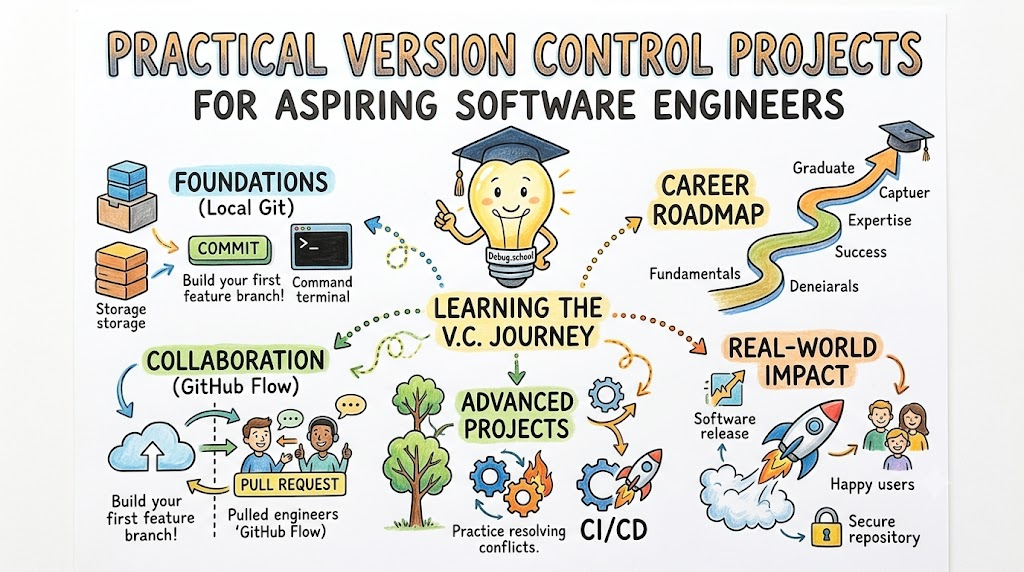
Mastering code management and collaboration workflows is an essential milestone for anyone entering the technology landscape. New developers often struggle to grasp distributed version control concepts when reading purely abstract documentation or memorizing dry terminal commands. Fortunately, learners can bridge this gap through the hands-on, mentor-led curriculum available at debug.school. This educational ecosystem emphasizes practical, project-based exercises that turn complicated merge operations, conflict resolutions, and branching architectures into second nature. Consequently, ambitious programmers quickly gain the practical competence needed to manage production codebases confidently alongside distributed engineering teams.
Key Operational Concepts You Must Know
Distributed Repository Architecture
Distributed repository models completely eliminate the single point of failure found in legacy centralized version control architectures. Rather than keeping file histories locked away on an isolated central server, every developer clones a full mirror of the repository locally. This full mirror includes every historical commit, branch reference, and project tag created across the codebase lifecycle.
Because the complete development log resides directly on local drives, engineers execute commits, inspect diffs, and switch branches without needing an active internet connection. As a result, productivity remains completely unaffected during unexpected network drops or travel.
Once local changes pass thorough unit tests, developers synchronize their work with remote repositories using push and pull mechanisms. This distributed framework ensures resilience across the entire development team because any workstation can restore a corrupted central mirror instantly.
The Staging Workflow and Object Storage
Every commit journey moves intentionally across three distinct operational zones: the working directory, the staging index, and the commit object store. The working tree reflects your live, editable files currently sitting on disk.
When you stage modifications, the system transforms your raw file updates into immutable data objects known as blobs. It then creates a snapshot manifest called a tree object, mapping filenames directly to their cryptographic content identifiers.
Finally, creating a commit seals this staged snapshot alongside metadata, author signatures, and references to previous commit ancestors. This disciplined, staged workflow empowers developers to craft precise, atomic commits rather than dumping messy, unorganized code into shared project branches.
Advanced Branching and Graph Traversal
Branches function as lightweight, movable pointers pointing directly to specific commit nodes within a directed acyclic graph. Because creating a branch merely writes a small file containing a commit hash, branching operations complete instantly.
Engineers routinely isolate feature experiments, security patches, and release candidates onto dedicated branch paths to avoid destabilizing main branches. When combining divergent branch lines, teams deploy merge commits or linear rebase operations depending on repository policy.
Furthermore, mastering graph movement operations allows developers to navigate through code history seamlessly. By understanding commit lineage, engineers safely isolate bugs, cherry-pick hotfixes across releases, and maintain crystal-clear historical timelines across multi-year software initiatives.
Conflict Detection and Resolution Engines
Merge conflicts occur naturally whenever two independent branches introduce conflicting edits to identical lines of code. When automated three-way merge algorithms encounter these overlapping edits, the engine pauses operations rather than guessing developer intent.
The system then injects conflict markers directly into the affected files, highlighting both incoming and current branch variants. Developers must examine these differences carefully, consult with their teammates, and select the appropriate code structure.
Once you clean up the conflicting markers and stage the unified changes, the system finalizes the resolution commit. Treating merge conflicts as routine synchronization milestones rather than critical errors helps teams maintain fearless collaborative momentum.
Platform Implementation vs. Culture — What's the Real Difference?
The Mechanics of Tool Adoption
Many engineering teams focus entirely on configuring remote hosting services, setting up automated access tokens, and enforcing strict command-line syntax. While these tactical steps build the operational environment, treating version management merely as an automated backup system severely limits team potential.
Teams that focus exclusively on basic command execution frequently produce chaotic commit logs filled with cryptic update descriptions. Furthermore, developers working without shared operational standards often hesitate to merge code regularly, creating massive integration backlogs.
Consequently, having modern tools installed across your infrastructure does not automatically guarantee clean code integration or frictionless releases. To achieve reliable delivery speeds, teams must look past the terminal commands and invest heavily in collaborative engineering behavior.
Fostering Collaborative Hygiene and Shared Ownership
A mature engineering culture treats every commit history as a permanent, readable documentation manual for future team members. In this collaborative environment, developers write descriptive commit narratives, submit small reviewable pull requests, and actively review peer code.
Additionally, a strong version control culture promotes early, frequent integration to expose regressions long before production deployments occur. When automated continuous integration checks run alongside every push, developers receive instantaneous feedback regarding system stability.
Ultimately, combining practical tool proficiency with disciplined collaboration hygiene elevates an entire software organization. Teams shift away from chaotic firefighting toward predictable, stress-free delivery cycles where every engineer shares complete visibility across the codebase.
| Evaluation Metric | Platform Implementation | Collaborative Engineering Culture |
|---|---|---|
| Primary Focus | Configuring repository settings, access keys, and remote hooks. | Writing descriptive commit logs and conducting thorough peer code reviews. |
| Workflow Cadence | Infrequent, massive code synchronizations to avoid manual merges. | Continuous, small pull requests integrated multiple times every day. |
| Conflict Management | Panicked manual patching when long-lived feature branches collide. | Routine, proactive synchronization minimizing file collisions early. |
| Historical Value | Serves merely as a remote disaster-recovery storage bucket. | Serves as an immutable architectural log explaining technical decisions. |
Real-World Use Cases of Modern Operations
Trunk-Based Continuous Integration
Modern continuous delivery engines depend entirely on trunk-based development to accelerate software delivery cycles. Instead of creating long-lived feature branches that drift away from production reality, developers merge their updates directly into the main branch daily.
To prevent incomplete features from breaking active environments, teams wrap unfinished functionality behind dynamic feature flags. Consequently, code paths deploy safely into production systems while remaining invisible to standard end users until launch day.
- Core Operational Pattern: Short-lived branches merged multiple times daily with automated test verification.
- Primary Business Impact: Slashes release cycle durations from several months down to continuous hourly deployments.
- Failure Mitigation: Automated rollback scripts and feature toggle switches disable broken paths instantly.
Open-Source Distributed Collaboration
Global open-source projects coordinate thousands of independent contributors without granting write access to central repositories. Instead, contributors duplicate the project into personal namespaces, perform work in complete isolation, and submit external pull requests.
Project maintainers then use automated validation pipelines to run test matrices across multiple operating environments before human review begins. This decentralized workflow enables massive technical ecosystems to scale securely while vetting code contributions from strangers worldwide.
- Collaboration Framework: Forking repositories combined with cross-repository pull requests and cryptographic commit signatures.
- Security Model: Strict branch protection rules requiring multiple peer approvals and automated green checkmarks.
- Scale Advantage: Coordinates thousands of global engineers without risking unauthorized writes to production branches.
Infrastructure as Code and GitOps Operations
Modern cloud infrastructure management treats network rules, compute clusters, and storage buckets as versioned code files. Under this operational model, teams define desired infrastructure state inside declarative configuration repositories.
Automated deployment agents continuously monitor these repositories, instantly applying detected configuration diffs directly to live cloud environments. Therefore, auditing infrastructure modifications or recovering from total datacenter outages requires merely examining commit histories or reverting commits.
- Architectural Blueprint: Declarative configuration files stored alongside application source code.
- Operational Mechanism: Reconciliation controllers align cloud infrastructure automatically with git repositories.
- Compliance Value: Provides immutable audit logs detailing every single infrastructure change.
Common Mistakes in Operations Engineering
Committing Secrets and Environment Credentials
A devastating mistake made by inexperienced developers is checking private API keys, database passwords, or certificates directly into repositories. Because version control systems record every intermediate state permanently, deleting the file in a subsequent commit does not remove the secret.
Malicious crawlers constantly scrape public repositories, extracting exposed credentials within seconds of publication to hijack expensive cloud resources. Once an engineer pushes an unencrypted credential, that secret must be treated as instantly compromised and rotated immediately.
To prevent this severe vulnerability, engineering teams must configure local pre-commit hooks and repository-level scanners that block secret patterns automatically. Additionally, environment variables and encrypted secret managers must store sensitive configuration outside repository tracking.
Maintaining Giant, Unmanageable Feature Branches
Allowing feature branches to live independently for weeks or months without synchronizing with main branches guarantees severe operational pain. As teammates merge their own changes into production, your isolated branch drifts further away from current system reality.
Eventually, attempting to merge that massive branch triggers hundreds of complex merge conflicts across diverse modules. Resolving these intertwined conflicts manually often introduces silent logic bugs that slip past automated test coverage into production.
Therefore, engineers should slice large technical initiatives into small, deliverable tasks that merge cleanly within twenty-four to forty-eight hours. Short branch lifecycles eliminate integration surprises and keep development velocity exceptionally high across teams.
Rewriting Shared Public Commit History
Modifying historical commits using interactive rebasing, history filtering, or forced pushes is helpful for polishing local development branches. However, applying these destructive history rewrites to shared public branches wreaks absolute havoc on downstream teammates.
When you alter a pushed commit's timestamp, message, or content, the engine generates completely new cryptographic hashes for that entire branch line. When teammates attempt to synchronize their local tracking branches, their environments experience massive graph divergence and phantom conflicts.
Consequently, teams must enforce strict branch protection policies that reject force pushes to shared collaboration branches. If a faulty commit reaches production, always push a new revert commit that cleanly negates changes without erasing historical records.
How to Become an Operations Expert — Career Roadmap
Step 1: Master Local Foundations
Begin your educational journey by developing complete fluency inside the terminal without relying on graphical interfaces. Learn to navigate directories, configure user profiles, and inspect repository status lines using standard shell utilities.
Practice initializing local repositories, inspecting modified diffs, and staging changes with surgical precision using patch-level staging commands. Focus heavily on crafting clear commit descriptions that explain both the underlying reasoning and functional impact of your code changes.
- Core Focus: Understand object states, master terminal navigation, and practice staging partial file updates.
- Practical Projects: Build a personal developer cheatsheet tracking shell scripts and configuration files across multiple commits.
- Milestone Outcome: Execute routine daily development workflows entirely through shell commands without reaching for graphical interfaces.
Step 2: Concurrency, Merging, and Conflict Resolution
Advance your skills by exploring complex branching topologies, interactive rebasing routines, and multi-branch conflict resolution strategies. Learn how git calculates common ancestors during merge operations and practice resolving intentionally broken merge branches locally.
Master the art of interactive rebasing to squash messy work-in-progress checkpoints into clean, production-ready commits before opening reviews. Additionally, familiarize yourself with stash commands to park uncommitted experiments temporarily when critical production hotfixes interrupt your workflow.
- Core Focus: Master fast-forward merges, three-way merge commits, interactive rebases, and stash stacks.
- Practical Projects: Simulate collaborative conflicts by cloning two copies of a repository into different folders and merging conflicting changes.
- Milestone Outcome: Resolve tangled multi-file merge conflicts cleanly without discarding legitimate code modifications.
Step 3: Remote Collaboration and Review Workflows
Expand your operational horizon by connecting local repositories to remote distributed hosting services and managing collaborative code review workflows. Master the mechanics of cloning, fetching branch updates, tracking remote heads, and publishing feature branches safely.
Learn how to manage open-source contributions using the fork-and-pull-request model while enforcing standardized pull request templates. Furthermore, practice conducting thoughtful, constructive code reviews that identify security vulnerabilities and maintainability issues before approving incoming code changes.
- Core Focus: Manage remote tracking branches, configure upstream remotes, and navigate collaborative review interfaces.
- Practical Projects: Contribute documentation improvements or bug fixes to active open-source projects using pull requests.
- Milestone Outcome: Confidently coordinate multi-engineer development initiatives across distributed timezones using structured review processes.
Step 4: Automation, CI/CD, and Enterprise GitOps
Complete your career roadmap by integrating version control repositories directly into automated deployment pipelines and cloud infrastructure systems. Master the configuration of automated continuous integration scripts that run test suites, lint checkers, and security scans on every push.
Study how webhooks notify external deployment clusters whenever engineers merge code into production branches. Finally, explore GitOps tools to automate multi-region infrastructure provisioning using declarative repository states as the single source of truth.
- Core Focus: Configure automated pipeline runners, write branch protection rules, and deploy infrastructure declaratively.
- Practical Projects: Construct a continuous integration pipeline that automatically builds container images and deploys them upon branch merges.
- Milestone Outcome: Design end-to-end enterprise release pipelines where every code merge triggers automated, zero-downtime production deployments.
FAQ Section
- What is the fundamental difference between git and GitHub? Git is an open-source, local command-line version control engine that tracks file changes across development history. GitHub is a cloud-based hosting platform that provides remote repository storage, graphical interfaces, pull request tooling, and collaboration services built around that core engine.
- When should an engineer choose rebasing over standard merging? Rebasing works best on private, local feature branches to clean up intermediate commits and maintain a neat, linear project history before sharing work. Standard three-way merging should always be used on public, shared branches to preserve the true chronological context of team integration events.
- How can I safely recover a commit that was accidentally deleted? You can locate discarded commits using the reference log tool, which records every single head movement across your local workstation. Once you identify the commit hash of your lost work, create a new branch pointing directly to that hash to restore the data safely.
- Why are atomic commits considered an industry best practice? Atomic commits encapsulate a single logical change, bug fix, or feature enhancement within an isolated, fully functional snapshot. Keeping changes atomic makes code reviews fast, simplifies conflict resolution, and enables precise rollbacks using cherry-pick or revert tools without affecting unrelated modules.
- What does the git stash command do with modified working files? The stash command shelves your uncommitted working directory edits and index changes into an internal temporary stack, reverting your files back to the last clean commit state. This mechanism lets you switch branches immediately to handle hotfixes without abandoning or prematurely committing your ongoing progress.
Final Summary
Learning distributed version control provides software engineers with the foundational confidence required to build scalable, resilient applications across distributed enterprise teams. By grounding your technical education in practical, hands-on repository projects rather than theoretical guides, you transform complex branching strategies and merge mechanics into reliable everyday habits. Educational ecosystems like debug.school provide the structured roadmaps, interactive environments, and mentor guidance needed to master both local terminal operations and enterprise-scale collaborative workflows. Rather than treating version management merely as an emergency cloud backup, embrace it as an expressive, architectural documentation engine for your codebase. Ultimately, cultivating strong collaborative hygiene, practicing continuous integration, and automating release verification empowers you to deliver exceptional software products efficiently throughout your engineering career.



Top comments (0)