
Introduction
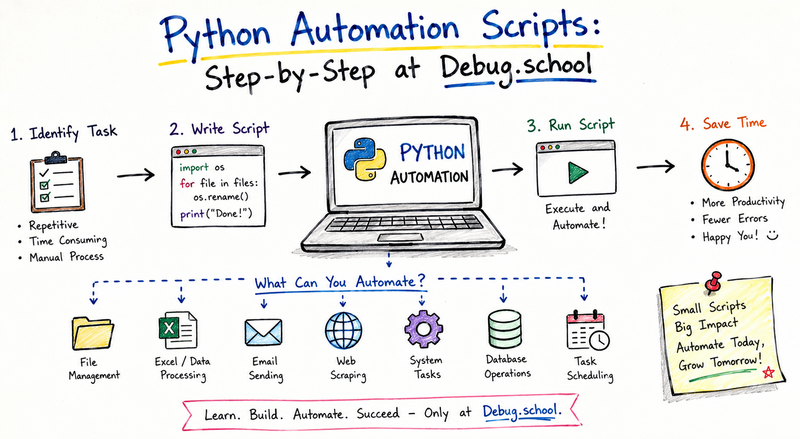
Python automation scripts help individuals and organizations eliminate repetitive work, improve accuracy, and save valuable time. Instead of manually performing the same actions every day, Python allows you to create scripts that automatically execute tasks such as file management, data processing, report generation, email handling, web scraping, system monitoring, and workflow coordination.
Automation is no longer limited to large enterprises or advanced software teams. Today, students, developers, administrators, analysts, and business professionals use Python automation to streamline daily operations and increase productivity. The simplicity of Python syntax combined with its extensive library ecosystem makes it one of the most popular programming languages for automation projects.
If you want to learn practical automation techniques and build real-world solutions, Debug.school provides a structured learning environment that helps learners understand automation concepts step by step while gaining hands-on experience.
In this comprehensive guide, you will learn how Python automation scripts work, how to create them from scratch, where they are used, common implementation challenges, operational concepts behind automation systems, and the roadmap for becoming an automation expert.
Understanding Python Automation Scripts
Python automation scripts are programs designed to perform tasks automatically with minimal human intervention. These scripts follow predefined instructions and execute actions repeatedly, accurately, and consistently.
Think about activities such as:
- Renaming hundreds of files
- Sending daily reports
- Processing spreadsheets
- Monitoring server performance
- Collecting website data
- Organizing folders
- Generating invoices
- Updating databases
Performing these tasks manually consumes time and increases the risk of human error. Automation scripts eliminate these problems by handling repetitive processes efficiently.
The core objective of automation is not simply replacing manual work. Instead, it allows people to focus on higher-value activities such as decision-making, analysis, innovation, and customer engagement.
Python excels in automation because it offers:
- Simple and readable syntax
- Extensive built-in libraries
- Cross-platform compatibility
- Strong community support
- Fast development cycles
- Integration capabilities with various systems
As a result, Python has become a preferred choice for automation engineers, developers, DevOps professionals, system administrators, and data analysts.
Why Python Is Ideal for Automation
Many programming languages support automation. However, Python provides several advantages that make it particularly effective.
Simplicity
Python code resembles plain English. This readability reduces development time and simplifies maintenance.
Example:
for file in files:
    print(file)
Even beginners can understand the logic immediately.
Large Ecosystem
Python offers libraries for almost every automation scenario.
Common examples include:
| Library | Purpose |
|---|---|
| os | File operations |
| shutil | File management |
| pandas | Data processing |
| requests | API communication |
| selenium | Browser automation |
| openpyxl | Excel automation |
| smtplib | Email automation |
| schedule | Task scheduling |
Scalability
Python automation scripts can start small and gradually evolve into enterprise-level automation systems.
Community Support
Thousands of tutorials, libraries, frameworks, and examples make learning easier.
How Python Automation Works
Every automation script follows a similar workflow.
Step 1: Identify Repetitive Tasks
First, determine which activities consume time repeatedly.
Examples include:
- Daily report generation
- Folder organization
- Data collection
- Email distribution
- System checks
Step 2: Define Rules
Automation requires clear instructions.
For example:
- Read all Excel files
- Extract sales data
- Calculate totals
- Generate report
- Email manager
Step 3: Write Script Logic
Python translates business rules into executable code.
Step 4: Test Execution
Testing ensures reliability before deployment.
Step 5: Schedule Automation
Scripts can run automatically using schedulers.
Examples include:
- Every hour
- Every day
- Every week
- Upon system startup
Step 6: Monitor Results
Monitoring ensures successful execution and quick issue resolution.
Building Your First Python Automation Script
Let's create a simple file-renaming automation script.
Problem
A folder contains hundreds of images with inconsistent names.
Example:
img1.jpg
img2.jpg
img3.jpg
You want:
product_1.jpg
product_2.jpg
product_3.jpg
Solution
import os

folder = "images"

files = os.listdir(folder)

for index, file in enumerate(files, start=1):
    old_path = os.path.join(folder, file)
    new_path = os.path.join(folder, f"product_{index}.jpg")
    os.rename(old_path, new_path)

print("Files renamed successfully")
Benefits
- Saves time
- Removes manual effort
- Maintains consistency
- Reduces errors
This simple example demonstrates the power of automation.
Automating Excel Operations
Many organizations rely heavily on spreadsheets.
Python can automate:
- Data entry
- Report creation
- Formatting
- Calculations
- Data validation
Example:
from openpyxl import load_workbook

workbook = load_workbook("sales.xlsx")
sheet = workbook.active

total = 0

for row in sheet.iter_rows(min_row=2):
    total += row[2].value

print("Total Sales:", total)
Instead of calculating manually, Python processes large datasets instantly.
Email Automation with Python
Sending repetitive emails is another common automation scenario.
Python can:
- Send notifications
- Deliver reports
- Trigger alerts
- Distribute updates
Example workflow:
- Generate report
- Attach file
- Send email automatically
- Log delivery status
This approach improves communication efficiency while reducing administrative workload.
Web Scraping Automation
Organizations often collect information from websites regularly.
Python automates this process using tools like BeautifulSoup and Requests.
Common applications include:
- Price tracking
- Competitor analysis
- Market research
- Content aggregation
- Product monitoring
Automation eliminates the need to manually gather information from multiple sources.
API Automation
Modern systems communicate through APIs.
Python automates interactions such as:
- Fetching data
- Updating records
- Synchronizing applications
- Creating reports
Example:
import requests

response = requests.get("api_endpoint")

data = response.json()

print(data)
API automation enables seamless integration across platforms.
Task Scheduling in Automation
Running scripts manually defeats the purpose of automation.
Scheduling tools allow scripts to execute automatically.
Common scheduling methods include:
- Cron jobs
- Windows Task Scheduler
- Python schedule library
- Workflow orchestration tools
Example:
import schedule
import time

def job():
    print("Task running")

schedule.every().day.at("09:00").do(job)

while True:
    schedule.run_pending()
    time.sleep(1)
Scheduling transforms simple scripts into fully automated solutions.
Key Operational Concepts You Must Know
Automation is not just about writing code. Successful automation requires understanding operational principles.
Reliability
Scripts must perform consistently.
Reliable automation includes:
- Error handling
- Validation checks
- Recovery mechanisms
Scalability
Automation systems should accommodate increasing workloads.
Good automation grows without major redesign.
Observability
Teams need visibility into system behavior.
Monitoring should capture:
- Execution status
- Errors
- Performance metrics
- Resource usage
Maintainability
Scripts should remain easy to update and improve.
Readable code and documentation support long-term success.
Security
Automation frequently interacts with sensitive information.
Security practices include:
- Credential protection
- Access control
- Data encryption
- Audit logging
Standardization
Consistent coding standards improve collaboration and reduce complexity.
Platform Implementation vs. Culture — What's the Real Difference?
Organizations often assume automation success depends entirely on technology. In reality, culture plays an equally important role.
| Platform Implementation | Culture |
|---|---|
| Tools | Mindset |
| Software | Behavior |
| Infrastructure | Collaboration |
| Processes | Adoption |
| Technology | Continuous Improvement |
Platform Implementation
Platform implementation focuses on technical deployment.
Examples include:
- Automation frameworks
- Cloud platforms
- Monitoring systems
- Deployment pipelines
- Infrastructure tools
These components provide the foundation.
Culture
Culture determines how people use automation.
Strong automation cultures encourage:
- Learning
- Experimentation
- Documentation
- Collaboration
- Process improvement
Why Culture Matters
Even the most advanced platform can fail if teams resist adoption.
Successful organizations combine technical excellence with operational discipline.
The result is sustainable automation growth.
Advanced Python Automation Techniques
As your skills improve, automation projects become more sophisticated.
Multi-Step Workflows
Automation often involves interconnected tasks.
Example:
- Download data
- Clean records
- Generate report
- Email stakeholders
- Archive files
Python can manage entire workflows automatically.
Database Automation
Python interacts with databases to:
- Insert records
- Update information
- Generate analytics
- Perform maintenance
This capability supports business intelligence and operational efficiency.
Cloud Automation
Modern organizations rely on cloud environments.
Python automates:
- Resource provisioning
- Monitoring
- Scaling
- Backup management
Cloud automation improves flexibility and cost control.
System Administration Automation
Administrators automate:
- User management
- Log analysis
- Backup creation
- Service monitoring
Automation reduces repetitive operational work.
Real-World Use Cases of Modern Operations
Automation influences nearly every industry.
IT Operations
Organizations automate:
- Server monitoring
- Patch deployment
- Backup management
- Incident response
Benefits include improved reliability and reduced downtime.
Finance
Financial teams automate:
- Invoice processing
- Reconciliation
- Report generation
- Risk analysis
Automation improves accuracy and compliance.
Healthcare
Healthcare organizations automate:
- Appointment reminders
- Data processing
- Record management
- Operational reporting
Efficiency improvements help staff focus on patient care.
E-Commerce
Online businesses automate:
- Inventory updates
- Order processing
- Product monitoring
- Customer notifications
Automation supports scalability.
Marketing
Marketing teams automate:
- Campaign tracking
- Email distribution
- Data analysis
- Lead management
This allows faster decision-making.
Human Resources
HR departments automate:
- Employee onboarding
- Attendance tracking
- Performance reporting
- Document management
Administrative workloads decrease significantly.
Manufacturing
Manufacturers automate:
- Equipment monitoring
- Quality control
- Production tracking
- Maintenance scheduling
Automation enhances operational consistency.
Best Practices for Writing Automation Scripts
Successful automation projects follow proven principles.
Keep Scripts Modular
Break functionality into reusable components.
Benefits include:
- Easier maintenance
- Better testing
- Improved scalability
Add Logging
Logs help diagnose issues quickly.
Example:
import logging

logging.basicConfig(level=logging.INFO)

logging.info("Automation started")
Handle Errors Properly
Unexpected failures occur.
Use exception handling:
try:
    run_task()
except Exception as e:
    print(e)
Document Everything
Documentation helps future maintenance.
Include:
- Purpose
- Dependencies
- Workflow
- Configuration details
Test Frequently
Testing prevents failures in production environments.
Common Mistakes in Operations Engineering
Many automation initiatives encounter avoidable problems.
Understanding these mistakes helps teams build stronger systems.
Automating Broken Processes
Automation should improve processes, not hide inefficiencies.
Always optimize workflows before automating them.
Ignoring Error Handling
Scripts eventually encounter unexpected situations.
Without error handling, failures can disrupt operations.
Poor Documentation
Undocumented automation becomes difficult to maintain.
Knowledge loss creates operational risks.
Hardcoded Values
Avoid embedding:
- Passwords
- Paths
- Server names
- Configuration settings
Use configuration files instead.
Lack of Monitoring
Teams often assume scripts will always work.
Monitoring ensures issues are detected early.
Overengineering
Complex solutions create unnecessary maintenance burdens.
Keep automation as simple as possible.
Insufficient Security
Poor credential management creates vulnerabilities.
Security should be integrated from the beginning.
No Backup Plan
Automation failures can impact business operations.
Always define recovery procedures.
Automation Project Lifecycle
Understanding the lifecycle improves implementation success.
Planning
Define:
- Goals
- Scope
- Requirements
- Success metrics
Design
Create architecture and workflow diagrams.
Development
Write and organize automation logic.
Testing
Validate functionality thoroughly.
Deployment
Release automation into production environments.
Monitoring
Track performance continuously.
Improvement
Refine automation based on feedback and operational insights.
How to Become an Operations Expert — Career Roadmap
Operations expertise requires a combination of technical and business knowledge.
Stage 1: Learn Programming Fundamentals
Focus on:
- Python basics
- Variables
- Loops
- Functions
- Data structures
A strong programming foundation is essential.
Stage 2: Master Automation Concepts
Learn:
- Scheduling
- Workflow design
- APIs
- File automation
- Data processing
Practice through small projects.
Stage 3: Understand Operating Systems
Develop familiarity with:
- Linux
- Windows administration
- Command-line tools
- Process management
Operational knowledge increases automation capabilities.
Stage 4: Learn Databases
Study:
- SQL
- Database design
- Query optimization
- Data management
Many automation projects interact with databases.
Stage 5: Explore Cloud Platforms
Understand:
- Infrastructure concepts
- Cloud services
- Resource management
- Automation tools
Cloud knowledge expands career opportunities.
Stage 6: Develop Monitoring Skills
Learn:
- Logging
- Metrics
- Alerting
- Observability practices
Monitoring is critical for operational success.
Stage 7: Build Real Projects
Recommended projects:
- Automated reporting systems
- Inventory trackers
- Monitoring dashboards
- Backup automation
- Email automation workflows
Hands-on experience accelerates growth.
Stage 8: Improve Soft Skills
Technical expertise alone is insufficient.
Develop:
- Communication
- Documentation
- Leadership
- Problem-solving
- Collaboration
These skills support long-term career advancement.
Career Opportunities
Operations expertise can lead to roles such as:
- Automation Engineer
- Python Developer
- DevOps Engineer
- Site Reliability Engineer
- Systems Administrator
- Platform Engineer
- Infrastructure Engineer
- Cloud Operations Specialist
Each role benefits from strong automation capabilities.
Future of Python Automation
Automation continues expanding across industries.
Emerging trends include:
- Intelligent workflows
- AI-assisted automation
- Event-driven systems
- Cloud-native operations
- Advanced monitoring
- Self-healing infrastructure
Python remains a major contributor because of its flexibility and extensive ecosystem.
Organizations increasingly depend on automation to improve efficiency, reduce costs, and maintain competitiveness.
Professionals who develop automation skills position themselves for long-term career growth.
FAQ Section
What is a Python automation script?
A Python automation script is a program that automatically performs repetitive tasks without requiring constant human intervention.
Why is Python widely used for automation?
Python offers simple syntax, powerful libraries, extensive community support, and excellent integration capabilities.
Do I need advanced programming skills to start automation?
No. Beginners can start with basic Python knowledge and gradually build more advanced automation projects.
What tasks can be automated with Python?
Python can automate file management, data processing, reporting, email delivery, web scraping, monitoring, and many other workflows.
Is Python automation suitable for businesses?
Yes. Businesses use Python automation to improve efficiency, reduce manual effort, and increase operational consistency.
Can Python automate Excel operations?
Yes. Python can read, write, format, analyze, and generate Excel files automatically.
What is workflow automation?
Workflow automation combines multiple automated tasks into a structured process that executes with minimal human involvement.
Is automation useful for small organizations?
Absolutely. Small organizations often gain significant productivity improvements through automation.
How important is error handling in automation?
Error handling is critical because it helps scripts manage unexpected situations without causing major operational disruptions.
What career paths benefit from automation expertise?
Roles such as Automation Engineer, DevOps Engineer, Site Reliability Engineer, Platform Engineer, and Python Developer benefit greatly from automation skills.
Final Summary
Python automation scripts provide a practical and powerful way to eliminate repetitive work, improve efficiency, and reduce operational errors. By automating tasks such as file management, reporting, email distribution, data processing, monitoring, and workflow coordination, organizations can focus more on strategic activities and innovation.
Successful automation extends beyond writing code. Professionals must understand reliability, scalability, observability, security, maintainability, and operational best practices. Equally important is recognizing the difference between platform implementation and organizational culture, since long-term automation success depends on both technology and people.
Modern operations rely heavily on automation across industries including IT, finance, healthcare, manufacturing, marketing, human resources, and e-commerce. As automation adoption continues to grow, Python remains one of the most effective tools for building flexible and scalable solutions.
Whether you are a beginner learning your first script or an experienced professional expanding operational expertise, mastering Python automation creates opportunities to solve complex problems, improve business outcomes, and advance your career in modern technology environments.



Top comments (0)