
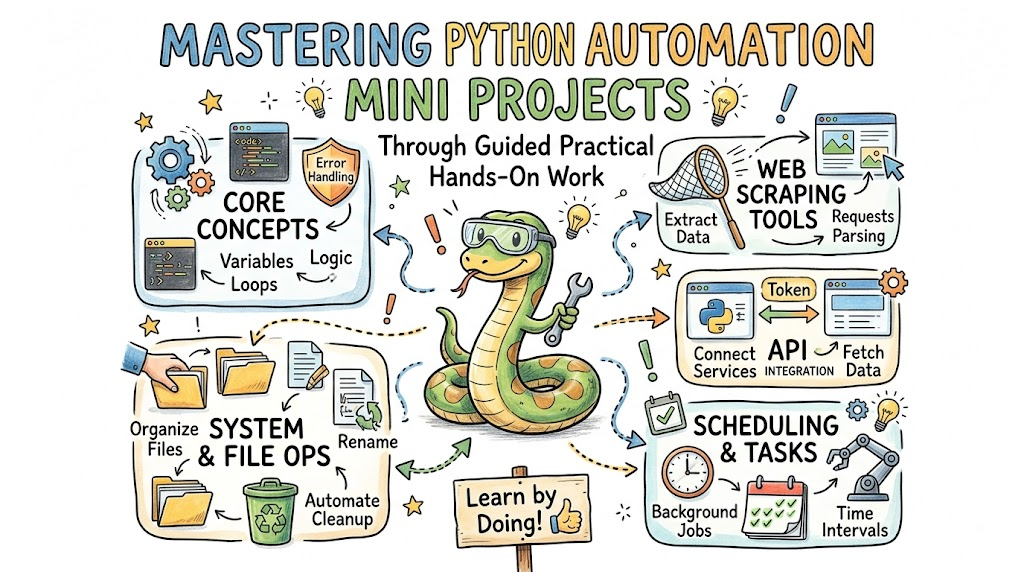
Automation transforms repetitive, time-consuming tasks into fast, error-free background processes. However, mastering script creation requires systematic hands-on practice through real-world builds. Aspiring developers can accelerate their scripting expertise by building practical projects at debug.school. This interactive platform simplifies learning by turning complex programming concepts into manageable, real-world tasks. Consequently, learners quickly acquire practical skills in file management, web scraping, API communication, and task scheduling without feeling overwhelmed by dry theoretical manual pages.
Automated File Organization and System Management
File system management represents one of the most immediate practical wins in Python programming. Operating systems routinely accumulate hundreds of unorganized downloads, temporary logs, and scattered documents over time. Fortunately, developers can write lightweight scripts to inspect directories, sort files based on extensions, and automatically archive older records.
Furthermore, these scripts utilize operating system modules to create directories, rename files, and calculate total storage usage dynamically. Because the script handles file operations programmatically, execution takes only seconds rather than hours of manual clicking.
Consequently, building an automated file organization script teaches core fundamentals like path manipulation, conditional branching, and file system permissions. When you master directory operations, keeping local environments clean becomes an effortless, fully automated process.
Web Scraping and Data Extraction Workflows
Extracting unstructured information from websites opens massive possibilities for data analysis and market intelligence. Web scraping tools parse raw HTML structures, search for specific tag patterns, and isolate targeted text or media elements cleanly.
Additionally, modern extraction scripts handle dynamic web elements, handle pagination, and manage request headers to emulate real user browser interaction. By converting messy web pages into structured tables, scripts save hours of tedious copy-and-paste effort.
Subsequently, developers learn how to handle network timeouts, HTTP status codes, and subtle structural changes in target websites. Building web scrapers reinforces structural parsing logic while demonstrating the immense efficiency of automated web collection pipelines.
API Integration and Automated Reporting
Application Programming Interfaces serve as the digital bridges connecting separate software platforms across the web. Through simple HTTP requests, automation scripts can fetch live weather metrics, financial ticker updates, or internal server metrics effortlessly.
Moreover, scripts can clean raw payload data and format key metrics directly into readable summaries or executive PDF reports. Automatically emailing these generated summaries every morning ensures stakeholders stay continuously informed without manual data compilation.
As a result, API communication mini projects introduce foundational concepts like data serialization, authentication tokens, and payload parsing. Developing seamless integrations allows different cloud tools to communicate and execute administrative workflows autonomously.
Task Scheduling and Process Automation
Creating a powerful script represents only half the challenge; running that script automatically at precise intervals completes the workflow. Task scheduling libraries allow developers to set background timers that trigger execution daily, weekly, or upon system startup.
Furthermore, scheduled automation ensures critical processes like database backups, log cleanup, and system health checks execute consistently on time. By offloading timing management to continuous background runners, administrative routines execute reliably without human reliance.
Ultimately, mastering process scheduling teaches essential background execution techniques and system daemon management. Setting up automated job execution transforms isolated scripts into reliable, self-sustaining operational assets.
Key Operational Concepts You Must Know
Script Modularization and Error Handling
Writing production-grade automation requires moving beyond single-file scripts toward modular code bases. Breaking complex scripts into isolated functions ensures that individual components remain easy to test, debug, and upgrade independently.
Additionally, robust exception handling prevents scripts from crashing silently when encountering unexpected missing files or network interruptions. Wrapping file operations and network calls in structured error-handling blocks guarantees graceful recovery and detailed failure logging.
Consequently, modular architecture combined with robust error handling creates resilient scripts that run smoothly in unattended production environments. Developing defensive coding habits early saves hours of debugging time during system outages.
Environmental Isolation and Dependency Management
Managing external packages across different projects requires strict environment isolation to prevent library version conflicts. Dedicated virtual environments create self-contained execution sandboxes for every project on your local machine.
Moreover, explicit dependency files ensure that every team member or remote execution server installs the exact same library versions. This consistency completely eliminates the classic engineering issue where code works on one computer but fails in production.
As a result, practicing disciplined dependency management guarantees portability across different operating systems and deployment servers. Clean environment isolation forms the foundation of reliable software distribution across engineering teams.
Asynchronous Execution and Concurrency
Sequential script execution quickly becomes a major bottleneck when handling hundreds of simultaneous network requests or file operations. Concurrency modules allow scripts to initiate multiple network calls in parallel, drastically reducing total execution time.
Furthermore, asynchronous execution lets the program process other pending tasks while waiting for slow external web servers to respond. This parallel execution model optimizes hardware resource usage and dramatically increases pipeline throughput.
Substantially, learning asynchronous programming unlocks massive performance gains when scaling mini projects into large-scale production pipelines. Parallel execution guarantees fast results when processing large workloads across distributed networks.
Logging, Auditing, and Automated Monitoring
Unattended background scripts require clear visibility into their internal execution state through structured logging systems. Rather than printing temporary console messages, scripts must output standardized log files containing timestamps, log levels, and detailed error messages.
Additionally, auditing systems track execution success rates, processing speed, and resource utilization over extended periods. When unexpected failures occur, detailed log trails allow engineers to identify root causes within minutes.
Therefore, integrating comprehensive logging frameworks into every mini project builds vital operational observability. High observability guarantees complete transparency, allowing developers to maintain full control over background background operations.
Platform Implementation vs. Culture — What's the Real Difference?
The Infrastructure Trap in Automation
Many engineering organizations assume that purchasing expensive enterprise tools will automatically solve operational inefficiencies. This over-reliance on tools creates a technology trap where teams implement complex commercial platforms without building basic scripting skills. Consequently, companies end up with rigid, expensive frameworks that developers struggle to customize or maintain efficiently.
In contrast, true operational efficiency stems from writing simple, focused scripts tailored precisely to organizational bottlenecks. When engineers rely too heavily on massive platform features, they lose sight of lightweight software design principles.
Therefore, mastering simple scripting foundations prevents organizations from over-engineering basic administrative workflows. Learning how software components communicate fundamentally solves operational problems much faster than buying redundant software subscriptions.
Fostering an Automation-First Mindset
An automation-first culture encourages team members to identify and eliminate repetitive manual workflows across all operational tasks. In this collaborative environment, engineers treat administrative scripts as shared code assets requiring peer review, testing, and documentation. This collective ownership guarantees that internal toolsets remain reliable, scalable, and fully transparent.
Furthermore, an automation culture empowers developers to continuously automate small daily tasks, building momentum over time. Eliminating tedious toil frees team members to focus on high-value creative engineering problems.
When an organization successfully balances platform tools with a strong scripting culture, engineering productivity increases dramatically. Teams build efficient, custom workflows that adapt effortlessly to changing technical requirements.
| Aspect | Platform Implementation | Culture & Mindset |
|---|---|---|
| Primary Focus | Buying software licenses, configuring dashboards, and setting up commercial platforms. | Encouraging internal scripting, automating manual toil, and sharing operational toolsets. |
| Longevity | Tied directly to software vendor contracts and commercial update cycles. | Permanent operational habit that scales across changing technologies over time. |
| Success Metric | Number of software features deployed and cloud platform uptime statistics. | Reduced manual toil hours, elevated code quality, and fast issue resolution. |
| Core Value | Provides standardized interface environments and pre-built management tools. | Drives creative problem-solving, custom utility creation, and developer autonomy. |
Real-World Use Cases of Modern Operations
Automated Financial Reconciliation and Audit Logs
Financial departments routinely process massive volumes of daily transactional data across multiple banking systems and databases. Custom automation scripts can ingest raw CSV files, verify matching invoice numbers, and isolate discrepancies automatically within seconds.
Simultaneously, the script generates immutable audit logs that record every calculated variance for compliance reviews. This automated verification eliminates manual spreadsheet checks while guaranteeing total precision across financial records.
- Key Requirements: High precision calculations, robust input validation, and detailed audit trail logging.
- Core Benefit: Saves dozens of manual accounting hours while completely eliminating human calculation errors.
- Data Scale: Processes thousands of transactional line items daily across separate enterprise systems.
System Health Monitoring and Incident Alerting
System administrators require continuous oversight of server memory, disk usage, and active network connections across cloud infrastructure. Lightweight Python monitoring scripts inspect local system metrics continuously and evaluate performance against defined safety thresholds.
When disk utilization exceeds safety limits, the script instantly triggers webhooks to send urgent notifications directly to engineering chat channels. This immediate notification mechanism allows response teams to resolve infrastructure issues before end users experience outages.
- Data Types: CPU usage percentages, disk capacity metrics, and active network connection counts.
- Operational Goal: Detect performance degradation early and prevent unplanned server downtime.
- Analysis Method: Compares live hardware metrics against pre-set operational threshold limits continuously.
Dynamic E-Commerce Price Tracking and Inventory Updates
E-commerce businesses must adjust product pricing dynamically based on changing competitor inventory and market demand. Automated scraping and API scripts monitor rival websites continuously, tracking price movements and stock availability in real time.
Furthermore, these scripts automatically update central database records, adjusting sales prices dynamically based on pre-defined margin rules. This real-time synchronization keeps online stores competitive without requiring constant manual market oversight.
- Target Outcomes: Optimized sales conversion rates, improved profit margins, and instant market competitiveness.
- Pipeline Structure: Web scraping workers paired with centralized database update scripts.
- Scale Challenge: Handling structural layout changes on target websites smoothly without crashing background execution.
Common Mistakes in Operations Engineering
Hardcoding Credentials and Dynamic Configuration
A frequent security mistake among novice developers is hardcoding API keys, passwords, and database credentials directly inside script files. Storing sensitive credentials in plain text leads to severe security breaches when code repositories are shared or made public.
Instead, developers must utilize environment variables or secure vault stores to manage sensitive configuration settings safely. Fetching credentials at runtime keeps sensitive secrets completely isolated from the core application source code.
Ultimately, practicing strict credential hygiene prevents costly security vulnerabilities across internal projects. Keeping secrets isolated guarantees that scripts can safely move between development and production environments.
Neglecting Error Recovery and Idempotency
Writing scripts that assume flawless execution under ideal conditions frequently leads to corrupted data during unexpected runtime failures. If a script crashes midway through a multi-step database update, re-running it might create duplicate records or corrupted states.
To prevent this issue, developers must design idempotent workflows that produce identical results regardless of how many times they execute. Incorporating atomic file writes and transaction rollbacks ensures that partial failures leave the system in a clean state.
Therefore, designing for failure guarantees that background scripts handle unexpected network drops gracefully. Building resilient recovery pathways saves hours of manual database cleanup after network disruptions.
Uncontrolled Script Sprawl and Lack of Version Control
As automation efforts expand, organizations often accumulate dozens of unorganized, undocumented scripts scattered across various local machines. Without central version control repositories, tracking changes, updating logic, or identifying the author of a specific script becomes impossible.
Consequently, duplicate scripts emerge, leading to conflicting operations and severe confusion among engineering team members. Establishing centralized repositories ensures every utility remains properly documented, versioned, and easily accessible.
As a result, applying software engineering best practices to administrative scripts prevents operational chaos. Structured code management guarantees that automation assets remain valuable long-term organizational tools.
How to Become an Operations Expert — Career Roadmap
Step 1: Mastering Core Scripting Fundamentals
Begin your career progression by establishing a solid understanding of fundamental programming concepts and operating system interfaces. Focus heavily on mastering core data structures, string manipulation techniques, file handling operations, and error management strategies.
- Core Focus: Master Python syntax, learn command-line navigation, and understand local file system structures thoroughly.
- Learning Resources: Hands-on mini project exercises, interactive coding tutorials, and practical scripting documentation.
- Estimated Time: Dedicate your initial phase to building small utility scripts that automate personal daily manual tasks.
Step 2: Designing Robust Automation Workflows
Once you master basic syntax, move on to building modular scripts that interact with web servers and external services. Learn how to parse structured files, write robust web scrapers, and consume REST APIs using standard networking libraries.
- Core Focus: Build dynamic API integrations, handle web scraping workflows, and implement structured logging frameworks.
- Practical Projects: Build a custom script that scrapes daily news headlines and emails formatted summaries automatically.
- Key Concept: Focus on building clean exception handling and logging mechanisms into every script you write.
Step 3: Scaling Execution Across Distributed Systems
Transition your skills toward advanced concepts like asynchronous programming, concurrent execution, and background process management. Learn how to containerize your scripts using lightweight virtualization tools to guarantee identical execution across different server environments.
- Core Focus: Implement asynchronous processing, package scripts into containers, and schedule background daemon tasks.
- Design Skills: Structure idempotent workflows that process large workloads concurrently without data corruption.
- Optimization Goal: Minimize execution latency and hardware resource consumption across parallel processing pipelines.
Step 4: Enterprise Orchestration and Governance
Complete your expert roadmap by mastering central job orchestration engines, continuous deployment pipelines, and cloud deployment frameworks. Learn to manage enterprise automation infrastructure using code, enforcing strict security standards and automated testing procedures across all repositories.
- Core Focus: Manage complex workflow DAGs, implement automated CI/CD pipelines, and manage cloud resources programmatically.
- Career Growth: Advance from a basic utility scripter into a senior automation architect leading enterprise-wide transformations.
- Final Goal: Build self-healing, fully automated operational pipelines that run reliably at enterprise scale.
FAQ Section
- How do Python automation scripts handle unexpected operational errors during execution? Developers use structured try-except blocks to catch runtime exceptions gracefully without crashing the entire background process. Additionally, scripts output error details to standardized log files, allowing engineers to review and fix underlying issues quickly.
- Why is virtual environment management critical when building small automation projects? Virtual environments isolate library dependencies for individual projects, preventing version conflicts between separate automation scripts on the same machine. This clean separation guarantees that scripts execute consistently across different server environments.
- What makes Python the preferred language for administrative task automation? Python offers clean syntax, an extensive standard library, and a massive ecosystem of third-party packages for file manipulation, web scraping, and API communication. This rich ecosystem allows developers to write powerful automation tools using concise, readable code.
- How can automated scripts run continuously without manual human intervention? Engineers use system scheduling utilities or task queue frameworks to trigger script execution at specific time intervals or event triggers. These background schedulers keep scripts running continuously without requiring manual developer input.
- Where should sensitive configuration credentials be stored in automation scripts? Sensitive credentials should always be stored in external environment variables or secure secret managers rather than hardcoded inside source files. Fetching keys dynamically at runtime keeps sensitive access tokens safe from public code repositories.
Final Summary
Mastering operational scripting does not require years of theoretical study, but it demands dedicated hands-on practice building real-world projects. By breaking down complex administrative tasks into manageable mini builds, aspiring engineers build functional utility tools while mastering core software engineering principles. Platforms like debug.school provide the structured guidance, practical exercises, and progressive roadmaps needed to master practical programming quickly. Avoid the temptation of relying solely on expensive commercial software; instead, focus on building clean, modular, and well-documented scripts. Ultimately, combining strong scripting fundamentals with an automation-first culture empowers developers to eliminate manual toil and build highly efficient operational workflows.



Top comments (0)