
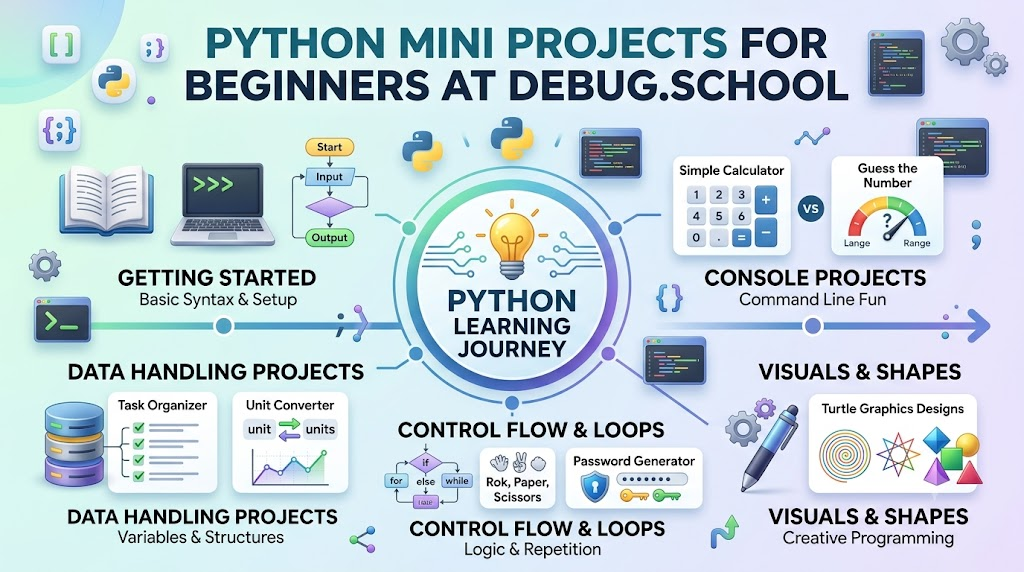
Learning how to code feels exciting when you make real things right away. Instead of reading thick books, you can create quick games and helpful digital tools. You can explore fun, bite-sized tasks by joining debug.school. This friendly platform guides new coders through easy steps, turning tricky concepts into fun playground activities.
Building small projects helps your brain remember how computer commands work together. You type simple commands, run your program, and see instant magic on your screen. When something breaks, finding the error turns into a fun detective game.
Starting small protects you from feeling lost or overwhelmed by giant programs. Each tiny success builds strong coding muscles and boosts your confidence. Soon, writing code feels as natural as writing a letter to a friend.
Understand How Computers Follow Your Steps
A computer is a helpful machine that follows every instruction exactly as told. If you skip a step, the machine stops because it cannot guess your mind. You must give clear orders in the exact right order.
Writing a small script is just like making a sandwich. You must spread the peanut butter before you close the bread slices. Good coders break big tasks into small, tidy pieces first.
Catch Mistakes and Fix Your Code
Errors in your code are called bugs, and every programmer meets them daily. Sometimes you forget a small bracket, or you misspell a single command word. These tiny slips cause the computer to stop and show an error note.
Fixing mistakes is a normal, healthy part of learning how to build software. You read the error clue, inspect your lines, and fix the typo. Overcoming these small puzzles makes you a much sharper thinker.
Store Information in Digital Boxes
Computer programs must remember names, numbers, and scores while they run. You use digital boxes called variables to keep this information safe. You can change what lives inside these boxes whenever you want.
Think of a variable like a labeled jar in your kitchen. One jar holds your score, while another jar holds your player name. Organizing your jars well keeps your entire game tidy and easy to read.
Repeat Tasks Without Getting Tired
Computers never complain when they have to do the same task a million times. You use loops to tell the machine to repeat actions automatically. This smart tool saves you from typing the same line over and over.
For example, a loop can count to one hundred in a split second. It can also keep a game running until the player decides to quit. Loops give your mini projects energy and continuous movement.
Key Operational Concepts You Must Know
Writing Clear Step-by-Step Plans
Every good program starts with an action plan before you type real code. Programmers call this logical recipe an algorithm. You decide what comes first, what comes next, and how the program ends.
Testing your ideas on scrap paper helps you spot mistakes early. You can draw simple boxes and arrows to map the path of your ideas. This simple habit keeps your thinking neat and organized.
Choosing the Best Storage Boxes
Python provides handy built-in tools to hold groups of items together. You can store a list of high scores in an ordered digital strip. You can also match player names to secret codes using smart lookups.
Using the correct container makes finding your saved information super fast. When your data stays organized, your code runs smoothly without messy slowdowns. Tidy data storage forms the backbone of every great project.
Handling Weird User Guesses
People using your programs will sometimes type strange things by mistake. For instance, a player might type letters when your game asks for a number. If your program does not expect this, it crashes instantly.
Smart coders add gentle safety checks to catch unexpected answers. You can show a polite note asking the user to try typing again. Guarding your code against surprises keeps your projects running safely.
Keeping Your Computer Memory Clean
Even tiny games use up a little bit of your computer's temporary memory. If you create giant piles of unused information, your machine slows down. Clean code deletes or ignores old, useless data quickly.
Writing lean instructions ensures your programs open quickly on any computer. You want your mini projects to feel snappy and responsive. Careful resource use is an awesome habit to learn early.
Platform Implementation vs. Culture — What's the Real Difference?
Tools Never Replace Real Practice
Some beginners believe that buying a fancy laptop makes them great coders immediately. They spend hours changing screen colors and downloading fancy text editors. However, shiny tools cannot solve logic puzzles for you.
A basic laptop runs simple Python scripts just as well as an expensive gaming rig. The real magic happens inside your own creative mind, not in the machine. True skill comes from writing, testing, and fixing lines of code yourself.
Building a Daily Learning Habit
The best coders spend a short time practicing every single day. Instead of cramming for eight long hours on a Saturday, they code for twenty minutes after school. This steady routine keeps concepts fresh and exciting.
Regular practice turns scary coding syntax into familiar everyday habits. You begin to see patterns and answers without feeling stressed. Consistency builds true skill much faster than occasional bursts of hard work.
| Feature | Fancy Platform Tools | Daily Coding Habit |
|---|---|---|
| Main Goal | Collecting cool accessories and pretty screen themes. | Training your brain to solve fun everyday puzzles. |
| Skill Progress | Looks neat on your desk but builds zero coding power. | Creates deep problem-solving skills that last forever. |
| Project Results | Produces empty files inside expensive software apps. | Produces fun, working games and helpful little tools. |
| True Value | Cool gear quickly becomes old and outdated. | Strong thinking habits stay with you throughout life. |
Real-World Use Cases of Modern Operations
Rolling Digital Dice for Board Games
Many classic tabletop board games require players to roll a pair of dice. A quick Python script can pick random numbers between one and six in a flash. This handy tool ensures nobody loses the plastic dice under the living room couch.
The random tool picks fair, unbiased numbers every single turn. You can run the code on a laptop right next to your game board. Simple scripts like this bring modern tech right into family game nights.
- Target Goal: Create fair random rolls for two players during board game matches.
- Core Logic: Pick a random number between one and six using built-in math tools.
- Practical Benefit: Never pause a fun game to search for missing physical dice again.
Organizing Daily Homework with a To-Do List
Students often struggle to remember all their daily reading and math assignments. A basic Python task tracker lets you type in chores and mark them finished. You can view your remaining jobs clearly in a neat command list.
The script can save your tasks to a plain text file on your hard drive. That way, your list stays safe even after you turn off the computer. This tiny helper keeps your schoolwork tidy and stress-free.
- Target Goal: Keep track of school assignments and daily chores in one place.
- Core Logic: Store text items in a list and remove them when finished.
- Practical Benefit: Helps you finish homework on time without forgetting any tasks.
Generating Unbreakable Secret Passwords
Using the same simple password for every website is very dangerous. A Python password maker can mix uppercase letters, numbers, and symbols into super tough codes. It creates unique, hard-to-crack shields for your personal accounts in seconds.
You simply tell the program how many characters you want in the password. It scrambles the pieces and hands you a rock-solid security key. This mini project teaches you how real cybersecurity tools protect sensitive data.
- Target Goal: Build tough passwords to keep private online accounts secure.
- Core Logic: Combine random characters from letters, numbers, and punctuation lists.
- Practical Benefit: Protects your gaming profiles and email from online guessing attacks.
Common Mistakes in Operations Engineering
Writing Massive Blocks of Code All at Once
Beginners often try to write an entire game in one giant burst before running it. When they finally press run, dozens of scary error messages pop up simultaneously. Finding which line caused the breakdown becomes an exhausting headache.
Instead, write just two or three lines of code and run a test immediately. Confirm that your new lines work properly before adding the next piece. Small steps make testing simple and keep frustration far away.
Giving Variables Confusing and Random Names
It is tempting to name your storage variables quick single letters like x, y, and z. However, when you re-read your code next week, you will forget what those letters mean. Your own script turns into a confusing, unreadable riddle.
Always pick clear, descriptive names like player_score, user_name, or total_coins. Good names explain exactly what sits inside each digital box. Clear code reads just like a story, making it easy to share with friends.
Forgetting to Save Progress Frequently
Nothing hurts more than losing hours of hard work because your computer battery died. Beginners often forget to save their project files as they write new code. A sudden freeze can wipe away your neat ideas in a single second.
Make a habit of pressing the quick save keys after every good sentence you write. You can also save backup copies in separate folders as your project expands. Protecting your work ensures you never have to rebuild your creations from scratch.
How to Become an Operations Expert — Career Roadmap
Step 1: Play with Interactive Text Games
Start your adventure by building simple games that talk back to you in text. Write a guessing game where the computer hides a number between one and ten. Ask the player for guesses and print hints like "too high" or "too low".
- Action Item: Build a number guessing game that congratulates the player when they win.
- Time Target: Spend your first three weeks building simple question-and-answer text apps.
- Core Goal: Master basic math checks, user inputs, and simple loop controls.
Step 2: Build Useful Everyday Utility Scripts
Once games feel easy, try writing little tools that solve small, real problems. Make a digital piggy bank that tracks how much pocket money you save each week. You can also build a unit converter that turns miles into kilometers.
- Action Item: Create a simple countdown timer that rings an alarm when study time ends.
- Time Target: Practice building two helpful desk utilities each month.
- Core Goal: Learn how to calculate formulas and save numbers inside tidy lists.
Step 3: Draw Fun Shapes with Visual Code
Move beyond plain terminal text by drawing vibrant shapes and animations on your screen. Python includes a classic drawing buddy named Turtle that moves across the canvas. You can command your turtle to draw colorful stars, houses, and spiral patterns.
- Action Item: Command your digital turtle to draw a colorful geometric pattern using nested loops.
- Time Target: Spend four weeks experimenting with visual movements and coordinates.
- Core Goal: Connect your logical thinking directly to visual shapes and colors on the screen.
Step 4: Share Your Projects with the World
Take pride in your finished creations and share them with friends, teachers, and family. Show other students how your code works and invite them to play your custom games. Listening to their feedback gives you great ideas for your next update.
- Action Item: Teach a friend how to run your guessing game on their own computer.
- Time Target: Dedicate one afternoon each month to showcasing your work to others.
- Core Goal: Build clear communication skills and gain pride in your technical creations.
FAQ Section
- How long does it take a beginner to build a mini project? Most simple projects take between thirty minutes and two hours to build. You can easily finish a fun guessing game in a single afternoon.
- Do I need to be great at math to write Python code? Not at all! Basic adding, subtracting, and simple logic are plenty for beginner projects. The computer handles all the heavy number crunching for you.
- What is the best mini project for a complete beginner? A number guessing game or a simple calculator is the perfect place to start. Both projects teach you how to gather input and make decisions cleanly.
- What should I do if my Python code refuses to run? Check your lines carefully for missing quotes, misspelled words, or uneven indents. Reading the last line of the error message usually tells you exactly where to look.
- Can I create visual games using Python? Yes, you can! You can start with basic Turtle graphics and later move up to rich game tools like Pygame. These tools let you add buttons, moving characters, and sound effects.
Final Summary
Creating small Python projects is the most exciting path to mastering computer programming. It transforms abstract rules into playable games, smart calculators, and helpful tools. Educational communities like debug.school make every step feel clear, friendly, and manageable. You do not need expensive hardware or genius-level math skills to become a great coder. All you need is regular curiosity, small daily practice, and the courage to fix silly bugs. Pick a fun idea today, write your first three lines of code, and enjoy the adventure!



Top comments (0)