
This is how serious SaaS systems track:
Introduction
What is Audit Logging?
Why Audit Logging is Critical in Production
When Should You Add Audit Logging?
Architecture of Secure Logging
Step 1: Add Logging Dependency
Step 2: Initialize Logger in main.rs
Step 3: Log Login Attempts
Log Unauthorized Access Attempts
Step 4: Log Data Modification Events
Step 5: Store Logs in File (Production Mode)
Advanced: Structured Logging (JSON Format)
Database-Based Audit Logging (Enterprise Level)
Login attempts

Failed access

Suspicious behavior

Admin actions

Data modifications

Security events
1️⃣ Introduction
Security does not end with authentication.
Even if your system is protected, you must be able to answer:
Who logged in?

From which IP?

At what time?

Was the login successful?

Who tried to access restricted routes?

Who deleted a record?
Without audit logging, you are blind.
2️⃣ What is Audit Logging?
Audit logging is the practice of recording security-relevant events in your system.
It answers:
Who did what, when, and from where?
3️⃣ Why Audit Logging is Critical in Production
Audit logs help with:
Fraud detection

Incident investigation

Legal compliance

Account takeover detection

Admin misuse tracking
Without logs, debugging security issues becomes impossible.
4️⃣ When Should You Add Audit Logging?
You must log:
Login attempts (success + failure)

Logout events

Password changes

Role changes

File uploads

Record deletion

Unauthorized access attempts

Admin actions
5️⃣ Architecture of Secure Logging
User Action
   ↓
Handler/Middleware
   ↓
Audit Log Layer
   ↓
File or Database
Logging must not interfere with main logic.
6️⃣ Step 1: Add Logging Dependency
In Cargo.toml:
log = "0.4"
env_logger = "0.11"
chrono = "0.4"
7️⃣ Step 2: Initialize Logger in main.rs
use env_logger;

#[actix_web::main]
async fn main() -> std::io::Result<()> {
    env_logger::init();
Now logs will print to console.
8️⃣ Step 3: Log Login Attempts
Modify login handler:
use actix_web::HttpRequest;
use log::{info, warn};
use chrono::Utc;

pub async fn login(
    req: HttpRequest,
    body: web::Json<LoginForm>,
    state: web::Data<AppState>,
    session: Session,
) -> Result<HttpResponse> {

    let ip = req.peer_addr()
        .map(|a| a.to_string())
        .unwrap_or_else(|| "unknown".to_string());

    let user_agent = req
        .headers()
        .get("User-Agent")
        .and_then(|v| v.to_str().ok())
        .unwrap_or("unknown");

    info!(
        "[LOGIN_ATTEMPT] username={} ip={} ua={} time={}",
        body.username,
        ip,
        user_agent,
        Utc::now()
    );

    let user = find_user_by_username(&state.pool, &body.username).await?;

    if let Some(user) = user {
        if user.password == body.password {

            info!(
                "[LOGIN_SUCCESS] username={} ip={} time={}",
                body.username,
                ip,
                Utc::now()
            );

            session.insert("user_id", user.id)?;
            session.insert("role", user.role)?;

            return Ok(HttpResponse::Ok().finish());
        }
    }

    warn!(
        "[LOGIN_FAILED] username={} ip={} time={}",
        body.username,
        ip,
        Utc::now()
    );

    Err(error::ErrorUnauthorized("Invalid credentials"))
}
9️⃣ Log Unauthorized Access Attempts
In middleware:
warn!(
    "[UNAUTHORIZED_ACCESS] path={} ip={} time={}",
    req.path(),
    req.peer_addr().unwrap(),
    Utc::now()
);
This helps detect brute force attacks.
🔟 Step 4: Log Data Modification Events
Example: Deleting a shop
info!(
    "[SHOP_DELETE] user_id={} shop_id={} time={}",
    user_id,
    shop_id,
    Utc::now()
);
You must log all destructive operations.
1️⃣1️⃣ Step 5: Store Logs in File (Production Mode)
Instead of printing to console, redirect to file.
Run server with:
RUST_LOG=info cargo run > audit.log
Now logs go to audit.log.
1️⃣2️⃣ Advanced: Structured Logging (JSON Format)
Instead of plain text logs:
info!(
    r#"{{"event":"login_success","user":"{}","ip":"{}","time":"{}"}}"#,
    body.username,
    ip,
    Utc::now()
);
Structured logs are easier for monitoring tools.
1️⃣3️⃣ Database-Based Audit Logging (Enterprise Level)
Create table:
CREATE TABLE audit_logs (
    id BIGINT AUTO_INCREMENT PRIMARY KEY,
    user_id BIGINT,
    event_type VARCHAR(100),
    ip_address VARCHAR(100),
    user_agent TEXT,
    created_at TIMESTAMP DEFAULT CURRENT_TIMESTAMP
);
Insert Log in DB
sqlx::query!(
    "INSERT INTO audit_logs (user_id, event_type, ip_address, user_agent)
     VALUES (?, ?, ?, ?)",
    user_id,
    "login_success",
    ip,
    user_agent
)
.execute(&state.pool)
.await?;
This is enterprise-grade monitoring.
1️⃣4️⃣ What Should NEVER Be Logged?
❌ Plain passwords
❌ Full tokens
❌ Credit card numbers
❌ Sensitive user data
Log metadata, not secrets.
1️⃣5️⃣ Add Login Rate Monitoring
If 5 failed attempts from same IP:
warn!("[POSSIBLE_BRUTE_FORCE] ip={}", ip);
Later integrate rate limiter.
1️⃣6️⃣ Add File Upload Logging
info!(
    "[FILE_UPLOAD] user_id={} file={} size={} time={}",
    user_id,
    filename,
    size,
    Utc::now()
);
Tracks storage abuse.
1️⃣7️⃣ Production Logging Best Practices
Use structured logs

Rotate log files

Store logs centrally

Monitor unusual patterns

Alert on repeated failures
1️⃣8️⃣ Real Production Flow
User Login Attempt
   ↓
Log attempt
   ↓
Login success/failure
   ↓
Log result
   ↓
User accesses admin route
   ↓
Log access
1️⃣9️⃣ Audit Logging vs Debug Logging
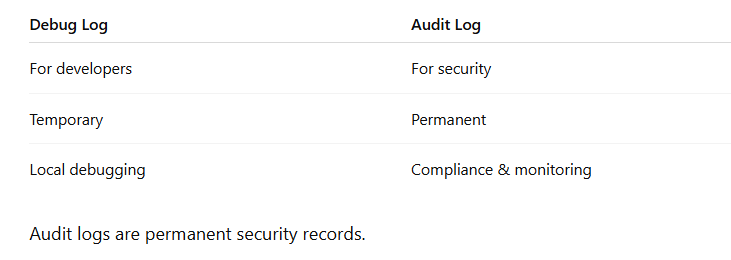
Final Security Stack Now Includes
Authentication

Authorization

CSRF

Vendor Isolation

ID Tampering Protection

Secure Cookies

CORS Control

File Upload Security

Audit Logging
Now your backend is:
Enterprise Ready
Security Monitored
Production Grade



Top comments (0)