
Large css dumped inline in listing pages
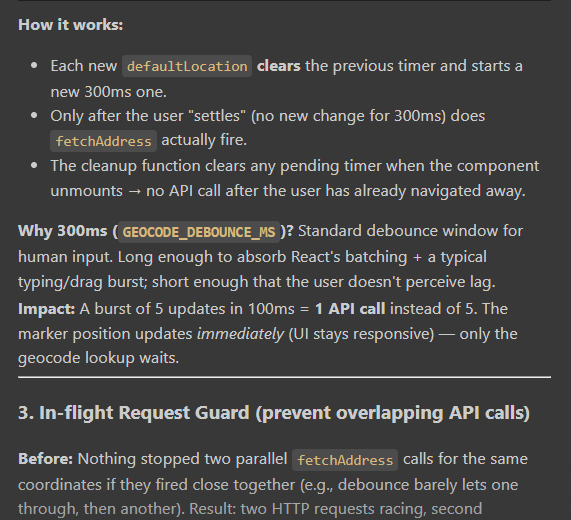
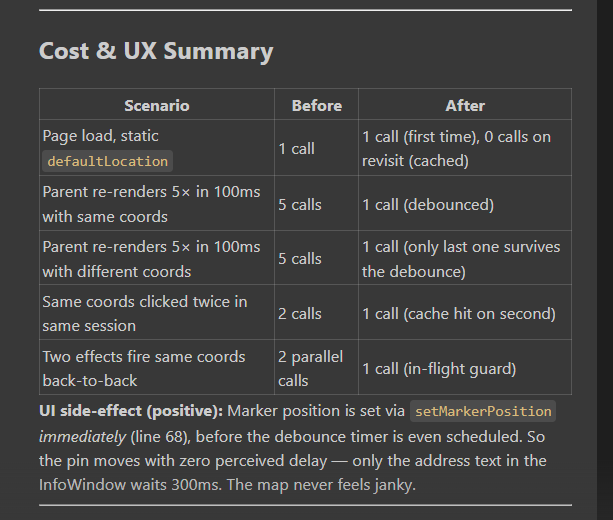
Use debounce to avoid unnecessary Api call
Large css dumped inline in listing pages
Why it is a problem
When CSS is written directly inside the Blade page, the browser has to download that CSS again and again on every page load.
The browser cannot cache it separately.
So every time user opens:
/bike-listing
/car-listing
/search-vehicle
/booking
the same CSS may be sent again with the HTML response.
This makes the page heavier and slower.
Meaning of “not cacheable”
If CSS is in a separate file like:
resources/css/bike-listing.css
then Vite can generate a versioned file like:
bike-listing-abc123.css
The browser can cache this file.
So next time user visits the page, browser does not need to download CSS again.
But if CSS is inside Blade:
...
then it is part of the HTML. Browser cannot reuse it separately.
Impact
The screenshot says:
+200–500ms LCP on slow connections
LCP means Largest Contentful Paint.
Simple meaning:
how much time the main visible content takes to load on screen.
If inline CSS is large, it can delay page rendering, especially on mobile or slow internet.
Recommended fix
Move the inline CSS from Blade files into a separate CSS file.
Example:
resources/css/bike-listing.css
Then load it using Vite:
@vite(['resources/css/bike-listing.css'])

Or if you already have one main CSS file:

@vite(['resources/css/app.css'])
Use debounce to avoid unnecessary Api call
npm install lodash.debounce
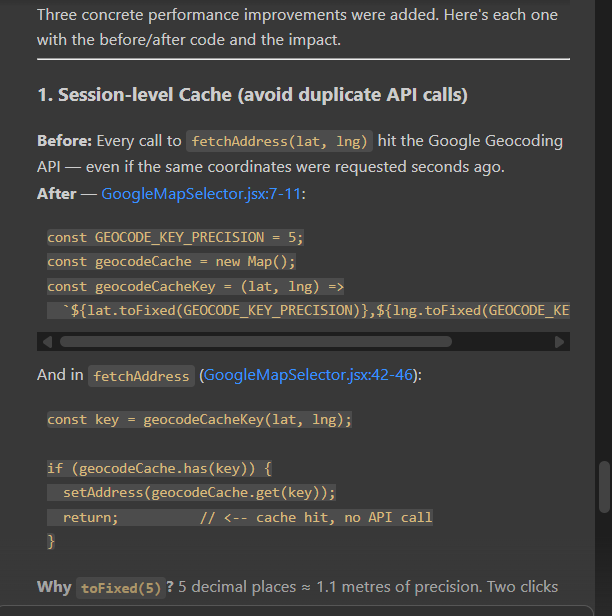
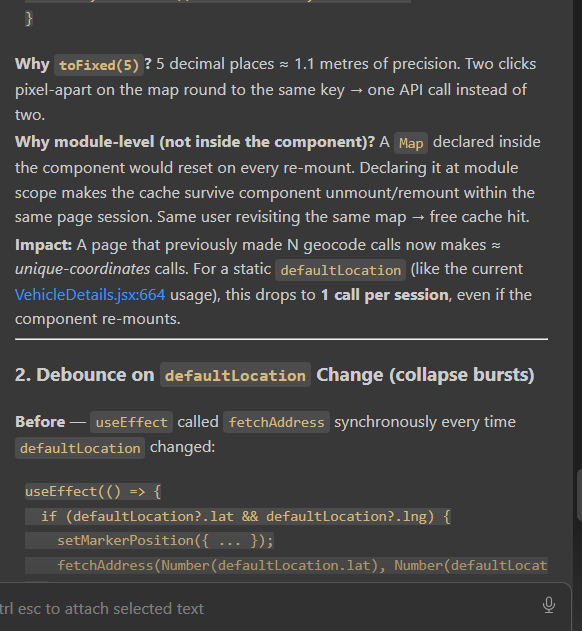
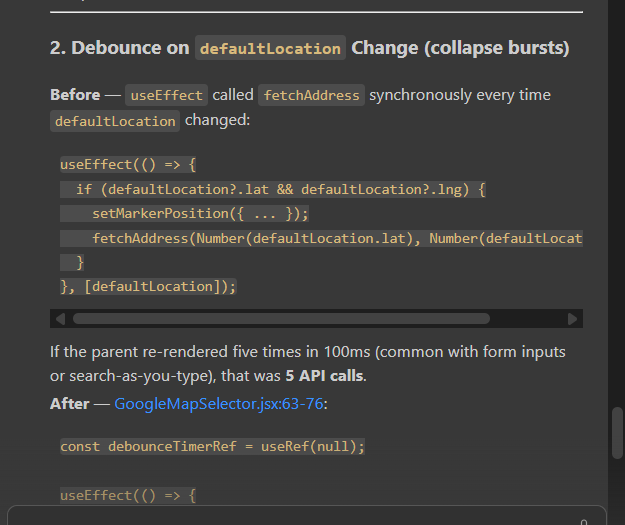
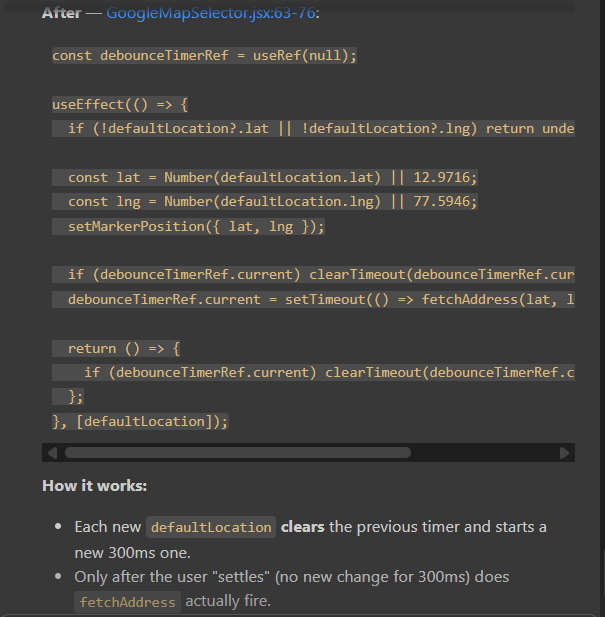
Debounce is used to improve performance by reducing unnecessary function calls, API calls, database queries, and browser work.
Debounce is a programming technique used to delay the execution of a function until the user stops triggering the same event for a specific time.
In simple words:
Debounce means: “Wait for some time. If the user does not repeat the action again, then run the function.”
Example:
When user types in a search box, instead of calling API on every letter, debounce waits until the user stops typing for 400ms or 500ms, then calls the API once.
Without debounce:
m → API call
mo → API call
mob → API call
mobi → API call
mobile → API call
With debounce:
mobile → API call only once after user stops typing
Before Debounce
In this code, API/function runs on every key press.
const searchBox = document.getElementById('searchBox');

searchBox.addEventListener('input', function () {
    const keyword = searchBox.value;

    searchProduct(keyword);
});

function searchProduct(keyword) {
    console.log('API called for:', keyword);

    // Example API call
    fetch(`/api/search?keyword=${keyword}`)
        .then(response => response.json())
        .then(data => {
            document.getElementById('result').innerHTML = JSON.stringify(data);
        });
}
What happens here?
User types:
mobile
API calls:
API called for: m
API called for: mo
API called for: mob
API called for: mobi
API called for: mobil
API called for: mobile
So API is called 6 times.
Problem
This creates:
Too many API calls
Slow performance
More server load
Bad user experience
Unnecessary database queries
After Debounce
npm install lodash.debounce
In this code, API runs only when user stops typing for 500ms.
const searchBox = document.getElementById('searchBox');

let searchTimer = null;

searchBox.addEventListener('input', function () {
    const keyword = searchBox.value;

    clearTimeout(searchTimer);

    searchTimer = setTimeout(function () {
        searchProduct(keyword);
    }, 500);
});

function searchProduct(keyword) {
    console.log('API called for:', keyword);

    // Example API call
    fetch(`/api/search?keyword=${keyword}`)
        .then(response => response.json())
        .then(data => {
            document.getElementById('result').innerHTML = JSON.stringify(data);
        });
}
What happens now?
User types quickly:
mobile

API call:

API called for: mobile

Only 1 API call happens after user stops typing.
Another code example
Before debounce
  const handlePinCodeChange = (e) => {
    const pinCode = e.target.value.replaceAll(/\D/g, '').slice(0, 6);
    setFormData((prev) => ({ ...prev, pinCode }));
    setFieldErrors((prev) => { const { pinCode: _, ...rest } = prev; return rest; });
    if (pinCode.length === 6) fetchStateAndCity(pinCode);
  };
After Debounce
npm install lodash.debounce
import { debounce } from "lodash";
import { useMemo } from "react";

// inside the component:
const debouncedFetch = useMemo(
  () => debounce(fetchStateAndCity, 400),
  []
);

const handlePinCodeChange = (e) => {
  const pinCode = e.target.value.replaceAll(/\D/g, '').slice(0, 6);
  setFormData((prev) => ({ ...prev, pinCode }));
  setFieldErrors((prev) => { const { pinCode: _, ...rest } = prev; return rest; });
  if (pinCode.length === 6) debouncedFetch(pinCode);
};
Where We Can Use Debounce
| Use Case | Why Debounce Helps |
|---|---|
| Search box | Avoid API call on every letter |
| Pincode city/state fetch | Call API only after full pincode |
| Username availability check | Check only after user stops typing |
| Email validation API | Avoid repeated validation calls |
| Auto-save form | Save after user stops typing |
| Filter products | Avoid reloading results again and again |



Top comments (0)