
Agentic AI is an AI system that can understand a goal, make a plan, take decisions, use tools or APIs, perform actions, check the results, and continue working until the task is completed.
In very simple words:
Agentic AI = AI that can think, plan, act, and complete a goal with less human intervention.
Example:
A normal chatbot:
User asks → AI gives an answer
Agentic AI:
User gives a goal → AI plans → searches data → calls APIs/tools → performs actions → checks results → completes the goal
Example:
“Find the best hospital, compare prices, book an appointment, and send me confirmation.”
An Agentic AI system could potentially handle the whole workflow instead of only telling you what to do
Agentic ai architecture
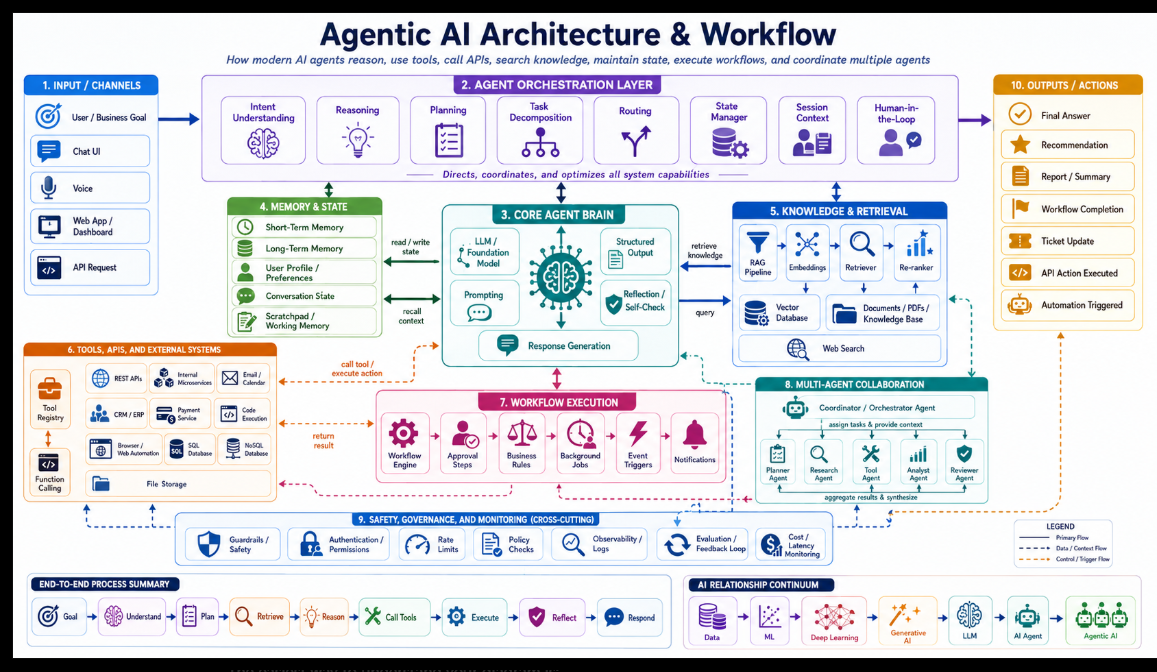
The easiest way to understand your diagram is
:
Input → Understand/Plan → Think → Remember → Retrieve Knowledge → Use Tools → Execute Workflow → Collaborate → Govern/Monitor → Produce Action
One important point: sections 4–9 are not always executed one time in a strict sequence. The Agent Orchestration Layer can repeatedly move between memory, RAG, tools, workflows, and other agents until the goal is completed
Agentic AI Architecture — Section 1 to 10
INPUT / CHANNELS
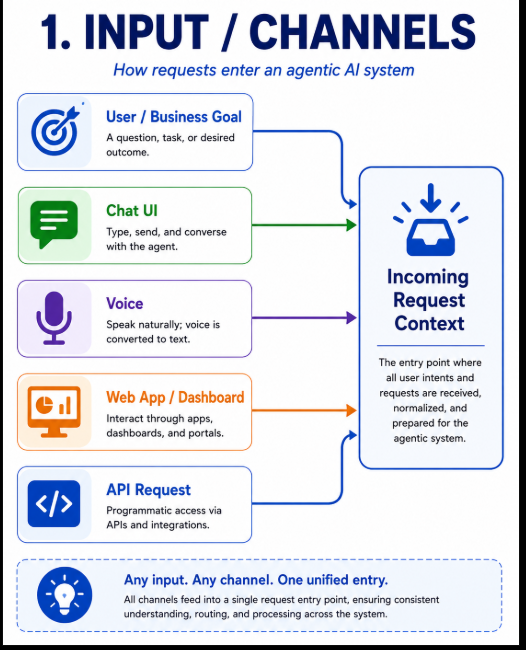
This is where the request enters the Agentic AI system.
Your architecture supports multiple entry points:
User / Business Goal
Chat UI
Voice
Web App / Dashboard
API Request
For example, a user says:
"Find the best hospital for knee surgery in Delhi, compare prices, and send me a report."
That request might come from:
Chat
Voice
Mobile App
Website
REST API
All of them eventually become an input request/context.
Flow
User / Business Goal
        ↓
Chat / Voice / Web / API
        ↓
Agentic AI System
The important concept is:
Different channels, same Agentic AI backend.
AGENT ORCHESTRATION LAYER
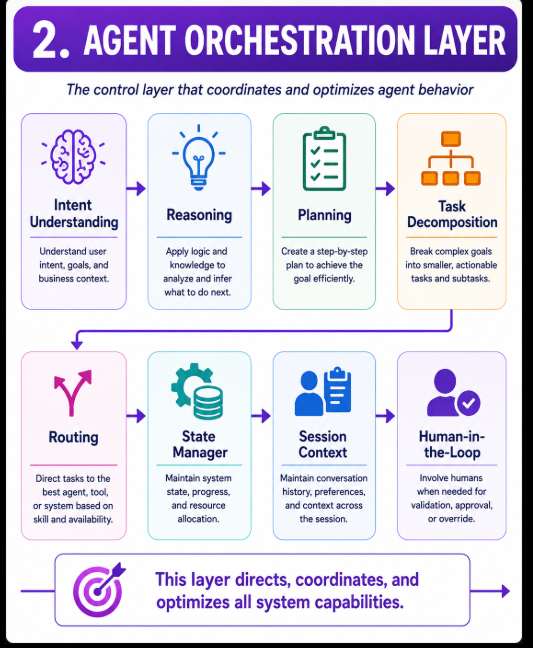
This is effectively the control center / manager of the entire Agentic AI system.
It decides:
What does the user want?
What should happen next?
Which agent should work?
Which tool should be called?
Does RAG need to be used?
Do we need human approval?
Your architecture includes eight important components.
Intent Understanding
Determines what the user actually wants.
Example:
User:
"Find hospitals in Delhi and compare knee surgery costs."
Intent becomes:
Goal:
Hospital research + cost comparison
Reasoning
The agent thinks about how to solve the request.
Need hospitals
Need treatment information
Need pricing
Need comparison
Need final report
Planning
Creates an execution plan.
Step 1 → Find hospitals
Step 2 → Search internal data
Step 3 → Search web if necessary
Step 4 → collect prices
Step 5 → compare hospitals
Step 6 → generate report
Task Decomposition
A large goal is divided into smaller tasks.
Main Goal
   │
   ├── Hospital Search
   ├── Treatment Research
   ├── Cost Research
   ├── Review Analysis
   └── Report Generation
This becomes extremely useful for multi-agent systems.
Routing
Routing determines:
Who should perform each task?
For example:
Hospital research → Research Agent


Pricing → API / Database


Comparison → Analyst Agent


Final validation → Reviewer Agent
State Manager
Tracks the current progress of the job.
Example:
Hospital search        ✓ Completed
Price collection       ✓ Completed
Review analysis        ⏳ Running
Report generation      Pending
Without state management, long-running agents can lose track of what they have already completed.
Session Context
Maintains the current conversation.
Example:
User:
Find hospitals in Delhi.


User later:
Only show NABH accredited ones.
The agent understands that:
"ones"
=
Delhi hospitals found earlier.
Human-in-the-Loop
Sometimes AI should not automatically perform the final action.
For example:
Agent generates ₹1,00,000 payment
        ↓
Human approval required
        ↓
Approved
        ↓
Payment executed
This is especially useful for:
payments
deleting records
financial decisions
medical workflows
account changes
high-risk operations
CORE AGENT BRAIN
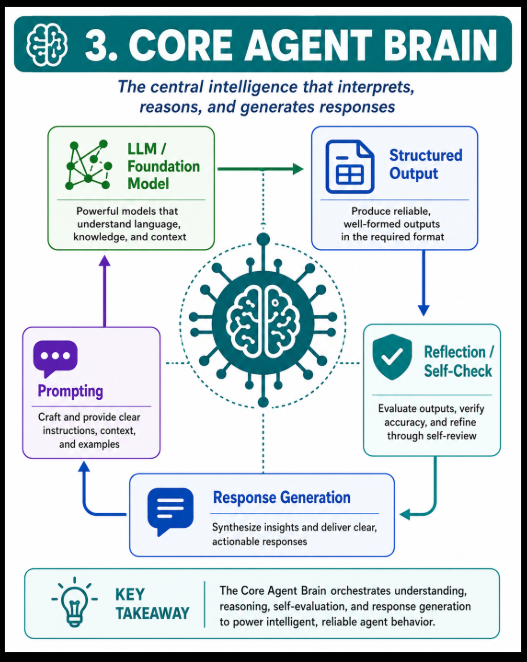
Now the orchestration layer sends the task to the Core Agent Brain.
Think of this as:
The intelligence engine of your Agentic AI system.
Your diagram contains:
LLM / Foundation Model
Prompting
Structured Output
Reflection / Self-Check
Response Generation
LLM / Foundation Model
The LLM provides language understanding and reasoning capabilities.
Examples could include models from OpenAI, Anthropic, Google, open-source models, etc.
Conceptually:
Prompt + Context + Knowledge
              ↓
             LLM
              ↓
       Reasoned response
Prompting
The system gives the LLM instructions.
Example:
You are a hospital research agent.
Find hospitals matching:
- Delhi
- Knee surgery
- NABH accredited


Return:
hospital_name
location
estimated_cost
rating
Structured Output
Instead of returning random text, the model can generate predictable structured data.
Example:
{
  "hospital": "ABC Hospital",
  "city": "Delhi",
  "procedure": "Knee Replacement",
  "estimated_cost": 250000
}
This is critical for production systems.
Reflection / Self-Check
Before accepting the answer, the agent can check:
Did I complete every task?
Did I use reliable data?
Did the API fail?
Is information missing?
Does the output match the requested format?
If not:
Reflect
   ↓
Retry
   ↓
Retrieve more information
   ↓
Call another tool
This creates an agent loop.
Response Generation
Finally, all information is combined into a useful response.
But before reaching this stage, the Core Agent Brain may interact with sections 4, 5, 6, 7, and 8 many times.
MEMORY & STATE
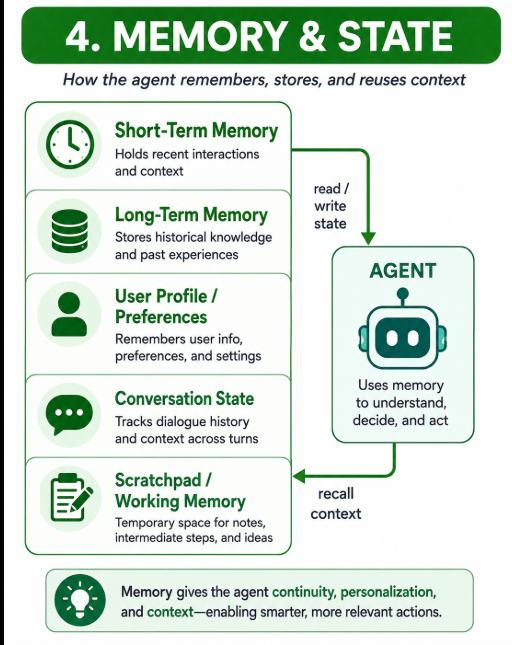
The agent often needs memory.
Your architecture has five types.
Short-Term Memory
Long-Term Memory
User Profile / Preferences
Conversation State
Scratchpad / Working Memory
Short-Term Memory
Stores information from the current task/session.
Example:
User asked for:
Delhi hospitals
Knee surgery
Budget ₹4 lakh
Long-Term Memory
Stores information that may be useful across sessions.
For example:
Preferred city = Delhi
Preferred language = English
Preferred hospital type = NABH-accredited
User Profile / Preferences
Stores personalization information.
User
 ├── Preferred language
 ├── Currency
 ├── Location
 └── Preferences
Conversation State
Tracks the ongoing conversation.
Question 1
   ↓
Answer
   ↓
Follow-up question
   ↓
Previous context reused
Scratchpad / Working Memory
Temporary information required while solving the problem.
For example:
Hospital A score = 8.7


Hospital B score = 9.1


Hospital C score = 8.3


Best candidate currently = Hospital B
Your diagram correctly shows:
Agent
 ↕
read/write state
 ↕
Memory
and
Memory
   ↓
recall context
   ↓
Agent
KNOWLEDGE & RETRIEVAL
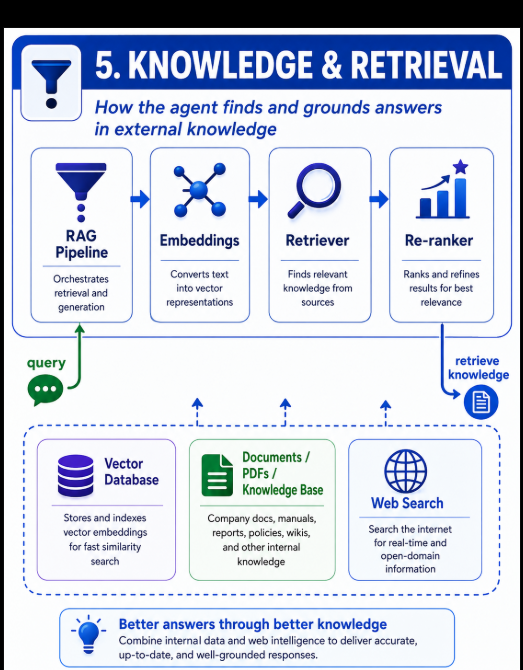
The LLM does not necessarily know current or company-specific information.
Therefore your agent uses RAG — Retrieval-Augmented Generation.
Your flow is roughly:
Query
 ↓
RAG Pipeline
 ↓
Embeddings
 ↓
Retriever
 ↓
Re-ranker
 ↓
Relevant Knowledge
 ↓
Agent
Documents / PDFs / Knowledge Base
Example sources:
Company policies
Product documentation
Hospital information
PDF reports
Training manuals
FAQs
Internal Wiki
Embeddings
Documents are converted into numerical vector representations.
Conceptually:
"Knee replacement cost"
        ↓
Embedding Model
        ↓
[0.19, -0.32, 0.71 ...]
Vector Database
Those vectors are stored in something like:
Vector DB
The system can then perform semantic search.
Retriever
Finds relevant chunks.
Example query:
"Knee surgery package Delhi"
Retriever might return:
Hospital A package
Hospital B package
Hospital C package
Re-ranker
The retriever may return 20 results.
The re-ranker decides:
Most relevant
↓
1 Result
2 Result
3 Result
Only the strongest evidence is sent to the LLM.
Web Search
If internal knowledge isn't enough:
Agent
↓
Web Search
↓
Current information
↓
Agent
So this part of your architecture means:
The agent does not rely only on the LLM's internal knowledge.
TOOLS, APIs & EXTERNAL SYSTEMS
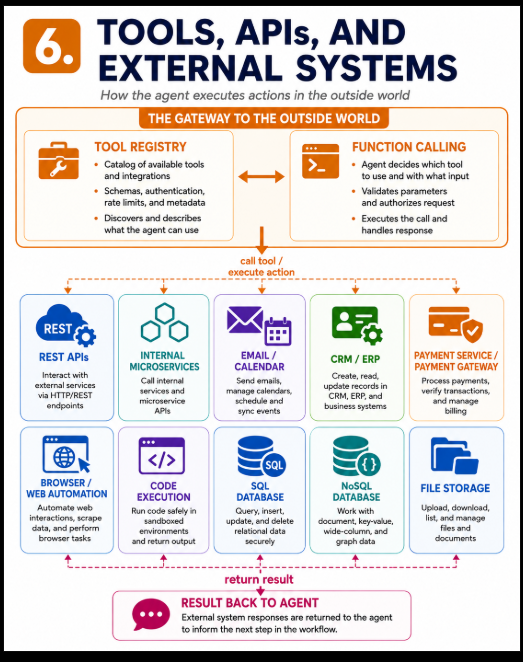
This is one of the biggest differences between a normal chatbot and an AI agent.
A chatbot mainly:
Question
↓
LLM
↓
Answer
An agent can:
Question
↓
Think
↓
Call Tool
↓
Do Something
↓
Receive Result
↓
Continue Reasoning
Your architecture includes:
Tool Registry
Function Calling
REST APIs
Internal Microservices
Email / Calendar
CRM / ERP
Payment Service
Code Execution
Browser Automation
SQL Database
NoSQL Database
File Storage
Tool Registry
The agent needs to know which tools exist.
Example:
Tools Available
│
├── search_hospital()
├── send_email()
├── create_booking()
├── get_payment_status()
├── create_calendar_event()
└── generate_report()
Function Calling
The LLM decides:
I need hospital information.
Then it may call:
search_hospital(
city="Delhi",
speciality="Orthopedics"
)
REST APIs
For external services:
Agent
↓
REST API
↓
External System
Internal Microservices
Very important for microservice applications.
Example:
AI Agent
↓
Hospital Microservice
↓
Doctor Microservice
↓
Quote Microservice
↓
Payment Microservice
Email / Calendar
Agent could execute:
Send email
Create meeting
Update calendar
Schedule appointment
CRM / ERP
Example:
Create customer
Update lead
Retrieve order
Update support case
Payment Service
For example:
Create payment request
Check transaction
Process refund
Verify payment
Normally sensitive actions should use human approval.
Code Execution
The agent could write and execute code.
Example:
Generate Python analysis
↓
Execute
↓
Get result
Browser / Web Automation
Example:
Open website
↓
Search data
↓
Fill form
↓
Click button
↓
Get result
SQL / NoSQL
Agent can interact with databases.
Agent
↓
SQL Query
↓
Database
↓
Result
↓
Agent
The key loop shown in your diagram is:
Agent
↓
Call Tool / Execute Action
↓
External System
↓
Return Result
↓
Agent
This loop might run several times.
- WORKFLOW EXECUTION
A real business operation usually contains multiple steps.
That's why your architecture includes a Workflow Execution Layer.
Workflow Engine
↓
Approval Steps
↓
Business Rules
↓
Background Jobs
↓
Event Triggers
↓
Notifications
Workflow Engine
Controls the overall execution.
Example:
Patient Request
↓
Find hospitals
↓
Get quotes
↓
Compare quotes
↓
Patient approval
↓
Booking
Approval Steps
Some processes require approval.
AI Recommendation
↓
Human Approval
↓
Continue Workflow
Business Rules
Example:
IF amount > ₹50,000
THEN require manager approval
or:
IF doctor unavailable
THEN find next available doctor
Background Jobs
Tasks may run asynchronously.
Examples:
Generate report
Process large document
Send bulk notifications
Run analytics
Event Triggers
Something happens and activates the agent.
Example:
Payment Completed
↓
Event
↓
Agent Workflow Starts
or:
New Support Ticket
↓
AI Agent
↓
Classify ticket
Notifications
Finally:
Email
SMS
Push Notification
WhatsApp
Dashboard Notification
can be sent.
- MULTI-AGENT COLLABORATION
Instead of one AI agent doing everything, your architecture supports specialized agents.
You have:
Coordinator / Orchestrator Agent
↓
┌───────────┼───────────┐
↓ ↓ ↓
Planner Research Tool
Agent Agent Agent
↓
Analyst
↓
Reviewer
A more complete interpretation:
Coordinator Agent
│
├── Planner Agent
├── Research Agent
├── Tool Agent
├── Analyst Agent
└── Reviewer Agent
Planner Agent
Creates the plan.
Goal
↓
Tasks
↓
Execution sequence
Research Agent
Searches:
RAG
Documents
Web
Databases
Tool Agent
Handles:
APIs
Databases
Microservices
Code
External systems
Analyst Agent
Processes the results.
Example:
Hospital A ₹3.2L
Hospital B ₹2.7L
Hospital C ₹3.5L
It can analyze:
Cost
Rating
Distance
Facilities
Risk
Reviewer Agent
Checks:
Accuracy
Completeness
Compliance
Quality
Then:
All agent results
↓
Coordinator
↓
Aggregate Results
↓
Synthesize
↓
Final Output
That is what the arrows in your Multi-Agent Collaboration block represent.
- SAFETY, GOVERNANCE & MONITORING
This section is a little different.
It does not happen only after step 8.
It surrounds and controls the entire Agentic AI system.
Your architecture correctly labels it:
Cross-Cutting
Meaning:
          Governance
              │
┌─────────────────────────────────┐
│ Input │
│ LLM │
│ RAG │
│ Memory │
│ Tools │
│ Agents │
│ Workflow │
│ Outputs │
└─────────────────────────────────┘
It contains:
Guardrails / Safety
Protects against:
Harmful requests
Prompt injection
Unsafe output
Invalid actions
Authentication / Permissions
Checks:
Who is the user?
What are they allowed to do?
Example:
Student → read course
Trainer → update class
Admin → manage users
Rate Limits
Prevents excessive API/tool usage.
Example:
100 requests / minute
Policy Checks
Example:
Can AI issue a refund?
Can this user access patient data?
Can this agent delete a record?
Observability / Logs
Every important action should be logged.
Agent decision
Tool call
API request
Model response
Latency
Error
Evaluation / Feedback Loop
Measure:
Was answer correct?
Did agent choose correct tool?
Did workflow succeed?
Was user satisfied?
Results improve future performance.
Cost / Latency Monitoring
Track:
Token cost
API cost
Tool cost
Response time
Agent execution time
This becomes extremely important in production Agentic AI.
- OUTPUTS / ACTIONS
Finally the system produces something useful.
Your architecture includes two categories:
Information Outputs
Final Answer
Recommendation
Report / Summary
Example:
Hospital B appears to offer the best combination of price, rating, and facilities.
Real-World Actions
This is where Agentic AI becomes more powerful than simple GenAI.
Your architecture includes:
Workflow Completion
Ticket Update
API Action Executed
Automation Triggered
For example:
User:
"Book the selected hospital appointment."
Agent
↓
Check availability
↓
Call Hospital API
↓
Create booking
↓
Send email
↓
Create calendar event
↓
Update database
↓
Return confirmation
The output isn't merely:
"Your appointment should be booked."
Instead, the system can actually perform the action.
Complete 1 → 10 flow
Your entire architecture can therefore be understood as:
INPUT / CHANNELS
User gives a goal
↓AGENT ORCHESTRATION
Understand
Reason
Plan
Decompose
Route
↓CORE AGENT BRAIN
LLM thinks and decides
↓MEMORY & STATE
Remember context and progress
↕
│KNOWLEDGE & RETRIEVAL
RAG / Vector DB / Documents / Web
↕
│TOOLS & APIs
APIs / DB / Microservices / Email / Browser
↕
│WORKFLOW EXECUTION
Rules / approvals / jobs / events
↕
│MULTI-AGENT COLLABORATION
Planner + Researcher + Tool + Analyst + Reviewer
↓SAFETY + GOVERNANCE + MONITORING
Controls ALL layers continuously
↓OUTPUT / ACTION
Answer / Report / API Action / Automation
But the real runtime architecture is more like this:
                     ┌──────────── MEMORY ────────────┐
                     │                               │
                     ↓                               │
User → Orchestrator → Agent Brain ←→ RAG │
↕ │
Tools / APIs │
↕ │
Workflow │
↕ │
Other Agents ────────────────────────┘
│
↓
Reflect / Validate
│
Need more info?
↙ ↘
YES NO
│ │
└── LOOP ──→ Output
That loop is the most important concept in Agentic AI.
A chatbot normally does:
Prompt → LLM → Answer
Whereas your architecture represents:
Goal
↓
Understand
↓
Plan
↓
Reason
↓
Retrieve
↓
Use Memory
↓
Call Tools
↓
Execute
↓
Observe Result
↓
Reflect
↓
Need another step?
↓ YES
Repeat
↓
Complete Goal
↓
Final Answer / Real Action
So the simplest one-line definition of the architecture in your image is:
Agentic AI is an AI system where an LLM is surrounded by orchestration, memory, RAG, tools, APIs, workflows, specialized agents, and governance so it can reason, make decisions, execute actions, observe results, and continue working until a goal is completed.
chatgpt



Top comments (0)