
Your application passes every test, but after deployment, users cannot log in. What went wrong?
The code may be correct while the deployment is incomplete. A missing database migration, incorrect environment setting, or outdated worker can break a release even when CI is green.
This guide explains the roles of CI and CD, common deployment mistakes, and practical ways to detect them.
1. What Is CI?
Continuous Integration (CI) automatically builds and checks code when developers push changes or open a pull request.
Typical checks include unit tests, integration tests, functional tests, static analysis, and dependency checks. Some projects also run UI, security, and performance tests in CI, depending on cost and environment needs.
For example, CI can verify that a login function returns the expected result and that the application builds successfully.
2. What Is CD?
CD automates preparing and releasing a tested application to an environment, such as staging or production.
CD has two common meanings:
| Term | How production deployment happens |
|---|---|
| Continuous Delivery | The pipeline prepares a releasable version; a person authorizes production deployment. |
| Continuous Deployment | The pipeline deploys automatically when all required checks pass. |
An approval gate automates waiting and enforcing authorization. A human still makes the approval decision.
3. Which Comes First: CI or CD?
Start with CI, then add CD. CI provides evidence that a change is ready; CD provides a repeatable way to release it.
| Aspect | CI | CD |
|---|---|---|
| Main question | Does this change pass our checks? | Can we release it successfully? |
| Main activities | Build, analyze, and test | Configure, deploy, verify, and recover |
| Common failure found | A function returns an incorrect result | The production environment lacks a required setting |
Both matter. A reliable deployment process cannot compensate for inadequate tests, and passing tests cannot guarantee a correct deployment.
4. How Does CD Automate Deployment?
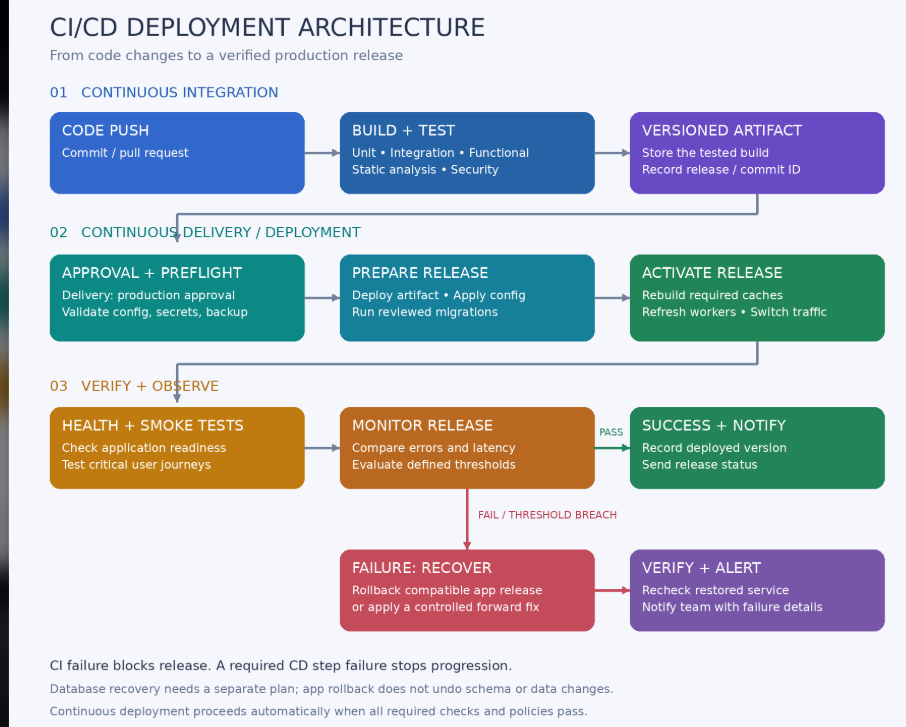
A pipeline is a sequence of commands and tool calls. Each step has a purpose, a success condition, and a response to failure.
| Stage | Automated action |
|---|---|
| Approval | Wait for an authorized reviewer when required |
| Release selection | Retrieve the exact artifact that passed CI |
| Preflight checks | Verify access, capacity, configuration, and required secrets |
| Backup | Trigger a backup and confirm completion when the release requires one |
| Deployment | Place the new application release on the target environment |
| Database changes | Apply reviewed migrations in the planned order |
| Configuration and caches | Apply environment values and rebuild required caches |
| Process refresh | Reload services and workers that need the new code |
| Verification | Run health checks and smoke tests |
| Monitoring | Evaluate errors, latency, and other release metrics |
| Recovery | Execute a tested rollback or other recovery procedure |
| Notification | Report the release result and relevant evidence |
These actions happen only when they are configured. A pipeline does not automatically understand how your application should be deployed.
5. Common Deployment Mistakes and How to Find Them
| Mistake | Example | How to detect it | Prevention |
|---|---|---|---|
| Wrong release | Production receives an old build | Compare the deployed release ID with the approved artifact | Deploy immutable, versioned artifacts |
| Incorrect configuration | Production points to a staging database | Validate the intended environment and connection target | Keep configuration specific to each environment |
| Missing secrets | A payment integration has no API key | Validate required secret presence without displaying values | Inject secrets from a controlled secret store |
| Failed migration | Application code expects a missing column | Inspect migration results and schema status | Test migrations and stop deployment on failure |
| Incorrect permissions | The application cannot write logs | Check access as the application service user | Provision ownership and permissions consistently |
| Missing dependencies | A required class or extension is unavailable | Check build output and runtime requirements | Package dependencies and verify runtime compatibility |
| Stale cache | The application uses an outdated setting | Verify effective configuration and expected behavior | Rebuild the appropriate caches during release |
| Old worker processes | Background jobs still execute old code | Check worker logs and release identifiers | Refresh long-running processes |
| Service startup failure | Requests return 502 or 503 | Inspect service status, health checks, and server logs | Validate service configuration before switching traffic |
| Broken user journey | Login fails despite a healthy homepage | Run focused smoke tests against the deployed environment | Cover critical journeys in release verification |
| Performance regression | Requests slow down after release | Compare latency and error metrics against a baseline | Use defined release thresholds |
| Unsafe rollback | Previous code cannot read the new schema | Rehearse recovery in staging | Keep schema changes backward compatible where possible |
6. Practical Laravel Checks
The following commands illustrate individual checks. They are not a complete production deployment script. Confirm behavior against the documentation for your installed Laravel version.
Check Migration Status
php artisan migrate:status
Inspect whether expected migrations have run. A successful status command does not, by itself, mean every expected migration is applied.
Rebuild Configuration Cache
php artisan config:cache
Build this cache with the intended environment settings. Application code should read settings through config(); keep env() calls in configuration files. See the Laravel configuration documentation.
Refresh Queue Workers
php artisan queue:restart
This asks workers to exit gracefully after their current job. A process manager must bring them back, and the restart signal requires the appropriate cache configuration. See the Laravel queue documentation.
Check an Application Endpoint
curl --fail --silent --show-error --max-time 15 https://example.com/up
Replace the URL with your application's actual health endpoint. A successful response proves only what that endpoint checks. Add targeted checks for important dependencies and user journeys.
Inspect Application Logs
tail -n 100 storage/logs/laravel.log
Use the configured logging destination if your application sends logs elsewhere. Correlate errors with the deployment time and release ID.
Laravel also requires appropriate write access for storage and bootstrap/cache. Check ownership and service-user access rather than granting unrestricted permissions. See the Laravel deployment documentation.
7. Health Checks, Smoke Tests, and Monitoring
These checks answer different questions:
| Check | Purpose | Example |
|---|---|---|
| Health check | Is the application responding as expected? | A health endpoint returns its expected status |
| Smoke test | Do essential features work after deployment? | A designated test account can log in |
| Monitoring | Is the application staying reliable under real traffic? | Error rates and response times remain within limits |
Use controlled test data for smoke tests. Avoid creating real payments or sending messages to customers unless the test is explicitly designed and authorized for that purpose.
8. A Realistic Deployment Failure
Imagine a release adds a phone_verified_at column and updates the login flow to read it.
- CI passes because its test database includes the migration.
- The deployment copies the application code but skips the production migration.
- Login requests return an error because the column does not exist.
- A post-deployment login smoke test fails.
- Application logs identify the missing column.
- The pipeline marks the release as failed and follows the configured recovery plan.
The lesson: test success and deployment success are separate conditions. Both need verification.
9. Plan Recovery Before Deploying
Rolling back application files does not automatically reverse database changes, configuration updates, or external side effects.
For example, restoring an older database backup could remove records created after that backup. A backup is useful only when the restore procedure and acceptable data loss are understood.
A practical recovery plan identifies the previous release, explains how to restore traffic, checks schema compatibility, and defines when to roll back versus apply a forward fix. Test that plan in staging.
10. A Simple Release Checklist
- [ ] Required CI checks passed for the selected artifact.
- [ ] Production approval was obtained when required.
- [ ] Environment settings and required secrets were validated.
- [ ] Any required backup completed successfully.
- [ ] Database changes were reviewed and applied successfully.
- [ ] The intended release is running.
- [ ] Required caches and long-running processes were refreshed.
- [ ] Health checks and critical smoke tests passed.
- [ ] Post-release metrics meet defined thresholds.
- [ ] Recovery instructions and release evidence are available.
Conclusion
CI checks your changes before release. CD makes deployment repeatable and verifies the application afterward. Combining tested artifacts, clear failure conditions, useful monitoring, and rehearsed recovery helps teams catch deployment mistakes before they become prolonged outages.



Top comments (0)