
Difference between stored procedure ,views and index
Query optimization step by step
Difference between stored procedure ,views and index
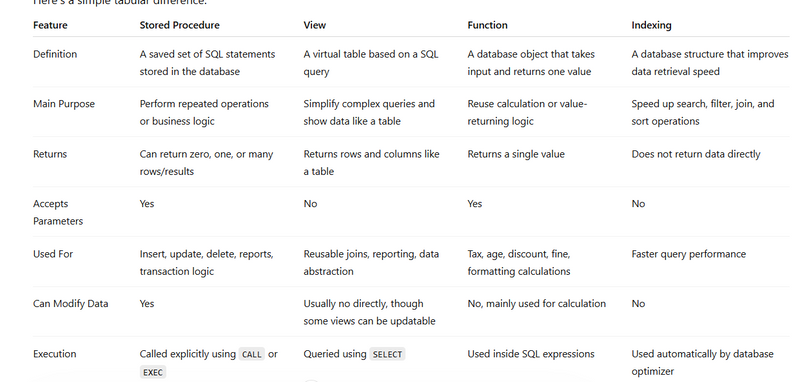
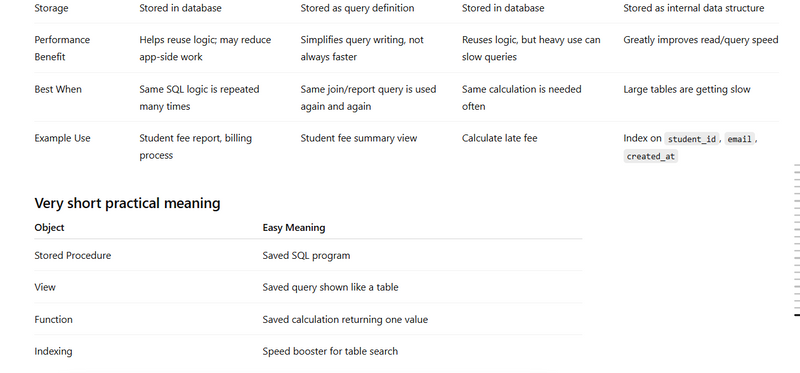
. Stored Procedure
A stored procedure is a named database routine saved inside the DB itself.
Instead of writing the same multi-step SQL in Flask again and again, the app calls the procedure and passes inputs.
Example idea:
CALL save_command_and_category(p_category, p_text);
How it works:
Procedure lives inside PostgreSQL/MySQL/SQL Server.
Frontend calls Flask API.
Flask route receives request.
Flask executes the procedure through DB connection.
Procedure does insert/update/select logic in DB.
Flask returns result to frontend.
Why people use it:
Reuse same business logic from many APIs.
Reduce repeated SQL in Python code.
Keep complex transactional logic in one place.
Sometimes faster because execution stays near the data.
When to use:
Complex business rules
Multi-step insert/update/delete
Heavy validation logic
Same SQL used in many endpoints
When not to use:
Simple CRUD
Very small queries
When business logic should stay clearly in app layer
In your project:
Good for repeated complex backend workflows
Not needed for simple task, student, user
- View
A view is a saved SQL query that behaves like a virtual table.
It does not usually store data itself; it stores the query definition.
Example:
CREATE VIEW vw_command_details AS
SELECT c.id, c.text, c.category_id, cat.category
FROM "Command" c
LEFT JOIN "Category" cat ON c.category_id = cat.id;
How it works:
DB stores the query as a named object.
Flask queries the view like a table:
SELECT * FROM vw_command_details;
The DB expands that view query internally.
Why people use it:
Simplifies complex joins
Makes reporting easier
Reuses same query logic
Keeps SQL cleaner in app code
When to use:
Repeated joins
Reporting endpoints
Read-heavy complex query output
Same select logic needed in multiple places
When not to use:
Simple one-table query
CRUD that already stays easy in ORM
Places where abstraction makes debugging harder
In your project:
Good for fetchCodes, fetchcommand, fetch_finderror, fetchLogsplitting
Not needed for simple task/student/user modules
- Indexing
An index is a database data structure that helps find rows faster.
Without an index, DB often scans the full table. With an index, it can jump faster to matching rows.
Example:
CREATE INDEX ix_command_category_id ON "Command"(category_id);
How it works:
DB creates a lookup structure on one or more columns.
When query filters, joins, or sorts by that column, DB can use the index.
Reads become faster.
But inserts/updates may become a little slower because index also needs updating.
Best columns for indexes:
Frequently used in WHERE
Frequently used in JOIN
Frequently used in ORDER BY
Foreign keys
Repeated lookup fields
Examples:
WHERE category_id = 5
JOIN Category ON Command.category_id = Category.id
ORDER BY id DESC
Why people use it:
Faster search
Faster join
Better performance for reporting
Better scaling as data grows
When not to overuse:
Too many indexes slow inserts/updates
Small tables often don’t need many indexes
Index low-value columns only if query pattern really needs it
In your project:
Good on category_id, Error_type_id, Errorvalue_id, logs_id
Not necessary everywhere
How Frontend, Flask, and DB Connect
Flow:
Frontend sends API request.
Flask route receives it.
Flask validates request data.
Flask either:
runs normal ORM query,
calls a reusable query helper,
reads from a DB view,
or calls a stored procedure.
DB returns result.
Flask sends JSON back to frontend.
Example flow with view:
Frontend calls /customlangchain/fetchCodes
Flask route calls helper
Helper runs:
SELECT * FROM vw_codegenerate_details
DB returns joined data
Flask returns JSON
Example flow with stored procedure:
Frontend sends command payload
Flask route calls:
CALL save_command(...)
Procedure inserts/updates inside DB
Flask returns success response
When To Use Which
Use stored procedure when:
logic is multi-step
logic is reused across many APIs
transactions are complex
Use view when:
query is read-only
join is repeated
reporting/listing is complex
Use index when:
query is slow because of filtering/joining/sorting
same lookup columns are used repeatedly
The performance comparison between Laravel's Query Builder and stored procedures depends on various factors, and there is no one-size-fits-all answer. Both approaches have their strengths and weaknesses, and the choice often depends on the specific requirements of your application, the database engine you are using, and your team's expertise.
Laravel's Query Builder
:
Pros:
Flexibility and Readability:
Laravel's Query Builder provides a flexible and readable syntax for constructing SQL queries, making it easier for developers to understand and maintain code.
Eloquent ORM:
Laravel's Eloquent ORM simplifies database interactions by providing an expressive syntax for working with database tables as classes and objects.
Database Agnostic:
Laravel's Query Builder is designed to be database agnostic, allowing you to switch between different database engines without changing your queries.
Dynamic Query Building:
The Query Builder allows dynamic construction of queries based on application logic, which is helpful for building dynamic and conditional queries.
Cons:
Query Execution Plan:
Query execution plans may not be as optimized as stored procedures, as the database engine may need to generate a new execution plan for each query.
Security:
While Laravel provides ways to prevent SQL injection (e.g., parameter binding), developers need to be vigilant about security practices.
Stored Procedures
:
Pros:
Precompiled Execution Plan:
Stored procedures are precompiled, and their execution plans are cached, which can lead to faster execution as compared to dynamically generated SQL queries.
Reduced Network Traffic:
Only the procedure name and parameters need to be sent over the network, reducing the amount of data transferred.
Security:
Stored procedures can enhance security by controlling access to database tables. Users may only need permission to execute the stored procedure, not direct access to the underlying tables.
Encapsulation:
Stored procedures encapsulate business logic in the database, promoting code organization and maintenance.
Cons:
Database Vendor Lock-in:
Stored procedures can tie your application to a specific database vendor, limiting portability.
Development and Maintenance:
Stored procedures may require additional effort for development and maintenance, especially for complex business logic.
Considerations:
Application Requirements:
Consider the specific requirements of your application. For simpler queries and dynamic requirements, Laravel's Query Builder may be sufficient. For complex business logic, stored procedures may be advantageous.
Development Team Skills:
Consider the expertise of your development team. If your team is more comfortable with Laravel and PHP, using Laravel's Query Builder may be more practical.
Database Engine:
Some database engines are optimized for stored procedures, while others may perform equally well with dynamically generated queries. Consider the characteristics of your chosen database engine.
Security Requirements:
Assess your security requirements. Laravel provides ways to prevent SQL injection, but stored procedures can offer an additional layer of security.
Testing and Profiling:
Regularly test and profile the performance of your queries. The actual performance can vary based on the specific queries, data volume, and database engine.
In summary, the choice between Laravel's Query Builder and stored procedures depends on various factors. Both approaches can be effective, and the decision should be made based on the specific needs and constraints of your project.
Query optimization step by step
Query optimization means making SQL run with less time, less CPU, and fewer rows scanned.
The practical way is not “write magic SQL.”
It is usually this flow:
Query optimization step by step
- Find the slow query
First identify which query is slow.
Example:
SELECT *
FROM bookings
WHERE vender_id = 25
AND status = 'confirmed';
If table is large, this may become slow.
- Check execution plan
Use:
EXPLAIN
SELECT *
FROM bookings
WHERE vender_id = 25
AND status = 'confirmed';
What to look for
type = ALL → full table scan, bad for big table

key = NULL → no index used

rows = very high → scanning too many rows
- Add proper index
If query filters by vender_id and status, use composite index:
CREATE INDEX idx_bookings_vendor_status ON bookings(vender_id, status);
Now run again:
EXPLAIN
SELECT *
FROM bookings
WHERE vender_id = 25
AND status = 'confirmed';
Now it should use the new index.
Practical examples
Example 1: Avoid SELECT *
Bad
SELECT *
FROM users
WHERE email = 'test@gmail.com';
Better
SELECT id, name, email
FROM users
WHERE email = 'test@gmail.com';
Why?
less data fetched

less memory used

faster response
Example 2: Add index on frequently searched column
Slow query
SELECT id, name, city
FROM users
WHERE city = 'Delhi';
Optimization
CREATE INDEX idx_users_city ON users(city);
Example 3: Composite index
Query
SELECT id, vehicle_id, status
FROM bookings
WHERE vender_id = 10
AND status = 'active'
ORDER BY created_at DESC;
Better index
CREATE INDEX idx_bookings_vendor_status_created
ON bookings(vender_id, status, created_at);
Why?
Because query uses:
WHERE vender_id

WHERE status

ORDER BY created_at
Example 4: Avoid function on indexed column
Bad
SELECT *
FROM bookings
WHERE DATE(created_at) = '2026-03-16';
Problem
DATE(created_at) can stop index usage.
Better
SELECT *
FROM bookings
WHERE created_at >= '2026-03-16 00:00:00'
AND created_at < '2026-03-17 00:00:00';
This is more index-friendly.
Example 5: Optimize JOIN
Slow
SELECT b.id, b.user_name, u.email
FROM bookings b
JOIN users u ON b.user_id = u.id
WHERE b.status = 'confirmed';
Make sure indexes exist
CREATE INDEX idx_bookings_user_id ON bookings(user_id);
CREATE INDEX idx_bookings_status ON bookings(status);
Usually users.id is already primary key indexed.
Example 6: Avoid unnecessary subqueries
Less optimal
SELECT *
FROM users
WHERE id IN (
    SELECT user_id
    FROM bookings
    WHERE status = 'confirmed'
);
Better in many cases
SELECT DISTINCT u.*
FROM users u
JOIN bookings b ON b.user_id = u.id
WHERE b.status = 'confirmed';
This is often easier for optimizer, though not always.
Check with EXPLAIN.
Example 7: Limit large result sets
Bad
SELECT *
FROM bookings
ORDER BY created_at DESC;
Better
SELECT id, user_name, status, created_at
FROM bookings
ORDER BY created_at DESC
LIMIT 20;
Why?
For UI pages, you usually do not need all rows.
Example 8: Pagination optimization
Common
SELECT id, user_name, status
FROM bookings
ORDER BY id DESC
LIMIT 20 OFFSET 10000;
This can get slow on huge tables.
Better keyset pagination
SELECT id, user_name, status
FROM bookings
WHERE id < 50000
ORDER BY id DESC
LIMIT 20;
This is often faster for big data.
Practical coding in MySQL
Table
CREATE TABLE bookings (
    id BIGINT PRIMARY KEY AUTO_INCREMENT,
    user_id BIGINT,
    vender_id BIGINT,
    status VARCHAR(50),
    created_at DATETIME,
    amount DECIMAL(10,2)
);
Slow query
SELECT id, user_id, amount
FROM bookings
WHERE vender_id = 15
AND status = 'paid'
ORDER BY created_at DESC;
Step 1: check plan
EXPLAIN
SELECT id, user_id, amount
FROM bookings
WHERE vender_id = 15
AND status = 'paid'
ORDER BY created_at DESC;
Step 2: add index
CREATE INDEX idx_bookings_vendor_status_created
ON bookings(vender_id, status, created_at);
Step 3: check again
EXPLAIN
SELECT id, user_id, amount
FROM bookings
WHERE vender_id = 15
AND status = 'paid'
ORDER BY created_at DESC;
Practical optimization in Flask / SQLAlchemy
Bad
bookings = Booking.query.filter_by(status='paid').all()
If table is huge, .all() loads everything.
Better
bookings = Booking.query.with_entities(
    Booking.id, Booking.user_id, Booking.amount
).filter_by(status='paid').limit(50).all()
Why?
fetch only required columns

fetch fewer rows
SQLAlchemy join optimization
Example
results = db.session.execute(text("""
    SELECT b.id, b.user_name, u.email
    FROM bookings b
    JOIN users u ON b.user_id = u.id
    WHERE b.status = :status
    ORDER BY b.created_at DESC
    LIMIT 50
"""), {"status": "confirmed"}).mappings()
Optimize in DB
CREATE INDEX idx_bookings_status_created_user
ON bookings(status, created_at, user_id);
Real optimization checklist
Use indexes on:
WHERE columns
JOIN columns
ORDER BY columns
GROUP BY columns
Avoid:
SELECT *
functions on indexed columns in WHERE
unnecessary nested subqueries
huge OFFSET
too many unnecessary joins
Use:
EXPLAIN
LIMIT
composite indexes
proper datatype matching
only needed columns
Practical example from your vehicle/rental type system
Slow query
SELECT *
FROM bookings
WHERE vender_id = 12
AND status = 'approved'
AND created_at >= '2026-03-01';
Better
SELECT id, user_name, vehicle_id, status, created_at
FROM bookings
WHERE vender_id = 12
AND status = 'approved'
AND created_at >= '2026-03-01'
ORDER BY created_at DESC
LIMIT 100;
Matching index
CREATE INDEX idx_bookings_vendor_status_created_at
ON bookings(vender_id, status, created_at);
Practical example for query optimization using join
Query
SELECT
b.id,
b.user_name,
s.partner_name,
u.email
FROM bookings b
LEFT JOIN shops s ON CAST(b.shop_id AS UNSIGNED) = s.id
LEFT JOIN users u ON u.id = b.vender_id
WHERE b.status = 'approved';
Problem
CAST(b.shop_id AS UNSIGNED) in join can hurt performance.
Better
Store shop_id in same datatype in both tables.
Best
bookings.shop_id = BIGINT
shops.id = BIGINT
Then join becomes:
SELECT
b.id,
b.user_name,
s.partner_name,
u.email
FROM bookings b
LEFT JOIN shops s ON b.shop_id = s.id
LEFT JOIN users u ON u.id = b.vender_id
WHERE b.status = 'approved';
Add indexes
CREATE INDEX idx_bookings_status_shop_vendor ON bookings(status, shop_id, vender_id);
This is a very practical real-world optimization.
How to know optimization worked
Check before and after with:
EXPLAIN SELECT ...
Compare:
rows scanned
chosen key
type
extra
Also check actual response time.
Simple interview answer
Query optimization is the process of improving SQL performance by reducing scanned rows, using proper indexes, selecting only required columns, optimizing joins, avoiding unnecessary functions in WHERE clauses, and validating improvements with EXPLAIN
Triggers are commonly used for:
audit/history logging

automatic field updates

validation/business rules

syncing data into another table

preventing bad data before insert/update.
CREATE TRIGGER trg_users_before_insert
BEFORE INSERT ON users
FOR EACH ROW
SET NEW.created_at = NOW();
Auto-fill created date before insert
Useful when you want the database to always set a value.
CREATE TRIGGER trg_users_before_insert
BEFORE INSERT ON users
FOR EACH ROW
SET NEW.created_at = NOW();
Use case
Whenever a new user is inserted, created_at gets filled automatically.
2) Block invalid salary or negative amount
This is one of the most practical real-world uses: validation.
DELIMITER //
CREATE TRIGGER trg_employees_before_insert
BEFORE INSERT ON employees
FOR EACH ROW
BEGIN
IF NEW.salary < 0 THEN
SIGNAL SQLSTATE '45000'
SET MESSAGE_TEXT = 'Salary cannot be negative';
END IF;
END//
DELIMITER ;
Use case
Prevents bad data from entering the table.
You can do the same for price, quantity, age, booking amount, etc. MySQL supports SIGNAL in triggers for raising custom errors.
3) Save old data into audit log after update
Very common in admin panels and enterprise systems.
DELIMITER //
CREATE TRIGGER trg_employee_after_update
AFTER UPDATE ON employees
FOR EACH ROW
BEGIN
INSERT INTO employee_audit (
employee_id,
old_name,
new_name,
old_salary,
new_salary,
changed_at
)
VALUES (
OLD.id,
OLD.name,
NEW.name,
OLD.salary,
NEW.salary,
NOW()
);
END//
DELIMITER ;
Use case
Whenever employee data changes, you store the old and new values in a log table.
4) Reduce product stock after order item insert
Very popular in e-commerce and booking systems.
DELIMITER //
CREATE TRIGGER trg_order_items_after_insert
AFTER INSERT ON order_items
FOR EACH ROW
BEGIN
UPDATE products
SET stock = stock - NEW.quantity
WHERE id = NEW.product_id;
END//
DELIMITER ;
Use case
When a new order item is inserted, stock is reduced automatically.
Better safer version
DELIMITER //

CREATE TRIGGER trg_order_items_before_insert
BEFORE INSERT ON order_items
FOR EACH ROW
BEGIN
    DECLARE current_stock INT;

    SELECT stock INTO current_stock
    FROM products
    WHERE id = NEW.product_id;

    IF current_stock < NEW.quantity THEN
        SIGNAL SQLSTATE '45000'
        SET MESSAGE_TEXT = 'Not enough stock available';
    END IF;
END//

DELIMITER ;
This checks stock before inserting the order.
5) Archive deleted records before delete
Useful when you want a history of deleted data.
DELIMITER //
CREATE TRIGGER trg_customers_before_delete
BEFORE DELETE ON customers
FOR EACH ROW
BEGIN
INSERT INTO customers_deleted (
customer_id,
name,
email,
deleted_at
)
VALUES (
OLD.id,
OLD.name,
OLD.email,
NOW()
);
END//
DELIMITER ;
Use case
Before deleting a customer, save their details in a backup/archive table.
6) Keep updated_at fresh on every update
Very common pattern.
CREATE TRIGGER trg_posts_before_update
BEFORE UPDATE ON posts
FOR EACH ROW
SET NEW.updated_at = NOW();
Use case
Whenever a post is edited, updated_at changes automatically.
7) Prevent duplicate business logic mistakes
For example, stop a booking if end date is before start date.
DELIMITER //

CREATE TRIGGER trg_bookings_before_insert
BEFORE INSERT ON bookings
FOR EACH ROW
BEGIN
    IF NEW.end_date < NEW.start_date THEN
        SIGNAL SQLSTATE '45000'
        SET MESSAGE_TEXT = 'End date cannot be before start date';
    END IF;
END//

DELIMITER ;
Use case
Very useful in booking, rental, hospital appointment, and travel systems.
8) Maintain summary table automatically
Useful for dashboards.
DELIMITER //
CREATE TRIGGER trg_orders_after_insert
AFTER INSERT ON orders
FOR EACH ROW
BEGIN
    UPDATE daily_sales
    SET total_orders = total_orders + 1,
        total_amount = total_amount + NEW.total_amount
    WHERE sales_date = CURDATE();
END//

DELIMITER ;
Use case
Your summary/report table updates automatically when a new order arrives.
9) Write login/activity history
Good for security or admin audit.
DELIMITER //

CREATE TRIGGER trg_user_status_after_update
AFTER UPDATE ON users
FOR EACH ROW
BEGIN
    IF OLD.status <> NEW.status THEN
        INSERT INTO user_status_log (
            user_id,
            old_status,
            new_status,
            changed_at
        )
        VALUES (
            OLD.id,
            OLD.status,
            NEW.status,
            NOW()
        );
    END IF;
END//

DELIMITER ;
Use case
Track when a user becomes active, inactive, blocked, approved, etc.
10) Automatically create related row
Example: when hospital is created, create a default settings row.
DELIMITER //

CREATE TRIGGER trg_hospitals_after_insert
AFTER INSERT ON hospitals
FOR EACH ROW
BEGIN
    INSERT INTO hospital_settings (
        hospital_id,
        booking_enabled,
        created_at
    )
    VALUES (
        NEW.id,
        1,
        NOW()
    );
END//

DELIMITER ;
how-to-use-stored-procedure-to-prevent-sql-injection-attacks-in-laravel



Top comments (0)