
What “Dynamic Redirect” means in Keycloak flows
In Keycloak, you don’t “redirect inside the same authenticator action” if you want to switch flows (OTP → Register).
Instead, you restart the authentication request with a query parameter like:
login_hint=register:renter

login_hint=register:partner

login_hint=otp:whatsapp
Then your RouteByHintAuthenticator.authenticate() reads login_hint and writes notes:
FLOW_MODE=register | otp

USER_TYPE=renter | partner

DEFAULT_CHANNEL=sms | whatsapp
These notes are stored in:
AuthenticationSessionModel (s.setAuthNote(...))
Then later steps (PhoneInput / OTP Gate / Register Gate) decide:
render phone-login page
or skip phone-login and go to register-start
or skip register path and go to otp path
✅ That is proper Keycloak routing design.
2) Key Concepts: authenticate() vs action()
authenticate(context)
Runs when Keycloak reaches that execution step
Used to render a page (context.challenge(form))
action(context)
Runs when the user submits the form (POST)
Used to validate input and move to next step or re-render with errors
Debugging tip: if a click should change route (Register button), it must do a GET to /protocol/openid-connect/auth?... not a POST to loginAction.
That’s why your “Register” must be an (GET), not .
3) Correct Flow (KC Admin) — must be set first
In Authentication → Flows, create a custom Browser flow like:
Browser-Motoshare (Required)
Route By Hint (OTP/Register) — REQUIRED

Methods — REQUIRED (Subflow)

OTP Methods — ALTERNATIVE (Subflow)

OTP Gate (FLOW_MODE=otp) — REQUIRED

Phone Login Enter Phone — REQUIRED

Phone Verify OTP — REQUIRED

Register Methods — ALTERNATIVE (Subflow)

Register Gate (FLOW_MODE=register) — REQUIRED

Register Start — REQUIRED
Then bind it:
✅ Realm → Authentication → Bindings → Browser Flow = Browser-Motoshare
✅ Client (motoshare) overrides must not point to old flow.
If RouteByHint prints don’t show, it means flow binding is wrong.
4) Step-by-step Coding: RouteByHintAuthenticator (Core router)
4.1 Constants (keep same across authenticators)
public static final String NOTE_FLOW_MODE = "FLOW_MODE";
public static final String NOTE_USER_TYPE = "USER_TYPE";
public static final String NOTE_DEFAULT_CHANNEL = "DEFAULT_CHANNEL";
4.2 authenticate() (routing only)
@Override
public void authenticate(AuthenticationFlowContext context) {
    AuthenticationSessionModel s = context.getAuthenticationSession();

    System.out.println("=================================================");
    System.out.println("[RouteByHint] ENTER execId=" + context.getExecution().getId());
    System.out.println("[RouteByHint] uri=" + context.getUriInfo().getRequestUri());
    System.out.println("=================================================");

    String loginHint = readLoginHint(context); // you already wrote correctly

    String mode = "otp";
    String userType = "renter";
    String channel = "whatsapp";

    if (loginHint != null) {
        String lh = loginHint.trim().toLowerCase();
        if (lh.startsWith("register")) mode = "register";
        if (lh.contains(":partner")) userType = "partner";
        if (lh.contains(":renter")) userType = "renter";

        if (lh.startsWith("otp:sms")) channel = "sms";
        if (lh.startsWith("otp:whatsapp")) channel = "whatsapp";
    }

    s.setAuthNote(NOTE_FLOW_MODE, mode);
    s.setAuthNote(NOTE_USER_TYPE, userType);
    s.setAuthNote(NOTE_DEFAULT_CHANNEL, channel);

    System.out.println("[RouteByHint] login_hint=" + loginHint +
            " mode=" + mode +
            " userType=" + userType +
            " channel=" + channel);

    context.success(); // continue to Methods subflow
}
✅ RouteByHint must never render a page, only set notes and success().
5) Step-by-step Coding: PhoneInputAuthenticator (OTP login page)
5.1 Skip logic (VERY IMPORTANT)
@Override
public void authenticate(AuthenticationFlowContext context) {
    AuthenticationSessionModel s = context.getAuthenticationSession();

    if (s.getAuthenticatedUser() != null) {
        context.attempted();
        return;
    }

    String flowMode = safe(s.getAuthNote("FLOW_MODE"));
    if ("register".equalsIgnoreCase(flowMode)) {
        context.attempted(); // skip phone-login when in register mode
        return;
    }

    // fetch apiBase, countries etc...
    Response challenge = context.form()
        .setAttribute("apiBase", apiBase)
        .setAttribute("countries", countries)
        .setAttribute("userType", userType)
        .createForm("phone-login.ftl");

    context.challenge(challenge);
}
5.2 Debugging in FTL requires setAttribute()
Whatever you want to print in FTL must be passed like:
.setAttribute("apiBase", apiBase)
Then in FTL you print with correct case:
${apiBase!"NOT_SET"}
6) Step-by-step Coding: phone-login.ftl (Dynamic redirect “Register”)
6.1 The correct dynamic register URL (NO HARD CODE)
Use Keycloak built-in url.loginUrl:
<#assign baseLoginUrl = url.loginUrl />
<#assign sep = baseLoginUrl?contains("?")?then("&","?") />
<#assign registerUrl = baseLoginUrl + sep + "login_hint=register:" + ut />
<div style="
  background:#111827;
  color:#e5e7eb;
  padding:10px;
  margin-bottom:10px;
  border-radius:6px;
  font-size:12px;
">
  <b>DEBUG – Flags</b><br/><br/>

  apiBase = <b>${apiBase!"NOT_SET"}</b><br/>
  requestBase = <b>${requestBase!"NOT_SET"}</b><br/>
  userType = <b>${userType!"NOT_SET"}</b><br/>
</div>
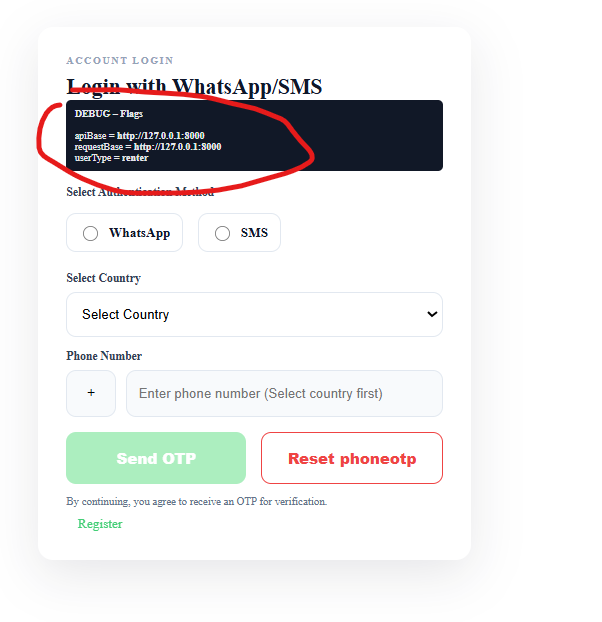
6.2 Register link must be outside the form
<div class="ms-footer-links" style="margin-top:10px;">
  <a id="registerBtn" class="ms-link" href="${registerUrl}">Register</a>
</div>
=================OR======================================
     </form>

        <div class="ms-footer-links" style="margin-top:10px;">
 <a id="registerBtn"
   class="ms-link"
   href="${apiBase}/realms/motoshare/protocol/openid-connect/auth?client_id=motoshare&redirect_uri=http%3A%2F%2F127.0.0.1%3A8000%2Fauth%2Fkeycloak%2Fcallback&response_type=code&scope=openid+email+profile&login_hint=register:renter">
   Register
</a>
</div>
This triggers a fresh GET to /protocol/openid-connect/auth?... → RouteByHint runs.
6.3 Optional force navigation (if overlay/click issues)
<script>
(function(){
  var a = document.getElementById("registerBtn");
  if(!a) return;
  a.addEventListener("click", function(e){
    e.preventDefault();
    window.location.href = a.href;
  }, true);
})();
</script>
7) Debugging Checklist (Most common failures)
A) RouteByHint prints not visible
✅ Browser flow binding wrong OR client override wrong.
B) “Register click opens same page”
Usually:
link not navigating (overlay / wrong href)
registerUrl built wrong (& vs ?)
flow still default browser flow
C) FTL debug variable not printing
Because:
you wrote ${apibase} but Java sent "apiBase"
fix: ${apiBase!"NOT_SET"}
D) Internal server error
Usually FreeMarker error due to missing variable. Use safe fallback !"...".
8) Final Working Pattern (Your exact requirement)
✅ Register button should:
not call PhoneInput.action()
restart request with login_hint=register:renter

RouteByHint sets FLOW_MODE=register
OTP Gate/PhoneInput skip



Top comments (0)