
Introduction
When building custom authentication flows in Keycloak (like phone login, WhatsApp/SMS login, partner/renter logic), we often need to:
Set dynamic variables

Store data based on conditions

Reuse stored data in the next step

Avoid trusting client-side input
This blog explains how to store dynamic variables conditionally using AuthenticationSession in Keycloak (Keycloak 26 compatible).
🎯 Problem Statement
Let’s say:
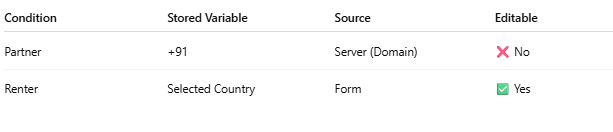
If user type = partner, country must be fixed (e.g., +91 India)

If user type = renter, country comes from dropdown
Country must be stored securely and reused in action()
We cannot trust:
formData.getFirst("country");
Because users can manipulate browser values.
So how do we store dynamic variables securely based on condition?
🧠 Theory – How Keycloak Flow Works
Every custom authenticator has two important methods:
1️⃣ authenticate()
Runs first

Prepares UI

Sets session data
2️⃣ action()
Runs after form submission

Reads data

Validates and processes
To store dynamic data across steps, Keycloak provides:
AuthenticationSessionModel
You can store values using:
session.setAuthNote("KEY", "VALUE");
And retrieve later using:
session.getAuthNote("KEY");
This is the correct enterprise approach.
🔐 Why Use AuthNotes?
Because:
It is server-side

Cannot be modified from browser

Exists only during authentication flow

Automatically cleared after login completes
Perfect for temporary dynamic variables.
🛠
Step-by-Step Coding Example
✅ STEP 1 — Define Dynamic Keys
At top of your class:
private static final String NOTE_USER_TYPE = "USER_TYPE";
private static final String NOTE_COUNTRY_DIAL = "PHONE_COUNTRY_DIAL";
private static final String NOTE_COUNTRY_NAME = "PHONE_COUNTRY_NAME";
✅ STEP 2 — Set Dynamic Variables Conditionally (authenticate())
@Override
public void authenticate(AuthenticationFlowContext context) {

    AuthenticationSessionModel session = context.getAuthenticationSession();

    String userType = session.getAuthNote(NOTE_USER_TYPE);

    CountryFetcher fetcher = new CountryFetcher();

    if ("partner".equalsIgnoreCase(userType)) {

        List<Map<String,String>> countries =
                fetcher.buildSingleCountryFromDomain(context);

        if (countries != null && !countries.isEmpty()) {

            String dial = countries.get(0).get("dial_code"); // +91
            String name = countries.get(0).get("name");      // India

            // 🔥 Store dynamically
            session.setAuthNote(NOTE_COUNTRY_DIAL, dial);
            session.setAuthNote(NOTE_COUNTRY_NAME, name);
        }

    } else {

        // renter logic (do not set fixed country)
        session.removeAuthNote(NOTE_COUNTRY_DIAL);
        session.removeAuthNote(NOTE_COUNTRY_NAME);
    }

    context.success();
}
✅ STEP 3 — Retrieve Stored Variable (action())
@Override
public void action(AuthenticationFlowContext context) {

    AuthenticationSessionModel session = context.getAuthenticationSession();

    MultivaluedMap<String,String> formData =
            context.getHttpRequest().getDecodedFormParameters();

    String userType = session.getAuthNote(NOTE_USER_TYPE);

    String country;

    if ("partner".equalsIgnoreCase(userType)) {

        // 🔐 Always use server-side value
        country = session.getAuthNote(NOTE_COUNTRY_DIAL);

    } else {

        // renter can choose from form
        country = formData.getFirst("country");
    }

    System.out.println("Final country used = " + country);
}
Conditional Storage Logic Diagram
Storing Dynamic Multiple Variables
You can also store JSON dynamically:
session.setAuthNote("DYNAMIC_SCHEMA", schemaJson);
And retrieve later:
String schema = session.getAuthNote("DYNAMIC_SCHEMA");
This is useful for:
Dynamic forms
Multi-step flows
OTP verification state
Registration enhancements



Top comments (0)