
Meta description: Learn how runtime updates, upload limits, streaming, isolated workers, least privilege, monitoring, and testing protect document-processing services.
Suggested slug: secure-file-uploads-prevent-memory-exhaustion
Topics: application security, memory safety, secure file uploads, Python, FastAPI, PHP, Docker, Linux
An uploaded PDF may look small but take substantial memory or CPU to process. A busy API can also exhaust resources by accepting too many ordinary files at once. Protecting a service means controlling both the input and the work that follows.
This guide explains seven practical layers using a document-upload application. The same principles apply to PHP/Laravel, Python, Node.js, Go, and Rust services. Configuration values are examples to tune in staging, not universal production defaults. Outputs below are illustrative unless explicitly stated otherwise.
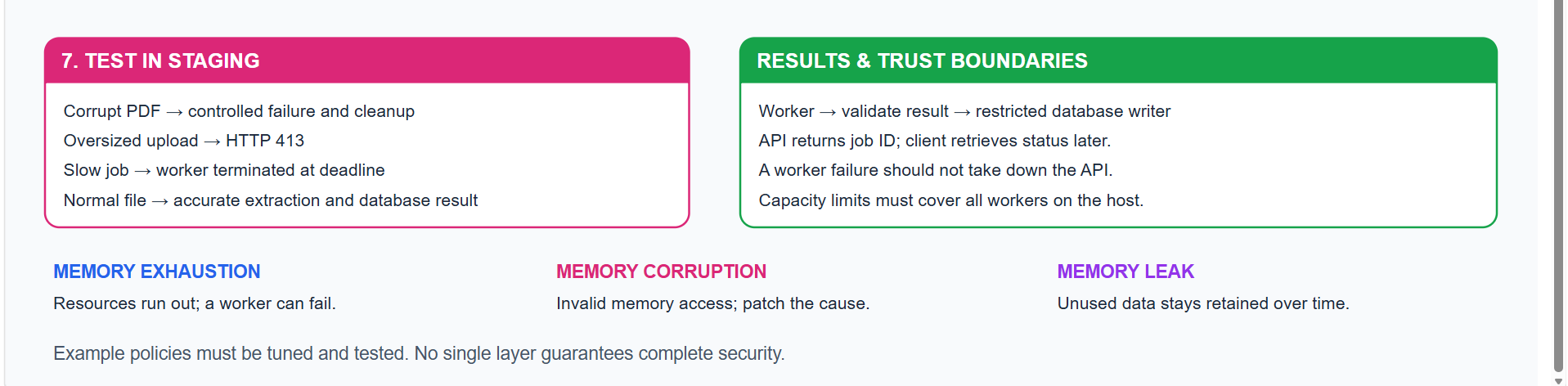
Memory Exhaustion, Memory Corruption, and Memory Leaks
| Problem | Meaning | Example | Possible outcome |
|---|---|---|---|
| Memory exhaustion | More memory is requested than available or permitted | Many uploads are loaded into RAM together | Error, worker termination, or outage |
| Memory corruption | Internal memory is accessed incorrectly | A native parser uses a reference after its allocation was freed | Crash or, for some exploitable bugs, code execution |
| Memory leak | Unneeded memory remains retained | A global list keeps every processed document | Gradually increasing memory usage |
Running code at runtime is normal. It does not itself cause corruption. Compiled programs also use memory during execution. Exhaustion does not automatically give an attacker control; exploitable implementation bugs are a separate issue.
1. Patch the Runtime, Extensions, and Dependencies
What are these components?
| Term | Meaning | Example |
|---|---|---|
| Runtime | Software that executes application instructions | Python interpreter, PHP runtime, Node.js |
| Extension | Extra functionality integrated into a runtime | PHP database driver or native Python module |
| Dependency | Library installed for an application | pypdf, FastAPI, Laravel |
| Version | Identifier for a software release | A major.minor.patch release number |
| Security patch | Change addressing a known security weakness | Updated parser or runtime release |
A corrected application can still use a vulnerable library. Likewise, updating Laravel does not automatically replace the PHP runtime running it.
Example: inspect versions before choosing an update
python --version
python -m pip show pypdf
php -v
php-fpm8.4 -v
Illustrative result:
Python <installed-version>
Name: pypdf
Version: <installed-library-version>
PHP <CLI-version>
PHP <FPM-version>
These are placeholders, not commands to install a specific release. Compare installed versions with the current official advisory and applicable operating-system vendor package information. Vendors may backport fixes without adopting the newest upstream version number.
Scenario: CLI updated, website unchanged
Your terminal can use a new PHP executable while Apache still forwards requests to an older FPM pool. Record the executable and service actually serving each site, then verify the running workers after an approved restart or migration.
Safer update workflow
- Inventory the deployed components and lockfiles.
- Identify a supported release that contains the required fix.
- Update in staging and run compatibility checks.
- Deploy the tested dependencies and runtime.
- Restart or replace the relevant workers and verify real workflows.
Keep reproducible dependency versions, but review and refresh them regularly. Pinning a vulnerable version forever is not protection. Updating also does not remove malware from an earlier compromise.
2. Limit Request Size, Field Count, Time, and Concurrency
Reject excessive input before expensive document processing begins.
| Control | Example policy | What it reduces |
|---|---|---|
| Request body size | 12 MiB overall request | Oversized incoming bodies |
| Individual file size | 10 MiB | Oversized document files |
| Multipart fields | At most 20 | Excessive parser work |
| Multipart files | At most 1 | Unexpected multiple uploads |
| Processing deadline | 30 seconds per job | Stuck or costly extraction |
| Worker concurrency | 2 simultaneous PDF jobs | Too many costly tasks together |
| Queue capacity | At most 100 waiting jobs | Unbounded backlog growth |
Example: reverse-proxy body limit
For an Nginx deployment, these directives belong in the appropriate server or location configuration:
client_max_body_size 12m;
client_body_timeout 15s;
Expected behavior for a body above the configured maximum:
HTTP 413 Request Entity Too Large
The proxy allows a little more than the file limit because multipart requests include boundaries and other metadata. Choose limits that fit your form. The body timeout measures gaps between body reads; it is not a total upload deadline or an extraction deadline.
Example: multipart parser limits
In a Starlette-style request handler with a compatible installed version:
async with request.form(max_files=1, max_fields=20) as form:
    uploaded_file = form.get("file")
    # Validate the selected file before further processing.
Use parser settings supported by your installed framework. FastAPI may parse an UploadFile before your endpoint executes, so endpoint code alone cannot impose every parser limit.
Scenario: many valid uploads
If 50 documents each require approximately 200 MiB while parsing, unrestricted parallel execution could demand about 10,000 MiB. Two workers need roughly 400 MiB for that work, plus runtime, buffers, and other overhead. Queue the remaining jobs with a bounded backlog and expiry policy.
Possible application response when capacity is exhausted:
{"detail": "Processing capacity reached. Please retry later."}
Return a documented status such as 429 or 503 according to your API policy. A semaphore inside one process does not impose a global limit across multiple API processes.
3. Stream Uploaded Files Instead of Reading Everything into Memory
This reads the complete uploaded file into one bytes object:
content = await file.read()
Checking len(content) afterward happens after that allocation. Read and save bounded chunks instead.
Example: save chunks and remove partial files
import os
import tempfile
from pathlib import Path
from fastapi import HTTPException, UploadFile

MAX_BYTES = 10 * 1024 * 1024
CHUNK_BYTES = 64 * 1024
UPLOAD_DIR = Path("/srv/documentapp/uploads")

async def save_upload(file: UploadFile) -> dict:
    # Provision this private directory and its permissions during deployment.
    fd, name = tempfile.mkstemp(prefix="upload-", dir=UPLOAD_DIR)
    path = Path(name)
    total = 0
    completed = False

    try:
        with os.fdopen(fd, "wb") as output:
            while chunk := await file.read(CHUNK_BYTES):
                total += len(chunk)
                if total > MAX_BYTES:
                    raise HTTPException(413, "File exceeds 10 MiB")
                output.write(chunk)

        if total == 0:
            raise HTTPException(400, "Empty files are not allowed")

        completed = True
        return {"path": str(path), "saved_bytes": total}
    finally:
        if not completed:
            path.unlink(missing_ok=True)
        await file.close()
The internal path should stay inside the service or trusted job message; do not expose it as a public download address. Local disk writes here are synchronous; a busy async service should offload blocking disk operations or use an appropriate asynchronous storage implementation.
Expected internal result for a 200 KiB file:
{"path": "/srv/documentapp/uploads/upload-example", "saved_bytes": 204800}
Expected error detail for a file exceeding 10 MiB:
{"detail": "File exceeds 10 MiB"}
What streaming does and does not solve
Each read requests at most 64 KiB, but this is not a total process-memory guarantee. Framework buffers, multipart parsing, and PDF extraction add memory. Use content validation as well as extension checks; renaming an executable to .pdf does not turn it into a PDF. Limit temporary disk usage and expire abandoned uploads.
4. Process PDFs and Images in Isolated Workers
The API can accept a document and return a job identifier. A separate worker performs extraction, so a parser crash does not directly crash the API process.
Example: container resource boundaries
Assuming a trusted worker image has already been built and the input directory exists:
docker run --rm \
  --network none \
  --memory 512m \
  --memory-swap 512m \
  --cpus 1 \
  --pids-limit 64 \
  --read-only \
  --cap-drop ALL \
  --security-opt no-new-privileges \
  --user 10001:10001 \
  --tmpfs /tmp:rw,noexec,nosuid,size=64m \
  --mount type=bind,src=/srv/pdf-input,dst=/input,readonly \
  your-pdf-worker
The image name is a placeholder. The worker must have permission to read its input and a defined output mechanism, such as bounded standard output. The container has no network access in this example. CPU limits control CPU allocation, not elapsed execution time. Swap enforcement depends on host support.
| Scenario | Expected behavior |
|---|---|
| Ordinary PDF | Worker returns extracted results |
| Excessive memory use | Worker may be killed by its memory boundary |
| Worker needs network access | Network operation fails |
| Write to container root filesystem | Rejected because it is read-only |
Enforce the 30-second job deadline in the controller: terminate and, if necessary, forcibly kill the actual worker/container. Merely stopping an await or timing out a thread does not guarantee the parser stops running.
Scenario: compressed content expands dramatically
A small PDF or image may expand into much larger internal structures. Enforce page count, image pixel dimensions, extracted-output size, and job duration as well as uploaded bytes. Check limits before expensive operations wherever the parser permits it.
Containers reduce exposure but share the host kernel; they are not an absolute security boundary. Avoid privileged containers and never mount the Docker socket into an untrusted parser.
5. Use Limited Permissions and Separate Credentials
A document parser should not have permission to modify other applications or administer a database.
Example: systemd permission restrictions
Illustrative unit settings, to adapt and test for your application:
[Service]
User=documentapp
Group=documentapp
NoNewPrivileges=true
ProtectSystem=strict
ProtectHome=true
PrivateTmp=true
ReadWritePaths=/srv/documentapp/uploads
UMask=0077
Provision the application account and required directories first. Other storage, sockets, and temporary paths may need explicit access.
Expected behavior:
Write to the allowed uploads directory → succeeds
Write to a protected application directory → denied
Example: separate database permissions
-- Example for an already-created PostgreSQL role and table:
GRANT SELECT, INSERT ON TABLE documents TO document_app;
Grant schema access and sequence permissions separately when required. Keep schema migration credentials separate from ordinary runtime credentials.
Scenario: compromised parser
With narrowly scoped permissions, a compromised parser has fewer accessible files and credentials. Ideally, the extraction worker does not receive database credentials at all; a separate trusted component stores its validated result.
6. Monitor Memory, Crashes, Errors, and Controlled Restarts
Monitor both individual processes and the host. Per-worker limits can still exceed total server capacity when multiplied across many workers.
Example: bounded restart policy
[Unit]
StartLimitIntervalSec=60
StartLimitBurst=3

[Service]
Restart=on-failure
RestartSec=5
These are settings to merge into a valid service unit, not a complete unit file.
Inspect a service:
systemctl status document-worker --no-pager
journalctl -u document-worker -n 50 --no-pager
free -h
Illustrative log sequence:
job=abc123 status=started
job=abc123 status=failed reason=processing_timeout
worker restart scheduled
After repeated failures the start-rate limit can stop further automatic starts. This avoids an endless restart loop and should trigger an alert.
What to measure
| Metric | Useful signal |
|---|---|
| Worker memory over time | Leak, unusually expensive input, or oversized workload |
| OOM terminations | Limit too low, excess concurrency, or abnormal input |
| Job duration | Slow parsing or stuck work |
| Queue depth and oldest job age | Backlog or insufficient capacity |
| 413 and rejection counts | Oversized inputs or client configuration problems |
| Restart count | Persistent worker instability |
Use bounded retries with backoff. Repeatedly retrying the same document that crashes a parser creates a crash loop. Store a safe failure code and quarantine the job for investigation. Avoid logging full contracts, passwords, tokens, or database credentials.
7. Test Malformed and Oversized Input in Staging
Test the protection layers with isolated data and sandbox integrations. Do not deliberately exhaust a shared production server.
Example: oversized upload test
def test_oversized_upload(client, valid_headers):
    response = client.post(
        "/upload",
        headers=valid_headers,
        files={
            "file": (
                "large.txt",
                b"x" * (11 * 1024 * 1024),
                "text/plain",
            )
        },
    )
    assert response.status_code == 413
This assumes an application configured to enforce a 10 MiB file limit and valid authentication. The test fixture intentionally allocates an 11 MiB sample. A direct test client does not test Nginx; send separate staging requests through the real proxy to verify its limits.
Expected pytest result after implementation:
1 passed
This is an expected result, not evidence that the example was executed against your application.
Additional scenarios
| Test | Expected result |
|---|---|
| Empty file | Controlled 400 response |
| Corrupt PDF | Controlled failure; no parser details leaked to client |
| Filename ending in .PDF | Case-normalized extension accepted if content is valid |
| Executable renamed .pdf | Content validation rejects it or parser fails safely |
| More form fields than allowed | Parser rejects the request |
| File over the limit | 413; partial temporary file removed |
| Job exceeds deadline | Actual worker stops; job marked failed |
| Many simultaneous jobs | Active work and queue stay within policy |
| Worker crashes | Other services remain healthy; controlled retry or failure |
| Unauthorized upload | Authentication rejects it |
Include regression tests for ordinary valid uploads, extraction accuracy, database storage, and download permissions. Security controls should preserve expected business behavior.
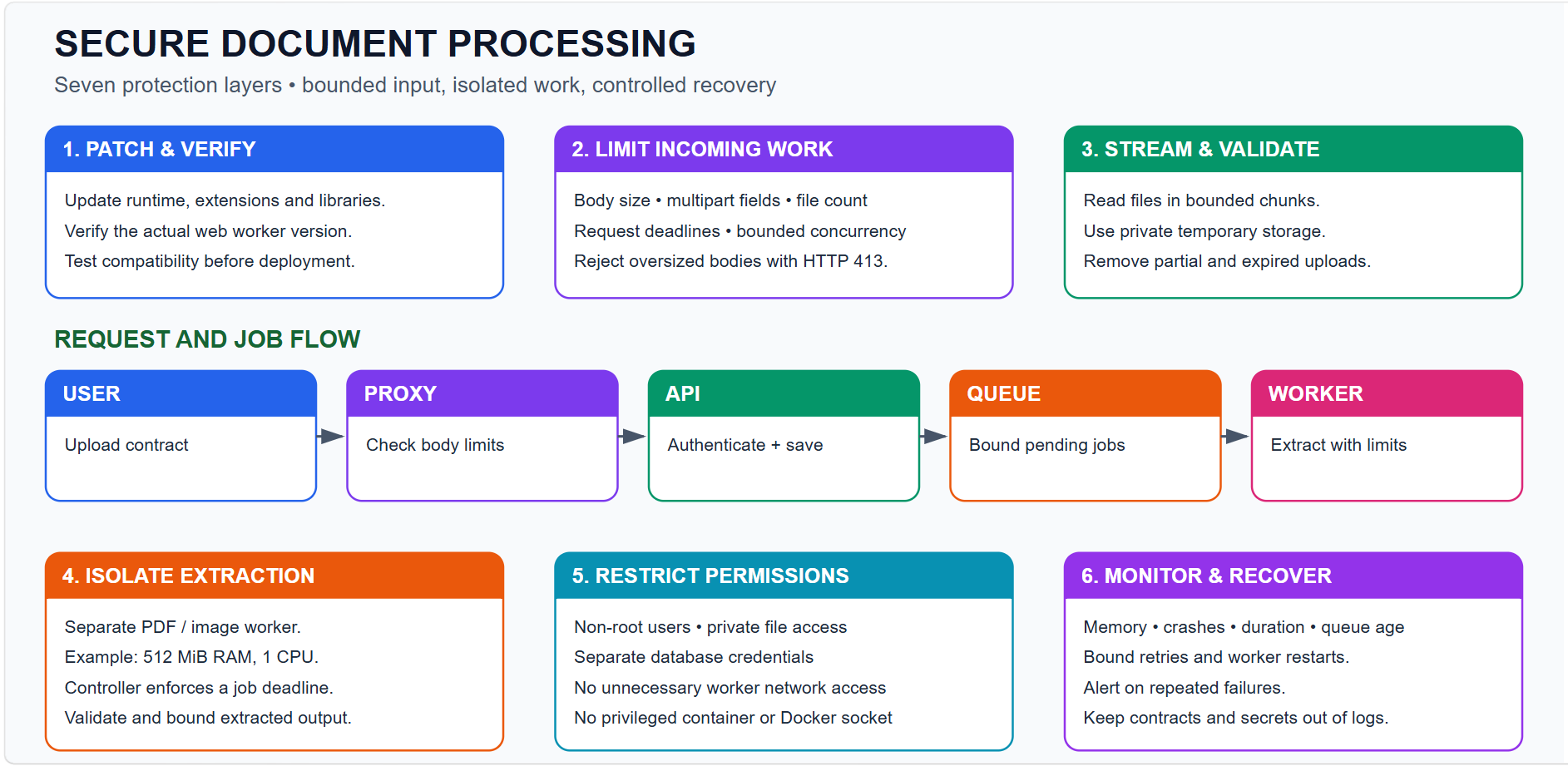
A Practical Example: A User Uploads a Contract
- The reverse proxy checks the incoming body against its request limit.
- The API authenticates the user and validates allowed fields and document type.
- Bounded reads save the file to private temporary storage.
- A queue accepts the job only when capacity is available.
- An isolated worker extracts text under memory, output-size, and time limits.
- A trusted component validates and stores the result using restricted credentials.
- Monitoring records duration and outcome without recording confidential contract text.
A typical asynchronous acceptance response could be:
{"job_id": "abc123", "status": "queued"}
A later status response could be:
{"job_id": "abc123", "status": "completed", "page_count": 3, "word_count": 1250}
These responses illustrate a proposed queued design, not the behavior of the original synchronous upload endpoint.
Frequently Asked Questions
Does try-except prevent memory corruption?
No. It handles exceptions the runtime exposes. It cannot reliably recover from native memory corruption, process aborts, or an operating-system kill.
Does a 10 MiB upload limit mean extraction uses only 10 MiB RAM?
No. Decoding, parsing, object creation, and extracted text can require substantially more memory than the original file.
Does Rust prevent memory exhaustion?
No. Safe Rust prevents many invalid-memory operations, but applications can still request too much memory or accept excessive work. Go, Python, Node.js, and PHP also need resource controls.
Does a container automatically have a memory limit?
No. Configure and verify resource limits explicitly. Test the behavior on the actual host.
Should I install the newest package directly on production?
Review advisories promptly, select a fixed supported release, and use a tested deployment and recovery procedure. Avoid unreviewed blanket dependency updates.
Official Documentation
- Python MemoryError
- FastAPI uploaded files
- Starlette request parsing and limits
- Nginx request body limits and timeouts
- Docker resource constraints
- systemd execution restrictions
- systemd service restart behavior
Colourful Secure Document Processing Architecture
Upload the accompanying secure-document-processing-architecture.svg to your blog media storage and replace the relative image URL below with its published URL. This provides a colourful diagram even when the editor does not support Mermaid.
Editable Mermaid Version
For an editor that supports Mermaid, use this diagram instead:
flowchart TD
    U["User uploads document"] --> P["Proxy: body and traffic limits"]
    P --> A["API: authentication and validation"]
    A --> S["Private storage: bounded file reads"]
    S --> Q["Queue: capacity and concurrency limits"]
    Q --> W["Isolated worker: memory and time limits"]
    W --> V["Validate extraction result"]
    V --> D["Database: restricted credentials"]
    A --> M["Monitoring: errors and resource usage"]
    W --> M
    Q --> M
    R["Patched runtimes and dependencies"] -.-> A
    R -.-> W
    T["Staging: malformed and oversized tests"] -.-> P
    T -.-> W
    classDef blue fill:#dbeafe,stroke:#2563eb,color:#172554
    classDef green fill:#dcfce7,stroke:#16a34a,color:#14532d
    classDef orange fill:#ffedd5,stroke:#ea580c,color:#7c2d12
    classDef purple fill:#f3e8ff,stroke:#9333ea,color:#581c87
    classDef pink fill:#fce7f3,stroke:#db2777,color:#831843
    class U,P blue
    class A,S,V,D green
    class Q,W orange
    class M,R purple
    class T pink


Top comments (0)