
Yes, attackers can sometimes use memory exhaustion to disrupt a website. An out-of-memory error does not automatically give them control of the server.
This applies to applications written in PHP, Python, Node.js, Rust, and Go. The language affects how failures happen, but every application needs limits on the amount of work it accepts.
This guide explains the risk in simple words using realistic web application scenarios. All memory sizes are illustrative, not measurements from a specific server. The scenarios explain attack mechanisms; they are not reports of named security incidents.
1. What Is an Out-of-Memory Error?
RAM is a program's temporary workspace. Programs use it to hold uploaded data, database results, decoded images, application objects, and intermediate calculations.
Think of RAM as a restaurant kitchen's work surface. A few orders fit comfortably. If hundreds arrive together, the kitchen cannot handle them all.
A program faces a similar problem when it cannot obtain more memory or reaches an enforced memory limit.
For example:
A server has limited memory.
A document-processing feature accepts unlimited work.
Too much work runs together.
Requests fail, workers stop, or the service becomes unavailable.
A script or container can hit its own limit even while the host machine still has available RAM.
2. How Does This Give an Attacker an Advantage?
An attacker may submit requests that cause your application to do expensive work. They do not necessarily need an account if the affected feature is public.
They also do not need to click your website's form. A form is just one way of sending an HTTP request; a public endpoint must enforce its own rules on the server.
If each request consumes significant memory and the service accepts too many requests or jobs, genuine visitors may lose access.
This is a denial-of-service attack, often shortened to DoS.
Simple analogy: Someone floods the restaurant with difficult orders. Real customers cannot get served, even though the attacker never obtains the kitchen keys.
| Event | Possible result | Does this alone give server control? |
|---|---|---|
| One request reaches its memory limit | That request fails | No |
| Many expensive requests fill worker capacity | Visitors wait or receive errors | No |
| An API process runs out of memory | Its connections and requests are interrupted | No |
| Services exhaust shared machine resources | Multiple applications may suffer | No |
| A separate exploitable memory-handling bug is triggered | Consequences depend on that vulnerability | Potentially, but not because OOM automatically grants access |
3. Real-World Scenario: A PDF Upload Feature
Imagine a hospital website that lets patients upload medical reports. The server extracts text from each PDF for search or analysis.
Suppose one extraction job peaks at about 300 MB:
1 job:   about 300 MB
5 jobs:  about 1.5 GB
20 jobs: about 6 GB
These estimates exclude the database, web server, operating system, and other allocations.
What can go wrong?
The feature starts processing every upload immediately. Someone repeatedly submits expensive documents, and too many jobs run together.
What do genuine users see?
- Report uploads fail.
- Appointment pages may slow down if they share the same resources.
- Requests time out or return server errors.
- A stopped worker may leave jobs unfinished.
What does the attacker gain?
They interrupt availability. Patients and staff cannot reliably use the service.
How can you reduce the risk?
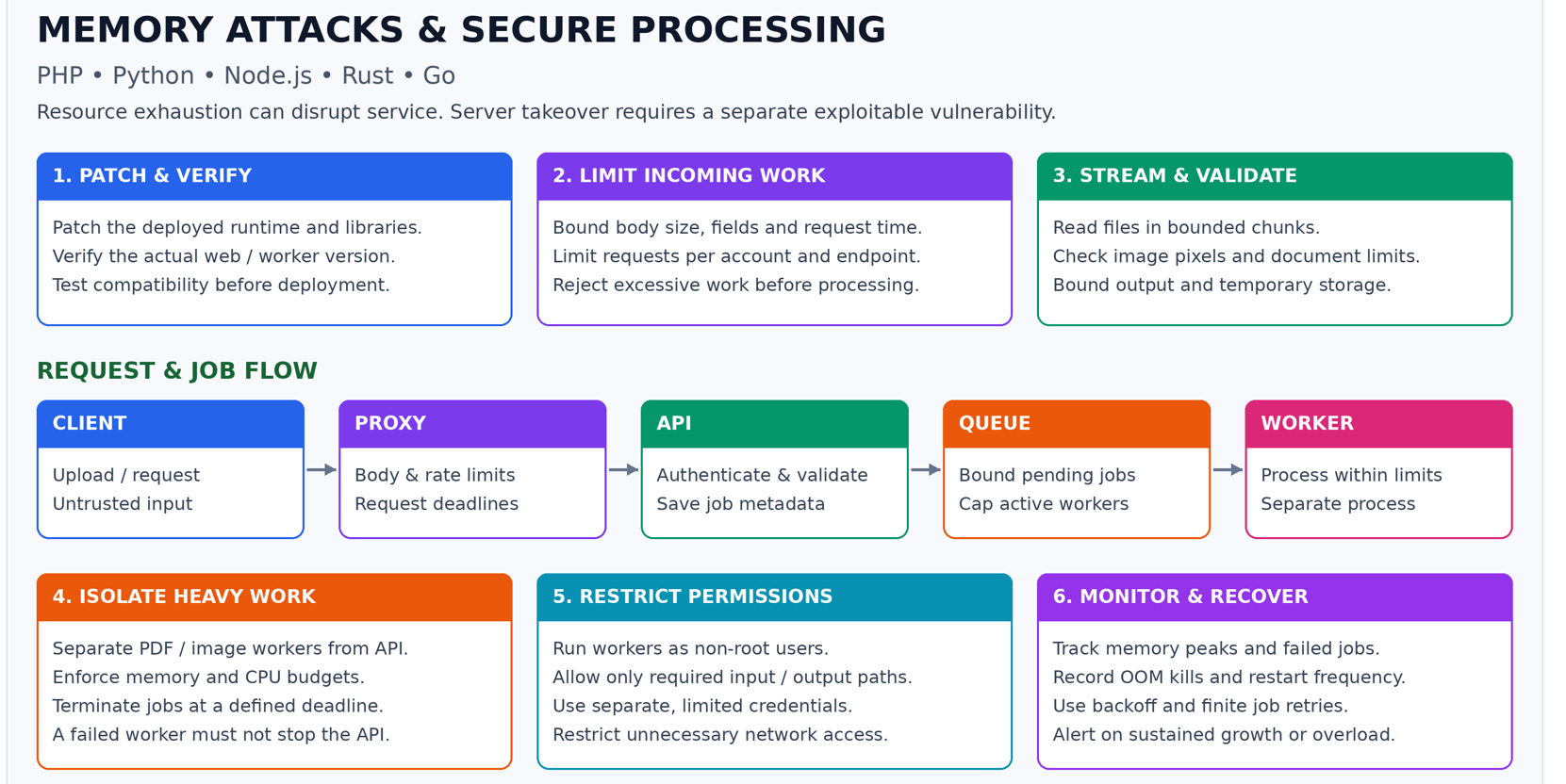
Use a queue, cap the number of simultaneous jobs, and give document workers memory and time limits. Reject excessive uploads and limit work per user or account.
An illustrative policy is:
Maximum upload size: 10 MiB
Maximum PDF pages: 100
Maximum active extraction workers: 2
Remaining accepted jobs: wait in a bounded queue
Choose actual limits from measurements. Checking page count can itself require parsing, so risky document inspection also belongs inside the constrained worker. Cap queue growth and temporary-file storage too.
4. Real-World Scenario: A Small Image with Huge Dimensions
A compressed image may look small on disk but expand substantially when decoded.
For an image with 10,000 × 10,000 pixels and four bytes per decoded pixel:
10,000 × 10,000 × 4 = 400,000,000 bytes
Approximately 381 MiB for one decoded pixel buffer
Resizing, converting, or making a second copy can require more memory.
What does the attacker gain?
An accepted upload can trigger much more processing work than its compressed size suggests. Enough concurrent work may interrupt the service.
Protection
Check compressed file size, dimensions, total pixel count, output size, and processing duration. Process images in isolated workers. A file-extension check alone cannot enforce these resource limits.
5. PHP: Can a Memory-Limit Error Help an Attacker?
Yes, repeated expensive PHP requests can occupy workers or cause failures. However, one PHP request exceeding its memory limit does not automatically mean the whole server crashes.
Example situation
memory_limit = 128M
A request tries to load a much larger file:
<?php
// Risky when the file is large.
$data = file_get_contents('large-report.csv');
Possible error:
Fatal error: Allowed memory size ... exhausted ...
Simple meaning: This request used more tracked PHP memory than allowed.
The request may fail while other workers continue. If many expensive requests arrive together, the worker pool can still become overloaded.
PHP's memory setting is not a complete operating-system limit on every byte used by a worker, including all native-library allocations.
Better example: read a CSV progressively
<?php
$file = fopen('large-report.csv', 'r');

if ($file === false) {
    exit('Cannot open file');
}

$count = 0;

while (($row = fgetcsv($file)) !== false) {
    // Process one row; do not retain every row.
    $count++;
}

fclose($file);
echo "Processed $count rows";
Example output for 5,000 CSV records:
Processed 5000 rows
This reduces whole-file retention. An exceptionally large record can still consume significant memory, so streaming should be combined with input limits.
Practical protection: Bound uploads, batch database queries, control worker concurrency, and patch the PHP runtime serving the website, its extensions, and dependencies.
6. Python: Does MemoryError Protect the Service?
Python may raise MemoryError when an allocation fails. Sometimes the application can handle it, but recovery is not guaranteed.
Example situation
A Python PDF worker holds every page's text, decoded images, and intermediate data in memory. A difficult document pushes it beyond its available resources.
Possible result:
MemoryError
Alternatively, the operating system may kill the process before a Python exception can be handled.
Safe demonstration of the exception handler
try:
    raise MemoryError("Simulated allocation failure")
except MemoryError:
    print("This job could not finish because of a memory problem")
Expected output:
This job could not finish because of a memory problem
This simulates the exception without exhausting RAM. It does not prove that real exhaustion is recoverable. Even building an error response requires memory.
What does the attacker gain?
If expensive jobs run inside the main API process, that process may stop or become unresponsive. Other requests handled by it can be affected.
Practical protection: Separate document jobs from the API, cap concurrency and job size, and let the parent service record worker failures. An except MemoryError block cannot intercept a forced OS kill.
7. Node.js: Can an Unlimited Cache Take Down an API?
Yes. Objects that remain referenced cannot simply be removed by garbage collection.
Risky example
const requestHistory = [];

function rememberRequest(body) {
  requestHistory.push(body);
}
If the application uses this function for every request and never removes entries, retained memory keeps growing.
Possible failure:
FATAL ERROR: Reached heap limit
Allocation failed - JavaScript heap out of memory
What does the attacker gain?
Repeated accepted requests can accelerate memory growth. Fatal heap exhaustion can terminate the process, interrupting requests served by that instance.
Better example: bound retained entries
const history = [];
const MAX_ENTRIES = 100;

function rememberSummary(summary) {
  if (history.length >= MAX_ENTRIES) {
    history.shift();
  }
  history.push(summary);
}

for (let i = 0; i < 150; i++) {
  rememberSummary(`Request ${i}`);
}

console.log(history.length);
Expected output:
100
This is a small educational example. Also limit the size of each entry, avoid retaining full sensitive request bodies, and use suitable bounded cache storage for larger workloads.
Practical protection: Bound caches and request bodies, stream files with backpressure, and isolate heavy processing. Ordinary JavaScript try/catch cannot recover a fatal V8 heap OOM. The --max-old-space-size option controls part of the heap, not total process memory.
8. Rust: Does Memory Safety Stop Resource-Exhaustion Attacks?
No. Safe Rust prevents many invalid memory accesses, but the program can still accept more work than its resources can support.
Example situation
An endpoint accepts a requested output size and allocates memory without enforcing a reasonable maximum.
If enough memory is requested, allocation can fail. Ordinary allocation failure in a typical Rust standard-library binary commonly aborts the process. Some APIs provide fallible allocation instead.
Better example: reject oversized work first
fn main() {
    let requested_bytes: usize = 20 * 1024 * 1024;
    let maximum_bytes: usize = 5 * 1024 * 1024;

    if requested_bytes > maximum_bytes {
        println!("Rejected: request exceeds the 5 MiB limit");
        return;
    }

    let mut data: Vec<u8> = Vec::new();

    match data.try_reserve(requested_bytes) {
        Ok(()) => println!("Capacity reserved"),
        Err(_) => println!("Unable to reserve capacity"),
    }
}
Expected output with these values:
Rejected: request exceeds the 5 MiB limit
try_reserve can report capacity overflow or an allocator-reported failure. It cannot prevent the OS from killing the process, and successful reservation does not guarantee every later allocation will succeed.
What does the attacker gain?
An unbounded workload can still cause service interruption even without exploiting a memory-corruption bug.
Practical protection: Validate sizes before allocating, enforce actual bytes while reading, use fallible allocation where appropriate, and constrain concurrency.
9. Go: Can Garbage Collection Prevent Every Memory Attack?
No. Go's garbage collector can reclaim unreachable objects. It cannot discard data the application still retains.
Risky example
var history [][]byte

func remember(data []byte) {
    history = append(history, data)
}
If this collection keeps growing, the referenced buffers remain live.
Possible runtime failure:
fatal error: runtime: out of memory
The OS can also kill the process first.
What does the attacker gain?
Repeated requests that cause long-term retention can push the service toward failure faster.
Protection example: limit body reads in an HTTP handler
package main

import (
    "fmt"
    "io"
    "net/http"
)

func upload(w http.ResponseWriter, r *http.Request) {
    const maximumBytes = 1 << 20 // 1 MiB
    r.Body = http.MaxBytesReader(w, r.Body, maximumBytes)
    defer r.Body.Close()

    data, err := io.ReadAll(r.Body)
    if err != nil {
        // Simplified example: not every read error means oversize.
        http.Error(w, "Cannot read request within the allowed limit", http.StatusBadRequest)
        return
    }

    fmt.Fprintf(w, "Accepted %d bytes", len(data))
}

func main() {
    http.HandleFunc("/upload", upload)
    if err := http.ListenAndServe(":8080", nil); err != nil {
        panic(err)
    }
}
Example response for a successful 100-byte body:
Accepted 100 bytes
The reader enforces a per-request maximum while reading. Production code should distinguish an oversized-body error and return HTTP 413, configure server timeouts, and limit concurrent requests. Even a 1 MiB allowance multiplied across thousands of requests can be excessive.
Practical protection: Bound retained collections, body sizes, and concurrency. Ordinary recover() does not recover a fatal runtime OOM. GOMEMLIMIT is a soft runtime limit, not an absolute cap on all process memory.
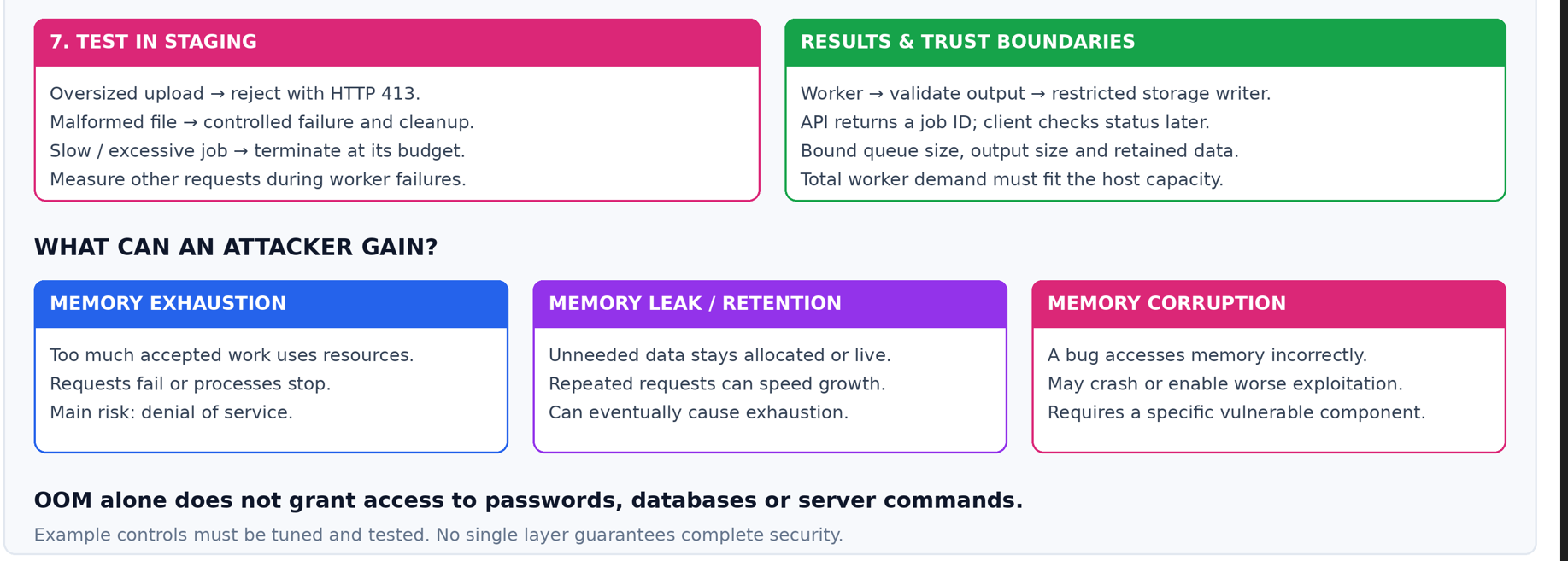
10. Memory Exhaustion, Memory Leaks, and Memory Corruption Are Different
| Problem | Simple explanation | Typical security relevance |
|---|---|---|
| Memory exhaustion | The application cannot obtain more memory or exceeds a limit | Can interrupt availability |
| Memory leak or unintended retention | Memory stays allocated or reachable longer than intended | Can gradually cause exhaustion; repeated requests may accelerate it |
| Memory corruption | A bug accesses or changes memory incorrectly | May crash the process or have more serious consequences, depending on the bug |
An unlimited global cache is usually unintended retention. In garbage-collected languages, it may be called a logical memory leak even though the collector correctly preserves reachable objects.
Memory corruption can occur without OOM. OOM can occur without corruption. A growing cache does not automatically let someone read the cached data.
11. When Could Code Execution Become Possible?
Normally, memory exhaustion causes failure or termination. It does not turn uploaded data into executable instructions.
More serious exploitation requires a specific vulnerability, such as a bug in a runtime or native document-processing library.
A conceptual sequence is:
- The application processes attacker-controlled input.
- A particular vulnerable component handles that input incorrectly.
- The bug causes an invalid memory operation.
- Depending on the vulnerability and protections, the result may be a crash or potentially a more serious compromise.
This is conditional. It is not a claim that all OOM conditions are exploitable or that any named runtime currently has such a vulnerability.
Restaurant analogy: Too many orders overload the kitchen. A separate defective emergency lock might create an additional security problem. Overloading the kitchen does not automatically create that defective lock.
For Go and Rust, unsafe code, native integrations, runtime bugs, and dependencies still need attention. For Python, PHP, and Node.js, native runtimes and extensions also matter. No language choice replaces patching and resource controls.
12. Practical Protection Checklist
| Protection | Example | Why it helps |
|---|---|---|
| Patch the deployed runtime and libraries | Update the actual PHP web runtime and PDF library | Fixes known vulnerabilities |
| Limit input | Upload bytes, image pixels, document pages, field count | Reduces expensive accepted work |
| Limit processing time | Terminate an isolated job after its budget | Prevents indefinitely running jobs |
| Limit simultaneous work | Two measured document workers | Keeps combined demand manageable |
| Bound queues and temporary storage | Maximum pending jobs and retention period | Prevents moving the overload into another resource |
| Stream or batch data | CSV rows and database batches | Avoids retaining complete datasets |
| Isolate heavy work | Separate API and document worker processes | Reduces the impact of a worker failure |
| Restrict worker permissions | Access only assigned input/output paths | Limits damage from a separate compromise |
| Use fair rate limits | Per-account quotas plus other abuse controls | Reduces repeated resource consumption |
| Monitor and cap retries | Alert on repeated kills and failing documents | Detects recurring failure and retry storms |
A rate limit alone is not enough: one permitted request may still be too expensive. A memory limit alone is not enough: too many workers can exhaust shared resources.
13. What Should Users See When a Job Fails?
Use controlled messages that do not expose internal file paths, secrets, or detailed stack traces.
Examples:
Upload too large:
HTTP 413 Content Too Large
Please upload a smaller document.

Per-user request limit reached:
HTTP 429 Too Many Requests
Please try again later.

Background document job failed:
We could not process this document within the allowed resource limits.
A background job failure does not necessarily correspond to a new HTTP error response: the original upload may already have returned a job ID. Record the job status so the user can see the outcome.
14. Frequently Asked Questions
Can a hacker cause trouble without logging in?
Yes, if a public endpoint accepts expensive work without adequate limits. Authentication can improve accountability, but authenticated endpoints also need resource controls.
Does an OOM error prove someone attacked my site?
No. Legitimate traffic, an unexpectedly difficult file, a growing cache, or a configuration mistake can produce the same symptoms. Investigate request patterns and resource measurements.
Will more RAM solve the problem?
It can support a larger legitimate workload. It does not fix unlimited growth or unlimited accepted work.
Is switching from PHP to Go or Rust enough?
No. Go and Rust applications can also exhaust memory. Language memory-safety properties and service resource limits solve different problems.
Do process restarts solve the underlying issue?
They may restore availability temporarily. If the same workload or retention bug remains, failures can return. Use backoff and finite retries while addressing the cause.
Can attackers automatically steal passwords when memory runs out?
No. Exhaustion alone does not grant access to passwords, database contents, or server commands. Data theft requires another access path or vulnerability.



Top comments (0)