
A practical guide with configuration paths, code examples and a layered security architecture.
A Laravel website can run out of memory when it processes a large upload, reads an entire database table, generates a heavy PDF or receives too many expensive requests at once. Attackers can deliberately trigger expensive work to interrupt service.
An out-of-memory error does not automatically mean an attacker can execute code. Remote code execution requires an exploitable vulnerability. Keep PHP patched and apply resource controls together.
Editorial note: This guide expands on the topic of Out of Memory Errors Explained: PHP vs Python vs Node.js vs Rust vs Go. The linked article could not be retrieved during preparation, so this is an independent implementation checklist, not a verified summary of that article.
1. Know Where Each Security Setting Belongs
<project> means your Laravel project root. Server paths below are common examples; confirm the configuration actually loaded on your server.
| Protection | Where to apply it | Simple purpose |
|---|---|---|
| PHP security updates | PHP installation serving the website | Fix engine vulnerabilities |
| PHP memory and upload limits | Active php.ini; LAMPP commonly /opt/lampp/etc/php.ini
|
Limit resources per request |
| Apache request limits |
/opt/lampp/etc/httpd.conf or etc/extra/httpd-vhosts.conf
|
Reject large bodies before PHP |
| Nginx request limits, if present | Commonly /etc/nginx/sites-available/<site>
|
Reject large bodies at the proxy |
| Input validation | <project>/app/Http/Requests/ |
Bound accepted strings, arrays and files |
| Route throttling |
<project>/routes/web.php or routes/api.php
|
Limit repeated requests |
| Database batching |
<project>/app/Http/Controllers/ and app/Jobs/
|
Avoid loading all records |
| Background jobs |
<project>/app/Jobs/ and config/queue.php
|
Control heavy processing |
| Private file storage | <project>/config/filesystems.php |
Keep sensitive uploads private |
| Production settings | <project>/.env |
Hide debug information |
| Application monitoring |
<project>/storage/logs/ plus server logs |
Detect errors and abuse |
2. Update the PHP Runtime That Actually Serves Your Website
Updating Laravel dependencies does not patch PHP itself. Also, CLI PHP and website PHP can be different installations.
Read-only checks for a LAMPP installation:
/opt/lampp/bin/php -v
/opt/lampp/bin/php --ini
From the Laravel project directory:
/opt/lampp/bin/php artisan --version
composer audit
composer audit checks known dependency advisories; it does not verify the PHP engine is patched.
- [ ] Identify the website runtime, SAPI and loaded INI through an administrator-only diagnostic.
- [ ] Remove the diagnostic afterward; do not expose a public
phpinfo()page. - [ ] Install a supported PHP release with current security fixes.
- [ ] Check PHP extension and Composer compatibility before deploying.
- [ ] Test login, SSO, uploads, payments and background jobs in staging.
For the October 2026 vulnerabilities discussed in PHP's official announcements, fixed releases include PHP 8.2.35, 8.3.36, 8.4.27 and 8.5.12. Use a current patched release appropriate to your branch. Request limits and Laravel validation do not replace these fixes.
3. Set PHP Memory, Upload and Error Limits
Path: the php.ini loaded by the website runtime.
Example starting values for an application accepting one 10 MB document:
memory_limit = 256M
upload_max_filesize = 10M
post_max_size = 12M
max_file_uploads = 5
max_input_vars = 1000
max_execution_time = 30
max_input_time = 60

display_errors = Off
log_errors = On
expose_php = Off
These are example budgets, not universal settings. post_max_size must cover the total multipart request, including all files and form fields. Five 10 MB files will not fit inside a 12 MB request.
- [ ] Keep
post_max_sizelarger than the permitted total upload payload. - [ ] Avoid unlimited
memory_limit = -1on public requests. - [ ] Choose limits based on measured legitimate workloads.
- [ ] Confirm error logs are writable, rotated and outside public access.
- [ ] Reload the correct service through your tested deployment process.
- [ ] Verify the website's effective settings after the change.
Example: Five simultaneous requests using 200 MB each can consume roughly 1 GB before accounting for other process and server overhead. A per-request limit alone does not protect total server RAM.
PHP execution limits are not complete wall-clock deadlines on all platforms. Configure network, database and worker timeouts separately.
4. Reject Oversized Requests Before They Reach PHP
Laravel validation runs after PHP has received and parsed parts of the request. Put request limits at the web server or reverse proxy too.
Apache / LAMPP
Common path: /opt/lampp/etc/extra/httpd-vhosts.conf
Within the relevant virtual host, an example 12 MiB body limit is:
LimitRequestBody 12582912
Validate the Apache configuration before a controlled reload:
/opt/lampp/bin/apachectl -t
Nginx, if it fronts your application
Common path: /etc/nginx/sites-available/<site>
Inside the appropriate server or location block:
client_max_body_size 12m;
Validate before reloading:
nginx -t
- [ ] Apply the setting to the correct website and upload location.
- [ ] Check CDN and load-balancer limits as well.
- [ ] Confirm valid uploads succeed and oversized bodies receive HTTP 413.
- [ ] Configure connection and request timeouts for slow clients.
5. Validate Files, Strings and Array Sizes in Laravel
Path: <project>/app/Http/Requests/StoreDocumentRequest.php
Example request class:
<?php

namespace App\Http\Requests;

use Illuminate\Foundation\Http\FormRequest;

class StoreDocumentRequest extends FormRequest
{
    public function authorize(): bool
    {
        // Add your policy check where access depends on a resource or role.
        return $this->user() !== null;
    }

    public function rules(): array
    {
        return [
            'title' => ['required', 'string', 'max:200'],
            'description' => ['nullable', 'string', 'max:20000'],
            'tags' => ['nullable', 'array', 'max:20'],
            'tags.*' => ['string', 'max:50'],
            'document' => ['required', 'file', 'mimes:pdf', 'max:10240'],
        ];
    }
}
max:10240 limits this file to 10 MB in Laravel's file-size units. The MIME rule examines file content to infer type, but it does not prove a PDF is harmless.
- [ ] Restrict file types to those the feature needs.
- [ ] Bound array counts and individual string lengths.
- [ ] Limit image dimensions before expensive transformations.
- [ ] Bound PDF page counts, processing time and output size.
- [ ] Avoid extracting untrusted archives, or enforce entry-count and decompressed-size limits.
- [ ] Isolate document conversion and scanning with memory, CPU and time budgets.
Example: A compressed 3 MB image can expand into hundreds of megabytes when decoded. Upload size alone does not bound processing memory.
6. Store Uploads Privately and Prevent Execution
Paths: <project>/config/filesystems.php and your upload controller.
Use a configured private local disk. For example, add a disk to filesystems.php:
'private_uploads' => [
    'driver' => 'local',
    'root' => storage_path('app/private/uploads'),
    'throw' => true,
],
In your controller method accepting StoreDocumentRequest $request:
$path = $request->file('document')->store('', 'private_uploads');
Laravel generates a storage filename. Record the path and owner in your database. Serve downloads through a controller that checks authorization and resolves a stored record, rather than accepting arbitrary filesystem paths.
- [ ] Keep sensitive uploads outside
public/and public storage links. - [ ] Prevent script execution in any publicly accessible upload location.
- [ ] Keep original filenames only as safely handled metadata.
- [ ] Enforce user storage quotas and clean up abandoned uploads.
- [ ] Scan or quarantine files where the application's risk requires it.
Example: A patient document must require authorization on every download. Knowing its URL must not grant access.
7. Rate-Limit Expensive Endpoints
Path: <project>/routes/web.php or routes/api.php
use App\Http\Controllers\DocumentController;
use Illuminate\Support\Facades\Route;

Route::post('/documents', [DocumentController::class, 'store'])
    ->middleware(['auth', 'throttle:10,1']);
This example uses the project's session authentication. Token APIs should use their configured authentication middleware, such as auth:sanctum, where applicable.
- [ ] Limit uploads, searches, exports, login and AI processing separately.
- [ ] Configure trusted proxies so client identity is resolved correctly.
- [ ] Use shared limiter storage across multiple application servers.
- [ ] Add per-user quotas and concurrent-job limits for costly features.
- [ ] Add edge protection for abusive traffic before Laravel boots.
Example: A legitimate user uploads two files. An abusive client attempts hundreds. Throttling rejects excess requests with HTTP 429, while quotas limit total work accepted.
8. Avoid Loading Entire Tables or Files Into Memory
Paths: <project>/app/Http/Controllers/, app/Services/ and app/Jobs/.
For a page listing:
$doctors = User::query()
    ->select(['id', 'name', 'slug'])
    ->paginate(20);
For batch processing:
User::query()
    ->select(['id', 'email'])
    ->chunkById(200, function ($users) {
        foreach ($users as $user) {
            // Process one record without accumulating all batches.
        }
    });
- [ ] Review unbounded
Model::all()and->get()calls. - [ ] Cap client-controlled page sizes.
- [ ] Stream large files instead of reading the entire file into a string.
- [ ] Avoid collecting all batch results in another large array.
- [ ] Use bounded related-record queries and suitable database indexes.
- [ ] Keep export and report generation out of interactive requests when heavy.
9. Run Heavy Work Through Controlled Queues
Paths: <project>/app/Jobs/, config/queue.php and your process manager configuration.
Configure an asynchronous queue connection appropriate to your infrastructure. The sync connection executes work inside the current process.
Example worker command, run from the project directory:
/opt/lampp/bin/php artisan queue:work \
  --memory=256 \
  --timeout=60 \
  --max-jobs=500 \
  --max-time=3600
- [ ] Use a process manager to restart exited workers.
- [ ] Keep worker timeout shorter than the queue connection's
retry_after; follow the relevant visibility-timeout model for services such as SQS. - [ ] Use finite retries and make jobs safe to retry.
- [ ] Set HTTP client and subprocess timeouts inside jobs.
- [ ] Limit worker count to available RAM and CPU.
- [ ] Apply OS/container limits to risky document processors.
--memory checks worker memory between jobs; it is not a hard memory cap during a job. A queue also needs backlog limits and monitoring—moving work to a queue does not make it free.
10. Protect Production Configuration and Monitor Failures
Path: <project>/.env
APP_ENV=production
APP_DEBUG=false
- [ ] Serve only
<project>/publicas the web document root. - [ ] Keep
.env, database exports, source backups and logs inaccessible over HTTP. - [ ] Avoid blanket
777permissions; grant runtime write access only where required. - [ ] Keep CSRF protection for browser forms and authorization checks for protected resources.
- [ ] Use parameterized queries and escaped Blade output.
- [ ] Do not log passwords, access tokens or complete uploaded documents.
- [ ] Rotate logs and monitor disk space as well as RAM.
- [ ] Alert on memory exhaustion, worker exits, repeated 500 errors and queue growth.
Monitor Laravel's configured logging destination, PHP errors, Apache/Nginx errors, process-manager logs and OS OOM events. Laravel may not record failures that happen before it starts or after a process is killed.
11. Verify Before Production Rollout
| Test in staging | Expected result |
|---|---|
| Upload a valid permitted document | Upload succeeds |
| Exceed application file limit but stay within server body limit | Validation fails cleanly; JSON requests typically receive 422 |
| Exceed web-server body limit | HTTP 413 |
| Repeat requests beyond the configured throttle | HTTP 429 |
| Download another user's private document | Access denied according to policy |
| Open a large listing | Pagination keeps returned records bounded |
| Process a heavy document | Work runs within job resource budgets |
| Trigger a controlled worker failure | Process manager recovers; retry behavior is safe |
| Check production error response | No stack trace or secret configuration exposed |
| Exercise login, SSO and existing uploads | Existing supported behavior still works |
Back up affected configuration, record current values and prepare rollback steps. Apply one layer at a time and verify it. A restart or runtime replacement can interrupt traffic; zero downtime requires a deployment design that supports it.
Official References
- PHP security release announcements
- PHP memory and upload directives
- Apache LimitRequestBody
- Nginx client_max_body_size
- Laravel validation
- Laravel routing and rate limiting
- Laravel Eloquent chunking
- Laravel queues
- Laravel deployment
Examples use Laravel 12 documentation; match configuration and syntax to your installed Laravel version.
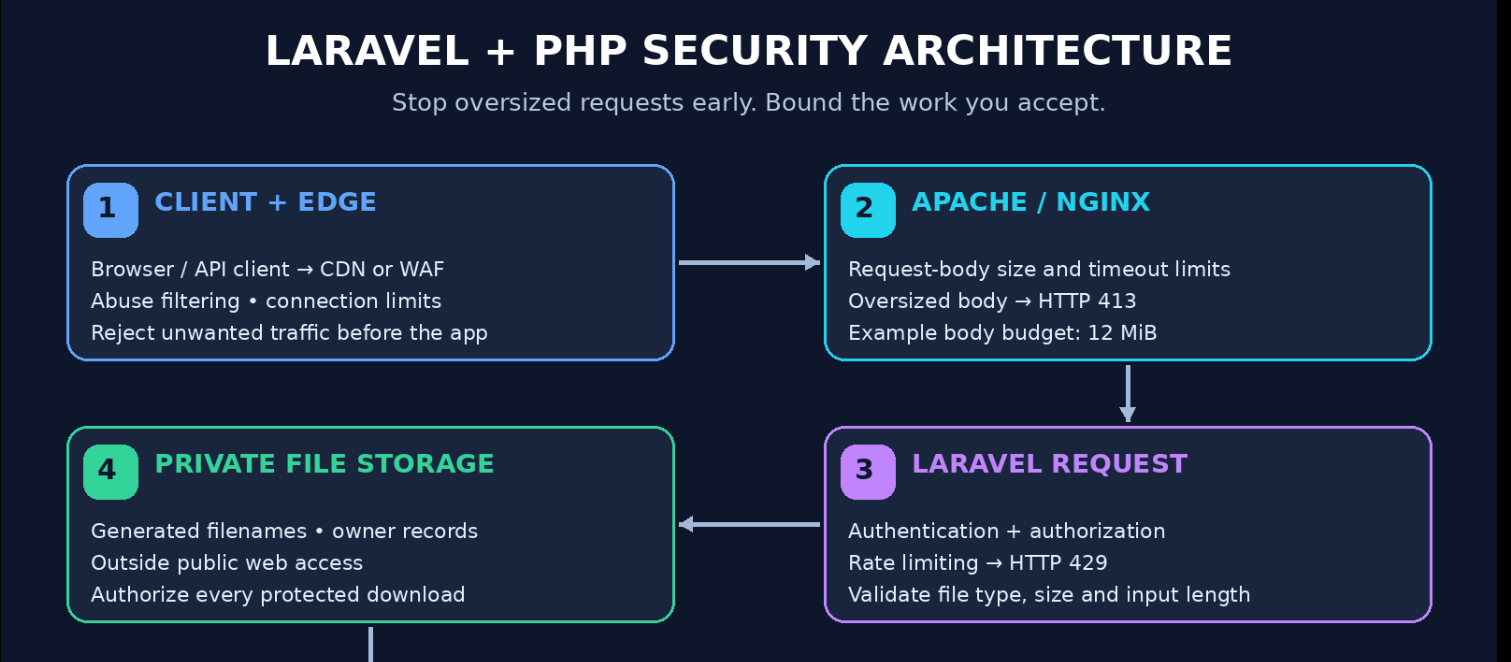
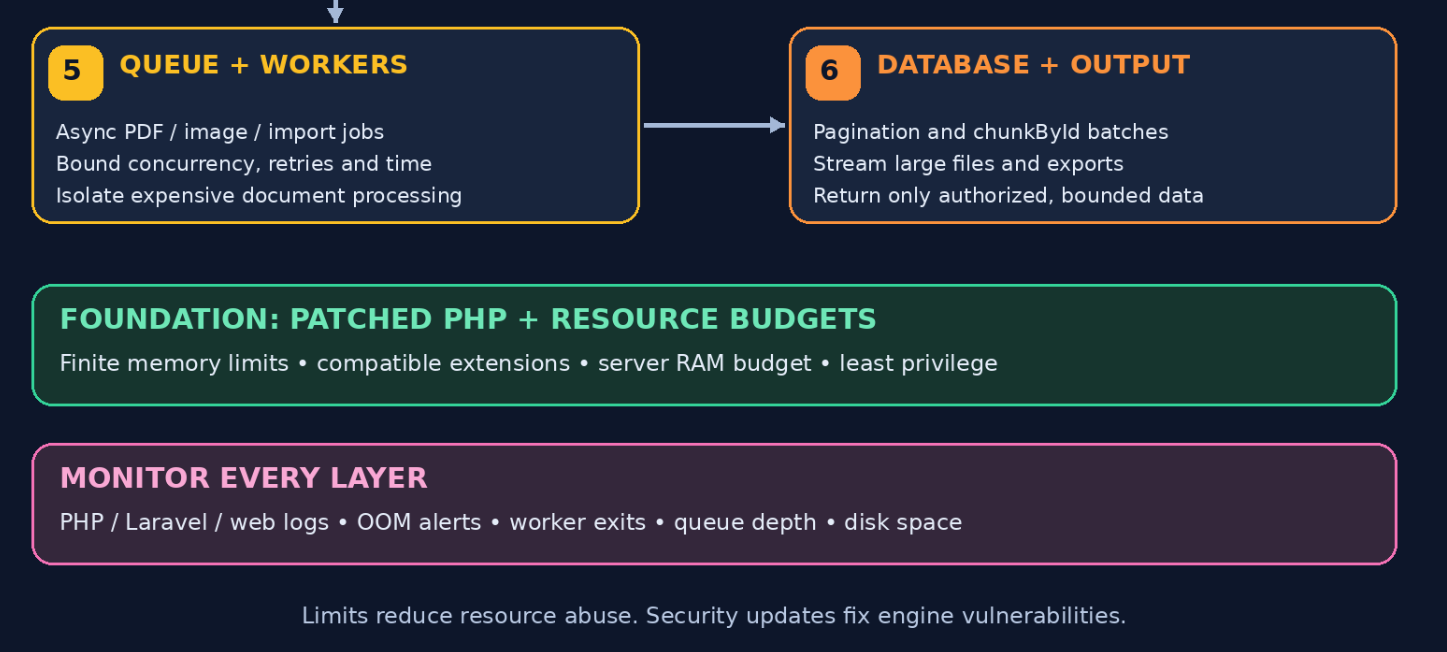
Colorful Architecture: Layered Laravel and PHP Protection



Top comments (0)