
File uploads can introduce more than an unwanted file. A large document, a high-resolution image, or many simultaneous jobs can consume memory, fill storage, and interrupt your application.
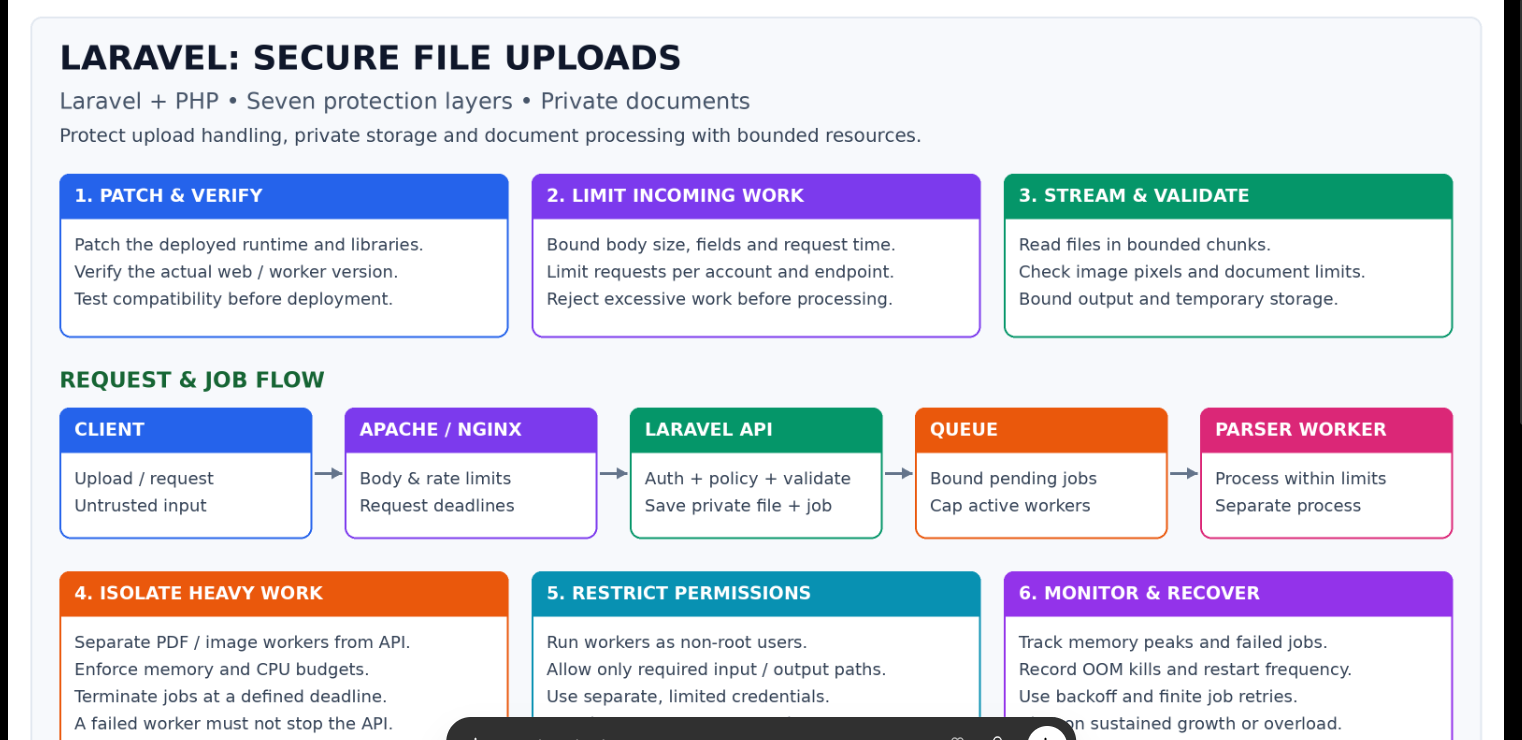
Secure uploads need multiple layers: limits before PHP, application validation, private storage, isolated processing, restricted permissions, monitoring, and testing.
This guide explains where each control belongs in a Laravel application and provides implementation examples.
Editorial source note: The requested Debug School article could not be retrieved during preparation. This is an independent implementation guide based on the seven protection layers discussed and official documentation, not a verified summary of that page.
Compatibility: Examples target Laravel 12.x-style APIs. Confirm your installed version before adapting them. Paths are relative to the Laravel project unless marked as server paths. Sizes and timeouts are illustrative; measure and test before production deployment.
1. Master Checklist: What to Protect and Where
| Layer | Checklist | Laravel or server location |
|---|---|---|
| Patch and verify | Identify HTTP and worker PHP runtimes; patch runtime, extensions, dependencies, and parsers | Apache/PHP-FPM config; worker configuration; composer.lock |
| Limit incoming work | Enforce body size, upload count, deadlines, authentication, quotas, and rate limits | Web server; active web php.ini; routes; service provider |
| Stream and validate | Validate content and size; use generated filenames; store privately | Form Request; controller; config/filesystems.php |
| Isolate processing | Use asynchronous jobs; enforce memory, time, CPU, and concurrency budgets | app/Jobs; queue manager; OS/container configuration |
| Restrict permissions | Use non-root accounts, narrow file access, and restricted credentials | OS permissions; worker environment; policies |
| Monitor and recover | Watch memory, failures, queue age, disk use, and repeated retries | Monitoring; logs; cleanup scheduler |
| Test in staging | Exercise invalid files, overload, worker kills, and unauthorized downloads | Feature tests and infrastructure tests |
2. Layer One: Patch the Actual Runtime and Dependencies
Checklist
- [ ] Identify the PHP runtime handling website requests.
- [ ] Identify the PHP binary used by queue workers and scheduled jobs.
- [ ] Check active configuration and loaded extensions for each runtime.
- [ ] Review PHP, Composer, PDF/image parser, and OS security updates.
- [ ] Test updates with backups and a rollback plan.
Example read-only inspection commands:
php -v
php --ini
php artisan --version
composer audit
For a LAMPP installation, inspect that binary separately:
/opt/lampp/bin/php -v
/opt/lampp/bin/php --ini
These commands inspect CLI installations. They do not prove which PHP module or FPM process serves HTTP requests. Verify the web server configuration and use a temporary authenticated diagnostic if needed; do not leave public phpinfo pages online.
Path example: /opt/lampp/etc/php.ini may be relevant to LAMPP, but verify it rather than assuming it is active.
Why it matters: A dependency fix does not patch the PHP engine. Updating one PHP installation does not update another runtime still serving requests.
3. Layer Two: Limit Work Before PHP and Laravel
Laravel validation runs after the request has passed through the server and PHP upload handling. Early limits protect those stages too.
A. Request-body ceiling at the web server
Apache example:
# Example: 12 MiB maximum request body.
LimitRequestBody 12582912
Nginx alternative:
client_max_body_size 12m;
Use the server actually handling the route. Apply settings in the appropriate virtual host or location and test configuration before a controlled reload.
Expected behavior: A body above the ceiling is rejected, typically with HTTP 413.
B. Active web PHP configuration
upload_max_filesize = 10M
post_max_size = 12M
max_file_uploads = 1
max_input_vars = 1000
max_input_time = 30
memory_limit = 256M
These are sample values for a single-document workflow. Multipart boundaries and other fields need space beyond the file itself. Global limits may affect existing forms; scope and test changes carefully.
max_input_vars does not act as a universal field limit for arbitrary JSON. Configure request-size limits and application schema limits for JSON too. PHP limits also do not replace server connection deadlines or OS worker limits.
C. Authentication, CSRF, and rate limits
Path: routes/web.php
use App\Http\Controllers\DocumentController;
use Illuminate\Support\Facades\Route;

Route::post('/documents', [DocumentController::class, 'store'])
    ->middleware(['auth', 'throttle:document-uploads']);
Keep CSRF middleware enabled for cookie-authenticated web forms. Include @csrf in the Blade form. Token-authenticated API routes require their appropriate authentication configuration instead.
Path: app/Providers/AppServiceProvider.php
Add imports:
use Illuminate\Cache\RateLimiting\Limit;
use Illuminate\Http\Request;
use Illuminate\Support\Facades\RateLimiter;
Inside the existing boot() method:
RateLimiter::for('document-uploads', function (Request $request) {
    return Limit::perMinute(5)->by(
        'document-upload:'.$request->user()->getAuthIdentifier()
    );
});
This limiter assumes the route authenticates first. Use shared limiter storage in a multi-instance deployment.
Also enforce storage quotas and maximum pending jobs per user. Rate limiting alone does not bound the lifetime size of a queue or upload directory. Admission checks should be atomic when concurrent requests could exceed a quota.
4. Layer Three: Validate, Stream, and Store Privately
A. Form Request validation
Path: app/Http/Requests/StoreDocumentRequest.php
<?php

namespace App\Http\Requests;

use Illuminate\Foundation\Http\FormRequest;

class StoreDocumentRequest extends FormRequest
{
    public function authorize(): bool
    {
        return $this->user() !== null;
    }

    public function rules(): array
    {
        return [
            'document' => [
                'bail',
                'required',
                'file',
                'max:10240', // 10 MiB, in KiB
                'mimes:pdf',
                'extensions:pdf',
            ],
        ];
    }
}
Laravel's mimes rule inspects content to infer MIME type. The extension rule separately checks the filename extension. Neither proves a PDF is harmless or cheap to parse.
Authentication here is only the first step. Add the relevant policy check when a file belongs to a patient, organization, project, or tenant.
B. Explicit private disk
Path: config/filesystems.php, inside disks:
'documents' => [
    'driver' => 'local',
    'root' => storage_path('app/private/documents'),
    'visibility' => 'private',
    'throw' => true,
],
Do not link this directory into public/ or expose it through a web-server alias. Private visibility settings do not override an independently configured public server alias.
C. Upload controller
Path: app/Http/Controllers/DocumentController.php
<?php

namespace App\Http\Controllers;

use App\Http\Requests\StoreDocumentRequest;

class DocumentController extends Controller
{
    public function store(StoreDocumentRequest $request)
    {
        $path = $request->file('document')
            ->store('incoming', 'documents');

        // Integration steps:
        // 1. Persist path, owner ID, and status in a document record.
        // 2. Dispatch processing using the document record's ID.
        // 3. Remove orphaned files if persistence or dispatch fails.

        return response()->json([
            'message' => 'Upload received',
        ], 202);
    }
}
This example stores a validated file using a generated filename. It deliberately leaves your application-specific document model and processing integration as clearly marked steps; it is not a complete document workflow.
Laravel upload storage uses streaming facilities. Avoid converting the file into a large string merely to store it:
// Avoid this unnecessary whole-file read for large uploads:
$contents = file_get_contents($request->file('document')->getRealPath());
Streaming storage does not guarantee that the PDF parser itself streams. Apply parser limits separately.
D. Authorized downloads
Paths: app/Policies/DocumentPolicy.php, download controller, protected route.
Retrieve the document record, authorize the user's access, and then use its stored path. Never use an arbitrary client-supplied filesystem path.
For a configured policy and document model, the core pattern is:
Gate::authorize('view', $document);

return Storage::disk('documents')->download($document->path);
Import Gate and Storage facades. The policy must check actual ownership, tenant membership, or approved sharing rules.
5. Layer Four: Isolate PDF and Image Processing
Checklist
- [ ] Configure a real asynchronous queue connection.
- [ ] Put expensive processing in a dedicated queue.
- [ ] Pass a document ID, not the entire file contents, in the payload.
- [ ] Bound active workers and accepted pending jobs.
- [ ] Enforce memory, CPU, wall-clock time, output size, and temporary storage budgets.
- [ ] Validate parser output before saving it as trusted application data.
Paths: .env, config/queue.php, app/Jobs/ProcessDocument.php.
Example .env setting, only after Redis is configured:
QUEUE_CONNECTION=redis
A configured database queue is another option. Do not use sync when isolation from the HTTP request is required.
Example properties inside a Laravel queued job implementing ShouldQueue:
public $timeout = 60;
public $tries = 1;
public $failOnTimeout = true;
These properties are not a complete job class. Its handler must obtain the owned document record and call your chosen parser within the enforced processing boundary.
Example worker command:
/opt/lampp/bin/php -d memory_limit=256M artisan queue:work \
  --queue=documents \
  --timeout=60 \
  --tries=1 \
  --max-jobs=100
Use that binary only if verified for your worker deployment. A process manager must supervise production workers.
| Control | What it means |
|---|---|
| PHP memory_limit | Limits PHP-tracked allocation; not all native process memory |
| Queue worker --memory | Recycling threshold, not a hard per-job RAM ceiling |
| Worker count | Caps simultaneous jobs |
| Container or systemd boundary | Can enforce OS-level memory and CPU restrictions |
| Job timeout | Worker timeout handling; external processes need their own deadline and termination handling |
For Redis/database connections, set retry_after longer than the worker timeout, with a margin: for example, 90 seconds versus 60. For services such as SQS, configure the corresponding visibility timeout instead. Laravel timeout handling requires the supported process-control environment; verify PCNTL for Linux workers.
When spawning a parser subprocess, ensure cancellation kills the relevant process tree and cleans up resources. Do not interpolate untrusted filenames into shell command strings.
Example processing budget
Maximum active workers: 2
Example worker hard memory boundary: 512 MiB each
Example parser deadline: 45 seconds
Example queue worker timeout: 60 seconds
Example retry_after: 90 seconds
Budget for the entire process tree and leave room for PHP/native overhead. These values must fit the host alongside Apache, the database, and other services.
6. Layer Five: Restrict Permissions and Access
- [ ] Run worker processes as non-root accounts.
- [ ] Allow only required input, output, and temporary paths.
- [ ] Keep application source and deployment files unwritable by processing workers where possible.
- [ ] Give workers separate, limited credentials.
- [ ] Restrict unnecessary outbound access to reduce SSRF and data-exfiltration paths.
- [ ] Keep secrets and uploaded report content out of logs.
- [ ] Prevent execution from every upload location.
Do not fix permissions with blanket chmod -R 777. Assign ownership and narrow permissions to the accounts that need access.
A Laravel job that boots the full application may inherit broad database credentials. A dedicated extraction process or container with no main-database credentials creates a narrower boundary. Send its validated result to a restricted writer.
7. Layer Six: Monitor, Recover, and Clean Up
Paths: config/logging.php, application jobs, scheduler, process-manager configuration.
Track:
| Metric | What it reveals |
|---|---|
| Worker peak RSS and OOM kills | Memory demand and enforced-limit failures |
| Oldest job age and pending count | Overload or stalled processing |
| Temporary storage and upload growth | Abandoned files or missing retention rules |
| Failed jobs and retry count | Poison documents or repeated failures |
| Parser duration and output size | Expensive or abnormal processing |
Useful Linux inspection commands:
free -h
ps -eo pid,comm,rss --sort=-rss
journalctl -k --since '1 hour ago'
RSS is reported in KiB by this ps command. Kernel-log access depends on permissions and environment. High RSS alone does not prove a leak.
Use finite retries and restart backoff. Avoid repeatedly retrying the same unprocessable document.
Cleanup must survive a killed worker
A finally block cannot run after a forced kill. Add scheduled cleanup for stale temporary directories, incomplete uploads, orphaned files, and expired results.
For newer Laravel project structures, schedule your cleanup command in routes/console.php. Older projects commonly use app/Console/Kernel.php.
Only remove files proven stale and inactive. Coordinate cleanup with job state to avoid deleting an active job's input.
For production, keep:
APP_DEBUG=false
Ensure deployment refreshes cached configuration appropriately. Do not expose stack traces, parser command lines, tokens, or patient report contents to users.
8. Layer Seven: Test in Staging
Path example: tests/Feature/DocumentUploadTest.php.
| Test | Expected behavior |
|---|---|
| Missing authentication | Rejected according to the route's authentication mode |
| Oversized HTTP body | Rejected before application processing, typically HTTP 413 |
| Invalid PDF MIME or extension | Validation failure; parser does not start |
| Another user's document download | Access denied |
| Malformed PDF | Controlled failed job and eventual cleanup |
| Excessive image dimensions | Rejected inside constrained inspection |
| Worker reaches its hard resource boundary | Worker stopped; failed/stale job detected |
| Many concurrent jobs | Active workers remain bounded; admission policy controls backlog |
| Worker killed before cleanup | Scheduled cleanup removes abandoned artifacts later |
| Parser output is huge | Output limit stops unbounded result storage |
Use Laravel feature tests for routing, authorization, validation, and dispatch behavior. Use separate staging tests for Apache/Nginx body limits, actual parser memory, subprocess termination, and OS-level worker isolation.
Fake uploads and queue mocks alone cannot prove that malformed files are safely handled by a real parser.
9. What Should Users See?
| Situation | Suggested behavior |
|---|---|
| Accepted asynchronous upload | HTTP 202 and an opaque job/document ID once the record and dispatch flow are implemented |
| Invalid upload | Validation response; typically HTTP 422 for JSON clients |
| Upload body too large | HTTP 413 |
| Per-user rate limit reached | HTTP 429 |
| Permission check fails | Denial response without exposing the file |
| Background parser fails | Job status becomes failed with a controlled message |
A background failure does not retroactively change the original HTTP response. Expose a protected status endpoint and authorize it just like a download.
10. Final Deployment Checklist
- [ ] Backups and rollback steps are ready.
- [ ] Correct HTTP and worker runtimes are verified and patched.
- [ ] Limits are tested against existing forms and uploads.
- [ ] Private uploads have no public aliases or executable paths.
- [ ] Ownership and tenant policies protect upload, status, and download operations.
- [ ] Queue processing is truly asynchronous and supervised.
- [ ] Work admission, concurrency, time, memory, and storage are bounded.
- [ ] Parser children cannot outlive cancellation unnoticed.
- [ ] Killed jobs and orphaned files are eventually reconciled.
- [ ] Monitoring and failure alerts are verified.
- [ ] Production debug output is disabled.
Official References
- Laravel 12.x validation
- Laravel 12.x file storage
- Laravel 12.x queues and timeouts
- Laravel 12.x authorization
- Laravel 12.x routing and rate limiting
- PHP configuration directives
- Apache LimitRequestBody
- Nginx client_max_body_size
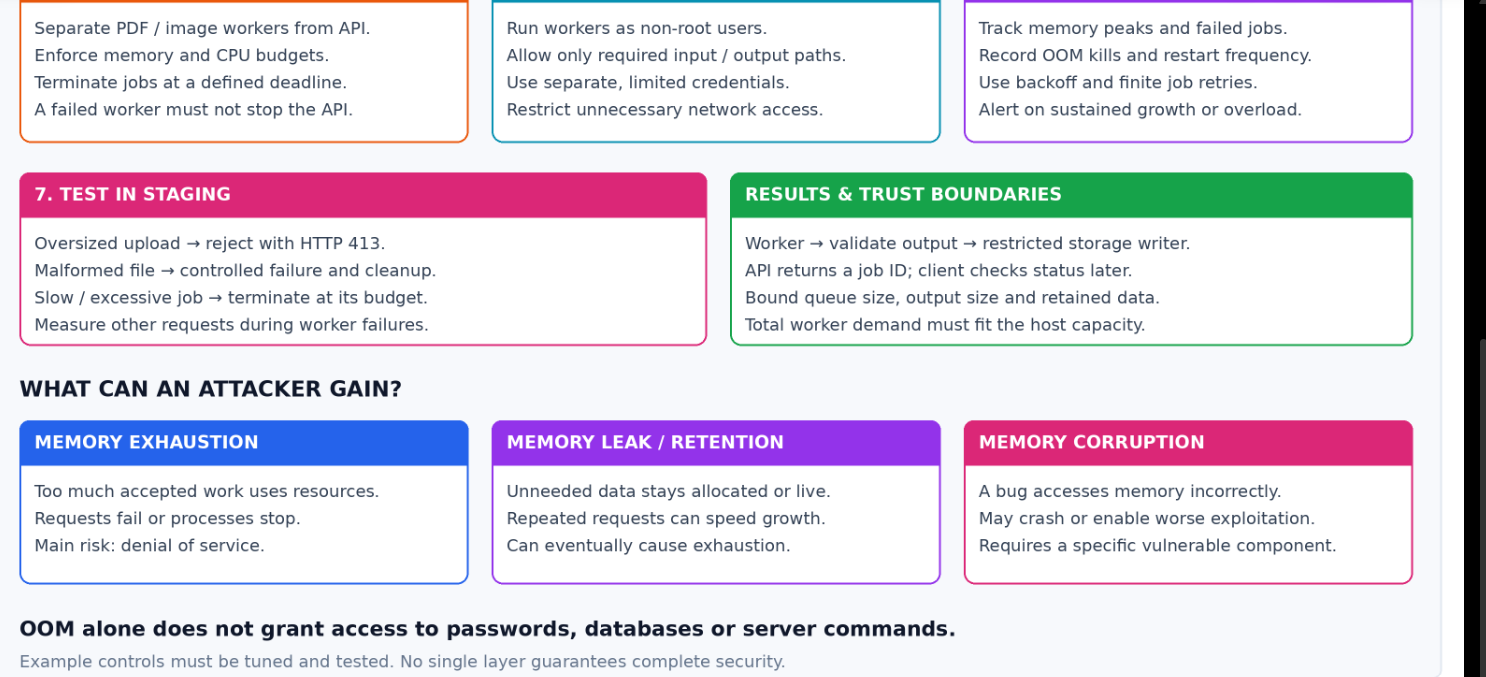
11. Colourful Laravel Upload Security Architecture



Top comments (0)