
A PHP or Laravel website needs clear budgets for memory, uploaded data, input parsing and execution time. It also needs production error settings that keep technical details private while recording failures for administrators.
This guide explains all 10 settings from the Laravel PHP Security Checklist, with examples and a production security checklist.
1. What Does This Protection Mean?
Imagine a hospital registration counter. Staff accept documents up to a certain size, allow only a few attachments per submission and have a reasonable processing budget. If something fails, the patient gets a helpful message while staff record the technical problem privately.
PHP limits serve similar purposes:
- Memory: control the working memory used by a script.
- Uploads: control each file, the total submission and file count.
- Input: bound parsed field count and parsing time.
- Execution: bound script execution time.
- Errors: keep diagnostics private and available to administrators.
These controls reduce resource abuse. They do not guarantee protection against every denial-of-service attack or replace PHP security updates.
2. Where Should You Configure Them?
Edit the php.ini loaded by the PHP runtime serving your website. A common LAMPP path is:
/opt/lampp/etc/php.ini
Confirm the actual website runtime and loaded configuration first. CLI PHP and website PHP can be different installations. A CLI command such as php --ini proves only the CLI configuration.
Use an administrator-only diagnostic to verify the website's loaded INI and effective values, then remove it. Do not leave a public phpinfo() page online.
3. Example Configuration
This example suits a feature accepting one document of up to 10 MiB. The file-count limit permits other smaller multi-file submissions, provided their combined POST body fits.
; Working-memory budget
memory_limit = 256M

; Incoming upload budgets
upload_max_filesize = 10M
post_max_size = 12M
max_file_uploads = 5
max_input_vars = 1000

; Time budgets, in seconds
max_execution_time = 30
max_input_time = 60

; Production error visibility and logging
display_errors = Off
log_errors = On
expose_php = Off
These values are starting examples, not universal recommendations. PHP's M notation uses multiples of 1,048,576 bytes (MiB), often casually called MB.
4. All 10 Settings: Syntax, Meaning and Purpose
| # | Syntax | Simple definition | Security purpose | Example |
|---|---|---|---|---|
| 1 | memory_limit = 256M |
Working-memory budget for one PHP script; normally one web request. | Reduce excessive memory allocation by one request. | An 80 MB request fits; a request needing 350 MB can fail. |
| 2 | upload_max_filesize = 10M |
Maximum size of one uploaded file. | Restrict individual uploads. | A 5 MB PDF fits; a 15 MB PDF exceeds it. |
| 3 | post_max_size = 12M |
Maximum total POST body, including files, fields and multipart overhead. | Bound the whole submission. | Two 7 MB files exceed this budget. |
| 4 | max_file_uploads = 5 |
Maximum uploaded-file count per request. | Bound simultaneous file handling. | Three files fit the count limit; six exceed it. |
| 5 | max_input_vars = 1000 |
Maximum parsed variables, counted separately for GET, POST and cookies. | Bound large input collections. | A 1,500-field form can be truncated. |
| 6 | max_execution_time = 30 |
PHP script execution-time budget in seconds. | Reduce long-running script execution. | A lengthy calculation can time out. |
| 7 | max_input_time = 60 |
PHP input-parsing time budget in seconds. | Bound request-input parsing. | Parsing form and upload data has a time budget. |
| 8 | display_errors = Off |
Stop PHP from printing diagnostics into responses. | Reduce exposure of internal details. | A filesystem path is not printed publicly by PHP's error display. |
| 9 | log_errors = On |
Record PHP errors in the configured logging destination. | Support investigation and monitoring. | An allocation failure is recorded when logging remains possible. |
| 10 | expose_php = Off |
Disable PHP's own identification header. | Reduce PHP version disclosure. | PHP stops adding its own X-Powered-By header. |
5. Memory Limit: File Size Is Not Processing Memory
memory_limit = 256M
PHP needs memory for Laravel, variables, database results and document processing. This setting does not reserve 256 MiB in advance.
Example A: Loading too many database records
// Can consume excessive memory on a large table.
$doctors = User::all();
For a listing page, fetch a bounded page:
$doctors = User::select('id', 'name', 'slug')->paginate(20);
For bulk processing, use batches and avoid accumulating every result:
User::select('id', 'email')->chunkById(200, function ($users) {
    foreach ($users as $user) {
        // Process this record without retaining every batch.
    }
});
Example B: A small image becomes large in RAM
A compressed 5 MB image may need much more working memory after decoding. Upload limits therefore do not bound processing memory. Restrict image dimensions and apply separate budgets to document conversion.
Example C: Many requests run together
Ten requests using 200 MB each consume roughly 2 GB before other server overhead. A per-request setting does not cap total server RAM. Worker counts, queues and operating-system limits also matter.
Current patched PHP releases document memory_limit as a soft limit: an allocation can briefly exceed it before a fatal error. It is not an exact cap on the operating system's total process memory.
6. Upload Limits: Three Different Questions
| Setting | Question it answers |
|---|---|
upload_max_filesize |
How big may each file be? |
post_max_size |
How big may the complete POST submission be? |
max_file_uploads |
How many files may arrive together? |
With the example configuration:
| Submission | Individual file check | Total POST check | File-count check | Result |
|---|---|---|---|---|
| One 9 MB PDF and a small form | Pass | Pass | Pass | Can proceed to application validation. |
| Two 4 MB PDFs and a small form | Pass | Pass | Pass | Can proceed. |
| Two 7 MB PDFs | Pass | Fail | Pass | Exceeds the POST budget. |
| One 11 MB PDF and a small form | Fail | May fit | Pass | Exceeds the individual file budget. |
| Six 1 MB files and a small form | Pass | Pass | Fail | Exceeds the file-count budget; do not assume all files were accepted. |
Five files of 10 MB each do not fit inside a 12 MB POST. If that is a legitimate requirement, the total request budget must exceed 50 MB with additional space for fields and formatting overhead. Assess concurrency and storage before increasing it.
When upload_max_filesize is exceeded, PHP reports an upload error for that file. When post_max_size is exceeded, PHP leaves $_POST and $_FILES empty. Provide a clear application response for these cases; do not assume Laravel will always return an ordinary file-validation error.
PHP size checks do not establish that a file is safe. Validate content type, authorization and processing requirements too.
7. Input Variables: Field Count Is Different From Text Length
max_input_vars = 1000
A form with name, email and phone has three ordinary input variables. A bulk-edit form containing 300 doctors with five fields each produces approximately 1,500 variables. A limit of 1,000 can truncate the submission.
One description containing a million characters is still one variable. Bound its length separately in Laravel:
$request->validate([
    'title' => ['required', 'string', 'max:200'],
    'description' => ['nullable', 'string', 'max:20000'],
    'tags' => ['nullable', 'array', 'max:20'],
    'tags.*' => ['string', 'max:50'],
    'document' => ['required', 'file', 'mimes:pdf', 'max:10240'],
]);
For files, Laravel's max:10240 represents 10,240 kilobytes. A MIME check helps identify file type; it does not prove a PDF is harmless. JSON payloads also need explicit application limits on array counts, nesting and strings; max_input_vars is not a general limit on decoded JSON objects.
8. Time Limits: Parsing and Execution Are Different
| Setting | What it controls | What you must not assume |
|---|---|---|
max_input_time = 60 |
Time PHP allows for parsing input. | Every browser upload must finish within exactly 60 seconds. |
max_execution_time = 30 |
PHP script execution time. | Every request, database query and external call has a strict 30-second wall-clock deadline. |
On non-Windows systems, some time spent outside script execution, such as database or stream operations, is not counted in the same way. Web-server buffering also affects how incoming data reaches PHP.
Use separate web-server slow-client protection, HTTP client timeouts, database timeouts and worker deadlines. Move expensive exports and conversions into controlled asynchronous jobs. A queue still needs memory budgets, finite retries and a limited worker count.
9. Error Settings: Hide Public Details, Keep Private Evidence
display_errors = Off
log_errors = On
expose_php = Off
| Setting | Visitor experience | Administrator benefit |
|---|---|---|
display_errors = Off |
PHP does not print raw diagnostics into the response. | Reduces accidental exposure of paths and implementation details. |
log_errors = On |
No need to show diagnostics publicly. | PHP errors can be investigated in protected logs. |
expose_php = Off |
PHP's own identification header is omitted. | Reduces unnecessary version disclosure. |
Configure Laravel separately:
APP_ENV=production
APP_DEBUG=false
Apply Laravel configuration changes through your normal deployment process, including rebuilding cached configuration when applicable.
The phrase error limits here mainly means error visibility and logging behaviour. These three directives do not set a maximum number of errors. They also do not fix the underlying error.
Check PHP's configured logging destination and Laravel's configured log channel. Protect logs from HTTP access, rotate them, monitor disk space and avoid recording passwords, tokens or uploaded medical documents. A killed process may not have an opportunity to write a final error.
10. Production Security: Right and Wrong Choices
| # | Setting | Right approach | Wrong or risky approach | Reason |
|---|---|---|---|---|
| 1 | memory_limit |
Use a measured finite budget. | Use -1 on ordinary public requests or increase blindly. |
Excessive allocations can exhaust RAM. |
| 2 | upload_max_filesize |
Allow the size required by the feature. | Permit huge files everywhere without a business need. | Increases bandwidth, storage and processing work. |
| 3 | post_max_size |
Cover legitimate combined payloads and overhead with a finite limit. | Make it too small for valid forms or unnecessarily large. | Breaks submissions or accepts excessive data. |
| 4 | max_file_uploads |
Match the legitimate attachment count. | Permit hundreds where only a few are needed. | Increases per-request work. |
| 5 | max_input_vars |
Bound field count and test complex forms. | Raise enormously or silently truncate real forms. | Resource consumption and application correctness both matter. |
| 6 | max_execution_time |
Use a finite web budget and separate external timeouts. | Use 0 for unlimited ordinary web execution. |
Long-running work occupies workers. |
| 7 | max_input_time |
Choose a finite suitable parsing budget. | Assume it alone blocks slow uploads. | Web-server protections remain necessary. |
| 8 | display_errors |
Off in production, with Laravel debug disabled. |
Publicly show detailed production errors. | May disclose internal information. |
| 9 | log_errors |
On, with private rotated logs. |
Disable evidence or let logs grow without bounds. | Investigation and disk availability matter. |
| 10 | expose_php |
Off, alongside patching. |
Treat version hiding as a substitute for updates. | Header reduction is only a small defensive measure. |
11. Safe Implementation and Verification Checklist
- [ ] Identify the PHP runtime and INI actually used by the website.
- [ ] Back up affected configuration and record existing values.
- [ ] Measure normal request memory and legitimate upload requirements.
- [ ] Test changes in staging, including all applications sharing the runtime.
- [ ] Align web-server body limits with the intended total upload policy.
- [ ] Validate files, strings and arrays in Laravel.
- [ ] Keep PHP error display and Laravel debug disabled in production.
- [ ] Confirm error logs are writable, private and rotated.
- [ ] Validate configuration and reload the correct service through the deployment process.
- [ ] Verify effective settings through a protected website diagnostic, then remove it.
- [ ] Test valid uploads, oversized files, excessive file counts and large forms.
- [ ] Monitor request failures, RAM, disk usage and worker exits after rollout.
A shared php.ini change can affect several projects. A service reload or restart can interrupt traffic depending on the deployment; plan and test it rather than assuming zero downtime.
12. Colorful Architecture: How the Protection Layers Work
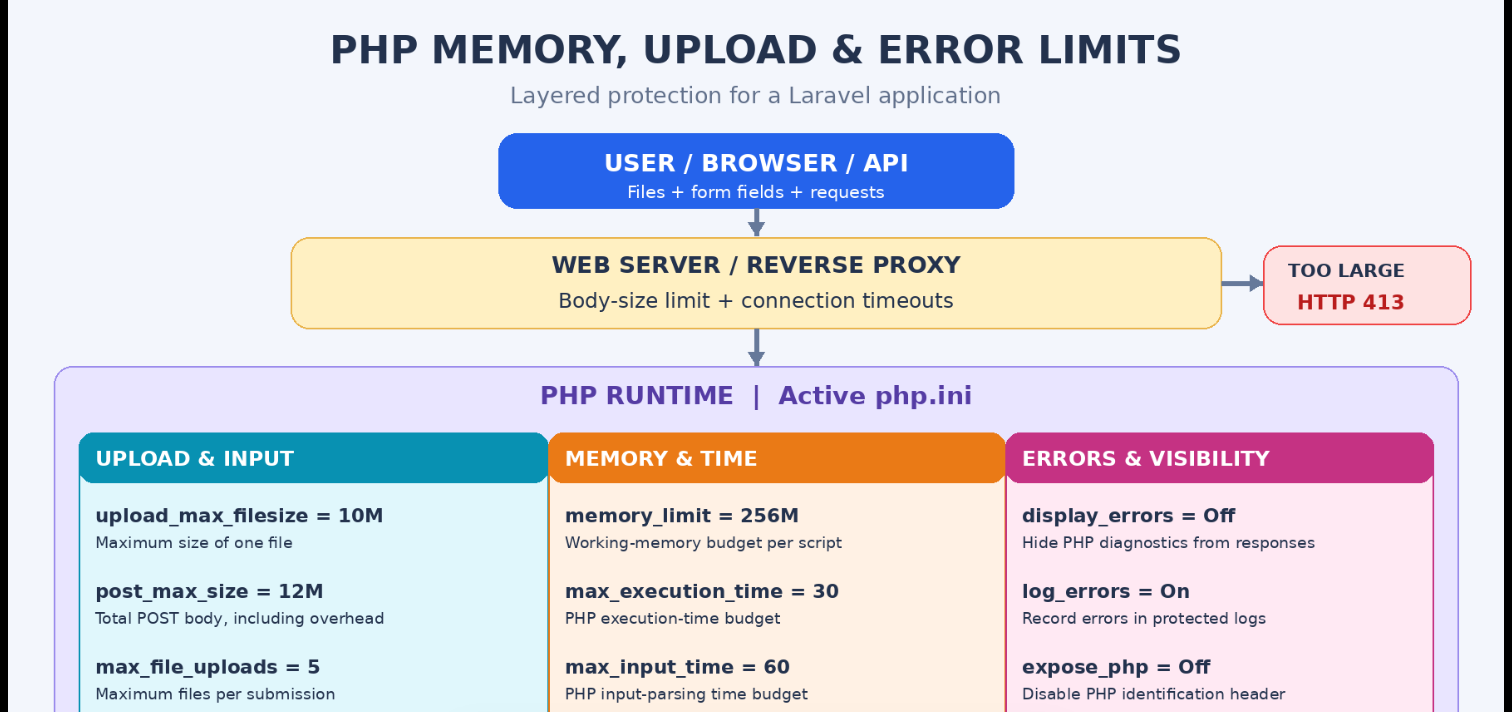
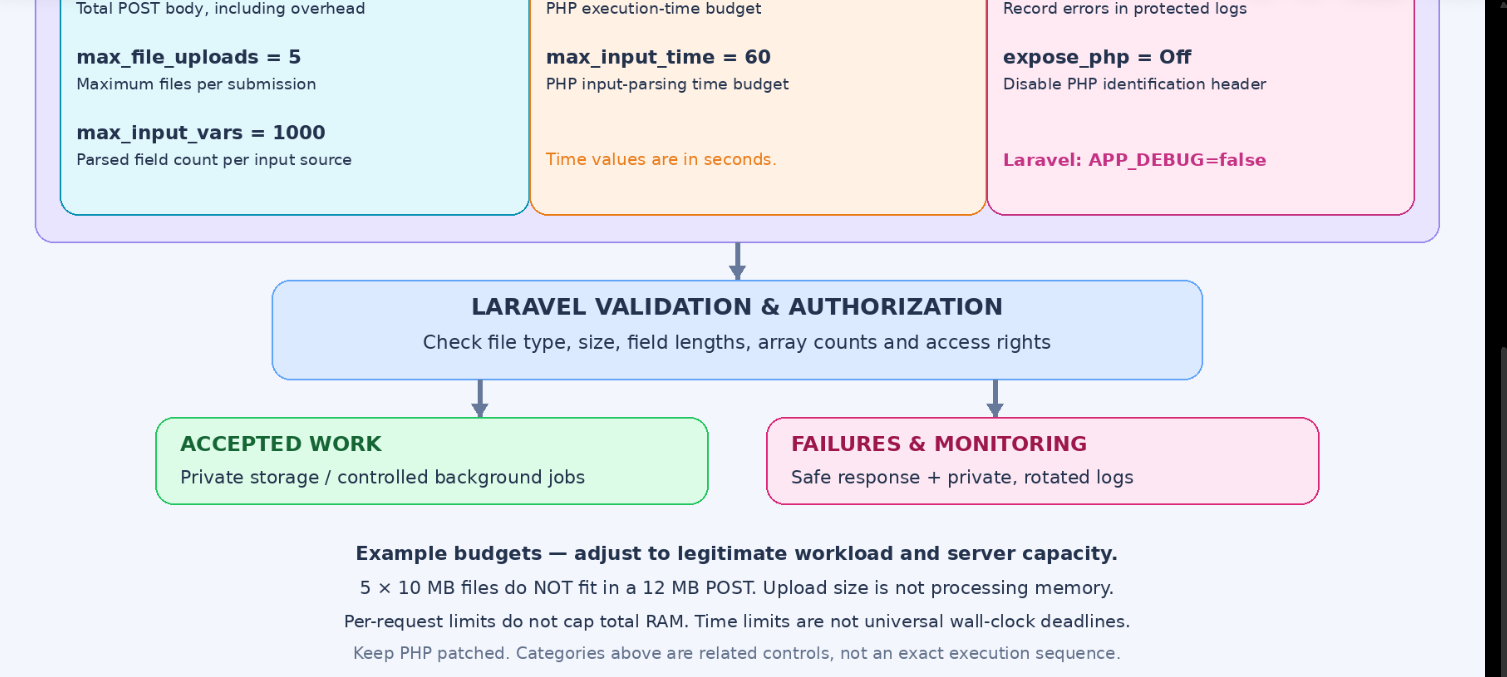
The diagram groups the 10 PHP settings by purpose. They are related controls, not a promise that PHP performs every check in the exact visual order. Web-server limits and Laravel validation provide surrounding layers.
flowchart TD
    U["User or API client"] --> W["Web server or reverse proxy"]
    W --> B{"Request body within server limit?"}
    B -->|No| X["Reject oversized body: HTTP 413"]
    B -->|Yes| P["PHP runtime: active php.ini"]

    P --> I["Incoming data budgets"]
    P --> R["Processing budgets"]
    P --> E["Production visibility"]

    I --> I1["upload_max_filesize = 10M"]
    I --> I2["post_max_size = 12M"]
    I --> I3["max_file_uploads = 5"]
    I --> I4["max_input_vars = 1000"]
    I --> I5["max_input_time = 60"]

    R --> R1["memory_limit = 256M"]
    R --> R2["max_execution_time = 30"]

    E --> E1["display_errors = Off"]
    E --> E2["log_errors = On"]
    E --> E3["expose_php = Off"]

    I --> A["Laravel validation and authorization"]
    R --> A
    A --> V{"Accepted by application policy?"}
    V -->|Yes| S["Private storage or controlled job"]
    V -->|No| F["Safe validation or error response"]
    E2 --> L["Protected rotated logs and monitoring"]
    E1 --> F

    classDef client fill:#dbeafe,stroke:#2563eb,color:#172554,stroke-width:2px;
    classDef gate fill:#fef3c7,stroke:#d97706,color:#78350f,stroke-width:2px;
    classDef runtime fill:#ede9fe,stroke:#7c3aed,color:#3b0764,stroke-width:2px;
    classDef input fill:#cffafe,stroke:#0891b2,color:#164e63,stroke-width:2px;
    classDef budget fill:#ffedd5,stroke:#ea580c,color:#7c2d12,stroke-width:2px;
    classDef error fill:#fce7f3,stroke:#db2777,color:#831843,stroke-width:2px;
    classDef success fill:#dcfce7,stroke:#16a34a,color:#14532d,stroke-width:2px;
    classDef reject fill:#fee2e2,stroke:#dc2626,color:#7f1d1d,stroke-width:2px;
    class U,W client;
    class B,V gate;
    class P,A runtime;
    class I,I1,I2,I3,I4,I5 input;
    class R,R1,R2 budget;
    class E,E1,E2,E3,L error;
    class S success;
    class X,F reject;
Reading the diagram: the web server can reject excessive bodies early; PHP applies runtime budgets; Laravel checks application rules; successful work uses protected storage or controlled jobs; failures produce safe responses and private diagnostics where possible.
The architecture is embedded as editable Mermaid. It renders in Markdown platforms that support Mermaid. Other blog editors may require exporting the diagram to an image before publishing.
Official References
- PHP core configuration: memory, POST, upload and input directives
- PHP execution and input-time configuration
- PHP error configuration
- PHP upload errors
- Laravel 12 validation
- Laravel 12 deployment and debug settings
- Laravel 12 Eloquent batching
Match framework examples to your installed Laravel version. Keep the website's PHP runtime on a supported, security-patched release.



Top comments (0)