
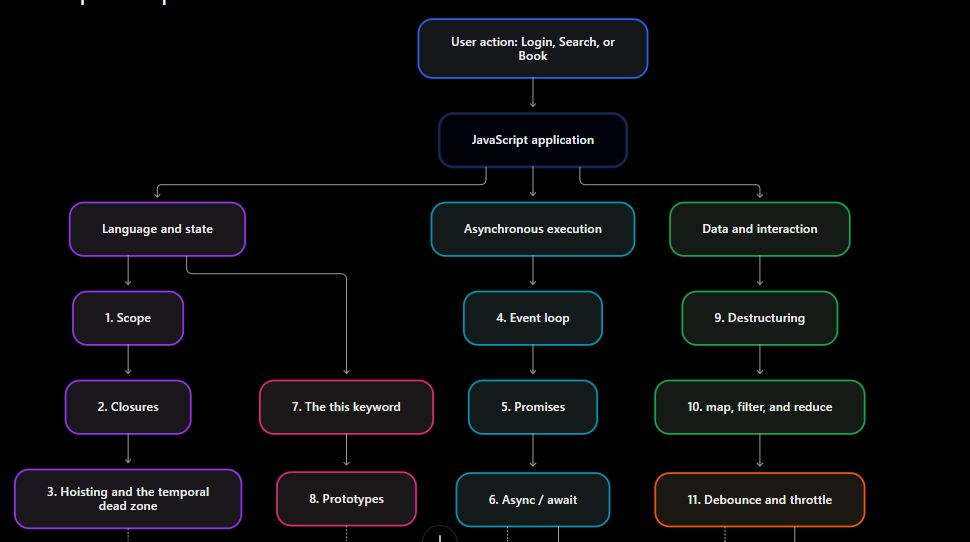
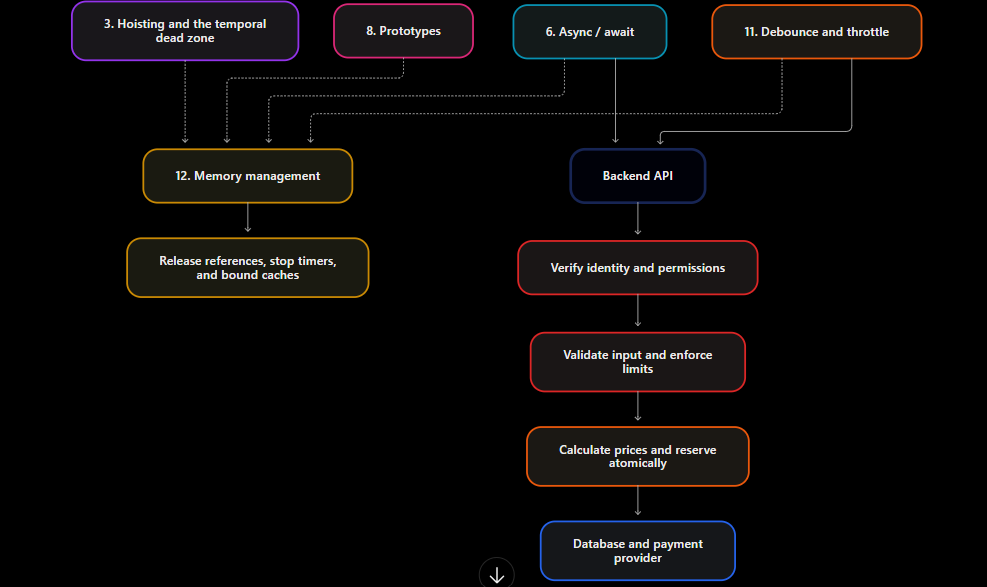
This guide expands the blog's 12 concepts while preserving the original concept headings, numbering, and order. It explains what each concept means, its security and performance implications, and how to apply it to production applications.
Language features help organize code. Security depends on correctly enforcing trust boundaries. Performance improvements depend on the workload and must be measured.
How to run the examples
-
Browser: run JavaScript in the browser console. Save complete HTML examples as an
.htmlfile and open them in a browser. -
Browser / Node.js: run snippets separately in a browser console or save each as a
.jsfile and runnode example.js. - Node.js backend simulation: runnable examples using fake requests, sessions, or databases. They demonstrate a principle; they are not complete production servers.
- Fragment: requires the surrounding application and is not standalone.
- Outputs are expected behavior, not a claim that all examples were executed against a production application. Console formatting varies. Timing and memory results depend on the runtime and machine.
Run each example separately to avoid duplicate top-level variable declarations. Risky code is included for explanation and should not be copied into production.
1. Scope
Simple explanation
Scope determines where a variable can be accessed. Use block scope for temporary values, function scope for work inside a function, and module scope for shared implementation details.
Prefer const when reassignment is unnecessary and let when it is necessary. A const object can still be modified. Scope mainly improves correctness and maintainability. Narrow scope is not encryption or authorization, and const is not automatically faster. See MDN: let.
Security considerations
A dangerous backend mistake is storing request-specific identity in shared mutable state. While one request waits, another can overwrite that state.
Risky and safer example — Node.js backend simulation
const wait = ms => new Promise(resolve => setTimeout(resolve, ms));

(async () => {
  // RISKY: shared across requests in this process.
  let currentUserId;

  async function unsafeBookings(userId, delay) {
    currentUserId = userId;
    await wait(delay);
    return `Bookings for ${currentUserId}`;
  }

  console.log(await Promise.all([
    unsafeBookings("Alice", 20),
    unsafeBookings("Bob", 0)
  ]));

  // SAFER: each invocation has its own binding.
  async function saferBookings(userId, delay) {
    await wait(delay);
    return `Bookings for ${userId}`;
  }

  console.log(await Promise.all([
    saferBookings("Alice", 20),
    saferBookings("Bob", 0)
  ]));
})();
Expected output
[ 'Bookings for Bob', 'Bookings for Bob' ]
[ 'Bookings for Alice', 'Bookings for Bob' ]
Why the correction helps: each request retains its own user ID across the asynchronous pause.
What it does not protect against: a caller supplying another user's ID, shared mutable objects elsewhere, or incorrectly scoped database queries.
Backend enforcement: obtain identity from a verified session or token, and authorize every requested booking. A frontend userId is not proof of identity. See OWASP: Authorization.
Performance considerations
Scope can influence reference lifetimes, but leaving a block does not guarantee immediate garbage collection.
Inefficient and improved example — Browser / Node.js
// INEFFICIENT when only the count is needed:
// the returned function retains access to the full array.
function retainListings() {
  const listings = Array.from({ length: 100_000 }, (_, id) => ({ id }));
  return () => listings.length;
}

// IMPROVED: retain only a number.
function retainCount() {
  const listings = Array.from({ length: 100_000 }, (_, id) => ({ id }));
  const count = listings.length;
  return () => count;
}

console.log(retainCount()());
Expected output
100000
Both versions initially create the array. The second avoids deliberately retaining it through the returned function.
Trade-off: useful for large data held by long-lived callbacks; insignificant for small temporary values. Engines may optimize closure environments.
Measure: retain several returned functions, compare heap snapshots, and inspect retaining paths. Do not infer actual memory savings from source code alone.
Practical example
The booking simulation demonstrates request isolation. The risky version reports Bob's identity for both calls. The safer version keeps Alice and Bob separate. A real service must extend that isolation to database queries and authorization.
Production checklist
- Do: keep request identity and temporary data local.
- Avoid: process-wide “current user” variables and assumptions that browser module variables are secure secrets.
2. Closures
Simple explanation
A closure is a function that retains access to its surrounding lexical bindings. Use closures for counters, configurable functions, callbacks, and ordinary encapsulation.
A closure retains access to bindings; it does not necessarily capture a frozen value. See MDN: Closures.
Security considerations
Closures do not make credentials safe to ship to a browser. Their main benefit is organizing state, not protecting data from compromised application code.
Risky and safer example — Browser / Node.js simulation
// RISKY design: this private-looking value still ships to the client.
function createUnsafePaymentClient() {
  const merchantSecret = "DEMO_SECRET_NEVER_SHIP_REAL_KEYS";
  return () => `Bearer ${merchantSecret}`;
}

console.log(createUnsafePaymentClient()());

// SAFER client responsibility: prepare a request to the backend.
// No merchant credential or client-selected payment amount.
function createPaymentRequest(bookingId) {
  return () => ({
    url: "/api/payment-intents",
    method: "POST",
    body: { bookingId }
  });
}

console.log(createPaymentRequest("booking-101")());
Expected output
Bearer DEMO_SECRET_NEVER_SHIP_REAL_KEYS
{
  url: '/api/payment-intents',
  method: 'POST',
  body: { bookingId: 'booking-101' }
}
Why the correction helps: the browser no longer needs the merchant credential. The backend can call the payment provider.
Limitations: moving a secret server-side does not automatically secure the endpoint. XSS may still make requests as the user. Incorrect endpoint logic can still charge the wrong amount.
Backend enforcement: booking ownership, payable state, server-calculated amount and currency, protected provider credentials, and payment idempotency.
Performance considerations
Closures can retain unnecessary data. Creating many separate closures also creates function objects.
Inefficient and improved example — Browser / Node.js
const vehicle = {
  id: 101,
  photos: Array.from({ length: 10_000 }, () => "photo metadata")
};

// INEFFICIENT if the callback only needs the ID.
function makeLargeCallback(vehicle) {
  return () => vehicle.id;
}

// IMPROVED: capture the small value needed.
function makeSmallCallback(vehicle) {
  const id = vehicle.id;
  return () => id;
}

console.log(makeSmallCallback(vehicle)());
Expected output
101
Trade-off: the improved callback remembers the ID at creation time. It does not follow later changes to the original object's ID. That can be desirable or incorrect depending on the application.
Measure: compare retained objects after removing other references. The example's top-level vehicle itself keeps the object alive, so remove that reference in a separate memory experiment before attributing retention to the closure.
Practical example
The payment closure remembers booking-101 and returns a request description. A real browser sends the request to the backend. The closure provides convenient state; the backend provides payment controls.
Production checklist
- Do: capture only the data a callback needs.
- Avoid: treating closures as encrypted storage or retaining full API responses unnecessarily.
3. Hoisting and the temporal dead zone
Simple explanation
Declarations behave differently before execution reaches their initialization:
-
varbindings initially containundefined. -
letandconstcannot be accessed during their temporal dead zone. - Ordinary function declarations are generally callable before their textual position in the same scope.
Use this knowledge to prevent initialization bugs. Hoisting mainly affects correctness; it is neither a security control nor a performance optimization. See MDN: Hoisting.
Security considerations
Initialization errors become security issues when an uninitialized permission value is interpreted as permission.
Risky and safer example — Node.js backend simulation
function unsafeDecision() {
  // RISKY: undefined !== false, so access is granted.
  if (isAdmin !== false) return "ALLOW";
  var isAdmin = false;
  return "DENY";
}

function saferDecision(verifiedUser) {
  const isAdmin = verifiedUser.isAdmin === true;
  return isAdmin ? "ALLOW" : "DENY";
}

console.log(unsafeDecision());
console.log(saferDecision({ isAdmin: false }));
console.log(saferDecision({}));
Expected output
ALLOW
DENY
DENY
Why the correction helps: it initializes the decision before use and requires an explicit positive result.
Limitations: replacing var with let in the risky code would throw, not repair the authorization design. An exception handler must not convert failure into permission.
Backend enforcement: derive permissions from trusted identity and policy data, deny by default, and handle authorization failures without allowing the operation.
Performance considerations
Moving declarations higher does not inherently make code faster. Avoiding unnecessary work can.
Inefficient and improved example — Browser / Node.js
function buildQuote(days) {
  // Represents pricing work; this particular calculation is trivial.
  return { total: days * 500 };
}

// INEFFICIENT if buildQuote becomes expensive and is often unnecessary.
function eagerQuote(isOpen, days) {
  const quote = buildQuote(days);
  if (!isOpen) return "Closed";
  return quote;
}

// IMPROVED: calculate only on the required path.
function lazyQuote(isOpen, days) {
  if (!isOpen) return "Closed";
  const quote = buildQuote(days);
  return quote;
}

console.log(lazyQuote(false, 7));
console.log(lazyQuote(true, 7));
Expected output
Closed
{ total: 3500 }
This is lazy execution, not a hoisting optimization.
Trade-off: worthwhile when computation is expensive and often skipped. Moving work can change when errors or side effects occur.
Measure: count buildQuote calls and profile realistic traffic. A trivial multiplication does not justify optimization effort.
Practical example
The quote example calculates a seven-day estimate only when bookings are open. The permission example shows why missing values should fail closed.
Production checklist
- Do: initialize before use and make permission checks explicit.
-
Avoid: depending on
undefined, TDZ exceptions, or declaration order as security mechanisms.
4. Event loop
Simple explanation
The event loop coordinates queued work with JavaScript execution. In browsers, long synchronous work delays input and rendering. Promise callbacks use microtasks; timers run as later tasks. A zero-delay timer is not immediate. Excessive microtasks can delay other work.
Use this model for UI updates, timers, callbacks, and responsiveness. Node.js scheduling details differ. See MDN: JavaScript execution model.
Security considerations
On a Node.js backend, attacker-controlled expensive synchronous work can block unrelated requests. Large JSON processing, pathological regular expressions, and synchronous APIs deserve particular attention. See Node.js: Don't Block the Event Loop.
Risky and safer example — Node.js backend simulation
// RISKY: work grows with an untrusted request value.
function unsafeEstimate(rawDays) {
  let total = 0;
  for (let day = 0; day < Number(rawDays); day++) total += 500;
  return total;
}

// SAFER for this fixed-rate business rule.
function saferEstimate(rawDays) {
  const days = Number(rawDays);

  if (!Number.isInteger(days) || days < 1 || days > 30) {
    throw new Error("Days must be an integer from 1 to 30");
  }

  return days * 500;
}

console.log(saferEstimate("7"));

try {
  saferEstimate("1000000000000");
} catch (error) {
  console.log(error.message);
}
Expected output
3500
Days must be an integer from 1 to 30
Why the correction helps: it bounds input and replaces repeated addition with constant-size work.
Limitations: the formula applies only to the stated fixed-rate rule. Real rentals may have variable rates and taxes. Workers move computation; they do not make unlimited work safe.
Backend enforcement: body limits, bounded processing, quotas, and concurrency limits before expensive work begins. Validate the request schema as well as the converted value.
Performance considerations
Inefficient and improved example — Browser
const listings = Array.from({ length: 20_000 }, (_, id) => ({ id }));

// Potentially unresponsive when real per-item work is expensive.
function processAllAtOnce(items) {
  return items.map(item => item.id * 2);
}

// IMPROVED responsiveness: yield between batches.
async function processInBatches(items) {
  const result = [];

  for (let start = 0; start < items.length; start += 500) {
    const end = Math.min(start + 500, items.length);

    for (let i = start; i < end; i++) {
      result.push(items[i].id * 2);
    }

    if (end < items.length) {
      await new Promise(resolve => setTimeout(resolve, 0));
    }
  }

  return result;
}

processInBatches(listings).then(result => {
  console.log(result.length, result[1]);
});
Expected output
20000 2
Trade-off: batching may increase completion time while reducing uninterrupted blocking. The trivial calculation may not need it. Suitable heavy computation may belong in a Web Worker.
Measure: record the browser Performance panel, input responsiveness, and longest tasks. Measure total completion time separately.
Practical example
A listing page can process results in batches while remaining interactive. Fetching fewer items through pagination often saves more CPU, memory, and network traffic than processing a huge response more cleverly.
Production checklist
- Do: bound work and profile long tasks.
-
Avoid: assuming
asyncmoves CPU work off-thread orawait Promise.resolve()reliably yields to rendering.
5. Promises
Simple explanation
A promise represents an eventual result. It starts pending and settles as either fulfilled or rejected. Use promises for asynchronous APIs and composable success/failure handling.
Promises do not automatically make synchronous computation asynchronous.
Security considerations
A fulfilled network promise does not mean the server approved an operation. fetch() normally fulfills for HTTP errors such as 403 and 500; check the status. See MDN: Using Fetch.
Risky and safer example — Browser / Node.js
const rejectedBookingResponse = () =>
  Promise.resolve({
    ok: false,
    status: 403,
    json: async () => ({ message: "Forbidden" })
  });

(async () => {
  // RISKY: any received response becomes a successful booking.
  await rejectedBookingResponse()
    .then(() => console.log("RISKY: Booking confirmed"));

  // SAFER: inspect the response and handle failure.
  await rejectedBookingResponse()
    .then(response => {
      if (!response.ok) {
        throw new Error(`Booking rejected: HTTP ${response.status}`);
      }
      return response.json();
    })
    .then(() => console.log("Booking confirmed"))
    .catch(error => console.log(error.message));
})();
Expected output
RISKY: Booking confirmed
Booking rejected: HTTP 403
Why the correction helps: the UI stops reporting rejected operations as successful.
Limitations: response handling is not authorization. A malicious user can ignore the UI. A successful HTTP response may still require application-specific validation.
Backend enforcement: authentication, booking authorization, inventory, trusted price, and atomic booking creation.
Performance considerations
Promises can coordinate independent operations.
Inefficient and improved example — Browser / Node.js
const load = (name, ms) =>
  new Promise(resolve => setTimeout(() => resolve(name), ms));

async function sequential() {
  const vehicles = await load("vehicles", 80);
  const cities = await load("cities", 80);
  return [vehicles, cities];
}

async function concurrent() {
  return Promise.all([
    load("vehicles", 80),
    load("cities", 80)
  ]);
}

(async () => {
  console.time("sequential");
  console.log(await sequential());
  console.timeEnd("sequential");

  console.time("concurrent");
  console.log(await concurrent());
  console.timeEnd("concurrent");
})();
Expected output — timings are illustrative
[ 'vehicles', 'cities' ]
sequential: approximately 160 ms or longer
[ 'vehicles', 'cities' ]
concurrent: approximately 80 ms or longer
Trade-off: concurrency raises simultaneous resource use. Use it for independent work and bound it for large collections. Promise.all() rejects when an input rejects; it does not cancel the remaining operations. See MDN: Promise.all.
Measure: compare network waterfalls, end-to-end latency, and backend load over repeated runs.
Practical example
A search screen can load city choices and vehicle listings concurrently when neither response depends on the other.
Production checklist
- Do: return promise chains, handle failures, and check HTTP status.
-
Avoid: unlimited
Promise.all()over user-controlled input or assuming rejection cancels work.
6. Async / await
Simple explanation
An async function returns a promise. await pauses that function until the awaited value settles. Use this syntax for readable asynchronous workflows and try/catch.
Waiting for I/O does not block the entire JavaScript thread, but synchronous computation inside an async function still does.
Security considerations
An await allows other work to run. A “check, wait, update” sequence can allow two users to book the same vehicle.
Risky and safer example — Node.js backend simulation
(async () => {
  let available = true;

  async function unsafeBook() {
    if (!available) return "Unavailable";
    await Promise.resolve(); // Simulated I/O boundary.
    available = false;
    return "Booked";
  }

  console.log(await Promise.all([unsafeBook(), unsafeBook()]));

  available = true;

  // Simulation of an atomic conditional database operation.
  // Atomic only within this synchronous, in-process example.
  function reserveAtomically() {
    if (!available) return false;
    available = false;
    return true;
  }

  async function saferBook() {
    return reserveAtomically() ? "Booked" : "Unavailable";
  }

  console.log(await Promise.all([saferBook(), saferBook()]));
})();
Expected output
[ 'Booked', 'Booked' ]
[ 'Booked', 'Unavailable' ]
Why the correction helps: the availability decision and state change happen together.
Limitations: a JavaScript variable or process-local lock does not coordinate multiple server processes. A production correction needs a database transaction, conditional write, or suitable constraint. Date-range bookings need overlap-aware enforcement.
Backend enforcement: atomic reservation, valid dates, ownership, authoritative pricing, and appropriate idempotency and retry behavior.
Performance considerations
A common mistake is making independent I/O sequential.
Inefficient and improved example — Browser / Node.js
const getVehicle = async id => ({ id, name: `Vehicle ${id}` });
const ids = [101, 102, 103];

// INEFFICIENT when independent calls actually involve I/O.
async function serial() {
  const results = [];
  for (const id of ids) results.push(await getVehicle(id));
  return results;
}

// IMPROVED for this small fixed set.
async function parallel() {
  return Promise.all(ids.map(id => getVehicle(id)));
}

parallel().then(rows => console.log(rows.map(row => row.id)));
Expected output
[ 101, 102, 103 ]
The mock functions finish immediately. This demonstrates structure, not a measured speed gain.
Trade-off: for thousands of IDs, use bounded concurrency or a batch endpoint. Dependent operations must remain ordered.
Measure: use real I/O in a controlled environment; compare latency, active requests, errors, and server saturation.
Practical example
The reservation simulation demonstrates a double-booking race. The listing example demonstrates independent reads. These workflows need different concurrency policies.
Production checklist
- Do: distinguish concurrent reads from transactional state changes.
-
Avoid:
array.forEach(async ...)when the caller must await completion, and never treatawaitas a lock.
7. The this keyword
Simple explanation
For ordinary functions, this generally depends on how the function is called. Arrow functions inherit this from their surrounding context.
Use it for object methods and class instances. Detached methods can lose their receiver. Its main effect is correctness; binding is not authorization or an automatic speed improvement. See MDN: this.
Security considerations
Do not use a caller-controlled receiver as proof of identity or role.
Risky and safer example — Node.js backend simulation
"use strict";

// RISKY if used as the authorization decision.
function unsafeCanRefund() {
  return this.role === "admin";
}

console.log(unsafeCanRefund.call({ role: "admin" }));

// SAFER shape: look up trusted identity data explicitly.
const trustedUsers = new Map([
  ["session-customer", { role: "customer" }],
  ["session-admin", { role: "admin" }]
]);

function canRefund(verifiedSessionId) {
  const user = trustedUsers.get(verifiedSessionId);
  return user?.role === "admin";
}

console.log(canRefund("session-customer"));
console.log(canRefund("unknown"));
Expected output
true
false
false
Why the correction helps: authorization no longer depends on arbitrary receiver properties.
Limitations: the fake map omits session verification, expiry, refund ownership, and limits. .call() is not itself a vulnerability; trusting attacker-controlled state is the issue.
Backend enforcement: verified identity and refund policy at the actual refund endpoint.
Performance considerations
Repeated .bind() calls allocate new functions and can make listener removal fail because callback identity changes.
Inefficient and improved example — Browser
const button = document.createElement("button");
button.textContent = "Refresh vehicles";
document.body.append(button);

class ListingController {
  constructor() {
    this.count = 0;
    this.onClick = this.onClick.bind(this); // Bind once.
  }

  onClick() {
    console.log(`Refresh ${++this.count}`);
  }
}

const controller = new ListingController();

// INEFFICIENT pattern:
// button.addEventListener("click", controller.onClick.bind(controller));
// button.removeEventListener("click", controller.onClick.bind(controller));
// Removal fails: these are different function objects.

// IMPROVED:
button.addEventListener("click", controller.onClick);
button.click();

button.removeEventListener("click", controller.onClick);
button.click(); // No additional log.
button.remove();
Expected output
Refresh 1
Trade-off: one bound function per instance is usually reasonable. Shared prototype methods use less per-instance function storage when binding is unnecessary.
Measure: check duplicate callback execution and retained listeners across repeated mount/unmount cycles. Profile allocations only when instance counts justify it.
Practical example
A listing refresh button keeps the controller's this and can be cleaned up using the same callback reference.
Production checklist
- Do: bind once when necessary and preserve callback identity.
-
Avoid: trusting caller-supplied
this.roleor repeatedly binding during rendering.
8. Prototypes
Simple explanation
Objects can inherit properties and methods through a prototype chain. Class methods normally live on the class prototype, allowing instances to share them.
Use classes or prototype-based patterns for related objects with reusable behavior.
Security considerations
Unsafe dynamic writes and merges can let untrusted keys affect prototypes or inherited properties. Parsing JSON alone does not automatically pollute a prototype; subsequent operations matter. See MDN: Prototype pollution.
Risky and safer example — Browser / Node.js
const input = JSON.parse(
  '{"__proto__":{"isAdmin":true},"city":"Goa"}'
);

// RISKY in environments with the legacy __proto__ setter enabled.
const unsafe = Object.assign({}, input);
console.log(unsafe.isAdmin);
console.log(Object.hasOwn(unsafe, "isAdmin"));

// SAFER for this fixed search schema: copy only the intended field.
function parseSearch(input) {
  if (typeof input.city !== "string" || input.city.length > 80) {
    throw new Error("Invalid city");
  }
  return { city: input.city };
}

const safe = parseSearch(input);
console.log(safe.city);
console.log(safe.isAdmin);
Expected output — standard browser/Node.js configuration
true
false
Goa
undefined
This changes the target object's prototype; it does not modify Object.prototype globally. Hardened runtimes that disable the legacy setter can behave differently.
Why the correction helps: attacker-controlled keys are not copied into the result.
Limitations: the function validates only this small schema. Nested input requires its own validation. Blocking only __proto__ does not cover every pollution path.
Backend enforcement: request schemas, safe merges, explicit permission defaults, maintained dependencies, and authorization from trusted data. Consider Map or null-prototype objects for arbitrary-key dictionaries.
Performance considerations
Inefficient and improved example — Browser / Node.js
// Separate function object for every instance.
function VehicleWithOwnMethod(name) {
  this.name = name;
  this.describe = function () {
    return `Vehicle: ${this.name}`;
  };
}

// Shared prototype method.
class Vehicle {
  constructor(name) {
    this.name = name;
  }

  describe() {
    return `Vehicle: ${this.name}`;
  }
}

const a = new Vehicle("Bike");
const b = new Vehicle("Car");

console.log(a.describe());
console.log(a.describe === b.describe);
console.log(
  new VehicleWithOwnMethod("A").describe ===
  new VehicleWithOwnMethod("B").describe
);
Expected output
Vehicle: Bike
true
false
Trade-off: shared methods can reduce allocations with many instances. Per-instance closures may be appropriate when capturing unique state. This does not establish that either call style is always faster.
Measure: compare heap use and instance creation time with realistic instance counts.
Practical example
Thousands of vehicle models can share describe(). Search filters should independently be built from validated fields rather than blindly merged request objects.
Production checklist
- Do: validate dynamic keys and share methods where appropriate.
- Avoid: modifying built-in prototypes or trusting inherited permission flags.
9. Destructuring
Simple explanation
Destructuring extracts object properties or array elements into variables. Use it for readable API handling and function arguments.
Defaults apply to undefined, not null. Destructuring can read inherited properties and is not a validator. It mainly improves readability and correctness; shorter syntax is not automatically faster. See MDN: Destructuring.
Security considerations
Extracting a field does not make it trustworthy.
Risky and safer example — Node.js backend simulation
const body = {
  vehicleId: 101,
  days: 2,
  dailyPrice: 1 // Attacker-selected price.
};

// RISKY:
const { days, dailyPrice } = body;
console.log(days * dailyPrice);

// SAFER: validate quantities and get price from trusted data.
const catalog = new Map([[101, { dailyPrice: 500 }]]);

function quoteRental(input) {
  if (!input || typeof input !== "object" || Array.isArray(input)) {
    throw new Error("Invalid input");
  }

  const { vehicleId, days } = input;

  if (!Number.isInteger(vehicleId) ||
      !Number.isInteger(days) || days < 1 || days > 30) {
    throw new Error("Invalid booking");
  }

  const vehicle = catalog.get(vehicleId);
  if (!vehicle) throw new Error("Unknown vehicle");

  return days * vehicle.dailyPrice;
}

console.log(quoteRental(body));
Expected output
2
1000
Why the correction helps: calculation uses validated days and a trusted price.
Limitations: this simplified quote omits taxes, dates, discounts, currency handling, and availability. Client-side copies remain bypassable.
Backend enforcement: schema and business validation, authoritative pricing, and protection against unauthorized field updates. See OWASP: Input Validation.
Performance considerations
Object rest syntax copies remaining own enumerable properties into a new object. This can be wasteful when only one field is needed.
Inefficient and improved example — Browser / Node.js
const response = {
  status: "ok",
  vehicles: [{ id: 101 }],
  facets: { city: ["Goa"] },
  metadata: { count: 1 }
};

// INEFFICIENT if only vehicles are needed:
const { status, ...everythingElse } = response;
console.log(everythingElse.vehicles);

// IMPROVED:
const { vehicles } = response;
console.log(vehicles);
Expected output
[ { id: 101 } ]
[ { id: 101 } ]
Trade-off: rest copies are shallow and do not duplicate nested arrays. Rest is useful when remaining fields are actually needed.
Measure: profile allocations in a hot path with large objects. Do not replace readable code based on speculative microbenchmarks.
Practical example
quoteRental() ignores the fake daily price and produces 1000 from the trusted catalog. Destructuring makes accepted inputs readable; validation and trusted data supply the protection.
Production checklist
- Do: validate before relying on extracted values.
-
Avoid: client-selected prices, mass assignment, and assuming defaults repair
nullor invalid types.
10. map, filter, and reduce
Simple explanation
-
mapcreates an array of transformed values. -
filtercreates an array of matching elements. -
reducecombines elements into a result.
Use them for listing displays, selections, and totals. New arrays do not imply deep copies of their object elements. Give reduce an appropriate initial value. See MDN: map and MDN: reduce.
Security considerations
Filtering sensitive data in the browser does not stop users inspecting the original response.
Risky and safer example — Node.js backend simulation
const database = [
  { id: 1, ownerId: "Alice", internalNote: "Private A" },
  { id: 2, ownerId: "Bob", internalNote: "Private B" }
];

// RISKY API response: everything is sent.
// A later browser filter cannot undo the disclosure.
const unsafeResponse = database;
console.log(unsafeResponse.length);

// SAFER: verified identity is supplied by server middleware.
function listBookings(verifiedUserId) {
  return database
    .filter(row => row.ownerId === verifiedUserId)
    .map(row => ({ id: row.id }));
}

console.log(listBookings("Alice"));
Expected output
2
[ { id: 1 } ]
Why the correction helps: unauthorized rows and unnecessary fields are removed before transmission.
Limitations: the demonstration trusts its verifiedUserId argument. The real server must verify identity. For large datasets, filter and project in the database instead of loading every row.
Backend enforcement: row-level and field-level access, safe queries, and pagination limits. Browser filtering is presentation, not authorization.
Performance considerations
Chains can create intermediate arrays and require multiple passes.
Inefficient and improved example — Browser / Node.js
const vehicles = [
  { name: "Bike", price: 500, available: true },
  { name: "Car", price: 1500, available: false },
  { name: "Scooter", price: 400, available: true }
];

// Additional arrays and multiple passes.
const chainedTotal = vehicles
  .filter(vehicle => vehicle.available)
  .map(vehicle => vehicle.price)
  .reduce((sum, price) => sum + price, 0);

// One pass and no intermediate arrays.
let singlePassTotal = 0;
for (const vehicle of vehicles) {
  if (vehicle.available) singlePassTotal += vehicle.price;
}

console.log(chainedTotal, singlePassTotal);
Expected output
900 900
Trade-off: for three items the readable chain is reasonable. A single pass becomes interesting for large or frequent operations. Callback work may dominate either version.
Avoid repeatedly spreading a growing reducer accumulator: repeated copying can turn linear work into quadratic work.
Measure: compare CPU and allocation profiles on realistic lists, verify identical results, and exclude logging from timed sections.
Practical example
The UI total is 900 for Bike and Scooter. A payment backend must independently calculate the actual payable total.
Production checklist
- Do: choose clear operations and optimize measured hot paths.
-
Avoid: frontend access filtering, unused
mapresults, and assuming array copies contain independent objects.
11. Debounce and throttle
Simple explanation
Debounce waits until calls stop for a specified interval. Use it for search after typing pauses.
Throttle limits execution frequency during repeated calls. Use it for periodic updates such as scroll tracking. Leading and trailing behavior depends on implementation. See MDN: Debounce and MDN: Throttle.
Security considerations
A debounced login button does not prevent direct requests to the endpoint.
Risky browser design — application fragment, not standalone
// RISKY assumption: "Users can only attempt login every 500 ms."
// A caller can bypass this UI and send requests directly.
loginButton.addEventListener("click", debounce(attemptLogin, 500));
Observable behavior: the UI reduces repeated calls, but a separate HTTP client can bypass it entirely.
Safer server-side principle — Node.js backend simulation
function createLimiter(limit, windowMs) {
  const buckets = new Map();

  return function allow(key, now) {
    let bucket = buckets.get(key);

    if (!bucket || now - bucket.started >= windowMs) {
      bucket = { started: now, count: 0 };
      buckets.set(key, bucket);
    }

    if (bucket.count >= limit) return false;
    bucket.count++;
    return true;
  };
}

const allow = createLimiter(2, 60_000);
console.log(allow("account+source", 0));
console.log(allow("account+source", 1));
console.log(allow("account+source", 2));
Expected output
true
true
false
Why the correction helps: the decision occurs on the request-processing side.
Limitations: this teaching limiter is process-local, has no bucket cleanup, and has fixed-window boundary weaknesses. It is not a complete production defense. In production, the server—not the caller—must provide the time and derive the limiting keys.
Backend enforcement: appropriate shared limits across instances, bounded limiter storage, account/source-aware abuse controls, and suitable responses such as HTTP 429. Avoid account-only policies that let attackers easily lock out victims. See OWASP: REST Security.
Performance considerations and practical search example
Searching on every keystroke creates unnecessary requests and rendering. Debouncing reduces calls. Stale-result protection stops older responses overwriting current results.
Improved example — Browser, complete HTML
<!doctype html>
<html lang="en">
<meta charset="utf-8">
<title>Debounced city search</title>
<label>
  Search city:
  <input id="city-search" autocomplete="off">
</label>
<pre id="results">Type a city</pre>

<script>
const input = document.querySelector("#city-search");
const output = document.querySelector("#results");
let requests = 0;

// Runnable mock: replace with a real API client in the application.
function searchApi(query) {
  requests++;
  const delay = query.length < 3 ? 500 : 100;
  return new Promise(resolve => {
    setTimeout(() => resolve(`Results for ${query}`), delay);
  });
}

let timer;
let version = 0;

function onInput() {
  const query = input.value.trim();
  const myVersion = ++version; // Invalidate old work immediately.

  clearTimeout(timer);
  output.textContent = query ? "Waiting…" : "Type a city";
  if (!query) return;

  timer = setTimeout(async () => {
    const result = await searchApi(query);
    if (myVersion === version) {
      output.textContent = `${result}\nRequests started: ${requests}`;
    }
  }, 300);
}

// INEFFICIENT alternative:
// input.addEventListener("input", () => searchApi(input.value));

input.addEventListener("input", onInput);

window.cleanupSearch = () => {
  clearTimeout(timer);
  version++;
  input.removeEventListener("input", onInput);
};
</script>
</html>
Expected visible output — type Goa quickly, then pause
Results for Goa
Requests started: 1
If typing pauses exceed the debounce delay, more requests can start. An old response cannot overwrite newer input. The mock always succeeds; a real API implementation must also check HTTP status and handle failures.
Throttle example — Browser / Node.js
// Leading-only throttle: no trailing invocation.
function throttle(fn, interval) {
  let last = -Infinity;

  return (...args) => {
    const now = performance.now();
    if (now - last >= interval) {
      last = now;
      fn(...args);
    }
  };
}

const update = throttle(value => console.log(value), 200);
update("first");
update("second"); // Normally dropped in consecutive calls.
Expected output under normal scheduling
first
An unusually long pause between calls could permit both. This simple arrow-based wrapper does not preserve dynamic this; use an appropriate function wrapper if that is required.
Trade-offs: debounce adds delay and can postpone execution indefinitely during continuous input. Leading-only throttle can miss the final value. Neither cancels already-started requests. Real fetch clients can additionally use AbortController, but aborting a client request does not guarantee server work or writes are rolled back.
Measure: compare request counts, transferred bytes, rendering work, and input-to-result latency using the same typing sequence. Test out-of-order responses.
Production checklist
- Do: select explicit leading/trailing behavior, invalidate stale results, and clean up timers.
- Avoid: treating client timing as server protection or assuming cancellation reverses server work.
12. Memory management
Simple explanation
Garbage collection reclaims memory that is no longer reachable. Objects referenced by live listeners, timers, caches, or application state remain reachable.
Use lifecycle cleanup in long-lived applications. Unreachable cycles can be collected; circular references alone do not establish a leak. Collection timing is controlled by the engine. See MDN: Memory management.
Security considerations
Unbounded caches with attacker-controlled keys can exhaust backend memory. Shared user-response caches can disclose information if their keys omit identity.
Risky and safer example — Node.js backend simulation
// RISKY: unlimited entries from arbitrary inputs.
const unsafeCache = new Map();
function unsafeRemember(query, result) {
  unsafeCache.set(query, result);
}

// SAFER demonstration: bounded entries and bounded strings.
const cache = new Map();
const MAX_ENTRIES = 2;

function rememberPublicSearch(query, result) {
  if (typeof query !== "string" || query.length > 80 ||
      typeof result !== "string" || result.length > 1000) {
    throw new Error("Cache item too large");
  }

  cache.delete(query);
  if (cache.size >= MAX_ENTRIES) {
    cache.delete(cache.keys().next().value);
  }
  cache.set(query, result);
}

rememberPublicSearch("Goa", "Public listings");
rememberPublicSearch("Delhi", "Public listings");
rememberPublicSearch("Pune", "Public listings");
console.log([...cache.keys()]);
Expected output
[ 'Delhi', 'Pune' ]
Why the correction helps: the interface bounds entry count and accepted string lengths.
Limitations: JavaScript string lengths are not exact byte budgets. Real memory use includes overhead and other references. This cache has no TTL and does not prevent expensive repeated cache misses.
Backend enforcement: memory/payload budgets, eviction, concurrency limits, tenant isolation, correct cache keys, and deliberate invalidation policies for sensitive data.
Performance considerations
Forgotten intervals retain callbacks and continue executing work.
Inefficient and improved example — Browser / Node.js
// INEFFICIENT lifecycle: caller cannot stop it.
function mountLeakyPolling() {
  setInterval(() => console.log("Polling"), 1000);
}

// IMPROVED: return cleanup.
function mountPolling() {
  let polls = 0;
  const id = setInterval(() => {
    console.log(`Poll ${++polls}`);
  }, 20);
  return () => clearInterval(id);
}

const cleanup = mountPolling();
setTimeout(() => {
  cleanup();
  console.log("Polling stopped");
}, 55);
Typical output — exact poll count depends on scheduling
Poll 1
Poll 2
Polling stopped
Trade-off: clearing a timer does not cancel asynchronous work it already started. Real polling may need abort signals and protection against overlapping requests.
Measure: repeatedly enter and leave the feature, compare heap snapshots, inspect detached nodes and retaining paths, and watch timer/network activity. Do not expect memory to fall immediately. See Chrome DevTools: Fix memory problems.
Practical example
A vehicle dashboard should stop polling when its view unmounts. Its public search cache should evict entries rather than growing for the lifetime of the process.
Setting a variable to null releases one reference; it does not securely erase sensitive data or remove other references.
Production checklist
- Do: clean up resources, bound caches, and investigate sustained memory growth.
- Avoid: expecting garbage collection to stop timers, close connections, or securely wipe secrets.
Summary table
| # | Original concept | Main security concern | Main performance concern | Recommended practice |
|---|---|---|---|---|
| 1 | Scope | Shared request state can mix user data | Unnecessarily retained references | Keep request data local; authorize server-side |
| 2 | Closures | Encapsulation mistaken for secret protection | Captured objects retained by callbacks | Keep secrets on backend; capture minimal state |
| 3 | Hoisting and the temporal dead zone | Uninitialized values used in fail-open checks | No inherent performance benefit | Initialize before use; deny by default |
| 4 | Event loop | Attacker-triggered blocking can deny service | CPU work delays input, rendering, and requests | Bound inputs; batch or offload suitable work |
| 5 | Promises | HTTP failure mistaken for success | Sequential I/O or excessive concurrency | Check status; handle failures; bound concurrency |
| 6 | Async / await | Check-then-update races | Unnecessary sequential waits | Use database atomicity and deliberate concurrency |
| 7 | The this keyword |
Caller-controlled receiver trusted as identity | Repeated binding and callback retention | Use trusted identity; bind once |
| 8 | Prototypes | Unsafe writes and prototype pollution | Per-instance functions and unnecessary mutation | Validate keys; use safe dictionaries and shared methods |
| 9 | Destructuring | Extraction mistaken for validation | Unnecessary rest-object copies | Validate input; select required fields |
| 10 |
map, filter, and reduce
|
Browser filtering mistaken for access control | Intermediate arrays and repeated copying | Authorize before transmission; profile large transforms |
| 11 | Debounce and throttle | Frontend timing mistaken for server rate limits | Excess requests, stale results, excessive updates | Combine UX controls, stale-result handling, and backend limits |
| 12 | Memory management | Resource exhaustion and cache data disclosure | Leaks, GC pressure, background work | Bound storage and clean up lifecycles |
Important security and performance topics missing from the blog
The blog introduces language behavior. These production areas need separate treatment.
Security topics
| Topic | Production requirement |
|---|---|
| Authentication and sessions | Verify identity, define expiry/rotation, protect session storage, and implement secure logout |
| Authorization | Check ownership, tenant, role, and allowed fields at protected operations |
| XSS and output handling | Use safe DOM APIs, context-appropriate encoding, sanitization where HTML is necessary, and CSP as defense in depth |
| CSRF | Protect state-changing operations using ambient credentials such as cookies |
| Injection | Use parameterized queries and safe handling of commands, templates, and other interpreters |
| Server-side request forgery | Restrict destinations when the backend fetches user-influenced URLs |
| Business logic | Enforce booking inventory atomically, calculate prices server-side, use payment idempotency, and verify provider events |
| Dependencies and secrets | Maintain supported dependencies, manage secrets, and restrict third-party scripts |
| Operational security | Redact logs, control errors, monitor abuse, and test recovery procedures |
For plain DOM text, prefer textContent over inserting untrusted strings using innerHTML. This prevents HTML interpretation at that text sink; it does not make URL, script, or arbitrary HTML contexts safe. See OWASP: DOM-based XSS Prevention.
Session protection requires deliberate cookie and lifecycle settings. HttpOnly limits JavaScript access to a cookie but does not prevent injected scripts from making authenticated requests. See OWASP: Session Management.
Performance topics
| Topic | What to investigate |
|---|---|
| Measurement and budgets | Real-user latency, Core Web Vitals, backend percentiles, and representative devices |
| Delivery cost | Bundle size, code splitting, compression, and caching |
| Images and fonts | Dimensions, formats, loading strategy, and layout stability |
| Rendering | Excess DOM nodes, repeated layout reads/writes, unnecessary updates, and virtualization |
| API design | Pagination, field selection, caching, deduplication, and response sizes |
| Backend and database | Slow queries, indexes, connection pools, N+1 queries, and downstream bottlenecks |
| Resilience | Timeouts, cancellation, bounded retries with backoff, queues, and backpressure |
| CPU and memory | Worker suitability, serialization costs, cache limits, allocations, and event-loop delay |
A syntax rewrite cannot fix an oversized response, slow database query, or large image. Measure the complete user journey before choosing an optimization.
Prioritized production checklist
Priority 0 — Protect users, data, and money
- [ ] Verify identity and enforce authorization on every protected backend operation.
- [ ] Calculate prices on the server.
- [ ] Make booking and payment state transitions atomic and appropriately idempotent.
- [ ] Validate request shapes, types, sizes, and business constraints.
- [ ] Keep credentials out of browser bundles, including closures and private fields.
- [ ] Remove unsafe DOM insertion and unsafe object merges.
- [ ] Enforce server-side rate, concurrency, and resource limits.
Priority 1 — Make asynchronous behavior correct
- [ ] Check HTTP status and handle rejected promises.
- [ ] Prevent stale responses from updating current UI state.
- [ ] Use database guarantees for shared state.
- [ ] Define timeouts and cancellation behavior.
- [ ] Retry only when safe, particularly for bookings and payments.
Priority 2 — Fix measured performance bottlenecks
- [ ] Record a baseline on representative devices and networks.
- [ ] Reduce unnecessary requests, payloads, and rendered items.
- [ ] Run independent I/O concurrently within explicit limits.
- [ ] Address long synchronous tasks and expensive database work.
- [ ] Compare latency, CPU, memory, request counts, and error rates before and after changes.
- [ ] Verify equivalent behavior as well as speed.
Priority 3 — Keep long-running applications stable
- [ ] Clean up listeners, timers, subscriptions, and in-flight work.
- [ ] Bound caches by suitable size and lifetime policies.
- [ ] Test repeated navigation and sustained load for memory growth.
- [ ] Add regression tests for authorization, booking races, stale responses, and payment retries.
References
- Source blog: JavaScript Concepts Every Developer Should Know
- MDN: let
- MDN: Closures
- MDN: Hoisting
- MDN: JavaScript execution model
- MDN: Using Fetch
- MDN: Promise.all
- MDN: this
- MDN: Prototype pollution
- MDN: Destructuring
- MDN: Array.map
- MDN: Array.reduce
- MDN: Debounce
- MDN: Throttle
- MDN: Memory management
- Node.js: Don't Block the Event Loop
- OWASP: Authorization
- OWASP: Input Validation
- OWASP: REST Security
- OWASP: DOM-based XSS Prevention
- OWASP: Session Management
- Chrome DevTools: Fix memory problems
These practices reduce specific risks and costs. They do not establish complete security or guarantee faster execution. Results depend on the application's trust boundaries, workload, runtime, and measurements.



Top comments (0)