
Avoids repeated SharedPreferences initialization
Improve Flutter App Performance Using compute() for Large JSON Responses
High-Impact Flutter Refactoring Plan
Inside build unnecessary ternary operator
Avoids repeated SharedPreferences initialization
Without cache, you may write this many times:
final prefs = await SharedPreferences.getInstance();
If many API methods call it, then every method will try to get the instance again.
With your _prefs() method, the first call loads SharedPreferences, and after that it reuses the same object.
So this is better:
final prefs = await _prefs();
Coding example
class MotoshareAPI {
  String baseUrl;

  // Cached SharedPreferences instance, lazily initialized on first access so
  // we don't pay the plugin async hop for every API call. The plugin caches
  // internally too, but the round-trip still costs frames on cold path.
  SharedPreferences? _cachedPrefs;

  MotoshareAPI({required this.baseUrl});

  Future<SharedPreferences> _prefs() async {
    return _cachedPrefs ??= await SharedPreferences.getInstance();
  }

  Future<void> init() async {
    final prefs = await _prefs();
    baseUrl = prefs.getString("baseUrl") ?? "https://global.motoshare.com";
    print("Loaded baseUrl from SharedPreferences: $baseUrl");
  }


  Future<bool> registerPartner(
      String phone,
      String name,
      String email,
      String pincode,
      String address,
      String state,
      String city,
      String aadhar) async {
    var url = "$baseUrl/api/registervendor";
    final prefs = await _prefs();
    String? dialCode = prefs.getString("dial_code");

    if (dialCode == null || dialCode.isEmpty) {
      print("Dial code is missing in SharedPreferences");
      return false; // Handle case where dial code is not set
    }

}
- Avoids repeated SharedPreferences initialization
Without cache, you may write this many times:
final prefs = await SharedPreferences.getInstance();
If many API methods call it, then every method will try to get the instance again.
With your _prefs() method, the first call loads SharedPreferences, and after that it reuses the same object.
So this is better:
final prefs = await _prefs();
- Improves performance slightly
SharedPreferences.getInstance() is async. It may read stored data from local storage during initialization.
By caching it:
_cachedPrefs ??=
you reduce unnecessary async initialization calls.
This is useful in service files like:
MotoshareAPI
because methods like login, booking, profile, city list, token check, and API calls may frequently need stored values.
- Cleaner code
Instead of writing this everywhere:
final prefs = await SharedPreferences.getInstance();
you can simply write:
final prefs = await _prefs();
This makes your service file cleaner and easier to maintain.
- Centralized preference access
All SharedPreferences access goes through one method:
Future<SharedPreferences> _prefs() async
So in the future, if you want to add logging, error handling, or migration logic, you can do it in one place.
Example:
Future<SharedPreferences> _prefs() async {
  try {
    return _cachedPrefs ??= await SharedPreferences.getInstance();
  } catch (e) {
    throw Exception("Failed to load app preferences");
  }
}
- Helpful for loading dynamic base URL
Your init() method loads baseUrl from local storage:
Future<void> init() async {
  final prefs = await _prefs();
  baseUrl = prefs.getString("baseUrl") ?? "https://global.motoshare.com";
}
This is useful when your app supports:
Different API base URLs
Environment switching
Country/city based server
Testing/staging/production URLs
Saved user preference
So if baseUrl was already saved earlier, the app will use that. Otherwise, it will use the default URL:
"https://global.motoshare.com"
- Reduces duplicate code in API methods
In your login method:
Future<bool> login_phone(String phone, String otpMethod) async {
  final prefs = await _prefs();
}
Now you can easily access saved values like:
final dialCode = prefs.getString("dial_code");
final baseUrl = prefs.getString("baseUrl");
final token = prefs.getString("token");
This is useful for API requests.
Important improvement
Avoid using print() in production:
print("Loaded baseUrl from SharedPreferences: $baseUrl");
Better use debug-only logging:
debugPrint("Loaded baseUrl from SharedPreferences: $baseUrl");
Improve Flutter App Performance Using compute() for Large JSON Responses
Current problem example
Your current code may look like this:
Future<List<AddVehicle>> getMyVehicle() async {
  final response = await http.post(
    Uri.parse("$baseUrl/api/get-my-vehicle"),
    body: {
      "user_id": "123",
    },
  );

  if (response.statusCode == 200) {
    final responseData = jsonDecode(response.body);

    final vehicleData = responseData["data"] as List;

    return vehicleData
        .map((data) => AddVehicle.fromJson(data))
        .toList();
  } else {
    throw Exception("Failed to load vehicles");
  }
}
The problem is here:
final responseData = jsonDecode(response.body);
For small responses, this is okay.
But for large responses like 100+ vehicles or bookings, the UI may freeze because Flutter is busy parsing the JSON.
- Better solution using compute()
Flutter provides compute() to move heavy work into a background isolate.
First import this:
import 'dart:convert';
import 'package:flutter/foundation.dart';
Then create a top-level parser function.
Important: this function should be outside the class.
dynamic parseJsonInBackground(String responseBody) {
  return jsonDecode(responseBody);
}
Now use it in your API method:
Future<List<AddVehicle>> getMyVehicle() async {
  final response = await http.post(
    Uri.parse("$baseUrl/api/get-my-vehicle"),
    body: {
      "user_id": "123",
    },
  );

  if (response.statusCode == 200) {
    final responseData = await compute(
      parseJsonInBackground,
      response.body,
    ) as Map<String, dynamic>;

    final vehicleData = responseData["data"] as List;

    return vehicleData
        .map((data) => AddVehicle.fromJson(data))
        .toList();
  } else {
    throw Exception("Failed to load vehicles");
  }
}
Now JSON decoding happens in the background, not on the UI thread.
- Best practical approach: only use compute() for big responses
Using compute() also has some cost. So do not use it for every small API response like login, OTP, profile check, etc.
Use it only when response is large, for example above 20 KB.
Future<Map<String, dynamic>> decodeResponse(String body) async {
  final int sizeInBytes = utf8.encode(body).length;

  if (sizeInBytes > 20 * 1024) {
    return await compute(parseJsonInBackground, body)
        as Map<String, dynamic>;
  }

  return jsonDecode(body) as Map<String, dynamic>;
}
Now your API method becomes cleaner:
Future<List<AddVehicle>> getMyVehicle() async {
  final response = await http.post(
    Uri.parse("$baseUrl/api/get-my-vehicle"),
    body: {
      "user_id": "123",
    },
  );

  if (response.statusCode == 200) {
    final responseData = await decodeResponse(response.body);

    final vehicleData = responseData["data"] as List;

    return vehicleData
        .map((data) => AddVehicle.fromJson(data))
        .toList();
  } else {
    throw Exception("Failed to load vehicles");
  }
}
This is better because:
Small response = normal jsonDecode()
Large response = compute() background parsing
- More complete reusable helper
You can create a reusable helper for your service file.
import 'dart:convert';
import 'package:flutter/foundation.dart';

const int jsonComputeThreshold = 20 * 1024;

dynamic parseJsonInBackground(String body) {
  return jsonDecode(body);
}

Future<dynamic> smartJsonDecode(String body) async {
  final int bodySize = utf8.encode(body).length;

  if (bodySize > jsonComputeThreshold) {
    return await compute(parseJsonInBackground, body);
  }

  return jsonDecode(body);
}
Then use this everywhere:
final responseData = await smartJsonDecode(response.body)
    as Map<String, dynamic>;
- Example for vehicle brand/model API
Before:
Future<List<VehicleBrandModel>> getVehicletypeBrandModel() async {
  final response = await http.get(
    Uri.parse("$baseUrl/api/vehicle-type-brand-model"),
  );

  if (response.statusCode == 200) {
    final responseData = jsonDecode(response.body);

    final list = responseData["data"] as List;

    return list
        .map((item) => VehicleBrandModel.fromJson(item))
        .toList();
  }

  throw Exception("Failed to load vehicle brand model");
}
After:
Future<List<VehicleBrandModel>> getVehicletypeBrandModel() async {
  final response = await http.get(
    Uri.parse("$baseUrl/api/vehicle-type-brand-model"),
  );

  if (response.statusCode == 200) {
    final responseData = await smartJsonDecode(response.body)
        as Map<String, dynamic>;

    final list = responseData["data"] as List;

    return list
        .map((item) => VehicleBrandModel.fromJson(item))
        .toList();
  }

  throw Exception("Failed to load vehicle brand model");
}
- Example for booking list API
Before:
Future<List<Booking>> getBookings() async {
  final response = await http.post(
    Uri.parse("$baseUrl/api/bookings"),
  );

  if (response.statusCode == 200) {
    final responseData = jsonDecode(response.body);

    final bookingList = responseData["data"] as List;

    return bookingList
        .map((item) => Booking.fromJson(item))
        .toList();
  }

  throw Exception("Failed to load bookings");
}
After:
Future<List<Booking>> getBookings() async {
  final response = await http.post(
    Uri.parse("$baseUrl/api/bookings"),
  );

  if (response.statusCode == 200) {
    final responseData = await smartJsonDecode(response.body)
        as Map<String, dynamic>;

    final bookingList = responseData["data"] as List;

    return bookingList
        .map((item) => Booking.fromJson(item))
        .toList();
  }

  throw Exception("Failed to load bookings");
}
- Even better: move model conversion also to background
Only moving jsonDecode() helps, but this part can also be heavy:
return vehicleData
    .map((data) => AddVehicle.fromJson(data))
    .toList();
For very large lists, fromJson() also runs on the UI thread.
Better approach:
List<AddVehicle> parseVehiclesInBackground(String body) {
  final responseData = jsonDecode(body) as Map<String, dynamic>;
  final vehicleData = responseData["data"] as List;

  return vehicleData
      .map((item) => AddVehicle.fromJson(item))
      .toList();
}
Then:
Future<List<AddVehicle>> getMyVehicle() async {
  final response = await http.post(
    Uri.parse("$baseUrl/api/get-my-vehicle"),
  );

  if (response.statusCode == 200) {
    final int bodySize = utf8.encode(response.body).length;

    if (bodySize > 20 * 1024) {
      return await compute(parseVehiclesInBackground, response.body);
    }

    final responseData = jsonDecode(response.body) as Map<String, dynamic>;
    final vehicleData = responseData["data"] as List;

    return vehicleData
        .map((item) => AddVehicle.fromJson(item))
        .toList();
  }

  throw Exception("Failed to load vehicles");
}
This is stronger because both operations happen in the background:
JSON decoding
Model mapping
- Where to apply in your project
Apply this mainly in large list APIs inside:
lib/services/motoshare_service.dart
Especially methods like:
getVehicletype_brand_model
getmyvehicle
booking list APIs
notification list APIs
vehicle listing APIs
partner vehicle APIs
city or location list APIs if response is large
Do not apply it blindly to small APIs like:
login
OTP verify
logout
single profile detail
small settings API
token validation
For those, normal jsonDecode() is fine.
- Final recommended code for your service file
Add this near the top-level of motoshare_service.dart, outside the class:
import 'dart:convert';
import 'package:flutter/foundation.dart';

const int jsonDecodeComputeThreshold = 20 * 1024;

dynamic _parseJson(String body) {
  return jsonDecode(body);
}

Future<Map<String, dynamic>> decodeJsonResponse(String body) async {
  final int bodySize = utf8.encode(body).length;

  if (bodySize > jsonDecodeComputeThreshold) {
    return await compute(_parseJson, body) as Map<String, dynamic>;
  }

  return jsonDecode(body) as Map<String, dynamic>;
}
Then replace this:
final responseData = jsonDecode(response.body);
with this:
final responseData = await decodeJsonResponse(response.body);
This is a safe, small, and professional performance improvement.
Main benefit: large API responses will not freeze the Flutter UI while JSON is being parsed.
Coding Example
import 'package:flutter/foundation.dart'; // for compute()
  static const int _largePayloadBytes = 20 * 1024;

  Future<dynamic> _decodeJson(String body) async {
    if (body.length > _largePayloadBytes) {
      return compute(jsonDecode, body);
    }
    return jsonDecode(body);
  }
if (response.statusCode == 200) {
      // Parse the response body to a Map<String, dynamic>
      final responseData = await _decodeJson(response.body) as Map<String, dynamic>;
===============================================
Before
 public function getmyvehicle(Request $request)
                {
                    $input = $request->all();
                      $selectedCountry = strtolower(config('app.selected_country', 'india'));
            Log::info("Selected country", ['country' => $selectedCountry]);
            $locationHelper = new LocationHelper();
            $cityCountryCodeLookup = $locationHelper->handleExcludedRegions($selectedCountry) ?? [];
            Log::info("Selected cityCountryCodeLookup", $cityCountryCodeLookup);
                    $getshop_data =  DB::table('addvechicles')
                    ->leftJoin('users', 'addvechicles.vendor_email', '=', 'users.email')
                    ->leftJoin('shops', 'addvechicles.shop_id', '=', 'shops.id')
                    ->leftJoin('bookings', 'addvechicles.id', '=', 'bookings.vechicle_id')
                    ->leftJoin('addvehical_byadmins', 'addvechicles.vehical_id', '=', 'addvehical_byadmins.id')
                    ->select(
                        'addvechicles.id',
                        DB::raw('MAX(addvechicles.vender_ID) as vender_ID'),
                        DB::raw('MAX(addvechicles.shop_id) as shop_id'),
                        DB::raw('MAX(addvechicles.price) as price'),
                        DB::raw('MAX(addvechicles.id) as vehical_id'),
                        DB::raw('MAX(addvechicles.numbers_of_vechile) as numbers_of_vechile'),
                        DB::raw('MAX(addvechicles.vendor_email) as vendor_email'),
                        DB::raw('MAX(addvechicles.rc_number_of_vechile) as rc_number_of_vechile'),
                        DB::raw('MAX(addvechicles.insurence) as insurence'),
                        DB::raw('MAX(addvechicles.pollution) as pollution'),
                        DB::raw('MAX(addvechicles.rc_ducoment) as rc_ducoment'),
                        DB::raw('MAX(addvechicles.vechicle_image) as vechicle_image'),
                        DB::raw('MAX(addvechicles.status) as status'),
                        DB::raw('MAX(users.profile_img) as profile_img'),
                        DB::raw('MAX(addvechicles.publish) as publish'),
                        DB::raw('MAX(addvechicles.info_field) as info_field'),
                        DB::raw('MAX(addvechicles.created_at) as created_at'),
                        DB::raw('MAX(addvechicles.updated_at) as updated_at'),
                        DB::raw('MAX(addvehical_byadmins.vehical) as vehical'),
                        DB::raw('MAX(addvehical_byadmins.brand) as brand'),
                        DB::raw('MAX(addvechicles.payment_type) as payment_type'),
                        DB::raw('MAX(addvehical_byadmins.model) as model'),
                        DB::raw('MAX(shops.location) as location'),
                        DB::raw('MAX(shops.longitude) as longitude'),
                        DB::raw('MAX(shops.latitude) as latitude'),
                          DB::raw('MAX(shops.shop_hours) as shop_hours'),
                        DB::raw('MAX(shops.partner_name) as PartnerName'),
                        DB::raw('MAX(shops.city) as shopcity'),
                        DB::raw('MAX(users.state) as state'),
                        DB::raw('MAX(users.address) as address'),
                        DB::raw('MAX(users.city) as city'),
                        DB::raw('MAX(users.name) as username'),
                        DB::raw('MAX(users.number) as number'),
                        DB::raw('MAX(bookings.id) as booking_id'),
                        DB::raw('MAX(bookings.start_date) as start_date'),
                        DB::raw('MAX(bookings.end_date) as end_date'),
                        DB::raw('MAX(bookings.price) as booking_price')
                    )
                    ->where('addvechicles.dummy_data', '0')
                     ->where('addvechicles.publish', '1')
                      ->where('addvechicles.status', 'active')
                    ->groupBy('addvechicles.id')
                    ->orderBy('addvechicles.id', 'desc') // Change 'id' to the column you want to order by
                    ->get()
                    ->map(function ($vehicle) use ($cityCountryCodeLookup) {
            $vehicle->currency_code = $cityCountryCodeLookup[$vehicle->shop_id] ?? null;
            return $vehicle;
        });


            $vehicleIds = $getshop_data->pluck('id')->toArray();

                       $bookings_all = Booking::whereIn('vechicle_id', $vehicleIds)
    ->whereIn('status', [0, 1, 2, 3, 4]) // Add this line
    ->get(['vechicle_id', 'start_date', 'end_date'])
    ->groupBy('vechicle_id')
    ->map(function ($vehicleBookings) {
        return $vehicleBookings->map(function ($booking) {
            return [
                'start' => \Carbon\Carbon::parse($booking->start_date)->toDateString(),
                'end' => \Carbon\Carbon::parse($booking->end_date)->toDateString()
            ];
        });
    });


                log::info("bookings_all");
                log::info($bookings_all);
                        $getshop_data = $getshop_data->map(function ($vehicle) use ($bookings_all) {
                            // Convert vehicle ID to string to match the bookings_all keys
                            $vehicleIdStr = (string) $vehicle->id;
                            // Add empty bookings array by default
                            $vehicle->bookings = [];
                            // If this vehicle has bookings, add them
                            if ($bookings_all->has($vehicleIdStr)) {
                                $vehicle->bookings = $bookings_all->get($vehicleIdStr);
                            }
                            return $vehicle;
                        });
                    log::info($getshop_data);

                    $response = [
                        'success' => true,
                        'data' => addvechiclesResource::collection($getshop_data),
                        'message' => 'get_shop_type retrieved successfully.',
                    ];
                    return response()->json($response, 200);
                }
After
public function getmyvehicle(Request $request)
{
    $user = auth()->user();
    $selectedCountry = strtolower(config('app.selected_country', 'india'));

    // Cache the country/region lookup — same per country, no need to recompute
    $cityCountryCodeLookup = Cache::remember(
        "excluded_regions_{$selectedCountry}",
        3600,
        fn() => (new LocationHelper())->handleExcludedRegions($selectedCountry) ?? []
    );

    // Main query: no booking join (was causing cartesian explosion),
    // no MAX/GROUP BY (not needed once bookings join is gone),
    // filtered to authenticated partner, paginated
    $paginator = DB::table('addvechicles')
        ->leftJoin('users', 'addvechicles.vendor_email', '=', 'users.email')
        ->leftJoin('shops', 'addvechicles.shop_id', '=', 'shops.id')
        ->leftJoin('addvehical_byadmins', 'addvechicles.vehical_id', '=', 'addvehical_byadmins.id')
        ->select(
            'addvechicles.id',
            'addvechicles.vender_ID',
            'addvechicles.shop_id',
            'addvechicles.price',
            'addvechicles.id as vehical_id',
            'addvechicles.numbers_of_vechile',
            'addvechicles.vendor_email',
            'addvechicles.rc_number_of_vechile',
            'addvechicles.insurence',
            'addvechicles.pollution',
            'addvechicles.rc_ducoment',
            'addvechicles.vechicle_image',
            'addvechicles.status',
            'addvechicles.publish',
            'addvechicles.info_field',
            'addvechicles.payment_type',
            'addvechicles.created_at',
            'addvechicles.updated_at',
            'users.profile_img',
            'users.state',
            'users.address',
            'users.city',
            'users.name as username',
            'users.number',
            'shops.location',
            'shops.longitude',
            'shops.latitude',
            'shops.shop_hours',
            'shops.partner_name as PartnerName',
            'shops.city as shopcity',
            'addvehical_byadmins.vehical',
            'addvehical_byadmins.brand',
            'addvehical_byadmins.model'
        )
        ->where('addvechicles.dummy_data', '0')
        ->where('addvechicles.publish', '1')
        ->where('addvechicles.status', 'active')
        ->where('addvechicles.vendor_email', $user->email)
        ->orderByDesc('addvechicles.id')
        ->paginate($request->input('per_page', 20));

    $vehicles    = collect($paginator->items());
    $vehicleIds  = $vehicles->pluck('id')->all();

    // Fetch bookings in ONE separate query, group by vehicle
    $bookingsByVehicle = Booking::whereIn('vechicle_id', $vehicleIds)
        ->whereIn('status', [0, 1, 2, 3, 4])
        ->get(['vechicle_id', 'start_date', 'end_date'])
        ->groupBy('vechicle_id')
        ->map(fn ($group) => $group->map(fn ($b) => [
            'start' => Carbon::parse($b->start_date)->toDateString(),
            'end'   => Carbon::parse($b->end_date)->toDateString(),
        ])->values());

    // Attach currency + bookings to each vehicle
    foreach ($vehicles as $v) {
        $v->currency_code = $cityCountryCodeLookup[$v->shop_id] ?? null;
        $v->bookings      = $bookingsByVehicle->get((string) $v->id, collect())->values();
    }

    return response()->json([
        'success'    => true,
        'data'       => addvechiclesResource::collection($vehicles),
        'pagination' => [
            'current_page' => $paginator->currentPage(),
            'last_page'    => $paginator->lastPage(),
            'per_page'     => $paginator->perPage(),
            'total'        => $paginator->total(),
        ],
        'message'    => 'get_shop_type retrieved successfully.',
    ], 200);
}
High-Impact Flutter Refactoring Plan
Split profiledialog.dart into smaller files
Current problem:
profiledialog.dart
- Dialog header
- Address section
- Google Places field
- Manual address field
- Pin/state/city fields
- Document upload section
- File picker card
- Submit button/footer
- API/geocode logic
- Validation logic
Better structure:
lib/screens/drawer_widget/profile_dialog/profile_dialog.dart
lib/screens/drawer_widget/profile_dialog/widgets/profile_dialog_header.dart
lib/screens/drawer_widget/profile_dialog/widgets/profile_form_fields.dart
lib/screens/drawer_widget/profile_dialog/widgets/profile_address_section.dart
lib/screens/drawer_widget/profile_dialog/widgets/profile_document_section.dart
lib/screens/drawer_widget/profile_dialog/widgets/profile_footer_actions.dart
lib/screens/drawer_widget/profile_dialog/helpers/profile_form_validators.dart
Main file should only control state and compose widgets.
- Keep build() lightweight
Your build() should not contain the full UI tree. It should look more like this:
@override
Widget build(BuildContext context) {
  return Dialog(
    insetPadding: const EdgeInsets.symmetric(horizontal: 16, vertical: 24),
    backgroundColor: Colors.white,
    shape: RoundedRectangleBorder(borderRadius: BorderRadius.circular(18)),
    child: Column(
      mainAxisSize: MainAxisSize.min,
      children: [
        ProfileDialogHeader(
          onClose: () => Navigator.of(context).pop(),
        ),
        Flexible(
          child: ProfileDialogFormBody(
            formKey: _formKey,
            nameController: _nameController,
            emailController: _emailController,
            phoneController: _phoneController,
            pinCodeController: pinCodeController,
            adharController: _adharController,
            cityController: _cityController,
            stateController: _stateController,
            locationController: _locationController,
            locationFocusNode: _locationFocusNode,
            useManualAddress: _useManualAddress,
            addressError: addressError,
            profileImage: _profileImage,
            qrImage: _qrImage,
            onAddressModeChanged: _changeAddressMode,
            onPinCodeChanged: fetchStateAndCity,
            onProfileImagePicked: (file) => setState(() => _profileImage = file),
            onQrImagePicked: (file) => setState(() => _qrImage = file),
          ),
        ),
        ProfileFooterActions(
          isLoading: _isLoading,
          onCancel: () => Navigator.of(context).pop(),
          onSubmit: _submitProfileData,
        ),
      ],
    ),
  );
}
This makes the file readable and reduces rebuild complexity.
- Convert helper methods into widgets
Instead of keeping these inside the same file:
_buildAddressSection()
_buildAddressModeOption()
_buildField()
_buildBadgedField()
_buildFilePickerCard()
_sectionLabel()
Move them into separate reusable widgets.
Example:
class ProfileDialogHeader extends StatelessWidget {
  final VoidCallback onClose;

  const ProfileDialogHeader({
    super.key,
    required this.onClose,
  });

  @override
  Widget build(BuildContext context) {
    return Container(
      padding: const EdgeInsets.fromLTRB(20, 16, 16, 16),
      decoration: const BoxDecoration(
        color: Color(0xFFFFFAF8),
        borderRadius: BorderRadius.vertical(top: Radius.circular(17)),
        border: Border(
          bottom: BorderSide(color: Color(0xFFEEE0D8)),
        ),
      ),
      child: Row(
        children: [
          const Expanded(
            child: Text(
              'Edit Profile',
              style: TextStyle(
                fontSize: 16,
                fontWeight: FontWeight.w700,
              ),
            ),
          ),
          InkWell(
            onTap: onClose,
            child: const Icon(Icons.close_rounded),
          ),
        ],
      ),
    );
  }
}
- Move jsonDecode() and API logic away from widget
This method is inside UI file:
final data = jsonDecode(response.body);
For small Google geocode response it may be okay, but better structure is to move it into a service:
lib/services/location_service.dart
Example:
class LocationService {
  Future<LocationResult?> getCityAndStateFromLatLng(
    double latitude,
    double longitude,
  ) async {
    final response = await http.get(Uri.parse(
      'https://maps.googleapis.com/maps/api/geocode/json?latlng=$latitude,$longitude&key=YOUR_KEY',
    ));

    if (response.statusCode != 200) return null;

    final data = jsonDecode(response.body);

    if (data['status'] != 'OK') return null;

    String? city;
    String? state;

    for (final result in data['results']) {
      for (final component in result['address_components']) {
        if (component['types'].contains('locality')) {
          city = component['long_name'];
        }

        if (component['types'].contains('administrative_area_level_1')) {
          state = component['long_name'];
        }
      }
    }

    return LocationResult(city: city, state: state);
  }
}

class LocationResult {
  final String? city;
  final String? state;

  LocationResult({
    this.city,
    this.state,
  });
}
Then your UI only calls:
final result = await LocationService().getCityAndStateFromLatLng(lat!, lng!);
- Do not hardcode API keys in Dart files
Your uploaded file contains Google API key directly inside the Dart file. This is risky because Flutter app code can be reverse-engineered. Move it to backend/config or use restricted API key settings.
Better:
const googleMapsApiKey = String.fromEnvironment('GOOGLE_MAPS_API_KEY');
Then build with:
flutter build apk --dart-define=GOOGLE_MAPS_API_KEY=your_key_here
Inside build unnecessary ternary operator
code
child: _isLoading
    ? const Center(
        child: CircularProgressIndicator(color: _kPrimary))
    : userProfile == null
        ? _buildEmptyState()
        : _buildProfileContent(),
How this creates problems (the "pron"/cons)
- Readability — the eye has to parse ? : chains A reader must mentally translate:
A ? X : (B ? Y : Z)
into "if loading → spinner, else if no profile → empty, else → content".
With one more state (e.g. _hasError), it becomes a 4-branch nested ternary that is almost unreadable in code review.
- Build() does branching work every frame build() runs on every setState, every parent rebuild, every keyboard open, every orientation change. Each rebuild:
re-evaluates _isLoading
re-evaluates userProfile == null
calls _buildEmptyState() or _buildProfileContent() — these are methods, not widgets, so Flutter cannot cache or const-optimize them.
A method returning a Widget rebuilds the entire subtree from scratch every time. A StatelessWidget with a const constructor would let Flutter skip the rebuild when inputs don't change.
No const optimization possible
Only the spinner line is const. _buildEmptyState() and _buildProfileContent() cannot be const because they are function calls. Extracting them as StatelessWidget classes with const constructors lets Flutter reuse the same element tree.Hard to add a new state safely
Tomorrow you need an "error" state. You must either:
Add another nested ternary (4 levels deep — unreadable), or
Refactor under pressure (risky — violates the Core Safety Rule in CLAUDE.md).
Debugging / breakpoints are awkward
You can't put a breakpoint on "the empty-state branch" cleanly — it's an expression, not a statement. Stack traces also point at build, not at a named widget like ProfileEmptyState, so Flutter DevTools' widget inspector is less useful.Mixes decision logic with UI construction
build() should describe what to render, not run multi-step decisions about which screen state we're in. The decision belongs in a small helper or a switch on an enum (ProfileViewState.loading | empty | ready).
SOLUTION:
using switch opertor
child: switch ((_isLoading, userProfile)) {
  (true, _) => const Center(
      child: CircularProgressIndicator(color: _kPrimary)),
  (_, null) => _buildEmptyState(),
  _ => _buildProfileContent(),
},
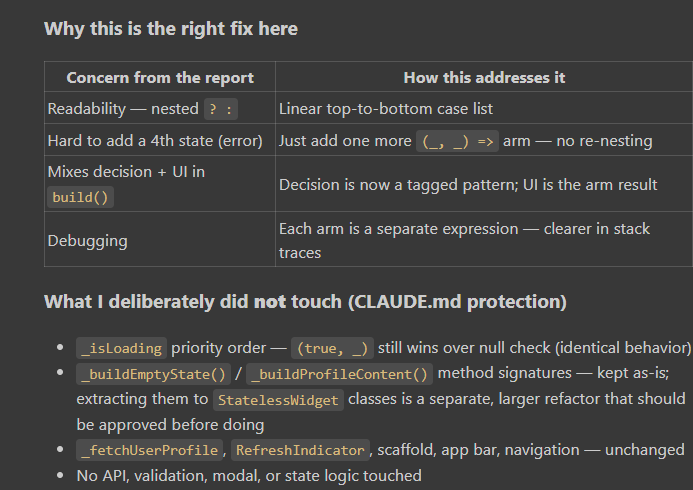
Another example
The triple branch is local to the build() method
The triple branch is local to the build() method. I have enough context — applying the same safe switch-expression pattern as before, plus adding a one-line comment explaining the previously-hidden "empty state wrapped in ListView" workaround
Two whole ListView widget trees inlined in a ternary
Unlike partner_profile.dart where each branch was _buildSomething(), here each branch is a full multi-line widget constructor with parameters. The eye has to parse:
"OK, _isLoading? No. Then isEmpty? Yes → this ListView constructor with physics: ..., padding: ..., children: [...] — wait, is that part of the empty branch or the data branch? Let me count parens..."
Reviewers literally count ?, :, and ) to find which arm they're in.
-
Duplicated physics config in both branchesBoth ListViews share:
physics: const BouncingScrollPhysics(
  parent: AlwaysScrollableScrollPhysics(),
),
If you change scroll behavior (e.g. switch to ClampingScrollPhysics), you must remember to update both places. Easy to miss → inconsistent scroll feel between empty and populated screens.
-
itemBuilder closure is recreated every rebuild
itemBuilder: (context, index) => _notificationCard(item: _notifications[index]),
A fresh function object on every build(). Even when _notifications hasn't changed, Flutter can't identity-compare the builder, so ListView.builder can't safely skip element rebuilds. With 50 notifications and a parent rebuild (keyboard, theme change, orientation), all visible cards rebuild from scratch.
-
The empty state is hidden behind a ListView hack (no comment)
ListView(
  physics: const BouncingScrollPhysics(parent: AlwaysScrollableScrollPhysics()),
  padding: const EdgeInsets.fromLTRB(20, 48, 20, 120),
  children: [_buildEmptyState()],
)
Why is a single empty-state widget wrapped in a ListView? Because RefreshIndicator needs a scrollable child to trigger pull-to-refresh — a Center would break refresh on the empty screen. This is a real, important workaround, but a new reader has no idea why; there's no comment, and the hack is buried inside a nested ternary.
-
_buildEmptyState() and _notificationCard() are methods, not widgets They cannot have const constructors. Flutter rebuilds the entire subtree on every parent rebuild. The widget inspector shows them as anonymous tree fragments, not named widgets like NotificationEmptyState / NotificationCard
child: _isLoading
    ? const Center(
        child: CircularProgressIndicator(color: _kPrimary),
      )
    : _notifications.isEmpty
        ? ListView(
            physics: const BouncingScrollPhysics(
              parent: AlwaysScrollableScrollPhysics(),
            ),
            padding: const EdgeInsets.fromLTRB(20, 48, 20, 120),
            children: [
              _buildEmptyState(),
            ],
          )
        : ListView.builder(
            physics: const BouncingScrollPhysics(
              parent: AlwaysScrollableScrollPhysics(),
            ),
            padding: const EdgeInsets.fromLTRB(16, 10, 16, 96),
            itemCount: _notifications.length,
            itemBuilder: (context, index) =>
                _notificationCard(item: _notifications[index]),
          ),
*after applying switch *
     child: RefreshIndicator(
            color: _kPrimary,
            onRefresh: _fetchData,
            child: switch ((_isLoading, _notifications.isEmpty)) {
              (true, _) => const Center(
                  child: CircularProgressIndicator(color: _kPrimary),
                ),
              // Empty state is wrapped in a ListView (not Center) so that
              // RefreshIndicator's pull-to-refresh still works when the list
              // has no items.
              (_, true) => ListView(
                  physics: const BouncingScrollPhysics(
                    parent: AlwaysScrollableScrollPhysics(),
                  ),
                  padding: const EdgeInsets.fromLTRB(20, 48, 20, 120),
                  children: [
                    _buildEmptyState(),
                  ],
                ),
              _ => ListView.builder(
                  physics: const BouncingScrollPhysics(
                    parent: AlwaysScrollableScrollPhysics(),
                  ),
                  padding: const EdgeInsets.fromLTRB(16, 10, 16, 96),
                  itemCount: _notifications.length,
                  itemBuilder: (context, index) =>
                      _notificationCard(item: _notifications[index]),
                ),
            },
          ),



Top comments (0)