
Defination
Basic example
Why use decorators?
Important: Supporting Function Arguments
Common Developer Scenarios
Logging
Authentication
Role-Based Authorization
Measuring Execution Time
Input Validation
Exception Handling
Retrying Failed API Calls
Caching Expensive Results
Rate Limiting
Database Transaction Management
Permission and Resource Ownership
Deprecation Warning
Decorating a Class Method
Multiple Decorators
Built-In Python Decorators
When Should You Use a Decorator?
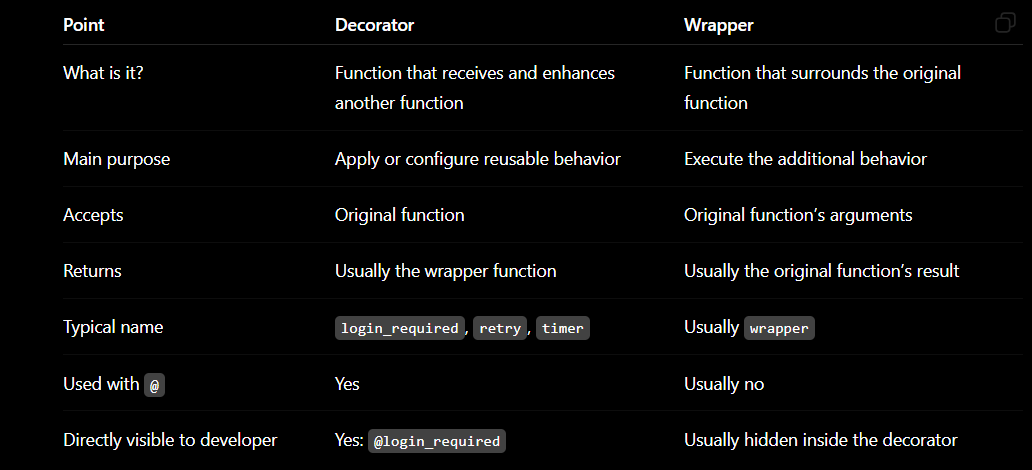
Difference Between a Decorator and a Wrapper in Python
why decoratores important role in fast api
Defination
A decorator is a function that adds extra behavior to another function or class without changing its original code.
Think of it like wrapping a gift:
Original function → Decorator wraps it → Enhanced function
Decorators use the @decorator_name syntax.
Basic example
def my_decorator(original_function):
    def wrapper():
        print("Something happens before the function.")

        original_function()

        print("Something happens after the function.")

    return wrapper


@my_decorator
def say_hello():
    print("Hello!")


say_hello()
Output:
Something happens before the function.
Hello!
Something happens after the function.
This:
@my_decorator
def say_hello():
    print("Hello!")
is equivalent to:
def say_hello():
    print("Hello!")

say_hello = my_decorator(say_hello)
Why use decorators?
Decorators help developers:
Reuse common logic
Avoid duplicate code
Keep business functions clean
Add authentication and authorization
Log function activity
Measure execution time
Validate input
Handle errors
Retry failed API calls
Cache results
Control API request rates
Manage database transactions
Important: Supporting Function Arguments
A practical decorator should support functions with any number of arguments.
from functools import wraps
def logger(func):
    @wraps(func)
    def wrapper(*args, **kwargs):
        print(f"Calling function: {func.__name__}")
        return func(*args, **kwargs)

    return wrapper


@logger
def add(a, b):
    return a + b


print(add(10, 20))
Output:
Calling function: add
30
*args accepts positional arguments.
**kwargs accepts keyword arguments.
return func(...) preserves the original return value.
@wraps(func) preserves the function’s name, documentation and metadata.
Common Developer Scenarios
- Logging
Use it when you want to record which function was called.
from functools import wraps
def log_activity(func):
    @wraps(func)
    def wrapper(*args, **kwargs):
        print(f"[LOG] Starting {func.__name__}")

        result = func(*args, **kwargs)

        print(f"[LOG] Finished {func.__name__}")
        return result

    return wrapper


@log_activity
def create_booking(user_id, trip_id):
    return {
        "user_id": user_id,
        "trip_id": trip_id,
        "status": "created"
    }


booking = create_booking(101, 5001)
print(booking)
Typical uses:
Tracking API calls
Debugging application flow
Auditing important operations
Recording background-job execution
Never log passwords, tokens, OTPs or other secrets.
- Authentication
Use it when a user must be logged in before accessing something.
from functools import wraps
current_user = {
    "id": 101,
    "is_authenticated": True
}
def login_required(func):
    @wraps(func)
    def wrapper(*args, **kwargs):
        if not current_user["is_authenticated"]:
            return "Please log in first."

        return func(*args, **kwargs)

    return wrapper


@login_required
def view_profile():
    return "Welcome to your profile."


print(view_profile())
This pattern is common in web frameworks such as Flask and Django.
- Role-Based Authorization
Authentication checks who the user is. Authorization checks what the user is allowed to do.
from functools import wraps
current_user = {
    "name": "Ashwani",
    "role": "admin"
}
def role_required(required_role):
    def decorator(func):
        @wraps(func)
        def wrapper(*args, **kwargs):
            if current_user["role"] != required_role:
                return "Access denied."

            return func(*args, **kwargs)

        return wrapper

    return decorator


@role_required("admin")
def delete_user(user_id):
    return f"User {user_id} deleted."


print(delete_user(25))
Notice that this decorator accepts a parameter:
@role_required("admin")
Use it for:
Admin-only APIs
Trip-manager permissions
Booking-manager permissions
Organizer access control
For real security, also verify ownership and permissions in the backend—not only the role name.
- Measuring Execution Time
Use it to identify slow functions or APIs.
import time
from functools import wraps


def measure_time(func):
    @wraps(func)
    def wrapper(*args, **kwargs):
        start_time = time.perf_counter()

        result = func(*args, **kwargs)

        duration = time.perf_counter() - start_time
        print(f"{func.__name__} took {duration:.3f} seconds")

        return result

    return wrapper


@measure_time
def generate_report():
    time.sleep(2)
    return "Report generated"


print(generate_report())
Useful for:
Performance monitoring
Database query analysis
AI model response-time tracking
Finding slow API endpoints
- Input Validation
Use it to reject invalid input before the main function runs.
from functools import wraps
def positive_amount_required(func):
    @wraps(func)
    def wrapper(amount, *args, **kwargs):
        if amount <= 0:
            raise ValueError("Amount must be greater than zero.")

        return func(amount, *args, **kwargs)

    return wrapper


@positive_amount_required
def make_payment(amount):
    return f"Payment of ₹{amount} completed."


print(make_payment(1500))
This prevents the payment function from processing zero or negative amounts.
- Exception Handling
Use it when several functions need the same error-handling behavior.
from functools import wraps


def handle_errors(func):
    @wraps(func)
    def wrapper(*args, **kwargs):
        try:
            return func(*args, **kwargs)
        except ValueError as error:
            return {
                "success": False,
                "error": str(error)
            }
        except Exception:
            return {
                "success": False,
                "error": "An unexpected error occurred."
            }

    return wrapper


@handle_errors
def divide(a, b):
    if b == 0:
        raise ValueError("Cannot divide by zero.")

    return {
        "success": True,
        "result": a / b
    }


print(divide(10, 0))
Avoid silently hiding every exception. Production applications should log unexpected errors safely.
- Retrying Failed API Calls
Useful when OpenAI, Claude, payment, weather or another external API temporarily fails.
import time
from functools import wraps


def retry(max_attempts=3, delay=1):
    def decorator(func):
        @wraps(func)
        def wrapper(*args, **kwargs):
            last_error = None

            for attempt in range(1, max_attempts + 1):
                try:
                    return func(*args, **kwargs)
                except ConnectionError as error:
                    last_error = error
                    print(f"Attempt {attempt} failed")

                    if attempt < max_attempts:
                        time.sleep(delay)

            raise last_error

        return wrapper

    return decorator


@retry(max_attempts=3, delay=2)
def call_external_api():
    raise ConnectionError("External API unavailable")


call_external_api()
Do not automatically retry:
Validation errors
Authentication failures
Most client-side 4xx errors
Non-idempotent payment operations without protection
For production, exponential backoff with jitter is usually better than a fixed delay.
- Caching Expensive Results
Use caching when the same calculation or database-independent result is requested repeatedly.
from functools import lru_cache


@lru_cache(maxsize=100)
def calculate_price(destination, days):
    print("Calculating price...")
    return days * 2500


print(calculate_price("Goa", 5))
print(calculate_price("Goa", 5))
Output:
Calculating price...
12500
12500
The function performs the calculation only once for the same arguments.
Good uses:
Expensive calculations
Frequently requested reference data
AI results when identical requests can safely share results
Avoid caching highly dynamic data unless you have a correct expiration strategy.
- Rate Limiting
Use it to prevent a function from being called too frequently.
import time
from functools import wraps


def rate_limit(seconds):
    def decorator(func):
        last_called = 0

        @wraps(func)
        def wrapper(*args, **kwargs):
            nonlocal last_called

            now = time.time()

            if now - last_called < seconds:
                raise RuntimeError("Too many requests. Try again later.")

            last_called = now
            return func(*args, **kwargs)

        return wrapper

    return decorator


@rate_limit(seconds=5)
def send_otp(phone_number):
    return f"OTP sent to {phone_number}"


print(send_otp("9876543210"))
This simple example is only suitable for learning or a single process. Production rate limiting usually uses Redis so limits work across multiple servers.
- Database Transaction Management
A decorator can automatically commit a successful operation or roll it back after an error.
from functools import wraps


def transactional(func):
    @wraps(func)
    def wrapper(db, *args, **kwargs):
        try:
            result = func(db, *args, **kwargs)
            db.commit()
            return result
        except Exception:
            db.rollback()
            raise

    return wrapper


@transactional
def create_booking(db, user_id, trip_id):
    db.execute(
        "INSERT INTO bookings (user_id, trip_id) VALUES (%s, %s)",
        (user_id, trip_id)
    )

    return {"status": "created"}
Purpose:
Commit when every database operation succeeds
Roll back when one operation fails
Avoid partially saved bookings, payments or orders
Many frameworks already provide transaction utilities, so use the framework’s standard solution where possible.
- Permission and Resource Ownership
A role check alone is often insufficient. For example, one organizer should not update another organizer’s trip unless specifically authorized.
from functools import wraps


def trip_owner_required(func):
    @wraps(func)
    def wrapper(current_user, trip, *args, **kwargs):
        is_owner = trip["organizer_id"] == current_user["organizer_id"]
        is_admin = current_user["role"] == "admin"

        if not is_owner and not is_admin:
            raise PermissionError(
                "You cannot modify another organizer's trip."
            )

        return func(current_user, trip, *args, **kwargs)

    return wrapper


@trip_owner_required
def update_trip(current_user, trip, new_title):
    trip["title"] = new_title
    return trip
This protects against cross-user and cross-organization access.
- Deprecation Warning
Use it when an old function still works but developers should move to a new function.
import warnings
from functools import wraps


def deprecated(func):
    @wraps(func)
    def wrapper(*args, **kwargs):
        warnings.warn(
            f"{func.__name__} is deprecated.",
            category=DeprecationWarning,
            stacklevel=2
        )

        return func(*args, **kwargs)

    return wrapper


@deprecated
def old_payment_method():
    return "Processing with old method"
Decorating a Class Method
Decorators also work with methods:
from functools import wraps


def audit(func):
    @wraps(func)
    def wrapper(self, *args, **kwargs):
        print(f"Action performed by {self.username}")
        return func(self, *args, **kwargs)

    return wrapper


class Admin:
    def __init__(self, username):
        self.username = username

    @audit
    def block_user(self, user_id):
        return f"User {user_id} blocked"


admin = Admin("ashwani")
print(admin.block_user(52))
Here, self represents the current class object.
Multiple Decorators
A function can have several decorators:
@login_required
@role_required("admin")
@log_activity
def delete_booking(booking_id):
    return f"Booking {booking_id} deleted"

Execution wraps from bottom to top:

delete_booking = login_required(
    role_required("admin")(
        log_activity(delete_booking)
    )
)
Therefore, decorator order matters.
Built-In Python Decorators
Python provides several common decorators.
@staticmethod
A method that does not need the object or class state:
class Calculator:
    @staticmethod
    def add(a, b):
        return a + b


print(Calculator.add(10, 5))
@classmethod
Receives the class through cls:
class User:
    user_type = "customer"

    @classmethod
    def get_user_type(cls):
        return cls.user_type


print(User.get_user_type())
@property
Allows a method to be accessed like an attribute:
class Product:
    def __init__(self, price, tax):
        self.price = price
        self.tax = tax

    @property
    def final_price(self):
        return self.price + self.tax


product = Product(1000, 180)
print(product.final_price)
Notice that you use:
product.final_price
instead of:
product.final_price()
Real FastAPI Example
FastAPI route declarations themselves use decorators:
from fastapi import FastAPI

app = FastAPI()


@app.get("/users/{user_id}")
def get_user(user_id: int):
    return {
        "user_id": user_id,
        "name": "Ashwani"
    }


@app.post("/bookings")
def create_booking():
    return {
        "message": "Booking created"
    }
Here:
@app.get(...)
@app.post(...)
register the functions as API endpoints.
When Should You Use a Decorator?
Use a decorator when:
The same logic is needed by several functions.
The logic is separate from the main business purpose.
It must run before or after a function.
Removing it should not require rewriting the function.
Good example:
@login_required
@log_activity
def create_booking():
...
The business function creates a booking. Authentication and logging are reusable supporting concerns.
Avoid decorators when:
Logic is required by only one function.
The wrapper makes execution difficult to understand.
Decorator order creates confusing behavior.
The decorator secretly changes arguments or return types.
A normal helper function would be clearer.
Difference Between a Decorator and a Wrapper in Python
The simplest difference is:
A wrapper is the inner function that runs extra logic before or after the original function.
A decorator is the outer function that accepts a function and returns the wrapper.
from functools import wraps


def decorator(original_function):       # Decorator
    @wraps(original_function)
    def wrapper(*args, **kwargs):        # Wrapper
        print("Before execution")

        result = original_function(*args, **kwargs)

        print("After execution")
        return result

    return wrapper


@decorator
def add(a, b):
    return a + b


print(add(10, 20))
Output:
Before execution
After execution
30
Comparison
why decoratores important role in fast api
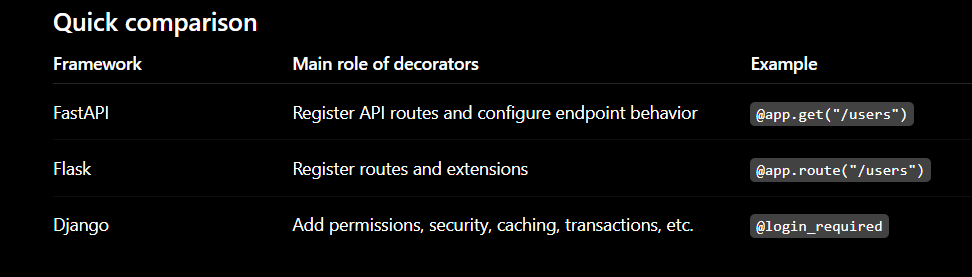
Why decorators are important in FastAPI
- They register API endpoints
from fastapi import FastAPI

app = FastAPI()


@app.get("/users")
def get_users():
    return {"users": []}
Here, @app.get("/users") tells FastAPI:
URL: /users
HTTP method: GET
Handler: get_users
Without it, get_users() is only a normal Python function.
FastAPI provides decorators for different HTTP operations:
@app.get("/users")
@app.post("/users")
@app.put("/users/{user_id}")
@app.patch("/users/{user_id}")
@app.delete("/users/{user_id}")
- They keep API configuration close to the code
@app.get(
    "/professionals",
    status_code=200,
    tags=["Professionals"],
    summary="Get professionals"
)
def get_professionals():
    return []
The decorator stores important endpoint metadata directly above the endpoint:
HTTP method
URL
Status code
API documentation group
Summary
Response configuration
- They generate OpenAPI documentation
from pydantic import BaseModel


class ProfessionalResponse(BaseModel):
    id: int
    name: str
    profession: str


@app.get(
    "/professionals/{professional_id}",
    response_model=ProfessionalResponse,
    tags=["Professionals"]
)
def get_professional(professional_id: int):
    return {
        "id": professional_id,
        "name": "Raj",
        "profession": "Electrician"
    }
The decorator and type hints help FastAPI generate:
Swagger UI
ReDoc
OpenAPI schema
Response documentation
Status-code documentation
However, decorators alone do not produce everything. FastAPI also reads function parameters and Pydantic models.
- They support response filtering and serialization
class UserResponse(BaseModel):
    id: int
    name: str


@app.get("/users/{user_id}", response_model=UserResponse)
def get_user(user_id: int):
    return {
        "id": user_id,
        "name": "Ashwani",
        "password": "secret"
    }
Because response_model=UserResponse, FastAPI excludes the password field from the response.
This helps prevent accidental exposure, but sensitive fields should still not be loaded or returned unnecessarily.
- They support dependency injection
Authentication and shared services in FastAPI are usually handled with Depends, used inside decorated endpoints:
from fastapi import Depends, FastAPI, HTTPException

app = FastAPI()


def get_current_user():
    return {
        "id": 101,
        "role": "admin"
    }


@app.delete("/users/{user_id}")
def delete_user(
    user_id: int,
    current_user: dict = Depends(get_current_user)
):
    if current_user["role"] != "admin":
        raise HTTPException(status_code=403, detail="Access denied")

    return {"message": f"User {user_id} deleted"}
The route decorator registers the endpoint, while Depends() handles reusable dependencies such as:
Keycloak authentication
Database sessions
Role verification
Tenant or organization resolution
Rate-limit checks
Shared service injection



Top comments (0)