
Backend Engineer vs AI Backend Engineer
Simple example
Recommended stack for you
Ordered AI Backend Engineering syllabus
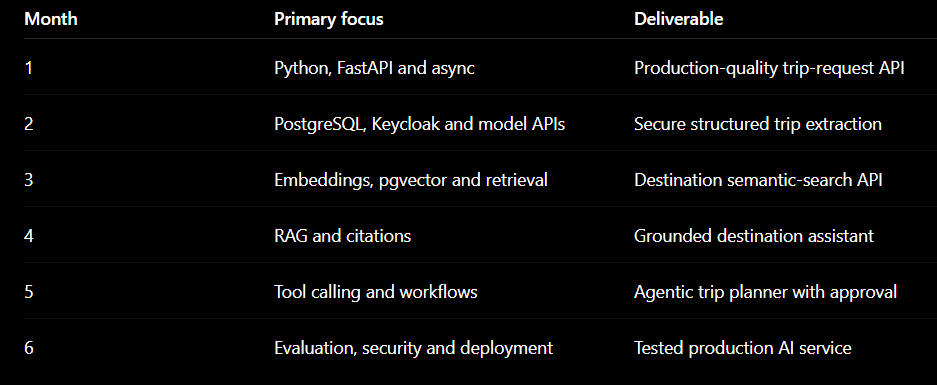
Six-month learning order
Recommended project sequence
What “expert” means
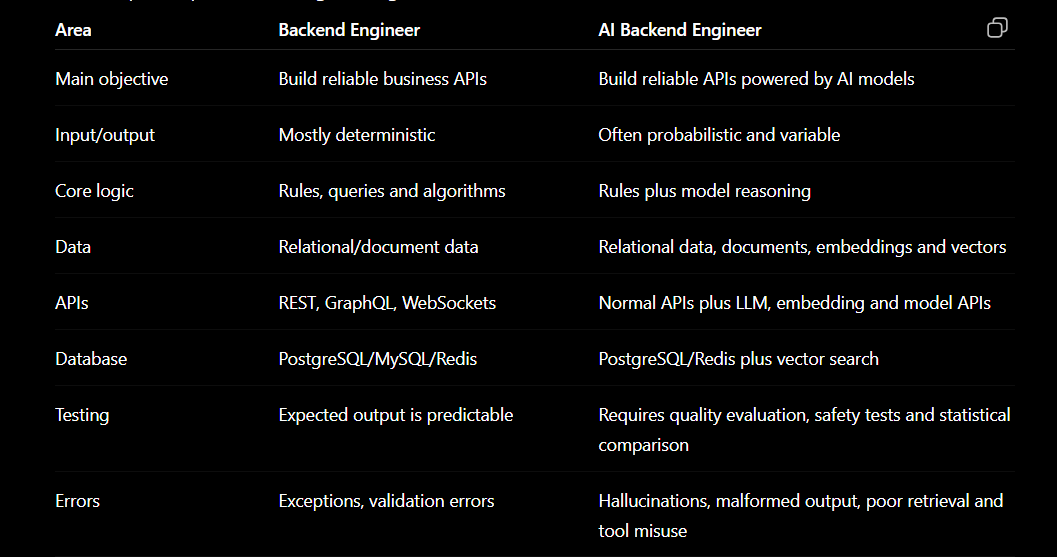
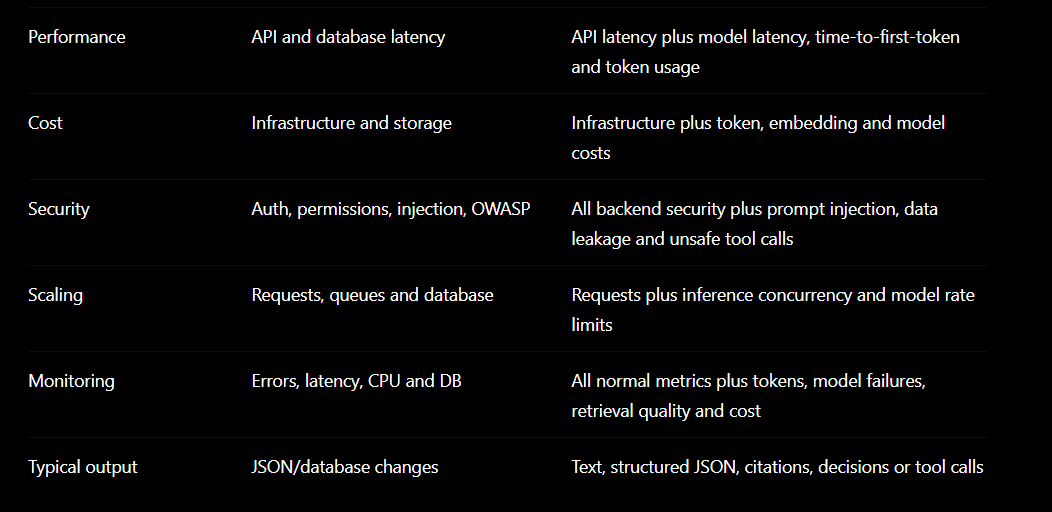
Backend Engineer vs AI Backend Engineer
Simple example
A normal HolidayLandmark backend endpoint:
GET /trips?destination=Delhi
→ Query PostgreSQL
→ Apply filters
→ Return matching trips
An AI-powered endpoint:
POST /ai/trip-plan
→ Validate user
→ Retrieve trip and destination information
→ Build controlled context
→ Call model
→ Validate structured response
→ Check budget and availability using real APIs
→ Store run, tokens, cost and evidence
→ Stream itinerary to user
The important difference is that the AI model must never become the source of truth for bookings, prices, payments or permissions.
Recommended stack for you
Because you already understand Laravel, microservices, PostgreSQL and Keycloak, use:
Language: Python
API framework: FastAPI
Validation: Pydantic
Database: PostgreSQL
ORM: SQLAlchemy
Migrations: Alembic
Vector search: pgvector
Cache/rate limiting: Redis
Background processing: Celery, Dramatiq or another durable queue
Authentication: Keycloak/OIDC
Containers: Docker
Monitoring: OpenTelemetry + Prometheus + Grafana
LLM providers: Claude and/or OpenAI
Testing: pytest
FastAPI supports typed APIs, dependency injection, security, streaming and async I/O. Its documentation also distinguishes between lightweight in-process background tasks and heavier work that should use a separate queue/worker architecture. FastAPI documentation, FastAPI async guide, FastAPI background tasks
PostgreSQL with pgvector is an excellent starting point because it keeps ordinary application records and embeddings in one database. pgvector supports exact search and approximate HNSW/IVFFlat indexes. pgvector documentation
Ordered AI Backend Engineering syllabus
Phase 1: Python engineering foundation
Duration: 2–3 weeks
Even though you know PHP/Laravel, first become comfortable writing production Python.
Learn
Python syntax and data structures
Functions, classes and modules
Type hints
Exceptions and custom exceptions
File and JSON processing
Virtual environments
Package management
Environment variables
Logging
Unit testing with pytest
async, await and concurrency
HTTP clients
Dataclasses and Pydantic models
Practice project
Build a small Python package that:
Accepts a trip request
Validates destination, dates and budget
Calculates duration
Produces structured JSON
Includes tests and proper exceptions
Completion test
You should be able to create a typed, tested Python application without copying its entire structure from AI.
Phase 2: FastAPI production backend
Duration: 3 weeks
Learn
FastAPI routing
Request and response models
Pydantic validation
Dependency injection
Middleware
Exception handlers
OpenAPI documentation
Async endpoints
File uploads
Server-Sent Events and streaming
Pagination and filtering
API versioning
CORS
Configuration management
pytest API tests
Project
Create hl-ai-service:
POST /api/v1/trip-requests
GET  /api/v1/trip-requests/{id}
POST /api/v1/trip-requests/{id}/generate
GET  /api/v1/generations/{id}
GET  /api/v1/generations/{id}/stream
Initially use normal deterministic responses—do not add an LLM yet.
Completion test
The API must have:
Validated inputs
Consistent error responses
OpenAPI documentation
Unit and integration tests
Correlation IDs
Structured logs
Phase 3: PostgreSQL and data modelling
Duration: 2–3 weeks
Learn
PostgreSQL fundamentals
Schema and ownership
Primary and foreign keys
Constraints
Transactions
Indexes
Query plans
Connection pooling
SQLAlchemy
Alembic migrations
Repository/service patterns
Audit records
Soft deletion
Multi-tenant data isolation
Suggested AI tables
ai_requests
ai_runs
ai_messages
ai_prompt_versions
ai_model_calls
ai_tool_calls
ai_usage_records
ai_feedback
ai_evaluations
knowledge_documents
knowledge_chunks
knowledge_embeddings
Project
Persist every itinerary-generation run with:
User ID
Trip ID
Model
Prompt version
Input/output
Status
Token usage
Cost
Latency
Failure reason
Correlation ID
Completion test
You must be able to trace one user request from API call to model call and final response.
Phase 4: Authentication and security
Duration: 2 weeks
Learn
OAuth 2.0
OpenID Connect
JWT validation
Keycloak integration
Roles and scopes
Service-to-service authentication
Resource-level permissions
Secret management
Rate limiting
Input-size limits
Audit logging
Personal-data handling
Project
Connect hl-ai-service to your existing HolidayLandmark Keycloak setup.
Rules:
Extract keycloak_user_id from verified sub
Never trust a user ID submitted in the request body
Verify trip ownership
Restrict admin endpoints
Use service credentials for internal calls
Keep provider API keys server-side only
Completion test
A tourist must never access another tourist’s conversation, plan or AI run.
Phase 5: LLM fundamentals
Duration: 2 weeks
Learn in this exact order
Tokens
Context windows
System and user messages
Temperature and generation controls
Prompt structure
Few-shot examples
Structured outputs
Tool/function calling
Streaming
Model limitations
Hallucination
Model selection
Token and cost calculation
Prompt caching
Retry and timeout behaviour
Claude tool use allows the model to request predefined functions, while your application remains responsible for executing those functions and returning results. Anthropic tool-use documentation
A large context window is not automatically better; relevance can degrade as irrelevant content accumulates, so context selection remains an engineering responsibility. Anthropic context-window documentation
Project
Build:
POST /api/v1/ai/extract-trip-request
Input:
I want a family trip to Goa in December for five people,
four nights, maximum budget ₹60,000.
Validated output:
{
  "destination": "Goa",
  "start_date": null,
  "month": "December",
  "travellers": 5,
  "duration_days": 5,
  "duration_nights": 4,
  "budget": {
    "amount": 60000,
    "currency": "INR",
    "type": "total"
  },
  "interests": ["family"]
}
Do not accept free-form model output directly. Validate it with Pydantic and retry or reject malformed results.
Phase 6: Reliable LLM integration
Duration: 3 weeks
Learn
Provider abstraction
Timeouts
Retries with backoff
Rate-limit handling
Idempotency
Structured output validation
Streaming cancellation
Fallback models
Prompt versioning
Model version tracking
Token limits
Cost budgets
Response caching
Failure classification
Safe logging and redaction
Architecture
API endpoint
→ AI orchestration service
→ prompt builder
→ provider adapter
→ output validator
→ policy/business validator
→ persistence
→ response
Create an interface such as:
class LLMProvider:
    async def generate(self, request): ...
    async def stream(self, request): ...
Implement:
ClaudeProvider
OpenAIProvider
MockProvider
Completion test
Switching providers should not require rewriting controllers or business logic.
Phase 7: Embeddings and vector search
Duration: 3 weeks
Learn
What embeddings represent
Embedding dimensions
Cosine similarity
Euclidean distance
Inner product
Chunking
Chunk overlap
Metadata filtering
Exact nearest-neighbour search
HNSW and IVFFlat
Hybrid keyword/vector search
Re-ranking
Embedding-version migrations
Retrieval quality measurement
pgvector supports cosine, inner-product and Euclidean-distance operations. Its HNSW index usually offers a stronger query speed/recall trade-off but uses more memory and takes longer to build; IVFFlat builds faster and uses less memory but generally provides lower query performance. pgvector documentation
Project
Build a HolidayLandmark destination knowledge service:
Upload destination document
→ extract text
→ clean it
→ split into chunks
→ create embeddings
→ save text + vector + metadata
→ retrieve relevant chunks
Metadata:
{
  "country_id": 101,
  "destination_id": 550,
  "document_type": "travel_guide",
  "language": "en",
  "source": "verified_internal",
  "embedding_model": "model-name",
  "content_version": 3
}
Completion test
Given “Is September suitable for Bishkek?”, retrieval should return the relevant Bishkek season information, not merely semantically similar content from another country.
Phase 8: RAG systems
Duration: 3–4 weeks
Learn
RAG architecture
Query rewriting
Metadata filters
Retrieval
Re-ranking
Context assembly
Source attribution
Answer generation
Citation validation
“No evidence” responses
Document access permissions
RAG evaluation
Index refresh and deletion
Pipeline
Question
→ normalize query
→ identify destination/user
→ apply authorization filters
→ hybrid retrieval
→ rerank
→ assemble limited context
→ generate answer
→ validate citations
→ return answer
Project
Build:
HolidayLandmark Destination Assistant
It should answer questions using:
Destination guides
Verified event data
Trip policies
Visa information
Organizer trip data
Internal FAQs
It must say “I do not have verified information” when retrieval finds insufficient evidence.
Completion test
Every factual destination answer should identify its supporting source.
Phase 9: Tools and agent workflows
Duration: 3–4 weeks
Do not start here before mastering normal LLM calls and RAG.
Learn
Tool schemas
Tool descriptions
Tool selection
Argument validation
Tool authorization
Tool-result handling
Multi-step workflows
State machines
Human approval
Maximum-step limits
Loop detection
Tool-call idempotency
Compensation/rollback
Agent memory
Agent observability
HolidayLandmark tools
search_destinations
get_weather
search_published_trips
check_trip_availability
calculate_trip_budget
find_organizers
request_quote
create_draft_plan
The AI may suggest calling request_quote, but your backend must require user confirmation before executing it.
Project
Implement:
Trip Intake
→ Planner
→ Destination Research
→ Available Trips
→ Budget Calculation
→ Itinerary Draft
→ Validation
→ Human Approval
→ Final Plan
Completion test
The model cannot:
Create a booking without confirmation
Invent a price
Access another user’s trip
Call tools indefinitely
Bypass Keycloak authorization
Phase 10: Background jobs and real-time processing
Duration: 2 weeks
Learn
Queues and workers
Job status
Retry policies
Dead-letter queues
Scheduled jobs
Idempotency keys
Job cancellation
SSE/WebSocket streaming
Long-running generation
Webhooks
Use FastAPI background tasks for small post-response work. Use an external durable queue for expensive embedding jobs, document processing or long AI workflows. FastAPI background-task guidance
Project
POST /knowledge/documents
→ return job_id
→ queue extraction
→ chunk document
→ create embeddings
→ update job status
→ notify user
Phase 11: AI evaluation
Duration: 3 weeks
This is the largest difference between an ordinary backend developer and a competent AI backend engineer.
Learn
Golden datasets
Deterministic assertions
Semantic evaluation
Retrieval precision and recall
Faithfulness
Citation correctness
Tool-selection accuracy
Structured-output success rate
Safety tests
Regression testing
Human review
A/B testing
Model comparison
Prompt comparison
HolidayLandmark evaluation dataset
Create at least 100 representative requests:
Normal requests
Ambiguous requests
Missing dates
Impossible budgets
Multilingual inputs
Prompt-injection attempts
Unsupported destinations
Conflicting requirements
Unauthorized requests
Very long conversations
Metrics
Valid JSON rate
Destination extraction accuracy
Retrieval relevance
Citation correctness
Hallucination rate
Tool-selection accuracy
Task-completion rate
Average latency
Tokens per request
Cost per successful request
User feedback
Completion test
Never change a prompt or model in production unless it passes regression evaluation.
Phase 12: AI safety and security
Duration: 2 weeks
Learn
Prompt injection
Indirect prompt injection
Sensitive-data leakage
Tenant isolation
Unsafe tool calls
Output sanitization
Content policies
Abuse prevention
Model denial-of-service
Token-budget attacks
File-upload security
Auditability
Required controls
Treat retrieved documents as untrusted data
Never place secrets inside prompts
Validate all tool arguments
Authorize every tool independently
Limit model steps and token consumption
Restrict outbound domains
Scan uploaded files
Redact sensitive logs
Require confirmation for consequential actions
Phase 13: Observability and cost engineering
Duration: 2 weeks
Learn and measure
API latency
Time to first token
Total model latency
Model/provider errors
Retrieval latency
Retrieved chunk count
Tool-call success rate
Tokens in/out
Cost by user and feature
Cache hit rate
Queue depth
Failed jobs
Vector-index performance
User rating
Correlation IDs
Claude prompt caching can reduce cost and latency when a stable prompt prefix or repeated context is reused. Anthropic prompt-caching documentation
Completion test
For any expensive or failed request, you should be able to identify:
Who triggered it
Which endpoint handled it
Which prompt version ran
Which model was called
Which documents were retrieved
Which tools were called
How many tokens were consumed
How much it cost
Where it failed
Phase 14: Deployment and scaling
Duration: 3 weeks
Learn
Docker
CI/CD
Secrets
Horizontal scaling
Worker scaling
Connection pooling
Redis and DB failure recovery
Provider rate limits
Circuit breakers
Load testing
Canary deployment
Model/prompt rollback
Database backup
Disaster recovery
Final project
Deploy the complete HolidayLandmark AI backend:
FastAPI API
PostgreSQL + pgvector
Redis
Background workers
Keycloak authentication
RAG pipeline
Tool-based trip planner
Streaming responses
Evaluation suite
Monitoring dashboard
Cost controls
Docker deployment
Six-month learning order
Recommended project sequence
Build these projects in order:
Structured Trip Request Extractor
Streaming AI Chat API
Destination Semantic Search
HolidayLandmark RAG Assistant
AI Trip Planner with tools
Human-approved Quote Request
Evaluation and monitoring platform
Production multi-provider AI gateway
Avoid beginning with a large agent framework. First implement direct model calls, structured outputs, retrieval and tool execution yourself. After understanding the mechanics, adopt an orchestration framework only when workflow complexity genuinely requires it.
What “expert” means
You are ready for an AI backend engineer role when you can independently:
Design secure AI APIs
Select models based on quality, latency and cost
Build reliable structured model outputs
Implement embedding and RAG pipelines
Design safe tool calling
Prevent unauthorized model actions
Evaluate prompts, models and retrieval changes
Trace and monitor every AI request
Control tokens and cost
Deploy and scale AI services
Explain when ordinary deterministic code is better than AI
Your strongest path is to use HolidayLandmark as the learning project and build each syllabus phase as a real microservice feature. This will teach you much more than building disconnected tutorial chatbots.



Top comments (0)