
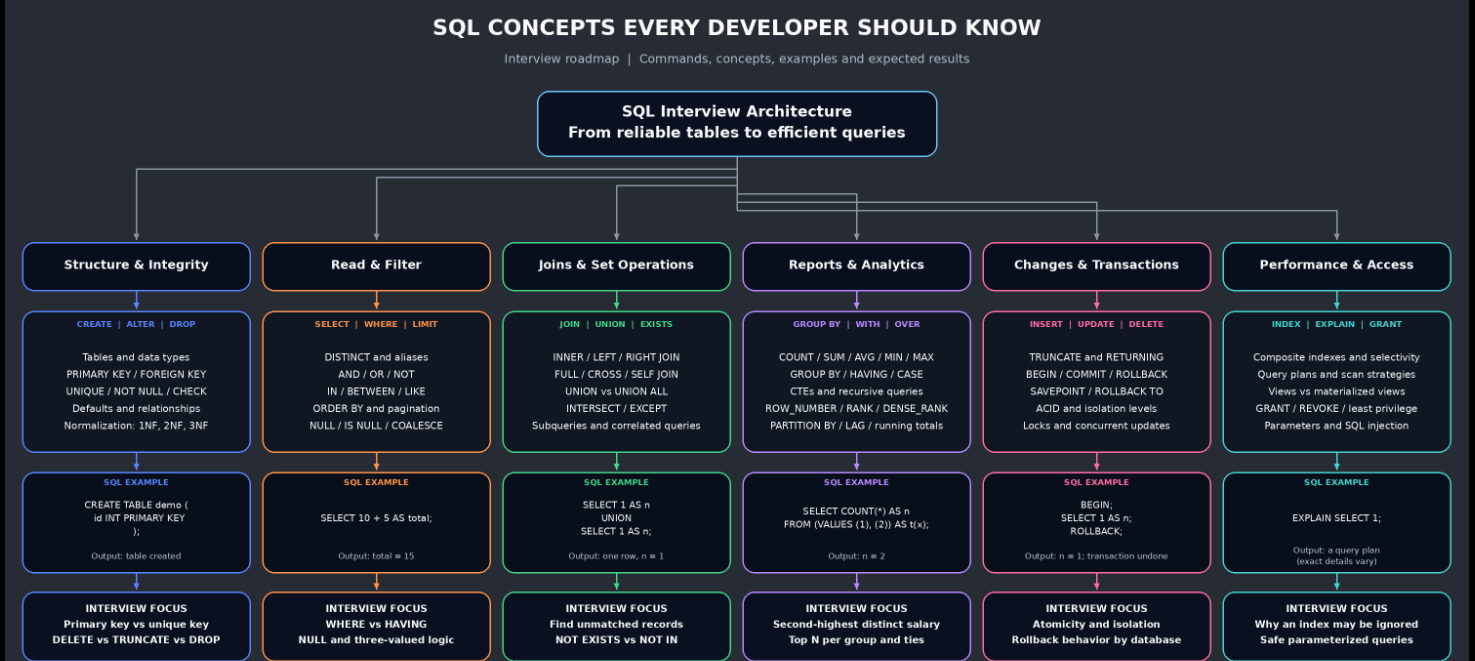
A practical SQL interview guide with commands, examples, expected outputs, interview answers, and a colorful architecture diagram.
SQL helps applications store reliable data, retrieve related records, and calculate useful reports. Interviews test both syntax and reasoning: how NULL behaves, why a join multiplies rows, how ties affect ranking, and when an index helps.
This guide follows the learning structure of the reference JavaScript blog: a quick overview, What/Why/When/Where/How explanations, practical examples, pitfalls, and a colored concept map at the bottom. The SQL examples and explanations are original.
Dialect: PostgreSQL. Most SELECT examples also work in modern MySQL and SQLite. RETURNING, permission syntax, DDL transactions, date functions, and execution plans vary by database. Outputs below are expected results; numeric display formatting can vary by client. Tables without meaningful ordering explicitly use ORDER BY.
Practice rule: Run the setup once. Each numbered section starts from the original setup, independently of changes made in other sections. Use a practice database. Mutation examples that use BEGIN and ROLLBACK leave the original data intact.
Quick overview
| Area | Important concepts | Typical interview task |
|---|---|---|
| Structure | CREATE, ALTER, constraints, keys, normalization | Design reliable tables |
| Read | SELECT, DISTINCT, WHERE, ORDER BY, LIMIT | Filter and paginate records |
| Calculate | Aggregates, GROUP BY, HAVING, CASE, NULL | Department reports |
| Combine | Joins, subqueries, EXISTS, UNION, CTE | Missing relationships and comparisons |
| Analyze | ROW_NUMBER, RANK, DENSE_RANK, SUM OVER, LAG | Top salaries and running totals |
| Change | INSERT, UPDATE, DELETE, TRUNCATE, DROP | Modify data safely |
| Reliability | Transactions, savepoints, ACID, isolation | Avoid partial updates |
| Performance/security | Indexes, EXPLAIN, views, GRANT, REVOKE, parameters | Efficient and authorized access |
Shared sample database
CREATE TABLE departments (
  dept_id INTEGER PRIMARY KEY,
  dept_name VARCHAR(40) NOT NULL UNIQUE
);
CREATE TABLE employees (
  emp_id INTEGER PRIMARY KEY,
  emp_name VARCHAR(40) NOT NULL,
  dept_id INTEGER REFERENCES departments(dept_id),
  salary INTEGER NOT NULL CHECK (salary >= 0),
  manager_id INTEGER REFERENCES employees(emp_id),
  email VARCHAR(100)
);
INSERT INTO departments VALUES
(10, 'Engineering'), (20, 'Sales'), (30, 'HR'), (40, 'Finance');
INSERT INTO employees VALUES
(1, 'Asha',  10, 90000, NULL, 'asha@example.com'),
(2, 'Ravi',  10, 70000, 1,    'ravi@example.com'),
(3, 'Neha',  20, 70000, 1,    'neha@example.com'),
(4, 'Imran', 20, 50000, 3,    NULL),
(5, 'Meera', 30, 60000, 1,    'meera@example.com'),
(6, 'Kabir', NULL, 40000, 1,  NULL);
Expected setup result: two tables created; four departments and six employees inserted.
| emp_id | emp_name | dept_id | salary | manager_id | |
|---|---|---|---|---|---|
| 1 | Asha | 10 | 90000 | NULL | asha@example.com |
| 2 | Ravi | 10 | 70000 | 1 | ravi@example.com |
| 3 | Neha | 20 | 70000 | 1 | neha@example.com |
| 4 | Imran | 20 | 50000 | 3 | NULL |
| 5 | Meera | 30 | 60000 | 1 | meera@example.com |
| 6 | Kabir | NULL | 40000 | 1 | NULL |
1. CREATE TABLE and constraints
What: CREATE defines a table; constraints enforce valid data.
Why: Rules remain enforced across all applications.
When and where: When designing tables and relationships.
How — example:
CREATE TABLE tasks (
  task_id INTEGER PRIMARY KEY,
  title VARCHAR(100) NOT NULL,
  status VARCHAR(12) DEFAULT 'open',
  owner_id INTEGER REFERENCES employees(emp_id),
  CHECK (status IN ('open', 'done'))
);
INSERT INTO tasks (task_id, title, owner_id)
VALUES (1, 'Review SQL', 2);
SELECT task_id, title, status, owner_id FROM tasks ORDER BY task_id;
Expected output:
| task_id | title | status | owner_id |
|---|---|---|---|
| 1 | Review SQL | open | 2 |
Interview question: PRIMARY KEY vs UNIQUE vs FOREIGN KEY?
Answer: A primary key uniquely identifies rows and cannot be NULL. UNIQUE prevents duplicate non-NULL values; PostgreSQL allows multiple NULLs by default. A foreign key requires a matching referenced key for non-NULL values.
2. SELECT and aliases
What: SELECT chooses expressions and columns; AS gives an output label.
Why: Retrieve exactly the fields needed.
When and where: API responses and reports.
How — example:
SELECT emp_name AS name, salary * 12 AS annual_salary
FROM employees WHERE emp_id = 2;
Expected output:
| name | annual_salary |
|---|---|
| Ravi | 840000 |
Interview question: Does SELECT change stored data?
Answer: An ordinary SELECT reads data. Calculating annual_salary does not update salary.
3. DISTINCT
What: DISTINCT removes duplicate result rows.
Why: Return unique values.
When and where: Filter options and unique lists.
How — example:
SELECT DISTINCT salary FROM employees ORDER BY salary DESC;
Expected output:
| salary |
|---|
| 90000 |
| 70000 |
| 60000 |
| 50000 |
| 40000 |
Interview question: DISTINCT vs GROUP BY?
Answer: DISTINCT deduplicates projected rows. GROUP BY forms groups for aggregation; it does not imply output sorting.
4. WHERE, AND, OR, and NOT
What: WHERE retains rows whose condition is TRUE.
Why: Apply business filters before aggregation.
When and where: Search screens and data selection.
How — example:
SELECT emp_name, salary FROM employees
WHERE (dept_id = 10 OR dept_id = 20) AND NOT salary < 70000
ORDER BY emp_id;
Expected output:
| emp_name | salary |
|---|---|
| Asha | 90000 |
| Ravi | 70000 |
| Neha | 70000 |
Interview question: Why use parentheses with AND and OR?
Answer: AND has higher precedence than OR. Parentheses make the intended logic explicit.
5. IN, BETWEEN, and LIKE
What: IN tests membership, BETWEEN checks an inclusive range, and LIKE matches patterns.
Why: Express common filters clearly.
When and where: Search by selected departments, ranges, or names.
How — example:
SELECT emp_name, salary FROM employees
WHERE dept_id IN (10, 20)
  AND salary BETWEEN 50000 AND 90000
  AND emp_name LIKE 'N%'
ORDER BY emp_id;
Expected output:
| emp_name | salary |
|---|---|
| Neha | 70000 |
Interview question: Is BETWEEN inclusive?
Answer: Yes. LIKE uses % for zero or more characters and _ for one character. Case sensitivity depends on the database and collation.
6. ORDER BY, LIMIT, and OFFSET
What: ORDER BY sorts; LIMIT caps rows; OFFSET skips rows.
Why: Build predictable top-N results and pages.
When and where: Leaderboards and pagination.
How — example:
SELECT emp_name, salary FROM employees
ORDER BY salary DESC, emp_id ASC LIMIT 2 OFFSET 1;
Expected output:
| emp_name | salary |
|---|---|
| Ravi | 70000 |
| Neha | 70000 |
Interview question: Why add emp_id after salary?
Answer: It breaks salary ties deterministically. Deep OFFSET pages can be expensive; keyset pagination is often better.
Watch out: SQL Server uses different pagination syntax. Without ORDER BY, row order is not guaranteed.
7. NULL, IS NULL, and COALESCE
What: NULL represents a missing or unknown value; COALESCE chooses the first non-NULL expression.
Why: Handle incomplete data explicitly.
When and where: Optional emails and unmatched relationships.
How — example:
SELECT emp_name, COALESCE(email, 'Not provided') AS contact
FROM employees WHERE email IS NULL ORDER BY emp_id;
Expected output:
| emp_name | contact |
|---|---|
| Imran | Not provided |
| Kabir | Not provided |
Interview question: Why does email = NULL not find missing emails?
Answer: Ordinary comparison with NULL produces UNKNOWN. WHERE keeps TRUE rows only; use IS NULL or IS NOT NULL.
8. COUNT, SUM, AVG, MIN, and MAX
What: Aggregates summarize a set of rows.
Why: Calculate counts and numeric statistics.
When and where: Dashboards and totals.
How — example:
SELECT COUNT(*) AS people, COUNT(email) AS known_emails,
       SUM(salary) AS total, CAST(AVG(salary) AS INTEGER) AS average,
       MIN(salary) AS lowest, MAX(salary) AS highest
FROM employees;
Expected output:
| people | known_emails | total | average | lowest | highest |
|---|---|---|---|---|---|
| 6 | 4 | 380000 | 63333 | 40000 | 90000 |
Interview question: COUNT(*) vs COUNT(column)?
Answer: COUNT(*) counts rows; COUNT(column) counts non-NULL values. SUM and AVG ignore NULL inputs. On no matching rows COUNT returns 0, while these other aggregates return NULL.
9. GROUP BY and HAVING
What: GROUP BY forms groups; HAVING filters grouped results.
Why: Report only groups meeting a threshold.
When and where: Department budgets and activity summaries.
How — example:
SELECT dept_id, COUNT(*) AS people, SUM(salary) AS payroll
FROM employees WHERE dept_id IS NOT NULL
GROUP BY dept_id HAVING COUNT(*) >= 2 ORDER BY dept_id;
Expected output:
| dept_id | people | payroll |
|---|---|---|
| 10 | 2 | 160000 |
| 20 | 2 | 120000 |
Interview question: WHERE vs HAVING?
Answer: WHERE filters input rows; HAVING filters groups after aggregation. Here NULL departments are excluded before counting.
10. CASE expressions
What: CASE chooses a value from conditions.
Why: Put conditional labels and calculations into a query.
When and where: Salary bands and conditional aggregation.
How — example:
SELECT emp_name, CASE WHEN salary >= 80000 THEN 'High'
 WHEN salary >= 60000 THEN 'Medium' ELSE 'Standard' END AS band
FROM employees ORDER BY emp_id;
Expected output:
| emp_name | band |
|---|---|
| Asha | High |
| Ravi | Medium |
| Neha | Medium |
| Imran | Standard |
| Meera | Medium |
| Kabir | Standard |
Interview question: Can CASE calculate conditional counts?
Answer: Yes: SUM(CASE WHEN condition THEN 1 ELSE 0 END) counts matching rows. CASE is an expression, not a separate query.
11. INNER JOIN
What: An inner join returns matching row combinations.
Why: Combine facts from related tables.
When and where: Employee and department reports.
How — example:
SELECT e.emp_name, d.dept_name FROM employees e
INNER JOIN departments d ON d.dept_id = e.dept_id ORDER BY e.emp_id;
Expected output:
| emp_name | dept_name |
|---|---|
| Asha | Engineering |
| Ravi | Engineering |
| Neha | Sales |
| Imran | Sales |
| Meera | HR |
Interview question: Why is Kabir absent?
Answer: His NULL department does not match a department row. Joins can multiply rows when a key matches multiple rows.
12. LEFT JOIN and missing relationships
What: A left join preserves all left-side rows and fills unmatched right columns with NULL.
Why: Find parents without children.
When and where: Departments without employees.
How — example:
SELECT d.dept_name FROM departments d
LEFT JOIN employees e ON e.dept_id = d.dept_id
WHERE e.emp_id IS NULL ORDER BY d.dept_id;
Expected output:
| dept_name |
|---|
| Finance |
Interview question: Why test e.emp_id rather than e.email?
Answer: emp_id is non-NULL for real matches. A nullable email could incorrectly classify a matched employee as missing.
Watch out: Filtering a right-side column in WHERE can remove unmatched rows. Put match restrictions in ON when those rows should remain.
13. RIGHT JOIN and FULL OUTER JOIN
What: RIGHT preserves the right side; FULL preserves unmatched rows from both sides.
Why: Audit relationships in both directions.
When and where: Reconciliation and missing department assignments.
How — example:
SELECT COALESCE(e.emp_name, '(no employee)') AS employee,
       COALESCE(d.dept_name, '(no department)') AS department
FROM employees e FULL OUTER JOIN departments d ON e.dept_id = d.dept_id
WHERE e.emp_id IS NULL OR d.dept_id IS NULL
ORDER BY employee;
Expected output:
| employee | department |
|---|---|
| (no employee) | Finance |
| Kabir | (no department) |
Interview question: Can a RIGHT JOIN be rewritten as a LEFT JOIN?
Answer: Yes, swap table order. FULL JOIN additionally keeps unmatched rows from both sides.
Watch out: MySQL does not directly support FULL OUTER JOIN. Use a carefully constructed UNION ALL alternative there.
14. CROSS JOIN
What: CROSS JOIN produces every pair of rows.
Why: Generate combinations deliberately.
When and where: Product options or scheduling grids.
How — example:
SELECT e.emp_name, d.dept_name FROM employees e
CROSS JOIN departments d WHERE e.emp_id = 2 AND d.dept_id IN (10, 20)
ORDER BY d.dept_id;
Expected output:
| emp_name | dept_name |
|---|---|
| Ravi | Engineering |
| Ravi | Sales |
Interview question: How many rows result from N cross-joined with M?
Answer: N × M rows before filtering. Accidental cross joins can produce very large intermediate results.
15. SELF JOIN
What: A self join uses different aliases for the same table.
Why: Represent relationships inside one entity type.
When and where: Employee/manager hierarchies.
How — example:
SELECT e.emp_name AS employee, m.emp_name AS manager
FROM employees e LEFT JOIN employees m ON m.emp_id = e.manager_id
WHERE e.emp_id IN (1, 4) ORDER BY e.emp_id;
Expected output:
| employee | manager |
|---|---|
| Asha | NULL |
| Imran | Neha |
Interview question: Why use LEFT JOIN for managers?
Answer: It preserves employees without a manager, including Asha. INNER JOIN would omit them.
16. Scalar subqueries
What: A scalar subquery supplies one value to an outer query.
Why: Compare rows against a calculated benchmark.
When and where: Above-average salary questions.
How — example:
SELECT emp_name, salary FROM employees
WHERE salary > (SELECT AVG(salary) FROM employees) ORDER BY emp_id;
Expected output:
| emp_name | salary |
|---|---|
| Asha | 90000 |
| Ravi | 70000 |
| Neha | 70000 |
Interview question: What if a scalar subquery returns multiple rows?
Answer: PostgreSQL raises an error. A scalar subquery must produce at most one row and one column; no rows gives NULL.
17. Correlated subqueries
What: A correlated subquery refers to a row of the outer query.
Why: Compare each row with its own group.
When and where: Above-department-average salary.
How — example:
SELECT e.emp_name, e.salary FROM employees e
WHERE e.salary > (SELECT AVG(x.salary) FROM employees x
                  WHERE x.dept_id = e.dept_id) ORDER BY e.emp_id;
Expected output:
| emp_name | salary |
|---|---|
| Asha | 90000 |
| Neha | 70000 |
Interview question: Does correlation always mean one physical execution per row?
Answer: No. That describes the dependency, but optimizers may transform execution. Inspect a plan instead of assuming performance.
18. EXISTS and NOT EXISTS
What: EXISTS checks whether a subquery produces any row.
Why: Test relationships without returning duplicate parent rows.
When and where: Anti-joins and existence filters.
How — example:
SELECT d.dept_name FROM departments d
WHERE NOT EXISTS (SELECT 1 FROM employees e WHERE e.dept_id = d.dept_id)
ORDER BY d.dept_id;
Expected output:
| dept_name |
|---|
| Finance |
Interview question: Why prefer NOT EXISTS over NOT IN for nullable data?
Answer: A NULL returned by a NOT IN subquery can make comparisons UNKNOWN and unexpectedly filter rows. NOT EXISTS tests matching rows directly.
19. UNION and UNION ALL
What: UNION removes duplicate combined rows; UNION ALL retains them.
Why: Combine compatible result sets.
When and where: Merging sources and event streams.
How — example:
SELECT salary FROM employees WHERE dept_id = 10
UNION
SELECT salary FROM employees WHERE dept_id = 20
ORDER BY salary;
Expected output:
| salary |
|---|
| 50000 |
| 70000 |
| 90000 |
Interview question: What changes with UNION ALL?
Answer: It returns 50000, 70000, 70000, 90000 for this example. It avoids duplicate elimination. Both branches must have equal column counts and compatible types.
20. INTERSECT and EXCEPT
What: INTERSECT returns shared rows; EXCEPT returns rows present only in the left result.
Why: Compare datasets directly.
When and where: Common salaries or reconciliation.
How — example:
SELECT salary FROM employees WHERE dept_id = 10
INTERSECT
SELECT salary FROM employees WHERE dept_id = 20
ORDER BY salary;
Expected output:
| salary |
|---|
| 70000 |
Interview question: What would EXCEPT return here?
Answer: 90000: it occurs in Engineering but not Sales. Without ALL, these set operations eliminate duplicates.
21. WITH and common table expressions
What: A CTE names a statement-scoped query result.
Why: Break complex SQL into readable steps.
When and where: Reusable report stages and derived totals.
How — example:
WITH payroll AS (
 SELECT dept_id, SUM(salary) AS total FROM employees
 WHERE dept_id IS NOT NULL GROUP BY dept_id
)
SELECT dept_id, total FROM payroll WHERE total >= 120000 ORDER BY dept_id;
Expected output:
| dept_id | total |
|---|---|
| 10 | 160000 |
| 20 | 120000 |
Interview question: CTE vs temporary table?
Answer: A CTE is scoped to one statement; a temporary table persists for its defined temporary lifetime. A CTE does not automatically cache results or make a query faster.
22. ROW_NUMBER, RANK, and DENSE_RANK
What: Window ranking functions number rows or salary peer groups.
Why: Solve ranking questions while preserving individual rows.
When and where: Top earners, ties, and deduplication.
How — example:
SELECT emp_name, salary,
 ROW_NUMBER() OVER (ORDER BY salary DESC, emp_id) AS row_num,
 RANK() OVER (ORDER BY salary DESC) AS salary_rank,
 DENSE_RANK() OVER (ORDER BY salary DESC) AS dense_rank
FROM employees ORDER BY salary DESC, emp_id;
Expected output:
| emp_name | salary | row_num | salary_rank | dense_rank |
|---|---|---|---|---|
| Asha | 90000 | 1 | 1 | 1 |
| Ravi | 70000 | 2 | 2 | 2 |
| Neha | 70000 | 3 | 2 | 2 |
| Meera | 60000 | 4 | 4 | 3 |
| Imran | 50000 | 5 | 5 | 4 |
| Kabir | 40000 | 6 | 6 | 5 |
Interview question: RANK vs DENSE_RANK with ties?
Answer: Both give Ravi and Neha rank 2. The next RANK is 4; the next DENSE_RANK is 3. ROW_NUMBER always assigns a unique position.
Watch out: Do not add emp_id to the RANK salary ordering if equal salaries should tie.
23. Second-highest distinct salary
What: Ranking distinct salary levels handles ties explicitly.
Why: Avoid confusing the second row with the second salary.
When and where: One of the most common SQL interview tasks.
How — example:
WITH ranked AS (
 SELECT emp_name, salary, DENSE_RANK() OVER (ORDER BY salary DESC) AS r
 FROM employees
)
SELECT emp_name, salary FROM ranked WHERE r = 2 ORDER BY emp_name;
Expected output:
| emp_name | salary |
|---|---|
| Neha | 70000 |
| Ravi | 70000 |
Interview question: What happens if there is only one distinct salary?
Answer: This query returns no rows. SELECT MAX(salary) FROM employees WHERE salary < (SELECT MAX(salary) FROM employees) instead returns one row containing NULL.
24. Top N per group
What: PARTITION BY restarts window calculations for each group.
Why: Rank within departments rather than across the whole table.
When and where: Highest paid employee in each department.
How — example:
WITH ranked AS (
 SELECT emp_id, emp_name, dept_id, salary,
 DENSE_RANK() OVER (PARTITION BY dept_id ORDER BY salary DESC) AS r
 FROM employees WHERE dept_id IS NOT NULL
)
SELECT dept_id, emp_name, salary FROM ranked WHERE r <= 1
ORDER BY dept_id, emp_id;
Expected output:
| dept_id | emp_name | salary |
|---|---|---|
| 10 | Asha | 90000 |
| 20 | Neha | 70000 |
| 30 | Meera | 60000 |
Interview question: How do you return exactly two employees per department?
Answer: Use ROW_NUMBER with salary DESC, emp_id and filter <= 2. DENSE_RANK <= 2 returns the top two salary levels, potentially more than two people.
25. Running totals and LAG
What: SUM OVER computes cumulative values; LAG reads a previous row.
Why: Analyze progression without collapsing rows.
When and where: Time series and comparisons.
How — example:
SELECT emp_id, salary,
 SUM(salary) OVER (ORDER BY emp_id ROWS BETWEEN UNBOUNDED PRECEDING AND CURRENT ROW) AS running_total,
 LAG(salary) OVER (ORDER BY emp_id) AS previous_salary
FROM employees ORDER BY emp_id;
Expected output:
| emp_id | salary | running_total | previous_salary |
|---|---|---|---|
| 1 | 90000 | 90000 | NULL |
| 2 | 70000 | 160000 | 90000 |
| 3 | 70000 | 230000 | 70000 |
| 4 | 50000 | 280000 | 70000 |
| 5 | 60000 | 340000 | 50000 |
| 6 | 40000 | 380000 | 60000 |
Interview question: Why specify ROWS for a running total?
Answer: It explicitly accumulates row by row. Default frames with ORDER BY can include all peers with the same ordering value, which changes results when values tie.
26. Finding duplicate values
What: GROUP BY plus HAVING identifies repeated values.
Why: Detect data quality problems.
When and where: Duplicate emails, business keys, or repeated salaries.
How — example:
SELECT salary, COUNT(*) AS occurrences FROM employees
GROUP BY salary HAVING COUNT(*) > 1 ORDER BY salary;
Expected output:
| salary | occurrences |
|---|---|
| 70000 | 2 |
Interview question: Does duplicate salary mean duplicate employee?
Answer: No. Define the business key first. To remove duplicate business records, ROW_NUMBER can identify extra rows using a deterministic keeper rule.
27. INSERT and RETURNING
What: INSERT adds rows; PostgreSQL RETURNING reports inserted values.
Why: Create records and immediately retrieve stored identifiers.
When and where: New employees and application create operations.
How — example:
BEGIN;
INSERT INTO employees (emp_id, emp_name, dept_id, salary, manager_id)
VALUES (7, 'Tara', 20, 55000, 3)
RETURNING emp_id, emp_name, salary;
ROLLBACK;
Expected output:
| emp_id | emp_name | salary |
|---|---|---|
| 7 | Tara | 55000 |
Interview question: Why specify column names in INSERT?
Answer: It makes intent clear and avoids depending on physical column order.
28. UPDATE
What: UPDATE modifies matching rows.
Why: Apply changes to existing records.
When and where: Salary changes and status updates.
How — example:
BEGIN;
UPDATE employees SET salary = salary + 5000 WHERE emp_id = 4
RETURNING emp_id, emp_name, salary;
ROLLBACK;
Expected output:
| emp_id | emp_name | salary |
|---|---|---|
| 4 | Imran | 55000 |
Interview question: What if WHERE is omitted?
Answer: Every row is updated. Confirm the intended target set and inspect the affected-row count.
29. DELETE
What: DELETE removes matching rows while retaining the table.
Why: Remove selected records.
When and where: Cleanup and record removal.
How — example:
BEGIN;
DELETE FROM employees WHERE emp_id = 6 RETURNING emp_id, emp_name;
SELECT COUNT(*) AS remaining FROM employees;
ROLLBACK;
Expected output:
| emp_id | emp_name |
|---|---|
| 6 | Kabir |
Then:
| remaining |
|---|
| 5 |
Interview question: DELETE vs TRUNCATE vs DROP?
Answer: DELETE can filter rows; TRUNCATE empties tables without WHERE; DROP removes the table object. Foreign keys and transaction behavior matter.
30. ALTER TABLE
What: ALTER changes an existing table definition.
Why: Evolve a schema as requirements change.
When and where: Adding fields or constraints.
How — example:
BEGIN;
ALTER TABLE employees ADD COLUMN active BOOLEAN NOT NULL DEFAULT TRUE;
SELECT emp_name, active FROM employees WHERE emp_id = 1;
ROLLBACK;
Expected output:
| emp_name | active |
|---|---|
| Asha | true |
Interview question: Can adding a column lock a table?
Answer: Yes. Locking, rewrites, and cost depend on the engine and operation. Plan production migrations accordingly.
31. TRUNCATE and DROP TABLE
What: TRUNCATE removes all rows; DROP removes the table definition and its data.
Why: Reset staging data or remove unused objects.
When and where: Practice tables and controlled schema changes.
How — example:
BEGIN;
CREATE TABLE scratch_ids (id INTEGER);
INSERT INTO scratch_ids VALUES (1), (2);
TRUNCATE TABLE scratch_ids;
SELECT COUNT(*) AS remaining FROM scratch_ids;
DROP TABLE scratch_ids;
ROLLBACK;
Expected output:
| remaining |
|---|
| 0 |
DROP TABLE succeeds; ROLLBACK leaves no scratch_ids table because its creation was also in the transaction.
Interview question: Can TRUNCATE be rolled back?
Answer: In PostgreSQL, yes inside a transaction. Do not generalize to all engines: MySQL TRUNCATE causes an implicit commit. PostgreSQL takes an ACCESS EXCLUSIVE lock; identity reset requires RESTART IDENTITY.
32. CREATE VIEW
What: A view stores a query definition and exposes it like a table.
Why: Provide a reusable data interface.
When and where: Reports and restricted projections.
How — example:
BEGIN;
CREATE VIEW engineering_people AS
 SELECT emp_id, emp_name FROM employees WHERE dept_id = 10;
SELECT * FROM engineering_people ORDER BY emp_id;
ROLLBACK;
Expected output:
| emp_id | emp_name |
|---|---|
| 1 | Asha |
| 2 | Ravi |
Interview question: View vs materialized view?
Answer: An ordinary view stores a query, not a separate result snapshot. A materialized view stores results that need refreshing. A view is not automatically a complete security boundary.
33. CREATE INDEX and EXPLAIN
What: An index is an access structure; EXPLAIN shows the planned execution strategy.
Why: Reduce work for suitable filters and joins.
When and where: Large tables and slow query investigation.
How — example:
BEGIN;
CREATE INDEX idx_employees_dept_salary ON employees (dept_id, salary);
EXPLAIN SELECT emp_id FROM employees WHERE dept_id = 10 AND salary >= 70000;
ROLLBACK;
Expected output:
CREATE INDEX succeeds. EXPLAIN returns a plan table; the exact plan and estimated costs depend on database statistics and configuration. On this six-row table, a sequential scan is plausible.
Interview question: Why might the optimizer ignore an index?
Answer: Small tables, low selectivity, statistics, and cost estimates can favor a sequential scan. Indexes consume space and add write overhead.
Watch out: A multicolumn B-tree is generally most effective when predicates constrain leading columns. EXPLAIN ANALYZE executes the statement; use care with mutations.
34. BEGIN, SAVEPOINT, ROLLBACK TO, COMMIT, and ROLLBACK
What: Transactions group work; savepoints allow partial undo.
Why: Avoid partial business operations.
When and where: Transfers, bookings, and related updates.
How — example:
BEGIN;
UPDATE employees SET salary = salary + 1000 WHERE emp_id = 2;
SAVEPOINT after_raise;
UPDATE employees SET salary = 0 WHERE emp_id = 2;
ROLLBACK TO SAVEPOINT after_raise;
SELECT emp_id, salary FROM employees WHERE emp_id = 2;
ROLLBACK;
Expected output:
| emp_id | salary |
|---|---|
| 2 | 71000 |
Interview question: How would COMMIT change this example?
Answer: Replacing the final ROLLBACK with COMMIT would persist Ravi’s 71000 salary. ROLLBACK TO preserves earlier work in the active transaction; a full ROLLBACK undoes the transaction.
35. ACID and isolation
What: ACID means atomicity, consistency, isolation, and durability.
Why: Reason about failures and concurrent operations.
When and where: Booking inventory and financial transactions.
How — example:
BEGIN TRANSACTION ISOLATION LEVEL REPEATABLE READ;
SHOW transaction_isolation;
SELECT salary FROM employees WHERE emp_id = 2;
ROLLBACK;
Expected output:
| transaction_isolation |
|---|
| repeatable read |
Then:
| salary |
|---|
| 70000 |
Interview question: READ COMMITTED vs REPEATABLE READ in PostgreSQL?
Answer: READ COMMITTED uses a new snapshot for each statement; REPEATABLE READ uses a stable transaction snapshot. PostgreSQL also prevents phantom reads at REPEATABLE READ, but serialization anomalies remain possible. SERIALIZABLE can abort conflicting transactions, so applications must retry.
36. GRANT and REVOKE
What: GRANT gives privileges; REVOKE removes a specific grant.
Why: Apply least-privilege access.
When and where: Read-only reporting roles.
How — example:
-- Prerequisite: reporting_user already exists; run as an authorized owner/admin.
GRANT SELECT ON employees TO reporting_user;
REVOKE SELECT ON employees FROM reporting_user;
Expected output:
With the prerequisites satisfied, PostgreSQL reports GRANT and REVOKE command completion. These statements do not return data rows.
Interview question: Does REVOKE guarantee the user can no longer read the table?
Answer: No. Access may still come through role membership, PUBLIC, ownership, or other privileges. Schema USAGE may also be required for access.
37. Normalization and relationships
What: Normalization separates facts to reduce redundant storage and update anomalies.
Why: Keep one authoritative place for each fact.
When and where: Relational schema design.
How — example:
SELECT e.emp_name, d.dept_name FROM employees e
JOIN departments d ON d.dept_id = e.dept_id WHERE e.emp_id = 2;
Expected output:
| emp_name | dept_name |
|---|---|
| Ravi | Engineering |
Interview question: Explain 1NF, 2NF, and 3NF.
Answer: 1NF uses atomic values and avoids repeating groups. 2NF removes partial dependencies on a composite candidate key. 3NF removes transitive dependencies of non-key attributes on keys. Here dept_name belongs in departments rather than being repeated for each employee.
38. Prepared statements and SQL injection
What: Prepared statements separate SQL structure from supplied values.
Why: Treat user input as values rather than executable SQL.
When and where: Login, search, and lookup endpoints.
How — example:
PREPARE employee_lookup(INTEGER) AS
 SELECT emp_id, emp_name FROM employees WHERE emp_id = $1;
EXECUTE employee_lookup(2);
DEALLOCATE employee_lookup;
Expected output:
| emp_id | emp_name |
|---|---|
| 2 | Ravi |
Interview question: Can parameters safely replace table names?
Answer: Normally parameters represent values, not SQL identifiers. Choose dynamic table or column names from an allowlist and quote them using trusted database APIs. Never concatenate untrusted values into SQL.
39. COMMIT: persist a successful transaction
What: COMMIT ends a transaction and persists its successful changes.
Why: Other transactions can then observe the committed result according to their isolation rules.
When and where: After all steps of a business operation succeed.
How — example:
CREATE TABLE commit_demo (id INTEGER PRIMARY KEY, message VARCHAR(40));
BEGIN;
INSERT INTO commit_demo VALUES (1, 'Saved successfully');
COMMIT;
SELECT id, message FROM commit_demo ORDER BY id;
DROP TABLE commit_demo;
Expected output:
| id | message |
|---|---|
| 1 | Saved successfully |
The row remains after COMMIT; the final DROP cleans up the demonstration table.
Interview question: Can a later ROLLBACK undo an already committed transaction?
Answer: No. A compensating operation, recovery procedure, or other database-specific mechanism is needed to reverse committed effects.
How a SELECT is logically evaluated
A useful interview model is: FROM/JOIN and ON → WHERE → GROUP BY and aggregates → HAVING → window calculations → SELECT projection → DISTINCT → ORDER BY → LIMIT/OFFSET. This is a reasoning model, not a promise about physical execution; the optimizer may transform operations while preserving semantics.
That model explains why you generally cannot use a SELECT alias in WHERE, why WHERE cannot directly filter a window function, and why a CTE or subquery helps filter a calculated rank.
Interview revision: common mistakes
| Mistake | Better answer or practice |
|---|---|
| Using = NULL | Use IS NULL; understand UNKNOWN |
| Using NOT IN with nullable subquery results | Consider correlated NOT EXISTS |
| Treating the second row as the second-highest salary | Rank distinct salary levels |
| Assuming JOIN removes duplicates | Check relationship cardinality |
| Filtering a LEFT JOIN right side carelessly | Distinguish ON match conditions from WHERE filters |
| Ranking ties with a unique ID in every window ORDER BY | Use unique IDs for ROW_NUMBER; preserve peers for salary ranking |
| Assuming GROUP BY sorts results | Add ORDER BY |
| Assuming indexes always speed up queries | Inspect the plan and workload |
| Claiming every CTE is materialized | Optimization depends on engine and query |
| Claiming TRUNCATE cannot be rolled back anywhere | State the engine; PostgreSQL supports transaction rollback |
| Assuming a view stores a refreshed data copy | Distinguish ordinary and materialized views |
| Concatenating values into SQL | Bind parameters |
References and publishing notes
- PostgreSQL tutorial: tables, joins, aggregates, updates, views, foreign keys, and transactions.
- PostgreSQL queries: filtering, grouping, set operations, sorting, limits, and CTEs.
- PostgreSQL window functions: calculations that retain individual rows.
- PostgreSQL TRUNCATE: locking, identity behavior, and transaction semantics.
- PostgreSQL transaction isolation: snapshots and concurrency anomalies.
The following diagrams use Mermaid with explicit color styles. Paste them into a Markdown publisher with Mermaid support. If your publisher shows the code rather than rendering it, export the diagram as an image using a Mermaid renderer and upload that image to the post.
Colorful SQL architecture and interview concept map
This is a learning map of SQL responsibilities, followed by a query-processing architecture. The command groups are common teaching categories; their labels are not a universal SQL standard taxonomy.
flowchart TD
    ROOT["SQL: developer and interview essentials"]:::root
    ROOT --> STRUCT["Structure and integrity"]:::purple
    ROOT --> QUERY["Read and analyze"]:::blue
    ROOT --> WRITE["Changes and reliability"]:::orange
    ROOT --> OPERATE["Performance and access"]:::pink
    STRUCT --> DDL["CREATE • ALTER • DROP"]:::purple
    DDL --> RULES["Keys • constraints • normalization"]:::purple
    RULES --> SCHEMA["Valid rows and reliable relationships"]:::purple
    QUERY --> BASIC["SELECT • WHERE • DISTINCT • ORDER BY • LIMIT"]:::blue
    BASIC --> COMBINE["JOIN • UNION • INTERSECT • EXCEPT"]:::cyan
    COMBINE --> REPORT["GROUP BY • HAVING • CASE • NULL"]:::green
    REPORT --> ADV["Subqueries • EXISTS • WITH • window functions"]:::green
    ADV --> INTERVIEW["Second salary • top N • duplicates • running totals"]:::green
    WRITE --> DML["INSERT • UPDATE • DELETE • TRUNCATE"]:::orange
    DML --> TX["BEGIN • SAVEPOINT • COMMIT • ROLLBACK"]:::yellow
    TX --> SAFE["ACID • isolation • concurrency"]:::yellow
    OPERATE --> PERF["CREATE INDEX • EXPLAIN • CREATE VIEW"]:::pink
    PERF --> ACCESS["GRANT • REVOKE • prepared statements"]:::pink
    ACCESS --> GOAL["Efficient queries and controlled access"]:::pink
    classDef root fill:#0f172a,stroke:#38bdf8,color:#ffffff,stroke-width:3px;
    classDef purple fill:#f3e8ff,stroke:#9333ea,color:#581c87,stroke-width:2px;
    classDef blue fill:#dbeafe,stroke:#2563eb,color:#172554,stroke-width:2px;
    classDef cyan fill:#cffafe,stroke:#0891b2,color:#164e63,stroke-width:2px;
    classDef green fill:#dcfce7,stroke:#16a34a,color:#14532d,stroke-width:2px;
    classDef orange fill:#ffedd5,stroke:#ea580c,color:#7c2d12,stroke-width:2px;
    classDef yellow fill:#fef9c3,stroke:#ca8a04,color:#713f12,stroke-width:2px;
    classDef pink fill:#fce7f3,stroke:#db2777,color:#831843,stroke-width:2px;
How an application query reaches stored data
flowchart TD
    APP["Application: SQL and bound values"]:::blue --> CHECK["Parse, resolve names, check privileges"]:::purple
    CHECK --> OPT["Optimizer: choose an execution plan"]:::yellow
    STATS["Statistics and available indexes"]:::pink --> OPT
    OPT --> EXEC["Executor: scans, joins, filters, aggregates"]:::green
    EXEC --> CACHE["Buffer manager and cached pages"]:::cyan
    CACHE --> TABLES["Table and index storage"]:::orange
    TABLES --> CACHE
    CACHE --> EXEC
    EXEC --> RESULT["Result rows or affected-row count"]:::blue
    EXEC -.-> TX["Transaction and concurrency control"]:::purple
    TX -.-> WAL["Write-ahead log for durable changes"]:::pink
    WAL -.-> TABLES
    classDef blue fill:#dbeafe,stroke:#2563eb,color:#172554,stroke-width:2px;
    classDef purple fill:#f3e8ff,stroke:#9333ea,color:#581c87,stroke-width:2px;
    classDef yellow fill:#fef9c3,stroke:#ca8a04,color:#713f12,stroke-width:2px;
    classDef green fill:#dcfce7,stroke:#16a34a,color:#14532d,stroke-width:2px;
    classDef cyan fill:#cffafe,stroke:#0891b2,color:#164e63,stroke-width:2px;
    classDef orange fill:#ffedd5,stroke:#ea580c,color:#7c2d12,stroke-width:2px;
    classDef pink fill:#fce7f3,stroke:#db2777,color:#831843,stroke-width:2px;
Solid arrows show the simplified request/data path; dotted arrows show supporting write and transaction responsibilities. PostgreSQL has additional processes and mechanisms beyond this teaching diagram.



Top comments (0)