
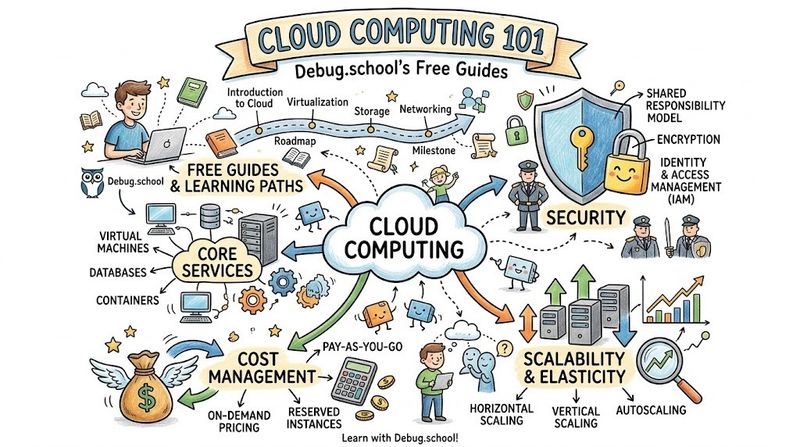
Cloud computing acts as the backbone of modern business. It powers everything from small mobile applications to massive global enterprise platforms. At its core, this technology delivers computing services over the internet. These services include servers, storage, databases, networking, software, and analytics. Instead of buying and maintaining physical data centers, companies rent access to these resources from cloud providers. This approach eliminates massive upfront hardware costs. Consequently, organizations can scale their operations smoothly based on real-time demand.
Understanding these foundational systems can feel overwhelming for beginners. Fortunately, learners can access structured, zero-cost education through the comprehensive Debug.school platform. This educational portal provides deep-dive tutorials, practical lab exercises, and architectural breakdowns. It helps aspiring engineers transition from theoretical knowledge to practical, hands-on mastery. By focusing on real-world engineering scenarios, these free resources demystify complex cloud environments. They give students a clear roadmap to build, secure, and manage modern cloud infrastructure.
Operating in the cloud requires a shift in how you think about infrastructure. Physical servers can fail, network lines can drop, and configuration errors can disrupt services. Therefore, modern cloud engineers must master architectural frameworks that emphasize high availability, security, and cost efficiency. The following sections provide a detailed deep dive into essential cloud concepts, operational strategies, platform implementation practices, and real-world deployment patterns.
Key Operational Concepts You Must Know
Managing cloud infrastructure requires a solid grasp of foundational operational pillars. These concepts ensure that applications remain online, secure, and cost-effective. Without these core principles, cloud environments quickly become chaotic, expensive, and vulnerable to security breaches.
High Availability and Fault Tolerance
High availability means designing a system to operate continuously without noticeable downtime. Engineers achieve this by eliminating single points of failure across the entire infrastructure stack. For example, you should never deploy a web application on a single cloud server. If that specific server crashes, your entire application goes offline instantly.
Instead, you must distribute your application workloads across multiple virtual machines or containers. These resources should live in different isolated geographic locations, known as Availability Zones. Cloud providers build these zones with independent power sources, cooling systems, and networking infrastructure.
[ Internet Traffic ]
        │
        ▼
┌─────────────────┐
│  Load Balancer  │
└────────┬────────┘
         │
         ├────────────────────────┐
         ▼                        ▼
┌─────────────────┐      ┌─────────────────┐
│   Web Server A  │      │   Web Server B  │
│ (Zone 1 - East) │      │ (Zone 2 - West) │
└─────────────────┘      └─────────────────┘
Fault tolerance takes this concept a step further. A fault-tolerant system can withstand the complete failure of a major component without any degradation in performance. While high-availability systems might experience a brief blink during a failover event, fault-tolerant architectures use active redundancy to keep operations seamless.
Implementing these setups requires a reliable load balancer. The load balancer acts as a traffic cop at the front door of your cloud infrastructure. It constantly monitors the health of your backend servers. If a server stops responding, the load balancer automatically redirects incoming user traffic to healthy instances in other zones.
Elasticity vs. Scalability
Many beginners confuse elasticity with scalability, but they represent different operational strategies. Scalability is the ability of a system to handle a growing amount of work by adding resources. You can scale your infrastructure in two different directions: vertically or horizontally.
Vertical scaling, or "scaling up," means adding more power to an existing server. For instance, you might upgrade a virtual machine from 4 gigabytes of RAM to 16 gigabytes of RAM. However, vertical scaling has a hard physical ceiling, and it often requires temporary downtime during the upgrade process.
Horizontal scaling, or "scaling out," means adding more servers to your pool. Instead of buying a larger machine, you deploy five identical small machines side by side. This method allows for almost infinite growth because you can keep adding servers as traffic increases.
Vertical Scaling (Scale Up)         Horizontal Scaling (Scale Out)
     ┌───────┐                           ┌───┐   ┌───┐   ┌───┐
     │       │                           │   │   │   │   │   │
     │  RAM  │                           └───┘   └───┘   └───┘
     └───┬───┘                             ▲       ▲       ▲
         ▼                                 └───────┼───────┘
     ┌───────┐                                     │
     │  BIG  │                           Add identical servers
     │Server │                           to distribute workload
     └───────┘
Elasticity adds dynamic automation to horizontal scalability. An elastic system automatically shrinks or grows its resource pool based on real-time demand. For example, an e-commerce website might experience a massive spike in traffic at noon. An elastic cloud environment detects this spike and automatically launches ten new servers within minutes.
Once the traffic drops at midnight, the elastic system terminates those extra servers automatically. This ensures that you only pay for the exact computing power you need at any given moment. Consequently, elasticity prevents you from wasting money on idle servers during quiet hours.
Disaster Recovery and Data Replication
Disaster recovery focuses on surviving catastrophic events, such as a major cloud provider outage, cyberattacks, or accidental data deletion. To protect your business, you must establish clear targets for data recovery. These targets guide your backup and replication strategies.
- Recovery Point Objective (RPO): This metric defines the maximum amount of data your business can afford to lose, measured in time. If your RPO is four hours, you must back up or replicate your data at least every four hours.
- Recovery Time Objective (RTO): This metric defines how quickly your systems must come back online after a failure occurs. If your RTO is thirty minutes, your engineering team must restore operations within that window.
Data replication strategies help you meet these critical targets. Synchronous replication writes data to two different locations simultaneously before confirming a successful write to the user. This approach prevents data loss but can introduce minor network latency.
Asynchronous replication writes data to the primary storage location first, then copies it to the secondary location a few seconds or minutes later. While this keeps your application fast, it introduces a small risk of data loss if the primary site fails before the replication completes.
Shared Responsibility Model
Security in the cloud operates under a strict partnership called the Shared Responsibility Model. Cloud providers do not secure your entire application stack automatically. Instead, they split the security burdens clearly between the provider and the customer.
The provider takes full responsibility for the security of the cloud. They secure the physical data centers, the concrete buildings, the actual hardware servers, the hypervisor software, and the underlying networking cables. They ensure that nobody can walk into the facility and steal a hard drive.
┌────────────────────────────────────────────────────────┐
│               CUSTOMER RESPONSIBILITY                  │
│  (Security IN the Cloud: Data, Apps, IAM, OS Config)   │
├────────────────────────────────────────────────────────┤
│               PROVIDER RESPONSIBILITY                  │
│  (Security OF the Cloud: Hardware, Regions, Physics)   │
└────────────────────────────────────────────────────────┘
The customer retains full responsibility for security in the cloud. You must secure your own operating systems, network access control lists, application code, user accounts, data encryption, and access permissions. If you leave a database open to the public internet without a password, that represents a customer-side failure.
Cost Optimization and Resource Management
Cloud environments make it incredibly easy to launch resources, which can lead to unexpected billing surprises. Efficient resource management requires constant monitoring and proactive optimization. Unused or oversized assets waste massive amounts of capital.
Engineers must identify and eliminate orphaned resources. These include unattached storage volumes, idle load balancers, and forgotten testing environments. If a developer launches a temporary server for an afternoon test and forgets to delete it, that server will incur charges indefinitely.
Right-sizing is another fundamental cost-control practice. It involves analyzing the CPU and memory utilization of your virtual machines. If a server consistently uses less than ten percent of its capacity, you should downsize it to a cheaper instance type.
Additionally, you can leverage different purchasing models. On-demand pricing offers maximum flexibility but costs the most. Reserved instances require a long-term commitment but provide massive discounts. Spot instances let you bid on unused cloud capacity at cheap rates, though the provider can reclaim them with short notice.
Platform Implementation vs. Culture — What's the Real Difference?
Many organizations struggle with cloud migrations because they treat modern operations purely as a software installation project. True operational excellence requires a balance between platform implementation tools and team culture.
The Tools: Building the Platform
Platform implementation involves the tangible software utilities, scripts, and infrastructure configurations that host your applications. This technical layer provides the foundation that development teams use to deploy their code safely.
Infrastructure as Code (IaC) stands at the center of modern platform implementation. Instead of clicking buttons inside a web console to create servers, engineers write declarative configuration files. These files define the exact state of the infrastructure. You can store these files in a version control system like Git, allowing you to track changes over time and roll back infrastructure updates easily.
┌─────────────────┐     ┌──────────────────┐     ┌─────────────────┐
│  Define IaC     │────>│  Git Repository  │────>│ Automated Tool  │
│  (Config Files) │     │ (Version Control)│     │  (Deploy Cloud) │
└─────────────────┘     └──────────────────┘     └─────────────────┘
Continuous Integration and Continuous Deployment (CI/CD) pipelines automate the movement of code from a developer's laptop to production. These automated workflows run security scans, execute unit tests, build container images, and update your cloud infrastructure automatically whenever code changes occur.
Observability software provides real-time visibility into the health of your platform. This includes centralized log aggregation, metrics collection (such as CPU, memory, and network throughput), and distributed tracing. Tracing allows engineers to follow a single user request across multiple microservices to find performance bottlenecks.
The Culture: Adopting DevOps and SRE
Tools alone cannot solve operational inefficiencies if the organization maintains old, siloed working habits. Cultural frameworks like DevOps and Site Reliability Engineering (SRE) change how human teams collaborate and share responsibility.
DevOps breaks down the historical wall between developers and operations teams. In traditional companies, developers write code and hand it over to operations to deploy and maintain. This dynamic often creates conflict because developers want to ship features quickly, while operations teams want to minimize changes to protect stability.
DevOps aligns these goals. It makes developers share accountability for the operational stability of their applications, while operations teams build automated platforms to help developers move faster.
Traditional Scleroses:
┌─────────────────┐   Siloed Wall   ┌─────────────────┐
│ Developers      │      (X)        │ Operations      │
│ (Want Changes)  │────────────────>│ (Want Stability)│
└─────────────────┘                 └─────────────────┘

Modern DevOps/SRE:
┌─────────────────────────────────────────────────────┐
│                 Shared Responsibility               │
│      Shared Goals, Common Metrics, Open Feedback    │
└─────────────────────────────────────────────────────┘
Site Reliability Engineering applies software engineering principles directly to operations problems. SRE teams treat operations as a software challenge, using automation to eliminate repetitive manual tasks (often called "toil"). They manage systems using strict, data-driven metrics:
- Service Level Indicators (SLI): A quantifiable metric of service performance, like request latency or error rate.
- Service Level Objectives (SLO): The target reliability goal for an SLI, such as keeping the error rate below one percent over a rolling month.
- Error Budgets: The allowable amount of downtime or errors a system can experience (calculated as 100% minus the SLO). If a team has a high error budget left, they can ship risky new features. If the error budget is exhausted, they must pause new features and focus exclusively on stability.
Balancing Automation with Human Processes
A common mistake involves automating bad human processes. If your internal approval process requires four different managers to sign off on a spreadsheet before a deployment, automating the underlying script won't fix the organizational bottleneck.
True optimization requires restructuring human workflows alongside technical automation. Organizations must move toward decentralized decision-making. Teams should trust automated testing suites and automated compliance checks to validate safety, rather than relying on manual management reviews.
Furthermore, cultural adoption requires a psychological shift toward a blameless culture. When a major production outage occurs, the organization must avoid searching for a human scapegoat to punish. Instead, teams should conduct blameless post-mortems.
These meetings focus entirely on finding the systemic weaknesses, lack of safety guardrails, or tooling gaps that allowed the human error to crash the environment. Fixing the system prevents future mistakes; punishing a person does not.
| Attribute | Platform Implementation | Operational Culture (DevOps/SRE) |
|---|---|---|
| Primary Focus | Systems, scripts, APIs, and tooling infrastructure. | Collaboration, metrics, shared empathy, and mindset. |
| Core Components | IaC, CI/CD pipelines, monitoring agents, containers. | Error budgets, blameless reviews, toil reduction. |
| Goal | Provide automated, reliable computing resources. | Align team incentives to deploy safely and rapidly. |
| Failure Mode | Misconfigurations, network drops, broken scripts. | Silos, finger-pointing, fear of deployment risk. |
Real-World Use Cases of Modern Operations
Understanding theoretical concepts is helpful, but seeing how companies apply these principles to solve actual business challenges brings the knowledge to life. Modern cloud infrastructure enables organizations to operate at a massive global scale with extreme agility.
Blue-Green Deployments for Zero-Downtime Releases
Shipping updates to software used to require schedule maintenance windows, often in the middle of the night. If something went wrong during the update, the platform would experience prolonged downtime while engineers manually patched the files. Modern cloud operations eliminate this risk using a pattern called Blue-Green deployments.
In this architecture, you maintain two identical production environments side-by-side. The "Blue" environment runs the current live version of your software, and all user traffic routes to it. The "Green" environment contains the new version of your software, completely isolated from public users.
Step 1: All traffic to Blue
[ Public Traffic ] ───> [ Load Balancer ] ───> [ Blue (v1.0) ]
                                                Green (v2.0) [Testing]

Step 2: Switch traffic to Green
[ Public Traffic ] ───> [ Load Balancer ] ───>   Blue (v1.0) [Idle]
                                         └───> [ Green (v2.0) ]
While users interact with the Blue environment, your QA engineering team runs exhaustive tests against the Green environment to ensure stability. Once the new code passes all checks, you update the central load balancer to redirect traffic from Blue to Green instantly.
If an unexpected bug shows up moments after the switch, you can flip the load balancer back to Blue instantly. This approach minimizes user impact to a few seconds, completely avoiding long, stressful rollback procedures.
Autoscaling E-Commerce Platforms During Flash Sales
Retail websites experience unpredictable surges in traffic during promotional events, holiday sales, or viral marketing campaigns. Traditional hardware data centers cannot handle these sudden spikes because buying new physical servers takes weeks of procurement.
An elastic cloud infrastructure solves this challenge using automated scaling policies. Engineers configure cloud monitoring metrics to watch aggregate CPU usage across the application tier. If the average CPU utilization crosses seventy percent for three consecutive minutes, the auto-scaling engine launches new compute instances.
[ Flash Sale Starts ] ──> CPU Spikes > 70% ──> Auto-Scaling Triggers ──> New Instances Online
                                                                                 │
[ Flash Sale Ends ]   ──> CPU Drops < 30% ──> Scale-In Triggers    ──> Terminate Idle Assets
To prevent performance drops while new servers boot up, companies use pre-baked container images or virtual machine snapshots. These images contain the pre-compiled application code and all necessary dependencies, allowing new instances to handle traffic within seconds of launching.
Once the flash sale concludes and web traffic drops, a companion "scale-in" policy detects that CPU usage has fallen below thirty percent. The system then terminates the extra assets safely, returning operational costs to their baseline level.
Multi-Region Infrastructure for Global Video Streaming
Global streaming applications must deliver high-definition video content to millions of concurrent users spread across different continents. If a provider hosts all video files in a single data center in North America, users in Europe or Asia will experience frustrating buffering delays due to network latency.
To solve this spatial challenge, modern operations teams combine global Content Delivery Networks (CDNs) with multi-region database replication. A CDN caches copies of popular video files on edge servers located physically close to end-users, cutting out long network round trips.
                ┌───────────────────────────┐
                │  Primary Write Database   │
                │     (US East Region)      │
                └─────────────┬─────────────┘
                              │
               Asynchronous │ Replication
                              ▼
┌───────────────────────────────────────────────────────────┐
│                 Read-Only Replica Nodes                   │
├─────────────────────────────┬─────────────────────────────┤
│       US West Region        │       Europe Region         │
└─────────────────────────────┴─────────────────────────────┘
For user data like watch history or watchlists, engineers deploy multi-region database setups. The primary application writes data in one region, and the database automatically copies those records to read-only replicas across other global regions.
If a major underground fiber-optic cable cuts out and takes down an entire cloud region, global traffic routers automatically detect the failure. They immediately redirect users to the nearest surviving region, keeping the streaming platform functional worldwide.
Common Mistakes in Operations Engineering
Even experienced engineering teams can fall into common traps when building and running cloud infrastructure. Recognizing these pitfalls early can save your organization thousands of dollars and prevent devastating security incidents.
Hardcoding Secrets and Credentials
One of the most frequent and costly mistakes in cloud engineering is saving sensitive credentials directly inside your application code or infrastructure scripts. This includes database passwords, API tokens, and encryption keys.
When developers push this code to a shared repository like Git, those secrets become visible to anyone with access to the codebase. If the repository is public or gets leaked accidentally, malicious actors use automated bots to scan for these keys within seconds.
CRITICAL SECURITY RISK:
if (api_key == "xyz123_secret_password") { ... } // Hardcoded in source code

SECURE APPROACH:
const apiKey = process.env.SECRET_STORE_API_KEY; // Loaded from secure runtime environment
Once attackers find valid cloud access keys, they can launch massive clusters of expensive virtual machines to mine cryptocurrency. This can leave your company with massive financial bills overnight.
To fix this risk, teams must use dedicated cloud secrets management services. These platforms store sensitive data in encrypted vaults outside of source code. Applications fetch these credentials securely at runtime using IAM roles, and the secrets rotate automatically on a regular schedule.
Over-Provisioning and Ignoring Cloud Waste
When moving from physical data centers to the cloud, engineers often bring old habits along. In a traditional data center, you buy oversized hardware to ensure you do not run out of capacity over a five-year lifecycle.
Applying this same mindset to cloud environments leads to extreme over-provisioning. Teams launch large virtual machines that run at only two to five percent CPU utilization, throwing away money on unused computing power.
Traditional Hardware Mindset (Wasteful in Cloud):
┌──────────────────────────────────────────────────┐
│ Unused Allocated Capacity (95% Waste)            │
│                                                  │
├─────────────────────────┐                        │
│ Actual Workload (5%)    │                        │
└─────────────────────────┴────────────────────────┘

Cloud Native Elastic Mindset (Efficient):
┌─────────────────────────┐
│ Dynamic Buffer (15%)    │
├─────────────────────────┤
│ Actual Workload (85%)   │
└─────────────────────────┘
Another massive source of waste comes from forgotten developer sandboxes. Engineers launch multi-node clusters for a quick proof-of-concept, finish their evaluation, and leave the environment running over weekends and holidays.
Organizations can eliminate this waste by enforcing automated resource tags, setting up aggressive billing alerts, and implementing automated scripts that shut down development environments outside of business hours.
Lack of Centralized Logging and Monitoring
Operating a distributed cloud application without centralized observability is like driving a vehicle with a blacked-out windshield. When a user reports that an application failed during checkout, engineers have no quick way to diagnose the issue if logs are scattered across ten different independent servers.
Manual troubleshooting requires engineers to log into each machine individually to search through raw text files. This slows down your incident response times and extends system outages.
Siloed Monitoring (Broken):
[ Server 1 Logs ]   [ Server 2 Logs ]   [ Server 3 Logs ] (Scattered across environment)

Centralized Observability (Correct):
[ Server 1 ] ───┐
[ Server 2 ] ───┼──> [ Unified Aggregator ] ───> [ Single Dashboard Analytics ]
[ Server 3 ] ───┘
Modern infrastructure requires a centralized log aggregation framework. All applications and host servers must instantly stream their logs and runtime performance metrics to a unified data store.
This central repository allows your team to query patterns across your entire environment from a single dashboard. Furthermore, you can configure automated alerting rules to notify your on-call engineers via chat applications the moment error rates cross your established baseline limits.
Treat Infrastructure as "Snowflakes"
A "snowflake server" is a cloud resource that someone configures manually over time through direct terminal commands or web interface clicks. Because these changes are never documented in code, no one on the team knows the exact software packages, security patches, or configuration adjustments live on that machine.
If a snowflake server crashes, recreating it becomes an operational nightmare. The team must guess the original configuration through trial and error, leading to extended downtime and inconsistent application behavior.
Manual Config (Snowflake - Dangerous):
[ Engineer Terminal ] ───(Manual Tweaks)───> [ Mystery Server ] (Impossible to replicate)

IaC Pipeline (Immutable - Safe):
[ Declarative Code ] ───> [ Automation Engine ] ───> [ 100 Identical Production Nodes ]
Engineers should treat all infrastructure as disposable assets, not precious items. You must define all infrastructure components using declarative code.
If a server acts up or needs a configuration update, you do not log in to patch it manually. Instead, you update the code template, destroy the old server instance, and let your automated pipeline deploy a fresh, perfectly configured replacement.
How to Become an Operations Expert — Career Roadmap
Transitioning into an operations engineering role requires a structured approach to learning. The field shifts rapidly, so focusing on foundational, transferable skills ensures long-term career success.
Step 1: Mastering Core Operating Systems and Networking
Before touching advanced cloud tools, you must build a strong foundational understanding of Linux operating systems and basic networking mechanics. The vast majority of cloud infrastructure runs on Linux distributions.
- Linux Internals: Learn how to navigate the file system using command-line terminals. Master file permissions, process management, log analysis, and system utilities like SSH for secure remote access.
- Networking Foundations: Study the core concepts of IP addressing, subnetting, the OSI model, and DNS routing. You must understand how routers, firewalls, and ports control the flow of data packets across the internet.
Step 2: Learning a Programming Language for Automation
Modern operations engineers do not perform manual tasks. You must learn to write clean scripts to automate repetitive system administration workloads.
- Python: Widely considered the gold standard for infrastructure scripting, data processing, and interacting with cloud provider APIs.
- Bash Scripting: Essential for writing quick automated sequences directly inside Linux operating system terminals.
- Version Control: Learn Git early. You must understand how to commit code, branch repositories, resolve merge conflicts, and collaborate with other developers on open platforms.
Step 3: Containers and Local Orchestration
Containers isolate applications from their underlying host operating systems. This ensures that code runs identically on a developer's laptop, a testing environment, and a production cloud cluster.
- Docker: Learn how to write container blueprints, build optimized container images, and manage isolated local storage networks.
- Container Security: Study how to scan container images for known software vulnerabilities and practice running processes with low user privileges to protect the host system.
Step 4: Infrastructure as Code and Cloud Platforms
Once you can containerize applications locally, you are ready to learn how to deploy and manage them across public cloud platforms using automated code templates.
- Cloud Fundamentals: Pick one major cloud provider (such as AWS, Azure, or Google Cloud) and learn its core service offerings deeply. Focus on virtual networking, compute instances, block storage, and IAM security access controls.
- Declarative Infrastructure: Master industry-standard tools like Terraform or OpenTofu. Practice writing reusable modules that can build, modify, and destroy complete cloud environments automatically.
Step 5: Advanced Orchestration and Observability
The final phase of your learning journey involves managing complex, multi-container applications across production environments while maintaining deep operational visibility.
- Kubernetes: Learn the industry-standard platform for container orchestration. Master how to manage container scheduling, automated self-healing, internal load balancing, and configuration rollouts.
- Observability Stacks: Implement end-to-end monitoring solutions using tools like Prometheus and Grafana. Learn how to design useful operational metrics dashboards and set up actionable alerting thresholds.
┌─────────────────────────────────────────────────────────┐
│          PHASE 5: Kubernetes & Observability            │
├─────────────────────────────────────────────────────────┤
│          PHASE 4: IaC & Public Cloud Platforms          │
├─────────────────────────────────────────────────────────┤
│          PHASE 3: Containers & Docker Basics            │
├─────────────────────────────────────────────────────────┤
│          PHASE 2: Python Scripting & Git VCS            │
├─────────────────────────────────────────────────────────┤
│          PHASE 1: Linux Terminal & IP Networking        │
└─────────────────────────────────────────────────────────┘
FAQ Section
- What is the difference between Cloud Computing and traditional web hosting?
Traditional web hosting usually places your application on a single physical server with fixed resources and rigid billing plans. Cloud computing gives you virtualized, on-demand resources that scale instantly up or down, operating under a flexible pay-as-you-go pricing model.
- Which cloud provider should a beginner learn first?
You can start with any major provider like AWS, Microsoft Azure, or Google Cloud Platform, as they all share similar core engineering principles. Focusing on mastering the underlying concepts—like networking, computing, and access control—matters far more than memorizing specific brand product names.
- Do I need to be an expert programmer to work in cloud operations?
You do not need to write complex application logic or user interfaces like a software developer. However, you must write functional automation scripts using languages like Python or Bash to handle system configurations, parse log data, and orchestrate cloud deployment pipelines.
- Why is Infrastructure as Code considered a mandatory operational practice?
IaC replaces manual human configuration adjustments with auditable, version-controlled text files. This approach guarantees that your environments can be recreated identically, eliminates configuration errors between testing and production, and tracks all changes over time.
- What is the main goal of Site Reliability Engineering?
SRE aims to treat operational challenges as software problems by using automation to eliminate manual, repetitive toil. It balances the need for rapid application feature releases with strict, data-driven reliability targets using metrics like error budgets.
- How do containers help during a cloud migration project?
Containers package your application code along with its exact dependencies, configuration files, and system libraries into a single portable unit. This isolation ensures that the application runs consistently on any cloud platform, eliminating environment compatibility issues.
- What happens if a company exceeds its database error budget?
When a team completely exhausts its error budget, they must pause shipping new application features. The engineering team shifts their full focus toward fixing infrastructure instability, improving testing frameworks, and resolving root operational bugs.
- How does a Content Delivery Network reduce website latency?
A CDN operates a large global network of edge servers that cache static assets like images, videos, and code files close to users. This distribution allows user browsers to download data from a nearby server, cutting out slow network trips back to the main data center.
- What is a blameless post-mortem review process?
A blameless post-mortem is an incident review meeting that avoids finding a human scapegoat to punish after an outage occurs. Instead, the team analyzes the systemic gaps, tooling issues, and lack of guardrails that allowed the mistake to disrupt operations.
- What is the difference between horizontal and vertical scaling?
Vertical scaling upgrades the physical power of a single server by adding resources like more CPU or RAM. Horizontal scaling adds completely new server nodes to your pool, spreading out the workload across multiple parallel systems.
Final Summary
Embracing modern cloud operations requires a balanced combination of technical tools and team culture. By implementing automation platforms, managing infrastructure through code, and using metrics-driven workflows, organizations can ship updates quickly while keeping systems stable. Aspiring engineers can start building these essential cloud skills today by exploring the wide range of hands-on tutorials available on Debug.school.



Top comments (0)