
Meta description: Learn what Apache LimitRequestBody does, why and when to use it, where to configure it in LAMPP, and how it works with PHP-FPM and Laravel.
What Is LimitRequestBody?
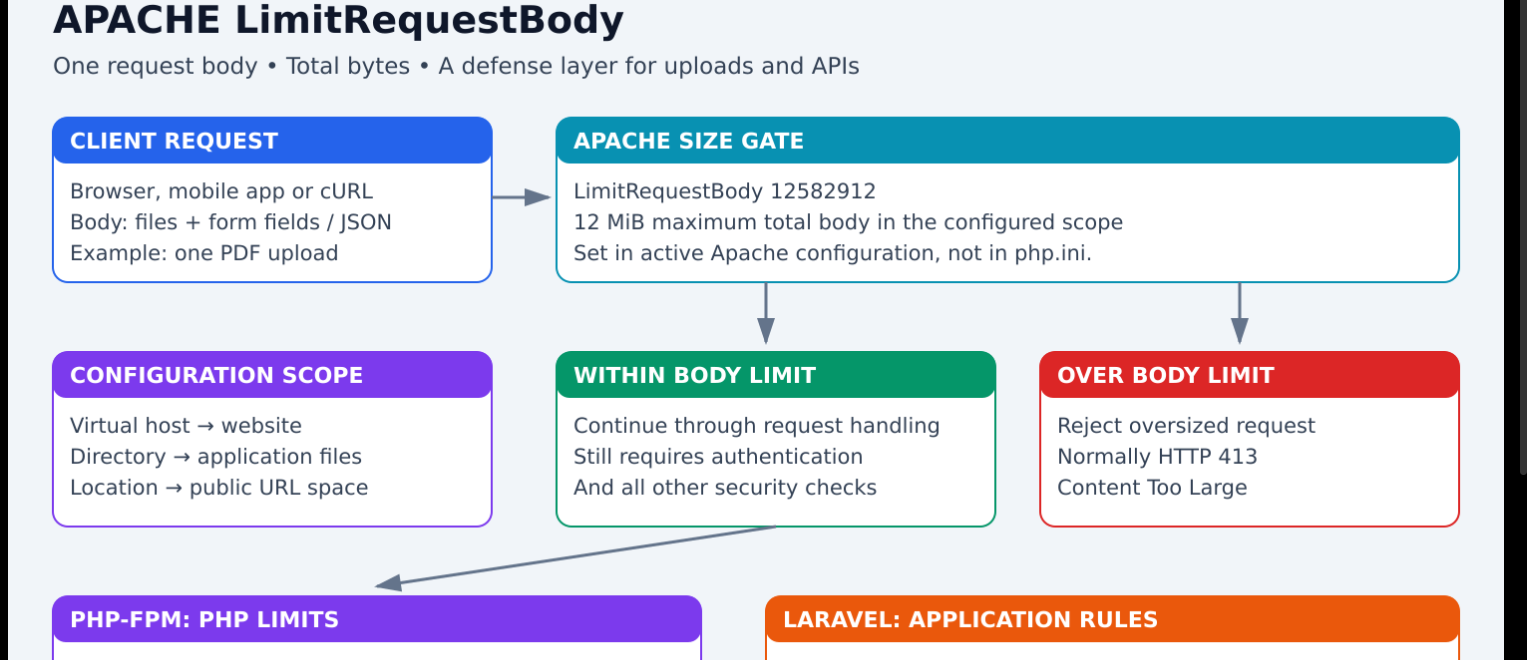
LimitRequestBody is an Apache setting that restricts the total size of one HTTP request body. A body can contain uploaded files, form fields, or JSON sent to an API.
# 12 MiB: 12 × 1024 × 1024 bytes
LimitRequestBody 12582912
It acts like a size-checking gate. When the body exceeds the applicable limit, Apache rejects the request, normally with HTTP 413 Content Too Large, rather than servicing the oversized request normally.
It does not set a limit on downloaded responses, RAM usage, request count, or file contents. Request headers and URL length have separate directives.
Why Use It? Purpose and Security Role
| Purpose | Real-world scenario | Benefit |
|---|---|---|
| Reject oversized uploads | A document service accepts small PDFs, but a client sends a huge file | Bounds the accepted body size |
| Limit API bodies | An endpoint expecting a small JSON object receives a very large body | Reduces unnecessary parsing and processing |
| Control combined uploads | Multiple individually small files make a very large request | Restricts their combined request size |
| Reduce some denial-of-service risks | Attackers repeatedly submit oversized bodies | Adds a resource-protection layer |
| Make service rules explicit | Different services have different upload needs | Avoids relying on a broad default |
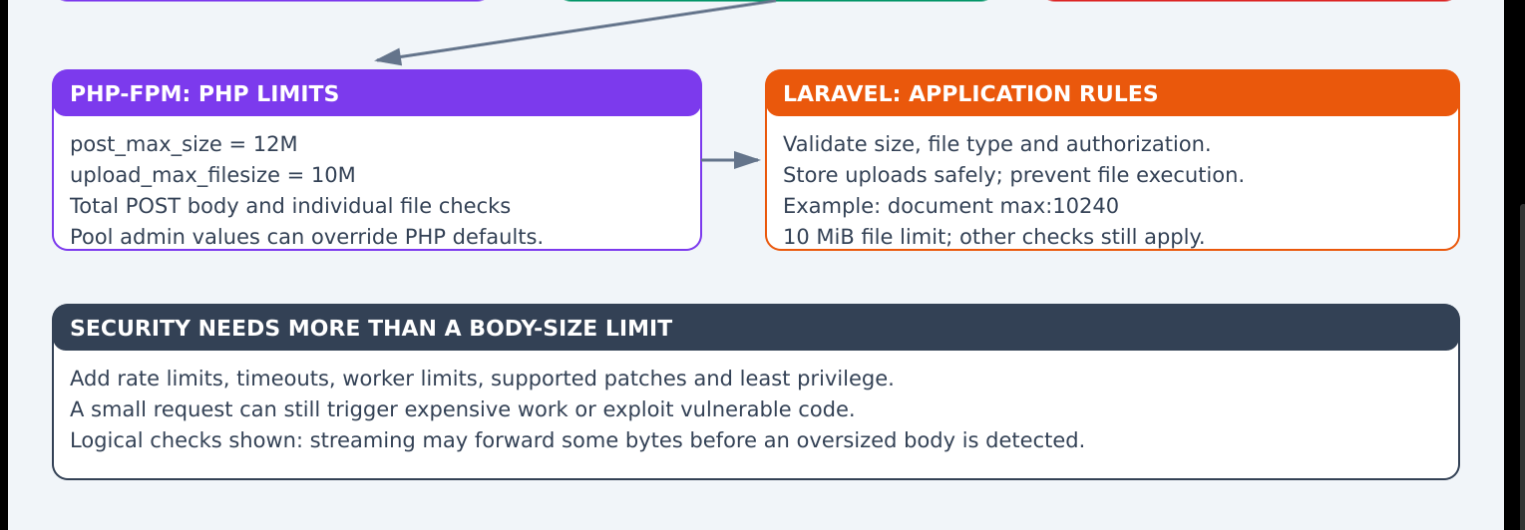
Important: this is one defense layer. Small malicious requests, many small requests, slow connections, and vulnerable PHP code still need separate protections. It does not fix PHP memory-corruption vulnerabilities.
Apache may receive some data or begin forwarding a streaming body before an oversized request is detected. Do not assume the entire body is buffered and checked before PHP-FPM sees any bytes. Verify behavior with your Apache version and request path.
When Should You Apply It?
Apply a deliberate limit to public services that accept bodies: uploads, contact forms, login requests, imports, and JSON APIs. Set it according to real business requirements.
| Endpoint | Illustrative body limit | Reason |
|---|---|---|
| Small JSON API | 1 MiB | Usually needs only small structured data |
| Single PDF upload, maximum file 10 MiB | 12 MiB | Leaves room for multipart boundaries and form fields |
| Several photos in one submission | Calculated from total allowed photos plus overhead | One request can contain many files |
| Large video upload | Service-specific | May need a dedicated upload service or object storage |
These are examples, not universal security values. Measure legitimate requests before reducing production limits.
Do not set the body limit equal to the maximum file size without allowing overhead. A 10 MiB file makes a multipart request larger than 10 MiB.
Syntax and Values
LimitRequestBody BYTES
| Setting | Meaning |
|---|---|
LimitRequestBody 1048576 |
1 MiB total body |
LimitRequestBody 12582912 |
12 MiB total body |
LimitRequestBody 26214400 |
25 MiB total body |
LimitRequestBody 0 |
Unlimited by this directive |
Use the integer byte value, rather than 12M.
Apache's documented default is 1 GiB in versions after 2.4.53; 2.4.53 and earlier defaulted to unlimited. Other configurations or front-end proxies can impose different effective limits. Set an explicit value for predictable behavior.
Where Should You Configure It?
This is an Apache setting, not a php.ini or PHP-FPM pool setting.
| Location | Scope | Typical use |
|---|---|---|
| Main Apache configuration | Broad server default | Shared baseline with reviewed exceptions |
| Existing virtual host | One website | Website-specific body limit |
<Directory> section |
Filesystem directory and descendants | One application public directory |
<Location> section |
URL space | A specific upload/API URL |
.htaccess |
Allowed directory scope | When central configuration is unavailable and overrides permit it |
Prefer central Apache configuration when you administer the server. Avoid conflicting rules in many places. URL rewrites, aliases, and overlapping sections can affect which rules apply, so test the actual public endpoint.
Find the Active Configuration in LAMPP
sudo /opt/lampp/bin/apachectl -t -D DUMP_INCLUDES
sudo /opt/lampp/bin/apachectl -S
The first command lists included configuration files. The second helps identify virtual hosts. Edit the actual file used by your intended HTTPS website; do not assume an unused configuration file is active.
Option 1: Limit a Website
Add this inside its existing HTTPS <VirtualHost> block:
# Maximum body for requests covered by this virtual host
LimitRequestBody 12582912
Preserve existing certificate, alias, proxy, and PHP-FPM settings. A website-wide limit can affect every service on that hostname.
Option 2: Limit an Application Directory
<Directory "/opt/lampp/htdocs/holiday-new/YOUR_SERVICE/public">
    LimitRequestBody 12582912
</Directory>
Replace YOUR_SERVICE with the actual application directory. Place this in an active Apache configuration file. It can also be added to the existing matching directory section.
Option 3: Limit a Public URL
Inside the relevant virtual host:
<Location "/api/contracts/upload">
    LimitRequestBody 12582912
</Location>
Use your actual public URL, including any service prefix. This URL-space rule also covers matching descendants; it is not an exact-route matcher.
Option 4: Use .htaccess When Permitted
LimitRequestBody 12582912
This only works where Apache permits the directive through its override configuration. Do not enable broad overrides just to add this setting if you already control the server configuration.
How It Works with PHP-FPM and Laravel
Each layer has a different responsibility:
| Layer | Setting | Responsibility |
|---|---|---|
| Apache | LimitRequestBody |
Total incoming body size |
| PHP | post_max_size |
Total POST data PHP accepts |
| PHP | upload_max_filesize |
Maximum individual uploaded file |
| PHP | memory_limit |
Script memory allocation limit |
| Laravel | Validation rules | Allowed file size, type, and other application rules |
Example: Accept One PDF up to 10 MiB
Apache:
LimitRequestBody 12582912
PHP configuration for the actual web runtime:
post_max_size = 12M
upload_max_filesize = 10M
For a service controlled through PHP-FPM pool admin settings, the equivalent is:
php_admin_value[post_max_size] = 12M
php_admin_value[upload_max_filesize] = 10M
Use the configuration mechanism already managing that service. Test and reload the correct FPM service separately if you change its configuration. Changing CLI PHP settings does not establish what the website uses.
Laravel controller validation:
$request->validate([
    'document' => ['required', 'file', 'mimes:pdf', 'max:10240'],
]);
Here max:10240 is Laravel's file-size limit in kilobytes, approximately 10 MiB. File-type validation is one check; store uploads privately and prevent uploaded content from executing.
If the POST body exceeds PHP's post_max_size, PHP may leave its POST and file arrays empty. The response can then come from application/framework handling rather than Apache. Keep the layers consistent and test their failure responses.
Example Requests and Expected Results
Assume an authenticated upload endpoint with a 12 MiB body limit and a 10 MiB PDF rule.
| Request | Expected behavior |
|---|---|
| Valid 2 MiB PDF | Passes these size checks; other rules still apply |
| Valid 10 MiB PDF with small form fields | Fits if complete body stays below 12 MiB |
| 11 MiB PDF with total body below 12 MiB | Rejected by PHP/file validation rather than Apache's body limit |
| 50 MiB upload | Rejected for exceeding the body limit, normally HTTP 413 |
| Two 8 MiB files in one body | Exceeds the combined body limit |
| Tiny request containing an SQL injection attempt | Body limit alone provides no SQL-injection protection |
Apply the Change Step by Step
- Identify the active virtual host, included files, and intended scope.
- Check legitimate upload/API sizes and existing limits at every layer.
- Back up the configuration file you will edit.
- Add the directive in the selected existing scope.
- Validate Apache configuration.
- Gracefully reload only after validation succeeds.
- Test a normal request, a boundary-size request, and an oversized request in staging.
- Check logs and verify unrelated services still work.
For LAMPP:
# Check syntax first
sudo /opt/lampp/bin/apachectl -t
Expected successful output:
Syntax OK
Then reload:
sudo /opt/lampp/bin/apachectl -k graceful
A graceful reload does not guarantee every application workflow is correct. If normal requests begin failing with 413, review the scope and required request sizes; restore the backed-up configuration if needed, validate it, and reload again.
A Small Local Test
On a local or staging endpoint configured with a 1 MiB body limit, create a 2 MiB test body:
python3 - <<'PY'
from pathlib import Path
Path('/tmp/body-limit-test.bin').write_bytes(b'x' * (2 * 1024 * 1024))
PY

curl -sS -o /dev/null -w 'HTTP %{http_code}\n' \
  -H 'Content-Type: application/octet-stream' \
  --data-binary @/tmp/body-limit-test.bin \
  http://localhost/body-limit-test
Expected result when this endpoint reads the body and the intended Apache limit applies:
HTTP 413
A redirect, authentication check, or handler that rejects the request before reading the body may produce a different response. Use a staging endpoint designed for this check. Do not send large test traffic to production.
What It Does Not Protect Against
| Risk | Additional controls |
|---|---|
| Many small requests | Rate limits and concurrency limits |
| Slow request delivery | Request-read timeouts and connection controls |
| SQL injection | Parameterized queries and input validation |
| Webshell uploads | Safe upload handling, private storage, no execution, least privilege |
| PHP runtime vulnerabilities | Supported, patched PHP and extensions |
| Small files that expand heavily | Isolated processing with memory/time limits |
| Unauthorized access | Authentication and per-resource authorization |
A small request can still cause expensive work. LimitRequestBody does not guarantee a maximum memory footprint or a maximum processing time.
Production Checklist
- Choose a body limit from real application requirements.
- Leave room for multipart overhead and additional fields.
- Review all services sharing the virtual host before applying a broad limit.
- Keep Apache, proxy/CDN, PHP, and Laravel limits consistent.
- Avoid unlimited bodies on endpoints that do not require them.
- Validate configuration before reload.
- Test successful uploads and expected error responses.
- Monitor 413 responses and resource usage.
- Retain patching, authorization, rate limits, timeouts, and safe processing.
Official References
- Apache core: LimitRequestBody
- PHP configuration: post_max_size
- PHP file upload settings
- Laravel file validation
Colourful Architecture: Where LimitRequestBody Fits




Top comments (0)