
Meta description: Learn PHP-FPM pools in simple words, including php.ini overrides, worker limits, Unix sockets, security scenarios, and a step-by-step setup guide.
Suggested slug: php-fpm-pools-security-php-ini-laravel-guide
A PHP-FPM pool is a group of PHP worker processes with its own configuration. Apache or Nginx forwards PHP requests to the pool, and an available worker executes the application.
Think of a shared office: PHP-FPM manages the staff, while each pool is a department with its own staff limit and rules. Booking, payment, and file services can use separate departments.
This guide uses Ubuntu-style paths and an Apache example. Adapt paths, accounts, PHP versions, and limits to your server. The configurations and outputs are illustrative, not evidence that your production server has been tested.
1. What Does Each Component Do?
| Component | Simple purpose | Example |
|---|---|---|
| Apache or Nginx | Receives HTTP requests and serves static content | Visitor opens a booking page |
| PHP-FPM service | Starts and supervises PHP workers | php8.4-fpm |
| FPM pool | Groups workers with service-specific rules | booking |
| Worker | Executes PHP application code | Laravel controller and database query |
| Unix socket | Local communication endpoint | /run/php/booking.sock |
| php.ini | Provides general PHP configuration | Default upload limit |
| Pool configuration | Defines worker behavior and PHP overrides | Booking pool settings |
Request example: a visitor opens /booking, Apache routes the PHP request to the booking socket, a worker executes Laravel, and Apache returns the response. A socket filename is only a name; it does not prove which PHP version owns it.
2. When and Why Should You Use Separate Pools?
| Situation | Why a separate pool helps |
|---|---|
| Multiple Laravel services share a host | Configure workers and settings separately |
| File uploads need different limits | Give the file service its own upload policy |
| Services need different Linux permissions | Use a separate worker account per service |
| You need clearer troubleshooting | Attribute worker activity and logs to a pool |
| You are migrating PHP versions gradually | Run separate versioned FPM services and switch one application's routing |
A small single application may need just one pool. More pools do not automatically mean more speed or security. Each additional worker competes for the same CPU, memory, database connections, and disk resources.
A pool belongs to its running FPM instance. A PHP 8.2 pool cannot turn itself into PHP 8.4 merely by changing a filename.
3. How Does a Pool Override php.ini?
General defaults:
; /etc/php/8.4/fpm/php.ini
upload_max_filesize = 2M
Pool override:
; /etc/php/8.4/fpm/pool.d/booking.conf
php_admin_value[upload_max_filesize] = 10M
Expected effective value for booking:
upload_max_filesize = 10M
| Pool | General default | Pool override | Effective PHP value |
|---|---|---|---|
| Booking | 2M | 10M | 10M |
| File service | 2M | 50M | 50M |
| Payment | 2M | None | 2M, assuming no other applicable override |
Changing the default to 5M leaves booking at 10M. A pool without an override inherits the new default after configuration is applied.
php_admin_value and php_admin_flag set administrative options that application code cannot override with ini_set(). Ordinary php_value settings do not provide the same administrative lock; whether another layer can change an option also depends on that directive's changeability. This example simplifies the hierarchy: additional loaded INI files and other applicable configuration can also matter.
4. Does PHP-FPM Stop Hackers?
It provides useful controls, but it is not a replacement for patched software or secure application code.
| Scenario | What could happen | Helpful control | Remaining limitation |
|---|---|---|---|
| Repeated expensive requests | All workers become occupied | Worker limits, traffic limits, queueing | The targeted service can still become unavailable |
| One service is compromised | Attacker tries to access another application's secrets | Different users and restrictive file permissions | Shared groups or readable secrets can defeat separation |
| Oversized uploads | Disk, bandwidth, or parser resources are consumed | Proxy limits, PHP limits, Laravel validation | Upload bytes do not predict extraction memory |
| Runtime vulnerability | Exploitable PHP code path is triggered | Patch the actual runtime and recycle workers | Pool settings do not repair a runtime bug |
| Technical error disclosure | Paths and stack details reach visitors | Hide public errors and keep protected logs | Laravel's own debug configuration also matters |
| Public FastCGI listener | Untrusted clients reach PHP directly | Permission-restricted local socket | Socket permissions must match the deployment |
Do not expose an FPM listener directly to the internet. Also avoid allowing upload directories to execute PHP. Different pool names with the same broadly privileged Linux account provide much less protection than genuinely restricted accounts.
Pools in one FPM instance share a master and may share facilities such as OPcache; they are not strong isolation boundaries for mutually untrusted tenants. Use separate instances, containers, or hosts when stronger separation is needed.
5. Step-by-Step Example Setup
Step 1: Inventory the Real Web Runtime
Read-only examples:
php -v
php-fpm8.4 -v
systemctl status php8.4-fpm --no-pager
CLI output identifies CLI PHP only. Inspect Apache handlers and FPM pool socket definitions to map each site to its actual service. Existing servers may use different binary names or installation paths.
Step 2: Back Up Configuration and Record a Baseline
Before editing, preserve the affected FPM and Apache configuration and record existing functionality and errors. Use a unique backup directory rather than overwriting a previous backup.
Record login, uploads, booking behavior, response codes, and application logs. HTTP 200 alone does not establish that a workflow works.
Step 3: Prepare Accounts and Filesystem Access
Use an existing verified application account or provision a dedicated account using your deployment process. Give the worker read access to application code and write access only to necessary runtime directories.
For Laravel these commonly include storage and bootstrap/cache. Keep source code and secrets protected; do not make everything writable or use chmod -R 777.
The example below assumes bookingapp exists and Apache workers use www-data. LAMPP commonly uses a different account, such as daemon; confirm it first. Socket ownership and directory traversal permissions must permit the actual Apache account to connect.
Step 4: Define the Pool
Example file: /etc/php/8.4/fpm/pool.d/booking.conf
[booking]
user = bookingapp
group = bookingapp

listen = /run/php/booking.sock
listen.owner = www-data
listen.group = www-data
listen.mode = 0660

pm = ondemand
pm.max_children = 3
pm.process_idle_timeout = 10s
pm.max_requests = 500

request_terminate_timeout = 60s
security.limit_extensions = .php
clear_env = yes

php_admin_value[memory_limit] = 256M
php_admin_value[upload_max_filesize] = 10M
php_admin_value[post_max_size] = 12M
php_admin_flag[display_errors] = off
php_admin_flag[log_errors] = on
| Setting | Meaning |
|---|---|
| user / group | Identity executing PHP |
| listen | Endpoint receiving FastCGI requests |
| pm.max_children | Maximum workers for this pool |
| pm.max_requests | Recycle a worker after a request count; not a leak fix |
| request_terminate_timeout | Terminate a worker serving an overlong request |
| memory_limit | PHP-managed memory ceiling, not a total pool/host cap |
clear_env = yes can affect applications that depend on inherited environment variables. Explicitly provide necessary values through your established secret/configuration mechanism. Test logging destinations and session paths too.
Do not use this memory value as mitigation for an unpatched memory-corruption vulnerability. Apply the appropriate runtime fix first.
Step 5: Route Apache to the Socket
In the application's appropriate virtual-host configuration:
DocumentRoot /srv/booking/public

<Directory /srv/booking/public>
    Require all granted
    AllowOverride All

    <FilesMatch "\.php$">
        SetHandler "proxy:unix:/run/php/booking.sock|fcgi://localhost/"
    </FilesMatch>
</Directory>
This fragment assumes the application exists at that path, required proxy modules are loaded, and Laravel rewrite rules are configured. Retain the existing TLS and virtual-host settings. Prevent execution in writable upload locations and inspect inherited PHP handlers before changing routing.
AllowOverride All supports an existing .htaccess deployment here; a carefully managed central configuration can restrict overrides further. Do not paste a new DocumentRoot over an unrelated existing site.
Step 6: Validate Before Applying
Ubuntu system-Apache example:
sudo php-fpm8.4 -t
sudo apachectl -t
For LAMPP Apache use its own binary instead:
sudo /opt/lampp/bin/apachectl -t
Expected messages include a successful FPM configuration test and:
Syntax OK
If validation fails, correct or restore the configuration before reloading. Syntax checks do not verify all application behavior.
Step 7: Apply With a Planned Reload
After successful validation and an approved change window:
sudo systemctl reload php8.4-fpm
Then reload the Apache instance actually serving the site. For LAMPP:
sudo /opt/lampp/bin/apachectl -k graceful
These examples depend on service support and deployment details. Do not promise zero downtime: long requests, shutdown settings, connection handling, and failures can affect reload behavior. Reloading one shared FPM service can involve multiple pools.
Step 8: Verify From a Protected Web Request
Use an authenticated/internal diagnostic mechanism to inspect:
[
    'version' => PHP_VERSION,
    'sapi' => PHP_SAPI,
    'memory_limit' => ini_get('memory_limit'),
    'upload_max_filesize' => ini_get('upload_max_filesize'),
    'post_max_size' => ini_get('post_max_size'),
]
Illustrative result:
{
  "version": "8.4.x",
  "sapi": "fpm-fcgi",
  "memory_limit": "256M",
  "upload_max_filesize": "10M",
  "post_max_size": "12M"
}
Do not leave a public phpinfo or unrestricted diagnostics page online. Remove temporary diagnostics after verification. CLI ini_get() does not prove FPM settings.
6. Plan Worker Counts Against the Whole Server
Suppose you measure approximately 100 MiB of resident memory per busy worker and allocate 600 MiB to a particular pool. Six workers is a rough starting estimate before allowing for overhead, peaks, and measurement limitations.
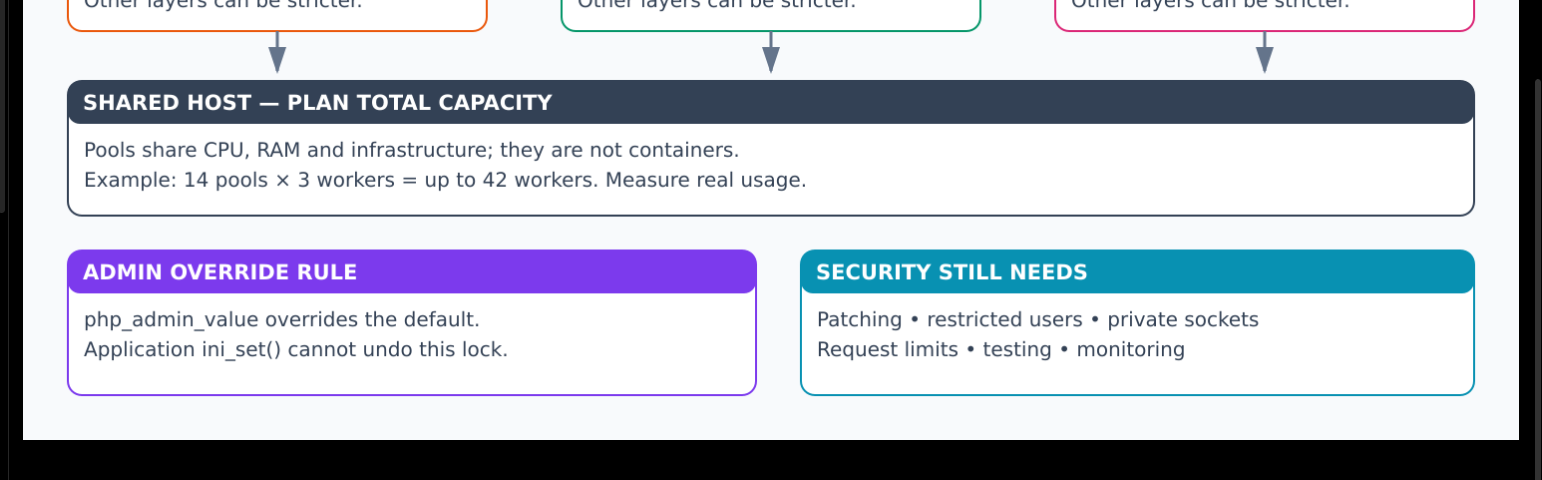
14 pools × 3 workers = up to 42 PHP workers
42 × illustrative 100 MiB = about 4,200 MiB
Reserve resources for Apache, databases, Keycloak, queues, the operating system, and other applications. RSS can double-count shared pages; PSS and real load tests improve the estimate. A 256M PHP memory limit is not an exact worker RSS cap. More workers can increase database contention and make performance worse.
7. Understand All Upload Limits
| Layer | Example limit | Purpose |
|---|---|---|
| Proxy / web server | 12 MiB request | Reject excessive bodies early |
| PHP post_max_size | 12M | Limit complete POST body |
| PHP upload_max_filesize | 10M | Limit one uploaded file |
| Laravel file validation | max:5120 | Reject files over 5,120 KiB at application level |
Multipart overhead means the request limit should leave room beyond the file itself. Coordinate related settings. A large PHP upload setting does not override a smaller upstream limit.
8. Verification and Rollback Checklist
- Confirm each site reaches its intended socket and running PHP version.
- Test login, sessions, uploads, important CRUD, and relevant sandbox integrations.
- Verify runtime directory and database permissions.
- Monitor FPM saturation, memory, errors, response times, and database connections.
- Remember CLI queues and cron jobs use their configured executables, not Apache's pool routing.
- Keep the previous configuration and a tested recovery procedure.
- Never recover service by silently exposing a known-vulnerable old runtime to the internet.
Official References
- PHP-FPM configuration manual
- PHP configuration change modes
- Apache mod_proxy_fcgi
- Laravel deployment guidance
Colourful Architecture: Requests and Configuration Overrides
Upload the accompanying diagram to your blog media storage and replace the relative URL below with its published URL.

flowchart TD
    U["Visitors"] --> A["Apache: route PHP requests"]
    A --> B["Booking pool: booking.sock"]
    A --> F["File pool: file.sock"]
    A --> P["Payment pool: payment.sock"]
    I["php.ini: upload default 2M"] -.-> B
    I -.-> F
    I -.-> P
    B --> BO["Pool admin override: 10M"]
    F --> FO["Pool admin override: 50M"]
    P --> PO["No override: inherits 2M"]
    BO --> R["Shared CPU, RAM and databases"]
    FO --> R
    PO --> R
    classDef blue fill:#dbeafe,stroke:#2563eb,color:#172554
    classDef orange fill:#ffedd5,stroke:#ea580c,color:#7c2d12
    classDef green fill:#dcfce7,stroke:#16a34a,color:#14532d
    classDef purple fill:#f3e8ff,stroke:#9333ea,color:#581c87
    class U,A blue
    class B,F,P orange
    class BO,FO,PO green
    class I,R purple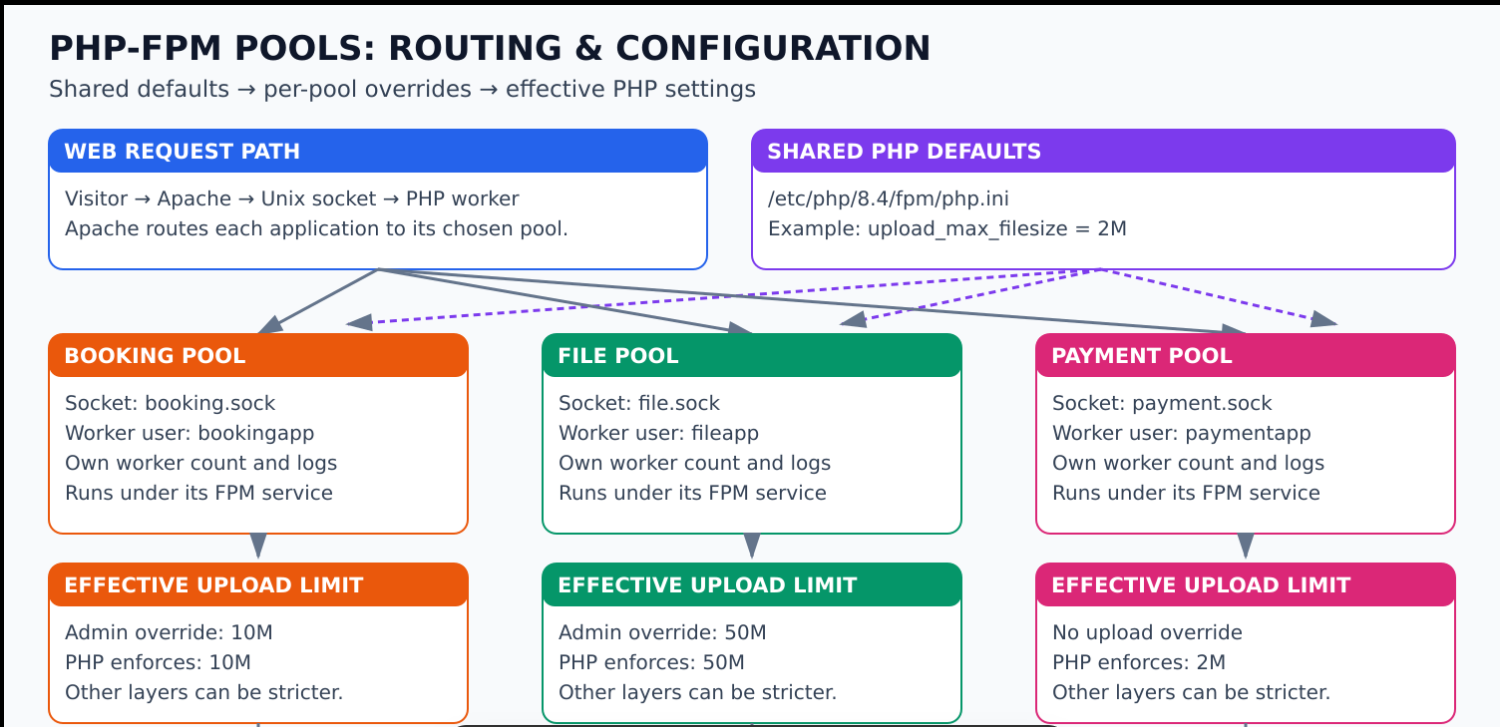



Top comments (0)