
Meta description: Understand how attackers abuse web requests, uploads, credentials, and vulnerable software, with safe code examples and practical PHP/Laravel defenses.
Suggested slug: how-websites-get-hacked-http-scripts-webshell-security
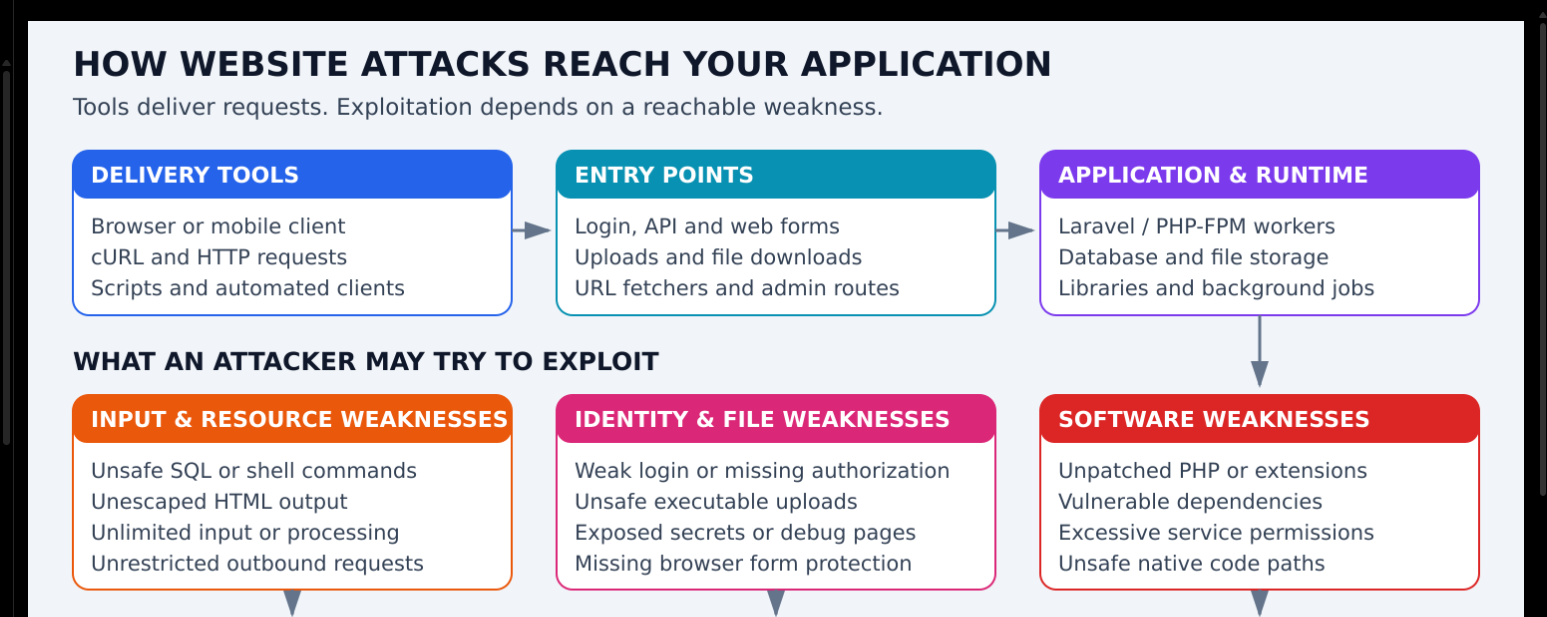
A website is usually compromised because a weakness allows an unauthorized action. The attacker might send requests from a browser, cURL, or a script. The tool is the delivery mechanism; the vulnerability is the weakness that makes an attack succeed.
The examples below use localhost, fake data, or defensive code. They are learning examples, not a complete security test suite. Responses are expected examples, not results observed on your server.
First Understand These Four Terms
| Term | Meaning | Is it automatically malicious? |
|---|---|---|
| HTTP request | A message sent to a web server | No; every normal website uses requests |
| cURL | A command-line tool for making requests and transferring data | No; developers use it for testing |
| Script | A program automating actions | No; legitimate automation also uses scripts |
| Webshell | Server-side code providing unauthorized remote control | In this context, it is an attacker control mechanism |
A scanner searches for weaknesses. It does not automatically compromise a site. A webshell usually appears after an attacker has already obtained a way to upload or write executable code.
1. Direct HTTP Requests: Bypassing the Visible Form
Scenario: An application hides an admin button but forgets to protect the backend endpoint. An attacker does not need to click that button; they can request the endpoint directly.
Harmless request to a local test server:
curl -i --max-time 5 http://127.0.0.1:8000/admin
Expected protected behavior: a login redirect or a 401/403 response, depending on whether it is a browser page or API.
Protection: Enforce authentication and authorization on the server. Hidden buttons and JavaScript checks are only user-interface controls.
2. cURL: A Delivery Tool, Not a Vulnerability
Scenario: A client submits JSON without using your frontend. The server must validate it exactly as it validates a browser request.
curl -i --max-time 5 \
  -H 'Content-Type: application/json' \
  -d '{"title":"Example booking","quantity":2}' \
  http://127.0.0.1:8000/api/demo-bookings
Syntax: -H adds a header; -d sends a body and normally selects POST; -i includes response headers. This example assumes you created the local demo endpoint.
Protection: Validate fields, verify ownership and permissions, and calculate trusted prices on the server. Restricting a User-Agent containing curl does not establish security because headers can be changed.
3. Scripts and Bots: Automating Requests
Scenario: Automation repeatedly exercises expensive endpoints. Without capacity controls, even valid requests may overwhelm resources.
Safe example making only one local health request:
from urllib.request import urlopen

with urlopen("http://127.0.0.1:8000/health", timeout=5) as response:
    print(response.status)
Expected output for a healthy demo endpoint:
200
Protection: Set rate limits, bounded queues, request deadlines, and per-account quotas. Rate limiting by IP alone may affect users sharing a network and can miss distributed abuse.
4. Login Abuse and Stolen Passwords
Scenario: Someone tries reused credentials obtained elsewhere. An application with no throttling or MFA is easier to abuse.
Laravel example of applying a configured rate limiter:
Route::post('/login', [LoginController::class, 'store'])
    ->middleware('throttle:login');
This assumes a named login limiter is defined in your application's rate-limiter configuration.
Expected response after the limit is reached:
429 Too Many Requests
Protection: MFA, secure password hashing, careful throttling, generic failure messages, and monitoring. Use fake accounts when testing. Do not log submitted passwords.
5. SQL Injection: Input Becomes Database Instructions
Scenario: A developer concatenates input into a SQL statement. The database may interpret input as query syntax rather than a value.
Defensive Laravel example:
$user = DB::selectOne(
    'SELECT id, name FROM users WHERE email = ?',
    [$request->input('email')]
);
The placeholder binds email as data. Expected result: one matching row or no matching row; user input does not become additional SQL instructions.
Protection: Parameterized queries and least-privilege database accounts. Bound parameters do not replace authorization, and dynamic column/table names require separate allowlists.
6. Cross-Site Scripting: Untrusted Content Reaches a Browser
Scenario: A public comment is inserted into HTML without appropriate escaping. Untrusted content could run in another user's browser.
Safe Blade text output:
<p>{{ $comment->body }}</p>
If a user submits <b>Hello</b>, ordinary escaped text output displays the characters rather than interpreting them as markup.
Protection: Context-appropriate output encoding, sanitization when allowing rich HTML, and a suitable Content Security Policy. HTML escaping alone is not sufficient for every JavaScript, CSS, or URL context.
7. Broken Access Control: Reading Another User's Booking
Scenario: A logged-in user changes a booking identifier. If the API checks only that they are logged in, it may disclose another person's booking.
Defensive ownership check:
$booking = Booking::query()
    ->where('user_id', $request->user()->id)
    ->findOrFail($bookingId);
Expected result: the owner's booking is returned; another user's identifier produces 404. Applications with organizer/admin sharing should use an appropriate authorization policy instead of this simplified rule.
Protection: Check permissions for every object and action. Unpredictable IDs help reduce guessing but do not substitute for authorization.
8. Unsafe Uploads and Webshells
Scenario: An attacker finds a way to place server-executable code in a web-accessible directory. If the server executes it, it can become a webshell.
Harmless defensive upload example:
$request->validate([
    'document' => ['required', 'file', 'mimes:pdf,txt', 'max:5120'],
]);

$path = $request->file('document')->store('contracts', 'local');
Verify that this disk is actually private in your application's filesystem configuration. max:5120 is a 5,120 KiB Laravel file-size rule.
Expected behavior: an allowed document is stored privately under a generated path; forbidden types are rejected. MIME validation cannot prove a parser will safely process every file.
Protection: Private storage, non-executable upload paths, generated filenames, parser isolation, and patched libraries. A sample executable webshell is unnecessary for understanding or testing these controls.
Read-only review example for unexpected PHP files in a known upload directory:
find /srv/myapp/storage/app/uploads -type f -iname '*.php' -print
This is an indicator search, not proof of compromise or a comprehensive scanner. Preserve suspicious files and evidence rather than executing them.
9. OS Command Injection: Input Becomes a Shell Command
Scenario: An application builds a shell command by joining a utility name with user-supplied text. Shell operators in that input may change what executes.
Defensive Python example:
import subprocess

result = subprocess.run(
    ["/usr/bin/printf", "%s", "sample-report.pdf"],
    check=True,
    capture_output=True,
    text=True,
    timeout=5,
)
print(result.stdout)
Expected output:
sample-report.pdf
An argument list avoids shell interpretation here. Real external programs can still interpret dangerous options or input; validate arguments and use a fixed executable. Prefer native library operations where possible.
10. Path Traversal: Accessing Files Outside the Intended Folder
Scenario: A download endpoint accepts arbitrary filesystem paths. An attacker could try to access configuration or secret files.
Defensive design using a server-managed ID:
$document = Document::findOrFail($documentId);
$this->authorize('view', $document);
return Storage::disk('local')->download($document->storage_path);
Expected behavior: only an authorized document is returned. The stored path must be generated and controlled by the server, not blindly copied from client input.
Protection: Map IDs to approved paths, enforce ownership, and carefully validate canonical paths if accepting any path input. Removing one ../ substring is not a complete solution.
11. Exposed Secrets and Debug Information
Scenario: A web root exposes .env, backups, source repositories, or logs. No code-execution exploit is needed if a password can simply be downloaded.
Laravel production setting:
APP_ENV=production
APP_DEBUG=false
Apache document-root example:
DocumentRoot /srv/myapp/public
Expected behavior: application source and private configuration remain outside the public document root. Check aliases, symlinks, backups, and cached configuration as well.
Protection: Restrict access and rotate any exposed credentials. Hiding an error page or version header does not fix a vulnerable application.
12. Runtime and Dependency Vulnerabilities
Scenario: A runtime or library has an implementation bug. A crafted request or file reaches that vulnerable code path, potentially before application checks.
Version inventory examples:
php -v
php-fpm8.4 -v
composer audit
These do different jobs: version commands inventory binaries; Composer audit checks known dependency advisories. None proves every deployed component is secure. CLI PHP and FPM may be different runtimes.
Protection: Verify official advisories, install supported fixed versions, test compatibility, and ensure serving workers actually load the update. A WAF or Laravel validation is not a substitute for a runtime patch.
13. Resource Exhaustion: Keeping the Server Too Busy
Scenario: Many costly searches or document jobs consume memory, CPU, disk, or database connections.
Illustrative pool limit:
pm = ondemand
pm.max_children = 3
This bounds that pool's PHP workers, not total host memory or all request volume. Expected behavior under saturation: requests queue or time out according to configured backlog and server behavior.
Protection: Request size limits, rate limits, processing deadlines, bounded queues, pagination, concurrency controls, and host-capacity planning. Test small controlled workloads in staging rather than generating an uncontrolled flood.
14. CSRF: An Unwanted Action Using a Browser Session
Scenario: A site relies on browser cookies for authentication but does not verify that a state-changing request originated through its protected flow.
Laravel Blade form:
<form method="POST" action="/profile">
    @csrf
    <input name="display_name" value="Example">
    <button type="submit">Save</button>
</form>
The token is effective only when the relevant CSRF middleware verifies it. Expected behavior: a missing/invalid token is rejected by that flow. API token authentication and browser cookie authentication require different design considerations.
15. SSRF: Making Your Server Request an Unwanted Destination
Scenario: A preview service fetches any URL supplied by a user. It could be abused to access internal services using the server's network position.
A defensive interface can accept predefined sources rather than arbitrary URLs:
SOURCES = {"help": "https://example.com/help"}
source_id = "help"
url = SOURCES[source_id]
Expected result: the selected URL comes from an approved mapping. Real fetchers still need network egress controls, redirect policy, destination/IP validation, and limits. A hostname check alone may be insufficient.
Example Relationship Between the Methods
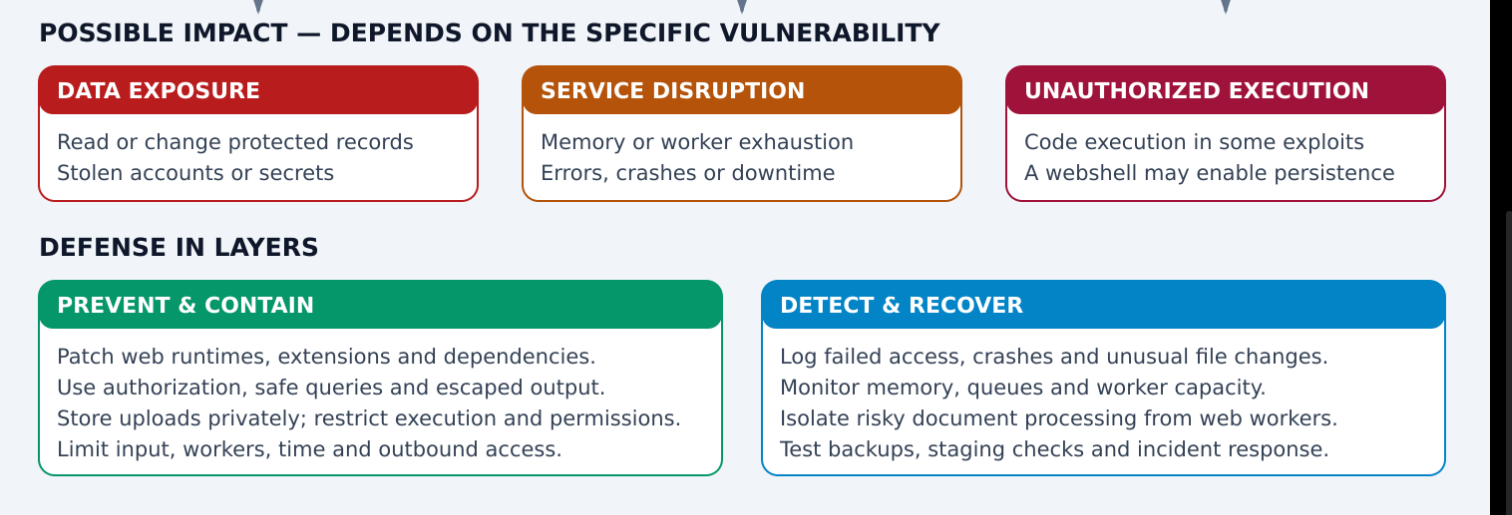
A script can send HTTP requests through cURL or a programming library. If an upload vulnerability allows executable code to be written, a webshell may provide later control. If permissions are broad, the compromised process might access more files and credentials. This is a possible sequence, not an inevitable result of receiving a request.
Practical Defense Checklist
- Patch the real web runtime and application dependencies.
- Enforce authentication and per-resource authorization.
- Validate input and use safe database and process APIs.
- Keep secrets and source code outside public storage.
- Prevent uploads from executing; isolate risky file parsers.
- Use restricted users and separate credentials for services.
- Bound request sizes, processing time, queues, and concurrency.
- Protect sessions and browser forms appropriately.
- Monitor suspicious patterns and preserve incident evidence.
- Maintain tested backups and restore procedures.
References
- OWASP attack concepts and categories
- cURL command documentation
- OWASP Cheat Sheet Series
- Laravel security and framework documentation
Colourful Architecture: Delivery, Weakness, Impact, and Defense



Top comments (0)