
How to Enable PHP-FPM and Disable mod_php in LAMPP Apache: A Step-by-Step Laravel Guide
Meta description: Configure PHP-FPM pools with LAMPP Apache, disable mod_php safely, understand php.ini defaults, and verify your Laravel application's PHP runtime.
Suggested slug: enable-php-fpm-disable-mod-php-lampp-apache
Why Use PHP-FPM?
PHP-FPM means FastCGI Process Manager. It manages PHP worker processes that execute application code. Apache receives website requests and forwards PHP execution to those workers through a local socket.
With mod_php, PHP runs inside Apache processes. With PHP-FPM, PHP runs in a separate managed service. This lets you manage PHP workers and per-application settings separately from Apache.
The purpose is controlled execution and configuration—not an automatic security guarantee or a guaranteed speed increase.
When Is This Approach Useful?
| Situation | Benefit |
|---|---|
| Multiple Laravel applications | Different pools for different services |
| Separate application permissions | Each pool can run as a different Linux user |
| Different resource requirements | Tune worker counts and limits per pool |
| Gradual PHP upgrades | Route one application to a newer FPM instance |
| Existing LAMPP Apache must remain | Keep Apache while using separately installed PHP-FPM |
Keep the runtime patched. Moving a vulnerable PHP version from mod_php to FPM does not itself fix that vulnerability.
What Your Screenshot Shows
The screenshot presents the following configuration chain. It shows configuration text, not independent proof of the running server's current state.
| Step | File | What the screenshot shows |
|---|---|---|
| 1 | /opt/lampp/etc/extra/httpd-xampp.conf | PHP module loading and an old AddType line are commented out |
| 2 | /opt/lampp/etc/httpd.conf | Three FPM routing configuration files are included |
| 3 | /opt/lampp/etc/extra/httpd-app-fpm.conf | Admin PHP files are routed to hn-admin-84.sock |
| 4 | php8.4-fpm.service | Starts the PHP 8.4 FPM executable |
| 5 | /etc/php/8.4/fpm/php.ini | General memory and upload defaults |
| 6 | /etc/php/8.4/fpm/php-fpm.conf | Loads pool.d/*.conf |
| 7 | /etc/php/8.4/fpm/pool.d/hn-admin-84.conf | Defines the socket and pool-specific administrative values |
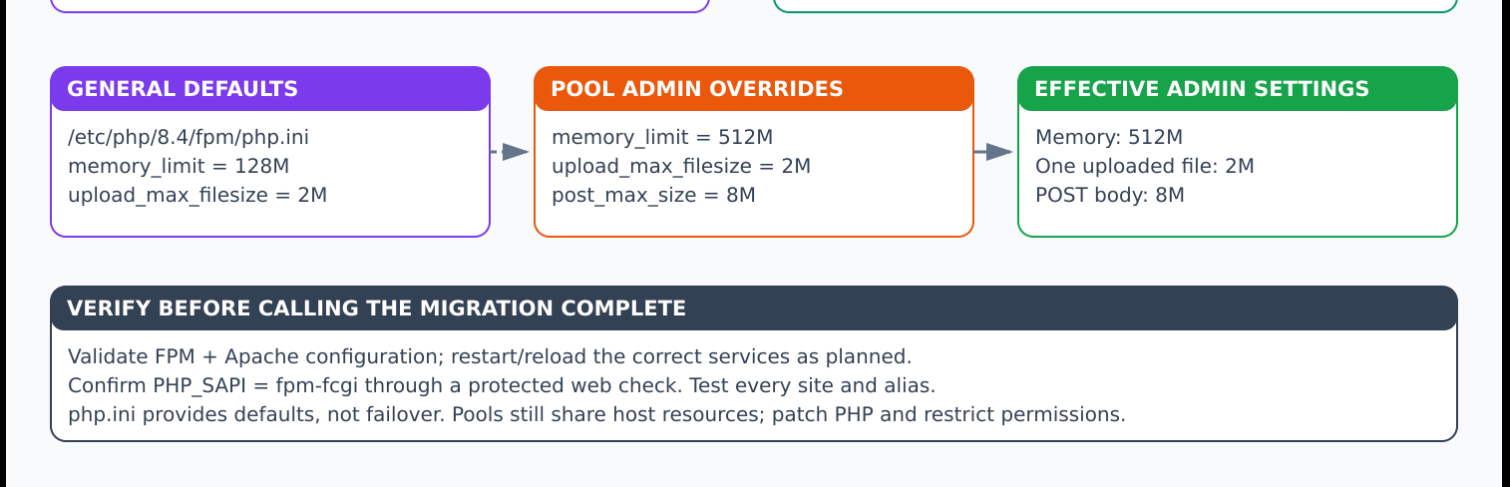
The screenshot includes these pool values:
php_admin_value[memory_limit] = 512M
php_admin_value[upload_max_filesize] = 2M
php_admin_value[post_max_size] = 8M
The effective values for this pool should therefore be 512M, 2M, and 8M respectively, assuming this configuration is loaded by the serving FPM instance. They are observed configuration values—not recommended defaults for every service.
Before Starting
This guide assumes a Linux system with LAMPP Apache and a separately installed PHP 8.4-FPM service. Confirm those facts first. Installation commands depend on the actual operating system and trusted package sources; do not blindly install a different Apache package on top of LAMPP.
Back up the configuration being changed and prepare recovery instructions. Inventory every PHP site, virtual host, alias, WordPress installation, phpMyAdmin route, and legacy folder. All executable PHP locations need correct FPM routing or explicit denial before mod_php is removed.
Use a planned maintenance window for changes requiring an Apache restart. Do not assume zero downtime.
Step 1: Inspect Apache and FPM
Read-only commands:
sudo /opt/lampp/bin/apachectl -M
sudo /opt/lampp/bin/apachectl -S
systemctl status php8.4-fpm --no-pager
php-fpm8.4 -v
Locate PHP-related configuration:
sudo grep -RnsE '^[[:space:]]*LoadModule.*php|SetHandler|AddType.*php|AddHandler.*php|Include.*fpm' \
/opt/lampp/etc
Determine which files are actually included. Recursive grep can also find backups and inactive files; a match alone does not prove the configuration is active.
Step 2: Confirm Apache FastCGI Proxy Modules
sudo /opt/lampp/bin/apachectl -M | grep -E 'proxy_module|proxy_fcgi_module'
Expected entries:
proxy_module (shared)
proxy_fcgi_module (shared)
If absent, verify that the matching module files exist and enable them in the active Apache configuration, avoiding duplicate declarations:
LoadModule proxy_module modules/mod_proxy.so
LoadModule proxy_fcgi_module modules/mod_proxy_fcgi.so
Use modules compatible with the bundled Apache build. Do not copy arbitrary system-Apache modules into LAMPP.
Step 3: Prepare a Dedicated Pool
Example file:
/etc/php/8.4/fpm/pool.d/hn-admin-84.conf
Illustrative configuration:
[hn-admin-84]
user = adminapp
group = adminapp

listen = /run/php/hn-admin-84.sock
listen.owner = daemon
listen.group = daemon
listen.mode = 0660

pm = ondemand
pm.max_children = 3
pm.process_idle_timeout = 10s
pm.max_requests = 500

php_admin_value[memory_limit] = 256M
php_admin_value[upload_max_filesize] = 2M
php_admin_value[post_max_size] = 8M
php_admin_flag[display_errors] = off
php_admin_flag[log_errors] = on

security.limit_extensions = .php
clear_env = yes
adminapp is a placeholder account that must exist. daemon assumes the confirmed Apache worker account is daemon; substitute the actual account. Existing socket ACL directives may affect how ownership settings apply.
The application user needs access to source files and required runtime directories. Restrict Laravel writes to necessary locations such as storage and bootstrap/cache. Do not use broad 777 permissions. Test environment-variable delivery, sessions, logging, and database access.
These values differ from the screenshot intentionally: 256M is an example to evaluate, whereas the screenshot shows 512M. Choose limits from workload measurements and the complete host memory budget.
Step 4: Ensure FPM Loads the Pool
Your screenshot shows this in /etc/php/8.4/fpm/php-fpm.conf:
include=/etc/php/8.4/fpm/pool.d/*.conf
Do not duplicate it if already present. Pool files must match the included pattern. A file ending in .conf.disabled normally does not match *.conf.
The service configuration shown starts:
/usr/sbin/php-fpm8.4 --nodaemonize --fpm-config /etc/php/8.4/fpm/php-fpm.conf
Inspect the actual unit with:
systemctl cat php8.4-fpm
Do not edit /lib/systemd/system/php8.4-fpm.service merely to enable pools. That vendor unit generally already loads the main FPM configuration; custom service changes, when necessary, belong in managed overrides.
Step 5: Configure Apache Routing
Your screenshot shows these includes in /opt/lampp/etc/httpd.conf:
Include etc/extra/httpd-legacy-fpm.conf
Include etc/extra/httpd-wp-fpm.conf
Include etc/extra/httpd-app-fpm.conf
Each named file must exist and contain reviewed routing for its intended applications. Retain your established split or use an equivalent managed layout; these filenames are not required by PHP itself.
For the admin application, a scoped handler can look like:
<Directory "/opt/lampp/htdocs/holiday-new/admin/public">
    <FilesMatch "\.php$">
        SetHandler "proxy:unix:/run/php/hn-admin-84.sock|fcgi://hn-admin-84/"
    </FilesMatch>
</Directory>
The screenshot scopes the Directory to /holiday-new/admin. For a conventional Laravel deployment, expose and route the public directory, while preserving a working virtual-host or alias mapping. Changing this fragment alone does not fix an incorrect DocumentRoot.
The socket must match the pool's listen value exactly. The fcgi hostname after the pipe is not the network destination when a Unix socket is used.
Ensure private project files are not web-accessible and uploaded PHP cannot execute. Audit more than the main homepage.
Step 6: Validate and Load FPM Before Removing mod_php
sudo php-fpm8.4 -t
Only after a successful test, start the service if it is not running:
sudo systemctl start php8.4-fpm
If it is already running and its configuration changed, use its supported reload operation:
sudo systemctl reload php8.4-fpm
Inspect the socket:
sudo ls -l /run/php/hn-admin-84.sock
A socket existing is useful evidence but not a complete end-to-end test. Validate Apache's proposed configuration and test an isolated staging or canary route before removing old execution paths.
Step 7: Disable mod_php and Retire Old Handlers
The screenshot shows the changes in:
/opt/lampp/etc/extra/httpd-xampp.conf
Comment out the actual module line:
#LoadModule php_module modules/libphp.so
The screenshot also comments out:
#AddType application/x-httpd-php .php .php3 .php4
Search for other active mod_php handlers or directives. PHP-specific Apache directives outside an appropriate module guard can make Apache configuration invalid after disabling the module. Conversely, stale handlers can break routing.
Do not simply remove PHP execution for a directory that remains publicly readable: source code could be disclosed. Route it through FPM or explicitly deny access. Existing php3/php4 legacy URLs need an explicit reviewed policy rather than silently becoming downloadable files.
Step 8: Test Apache and Apply the Change
sudo /opt/lampp/bin/apachectl -t
Expected result:
Syntax OK
A configuration test does not prove login, sessions, or uploads work. For a clean mod_php-to-FPM transition, plan a controlled full Apache stop/start rather than relying on graceful reload to fully retire an already loaded module.
# Planned maintenance only: stops and starts LAMPP Apache, not all LAMPP services.
sudo /opt/lampp/lampp stopapache
sudo /opt/lampp/lampp startapache
Confirm these subcommands are supported by your installed LAMPP script before the maintenance window. Do not use lampp stop unless you intend to stop its other services too.
If Apache fails to start, inspect its error log and follow the prepared recovery procedure. Do not assume it restarted because a command was issued.
Step 9: Verify the Running Result
sudo /opt/lampp/bin/apachectl -M | grep -E 'php|proxy_fcgi'
systemctl is-active php8.4-fpm
Expected Apache module check includes proxy_fcgi_module and no loaded php_module. Also inspect running processes and logs to corroborate the transition; the module-list command evaluates configuration and is not, by itself, proof about every old worker.
From a protected, temporary application diagnostic, inspect:
[
    'php_version' => PHP_VERSION,
    'handler' => PHP_SAPI,
    'memory_limit' => ini_get('memory_limit'),
    'upload_max_filesize' => ini_get('upload_max_filesize'),
]
Example expected result for the illustrative pool:
{
  "php_version": "8.4.x",
  "handler": "fpm-fcgi",
  "memory_limit": "256M",
  "upload_max_filesize": "2M"
}
Keep diagnostics authenticated or internal and remove temporary endpoints. Test each service's login, main operation, uploads, and integrations. Queues and cron require separate CLI-runtime checks.
Why Is php.ini Called a Fallback?
It is more accurate to call it the general default configuration. It is not an emergency fallback used when a pool fails.
; /etc/php/8.4/fpm/php.ini
memory_limit = 128M
; Admin pool from your screenshot
php_admin_value[memory_limit] = 512M
Expected effective memory limit for that loaded admin pool:
512M
For a different pool without an applicable memory override, the default is 128M, assuming no additional applicable configuration overrides it. Administrative values cannot be changed by application ini_set().
If FPM is unavailable, Apache does not automatically switch to php.ini or mod_php; requests will generally fail with a gateway/service error unless another explicit mechanism exists.
Security and Capacity Checklist
| Check | Purpose |
|---|---|
| Patched FPM runtime | Fix known runtime vulnerabilities |
| Local restricted socket | Prevent arbitrary access to FastCGI |
| Separate application users | Reduce cross-service filesystem access |
| Limited writable directories | Reduce opportunities to alter code |
| Coordinated upload limits | Reject excessive input at multiple layers |
| Worker counts fitted to RAM | Reduce shared-host exhaustion |
| Protected logs and debug disabled | Reduce public diagnostic disclosure |
| No executable uploads | Reduce uploaded-code execution risk |
| All aliases and legacy paths tested | Avoid forgotten mod_php dependencies |
FPM pools share server resources and are not containers. A per-request PHP memory setting is not an exact total process-memory cap. Sum worker capacity across all pools and allow for databases, Apache, Java, and the operating system.
Official Documentation
Configuration Architecture
flowchart TD
    V["Visitor"] --> A["LAMPP Apache"]
    A --> H["Scoped FPM handler"]
    H --> S["hn-admin-84.sock"]
    S --> P["Admin FPM workers"]
    P --> L["Laravel public/index.php"]
    C["php-fpm.conf"] --> PC["pool.d/hn-admin-84.conf"]
    PC -.-> P
    I["FPM php.ini: default 128M"] -.-> P
    O["Pool admin override: 512M"] -.-> P
    M["mod_php LoadModule: commented out"] -.-> A
    classDef blue fill:#dbeafe,stroke:#2563eb,color:#172554
    classDef green fill:#dcfce7,stroke:#16a34a,color:#14532d
    classDef purple fill:#f3e8ff,stroke:#9333ea,color:#581c87
    classDef orange fill:#ffedd5,stroke:#ea580c,color:#7c2d12
    class V,A,H blue
    class S,P,L green
    class C,PC,I,O purple
    class M orange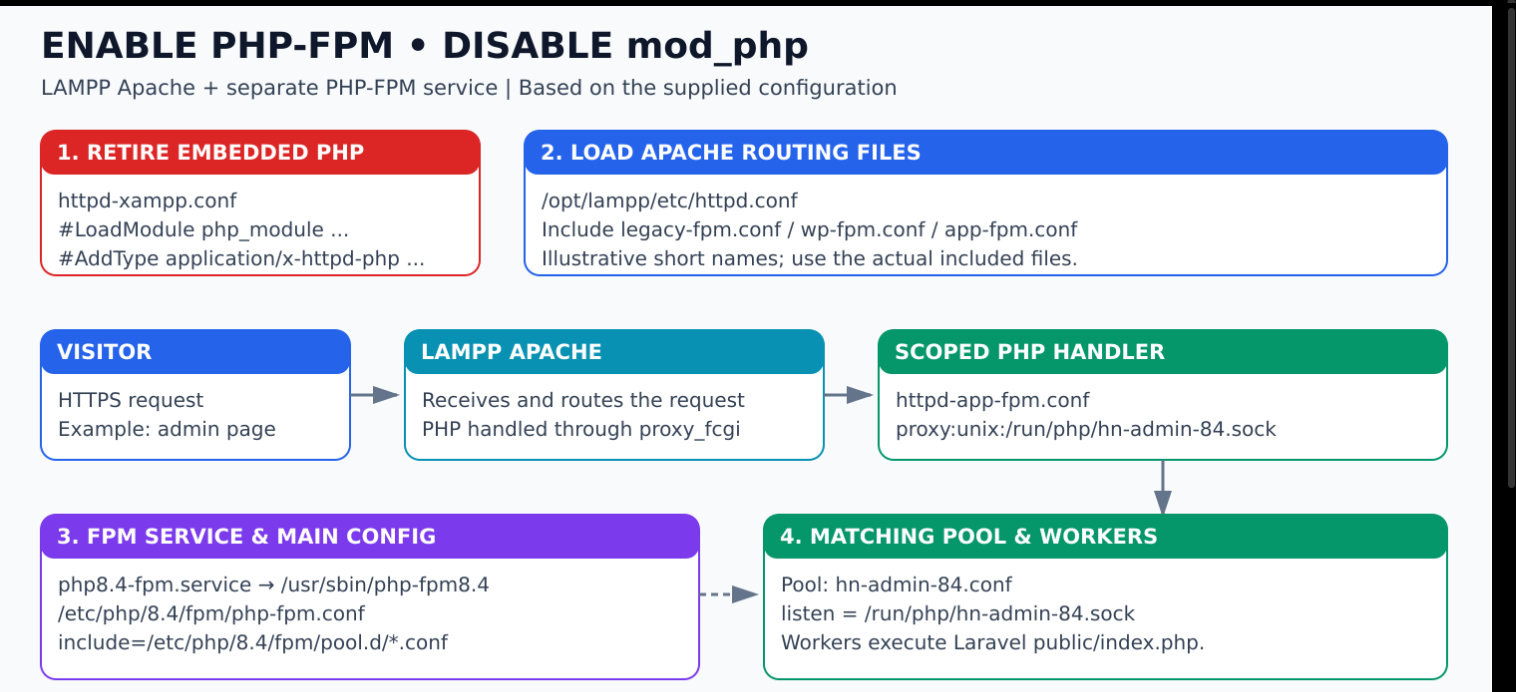



Top comments (0)