
Modern global apps often serve multiple countries with different backends. Instead of maintaining separate apps, a single Flutter codebase can dynamically switch backend domains using runtime configuration. This approach reduces maintenance cost, ensures feature parity across regions, and allows faster rollouts. The core idea is separating app logic from environment-specific configuration like base URLs, currencies, and localization.
Designing a Multi-Domain Mobile App Using a Single Flutter Codebase
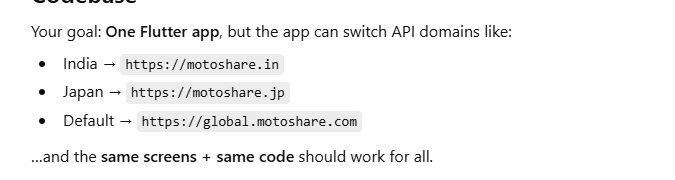
Core Components of the Architecture (Multi-Domain BaseUrl)
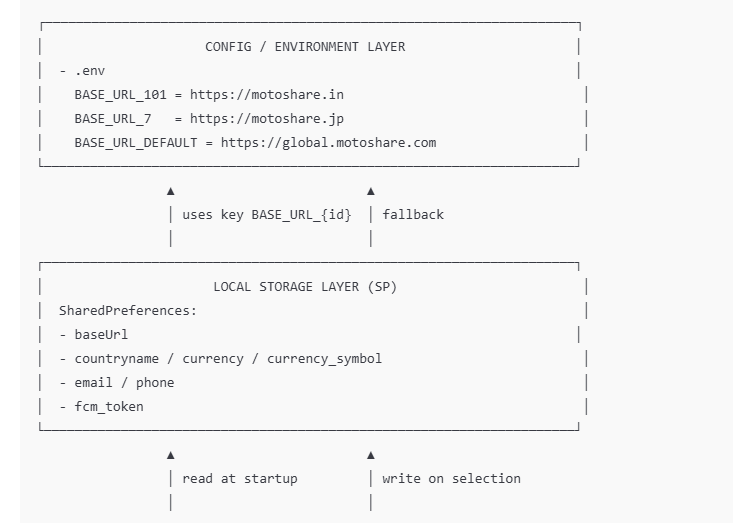
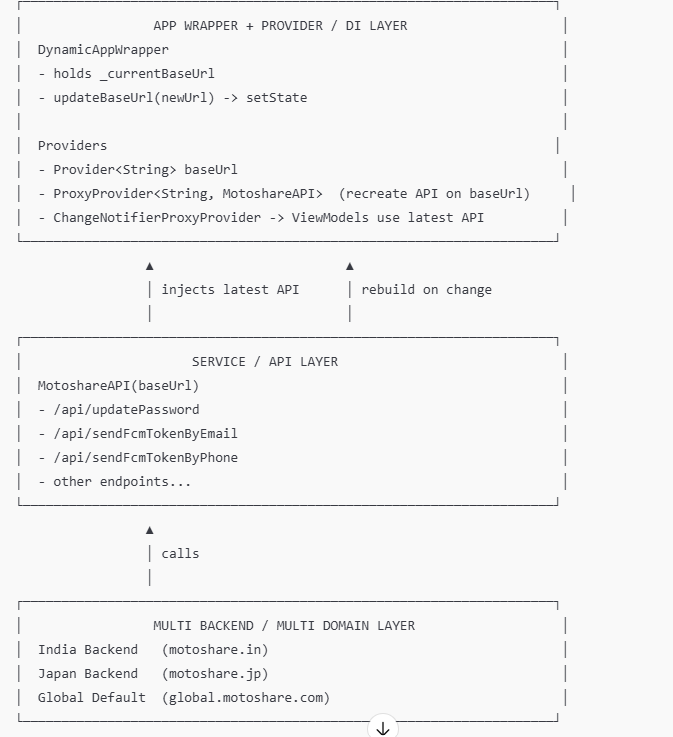

APP STARTUP FLOW (Decider + FCM + Navigation)
USER opens App
   │
   ▼
main()
- Firebase.init
- dotenv.load(.env)
- read SharedPreferences(baseUrl) else default https://motoshare.in
   │
   ▼
DynamicAppWrapper(initialBaseUrl)
- sets _currentBaseUrl
- Providers created (baseUrl -> API -> ViewModels)
   │
   ▼
DeciderPage
1) request notification permission
2) get FCM token
3) save token in SharedPreferences
4) if email/phone exists -> send token to backend (current baseUrl)
5) if logged in -> AllVehicle
   else -> CountrySelectionPage
COUNTRY SELECTION FLOW (How baseUrl switches correctly)
USER taps Country Button (India / Japan / etc)
   │
   ▼
CountrySelectionPage._onCountrySelected(countryName)
- find countryId, dial_code, currency, symbol from countryData
   │
   ▼
getBaseUrlForCountry(countryId)
- key = BASE_URL_{countryId}
- baseUrl = dotenv[key] else BASE_URL_DEFAULT
   │
   ▼
SharedPreferences.setString("baseUrl", baseUrl)
SharedPreferences.setString("countryname", name)
SharedPreferences.setString("currency", currency)
SharedPreferences.setString("currency_symbol", symbol)
   │
   ▼
Provider(updateBaseUrl(baseUrl))
DynamicAppWrapper.setState(_currentBaseUrl = baseUrl)
   │
   ▼
ProxyProvider rebuild
- MotoshareAPI(baseUrl NEW)
- ViewModels get NEW API instance
   │
   ▼
Navigate -> Loading -> next screen
Now ALL API calls hit NEW DOMAIN
API CALL FLOW (After baseUrl is updated)
UI (Any Screen)
  │
  ▼
ViewModel (e.g., MotoshareViewModel)
  │ calls
  ▼
MotoshareAPI(baseUrl)
  │ builds URL:  baseUrl + "/api/....."
  ▼
HTTP POST/GET → Correct backend domain
  │
  ▼
Response → ViewModel → UI


Example (your code):

updatePassword(email, pass)
URL = {baseUrl}/api/updatePassword


So if user selected Japan:

https://motoshare.jp/api/updatePassword
TOKEN FLOW (FCM token must go to correct country backend)
FCM token refresh OR app start token
   │
   ▼
NotificationServices.getDeviceToken()
   │
   ▼
SharedPreferences.save(fcm_token)
   │
   ▼
if phone available -> sendFcmTokenByPhone(phone, token)
else if email available -> sendFcmTokenByEmail(email, token)
   │
   ▼
API uses CURRENT baseUrl
(Same selected country backend gets token)
IMPORTANT RULE (To avoid wrong domain)
In your current code you do this on CountrySelectionPage.initState():
prefs.remove("baseUrl");
Step 1: Understand the Problem (Theory)
If you hardcode API like:
final url = "https://motoshare.in/api/...";
Then:
App will always hit India backend
For Japan you must rebuild/change code
Not scalable
✅ Solution: Dynamic baseUrl
Base URL is stored and changed at runtime.
Step 2: Keep All Country Backends in .env (Theory)
Instead of hardcoding, keep base URLs in .env:
BASE_URL_101=https://motoshare.in
BASE_URL_7=https://motoshare.jp
BASE_URL_DEFAULT=https://global.motoshare.com
Why .env?
Easy to manage environment config
You can add countries without touching code (just add keys)
Keeps config clean and separated from logic
Step 3: Decide a Runtime “Source of Truth” (SharedPreferences)
Your app must remember:
Which country user selected
Which baseUrl is active
So store in SharedPreferences:
baseUrl
countryname
currency, currency_symbol
dial_code
login info like email / phone
Theory:
SharedPreferences acts like the app’s “local memory” even after app closes.
Step 4: Build the “Dynamic Wrapper” (Core Theory)
You already have:
DynamicAppWrapper(initialBaseUrl)
it holds _currentBaseUrl
it exposes updateBaseUrl(newUrl)
✅ This wrapper is important because:
When baseUrl changes → it can rebuild dependency graph
All viewmodels/services automatically use new baseUrl
Step 5: Dependency Injection with Provider (Key Theory)
You use:
1) Expose current baseUrl
Provider<String>.value(value: _currentBaseUrl),

2) Recreate API when baseUrl changes
ProxyProvider<String, MotoshareAPI>(
  update: (_, baseUrl, __) => MotoshareAPI(baseUrl: baseUrl),
),
3) Recreate ViewModels with updated API
ChangeNotifierProxyProvider<MotoshareAPI, MotoshareViewModel>(
  create: (_) => MotoshareViewModel(MotoshareAPI(baseUrl: _currentBaseUrl)),
  update: (_, api, __) => MotoshareViewModel(api),
),
Theory:
This is the “magic” that makes one codebase work for multiple domains.
Whenever baseUrl changes:
API instance changes
ViewModels update
UI uses same methods but now hits different backend
Step 6: Country Selection Screen (Theory + Flow)
When user taps a country:
Get countryId from local map
Convert id into .env key BASE_URL_{id}
Save baseUrl to SharedPreferences
Call updateBaseUrl(baseUrl)
Navigate to next screen
Your pattern is correct:
final selectedBaseUrl = getBaseUrlForCountry(_selectedCountryId);
await prefs.setString("baseUrl", selectedBaseUrl);
final updateBaseUrl = Provider.of(context, listen: false);
updateBaseUrl(selectedBaseUrl);
Theory:
After this, the app behaves like it was built specifically for that domain.
Step 7: MotoshareAPI should ONLY depend on baseUrl (Theory)
Service class:
class MotoshareAPI {
  String baseUrl;
  MotoshareAPI({required this.baseUrl});

  Future<void> updatePassword(String email, String password) async {
    final url = "$baseUrl/api/updatePassword";
    ...
  }
}
✅ Good design because:
Base URL is injected once
Every endpoint automatically changes with baseUrl
Step 8: Decider Page (Theory)
Decider decides:
if logged in → go to dashboard (AllVehicle)
else → go to CountrySelectionPage
This keeps startup logic clean.
Step 9: FCM Token + Multi backend (Theory)
Because different domains exist, token must go to correct domain backend.
Your Decider sends token using current API:
sendFcmTokenByPhone
sendFcmTokenByEmail
This ensures:
India token goes to India server
Japan token goes to Japan server



Top comments (0)