
Main kinds of prompts Spring AI helps you make
A. System prompt
This tells the model how to behave.
Examples:
“You are a helpful banking assistant.”
“Answer in simple English.”
“Do not return unsafe medical advice.”
Role: controls tone, style, rules, and boundaries. Spring AI docs say system messages are generated by the system to guide the conversation.
B. User prompt
This is the actual question or request from the user.
Examples:
“What is compound interest?”
“Summarize this document.”
“Translate this to Hindi.”
Role: carries the direct input to the model. Spring AI identifies user messages as the direct inputs from the user.
C. Multi-message chat prompt
This combines multiple messages together, usually:
one or more system messages
one user message
sometimes previous conversation messages
Role: gives the model better context than a single plain text prompt. Spring AI’s prompt model is message-based, not just one raw string.
D. Template prompt / parameterized prompt
This is a prompt with placeholders like {name}, {topic}, {question}.
Examples:
“Explain {topic} to a beginner.”
“Write an email to {customerName} about {issue}.”
Role: makes prompts reusable and dynamic. The docs note that prompts often contain placeholders substituted at runtime. The prompt docs also compare this to a view template or SQL with placeholders.
E. External file prompt
You can keep prompts outside Java code in template files instead of hardcoding them. That makes them reusable and easier to version and maintain. Your screenshot mentions .st, .mustache, and .ftl, and Spring AI’s docs show PromptTemplate rendering support, including the default StPromptTemplate based on StringTemplate.
F. RAG prompt
This is used when you want the model to answer using retrieved context from documents or a vector database. Spring AI’s RAG support lets you customize a PromptTemplate that merges the user query with retrieved context, and the docs specify placeholders such as query and question_answer_context.
G. Memory-aware prompt
LLMs are stateless by default, so Spring AI adds chat memory features to carry useful prior context into later interactions. This helps create prompts that include conversation context without you manually rebuilding it each time.
2) Why these prompt types matter
Different prompt types solve different problems:
System prompt → behavior and rules
User prompt → actual request
Template prompt → reuse and dynamic input
RAG prompt → answer from documents/context
Memory-aware prompt → continue a conversation naturally
That is why Spring AI is useful: it gives structure around prompt creation instead of making you manually assemble raw HTTP JSON every time. ChatClient builds prompt parts fluently, and Advisors can add memory, retrieved documents, and more advanced behavior.
3) Coding examples
These examples are written in the normal Spring AI style and may need small adjustment depending on your exact Spring AI version.
Example 1: Simple system prompt + user prompt
@RestController
@RequestMapping("/ai")
public class ChatController {

    private final ChatClient chatClient;

    public ChatController(ChatClient.Builder builder) {
        this.chatClient = builder.build();
    }

    @GetMapping("/explain")
    public String explain(@RequestParam String topic) {
        return chatClient.prompt()
                .system("You are a Java teacher. Explain in simple English.")
                .user("Explain this topic for a beginner: {topic}")
                .param("topic", topic)
                .call()
                .content();
    }
}
What happens here
.system(...) creates a system prompt
.user(...) creates a user prompt
.param(...) fills the template placeholder dynamically
This matches the docs’ message-based prompt model and runtime placeholder substitution.
Example 2: Reusable template prompt
@Service
public class EmailPromptService {

    private final ChatClient chatClient;

    public EmailPromptService(ChatClient.Builder builder) {
        this.chatClient = builder.build();
    }

    public String generateEmail(String customerName, String issue) {
        return chatClient.prompt()
                .system("You are a professional customer support writer.")
                .user("""
                      Write a polite support email to {customerName}.
                      The issue is: {issue}
                      Keep the tone professional and short.
                      """)
                .param("customerName", customerName)
                .param("issue", issue)
                .call()
                .content();
    }
}
Why this is useful
Same prompt structure, different values. That is the main idea of template prompts. Spring AI docs explicitly describe placeholders being replaced based on user requests or application code.
Example 3: Prompt from external template file idea
Suppose you keep a prompt file like:
src/main/resources/prompts/greeting.st
Hello, my name is {name}. Can you greet me back nicely?
Then your code can render and send it through Spring AI. A simplified example:
@Service
public class GreetingService {

    private final ChatClient chatClient;

    public GreetingService(ChatClient.Builder builder) {
        this.chatClient = builder.build();
    }

    public String greet(String name) {
        String template = "Hello, my name is {name}. Can you greet me back nicely?";

        return chatClient.prompt()
                .user(template)
                .param("name", name)
                .call()
                .content();
    }
}
Spring AI supports prompt templating and documents PromptTemplate; for RAG templates it uses StPromptTemplate by default, based on StringTemplate.
Example 4: RAG-style prompt
String answer = chatClient.prompt()
        .system("Answer only from the provided context. If unsure, say you do not know.")
        .user("""
              Question: {question}

              Context:
              {context}
              """)
        .param("question", "What is the refund policy?")
        .param("context", """
                Refunds are allowed within 7 days of purchase
                if the product has not been activated.
                """)
        .call()
        .content();
This is the basic idea behind a RAG prompt: merge the user query with retrieved context. Spring AI’s RAG docs describe custom templates that combine query and retrieved context for answering.
Example 5: Memory-aware chat idea
String response = chatClient.prompt()
        .system("You are a helpful assistant that remembers prior discussion context.")
        .user("Continue our last discussion and summarize the final decision.")
        .call()
        .content();
In real apps, chat memory is usually backed by Spring AI chat memory support, because LLMs are stateless by default and Spring AI adds memory abstractions to maintain useful context.
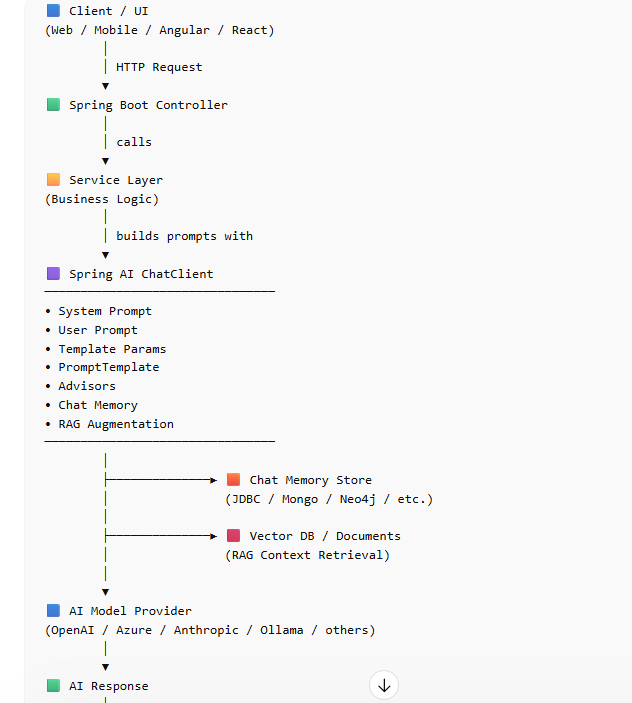
Very simple summary
Spring AI mainly helps you create these prompt types:
System prompts
User prompts
Multi-message prompts
Template prompts
External-file prompts
RAG prompts
Memory-aware prompts
So the big benefit is not just “send text to GPT.”
The real benefit is: Spring AI gives prompt structure, reuse, context, and maintainability inside a Spring Boot application



Top comments (0)