
A server can be running normally with gigabytes of free RAM, then lose its database a few seconds later. MySQL is killed and the site shows "Error establishing a database connection." Often the cause is a short memory spike on a server with no swap.
This guide covers what swap is, why a server needs it, how much to add, and every command to create, check and resize it.
What is swap?
Swap is disk space the Linux kernel can use as overflow memory.
RAM is fast, and every running program lives there.
Swap is a file or partition on disk, much slower than RAM, used only when RAM runs short.
When RAM fills up, the kernel moves memory pages that aren't being actively used, such as idle parts of programs or rarely touched data, from RAM into swap. That frees RAM for work that's actually happening.
What happens when there is no swap?
When RAM runs out and there's no swap, the kernel has one option left: the OOM killer (Out-Of-Memory killer). It picks a process, usually the largest one, and kills it straight away to free memory.
On a typical web server, the largest processes are the important ones:
MySQL / MariaDB / PostgreSQL: the site loses its database
Java apps (Keycloak, Elasticsearch, Jenkins): logins or search stop working
PHP-FPM / Node: requests start failing
Nothing warns you. The process just disappears, and you find out when users complain.
What swap changes
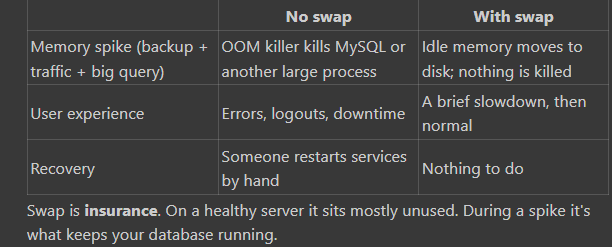
Swap is not extra RAM
Swap is much slower than RAM. If a server uses swap heavily and all the time, it slows down. That's a sign it needs more RAM, and swap doesn't fix that. Swap is for short spikes, not steady load.
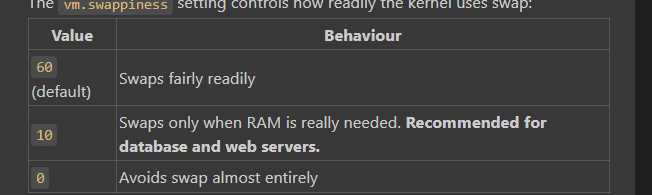
The vm.swappiness setting controls how readily the kernel uses swap:
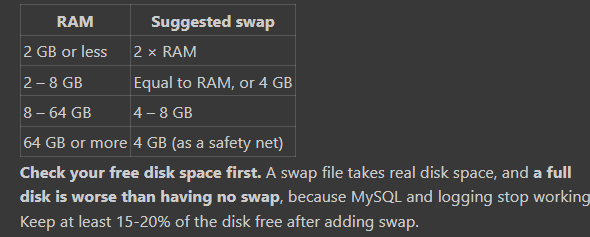
How much swap should you add?
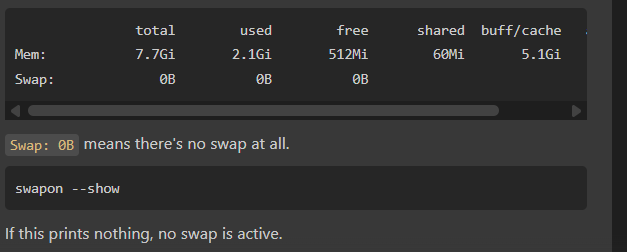
Part 2: Check Your Current State
free -h
Check free disk space
df -h /
Filesystem      Size  Used Avail Use% Mounted on
/dev/root       107G   92G   15G  87% /
Make sure Avail stays comfortable after you subtract the swap size.
Optional: has the OOM killer already struck?
dmesg -T | grep -iE "out of memory|killed process"
journalctl -k --since "30 days ago" | grep -iE "killed process"
Lines like Killed process 1234 (mysqld) mean you've already been losing processes to memory spikes.
Part 3: Add Swap (Step by Step)
Run these as root, or put sudo in front of each.
Step 1: Create the swap file
fallocate -l 4G /swapfile
If fallocate isn't supported on your filesystem, use dd:
dd if=/dev/zero of=/swapfile bs=1M count=4096
Step 2: Lock down permissions
chmod 600 /swapfile
Only root should be able to read swap, because it can contain pieces of memory such as passwords and session data.
Step 3: Format it as swap
mkswap /swapfile
Step 4: Turn it on
swapon /swapfile
Swap is now active, with no reboot needed.
Step 5: Keep it after a reboot
grep -q '/swapfile' /etc/fstab || echo '/swapfile none swap sw 0 0' >> /etc/fstab
The grep -q ... || part adds the line only if it isn't already there, so running the command twice won't create a duplicate.
Step 6: Set swappiness to 10
sysctl vm.swappiness=10
echo 'vm.swappiness=10' > /etc/sysctl.d/99-swappiness.conf
The first line applies it now; the second keeps it after a reboot.
Part 4: Verify Everything
Run all four checks:
free -h
swapon --show
grep swap /etc/fstab
cat /proc/sys/vm/swappiness
Expected output
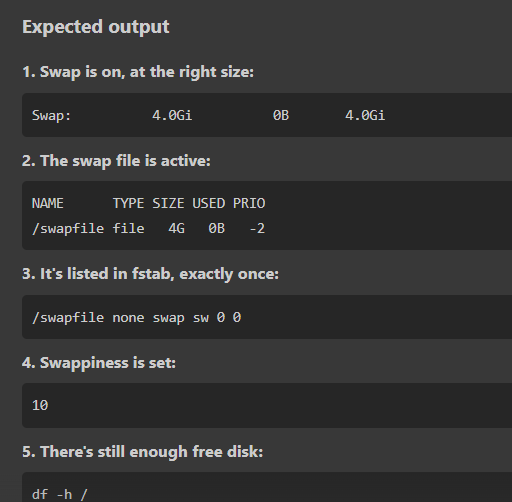
💡 Swap "used: 0B" is normal and good. It means RAM is enough right now. Swap only fills during a memory spike.
Part 5: Change the Swap Size
Say you meant to create 4 GB but free -h shows 8.0Gi, or you want to grow or shrink it later.
Check first that swap isn't heavily used, because swapoff has to move everything back into RAM:
free -h
Then recreate it at the new size:
swapoff /swapfile
rm /swapfile
fallocate -l 4G /swapfile
chmod 600 /swapfile
mkswap /swapfile
swapon /swapfile
The /etc/fstab line and swappiness setting stay the same. Check again:
free -h
swapon --show
df -h /
Part 6: Keep an Eye on It
Watch swap usage over time
free -h
vmstat 5 5
In vmstat, look at the si (swap in) and so (swap out) columns:
Mostly 0: healthy; swap is only a safety net.
Always above 0: the server is short of RAM. Add RAM, or reduce what's running.
See which processes are using swap
for f in /proc/[0-9]*/status; do
  awk '/^Name|^VmSwap/{printf "%s ", $2} END{print ""}' "$f" 2>/dev/null
done | awk '$2 > 0' | sort -k2 -rn | head
Remove swap completely
swapoff /swapfile
rm /swapfile
sed -i '\|^/swapfile |d' /etc/fstab
Quick Reference
# Check
free -h
swapon --show
df -h /

# Add 4 GB swap
fallocate -l 4G /swapfile
chmod 600 /swapfile
mkswap /swapfile
swapon /swapfile
grep -q '/swapfile' /etc/fstab || echo '/swapfile none swap sw 0 0' >> /etc/fstab

# Tune
sysctl vm.swappiness=10
echo 'vm.swappiness=10' > /etc/sysctl.d/99-swappiness.conf

# Verify
free -h
swapon --show
grep swap /etc/fstab
cat /proc/sys/vm/swappiness



Top comments (0)