
Main Purposes of Python Virtual Environments
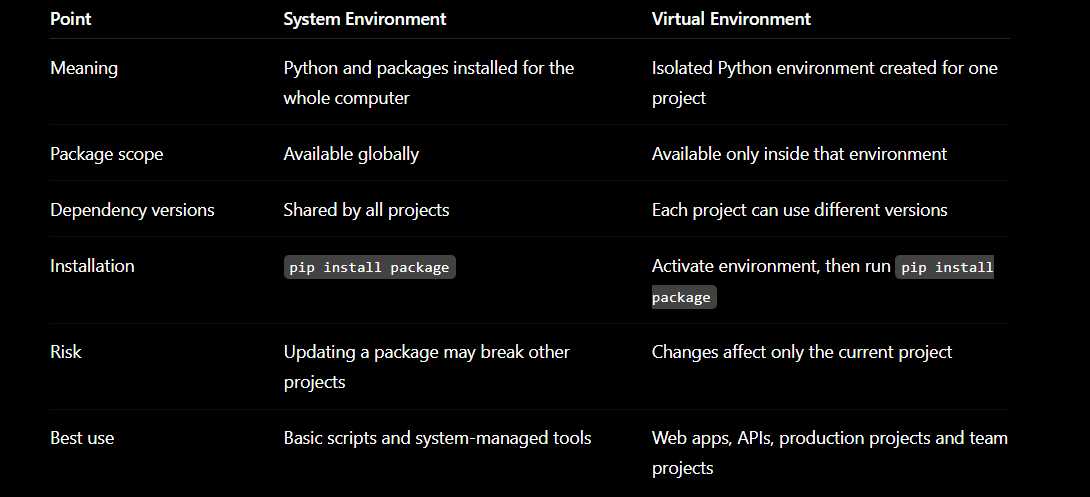
Python System Environment vs Virtual Environment
System-environment scenario
Virtual-environment scenario
System Environment = Common Kitchen
Virtual Environment = Private Kitchen
Main Purposes of Python Virtual Environments
Keep Every Project Separate
Each project gets its own Python packages and settings.
Prevent Package-Version Conflicts
One project can use Django 4 while another uses Django 5.
Protect Other Projects from Breaking
Installing or updating a package in one environment does not affect other projects.
Make Team Setup Easier
Team members can install the same package versions using requirements.txt.
Keep the System Python Clean
Project dependencies do not mix with packages required by your operating system.
Python System Environment vs Virtual Environment
System-environment scenario
Suppose both applications use the system Python:
Project A requires Django 4.2.
Project B requires Django 5.2.
Installing Django 5.2 globally may break Project A because only one global version is normally active.
python3 -m pip install django
python3 app.py
Use the system environment for:
Small temporary scripts
Learning basic Python
Running trusted command-line utilities
Packages managed by the operating system
Avoid installing application dependencies globally, especially with sudo pip install.
Virtual-environment scenario
Each project gets its own isolated packages:
project-a/
└── .venv/ → Django 4.2

project-b/
└── .venv/ → Django 5.2
Create and activate one:
mkdir my-api
cd my-api

python3 -m venv .venv
macOS/Linux:
source .venv/bin/activate

Windows PowerShell:

.venv\Scripts\Activate.ps1
Install dependencies:
python -m pip install fastapi uvicorn
python -m pip freeze > requirements.txt
Deactivate it:
deactivate
Use a virtual environment for:
FastAPI, Django or Flask applications
Multiple projects with different dependency versions
Team development
Testing package upgrades safely
CI/CD and production deployment
Reproducible projects using requirements.txt
Practical example
# ProfessNow API
cd professnow-api
python3 -m venv .venv
source .venv/bin/activate
pip install fastapi==0.115.0
deactivate

# HolidayLandmark API
cd holidaylandmark-api
python3 -m venv .venv
source .venv/bin/activate
pip install fastapi==0.116.0
Both FastAPI versions can coexist because the projects have separate environments.
Real time example
Imagine you have one common kitchen and several private kitchens.
System Environment = Common Kitchen
Your computer has one common kitchen containing Python and packages.
Suppose two developers use it:
ProfessNow needs FastAPI version 1
HolidayLandmark needs FastAPI version 2
You upgrade FastAPI for HolidayLandmark:
pip install --upgrade fastapi
Because both projects use the same system environment, ProfessNow may stop working.
It is like replacing an ingredient in the common kitchen: every cook is affected.
Virtual Environment = Private Kitchen
Now every project gets its own private kitchen:
ProfessNow
└── .venv → FastAPI version 1

HolidayLandmark
└── .venv → FastAPI version 2
If you upgrade FastAPI inside HolidayLandmark’s environment, ProfessNow remains unaffected.
It is like every cook having a separate kitchen with their own:
Ingredients
Tools
Recipes
Versions
Simple story
You are developing two projects:
Project A: ProfessNow
cd professnow
python3 -m venv .venv
source .venv/bin/activate
pip install fastapi==0.110
Project B: HolidayLandmark
cd holidaylandmark
python3 -m venv .venv
source .venv/bin/activate
pip install fastapi==0.115
Both projects run correctly because their packages are separated.
When should you use them?
Use the system environment for:
A small one-time Python script
Simple Python practice
Running operating-system tools
Use a virtual environment for:
FastAPI, Django or Flask projects
Company projects
Projects containing several dependencies
Different projects needing different package versions
Production applications
One-line difference
System environment is one common toolbox for the entire computer; a virtual environment is a separate toolbox for each project.



Top comments (0)