
How to split a String
String padding (left or right)
Like other languages, Dart provides .split(pattern) method to split a string into a list of sub-strings.
Let’s look at below example, it splits a string by spaces:
void main() {
  String str = 'This is a test String.';
  var strList = str.split(' ');
  print(strList);
}
Output
[This, is, a, test, String.]
If the provided pattern/regex is an empty string, it will split your string into single characters:
void main() {
  String str = 'This is a test String.';
  var strList = str.split('');
  print(strList);
}
Output
[T, h, i, s,  , i, s,  , a,  , t, e, s, t,  , S, t, r, i, n, g, .]
If you are good at Regular Expression (RegExp), you can split the string using complicated patterns. In below example, we split string by any number:
void main() {
  const String str = 'This1is2a3test4String.';
  final strList = str.split(RegExp('[0-9]'));
  print(strList);
}
Output
[This, is, a, test, String.]
click here
click here
click here
click here
click here
Practical Example
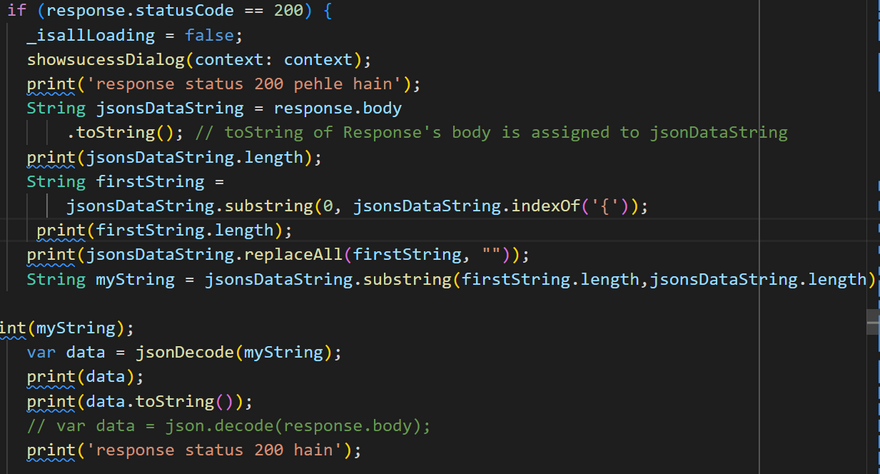
 var data = json.decode(response.body);
      String jsonsDataString = response.body
          .toString(); // toString of Response's body is assigned to jsonDataString
      print(jsonsDataString);
Output
I/flutter ( 5279): {"status":true,"user":[{"id":247,"event_id":"247","title":"my fitnesstest","description":"fgbfguiihyui","faq":"myorder","thumbnail":null,"poster":null,"images":null,"video_link":null,"video":null,"venue":null,"address":null,"city":null,"state":null,"zipcode":null,"slug3":"","slug1":"","slug2":"","country_state":"country_state","country_state_city":"country_state_city","c_s_c_cat":"","country_id":null,"state_id":null,"city_id":null,"operator_email":"rakesh1166@gmail.com","operator_name":"rakesh kumu","start_date":null,"end_date":null,"start_time":null,"end_time":null,"repetitive":0,"featured":0,"status":1,"meta_title":null,"meta_keywords":null,"meta_description":null,"category_id":"6","category":"Global Marketing Conference","user_id":"2","add_to_facebook":null,"created_at":null,"updated_at":null,"slug":"my-fitnesstest","price_type":0,"event_price":null,"ticket_type_name":null,"currency_name":null,"latitude":null,"longitude":null,"item_sku":0,"publish":0,"is_publishable":"{\"detail\":1}","merge_schedule":0,"o
String firstString =
          jsonsDataString.substring(0, jsonsDataString.indexOf('{'));
         print(jsonsDataString.replaceAll(firstString, ""));
Output
I/flutter ( 5279): {status: true, user: [{id: 247, event_id: 247, title: my fitnesstest, description: fgbfguiihyui, faq: myorder, thumbnail: null, poster: null, images: null, video_link: null, video: null, venue: null, address: null, city: null, state: null, zipcode: null, slug3: , slug1: , slug2: , country_state: country_state, country_state_city: country_state_city, c_s_c_cat: , country_id: null, state_id: null, city_id: null, operator_email: rakesh1166@gmail.com, operator_name: rakesh kumu, start_date: null, end_date: null, start_time: null, end_time: null, repetitive: 0, featured: 0, status: 1, meta_title: null, meta_keywords: null, meta_description: null, category_id: 6, category: Global Marketing Conference, user_id: 2, add_to_facebook: null, created_at: null, updated_at: null, slug: my-fitnesstest, price_type: 0, event_price: null, ticket_type_name: null, currency_name: null, latitude: null, longitude: null, item_sku: 0, publish: 0, is_publishable: {"detail":1}, merge_schedule: 0, online_location: null, excerpt: dgbf, e



Top comments (0)